Failed to configure a DataSource

When using spring cloud, we first create a parent project, and then add Eureka server module and SMS module, which run normally. Finally, after adding the payment module (mybatis and MySQL need to be integrated), the Eureka server module and SMS module report an error:

Description:

Failed to configure a DataSource: 'url' attribute is not specified and no embedded datasource could be configured.

Reason: Failed to determine a suitable driver class


Action:

Consider the following:
	If you want an embedded database (H2, HSQL or Derby), please put it on the classpath.
	If you have database settings to be loaded from a particular profile you may need to activate it (no profiles are currently active).

After investigation, because mybatis jar package is introduced:

<dependency>
            <groupId>org.mybatis.spring.boot</groupId>
            <artifactId>mybatis-spring-boot-starter</artifactId>
            <version>1.3.1</version>
</dependency>

Spring boot will load by default org.springframework.boot . autoconfigure.jdbc.DataSourceAutoConfiguration and the datasourceautoconfiguration class uses the @ configuration annotation to inject datasource into spring Bean, and because there is no configuration information about datasource in the project (Eureka server module and SMS module), when spring creates datasource bean, it will report an error due to lack of relevant information.

terms of settlement:

1. Add exclude to the @ springbootapplication annotation to release the automatic loading of datasourceautoconfiguration.

@EnableEurekaServer
@SpringBootApplication(exclude = DataSourceAutoConfiguration.class)
public class EurekaServerApplication {

	public static void main(String[] args) {
		SpringApplication.run(EurekaServerApplication.class, args);
	}
}

2. In the pom.xml The common jar dependencies of all sub modules are stored in the file, and the non common dependencies are stored in the file of each module itself pom.xml It is stated in the document. The advantage of this method is that the dependence of each module will not interfere with each other.

Failed to execute stage ‘setup validation’: cannot locate gluster packages

The author focuses on Java, architecture, Linux, applet, crawler, automation and other technologies. During the working period, I sorted out some information with tears, searched the way of programmer experts on wechat, and replied to keywords such as Java, hacker, crawler, applet and interview to get information for free.

catalog

1、 There is a problem

2、 Analyze the problem

3、 Problem solving

1. Install ovirt corresponding source

2. Forced update package

3. Install ovirt engine

OK, GAME OVER!


I. Problems

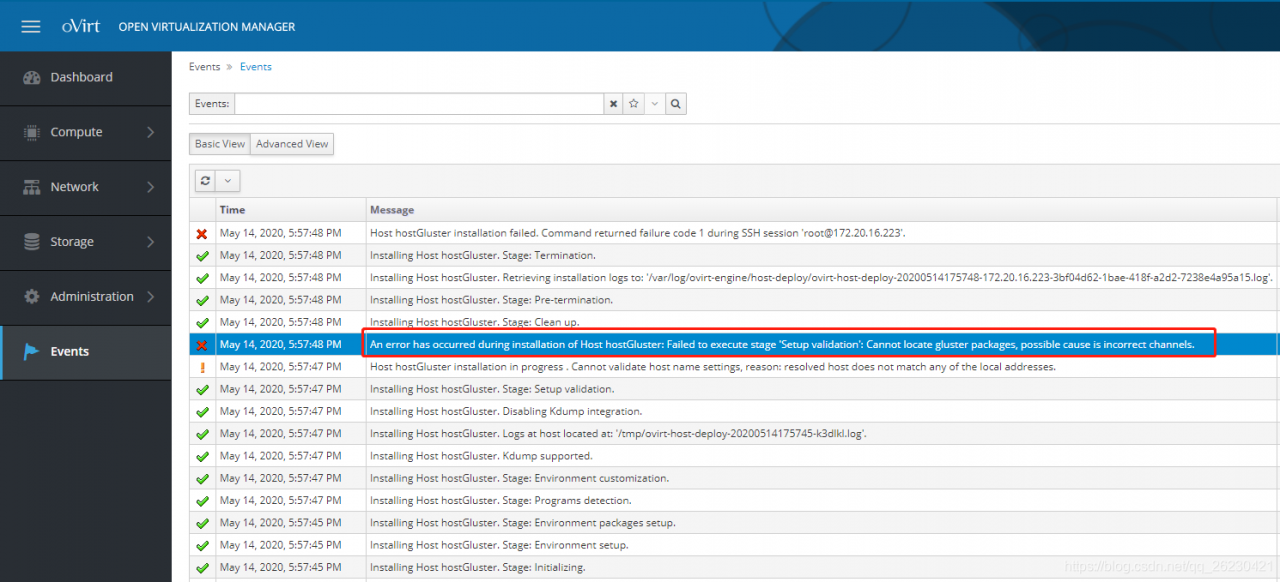
Today, after creating the host on ovirt, the installation failed. After checking the event, we found the following error:

An error has occurred during installation of Host hostGluster: Failed to execute stage ‘Setup validation’: Cannot locate gluster packages, possible cause is incorrect channels.

2、 Analyze the problem

The host needs to join the cluster, and the host joining the cluster must manually add the source of ovirt to operate!

3、 Problem solving

1. Install ovirt corresponding source

[ root@ovirt ~]# yum install https://resources.ovirt.org/pub/yum-repo/ovirt-release43.rpm

2. Forced update package

[ root@ovirt-test-04 ~]# yum update -y

3. Install ovirt engine

[ root@ovirt-test-04 ~]# yum install ovirt-engine -y

OK, GAME OVER!


The author focuses on Java, architecture, Linux, applet, crawler, automation and other technologies. During the working period, I sorted out some information with tears, searched the way of programmer experts on wechat, and replied to keywords such as Java, hacker, crawler, applet and interview to get information for free.

Failed to talk to init day

When using WSL in the morning, an error was reported:

root@PC0:/home/zhang# systemctl start ssh.service
System has not been booted with systemd as init system (PID 1). Can't operate.

This error report is easy to solve. The solution is to use Service :

root@PC0:/home/zhang# service ssh status
 * sshd is running

Then I try to shut down:

root@sidanzhang-PC0:/home/zhang# poweroff
System has not been booted with systemd as init system (PID 1). Can't operate.
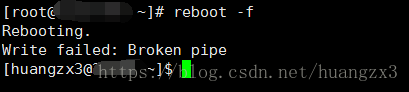
Failed to talk to init daemon.

True pit, shut down all report wrong.
According to this answer: rebooting Ubuntu on windows without rebooting windows?- super user
the solution is to open a new window of PowerShell and run the command:

wsl --shutdown

If your win10 system has not been updated, the administrator can run the following command:

net stop LxssManager

Elasticsearch cluster cannot be started. The following prompt fails to send join request to master appears

[node-2] failed to send join request to master [{node-1}{WbcP0pC_T32jWpYvu5is1A}{2_LCVHx1QEaBZYZ7XQEkMg}{10.10.11.200}{10.10.11.200:9300}], reason [RemoteTransportException[[node-1][10.10.11.200:9300][internal:discovery/zen/join]]; nested: IllegalArgumentException[can't add node {node-2}{WbcP0pC_T32jWpYvu5is1A}{p-HCgFLvSFaTynjKSeqXyA}{10.10.11.200}{10.10.11.200:9301}, found existing node {node-1}{WbcP0pC_T32jWpYvu5is1A}{2_LCVHx1QEaBZYZ7XQEkMg}{10.10.11.200}{10.10.11.200:9300} with the same id but is a different node instance]; ]

The reason is: because the copied elasticsearch folder contains the node data of instance 1 in the data file, you need to clear the file under the data file of instance 2.

Delete all the files in the ES cluster data database folder

https://blog.csdn.net/gamer_ gyt/article/details/59077189

Some processing experiences of failed to notify build listener

When writing a demo, there is a problem as follows:

Failed to notify build listener.

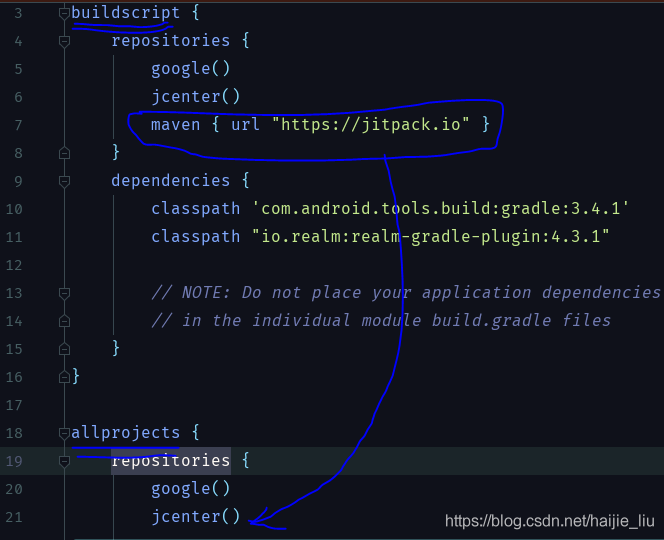
When searching on the Internet, it’s all about the current gradle problem. What is the specific problem?I found one of the Blogs:

https://blog.csdn.net/Evan_ L/article/details/87368075

What I’m saying is that the current gradle version supported by Android studio may not be consistent with the version you expect to use in your project and development tools.

So how do we check?We can carry out the following steps:

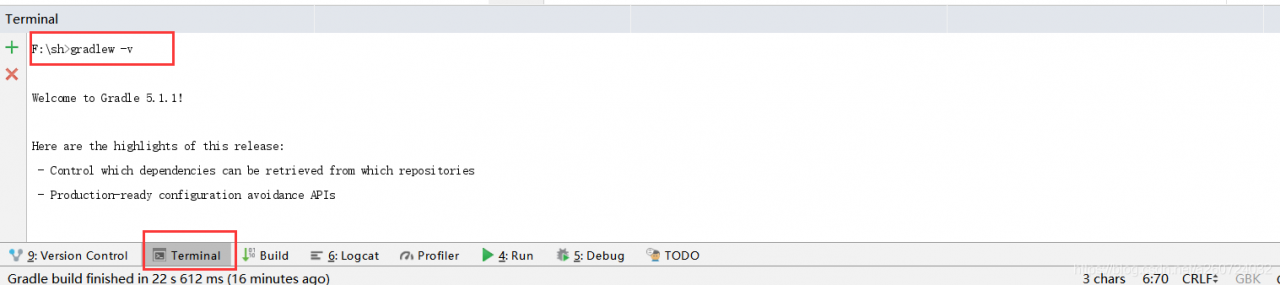
1. Check the gradle version you expect to use, and enter gradlew – V in terminal in Android studio. (if you have configured gradle environment, enter gradle – V in CMD) as shown in the figure below:

You can see that my version number here is 5.1.1.

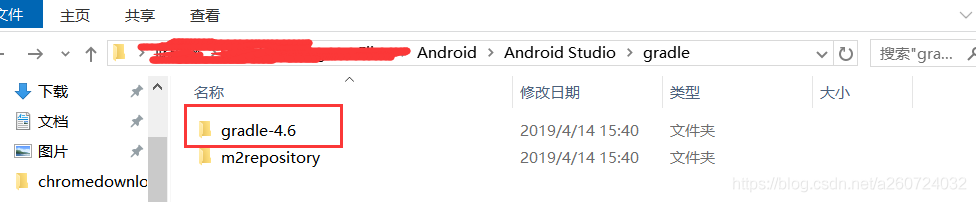
2. Check the gradle version supported by your current Android studio. The location is the gradle folder in your Android studio directory. As shown in the figure:

You can see that I support 4.6 here. So to sum up, my initial judgment is that my expected gradle version is too high. So I need to make my gradle version a little lower to meet the needs of my android studio. How to change it

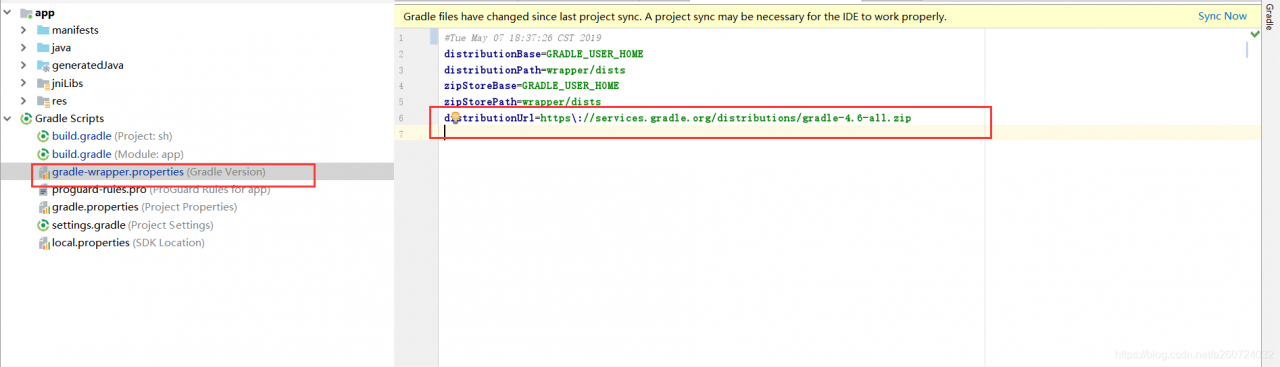
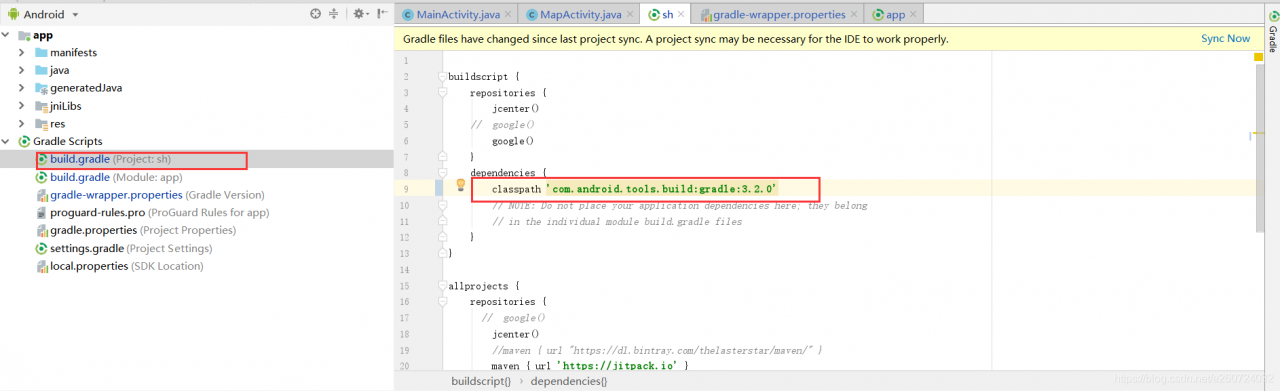
Here, just change your gradle version to the latest version supported by Android studio. After the change, remember to change the version number of the gradle plug-in, otherwise there will be problems. As shown in the figure:

Remember that the version number of the plug-in here must be changed to correspond to the version number of gradle. The specific corresponding relationship can be viewed on Android’s official website. Here is a link:

https://developer.android.google.cn/studio/releases/gradle-plugin.html#updating-plugin

Then, after the version number is mapped, you may need to change some dependent version numbers. Just follow the prompts. I can only say that’s how my problem was solved. I hope I can help you. Of course, what I said may not be right. I hope Daniel can see it and don’t laugh at us.

If you find that there may be something wrong with my blog, you can check this:

https://blog.csdn.net/qq_ 21397217/article/details/65630730

Efficient palm line segmentation using u-net context fusion module

abstract


Many cultures in the world believe that palm reading can be used to predict a person’s future life. Palmology uses features of the hand, such as the lines of the palm, the shape of the hand, or the position of the fingertips. However, the research of palmprint detection is still relatively small, many people use the traditional image processing technology. In most real scenes, the image is usually not very good, which leads to a serious lack of performance of these methods. This paper presents an algorithm to extract main palmprint from palm image. Our method uses deep learning networks (DNNS) to improve the performance. Another challenge to this problem is the lack of training data. In order to solve this problem, the author made a data set from scratch. From this data set, the author compares the performance of the existing method with that of the author’s method. In addition, based on the structure of UNET segmentation Neural Network and the knowledge of attention mechanism, an efficient palmprint detection structure is proposed. In order to improve the segmentation accuracy, a context fusion module is proposed to capture the most important context features. The experimental results show that the F1 score of this method is the highest, about 99.42%, and the Miou is 0.584 on the same data set, which is better than other methods.


Innovation of the paper


To sum up, the main contributions of the author are summarized as follows:

DNN is proposed to solve the problem of palmprint detection. The author uses deep learning and image processing technology instead of pure traditional image processing as in other previous papers. Provide high quality data set for this problem. The data set was carefully annotated by professionals in the field. The model and context fusion module proposed by the author can achieve high accuracy even in complex palmprint images. Through this method, the author has achieved good results in Miou score.


Frame structure


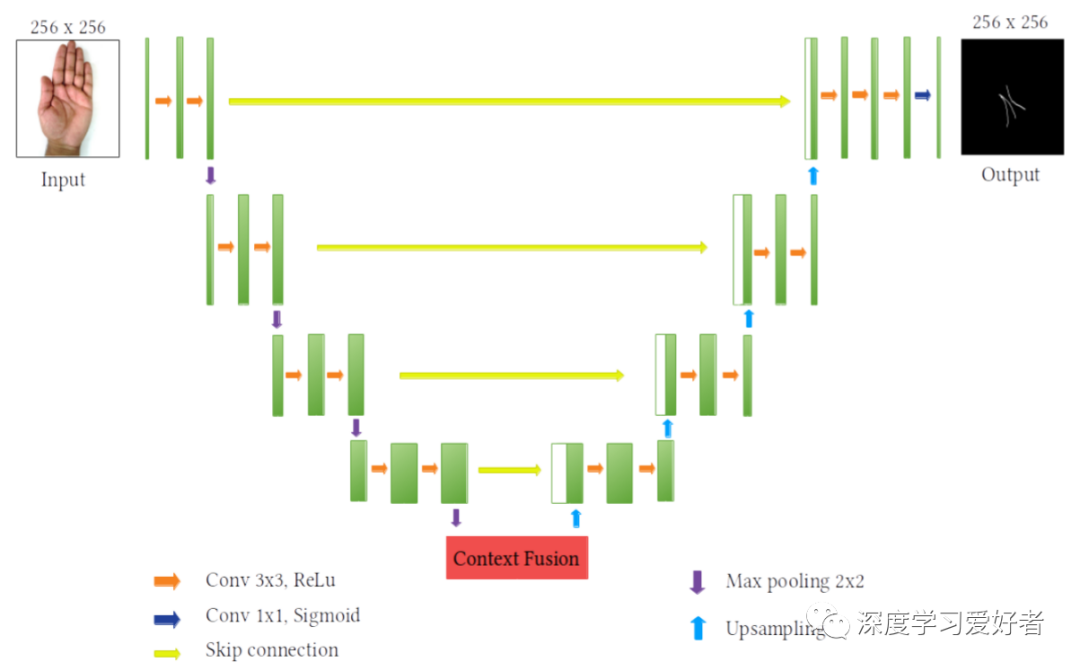
The author’s image segmentation system architecture

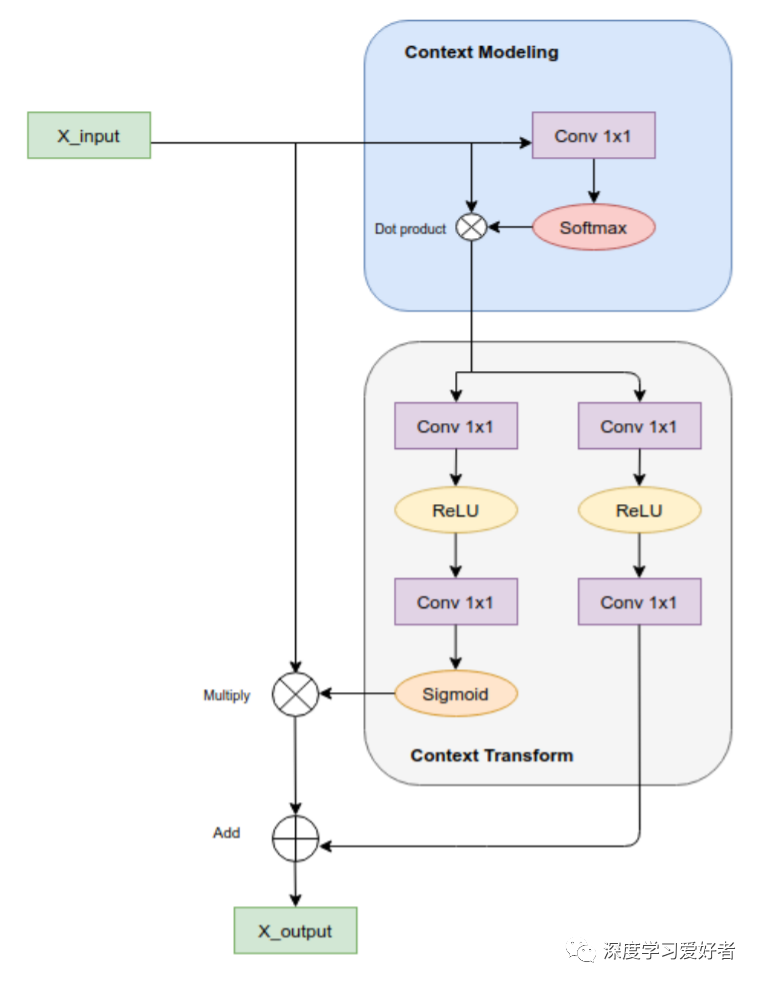
Context fusion module integrating local and global context features

U-net has context fusion module


experimental result


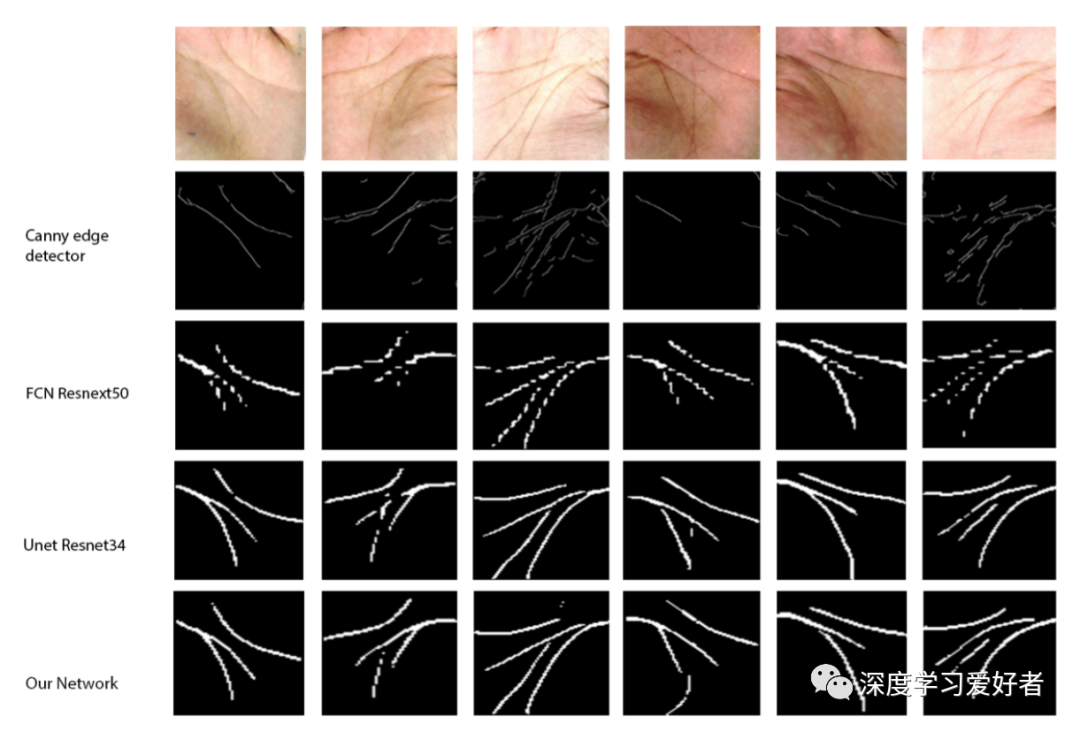
The output images of some models are applied to this problem. The author’s network (UNET CFM) has achieved good results in complex palmprint input.


Conclusion


In this paper, the author uses deep learning technology to establish neural network to solve the problem of palmprint segmentation. In the author’s data set, the final Miou of the author’s model is 0.584, and the F1 score is 99.42%. The data set is manually collected and will be published for scientific purposes. Experimental results show that this method has great advantages over traditional image processing in palmprint image segmentation task. The future work of this study will be to study a more robust method to deal with the changes of complex background images; in addition, other functions of CFM can be used for further investigation.


Link to the paper: https://arxiv.org/pdf/2102.12127.pdf

Original text: https://mp.weixin.qq.com/s/T_ kIP8F-usNfZBzRTIk0jA

The difference between problem and observables

There is a discussion on stackoverflow: what is the difference between problems and observables?

A useful blog: angular2 observables, HTTP, and separating services and components

An article on the official website of angular: observables compared to other technologies

The difference between observable and promise:

Observables are declarative; computation does not start until subscription. Promises execute immediately on creation. This makes observables useful for defining recipes that can be run whenever you need the result.

Observable is declarative, and calculation is not triggered until subscription. This is very different from promise — promise is executed immediately after it is created.

Observables provide many values. Promises provide one. This makes observables useful for getting multiple values over time.

Observable provides multiple values, while promises can only provide a single value.

Observables differentiate between chaining and subscription. Promises only have .then() clauses. This makes observables useful for creating complex transformation recipes to be used by other part of the system, without causing the work to be executed.

Observable can be combined into complex transformation recipes with the help of rich operators in rxjs, which is convenient for reuse in application, while promise has only one then operation.

Observables subscribe() is responsible for handling errors. Promises push errors to the child promises. This makes observables useful for centralized and predictable error handling.

The crash of delete after QT removeitem in qgraphicsscene and the display residue

Problem description

In the process of using QT’s graphicsview framework to create and interact with user-defined items, you need to remove unnecessary user-defined items. However, after the user-defined items interact with the re implemented rotation and scaling, removeitem () + delete will occasionally cause the error of accessing illegal memory, and even if you only use removeitem (), there will occasionally be residual items in the view.

Solutions

Using setitemindex method of qgraphicsscene (qgraphicsscene:: Noindex);
to disable quick query of index can solve the above problem.

other

For the problem of whether to delete after using removeitem(), the official question has given a clear explanation

The ownership of item is passed on to the caller (i.e., qgraphics scene will no longer delete item when destroyed).
remove the item and all its children from the scene. Ownership of the item is passed to the caller (that is, qgraphicsscene will not delete the item when it is destroyed).

So remember to delete

Redis: How to Implementate LRU Caching Mechanism Manually

preface

recently, I saw the interview questions about redis when I visited the blog. It was mentioned that redis will use LRU and other elimination mechanisms when its memory reaches the maximum limit. Then I found some information about this to share with you. LRU is generally like this: the most recently used ones are put in the front, and the most recently unused ones are put in the back. If a new number comes and the memory is full at this time, the old number needs to be eliminated. In order to move data conveniently, you must use a data structure similar to linked list. In addition, to judge whether the data is the latest or the oldest, you should also use keys such as HashMap -Data structure in the form of value.

Implementation of the first method using HashMap

public class LRUCache {

    int capacity;
    Map<Integer,Integer> map;

    public LRUCache(int capacity){
        this.capacity = capacity;
        map = new LinkedHashMap<>();
    }

    public int get(int key){
        //If not found
        if (!map.containsKey(key)){
            return -1;
        }
        //refresh data if found
        Integer value = map.remove(key);
        map.put(key,value);
        return value;
    }

    public void put(int key,int value){
        if (map.containsKey(key)){
            map.remove(key);
            map.put(key,value);
            return;
        }
        map.put(key,value);
        //exceeds the capacity, delete the longest useless that is the first, or you can override the removeEldestEntry method
        if (map.size() > capacity){
            map.remove(map.entrySet().iterator().next().getKey());
        }
    }

    public static void main(String[] args) {
        LRUCache lruCache = new LRUCache(10);
        for (int i = 0; i < 10; i++) {
            lruCache.map.put(i,i);
            System.out.println(lruCache.map.size());
        }
        System.out.println(lruCache.map);
        lruCache.put(10,200);
        System.out.println(lruCache.map);
    }

The second implementation (double linked list + HashMap)

public class LRUCache {

    private int capacity;
    private Map<Integer,ListNode>map;
    private ListNode head;
    private ListNode tail;

    public LRUCache2(int capacity){
        this.capacity = capacity;
        map = new HashMap<>();
        head = new ListNode(-1,-1);
        tail = new ListNode(-1,-1);
        head.next = tail;
        tail.pre = head;
    }

    public int get(int key){
        if (!map.containsKey(key)){
            return -1;
        }
        ListNode node = map.get(key);
        node.pre.next = node.next;
        node.next.pre = node.pre;
        return node.val;
    }

    public void put(int key,int value){
        if (get(key)!=-1){
            map.get(key).val = value;
            return;
        }
        ListNode node = new ListNode(key,value);
        map.put(key,node);
        moveToTail(node);

        if (map.size() > capacity){
            map.remove(head.next.key);
            head.next = head.next.next;
            head.next.pre = head;
        }
    }

    //Move the node to the tail
    private void moveToTail(ListNode node) {
        node.pre = tail.pre;
        tail.pre = node;
        node.pre.next = node;
        node.next = tail;
    }

    //Define bidirectional linked table nodes
    private class ListNode{
        int key;
        int val;
        ListNode pre;
        ListNode next;

        //Initializing a two-way linked table
        public ListNode(int key,int val){
            this.key = key;
            this.val = val;
            pre = null;
            next = null;
        }
    }
}

like the first method, it will be easier to copy removeeldestentry. Here is a brief demonstration

public class LRUCache extends LinkedHashMap<Integer,Integer> {


    private int capacity;
    
    @Override
    protected boolean removeEldestEntry(Map.Entry<Integer, Integer> eldest) {
        return size() > capacity;
    }
}