Springboot project: error parsing HTTP request header note: further occurrences of HTTP request parsing

There is no error reported after the spirngboot project is started, but when testing the interface with postman, it is found that there will be intermittent (one good and one bad) errors

Error parsing HTTP request header
 Note: further occurrences of HTTP request parsing errors will be logged at DEBUG level.
java.lang.IllegalArgumentException : Invalid character found in method name. HTTP method names must be tokens

Simple appearance is also very normal, it is a success, a mistake, make me at a loss.

Looking up the online materials, 98% of them said that the configuration change of the maximum header value of Tomcat would be good, but springboot is built-in Tomcat,

The method of modification is as follows: sever.tomcat.max -http-header-size=8192

But this configuration has been abandoned by the boot project of higher version,

It can be changed to: sever.max -http-header-size=8192

Full of joy, thought that good, and then found No.

The other 2% said it might be related to the HTTPS protocol, so it could be changed to http.

But I started it locally. It’s always http.

After struggling for a long time, I found that the culprit actually added content length to the header when requesting and gave it a fixed value, so I would report an error. Stupid cry~~

As for the function of modifying the max HTTP header size, I set this to 1 and request again to find that the error reported is not the same as my previous one, but:

Error processing request
org.apache.coyote .http11.HeadersTooLargeException: An attempt was made to write more data to the response headers than there was room available in the buffer.
Run spark to report error while identifying ‘ org.apache.spark . sql.hive.HiveSessionState ‘

Problem description

Recently, I changed a computer and tested the spark streaming code of the original computer to the new computer. I used idea to run it, but I reported an error

Error while instantiating 'org.apache.spark.sql.hive.HiveSessionState'

The root scratch dir: /tmp/hive on HDFS should be writable

After checking, it is found that/TMP/hive has insufficient permissions

resolvent

First, make sure that there is Hadoop on the computer and that Hadoop is configured_ The home environment variable ensures% Hadoop_ HOME%\bin\ winutils.exe , winutils.exe The following code can be executed in Baidu CMD, where f is my code running directory

%HADOOP_HOME%\bin\winutils.exe ls F:\tmp\hive
%HADOOP_HOME%\bin\winutils.exe chmod 777 F:\tmp\hive
%HADOOP_HOME%\bin\winutils.exe ls F:\tmp\hive

After modification, spark streaming can run normally

Error: uncaughtexception: cannot find module ‘internal / util / types’

Solution:
It is because the version does not match. I installed appium version is 1.4.16, and node version is v7.3.0, uninstalled node, and installed v6.9.4, perfect solution~
v6.9.4 download: v6.9.4 address
The error is as follows:
error: uncaughtException: Cannot find module ‘internal/fs’ date=Thu May 17 2018 20:39:28 GMT+0800, pid=8620, uid=null, gid=null, cwd=D:\appium\node_modules\appium, execPath=C:\Program Files\nodejs\node.exe, version=v7.9.0, argv=[C:\Program Files\nodejs\node.exe, D:\appium\node_modules\appium\bin\appium.js], rss=98328576, heapTotal=77393920, heapUsed=50451736, external=666939, loadavg=[0, 0, 0], uptime=34546.8093825, trace=[column=15, file=module.js, function=Function.Module._resolveFilename, line=470, method=Module._resolveFilename, native=false, column=25, file=module.js, function=Function.Module._load, line=418, method=Module._load, native=false, column=17, file=module.js, function=Module.require, line=498, method=require, native=false, column=19, file=internal/module.js, function=require, line=20, method=null, native=false, column=20, file=evalmachine.<anonymous>, function=null, line=18, method=null, native=false, column=1, file=D:\appium\node_modules\appium\node_modules\md5calculator\node_modules\unzip\node_modules\fstream\node_modules\graceful-fs\fs.js, function=, line=11, method=null, native=false, column=32, file=module.js, function=Module._compile, line=571, method=_compile, native=false, column=10, file=module.js, function=Object.Module._extensions..js, line=580, method=Module._extensions..js, native=false, column=32, file=module.js, function=Module.load, line=488, method=load, native=false, column=12, file=module.js, function=tryModuleLoad, line=447, method=null, native=false, column=3, file=module.js, function=Function.Module._load, line=439, metho

NPM run dev error Error:listenEADDRNOTAVAIL [How to Solve]

When running vue2.0 project with NPM run dev command,
half of the project is built with Vue cli scaffold

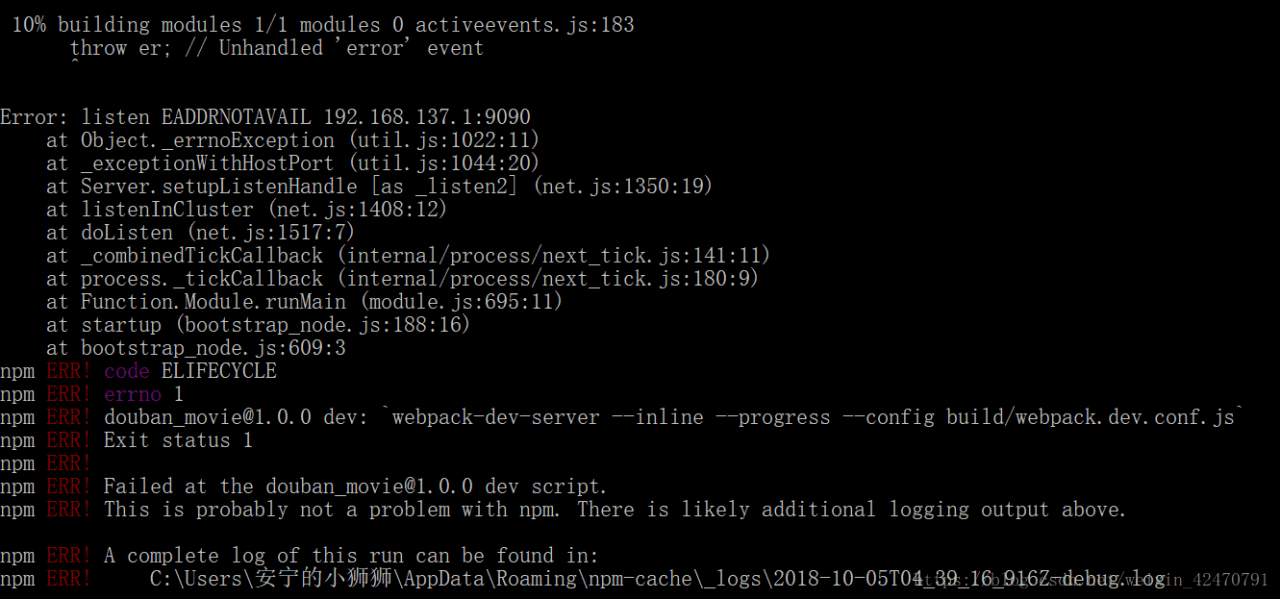
Error: listen EADDRNOTAVAIL 192.168.137.1:9090

The project cannot run,

Error report screenshot:

Error reason: static routing information in configuration has been changed

solution:
Open Directory/ index.js

 host: 'localhost',//Unchanged is filled in 192.168.137.1:9090  

If you need to access Vue project on your mobile phone, you can open the following link:
how to access Vue project on your mobile phone

Python_Syntax error: unexpected character after line continuation character

Python_ Syntax error: unexpected character after line continuation character

Reason: the content of the written file is incorrect and should be processed as a string

>>> import os
>>> os.makedirs(time_year+"\\"+time_month+"\\"+time_day)#where time_year, time_month, time_day are all variables with assigned values
>>> os.chdir(time_year\time_month\time_day)# The problem is here, it's not written correctly
  File "<stdin>", line 1
    os.chdir(time_year\time_month\time_day)
                                          ^
SyntaxError: unexpected character after line continuation character

This is OK: os.chdir (time_ year+”\\”+time_ month+”\\”+time_ day)

Refer to the writing method of creating directory in the first line

>>> os.chdir(time_year+"\\"+time_month+"\\"+time_day)#Correct
>>> with open(time_hours+".txt", "w+") as fp:#This method will go to the next step normally
...     fp.read()
...

Solve the problem of repeatedly clicking the same route console in Vue to report an error

After Vue router is upgraded to 3.1. X, when repeatedly clicking the navigation, the console will report an error. Although it does not affect the use of the function, it can not be ignored.

Error information

Cause of error

After Vue router ≥ v3.1, the callback form is changed to promise API, and promise is returned. If no error is caught, the console will always display the warning as shown in the figure above.

How to Solve This Error

[method 1] reduce the version

npm i [email protected] -S

[method 2] add the following code in the router folder

const routerPush = Router.prototype.push
Router.prototype.push = function push(location) {
  return routerPush.call(this, location).catch(error=> error)
}

[method 3] capture exception

// router.push error
this.$router.push(route).catch(err => {
    console.log('outpur error',err)
})

[method 4] complete the third parameter of router

// Completing the third argument of router.push()
this.$router.push(route, () => {}, (e) => {
    console.log('output error',e) 
})

Vue error in render: “typeerror: cannot read property ‘length’ of undefined”

Vue: error in render: “typeerror: cannot read property ‘length’ of undefined”

There are usually two situations:

1. Using length to report an error on the HTML tag of the template

When length is used in Vue, an error is sometimes reported as follows:

<div class="item_list" v-if="form.checkVal.length > 0" >list 1</div>
<div class="item_list" v-else >list 2</div>

resolvent:

Change to: form.checkVal !== undefined  &&   form.checkVal.length > 0

<div class="item_list" v-if="form.checkVal !== undefind && form.checkVal.length > 0" >list 1</div>
<div class="item_list" v-else >list 2</div>

2. Use length in JS to report an error, as follows

if(res.Data.length == 1){
   this.tableData1 = res.Data[0];
}

Error reason: at this time res.Data No data is undefined, so it cannot be found res.Data.length .

Solution: in addition to a layer of judgment, the first guarantee res.Data The existence is not null or undefined is changed to, as follows

 if(res.Data){
   if(res.Data.length == 1){
       this.tableData1 = res.Data[0];
   }
 }

git clone,pod install error: RPC failed; curl 56 LibreSSL SSL_read: SSL_ERROR_SYSCALL, errno 54

When you pod a new project or pod a third-party library, you often report an error
error: RPC failed; curl 56 libressl_ read: SSL_ ERROR_ SYSCALL, errno 54

This is because git download is limited, so extend git download limit
command line

git config --global http.postBuffer 524288000

It’s going to solve the problem

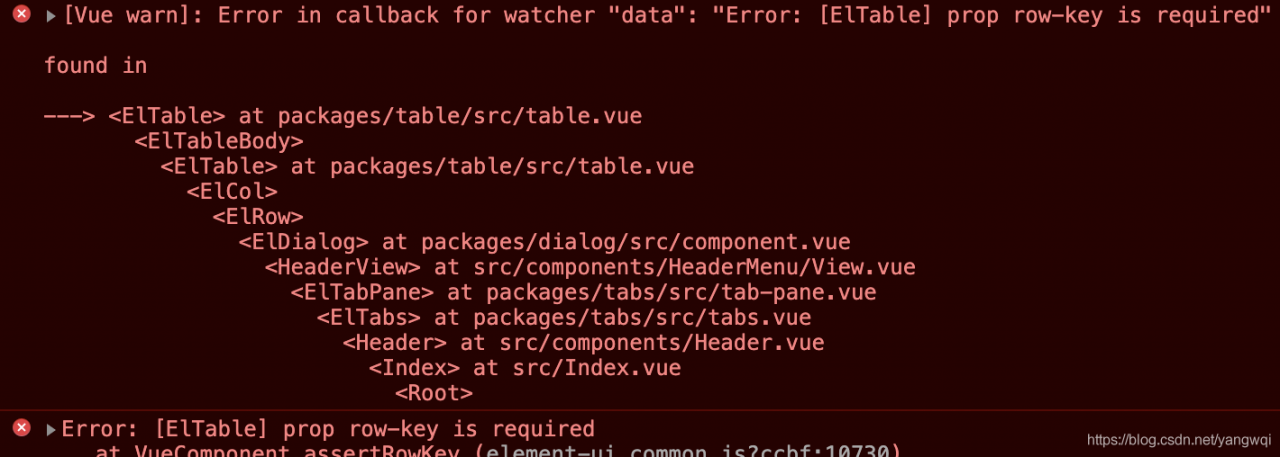
ElementUI Error in callback for watcher “data”: “Error: [ElTable] prop row-key is required”

Error in callback for watcher “data”: “Error: [ElTable] prop row-key is required”
Error: [ElTable] prop row-key is required

<el-table 
    :data="props.row.Entities" 
    border size="mini" 
    :row-key="getRowKeys" 
    empty-text="No node design relationship at this time">
    <el-table-column type="selection" :reserve-selection="true" width="55"></el-table-column>
    <el-table-column prop="phone" label="Affiliation" ></el-table-column>
    <el-table-column prop="nickName" label="Model Name" ></el-table-column>
</el-table>

JS

getRowKeys(row) {
    return row.staffTypeId;
},