mysql ERROR 1820 (HY000): You must reset your password using ALTER USER statement before executin

It’s still good to log in to MySQL (server version: 5.7.11) yesterday. The following error will be reported when executing any command after logging in today

mysql> help contents
ERROR 1820 (HY000): You must reset your password using ALTER USER statement before executing this statement.
mysql> help contents
ERROR 1820 (HY000): You must reset your password using ALTER USER statement before executing this statement.
mysql> show databases;
Error 1820 (HY000): you must reset your password using alter user statement before executing this statement

Or

MySQL > set password = password (“youpassword”);
2. Refresh permissions
MySQL > flush privileges;

MySQL > help contents
you asked for help about help category: “contents”
for more information, type ‘help < item >’, where < item> is one of the following
categories:
Account Management
Administration
Compound Statements
Data Definition
Data Manipulation
Data Types
Functions
Functions and Modifiers for Use with GROUP BY
Geographic Features
Help Metadata
Language Structure
Plugins
Procedures
Storage Engines
Table Maintenance
Transactions
User-Defined Functions
Utility
mysql>

Done!
C# WPF Framework: How to Build Caliburn.Micro Quickly

1. What is Caliburn?

Caliburn is an open source framework of MVVM class proposed by Rob Eisenberg on January 26, 2009 (Rob’s mix10 talk “build your own MVVM framework”). It is a set of libraries used to assist in the development of WPF, Silverlight, WP7 and win RT applications.

Caliburn.Micro Officially released by Rob Eisenberg on June 7, 2010.

Caliburn.Micro Is a small and powerful framework designed to build applications on all XAML platforms. With strong support for MVVM and other proven UI patterns, Caliburn.Micro Will enable you to build solutions quickly without sacrificing code quality and testability

2. Project creation:

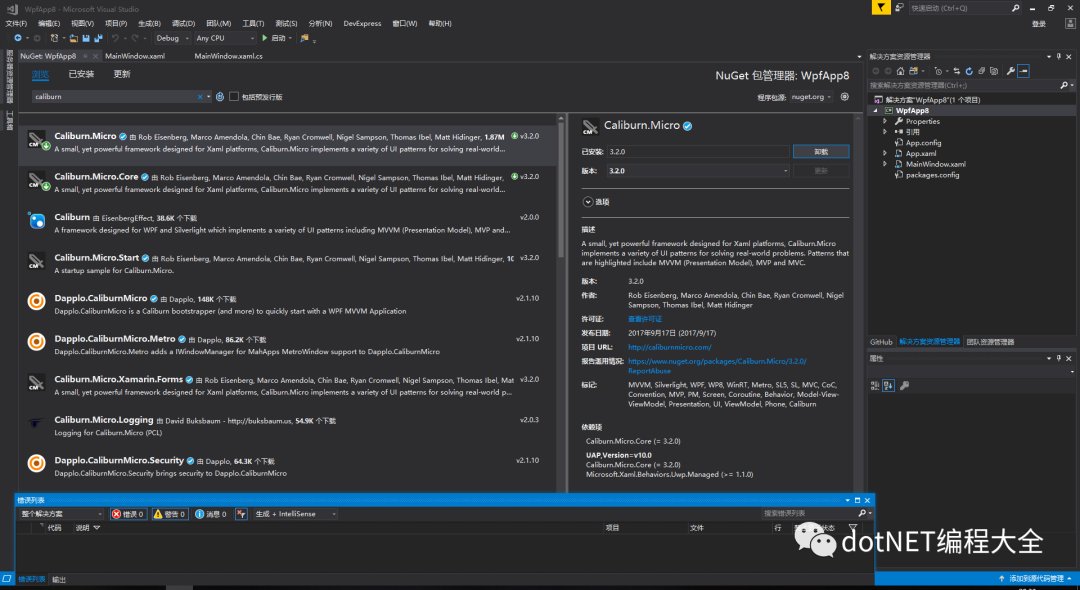
Step 1: create a project and install it for the current project using nuget package management tool Caliburn.Micro

Step 2: Project Creation:

newly build StartView.xaml

Delete the MainWindow.xaml

Modification App.xaml Delete startupuri=“ MainWindow.xmal “。

<Window x:Class="WpfApp8.StartView"
        xmlns="http://schemas.microsoft.com/winfx/2006/xaml/presentation"
        xmlns:x="http://schemas.microsoft.com/winfx/2006/xaml"
        xmlns:d="http://schemas.microsoft.com/expression/blend/2008"
        xmlns:mc="http://schemas.openxmlformats.org/markup-compatibility/2006"
        xmlns:local="clr-namespace:WpfApp8"
        mc:Ignorable="d"
        Title="StartView" Height="450" Width="800">
    <Grid Background="Gray">
        <Button x:Name="testBtn" Content="testBtn" HorizontalAlignment="Center"  VerticalAlignment="Center" Width="100" Height=" 50" Background="LightCyan"/>


    </Grid>


</Window>


newly build StartViewModel.cs

using Caliburn.Micro;
using System.Windows;


namespace WpfApp8
{
    class StartViewModel : Screen


    {
      
        public StartViewModel()
        {
           
        }


        public void testBtn()
        {
            MessageBox.Show("hello world!");
        }


    }
}


Create a new class that inherits bootstrapperbase. Here I name it mybootstrapper
class

using Caliburn.Micro;
using System.Windows;


namespace WpfApp8
{
    class MyBootstrapper : BootstrapperBase
    {


        public MyBootstrapper()
        {
            Initialize();//Initializing the framework
        }


        protected override void OnStartup(object sender, StartupEventArgs e)
        {
            DisplayRootViewFor<StartViewModel>();//show the main
        }
    }


}


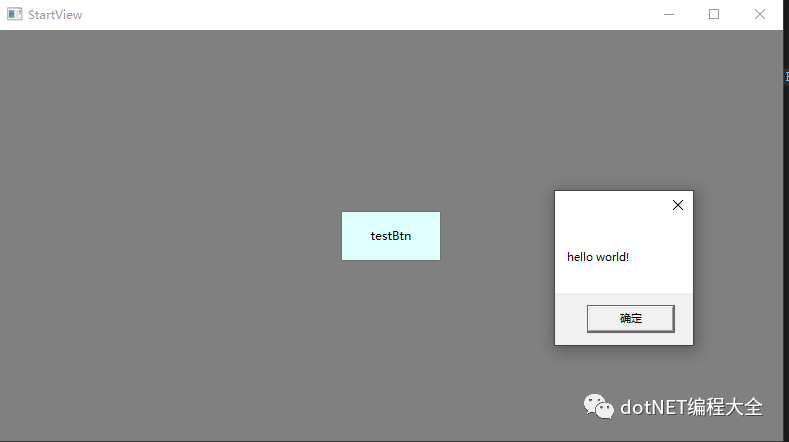
Running results:
0

Yaml Install ERROR: Cannot uninstall ‘PyYAML’.

Error: cannot install pyyaml.

Article Directory:

1.Error cause analysis II. Final error solution

1.Error analysis

1. Start installing
I started installing yaml </ code>, using the following command:

pip install yaml

It is installed correctly and can be imported correctly from the command line, and then an error is reported when executing the program: attributeerror: module 'yaml' has no attribute 'fullloader' </ code> then I checked the version of yaml I installed:

pip show yaml   # show is version 3.12, which is too old

2. Error exploration1
check the tutorial online and say that you want to update the yaml version to 5.2 . The update method is as follows:

pip install -U PyYAML

In the process of updating, an error was reported:

ERROR: Cannot uninstall 'PyYAML'. It is a distutils installed project and thus we cannot accurately determine which files belong to it which would lead to only a partial uninstall.

And then continue to find out how to solve this problem. Most of the solutions given are: delete all the yaml files under site packages , and guess what, LZ has been deleted completely. As a result, it is still this by when installing. Are you angry or not!

3. Error exploration 2

But I had to go to pypi website to download the wheel, and then install it directly

PyYAML-5.2-cp27-cp27m-win_ amd64.whlPyYAML-5.2-cp27-cp27m-win32.whl

Then install the wheels directly:

pip install PyYAML-5.2-cp27-cp27m-win_amd64.whl
# Then it said the platform is not supported, I looked at the amd may not be supported, so I tried again 32

pip install PyYAML-5.2-cp27-cp27m-win32.whl
# Again, the platform is not supported, I'm speechless

it seems that exploration is a failure. Let's find another way!

2、 Final error resolution

Use the following installation method to solve the problem:

# it worked
pip install --ignore-installed PyYAML

Another one, I don’t test it. You can try it

pip install  --force-reinstall PyYAML

or

pip install docker-py --ignore-installed PyYAML

Reference:
1 https://github.com/pypa/pip/issues/5247
2、 https://stackoverflow.com/questions/49911550/how-to-upgrade-disutils-package-pyyaml

Error in Linux running file: bash: $’\r’: command not found

Problem description

After the SH file is written in windows, an error will be reported when running in Linux: bash: $’\ R’: command not found

Problem-solving

This is because the windows system uses - for file wrapping, while the UNIX system uses - for file wrapping

Problem-solving

Method 1

Install dos2unix for file conversion

yum install -y dos2unix

dos2unix aaa.sh

Method 2

Use VIM to open the file, and then use the command: set FF = UNIX </ KBD>, save the file

# use vim to open file
vim aaa.sh
# change formate
:set ff=unix
# save file
:wq

Solution of fileuriexposedexception for Android 7.0 behavior change

The source of this article is as follows http://blog.csdn.net/qq_ 27512671/article/details/71439571

When we develop functions related to [sharing files between applications], we often report this runtime exception on Android 7.0. Why do we run the code with no problem below Android 7.0 on Android 7.0 +?This is mainly from a behavior change in Android 7.0!

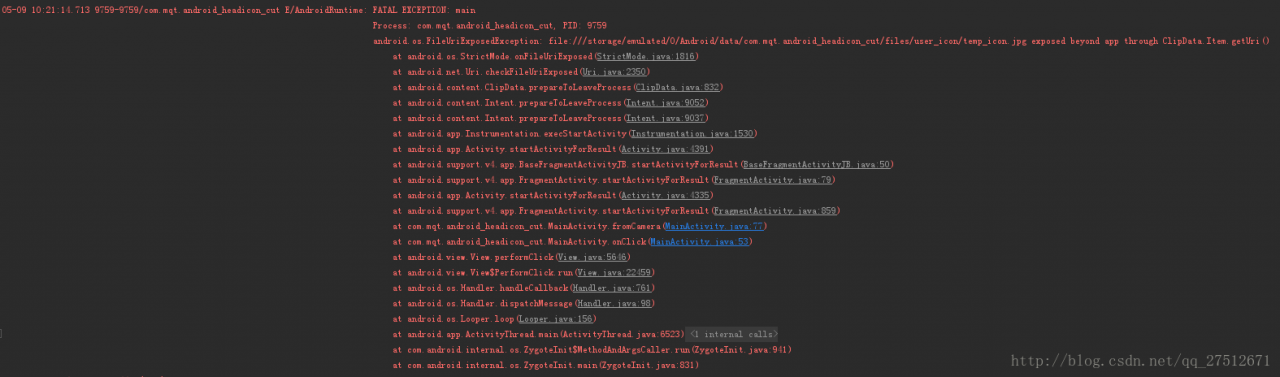
For Android 7.0-oriented applications, the strictmode API policy implemented by the Android framework prohibits the disclosure of file:// URI outside your application. If an intent containing a file URI leaves your application, the application fails and a fileuriexposedexception occurs. As shown in the figure:

To share files between applications, you should send a content:// URI and grant temporary access to the URI. The easiest way to do this is to use the fileprovider class.

Usage of fileprovider class:

Step 1: define a fileprovider list entry for your application. This entry can declare an XML file, which is used to specify the directory that the application can share.

<manifest xmlns:android="http://schemas.android.com/apk/res/android"
    package="com.example.myapp">
    <application
        ...>
        <provider
            android:name="android.support.v4.content.FileProvider"
            android:authorities="com.example.myapp.fileprovider"
            android:grantUriPermissions="true"
            android:exported="false">
            <meta-data
                android:name="android.support.FILE_PROVIDER_PATHS"
                android:resource="@xml/filepaths" />
        </provider>
        ...
    </application>
</manifest>

In this code, android:authorities Attribute should be unique. It is recommended to use [application package name + fileprovider]. It is recommended to write this android:authorities= ”${applicationId}.file_ The application package name can be found automatically.
The meta data tag specifies a path, which uses the XML file specified by resource to indicate the path:
the XML file is as follows:

<?xml version="1.0" encoding="utf-8"?>
<paths>
    <external-files-path name="bga_upgrade_apk" path="upgrade_apk" />
</paths>

The way to obtain URI should also be treated differently according to the current Android system version

      File dir = getExternalFilesDir("user_icon");
        if (Build.VERSION.SDK_INT > Build.VERSION_CODES.M) {
            icon_path = FileProvider.getUriForFile(getApplicationContext(),
                    "com.mqt.android_headicon_cut.file_provider", new File(dir, TEMP_FILE_NAME));
        } else {
            icon_path = Uri.fromFile(new File(dir, TEMP_FILE_NAME));
        }

So the problem is solved. Paste an example of installing APK adapter 7.0: http://blog.csdn.net/qq_ 27512671/article/details/70224978


Reference:
1 https://developer.android.google.cn/about/versions/nougat/android-7.0-changes.html#accessibility
https://developer.android.google.cn/training/secure-file-sharing/setup-sharing.html#DefineProvider

In C + + cin.getline The difference between () and getline () functions

cin.getline ():
usage: receive a string, which can receive spaces and output. It needs to include & lt; CString & gt;

char m[20];
cin.getline(m,5);
cout<<m<<endl;

Input: jkljkljkl
output: jklj

Receive 5 characters into m, and the last one is’ \ 0 ‘, so only 4 characters can be output;

Extension:
1 cin.getline () actually has three parameters, cin.getline (variables of receiving string, number of receiving characters, end characters)
2. When the third parameter is omitted, the system defaults to ‘\ 0’
3 cin.getline () to read cin.getline When jlkjkljkl is input, jklj is output; when jkaljkljkl is input, JK is output

Getline():
usage: to receive a string, which can receive spaces and output. It needs to include & lt; CString & gt;

string str;
getline(cin,str);
cout<<str<<endl;

Input: jkljkljkl
output: jkljkljkl

Input: JKL jfksldfj jklsjfl
output: JKL jfksldfj jklsjfl

Vue error: no postcss config found solution

Code from git clone:

npm install 

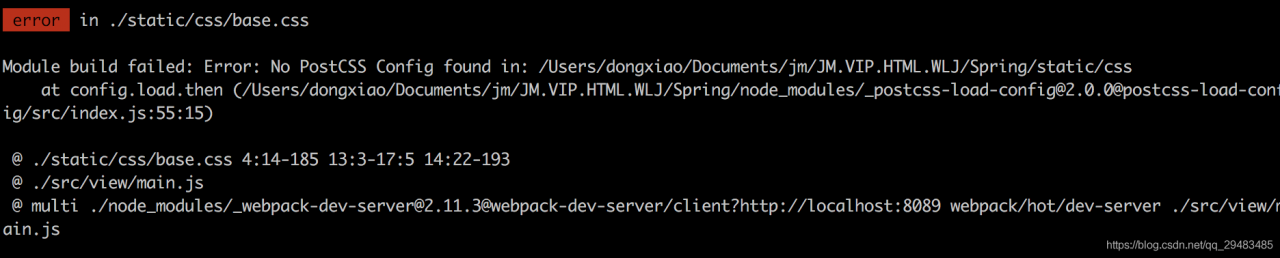
After the dependency is installed, the service is started and an error: no postcss config found appears

npm run dev

terms of settlement:

Create in the project root directory postcss.config.js The configuration content is as follows: you can fix the error problem.

module.exports = {  
  plugins: {  
    'autoprefixer': {browsers: 'last 5 version'}  
  }  
} 


Adobe Flash player error (error # 2044)

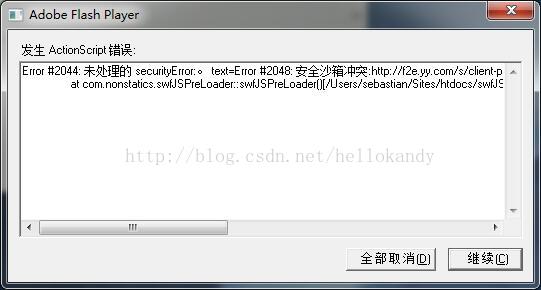
Recently, in the project, you need to use flash player to play flash, but after playing for a long time, the following prompt window will pop up:

It is said on the Internet that it is caused by the version of flash player. The solution is to first uninstall the flash player on this computer, and then install the previous version of flash player

Error in upload code of tortoisegit error:1407742E

report errors

When I come back from the festival, I type a code to upload it to GitHub and report an error. Whether it’s idea or tortoise, I report the following error:

fatal: unable to access 'https://github.com error:1407742E :ssl routines:ssl23_get_server_hello:tlsv1 alert protocol version

Baidu is also less than Baidu. Just a few days ago, I saw that the software manager suggested that tortoise git should be updated, so I gave it a try and gave it an update (after the update, I prompted that git bash should be updated again), and the result was solved.

solve

My updated software is the following version
tortoise git-preview-2.5.7.0-20180127-b2d00f8-64 bit.msi And git-2.16.2-64- bit.exe .
The link address is:
0 https://github.com/git-for-windows/git/releases/download/v2.16.2.windows.1/Git-2.16.2-64-bit.exe
https://download.tortoisegit.org/tgit/2.6.0.0/
(tortoise Git is updated from the software manager, with the download address of the official website attached. It should also be feasible in theory.)

If the icon of tortoisegit is not displayed after installation, you can refer to this
section https://jingyan.baidu.com/article/359911f552827957fe0306f8.html

Tomcat error parsing HTTP request header

Tomcat login was configured a few days ago https://localhost : 8080/I found that I didn’t find the reason for the error. Later, others suggested 127.0.0.1:8080. The result was really OK. I was very fascinated

Error parsing HTTP request header Note: further occurrences of HTTP header parsing errors will be logged at DEBUG level.

java.lang.IllegalArgumentException : Invalid character found in method name. HTTP method names must be tokens

at org.apache.coyote .http11. InternalInputBuffer.parseRequestLine ( InternalInputBuffer.java:139 )

at org.apache.coyote .http11.AbstractHttp11 Processor.process (AbstractHttp11 Processor.java:1028 )

at org.apache.coyote .AbstractProtocol$Abstr actConnectionHandler.process ( AbstractProtocol.java:637 )

at org.apache.tomcat . util.net.JIoEndpoint $ SocketProcessor.run ( JIoEndpoint.java:316 )

at java.util.concurrent . ThreadPoolExecutor.runWorker ( ThreadPoolExecutor.java:1145 )

at java.util.concurrent .ThreadPoolExecutor$ Worker.run ( ThreadPoolExecutor.java:615 )

at org.apache.tomcat . util.threads.TaskThread $ WrappingRunnable.run ( TaskThread.java:61 )

at java.lang.Thread .run( Thread.java:745 )

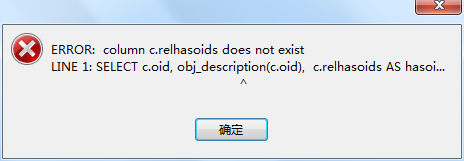
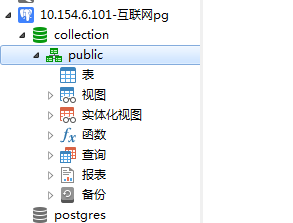
Using Navicat + premium + 11.1 to connect to PG12 version, error: column c.relhasoids does not exist

Phenomenon:
when using Navicat + premium + 11.1 client to connect to PG12, an error was reported:

reason:
the current database version: postgres12 is inconsistent with the client connection tool Navicat + premium + 11.1

Solutions:
1. Upgrade the client version to Navicat premium 12
2. Reduce postgres12 to 11

After solution:

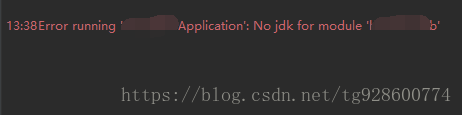
Error running ‘xxxapplication’: no JDK for module ‘xxx’

When I was running the project today, I suddenly found that the project that had been well before could not be started. An error was reported

Error running ‘XXXApplication’: No jdk for module ‘XXX’

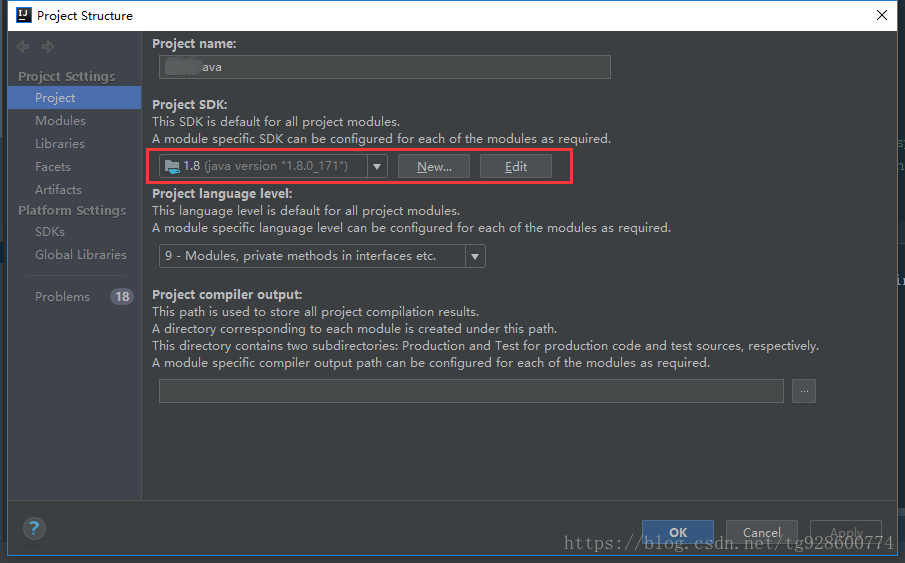
Normally, JDK is set in file – & gt; project structure, and there is no problem after checking

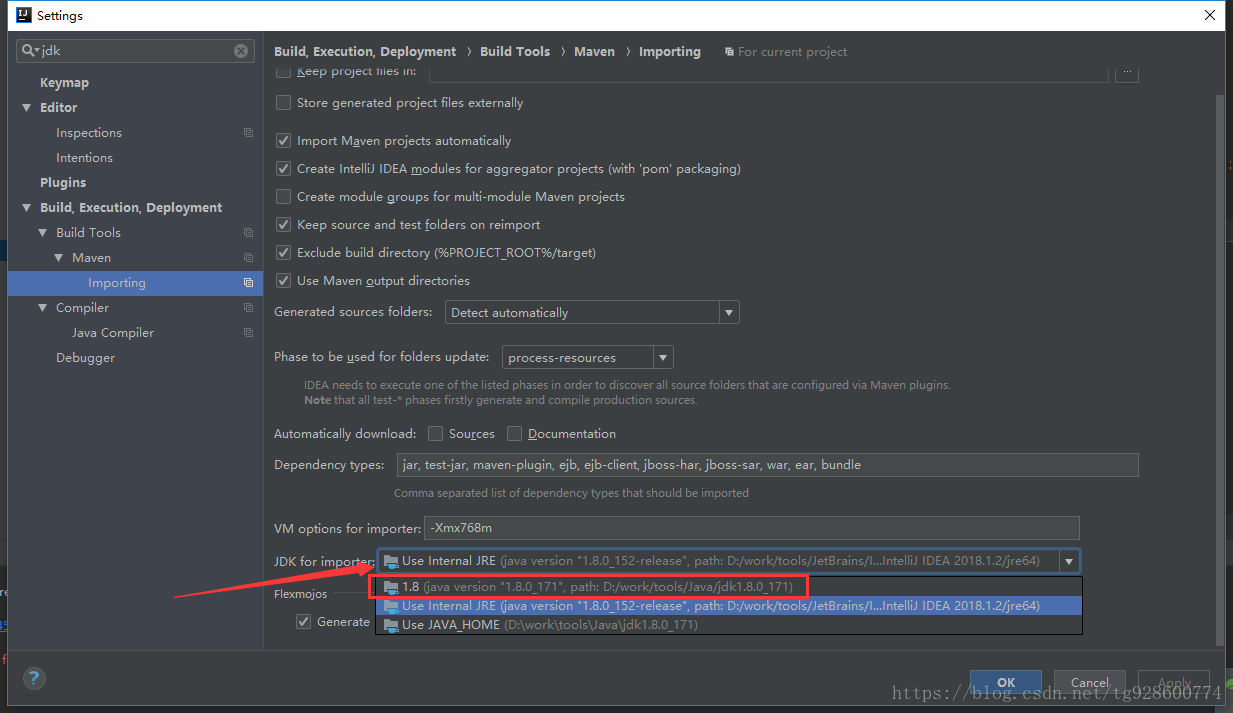
Later, after several twists and turns, through a direct search of JDK in settings, we found that there was such a place

The arrow points to the current state. Change this to the normal 1.8, and the project can run happily