JQuery: How to get the selected values of checkbox, radio and select

JQuery gets the selected value of radio:

<input type="radio" name="rd" id="rd1" value="1">1
<input type="radio" name="rd" id="rd2" value="2">2
<input type="radio" name="rd" id="rd3" value="3">3

All three methods are OK

$('input:radio:checked').val();
$("input[type='radio']:checked").val();
$("input[name='rd']:checked").val();

JQuery gets the selected value of select

  <select name="products" id="sel">
    <option value='1'>option1</option>
    <option value='2' selected>option2</option>
    <option value='3'>option3</option>
    <option value='4'>option4</option>
  </select>

Get the value of the selected item:

$('select#sel option:selected').val();
or
$('select#sel').find('option:selected').val();

Get the text value of the selected item:

$('select#seloption:selected').text();
or
$('select#sel').find('option:selected').text();

Get the index value of the currently selected item:

$('select#sel').get(0).selectedIndex;

JQuery gets the selected value of the check box:

<input type="checkbox" name="ck" value="checkbox1">checkbox1     
<input type="checkbox" name="ck" value="checkbox2" checked>checkbox2     
<input type="checkbox" name="ck" value="checkbox3">checkbox3      

Get a single check box selected item:

$("input:checkbox:checked").val() 
or 
$("input:[type='checkbox']:checked").val(); 
or 
$("input:[name='ck']:checked").val(); 

Get multiple check box items:

$('input:checkbox').each(function() { 
    if ($(this).attr('checked') ==true) { 
        alert($(this).val()); 
    } 
}); 
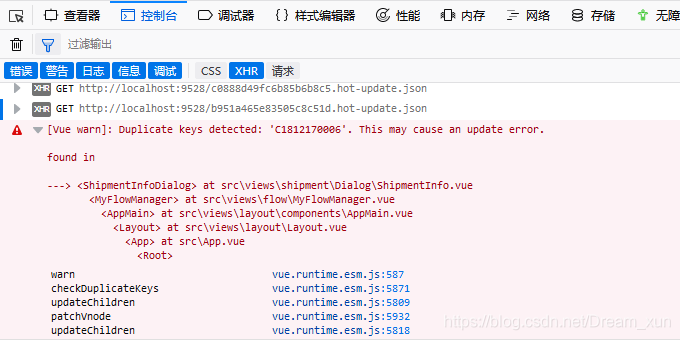
 

Duplicate keys detected: ‘XXXX’. This may cause an update error. Solution

This may cause an update error in Vue project: duplicate keys detected: ‘c1812170006’

Although it does not affect the use, but the error has to be resolved

As soon as you enter the page, you will get this red error. After checking the information on the Internet, you say that in the V-for loop, the key value may be repeated, so you will report this error.

After checking, there is a V-for loop on the page

The key value must be unique. If it is repeated, an error will be reported.
this situation can be avoided by changing the key value to index


Viewing the file system format of disk partition under Linux

Link to the original text:

https://www.cnblogs.com/youbiyoufang/p/7607174.html

————————————————————————-

DF – t can only view mounted partitions and file system types.

Filesystem Type 1K-blocks Used Available Use% Mounted on
/dev/sda1 ext4 20642428 3698868 15894984 19% /
tmpfs tmpfs 32947160 0 32947160 0% /dev/shm

Fdisk – L displays all mounted and unmounted partitions, but does not display the file system type.

Disk /dev/sda: 299.4 GB, 299439751168 bytes
255 heads, 63 sectors/track, 36404 cylinders
Units = cylinders of 16065 * 512 = 8225280 bytes
Sector size (logical/physical): 512 bytes/512 bytes
I/O size (minimum/optimal): 512 bytes/512 bytes
Disk identifier: 0x000576df

Device Boot Start End Blocks Id System
/dev/sda1 * 1 2611 20971520 83 Linux
/dev/sda2 2611 3134 4194304 82 Linux swap/Solaris
/dev/sda3 3134 36404 267248282 83 Linux

Parted – L to see the types of unmounted file systems and which partitions are not formatted.

Model: LSI MR9240-8i (scsi)
Disk /dev/sda: 299GB
Sector size (logical/physical): 512B/512B
Partition Table: msdos

Number Start End Size Type File system Flags
1 1049kB 21.5GB 21.5GB primary ext4 boot
2 21.5GB 25.8GB 4295MB primary linux-swap(v1)
3 25.8GB 299GB 274GB primary ext4

Lsblk – F can also view unmounted file system types.

NAME FSTYPE LABEL UUID MOUNTPOINT
sda 
|-sda1 ext4 c4f338b7-13b4-48d2-9a09-8c12194a3e95 /
|-sda2 swap 21ead8d0-411f-4c23-bdca-642643aa234b [SWAP]
`-sda3 ext4 2872b14e-45va-461e-8667-43a6f04b7bc9


file -s /dev/sda3

/dev/sda3: Linux rev 1.0 ext4 filesystem data (needs journal recovery) (extents) (large files) (huge files)

Shell: How to Get System Current Tme and Format it

time=$(date “+%Y%m%d-%H%M%S”)

or

time=$(date “+%Y-%m-%d %H:%M:%S”)

…… etc. in any format you want

echo “${time}”

The above two lines of simple code is the shell to get the current time and output it in the format you want.

A few things to note

There is a space after date, otherwise the command cannot be recognized, the shell is still very strict about spaces.
Y shows 4-digit year, e.g. 2018; y shows 2-digit year, e.g. 18. m shows month; M shows minute. d shows day, while D shows current date, e.g. 1/18/18 (i.e. 2018.1.18). h shows hour, while h shows month (a bit confusing). s shows current second in milliseconds; S shows current second in seconds.

Git Push Error: failed to push some refs to ‘[email protected]:

git push error: failed to push some refs to ‘[email protected]:

$ git push -u origin master
To [email protected]:xxx/xxx.git
 ! [rejected]        master -> master (fetch first)
error: failed to push some refs to '[email protected]:xxx/xxx.git'
hint: Updates were rejected because the remote contains work that you do
hint: not have locally. This is usually caused by another repository pushing
hint: to the same ref. You may want to first integrate the remote changes
hint: (e.g., 'git pull ...') before pushing again.
hint: See the 'Note about fast-forwards' in 'git push --help' for details.

Reason:
in GitHub remote warehouse README.md The file is not in the local warehouse.
solutions:

$ git pull --rebase origin master
$ git push -u origin master

Eureka unit test error creating bean with name ‘Eureka autoservice registration’: Singleton bean

 If you encounter the following error message during unit testing, there are two ways to resolve it
 org.springframework.beans.factory.BeanCreationNotAllowedException:
 Error creating bean with name 'eurekaAutoServiceRegistration': Singleton bean...

Method 1: add notes

Add the following annotation to the unit test class (rest assured that there will be no local reference, but it cannot be deleted)

@MockBean
private EurekaAutoServiceRegistration eurekaAutoServiceRegistration;

Method 2: implement the beanfactory postprocessor interface

@Component
public class FeignBeanFactoryPostProcessor implements BeanFactoryPostProcessor {

    @Override
    public void postProcessBeanFactory(ConfigurableListableBeanFactory beanFactory) throws BeansException {
        BeanDefinition bd = beanFactory.getBeanDefinition("feignContext");
        bd.setDependsOn("eurekaServiceRegistry", "inetUtils");
    }
}

Python3: Str.format Keyerror Solution for incoming parameter error

Python3 str.format Keyerror solution for incoming parameter error

Additional knowledge of keyerror description and solution

Keyerror description and solution

If the parameter is called in the way of ‘W’, keyerror will be generated

# Define the variable c
>>>c = {'w':'w', 'o': 'o', 'r': 'r', 'l': 'l', 'd': 'd'}
{'w':'w', 'o': 'o', 'r': 'r', 'l': 'l', 'd': 'd'}
# Calling the parameter with 'w' will generate a KeyError error
>>>"Hello, {'w'}{'o'}{'r'}{'l'}{'d'}!".format(**c)
Traceback (most recent call last):
  File "<stdin>", line 1, in <module>
KeyError: 'w'

Solution:

# Remove the single quotes and it'll be fine
>>> "Hello, {o}{r}{l}{d}!".format(**c)
Hello, world!

But I don’t understand the principle, I need to continue to learn.

Supplementary knowledge

When dict() is called to generate a dictionary, the key reference does not need to add single quotation marks.

>>>dict(w='w', o='o', r='r')
{'w': 'w', 'o': 'o', 'r': 'r'}

Initializingbean Interface & Applicationcontextaware Interface in Springboot

1. InitializingBean

There is only one method in this interface initializingbean, afterpropertieset. This method refers to the method that the spring container actively calls the interface after starting. If a bean implements initializingbean, the method will call the afterpropertieset method after the container instantiates the bean and initializes the bean’s properties. AfterPropertiesSet knows the meaning by the name of the method: it is called after the property of bean is set.

The initialization bean interface source code is as follows:

public interface InitializingBean {

    /**
     * This method is called by the BeanFactory when the bean's properties have been set.
     * This method allows the instance of the bean to perform some initialization actions, which are executed when all the bean properties are finished being set.   
     */
    void afterPropertiesSet() throws Exception;
}

2. ApplicationContextWare

Name with aware, you can know that this interface is actively notified and called by the spring container. The spring container injects the context ApplicationContext when it notifies the implementation class of the interface. There is only one method in the interface:
void setapplicationcontext (ApplicationContext) throws beansexception, that is, after the container is started, ApplicationContext is injected into the method.

The source code of interface applicationcontextware is as follows:

public interface ApplicationContextAware extends Aware {
    void setApplicationContext(ApplicationContext var1) throws BeansException;
}

3. Examples

3.1 enumeration class familyenum

package com.example.demo.blogTest;

public enum FamilyEnum {
    FATHER(45, "father"),
    MOTHER(42, "mother"),
    SON(18, "son");

    private Integer age;
    private String name;
    FamilyEnum(Integer age, String name) {
        this.age = age;
        this.name = name;
    }

    public Integer getAge() {
        return age;
    }

    public String getName() {
        return name;
    }
}

3.2 user defined injection class familyholder

package com.example.demo.blogTest;

import com.example.demo.service.BaseService;
import org.springframework.beans.BeansException;
import org.springframework.beans.factory.InitializingBean;
import org.springframework.context.ApplicationContext;
import org.springframework.context.ApplicationContextAware;
import org.springframework.stereotype.Component;

import java.util.HashMap;
import java.util.Map;
import java.util.function.Function;
import java.util.stream.Collectors;

@Component
public class FamilyHolder implements InitializingBean, ApplicationContextAware {
    private ApplicationContext applicationContext;
    private Map<FamilyEnum, BaseService> map = new HashMap<>();

    public BaseService getEnum(FamilyEnum familyEnum) {
        return map.get(familyEnum);
    }

    @Override
    public void afterPropertiesSet() throws Exception {
        map = applicationContext.getBeansOfType(BaseService.class)
                .values()
                .stream()
                .collect(Collectors.toMap(BaseService::getEnum, Function.identity()));
    }

    @Override
    public void setApplicationContext(ApplicationContext applicationContext) throws BeansException {
        this.applicationContext = applicationContext;
    }
}

3.3 abstract class BaseService

package com.example.demo.service;

import com.example.demo.blogTest.FamilyEnum;

public abstract class BaseService {
    // abstract working class, specific implementation by its successor
    public abstract void myJob();

    public abstract FamilyEnum getEnum();

    // Generic methods, which can also be overridden by inheritors
    public String getName(FamilyEnum person) {
        return person.getName();
    }
}

3.4 Abstract inheritance class fatherservice

package com.example.demo.service;

import com.example.demo.blogTest.FamilyEnum;
import org.springframework.stereotype.Service;

@Service
public class FatherService extends BaseService{
    @Override
    public void myJob() {
        System.out.println("I am a engineer!");
    }

    @Override
    public FamilyEnum getEnum() {
        return FamilyEnum.FATHER;
    }
}

3.5 Abstract inheritance class motherservice

package com.example.demo.service;

import com.example.demo.blogTest.FamilyEnum;
import org.springframework.stereotype.Service;

@Service
public class MotherService extends BaseService{
    @Override
    public void myJob() {
        System.out.println("I am a teacher!");
    }

    @Override
    public FamilyEnum getEnum() {
        return FamilyEnum.MOTHER;
    }
}

3.6 Abstract inheritance class myservice

package com.example.demo.service;

import com.example.demo.blogTest.FamilyEnum;
import org.springframework.stereotype.Service;

@Service
public class MyService extends BaseService{
    @Override
    public void myJob() {
        System.out.println("I am a student!");
    }

    @Override
    public FamilyEnum getEnum() {
        return FamilyEnum.SON;
    }
}

3.7 test class demoapplicationtests

package com.example.demo;

import com.example.demo.blogTest.FamilyEnum;
import com.example.demo.blogTest.FamilyHolder;
import com.example.demo.service.BaseService;
import org.junit.jupiter.api.Test;
import org.junit.runner.RunWith;
import org.springframework.beans.factory.annotation.Autowired;
import org.springframework.boot.test.context.SpringBootTest;
import org.springframework.test.context.junit4.SpringRunner;

@RunWith(SpringRunner.class)
@SpringBootTest
class DemoApplicationTests {
    @Autowired
    private FamilyHolder familyHolder;

    @Test
    void contextLoads() throws ClassNotFoundException {
        // Get all enumeration elements by reflection
        Class<FamilyEnum> clazz = (Class<FamilyEnum>) Class.forName("com.example.demo.blogTest.FamilyEnum");
        FamilyEnum[] enumConstants = clazz.getEnumConstants();
        for (FamilyEnum familyEnum : enumConstants) {
            BaseService baseService = familyHolder.getEnum(familyEnum);
            baseService.myJob();
        }
    }
}

Output results

I am a engineer!
I am a teacher!
I am a student!

Python: Np.where Ternary Operator

through the use of np.where It can perform more complex operations

np.where ()

score = np.random.randint(40, 100, (10, 5))
score
array([[51, 81, 74, 58, 56],
       [94, 79, 51, 92, 94],
       [84, 79, 54, 87, 81],
       [52, 53, 69, 83, 73],
       [42, 68, 67, 50, 55],
       [45, 85, 58, 72, 61],
       [78, 63, 80, 99, 95],
       [66, 45, 51, 89, 48],
       [46, 63, 78, 43, 85],
       [93, 69, 83, 91, 96]])

temp = score[:4, :4]
# Judgment of the top four students, the first four courses, the grade greater than 60 set to 1, otherwise 0
np.where(temp > 60, 1, 0)
array([[0, 1, 1, 0],
       [1, 1, 0, 1],
       [1, 1, 0, 1],
       [0, 0, 1, 1]])

Compound logic needs combination np.logical_ And and np.logical_ Or use

# determine the first four students, the first four courses, the results of greater than 60 and less than 90 for 1, otherwise 0
np.where(np.logical_and(temp > 60, temp < 90), 1, 0) # greater than 60, less than 90 show 1
array([[0, 1, 1, 0],
       [0, 1, 0, 0],
       [1, 1, 0, 1],
       [0, 0, 1, 1]])

# determine the first four students, the first four courses, the grades in greater than 90 or less than 60 for 1, otherwise 0
np.where(np.logical_or(temp <60, temp > 90), 1, 0) less than 60 greater than 90 show 1
array([[1, 0, 0, 1],
       [1, 0, 1, 1],
       [0, 0, 1, 0],
       [1, 1, 0, 0]])