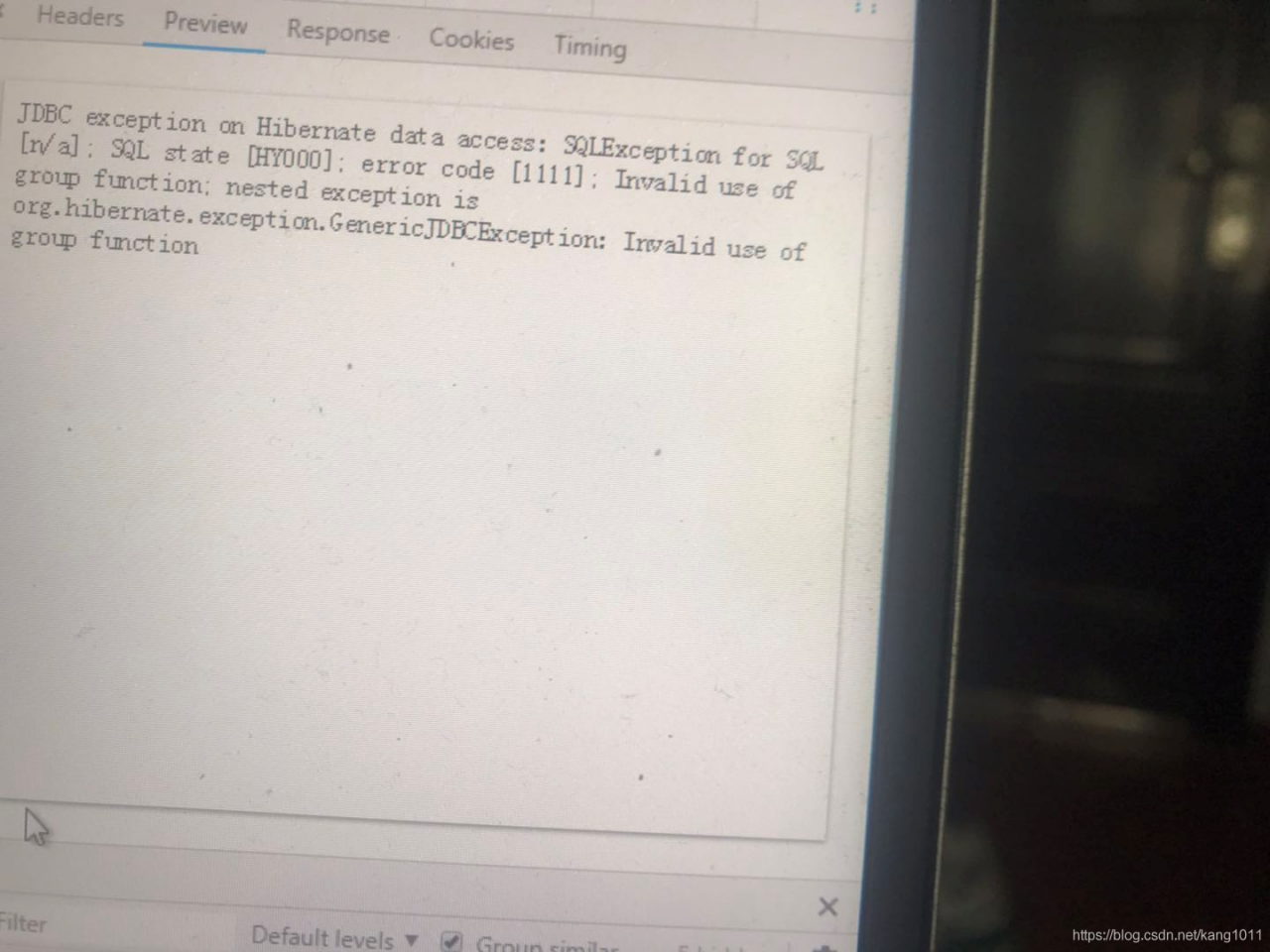
Mysql :error 1111. Invalid use of group function

Invalid use of group function Invalid use of group function
The phenomenon of

Oracle executes double-layer sum without Invalid use of group function, executes the same SQL to mysql, and Invalid use of group function


find the cause
check correct

SELECT [DISTINCT|DISINCTROW|ALL] select_expression,... -- Query results
[FROM table_references -- specify the table for the query
[WHERE where_definition] -- where clause, the filtering condition of the query data
[GROUP BY col_name,...] -- group the query results [that match the where clause]
[HAVING where_definition] -- condition on the grouped results
[ORDER BY{unsigned_integer | col_name | formula} [ASC | DESC],...] -- Sort the query results
[LIMIT [offset,] rows] -- Limit the number of rows to be displayed for a query
[PROCEDURE procedure_name] -- query the result set data returned by the procedure
]

Take a closer look at SQL to locate the two-layer SUM cause

Modify separate SUM, problem solved, the outermost package of a layer

Mongoose Error: e11000 duplicate key error collection, code: 11000

Problem description:

MongoError: E11000 duplicate key error collection: test.elementusers index: username_1 dup key: { username: "admin" }
    at Function.create (/Users/liangrumeng/Documents/HBuilderProjects/workspace/myapp/node_modules/mongodb/lib/core/error.js:44:12)
    at toError (/Users/liangrumeng/Documents/HBuilderProjects/workspace/myapp/node_modules/mongodb/lib/utils.js:150:22)
    at coll.s.topology.insert (/Users/liangrumeng/Documents/HBuilderProjects/workspace/myapp/node_modules/mongodb/lib/operations/common_functions.js:266:39)
    at handler (/Users/liangrumeng/Documents/HBuilderProjects/workspace/myapp/node_modules/mongodb/lib/core/sdam/topology.js:1000:24)
    at wireProtocol.(anonymous function) (/Users/liangrumeng/Documents/HBuilderProjects/workspace/myapp/node_modules/mongodb/lib/core/sdam/server.js:457:5)
    at /Users/liangrumeng/Documents/HBuilderProjects/workspace/myapp/node_modules/mongodb/lib/core/connection/pool.js:408:18
    at process._tickCallback (internal/process/next_tick.js:61:11)
  driver: true,
  name: 'MongoError',
  index: 0,
  code: 11000,
  keyPattern: { username: 1 },
  keyValue: { username: 'admin' },
  errmsg:
   'E11000 duplicate key error collection: test.elementusers index: username_1 dup key: { username: "admin" }',
  [Symbol(mongoErrorContextSymbol)]: {} 

MongoError: E11000 duplicate key error collection: test.elementusers index: username_1 dup key: {username: “admin”}
at Function. Create
driver: true,
name: ‘MongoError’,
index: 0,
code: 11000,
keyPattern: {username: 1},
keyValue: {username: ‘admin’},
errmsg:
‘E11000 duplicate key error collection: Test.elementusers index: username_1 dup key: {username: “admin”}’,
[Symbol(mongoErrorContextSymbol)]: {}
The reason:
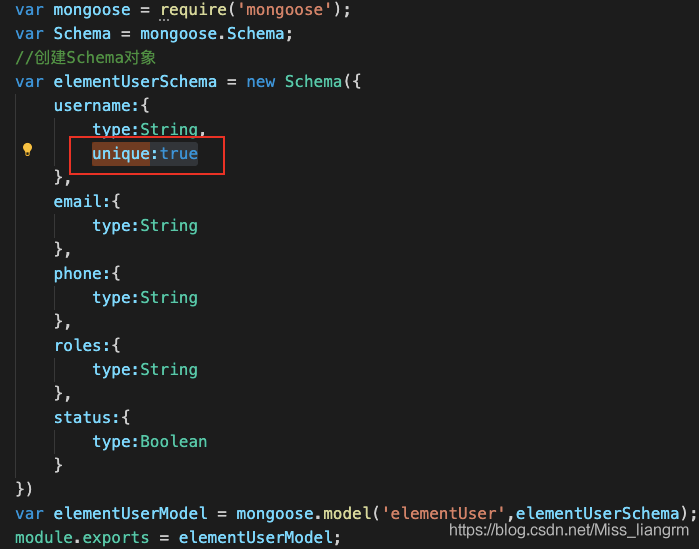
Because unique:true is set in the Schema, the registered user name must be unique.

We can make a corresponding judgment in ERR.

if(err.code == '11000'){
    res.json({
        msg:'This username has already been registered, please change your username',
        success:false
    })
}

Tidb2.1 reports Error statement count 5001 exceeded the transaction limit, autocommit = false

Error:
statement count 5001 exceeds the transaction limitation, autocommit = false


-- Explanation.
stmt-count-limit
Limit on the maximum number of statements allowed in a TiDB transaction.
Default: 5000
TiDB will return statement count 5001 exceeds the transaction limitation if there is no rollback or commit after more than stmt-count-limit statements in a transaction, autocommit = false error.

-- Solution.
conf/tidb.yml
Modify the file parameters.

 txn_local_latches:
  # Enable local latches for transactions. Enable it when
  # there are lots of conflicts between transactions.
  # enabled: true
  # capacity: 1024000

Method 1: Comment out the parameter enabled: true and set it to false
Method 2: Set the parameter capacity: 1024000 to very

Restart tidb after the parameters are modified.

error: could not install *smartsocket* listener: Address already in use PM8:49 ADB server didn’t AC…

Enter adb command in the terminal and the error is as follows:
localhost:work zhangyg$ adb devices
List of devices attached
adb server version (32) doesn’t match this client (36); killing…
error: could not install *smartsocket* listener: Address already in use
ADB server didn’t ACK
* failed to start daemon *
error: cannot connect to daemon

The reason for the error was that I chose Android Tools using Genymotion, so it caused a conflict with ADB program under Android SDK.
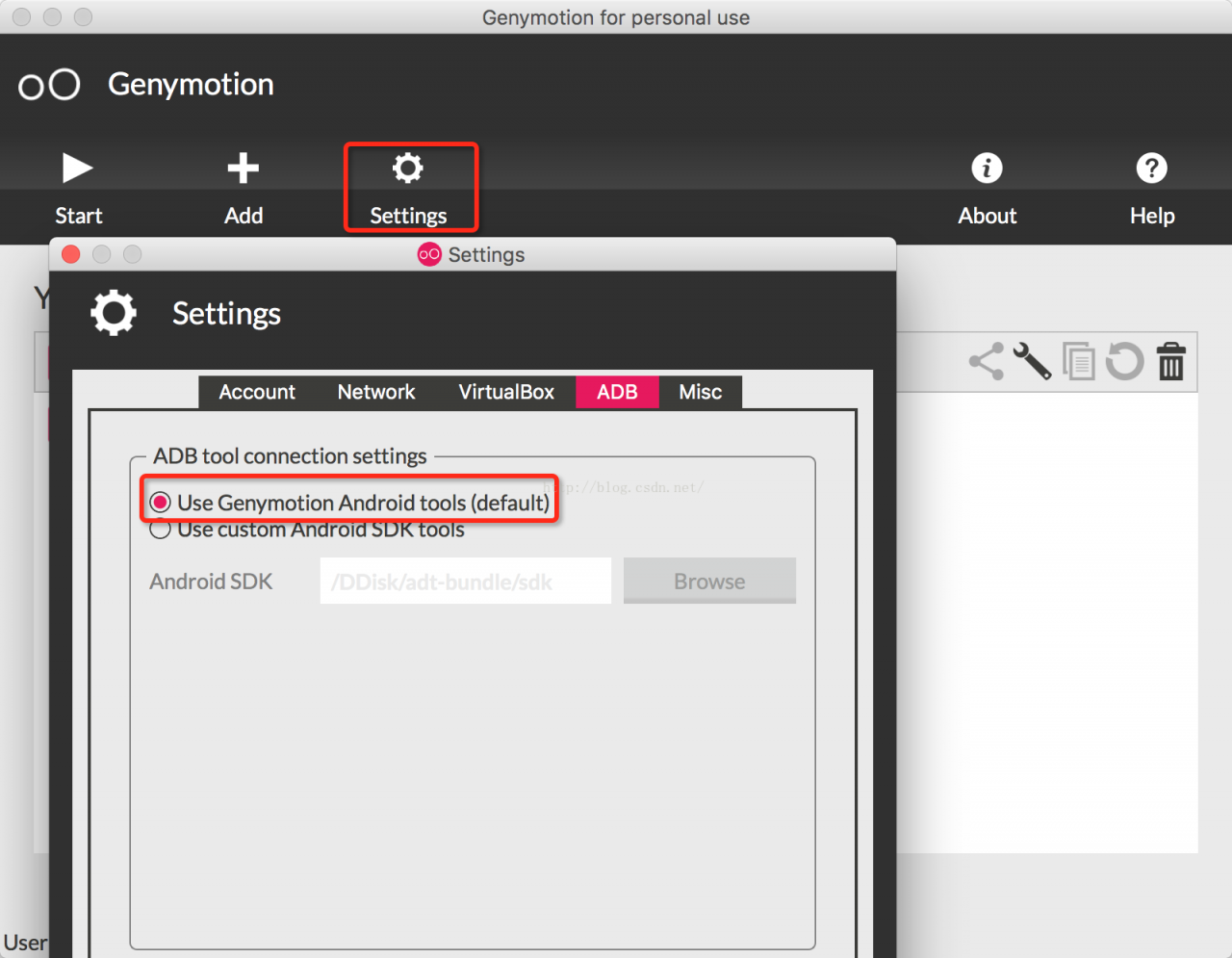
Click [Settings] in the main interface of Genymotion as shown below:

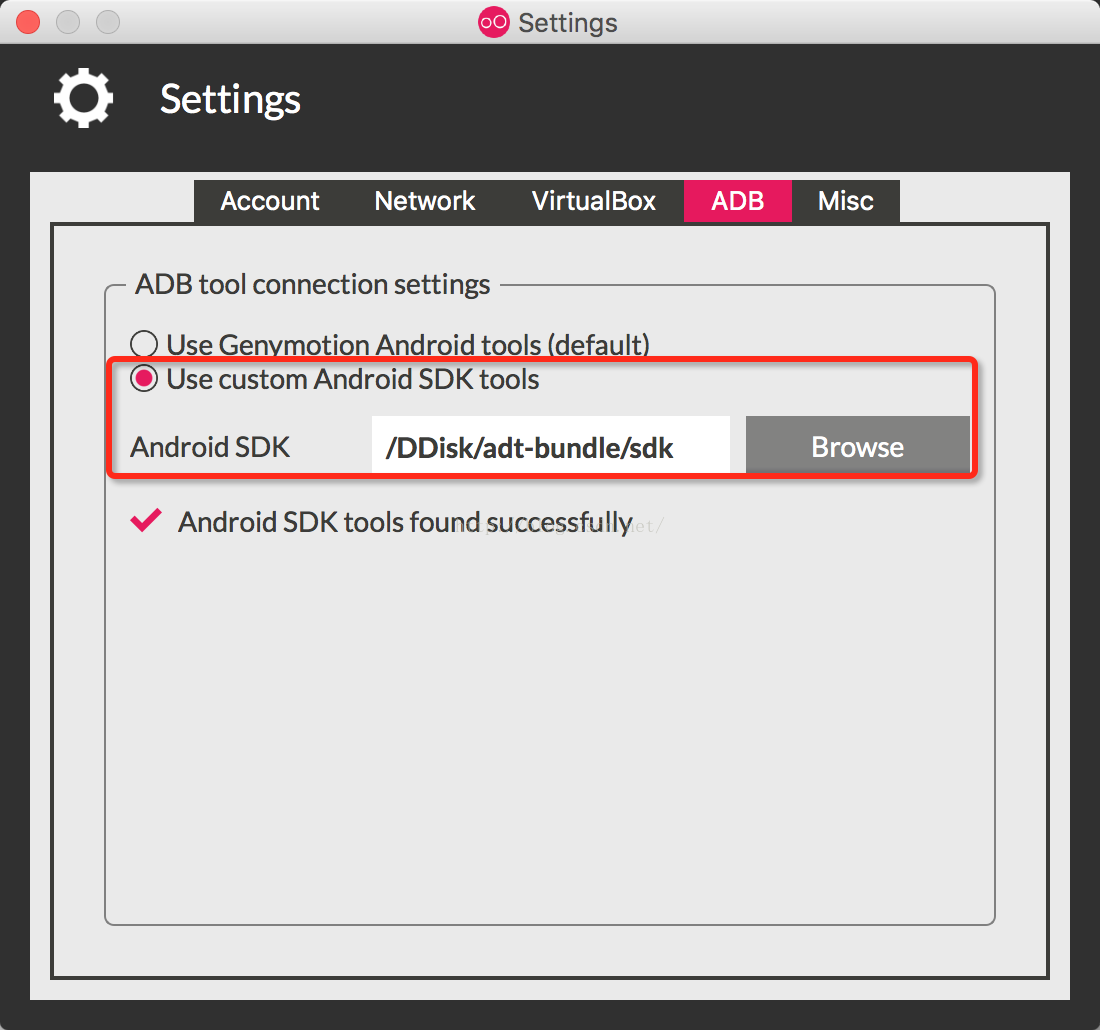
Select Use Custom Android SDK Tools, and then select the Androd SDK root directory, as shown in the figure below:

Restarting Genymotion’s virtual machine will solve the problem.

Using jgit to report errors: the solution of algorithm negotiation failure

In today’s Java project, when using the jgit library to pull the remote code with SSH protocol, we encountered a lot of errors and stepped on a lot of holes to solve the problem. I’d like to record it here to help you
first of all, let’s talk about the use environment:

    1. there is no problem for the code to run on the Linux server. You can use SSH to pull the code. The local MacBook can pull code with SSH, but not with java code

Problem solving

        1. code error:

      com.jcraft.jsch.jschexception: algorithm negotiation failure

      1. this means that the algorithm negotiation fails, and SSH communication protocol has a stage of secret agreement and algorithm negotiation, in which both parties negotiate the final algorithm according to the algorithm supported by the local end and the opposite end. Different versions of openssh have different default algorithm lists, which may lead to the failure of algorithm negotiation. Use SSH – version to view the current openssh version
$ ssh -Version
OpenSSH_7.9p1, LibreSSL 2.7.3

View_ Protocol used in RSA private key file header

-----BEGIN OPENSSH PRIVATE KEY-----

Use SSH keygen - M PEM - t RSA to generate old format keys

-----BEGIN RSA PRIVATE KEY-----

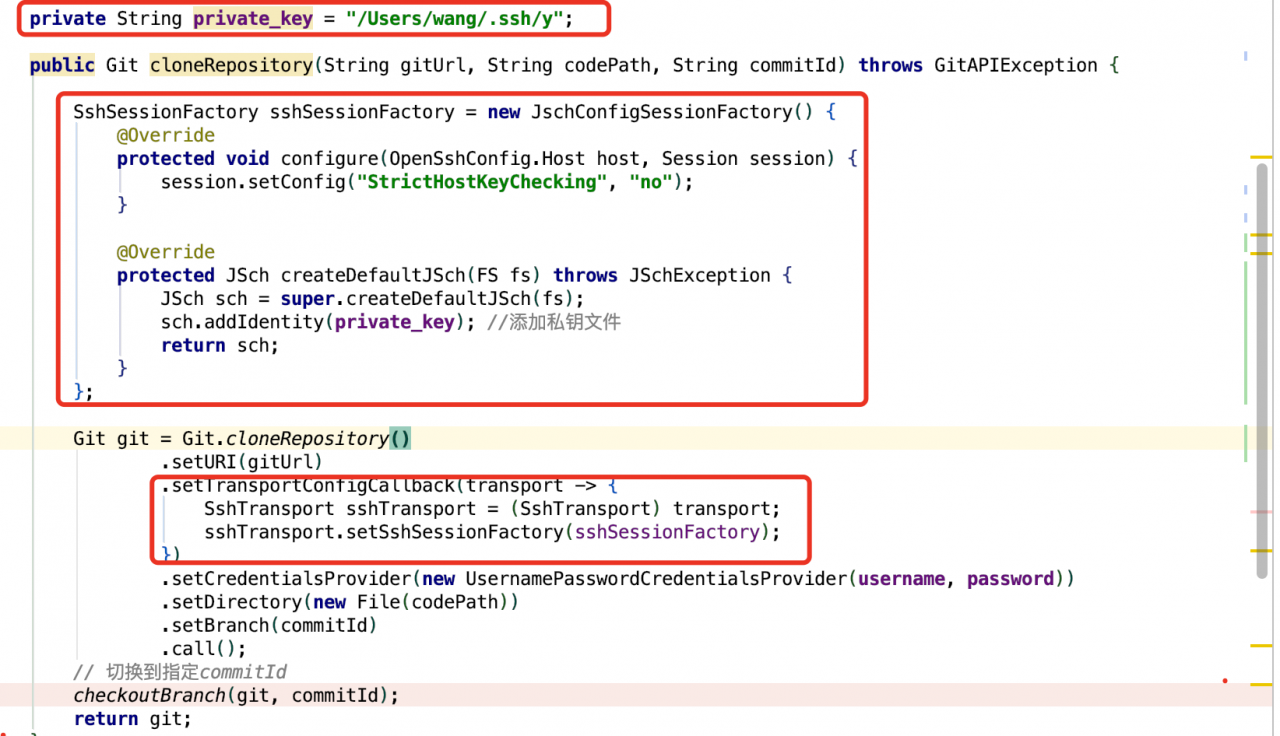
When configuring the newly generated public key of SSH in gitlab repository settings in Git clone repository, specify the SSH private key file

private String private_key = "/Users/wang/.ssh/y";
SshSessionFactory sshSessionFactory = new JschConfigSessionFactory() {
            @Override
            protected void configure(OpenSshConfig.Host host, Session session) {
                session.setConfig("StrictHostKeyChecking", "no");
            }

            @Override
            protected JSch createDefaultJSch(FS fs) throws JSchException {
                JSch sch = super.createDefaultJSch(fs);
                sch.addIdentity(private_key); 
                return sch;
            }
        };

        Git git = Git.cloneRepository()
                .setURI(gitUrl)
                .setTransportConfigCallback(transport -> {
                    SshTransport sshTransport = (SshTransport) transport;
                    sshTransport.setSshSessionFactory(sshSessionFactory);
                })
                .setCredentialsProvider(new UsernamePasswordCredentialsProvider(username, password))
                .setDirectory(new File(codePath))
                .setBranch(commitId)
                .call();
        checkoutBranch(git, commitId);
        return git;

Other issues

      1. an error is reported when jsch connects to SSH: the invalid private key reports an error in the private key file that uses

--- begin open private key -----

      1. protocol by default. Just use the above method to generate the old RSA private key. In

/etc/SSH/sshd_ Add the following two lines to the config

      1. file to enable SSH to support corresponding algorithms and Macs
KexAlgorithms [email protected],ecdh-sha2-nistp256,ecdh-sha2-nistp384,ecdh-sha2-nistp521,diffie-hellman-group-exchange-sha256,diffie-hellman-group14-sha1,diffie-hellman-group-exchange-sha1,diffie-hellman-group1-sha1

MACs [email protected],[email protected],[email protected],[email protected],hmac-sha2-512,hmac-sha2-256,hmac-ripemd160,[email protected],hmac-md5,hmac-sha1,hmac-sha1-96,hmac-md5-96

Restart sshd service on MAC

sudo launchctl load -w /System/Library/LaunchDaemons/ssh.plist

Stop sshd service on MAC

sudo launchctl unload -w /System/Library/LaunchDaemons/ssh.plist

How to check whether a process is started

sudo launchctl list | grep sshd
0   com.openssh.sshd

TypeError(‘Keyword argument not understood:‘, ‘***‘) in keras.models load_model

TypeError(‘Keyword argument not understood:’, ‘***’) in keras.models load_ model

1.Problem description

    1. after training on Google colab, model.save (filepath)_ Save) and then use after saving
from keras.models import load_model
model = load_model(model_file)
# Error: TypeError: ('Keyword argument not understood:', 'step_dim')

2.Solutions

      1. method 1: confirm whether the versions of keras and TF are different twice. Someone’s solution: I only solved it by upgrading tensorflow and keras on the local computer at the same time
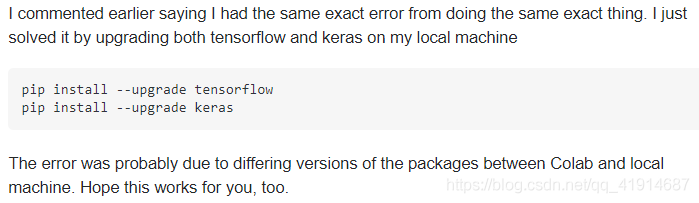
pip install --upgrade tensorflow
pip install --upgrade keras

What he means is the version problem. After training on Google’s colab, the model is saved locally. When it is called locally, the loading model will report an error due to the different versions of the packages in the two environments
then you can adjust the version of the local related package.

Similar to the following answer, the version when the model is saved is inconsistent with the version when the model is loaded, which may cause this problem
then unify the versions

import tensorflow as tf
import keras

print(keras.__version__)
print(tf.__version__)

But mine is still read on the colab, and the environment is the same, so this method can’t solve my specific problem.

      1. method 2. Model.load_ Weights() only reads weights


      1. the general idea is that we start with models.load_ Model () reads the network and weight. Now, because of the keyword argument not understood in the custom model, we first build the model structure, and then model. Load_ Weights () reads weights, which can achieve our original purpose


      1. at present, I use this method to solve the problem of re reading and importing the parameters of the network structure model of the user-defined model

I also have this problem I’ve tried a lot of methods and found that this method can be used

# first,build model
model = TextAttBiRNN(maxlen, max_features, embedding_dims).get_model()
model.compile(loss='binary_crossentropy',
              optimizer='adam',
              metrics=['accuracy'])
              
# second, load weights: I solved the problem with this:
model_file = "/content/drive/My Drive/dga/output_data/model_lstm_att_test_v6.h5"
model.load_weights(model_file)
# then,we will find the modle can be use.
# in this way,I avoided the previous questions.
How to Solve FATAL ERROR in native method: JDWP on getting class status, jvmtiError=JVMTI_ERROR_WRONG_PHASE

I. Error reporting Experience:
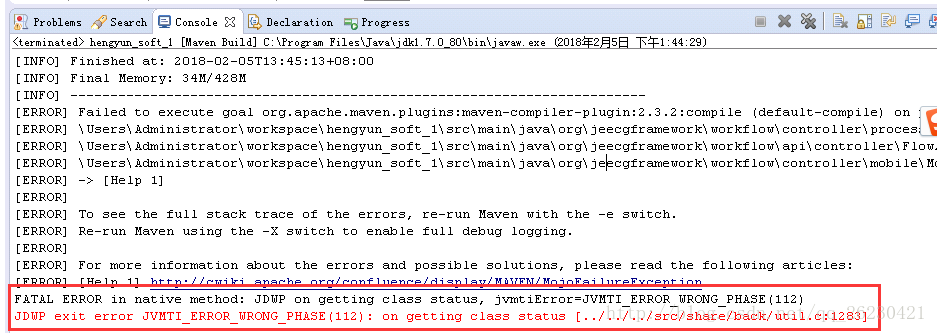
Today, while using Eclipse to launch through Maven Build, an error occurred as shown below
II. Analysis of problems:
This is due to the fact that eclipse’s JRE is not configured
Iii. Problem Solving:
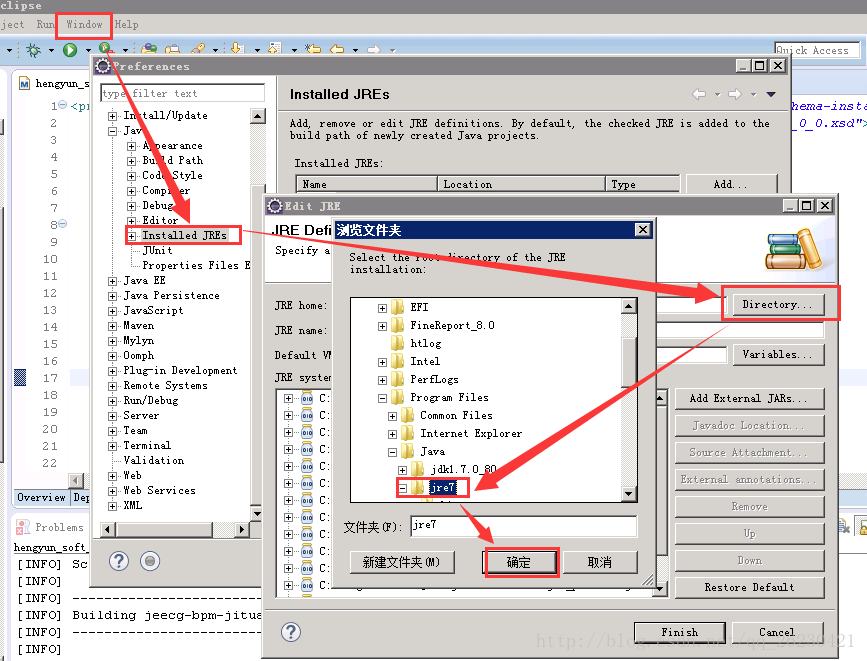
Step1 reconfigure the jre for eclipse
Open Window- Preferences- Java- Installed JREs, as shown in the figure below:

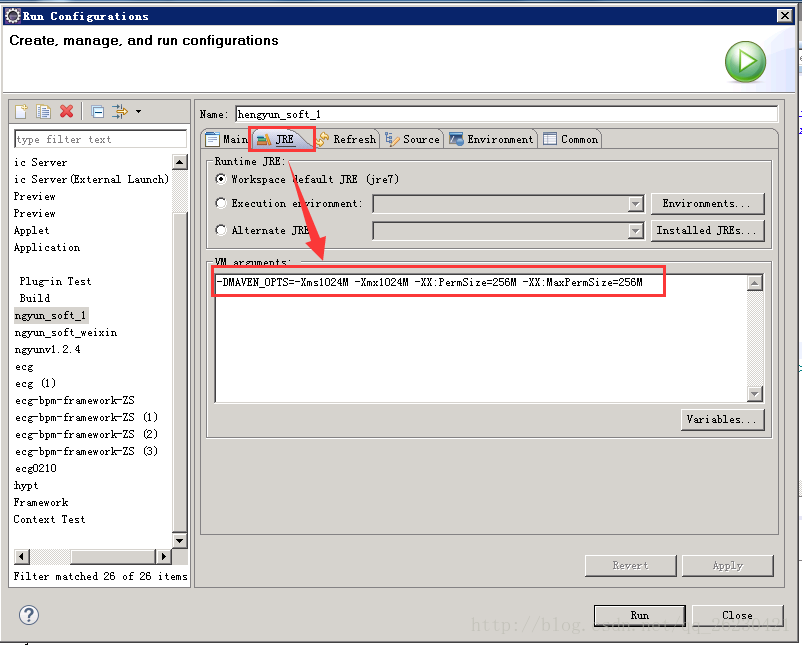
Step2 configure the JRE for maven build
Right-click on the project, and select Run As–Run Configurations:
Add the following code to the JRE TAB (modify the values based on your computer) :
-DMAVEN_OPTS=-Xms1024M -Xmx1024M -XX:PermSize=256M -XX:MaxPermSize=256M
As shown in the figure:

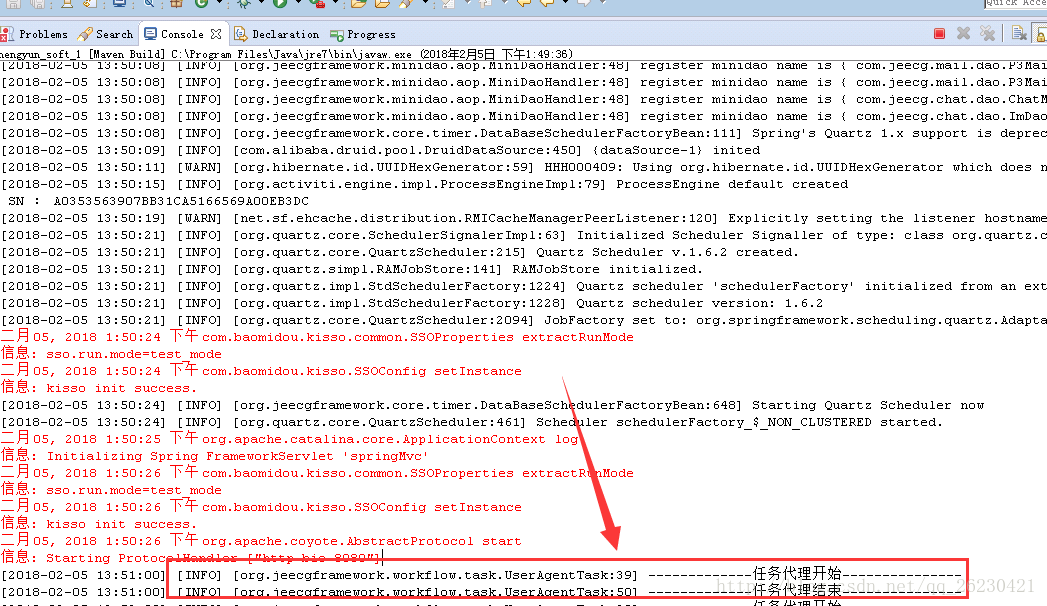
Iv. Startup:
Finally, you’re ready to start:

OK, GAME OVER !

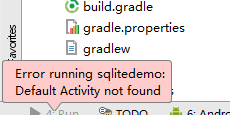
Remember an android app startup error Error running: Default Activity not found

The errors are shown in the figure below:

Reason 1:
This is because it is possible that When we delete the activity during the operation, Android Studio automatically removes our activity tag information from the Androidmanifest.XML, but when we create the activity again, it does not automatically fill in our activity information, so we need to fill it out manually.
Reason 1 Solution:
Fill in the Activity tag information in the Androidmanifest.xml:

<application android:allowBackup="true" android:icon="@mipmap/ic_launcher"
        android:label="@string/app_name" android:supportsRtl="true" android:theme="@style/AppTheme">
        <activity android:name=".MainActivity">
            <intent-filter>
                <action android:name="android.intent.action.MAIN" />

                <category android:name="android.intent.category.LAUNCHER" />
            </intent-filter>
        </activity>
    </application>

Reason 2:
Because of the requirement, projects do not need the Activity class. This is because When you create a project, AndroidStudio defaults to Lunche, which requires activity, so it will report an error.
Reason 2 solutions:
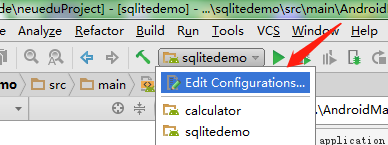
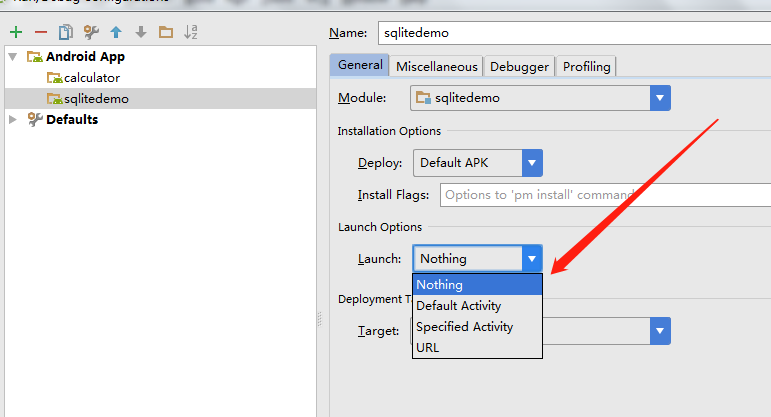
Step 1: Go to the Settings page

Step 2: Set it to Nothing in launch.

How to Solve “Error: source file could not be loaded“ [Ubuntu Use LibreOffice]

#Accident scene

Use libreoffice under Ubuntu to convert txt to PDF. The command is as follows:

libreoffice  --invisible --convert-to pdf   /home/parasaga/resource/testtxt.txt --outdir /home/parasaga/resource/

report errors:

Error: source file could not be loaded

#Causes and Solutions

1. Reason:

To install libreoffice, use the following command:

sudo apt-get install libreoffice-common

In this way, the libreoffice writer module will not be installed, resulting in the above error;

2. Solution:

Install the libreoffice writer module.

sudo apt-get install libreoffice-writer

Tensorflow UnknownError (see above for traceback): Failed to get convolution algorithm. This is pro

The environment configuration is Ubuntu 16.04, tensorflow 1.13.1, cuda10, cudnn7.6.4.
Error when running tensorflow code
UnknownError (see above for traceback): Failed to get convolution algorithm. This is probably because cuDNN failed to initialize, so try looking to see if a warning log message was printed above.
With the tensorflow, cuda, and cudnn versions corresponding correctly, add the following code to the code.

import os
os.environ['CUDA_VISIBLE_DEVICES'] = "0"

config = tf.ConfigProto()
config.allow_soft_placement=True # If the device you specify does not exist, allow TF to allocate the device automatically
config.gpu_options.per_process_gpu_memory_fraction = 0.9 #Allocate a portion of the video memory to the program to avoid memory overflow
config.gpu_options.allow_growth = True #Allocate video memory on demand

with tf.Session(config=config) as sess:
	#Your Codes

[Elasticsearch Exception]Found interface org.elasticsearch.common.bytes.BytesReference

24322; normal information

Found interface org.elasticsearch.common.bytes.BytesReference, but class was expected

picture of child problems.

https://stackoverflow.com/questions/61029889/error-at-createindex-elasticsearch-using-elasticsearchoperations-why-is-the-by

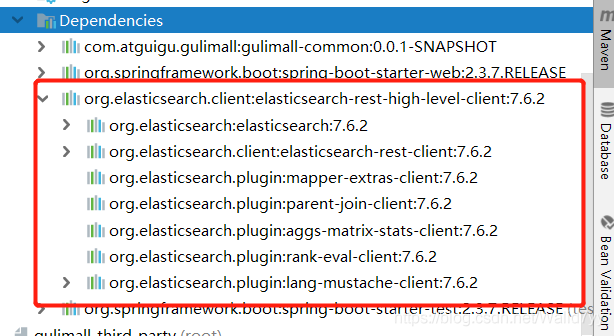
To solve the solution,

<elasticsearch.version> 7.6.2

<dependency>
         <groupId>org.elasticsearch.client</groupId>
         <artifactId>elasticsearch-rest-high-level-client</artifactId>
         <version>${elasticsearch.version}</version>
     </dependency>