[Go] Solve the fatal error: concurrent map writes map is not concurrently safe

Map is not concurrently safe, when there are multiple concurrent groutines reading and writing the same map 

Panic error will occur

concurrent map writes


For example, the following code will cause this error:

var mMap map[ int ] int

func TestMyMap(t * testing.T) {
    mMap = make(map[ int ] int )

    for i := 0 ; i < 5000 ; i++ {
        go func() {
            mMap[i] = i
        }()
        go readMap(i)
    }
}
func readMap(i int ) int {
     return mMap[i]
}

There are many ways to solve this error. Now we take the way of read-write lock.

Concurrent access to the map is not safe, and undefined behavior will occur, causing the program to exit. Therefore, if you want to access the map concurrently in a multi-coroutine, you must provide a synchronization mechanism. Generally, the concurrent access control to the map is achieved through the read-write lock sync.RWMutex, and the map and sync.RWMutex can be encapsulated to achieve the map Secure concurrent access

Transformed code

type SMap struct {
    sync.RWMutex
    Map map[ int ] int
}

func (l *SMap) readMap(key int ) ( int , bool ) {
    l.RLock()
    value, ok: = l.Map[key]
    l.RUnlock()
    return value, ok
}

func (l *SMap) writeMap(key int , value int ) {
    l.Lock()
    l.Map[key] = value
    l.Unlock()
}

var mMap * SMap

func TestMyMap(t * testing.T) {
    mMap = & SMap{
        Map: make(map[ int ] int ),
    }

    for i := 0 ; i < 5000 ; i++ {
        go func() {
            mMap.writeMap(i, i)
        }()
        go readMap(i)
    }
}
func readMap(i int ) ( int , bool ) {
     return mMap.readMap(i)
}

 There are three ways:

1. Use channel
2. Use sync.map
3. Use map but must be locked

[Go] Solve missing go.sum entry for module providing package

When a third-party library is used in the code, but the go.mod is not updated

This error will be reported if you run or build directly

missing go.sum entry for module providing package <package_name>


You can use go mod tidy to organize dependencies


This command will:

Remove unnecessary dependencies

Download the new dependency package

Update go.sum

[Go]Understand the golang project performance analysis tool PProf

PProf uses profile.proto to analyze data

Can collect command analysis when the program is executed

Run-time data analysis during HTTP service can be collected

Can be analyzed by go test test case


There are the following monitoring and analysis functions:

CPU analysis, memory analysis, blocking analysis, mutex analysis, Groutine analysis


If it is an http service, then it can be achieved by directly importing this package _ “net/http/pprof”

If you use the gin framework, you need to import this package github.com/gin-contrib/pprof

And register the gin object pprof.Register(g)


Directly visit http://service/debug/pprof/ through the browser

You can see the following page


 The meaning of each parameter is:

allocs: view all past memory allocation sample
blocks: view the stack trace that caused blocking synchronization
cmdline: the complete call path of the command line of the current program
goroutine: view all currently running goroutines stack trace
heap: view the memory allocation of active objects
mutex: View the stack trace
profile of the competing holder that caused the mutex lock : CPU Profiling is performed for 30s by default, and a profile file for analysis is obtained.
threadcreate: View the stack trace of creating a new OS thread


Use the interactive command line to analyze the results of the above URL

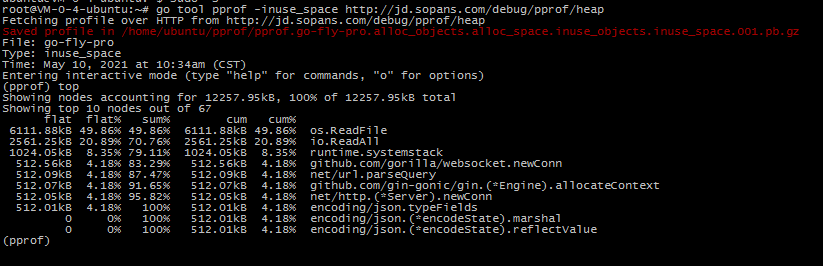
For example, analyze the resident memory situation

go tool pprof -inuse_space http://localhost:8081/debug/pprof/heap input top command


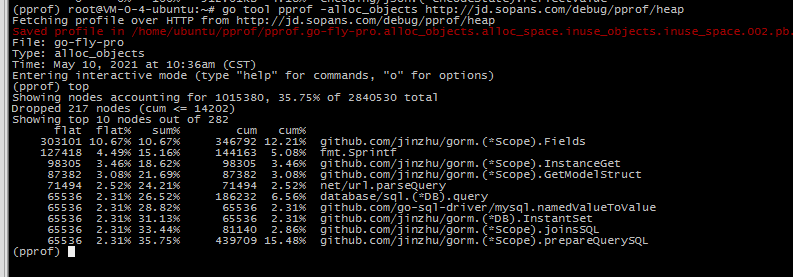
For example, analyze the temporary allocation of memory

go tool pprof -alloc_objects http://localhost:8081/debug/pprof/heap input top command


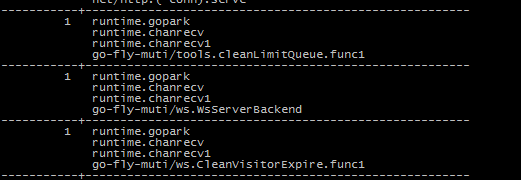
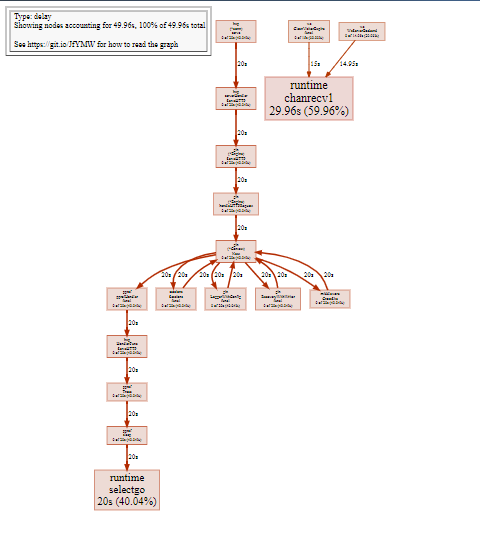
Analyze goroutine

 go tool pprof http://localhost:6060/debug/pprof/goroutine You can use traces to see the call stack

The focus is on the independent goroutine that I opened myself, and the bottom one is the call function of the package I wrote.

[Go]Understand the golang project performance analysis tool trace

When using PProf is not too detailed, you can use trace to view the trace.

This command can be used with PProf

Download the trace file first

curl http://domain name/debug/pprof/trace?seconds=20> trace.out 


use

go tool trace C:\Users\shihan1\Downloads\trace.out

Because it is monitoring 127.0.0.1, it may be inconvenient to access on the server line


To use this tool, you need to install graphviz first

Windows system can go here to download, pay attention to check and add environment variables during installation, otherwise you need to manually add

http://www.graphviz.org/download/#windows

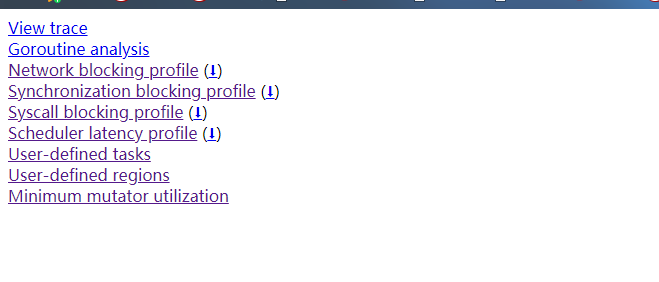
You can see the analysis by visiting the address


Javascript: js websocket disconnected reconnect library ReconnectingWebSocket

When websocket is connected, it is affected by the network

Or if the communication is not closed by the server for a long time, the disconnection reconnection mechanism is required


It is more troublesome to write the disconnection and reconnection by yourself, you can use this js library ReconnectingWebSocket.js

 https://github.com/joewalnes/reconnecting-websocket/ Download the min file directly, just import it

When using, only need to replace h5’s native websocket with ReconnectingWebSocket, everything else remains the same

For example: this is the use of this in vue.socket is the global ReconnectingWebSocket object, and other callback functions are also defined on the vue method

            the this .socket = new new ReconnectingWebSocket ( " xxxxxx " ); // Create Socket instance 
            the this .socket.debug = to true ;
             the this .socket.timeoutInterval = 10000 ; // connection timeout 
            the this .socket.reconnectInterval = 5000 ; // reconnection Interval time 
            this .socket.maxReconnectInterval = 600000 ; // Maximum reconnect interval time 
            this .socket.maxReconnectAttempts = 10 ; // Maximum number of reconnect attempts 
            this .socket.onmessage = this.OnMessage;
             this .socket.onopen = this .OnOpen;
             this .socket.onerror = this .OnError;
             this .socket.onclose = this .OnClose;


 If there is no communication for more than one minute, it will be interrupted, and then automatically reconnect

Javascript: Simple package localStorge operation

Determine whether the browser supports localStorge

Determine whether the browser is in incognito mode

Simple json encoding


// Storage localStorge 
function setLocalStorage(key,obj){
     if (!navigator.cookieEnabled|| typeof window.localStorage == ' undefined ' ){
         return  false ;
    }
    localStorage.setItem(key, JSON.stringify(obj));
    return  true ;
}
// Read localStorge 
function getLocalStorage(key){
     if (!navigator.cookieEnabled|| typeof window.localStorage == ' undefined ' ){
         return  false ;
    }
    var str = localStorage.getItem(key);
     if (! str){
         return  false ;
    }
    return JSON.parse(str);
}

[Linux] ps+awk +while View process memory usage in real time

Sometimes you need to see how much memory the process occupies

You can use my shell, you can view each process you want to see and the total memory

The red part is my process, here you can come according to your needs

while true;do clear;date;ps aux|grep go-fly-pro |grep -v grep|awk’BEGAIN{sum=0}{sum+=$6;print $6/1014 “M” “\t” $0;} END{print “sum:” sum/1024 “M”}’;sleep 1;done


This sentence is to check the process memory of my online customer service, which accounts for a total of 45M, and the main work child process accounts for 29M

Zabbix import MySQL database error ERROR 1046 (3D000) at line 1: No database selected

An error is reported when importing the Zabbix database using the following command

Solution:

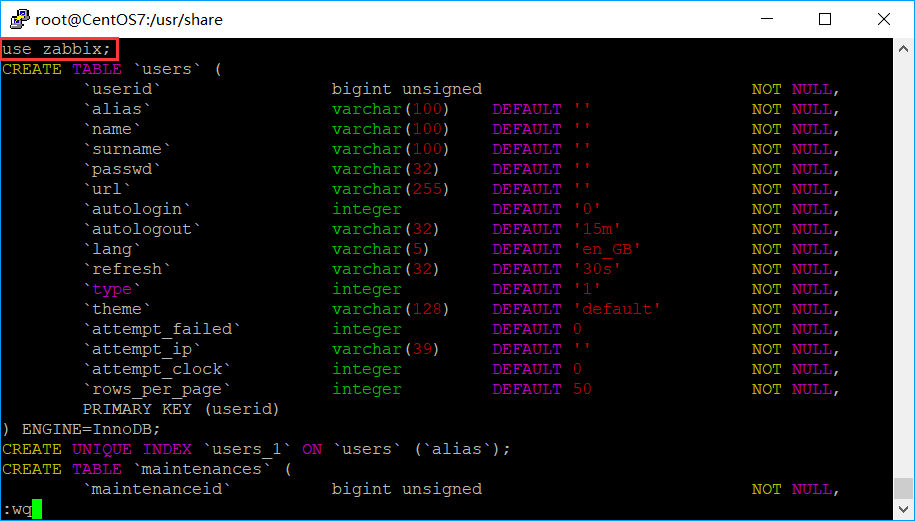
Edit the database file to be imported

vim /usr/share/doc/zabbix-server-mysql-4.0.7/create.sql.gz

# Add in the first line

use zabbix;

As shown below:

Save and exit!

Then re-import the MySQL database. Note: The import process may take a few seconds.

zcat /usr/share/doc/zabbix-server-mysql*/create.sql.gz | mysql -u zabbix -p