[Solved] Error PAM in lightdm startup_ Kwallet (5). So does not exist

PAM unable to dlopen(pam_kwallet.so): /lib/security/pam_kwallet.so: cannot open shared object file: No such file or directory
PAM unable to dlopen(pam_kwallet5.so): /lib/security/pam_kwallet5.so: cannot open shared object file: No such file or directory
1.Edit the /etc/pam.d/lightdm and /etc/pam.d/lightdm-greeter configuration files
Comment out (delete) all of the following lines in each file with #
auth    optional        pam_kwallet.so
auth    optional        pam_kwallet5.so
session optional        pam_kwallet.so auto_start
session optional        pam_kwallet5.so auto_start
2. reboot both can be  systemctl restart lightdm


An error was reported when Maven package was running the packaged jar package: there is no main list attribute in xxx.jar, which can be solved by configuring Maven plugin

The command line runs the packaged jar package:

leung@wuyujin simple-webservice-server % java -jar target/sample-1.0-SNAPSHOT.jar 7896
target/sample-1.0-SNAPSHOT.jar There is no master list property in the

Error reason: there is no manifest file in the packaged jar package, which has two lines of configuration, about the full path of the startup class of jar package 0

Add Maven plugin

<plugin>
	<groupId>org.apache.maven.plugins</groupId>
	<artifactId>maven-jar-plugin</artifactId>
	<version>3.0.2</version>
	<configuration>
		 <archive>
		  <manifest>
			   <addClasspath>true</addClasspath>
			   <classpathPrefix>lib/</classpathPrefix>
			   <mainClass>com.coffee.bee.Main</mainClass>
		  </manifest>
		 </archive>
	</configuration>
</plugin>

Plugins
pluginManagement > plugins

[Solved] com.mysql.jdbc.exceptions.jdbc4.CommunicationsException: Communications link failure error

This error was encountered during the test of integrating mybatis with springboot

com.mysql.jdbc.exceptions.jdbc4.CommunicationsException: Communications link failure

The last packet successfully received from the server was 317 milliseconds ago.  The last packet sent successfully to the server was 314 milliseconds ago.
	at sun.reflect.NativeConstructorAccessorImpl.newInstance0(Native Method) ~[na:1.8.0_181]
	。。。。
	followed by a long list of

The solution is to add usessl = false to the connection string
or change usessl = true to use = false
for example

 url: jdbc:mysql://localhost:3306/sqmb?useUnicode=true&characterEncoding=utf-8&useSSL=false&serverTimezone=UTC


end!!

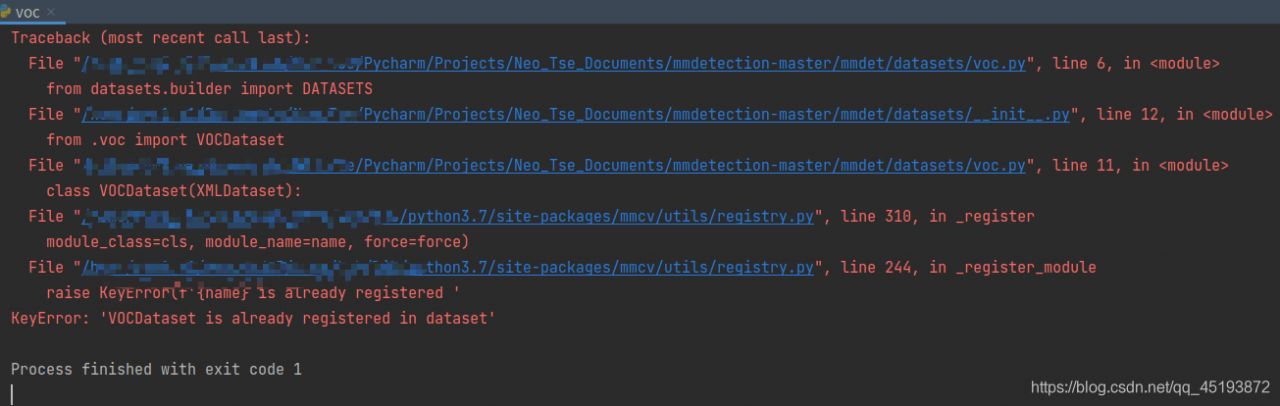
mmdetection Error when running voc.py: KeyError: ‘NumClassCheckHook is already registered in hook‘

This error is usually caused by the version of mmcv
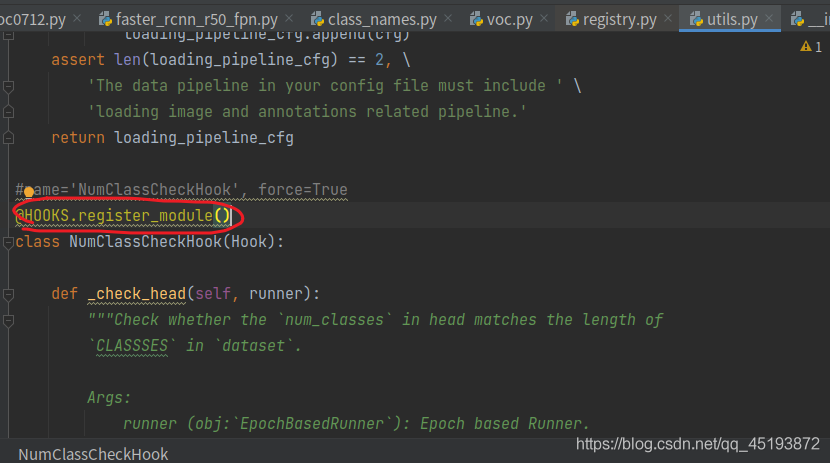
just click in one by one according to the following error prompt to find utils.py file:
change the code in the circle below:

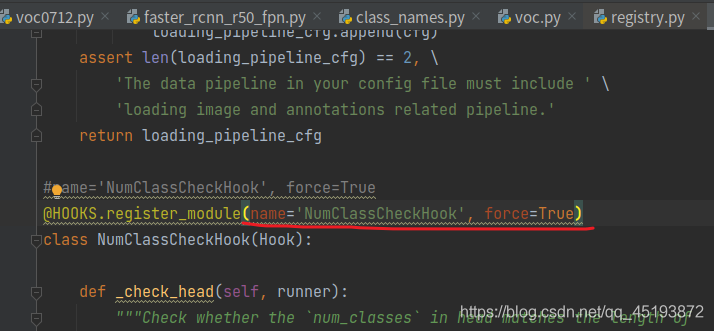
add in brackets:

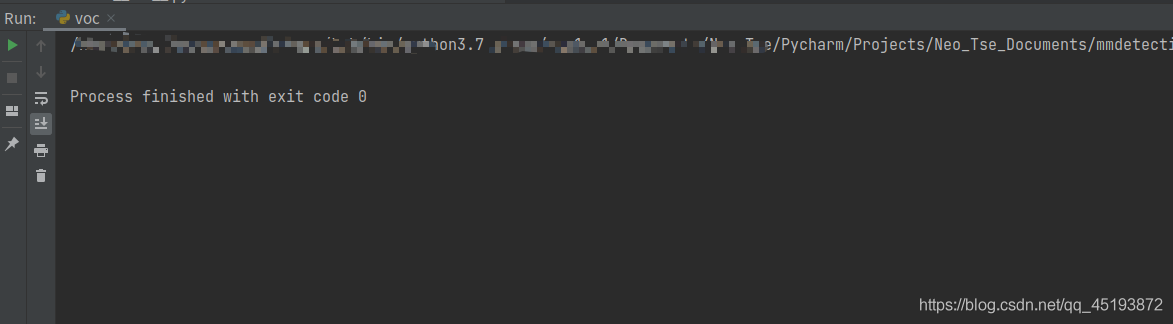
finally, it can run successfully.


Similar questions:
keyerror: ‘XXX is already registered in xxx’


Results: it runs perfectly

[Solved] Ubuntu pyinstaller Error when packaging executable file: … qt.qpa.plugin: Could not find the Qt platform plugin “xcb“ in “…

Ubuntu pyinstaller Error when packaging the executable: … qt.qpa.plugin: Could not find the Qt platform plugin “xcb” in “…
Solution to the problem


Problem
Ubuntu pyinstaller reports an error when packaging the executable: .QFactoryLoader::QFactoryLoader() checking directory path “/home/dyj/CarUI/dist/carmain/platforms” … qt.qpa.plugin: Could not find the Qt platform plugin “xcb” in “” This application failed to start because no Qt platform plugin could be initialized.
Solution
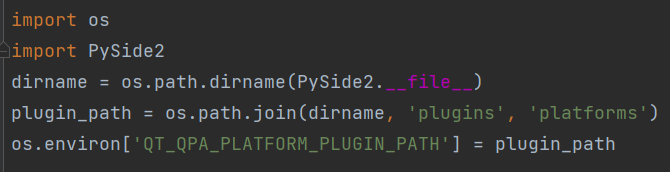
Add the following code to your own main program code.

import os
import PySide2
dirname = os.path.dirname(PySide2.__file__)
plugin_path = os.path.join(dirname, 'plugins', 'platforms')
os.environ['QT_QPA_PLATFORM_PLUGIN_PATH'] = plugin_path

Failed to download when creating Vue project, solution

When we want to create a Vue project through the Vue scaffold, the normal step is to execute the following command:

vue init webpack Project NAME

Then according to their own actual situation, choose which things need to be installed, and then we create a Vue front project

The author has created many projects in this way before, but there is no task problem. As a result, when creating a project in the same way today, it suddenly fails. The error message is: Vue cli · failed to download repo vuejs templates/webpack: read econnreset

After looking online for a long time, I didn’t find the reason for this error. Finally, I can only create a Vue project offline according to Baidu’s temporary decision scheme, so here’s a record.

1. You need to download the Vue templates/webpack in the GitHub repository

Download address: https://github.com/vuejs-templates/webpack

Download method:

    1. clone the code warehouse directly through GIT and download it through compressed package

(I recommend the first way, simple, convenient and fast)

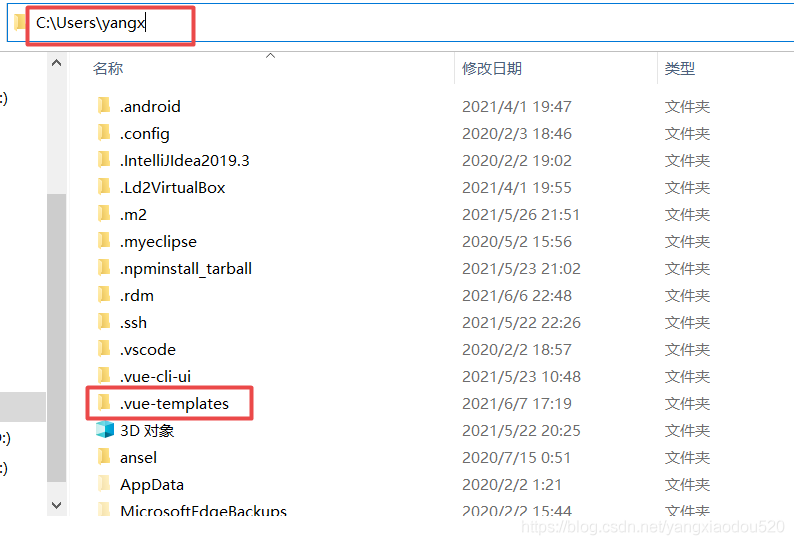
2. Place the downloaded project in the. Vue templates directory of the local user directory

Note: there is one in front of the folder name
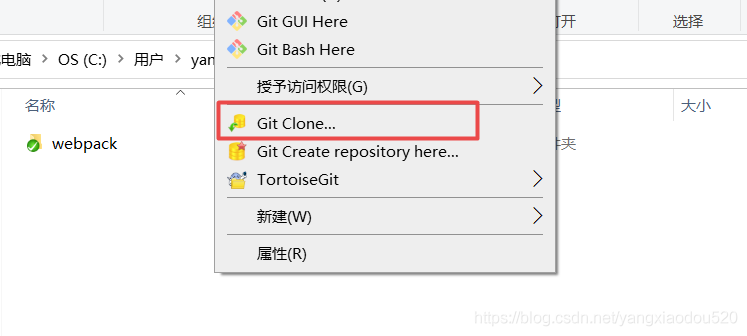
If it is downloaded through the first method, copy the address of the code warehouse, directly under this folder, right-click and select “git clone”, and the code will be downloaded
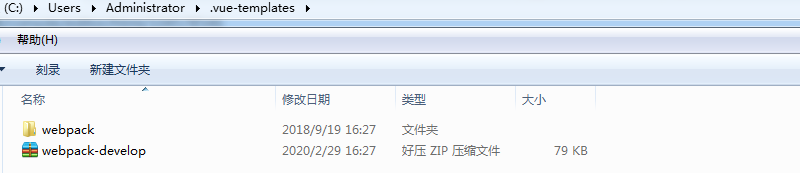
If it is downloaded through the second way, the compressed package after downloading is webpack-development.zip. After decompressing, we need to change the directory name to webpack, and then put the whole folder under the folder mentioned above
3. Create Vue project offline

When we use the Vue init webpack vuedemo command again, we need to bring the parameter offline to indicate offline initialization.

vue init webpack project name --offline

Pytorch error: `module ‘torch‘ has no attribute ‘__version___‘`

Today, I configured the python environment on windows. After installing python, I checked whether it was installed successfully. There was no error in inputting import torch. However, I found that print (torch. Version) could not query torch. After careful examination, I found that two underscores were missing, and there was no error in inputting print (torch. Version). It was a false alarm.

Refresh 404 after packaging Vue project, uncaught syntax error: unexpected token <

The login page can be accessed normally, and the menu can be accessed normally. Once the page is refreshed, it will be blank or not easy to make
at the same time, the console will report an error: unexpected token & lt;

This is because refreshing the page needs to re request the JS file, but the path has changed when the request is made, and the content of index.html is requested back

Solution
in Vue config – & gt; In index.js bulid,
configure assetspublicpath as the absolute path of your static resources. How to refresh this path will not change

build: {
    // Template for index.html
    index: path.resolve(__dirname, '../nqia-ias/index.html'),

    // Paths
    assetsRoot: path.resolve(__dirname, '../nqia-ias'),
    assetsSubDirectory: 'static',
    assetsPublicPath: '/s/nqia-ias/',
    ......
}

[Solved] Error in integrating redis with springboot: unable to connect to redis

org.springframework.data.redis.RedisConnectionFailureException: Unable to connect to Redis; nested exception is io.lettuce.core.RedisConnectionException: Unable to connect to 127.0.0.1:6379

	at org.springframework.data.redis.connection.lettuce.LettuceConnectionFactory$ExceptionTranslatingConnectionProvider.translateException(LettuceConnectionFactory.java:1621)
	at org.springframework.data.redis.connection.lettuce.LettuceConnectionFactory$ExceptionTranslatingConnectionProvider.getConnection(LettuceConnectionFactory.java:1529)
	at org.springframework.data.redis.connection.lettuce.LettuceConnectionFactory$SharedConnection.getNativeConnection(LettuceConnectionFactory.java:1315)
	at org.springframework.data.redis.connection.lettuce.LettuceConnectionFactory$SharedConnection.getConnection(LettuceConnectionFactory.java:1298)
	at org.springframework.data.redis.connection.lettuce.LettuceConnectionFactory.getSharedConnection(LettuceConnectionFactory.java:1039)
	at org.springframework.data.redis.connection.lettuce.LettuceConnectionFactory.getConnection(LettuceConnectionFactory.java:371)
	at org.springframework.data.redis.core.RedisConnectionUtils.fetchConnection(RedisConnectionUtils.java:193)
	at org.springframework.data.redis.core.RedisConnectionUtils.doGetConnection(RedisConnectionUtils.java:144)
	at org.springframework.data.redis.core.RedisConnectionUtils.getConnection(RedisConnectionUtils.java:105)
	at org.springframework.data.redis.core.RedisTemplate.execute(RedisTemplate.java:209)
	at org.springframework.data.redis.core.RedisTemplate.execute(RedisTemplate.java:189)
	at org.springframework.data.redis.core.AbstractOperations.execute(AbstractOperations.java:96)
	at org.springframework.data.redis.core.DefaultValueOperations.set(DefaultValueOperations.java:236)
	at com.gjw.RedisApplicationTests.contextLoads(RedisApplicationTests.java:24)
	at sun.reflect.NativeMethodAccessorImpl.invoke0(Native Method)
	at sun.reflect.NativeMethodAccessorImpl.invoke(NativeMethodAccessorImpl.java:62)
	at sun.reflect.DelegatingMethodAccessorImpl.invoke(DelegatingMethodAccessorImpl.java:43)
	at java.lang.reflect.Method.invoke(Method.java:498)
	at org.junit.platform.commons.util.ReflectionUtils.invokeMethod(ReflectionUtils.java:688)
	at org.junit.jupiter.engine.execution.MethodInvocation.proceed(MethodInvocation.java:60)
	at org.junit.jupiter.engine.execution.InvocationInterceptorChain$ValidatingInvocation.proceed(InvocationInterceptorChain.java:131)
	at org.junit.jupiter.engine.extension.TimeoutExtension.intercept(TimeoutExtension.java:149)
	at org.junit.jupiter.engine.extension.TimeoutExtension.interceptTestableMethod(TimeoutExtension.java:140)
	at org.junit.jupiter.engine.extension.TimeoutExtension.interceptTestMethod(TimeoutExtension.java:84)
	at org.junit.jupiter.engine.execution.ExecutableInvoker$ReflectiveInterceptorCall.lambda$ofVoidMethod$0(ExecutableInvoker.java:115)
	at org.junit.jupiter.engine.execution.ExecutableInvoker.lambda$invoke$0(ExecutableInvoker.java:105)
	at org.junit.jupiter.engine.execution.InvocationInterceptorChain$InterceptedInvocation.proceed(InvocationInterceptorChain.java:106)
	at org.junit.jupiter.engine.execution.InvocationInterceptorChain.proceed(InvocationInterceptorChain.java:64)
	at org.junit.jupiter.engine.execution.InvocationInterceptorChain.chainAndInvoke(InvocationInterceptorChain.java:45)
	at org.junit.jupiter.engine.execution.InvocationInterceptorChain.invoke(InvocationInterceptorChain.java:37)
	at org.junit.jupiter.engine.execution.ExecutableInvoker.invoke(ExecutableInvoker.java:104)
	at org.junit.jupiter.engine.execution.ExecutableInvoker.invoke(ExecutableInvoker.java:98)
	at org.junit.jupiter.engine.descriptor.TestMethodTestDescriptor.lambda$invokeTestMethod$6(TestMethodTestDescriptor.java:210)
	at org.junit.platform.engine.support.hierarchical.ThrowableCollector.execute(ThrowableCollector.java:73)
	at org.junit.jupiter.engine.descriptor.TestMethodTestDescriptor.invokeTestMethod(TestMethodTestDescriptor.java:206)
	at org.junit.jupiter.engine.descriptor.TestMethodTestDescriptor.execute(TestMethodTestDescriptor.java:131)
	at org.junit.jupiter.engine.descriptor.TestMethodTestDescriptor.execute(TestMethodTestDescriptor.java:65)
	at org.junit.platform.engine.support.hierarchical.NodeTestTask.lambda$executeRecursively$5(NodeTestTask.java:139)
	at org.junit.platform.engine.support.hierarchical.ThrowableCollector.execute(ThrowableCollector.java:73)
	at org.junit.platform.engine.support.hierarchical.NodeTestTask.lambda$executeRecursively$7(NodeTestTask.java:129)
	at org.junit.platform.engine.support.hierarchical.Node.around(Node.java:137)
	at org.junit.platform.engine.support.hierarchical.NodeTestTask.lambda$executeRecursively$8(NodeTestTask.java:127)
	at org.junit.platform.engine.support.hierarchical.ThrowableCollector.execute(ThrowableCollector.java:73)
	at org.junit.platform.engine.support.hierarchical.NodeTestTask.executeRecursively(NodeTestTask.java:126)
	at org.junit.platform.engine.support.hierarchical.NodeTestTask.execute(NodeTestTask.java:84)
	at java.util.ArrayList.forEach(ArrayList.java:1257)
	at org.junit.platform.engine.support.hierarchical.SameThreadHierarchicalTestExecutorService.invokeAll(SameThreadHierarchicalTestExecutorService.java:38)
	at org.junit.platform.engine.support.hierarchical.NodeTestTask.lambda$executeRecursively$5(NodeTestTask.java:143)
	at org.junit.platform.engine.support.hierarchical.ThrowableCollector.execute(ThrowableCollector.java:73)
	at org.junit.platform.engine.support.hierarchical.NodeTestTask.lambda$executeRecursively$7(NodeTestTask.java:129)
	at org.junit.platform.engine.support.hierarchical.Node.around(Node.java:137)
	at org.junit.platform.engine.support.hierarchical.NodeTestTask.lambda$executeRecursively$8(NodeTestTask.java:127)
	at org.junit.platform.engine.support.hierarchical.ThrowableCollector.execute(ThrowableCollector.java:73)
	at org.junit.platform.engine.support.hierarchical.NodeTestTask.executeRecursively(NodeTestTask.java:126)
	at org.junit.platform.engine.support.hierarchical.NodeTestTask.execute(NodeTestTask.java:84)
	at java.util.ArrayList.forEach(ArrayList.java:1257)
	at org.junit.platform.engine.support.hierarchical.SameThreadHierarchicalTestExecutorService.invokeAll(SameThreadHierarchicalTestExecutorService.java:38)
	at org.junit.platform.engine.support.hierarchical.NodeTestTask.lambda$executeRecursively$5(NodeTestTask.java:143)
	at org.junit.platform.engine.support.hierarchical.ThrowableCollector.execute(ThrowableCollector.java:73)
	at org.junit.platform.engine.support.hierarchical.NodeTestTask.lambda$executeRecursively$7(NodeTestTask.java:129)
	at org.junit.platform.engine.support.hierarchical.Node.around(Node.java:137)
	at org.junit.platform.engine.support.hierarchical.NodeTestTask.lambda$executeRecursively$8(NodeTestTask.java:127)
	at org.junit.platform.engine.support.hierarchical.ThrowableCollector.execute(ThrowableCollector.java:73)
	at org.junit.platform.engine.support.hierarchical.NodeTestTask.executeRecursively(NodeTestTask.java:126)
	at org.junit.platform.engine.support.hierarchical.NodeTestTask.execute(NodeTestTask.java:84)
	at org.junit.platform.engine.support.hierarchical.SameThreadHierarchicalTestExecutorService.submit(SameThreadHierarchicalTestExecutorService.java:32)
	at org.junit.platform.engine.support.hierarchical.HierarchicalTestExecutor.execute(HierarchicalTestExecutor.java:57)
	at org.junit.platform.engine.support.hierarchical.HierarchicalTestEngine.execute(HierarchicalTestEngine.java:51)
	at org.junit.platform.launcher.core.EngineExecutionOrchestrator.execute(EngineExecutionOrchestrator.java:108)
	at org.junit.platform.launcher.core.EngineExecutionOrchestrator.execute(EngineExecutionOrchestrator.java:88)
	at org.junit.platform.launcher.core.EngineExecutionOrchestrator.lambda$execute$0(EngineExecutionOrchestrator.java:54)
	at org.junit.platform.launcher.core.EngineExecutionOrchestrator.withInterceptedStreams(EngineExecutionOrchestrator.java:67)
	at org.junit.platform.launcher.core.EngineExecutionOrchestrator.execute(EngineExecutionOrchestrator.java:52)
	at org.junit.platform.launcher.core.DefaultLauncher.execute(DefaultLauncher.java:96)
	at org.junit.platform.launcher.core.DefaultLauncher.execute(DefaultLauncher.java:75)
	at com.intellij.junit5.JUnit5IdeaTestRunner.startRunnerWithArgs(JUnit5IdeaTestRunner.java:71)
	at com.intellij.rt.junit.IdeaTestRunner$Repeater.startRunnerWithArgs(IdeaTestRunner.java:33)
	at com.intellij.rt.junit.JUnitStarter.prepareStreamsAndStart(JUnitStarter.java:221)
	at com.intellij.rt.junit.JUnitStarter.main(JUnitStarter.java:54)
Caused by: io.lettuce.core.RedisConnectionException: Unable to connect to 127.0.0.1:6379
	at io.lettuce.core.RedisConnectionException.create(RedisConnectionException.java:78)
	at io.lettuce.core.RedisConnectionException.create(RedisConnectionException.java:56)
	at io.lettuce.core.AbstractRedisClient.getConnection(AbstractRedisClient.java:330)
	at io.lettuce.core.RedisClient.connect(RedisClient.java:216)
	at org.springframework.data.redis.connection.lettuce.StandaloneConnectionProvider.lambda$getConnection$1(StandaloneConnectionProvider.java:115)
	at java.util.Optional.orElseGet(Optional.java:267)
	at org.springframework.data.redis.connection.lettuce.StandaloneConnectionProvider.getConnection(StandaloneConnectionProvider.java:115)
	at org.springframework.data.redis.connection.lettuce.LettuceConnectionFactory$ExceptionTranslatingConnectionProvider.getConnection(LettuceConnectionFactory.java:1527)
	... 77 more
Caused by: io.lettuce.core.RedisCommandExecutionException: NOAUTH Authentication required.
	at io.lettuce.core.internal.ExceptionFactory.createExecutionException(ExceptionFactory.java:137)
	at io.lettuce.core.internal.ExceptionFactory.createExecutionException(ExceptionFactory.java:110)
	at io.lettuce.core.protocol.AsyncCommand.completeResult(AsyncCommand.java:120)
	at io.lettuce.core.protocol.AsyncCommand.complete(AsyncCommand.java:111)
	at io.lettuce.core.protocol.CommandHandler.complete(CommandHandler.java:746)
	at io.lettuce.core.protocol.CommandHandler.decode(CommandHandler.java:681)
	at io.lettuce.core.protocol.CommandHandler.channelRead(CommandHandler.java:598)
	at io.netty.channel.AbstractChannelHandlerContext.invokeChannelRead(AbstractChannelHandlerContext.java:379)
	at io.netty.channel.AbstractChannelHandlerContext.invokeChannelRead(AbstractChannelHandlerContext.java:365)
	at io.netty.channel.AbstractChannelHandlerContext.fireChannelRead(AbstractChannelHandlerContext.java:357)
	at io.netty.channel.DefaultChannelPipeline$HeadContext.channelRead(DefaultChannelPipeline.java:1410)
	at io.netty.channel.AbstractChannelHandlerContext.invokeChannelRead(AbstractChannelHandlerContext.java:379)
	at io.netty.channel.AbstractChannelHandlerContext.invokeChannelRead(AbstractChannelHandlerContext.java:365)
	at io.netty.channel.DefaultChannelPipeline.fireChannelRead(DefaultChannelPipeline.java:919)
	at io.netty.channel.nio.AbstractNioByteChannel$NioByteUnsafe.read(AbstractNioByteChannel.java:166)
	at io.netty.channel.nio.NioEventLoop.processSelectedKey(NioEventLoop.java:719)
	at io.netty.channel.nio.NioEventLoop.processSelectedKeysOptimized(NioEventLoop.java:655)
	at io.netty.channel.nio.NioEventLoop.processSelectedKeys(NioEventLoop.java:581)
	at io.netty.channel.nio.NioEventLoop.run(NioEventLoop.java:493)
	at io.netty.util.concurrent.SingleThreadEventExecutor$4.run(SingleThreadEventExecutor.java:989)
	at io.netty.util.internal.ThreadExecutorMap$2.run(ThreadExecutorMap.java:74)
	at io.netty.util.concurrent.FastThreadLocalRunnable.run(FastThreadLocalRunnable.java:30)
	at java.lang.Thread.run(Thread.java:748)


Process finished with exit code -1

The above is the complete error message

Baidu search all said to open the remote connection configuration, but my connection is local, so it is excluded
to check the redis configuration file (redis. Windows. Conf file) and find the following configuration

# Require clients to issue AUTH <PASSWORD> before processing any other
# commands.  This might be useful in environments in which you do not trust
# others with access to the host running redis-server.
#
# This should stay commented out for backward compatibility and because most
# people do not need auth (e.g. they run their own servers).
# 
# Warning: since Redis is pretty fast an outside user can try up to
# 150k passwords per second against a good box. This means that you should
# use a very strong password otherwise it will be very easy to break.
#
requirepass 123456

When I found the problem, I configured the password when I installed redis, but the previous springboot configuration file only had the configuration of host and port number.

Error configuration:

# redis
spring.redis.host=127.0.0.1
spring.redis.port=6379

Correct configuration

# redis
spring.redis.host=127.0.0.1
spring.redis.port=6379
spring.redis.password=123456

Problem solved!

Tensorflow Error: Could not create cudnn handle: CUDNN_STATUS_INTERNAL_ERROR

1. Confirm whether tensorflow corresponds to CUDA and cudnn. Check here. 2. Modify settings

os.environ['CUDA_VISIBLE_DEVICES']='0,1'
# tf 1.13
config = tf.ConfigProto()
config.gpu_options.allow_growth=True
sess = tf.Session(config=config)
sess.run(tf.global_variables_initializer())

# tf 2.0
# gpu = tf.config.experimental.list_physical_devices('GPU')
# tf.config.experimental.set_memory_growth(gpu[0], True)
# gpu = tf.config.experimental.list_physical_devices('GPU')
# tf.config.experimental.set_memory_growth(gpu[1], True)