Detailed explanation of Python__ new__() method

The new () method mainly exists in the new class of Python 2 and in Python 3. It is the static method responsible for creating class instances.

When Python instantiates an object, it first calls the__ new__() Method to construct an instance of a class and allocate the memory space of the corresponding type for it. The memory address of the instance is its unique identifier. And then call__ init__() Method to initialize an instance, usually the properties of the instance.

Here are some examples to illustrate:

Example 1: call first__ new__() Method call again__ init__() method

class Person(object):
    
    def __new__(cls):
        print("__new__ called")
        return super().__new__(cls)
    
    def __init__(self):
        print("__init__ called")
		  
a = Person()
		

result:

__new__ called
__init__ called

Example 2: the new () method constructs a class instance and passes it to its own__ init__() Method, i.e__ init__() The self parameter of the method.

class Person(object):
    
    def __new__(cls):
        print("__new__ called")
        instance = super().__new__(cls)
        print(type(instance))
        print(instance)
        print(id(instance))
        return instance
    
    def __init__(self):
        print("__init__ called")
        print(id(self))

b = Person()

result:

__new__ called
<class '__main__.Person'>
<__main__.Person object at 0x1093c1580>
4449899904
__init__ called
4449899904

Example 3: if__ new__() Method does not return any instances, the init () method will not be called.

class Person(object):
    
    def __new__(cls):
        print("__new__ called")

    def __init__(self):
        print("__init__ called")

c = Person()

result:

__new__ called

Example 4: if__ new__() Method returns an instance of another class__ init__() Method will not be called. Moreover, the new () method will initialize an object of another class.

class Animal(object):

    def __init__(self):
        pass

class Person(object):
    
    def __new__(cls):
        print("__new__ called")
        return Animal()

    def __init__(self):
        print("__init__ called")

d = Person()
print(type(d))
print(d)

result:

__new__ called
<class '__main__.Animal'>
<__main__.Animal object at 0x10fea3550>

Example 5: if overridden__ new__() Method, except for the CLS parameter, if no other parameters are set, it cannot be used__ init__() Method to set initialization parameters.

class Person(object):
    
    def __new__(cls):
        print("__new__ called")
        instance = super().__new__(cls)
        return instance
    
    def __init__(self, name):
        print("__init__ called")
        self.name = name

e = Person("Eric")
print(e.name)

result:

Traceback (most recent call last):
  File "example.py", line 102, in <module>
    e = Person("Eric")
TypeError: __new__() takes 1 positional argument but 2 were given

Example 6: in rewriting__ new__() Method, you need to add * args, * * kwargs to the parameters, or explicitly add the corresponding parameters to pass__ init__() Method initialization parameters.

class Person(object):
    
    def __new__(cls, *args,**kwargs):  # Or def __new__(cls, name)
        print("__new__ called")
        instance = super().__new__(cls)
        return instance
    
    def __init__(self, name):
        print("__init__ called")
        self.name = name

e = Person("Eric")
print(e.name)

result:

__new__ called
__init__ called
Eric
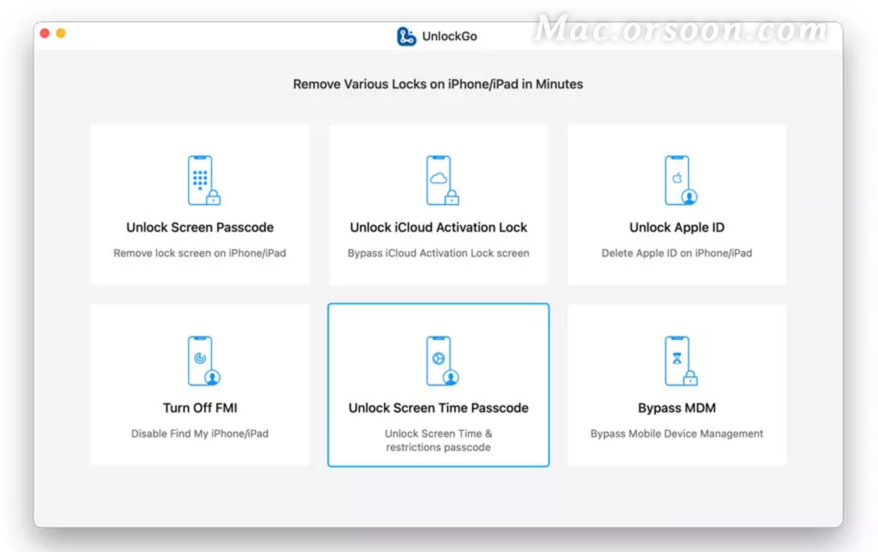
How to bypass screen time password with itolab unlockgo for Mac

If your device has screen usage enabled, you will be subject to various restrictions when using your phone. Forget the screen time, don’t know what to do?The future software park will bring you a guide to how to use itolab unlockgo for Mac to bypass screen time password. Come and have a look!

Itolab unlockgo for Mac supports M1 chip

How to bypass screen time password with itolab unlockgo for Mac

Step 1: connect your device to your computer

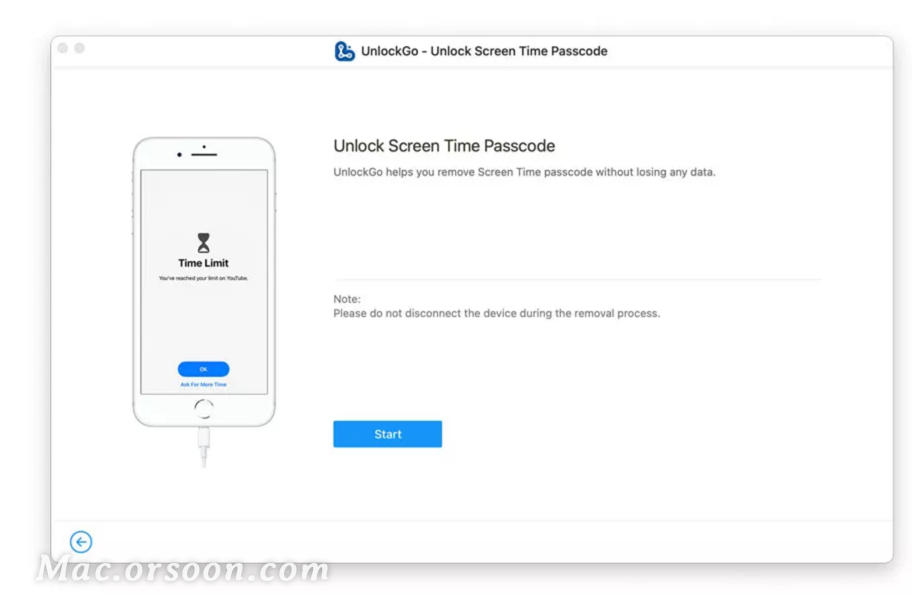
After connecting the device, open itolab unlockgo and select unlock screen time password, then click unlock now.

Step 2: enter the password to trust the computer

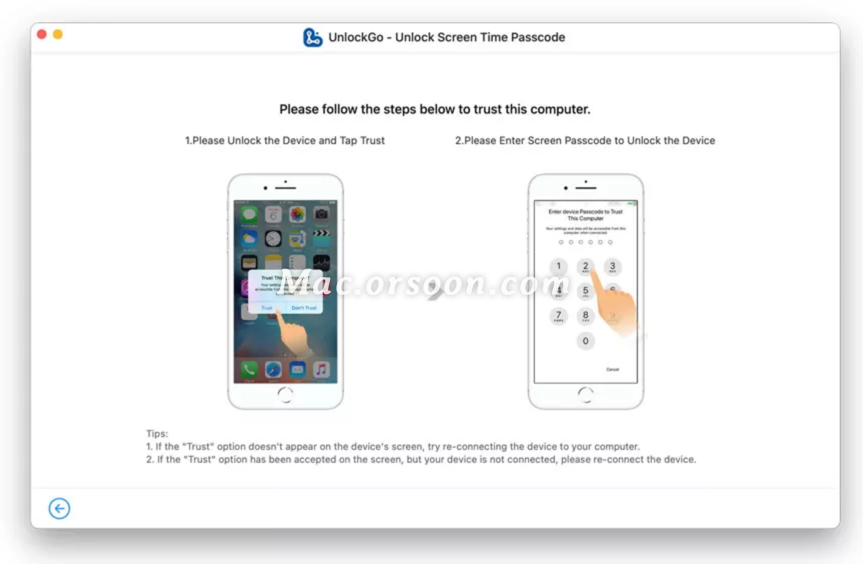
Next, you need to unlock the device and click the trust button, then enter the password to continue.

Step 3: unlock screen time password

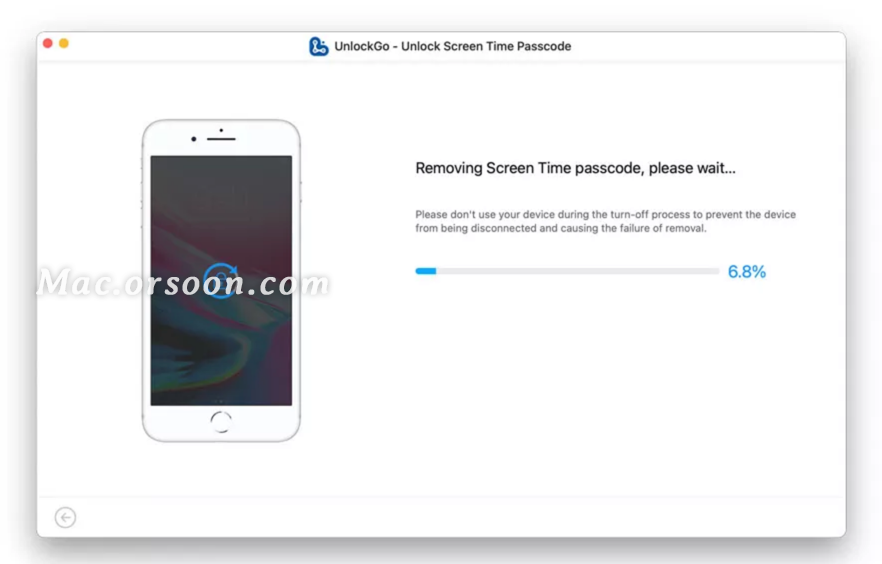
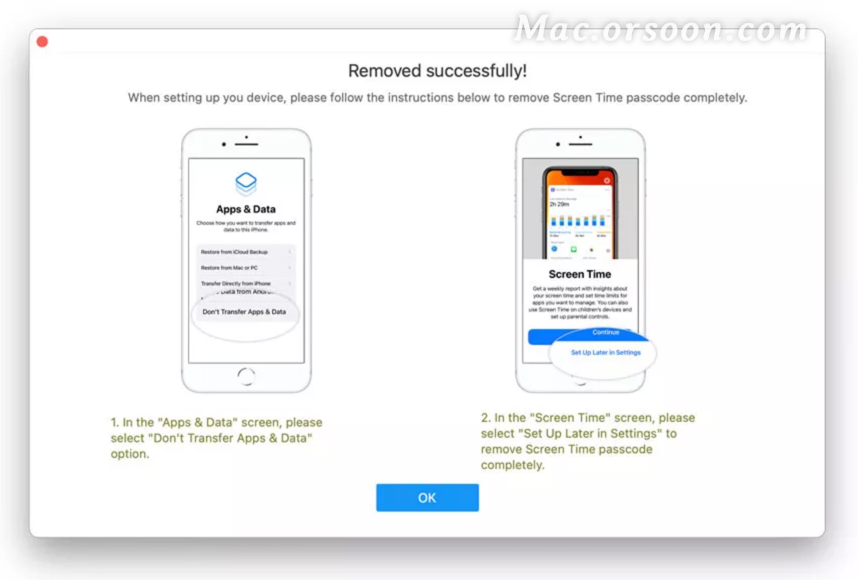
Now, unlockgo will begin to unlock the screen time password, and the whole process will take a few seconds. When you are finished, you will see the screen that was successfully deleted.

Integrate native IOS plug-ins into the flutter project

Modify signature

First, open the flutter project, open IOS module in Xcode, open the IOS folder in Xcode, modify the team, and change the signature to your IOS app signature.

In Android studio, run it on IOS simulator, and make sure there is no problem.

Add plug-in dependency

In pubspec.yaml, add plug-ins under dependencies to integrate zhgd with source code_ native_ Take the plugin native plug-in as an example

zhgd_native_plugin:
path: ../zhgd_native_plugin

Note: the plug-in project is located in the same level directory of the flutter project.

common problem

    file not found with < angled> include; Use "quotes" instead select target, build settings – & gt; Header search paths, add the corresponding header file search path, such as “${pods_ CONFIGURATION_ BUILD_ DIR}/Masonry/Masonry.framework/Headers” 'Masonry.h' file not found with < angled> include; Use is used in the use "quotes" instead podfile file_ frameworks!( Because several pods are swift libraries, and swift can only be integrated by framework. Therefore, the import method of header file has changed. It can only be imported through # import “masonry. H”, not # Import & lt; Masonry.h> Import in the same way:-1: Undefined symbol: _ OBJC_ CLASS_$_ Fluttermethodchannel and : - 1: undefined symbol:_ OBJC_ CLASS_$_ The fluttermethodchannel compiler cannot find the flutter. H header file. Most likely, use is used in podfile_ frameworks!( Because a swift plug-in is referenced in the project. This problem is the problem of flutter itself https://github.com/flutter/flutter/issues/10968 。

The Linux version of todesk cannot connect to the server

Problem description

Iniparser: input line too long in opt/todesk/config/todeskd.conf(1)

Can’t Parser config file: opt/todesk/config/todeskd.conf

Cause of the problem

Asked the customer service, it was the configuration file that had a problem

resolvent

Step 1. Delete configuration file

sudo   rm  / opt/todesk/config/todeskd.cfg

Step 2. Restart the service

sudo   systemctl   restart   todeskd.service


Because vcruntime140 was not found_ 1.dll, unable to continue code execution

Problem Description:

Error in installing MySQL: due to unable to find vcruntime140_ 1.dll, unable to continue code execution

resolvent:

This is the lack of dynamic link library (. DDL file), which has nothing to do with MySQL. You can download this DDL file
and decompress it to vcruntime140_ 1. DLL can be copied to C:// Windows/system32
note that the 32-bit version of vcruntime140_ 1. DLL needs to be copied to C:: (Windows) syswow64

Error response from daemon: driver failed programming external connectivity on endpoint quirky_allen is reported when docker port mapping or starting the container

phenomenon:

[root@localhost ~]# docker run -d -p 9000:80 centos:httpd /bin/sh -c /usr/local/bin/start.sh
d5b2bd5a7bc4895a973fe61efd051847047d26385f65c278aaa09e4fa31c4d76
docker: Error response from daemon: driver failed programming external connectivity on endpoint quirky_allen (6bda693d1143657e46bee0300276aa05820da2b21a3d89441e820d1a274c48b6): (iptables failed: iptables –wait -t nat -A DOCKER -p tcp -d 0/0 –dport 9000 -j DNAT –to-destination 172.17.0.2:80 ! -i docker0: iptables: No chain/target/match by that name.
(exit status 1)).

[root@localhost ~]# docker start d5b2bd5a7bc4
Error response from daemon: driver failed programming external connectivity on endpoint quirky_allen (4127da7466709fd45695a1fbe98e13c2ac30c2a554e18fb902ef5a03ba308438): (iptables failed: iptables –wait -t nat -A DOCKER -p tcp -d 0/0 –dport 9000 -j DNAT –to-destination 172.17.0.2:80 ! -i docker0: iptables: No chain/target/match by that name.
(exit status 1))
Error: failed to start containers: d5b2bd5a7bc4


Reason:

The custom chain DOCKER defined when the docker service is started is cleared for some reason.
Restart the docker service and regenerate the custom chain. DOCKER
Chain PREROUTING (policy ACCEPT)
target prot opt ​​source destination        
DOCKER all – 0.0.0.0/0 0.0.0.0/0 ADDRTYPE match dst-type LOCAL

Chain INPUT (policy ACCEPT)
target prot opt ​​source destination        

Chain OUTPUT (policy ACCEPT)
target prot opt ​​source destination        
DOCKER all – 0.0.0.0/0 !127.0.0.0/8 ADDRTYPE match dst-type LOCAL

Chain POSTROUTING (policy ACCEPT)
target prot opt ​​source destination        
MASQUERADE all – 172.17.0.0/16 0.0.0.0/0          
MASQUERADE  tcp  —  172.17.0.2           172.17.0.2           tcp dpt:8080

Chain DOCKER (2 references)
target     prot opt source               destination
RETURN     all  —  0.0.0.0/0            0.0.0.0/0
DNAT       tcp  —  0.0.0.0/0            0.0.0.0/0            tcp dpt:8888 to:172.17.0.2:8080
root@router:playbook#iptables -t nat -nL
Chain PREROUTING (policy ACCEPT)
target     prot opt source               destination
DOCKER     all  —  0.0.0.0/0            0.0.0.0/0            ADDRTYPE match dst-type LOCAL

Chain INPUT (policy ACCEPT)
target     prot opt source               destination

Chain OUTPUT (policy ACCEPT)
target     prot opt source               destination
DOCKER     all  —  0.0.0.0/0           !127.0.0.0/8          ADDRTYPE match dst-type LOCAL

Chain POSTROUTING (policy ACCEPT)
target     prot opt source               destination
MASQUERADE  all  —  172.17.0.0/16        0.0.0.0/0
MASQUERADE  tcp  —  172.17.0.2           172.17.0.2           tcp dpt:8080

Chain DOCKER (2 references)
target     prot opt source               destination
RETURN     all  —  0.0.0.0/0            0.0.0.0/0
DNAT       tcp  —  0.0.0.0/0            0.0.0.0/0            tcp dpt:8888 to:172.17.0.2:8080

Solution:

Restart the docker service and then start the container
systemctl restart docker
docker start foo

Error: (1, 1) java: Illegal character:’\ufeff’ [How to Solve]

the problem

When opening the eclipse java project compiling with IDEA, the following error occurred:

Error:(1, 1) java: Illegal character: ‘\ufeff’ 
Error:(1, 10) java: need class, interface or enum 

2. Reason analysis

Eclipse can intelligently convert UTF-8+BOM files into ordinary UTF-8 files. IDEA does not have this intelligent conversion.

Three, the solution

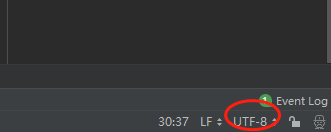
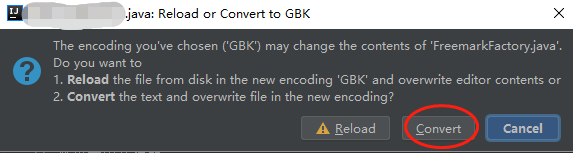
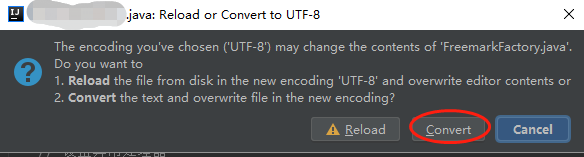
1 Convert with IDEA, first convert to GBK, and then back to UTF-8


2 Convert with other editors, such as notpade++, sublime, etc.

The principle is the same, the operation is omitted.

[Solved] Flutter – AAPT: error: resource android:attr/dialogCornerRadius not found.

Launching lib\main.dart on Nokia X6 in debug mode...

FAILURE: Build failed with an exception.

* What went wrong:
Execution failed for task ':app:processDebugResources'.
> Android resource linking failed
  Output:  E:\Flutter Projects\intro_to_flutter\build\app\intermediates\incremental\mergeDebugResources\merged.dir\values-v28\values-v28.xml:7: error: resource android:attr/dialogCornerRadius not found.
  E:\Flutter Projects\intro_to_flutter\build\app\intermediates\incremental\mergeDebugResources\merged.dir\values-v28\values-v28.xml:11: error: resource android:attr/dialogCornerRadius not found.
  E:\Flutter Projects\intro_to_flutter\build\app\intermediates\incremental\mergeDebugResources\merged.dir\values\values.xml:959: error: resource android:attr/fontVariationSettings not found.
  E:\Flutter Projects\intro_to_flutter\build\app\intermediates\incremental\mergeDebugResources\merged.dir\values\values.xml:960: error: resource android:attr/ttcIndex not found.
  error: failed linking references.

  Command: C:\Users\hupo3\.gradle\caches\transforms-1\files-1.1\aapt2-3.2.1-4818971-windows.jar\c1441429ce2aae0e0bed3ad48db2b49e\aapt2-3.2.1-4818971-windows\aapt2.exe link -I\
          C:\Users\hupo3\AppData\Local\Android\sdk\platforms\android-27\android.jar\
          --manifest\
          E:\Flutter Projects\intro_to_flutter\build\app\intermediates\merged_manifests\debug\processDebugManifest\merged\AndroidManifest.xml\
          - the\
          E:\Flutter Projects\intro_to_flutter\build\app\intermediates\processed_res\debug\processDebugResources\out\resources-debug.ap_\
          -R\
          @E:\Flutter Projects\intro_to_flutter\build\app\intermediates\incremental\processDebugResources\resources-list-for-resources-debug.ap_.txt\
          --auto-add-overlay\
          --java\
          E:\Flutter Projects\intro_to_flutter\build\app\generated\not_namespaced_r_class_sources\debug\processDebugResources\r\
          --custom-package\
          com.xiaobing.introtoflutter \
          -0 \
          apk\
          --output-text-symbols\
          E:\Flutter Projects\intro_to_flutter\build\app\intermediates\symbols\debug\R.txt\
          --no-version-vectors
  Daemon:  AAPT2 aapt2-3.2.1-4818971-windows Daemon #0
  Output:  C:\Users\hupo3\.gradle\caches\transforms-1\files-1.1\appcompat-v7-28.0.0.aar\12aaee80bab0fcaef8511d3958ba785b\res\values-v28\values-v28.xml:9:5-12:13: AAPT: error: resource android:attr/dialogCornerRadius not found.

  E:\Flutter Projects\intro_to_flutter\build\app\intermediates\incremental\mergeDebugResources\merged.dir\values-v28\values-v28.xml:11: AAPT: error: resource android:attr/dialogCornerRadius not found.

  C:\Users\hupo3\.gradle\caches\transforms-1\files-1.1\support-compat-28.0.0.aar\b1fc0e0ff1348f4d278539eb80ede9d3\res\values\values.xml:89:5-125:25: AAPT: error: resource android:attr/fontVariationSettings not found.

  C:\Users\hupo3\.gradle\caches\transforms-1\files-1.1\support-compat-28.0.0.aar\b1fc0e0ff1348f4d278539eb80ede9d3\res\values\values.xml:89:5-125:25: AAPT: error: resource android:attr/ttcIndex not found.

  error: failed linking references.
  Command: C:\Users\hupo3\.gradle\caches\transforms-1\files-1.1\aapt2-3.2.1-4818971-windows.jar\c1441429ce2aae0e0bed3ad48db2b49e\aapt2-3.2.1-4818971-windows\aapt2.exe link -I\
          C:\Users\hupo3\AppData\Local\Android\sdk\platforms\android-27\android.jar\
          --manifest\
          E:\Flutter Projects\intro_to_flutter\build\app\intermediates\merged_manifests\debug\processDebugManifest\merged\AndroidManifest.xml\
          - the\
          E:\Flutter Projects\intro_to_flutter\build\app\intermediates\processed_res\debug\processDebugResources\out\resources-debug.ap_\
          -R\
          @E:\Flutter Projects\intro_to_flutter\build\app\intermediates\incremental\processDebugResources\resources-list-for-resources-debug.ap_.txt\
          --auto-add-overlay\
          --java\
          E:\Flutter Projects\intro_to_flutter\build\app\generated\not_namespaced_r_class_sources\debug\processDebugResources\r\
          --custom-package\
          com.xiaobing.introtoflutter \
          -0 \
          apk\
          --output-text-symbols\
          E:\Flutter Projects\intro_to_flutter\build\app\intermediates\symbols\debug\R.txt\
          --no-version-vectors
  Daemon:  AAPT2 aapt2-3.2.1-4818971-windows Daemon #0

* Try:
Run with --stacktrace option to get the stack trace. Run with --info or --debug option to get more log output. Run with --scan to get full insights.

* Get more help at https://help.gradle.org

BUILD FAILED in 18s
Gradle task assembleDebug failed with exit code 1
Exited (sigterm)


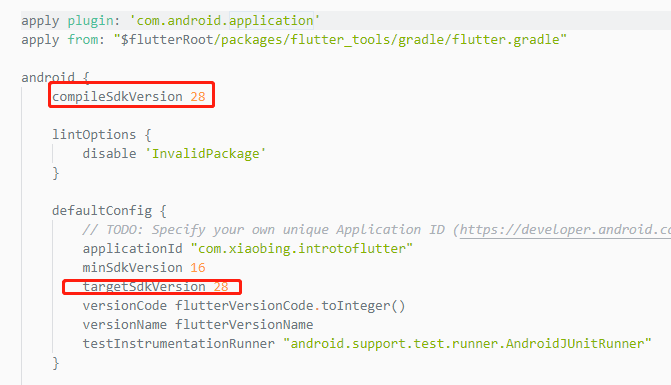
Open android\app\build.gradle

Modify compileSdkVersion and  targetSdkVersion

Windows 7 IIS (HTTP Error 500.21-Internal Server Error) solution

When I was testing the website today, when I entered http://localhost/ in the browser, the following error occurred:

HTTP Error 500.21-Internal Server Error

Handler “WebServiceHandlerFactory-Integrated” has a bad module “ManagedPipelineHandler” in its module list.

I looked for the reason on the Internet, and the result was

Reason: After installing Framework v4.0, enable IIS, resulting in the Framework not being fully installed

Solution: Start -> All Programs -> Accessories -> Right-click on “Command Prompt” -> Run as Administrator ->%windir%\Microsoft.NET\Framework\v4.0.30319\aspnet_regiis.exe -i

[Solved] error LNK2038: Detected mismatch of “RuntimeLibrary”: The value “MDd_DynamicDebug” does not match the value “MTd_StaticDebug”

A bunch of errors appeared in VS2012 C++ compilation today:

1  1 >   Code generation...
 2  1 >Code.obj: error LNK2005: " public: __thiscall std::_Container_base12::_Container_base12(void) " (?? 0_Container_base12@std@@QAE@XZ) is already in msvcprtd. Defined in lib(MSVCP110D.dll)
 3  1 >Code.obj: error LNK2005: " public: __thiscall std::_Container_base12::~_Container_base12(void) " (?? 1_Container_base12@std@@QAE@XZ) is already in msvcprtd. Defined in lib(MSVCP110D.dll)
 4  1 >Code.obj: error LNK2005: " public: void __thiscall std::_Container_base12::_Orphan_all(void) " (?_Orphan_all@_Container_base12@std@@QAEXXZ) has been defined in msvcprtd.lib(MSVCP110D.dll)
 5  1 > IOCP_Socket.lib(CLog.obj): error LNK2038: mismatch detected for "RuntimeLibrary": value "MDd_DynamicDebug" Mismatched value "MTd_StaticDebug" (in Code.obj)
 6  1 > IOCP_Socket.lib(TcpServer.obj): error LNK2038: mismatch detected for "RuntimeLibrary": The value "MDd_DynamicDebug" does not match the value "MTd_StaticDebug" (Code. obj)
 7  1 > IOCP_Socket.lib(stdafx.obj): error LNK2038: mismatch detected for "RuntimeLibrary": The value "MDd_DynamicDebug" does not match the value "MTd_StaticDebug" (Code.obj)
 8  1 > IOCP_Socket.lib (TcpSrvException.obj): error LNK2038: mismatch detected for "RuntimeLibrary": The value "MDd_DynamicDebug" does not match the value "MTd_StaticDebug" (in Code.obj)
 9  1> IOCP_Socket.lib(TcpReceiveContext.obj): error LNK2038: mismatch detected for "RuntimeLibrary": The value "MDd_DynamicDebug" does not match the value "MTd_StaticDebug" (in Code.obj)
 10  1 > IOCP_Socket.lib(TcpSendContext.obj) : error LNK2038: mismatch detected for "RuntimeLibrary": The value "MDd_DynamicDebug" does not match the value "MTd_StaticDebug" (Code.obj)
 11  1 > IOCP_Socket.lib(AcceptContext.obj): error LNK2038: "RuntimeLibrary" detected Mismatch for: value "MDd_DynamicDebug" does not match value "MTd_StaticDebug" (in Code.obj)
 12  1 > IOCP_Socket.lib(OperateContext.obj): error LNK2038: mismatch detected for "RuntimeLibrary": value "MDd_DynamicDebug" Does not match the value "MTd_StaticDebug" (in Code.obj)
 13  1 >IOCP_Socket.lib(MemoryBlock.obj): error LNK2038: mismatch detected for "RuntimeLibrary": The value "MDd_DynamicDebug" does not match the value "MTd_StaticDebug" (in Code.obj)
 14  1 > IOCP_Socket.lib(ContextStack.obj): error LNK2038: mismatch detected for "RuntimeLibrary": The value "MDd_DynamicDebug" does not match the value "MTd_StaticDebug" (in Code.obj)
 15  1 >msvcprtd.lib(MSVCP110D.dll): error LNK2005: " void __cdecl std:: _Debug_message(wchar_t const *,wchar_t const *,unsigned int) " (? _Debug_message@std@@YAXPB_W0I@Z) has been defined in libcpmtd.lib(stdthrow.obj)
 16  1 >msvcprtd.lib(MSVCP110D.dll): error LNK2005: " public: __thiscall std::_Container_base12::_Container_base12(void) " (??0_Container_base12@std@@QAE@XZ) has been defined in Code.obj
 17  1 >msvcprtd.lib(MSVCP110D.dll): error LNK2005: " public: __thiscall std::_Container_base12::~_Container_base12(void) " (?? 1_Container_base12@std@@QAE@XZ) has been defined in Code.obj
 18  1 >msvcprtd.lib(MSVCP110D.dll): error LNK2005: " public: void __thiscall std::_Container_base12::_Orphan_all(void) " (? _Orphan_all @_Container_base12@std@@QAEXXZ) has been defined in Code.obj
 19  1 >msvcprtd.lib(MSVCP110D.dll): error LNK2005: " void __cdecl std::_Xbad_alloc(void) " (?_Xbad_alloc@std@@YAXXZ) has been defined in libcpmtd.lib(xthrow.obj)
 20  1 >msvcprtd.lib(MSVCP110D.dll): error LNK2005: " void __cdecl std::_Xlength_error(char const *) " (? _Xlength_error @std@@YAXPBD@Z) has been defined in libcpmtd.lib(xthrow.obj)
 21  1 >msvcprtd.lib(MSVCP110D.dll): error LNK2005: " void __cdecl std::_Xout_of_range(char const *) " (? _Xout_of_range@std@@YAXPBD@Z) has been defined in libcpmtd.lib(xthrow.obj)
 22  1 >msvcprtd.lib(MSVCP110D.dll): error LNK2005: " char const * __cdecl std::_Syserror_map(int) " ( ?_Syserror_map@std@@YAPBDH@Z) has been defined in
 libcpmtd.lib(syserror.obj) 23  1 >msvcprtd.lib(MSVCP110D.dll): error LNK2005: " char const * __cdecl std::_Winerror_map(int) " ( ? _Winerror_map@std@@YAPBDH@Z) has been defined in
 libcpmtd.lib(syserror.obj) 24  1 >msvcprtd.lib(MSVCP110D.dll): error LNK2005: " public: __thiscall std::_Lockit::_Lockit(int ) " (?? 0_Lockit@std@@QAE@H@Z) has been defined in libcpmtd.lib(xlock.obj)
 25  1 >msvcprtd.lib(MSVCP110D.dll): error LNK2005: " public: __thiscall std:: _Lockit::~_Lockit(void) " (??1_Lockit@std@@QAE@XZ) is already defined in libcpmtd.lib(xlock.obj)
 26  1 > MSVCRTD.lib(MSVCR110D.dll): error LNK2005: _memmove is already defined in LIBCMTD.lib(memmove.obj)
 27  1 > MSVCRTD.lib(MSVCR110D.dll): error LNK2005: _fclose already defined in LIBCMTD.lib(fclose.obj)
 28  1 > MSVCRTD.lib(MSVCR110D.dll): error LNK2005: _fflush already defined in LIBCMTD.lib(fflush .obj)
 29  1 > MSVCRTD.lib(MSVCR110D.dll): error LNK2005: _printf already defined in LIBCMTD.lib(printf.obj)
 30  1 > MSVCRTD.lib(MSVCR110D.dll): error LNK2005: _vprintf already defined Defined in LIBCMTD.lib(vprintf.obj)
 31  1 >MSVCRTD.lib(MSVCR110D.dll): error LNK2005: __vsnprintf_s already defined in LIBCMTD.lib(vsnprnc.obj)
 32  1 > MSVCRTD.lib(MSVCR110D.dll): error LNK2005: _vsprintf_s already defined in LIBCMTD.lib(vsnprnc.lib(vsnprnc) ) Defined in
 33  1 > MSVCRTD.lib(MSVCR110D.dll): error LNK2005: __invalid_parameter is already defined in LIBCMTD.lib(invarg.obj)
 34  1 > MSVCRTD.lib(MSVCR110D.dll): error LNK2005: _memcpy_s is already defined in LIBCMTD .lib(memcpy_s.obj) is defined in
 35  1 > MSVCRTD.lib(MSVCR110D.dll): error LNK2005: _strncpy_s is already defined in LIBCMTD.lib(strncpy_s.obj)
 36  1 >MSVCRTD.lib(MSVCR110D.dll): error LNK2005: "public: virtual __thiscall std::exception::~exception(void) " (?? 1exception@std@@UAE@XZ) has been defined in LIBCMTD.lib(stdexcpt.obj)
 37  1 >MSVCRTD.lib(MSVCR110D.dll ): error LNK2005: " public: virtual char const * __thiscall std::exception::what(void)const " (? what@exception@std@@UBEPBDXZ) is already defined in LIBCMTD.lib(stdexcpt.obj)
 38  1 > MSVCRTD.lib(MSVCR110D.dll): error LNK2005: __CrtDbgReportW is already defined in LIBCMTD.lib(dbgrptw.obj)
 39  1 >MSVCRTD.lib(ti_inst.obj): error LNK2005: " private: __thiscall type_info::type_info( class type_info const &) " (??0type_info@@AAE@ABV0@@Z) is already defined in LIBCMTD.lib(typinfo.obj)
 40  1 >MSVCRTD.lib(ti_inst.obj): error LNK2005: " private: class type_info & __thiscall type_info::operator=( class type_info const &) " (?? 4type_info@@AAEAAV0@ABV0@@Z) has been defined in LIBCMTD.lib(typinfo.obj)
 41  1 >LINK: warning LNK4098: The default library "MSVCRTD" conflicts with the use of other libraries ;Please use / NODEFAULTLIB:library
 42  1 >E:\Projects\C++ \IOCP_Socket\Debug\Test.exe: fatal error LNK1169: Found one or more multiple defined symbols
 43 ========== Generate : Success 0 , failure 1 , 0 latest , skip 0 ==========

Later, I checked it and found that it was a problem with the runtime library settings; the runtime library settings for several projects were different:

Project Properties -> Configuration Properties -> C/C++ -> Code Generation -> Runtime Library

We are set on the line, like multi-threaded debugging (/ MTd)

error: src refspec master does not match any. [How to Solve]

Since I learned git last time, I rarely use it. Using today


The local warehouse is initialized with the following command:

$ git init

Then use the following command to add the remote library:

$ git remote add origin [email protected]:hahah/ftpmanage.git

Then use

$ git push -u origin master

The following error occurred:

error: src refspec master does not match any.
error: failed to push some refs to '[email protected]:hahaha/ftpmanage.git'

the reason:

The local warehouse is empty

Solution: Use the following command to add files;

$ git add add.php addok.php conn.php del.php edit.php editok.php ftpsql.sql index.php

$ git commit -m "init files"

Then the following error occurred during the push process:

$ git push -u origin master
Warning: Permanently added the RSA host key for IP address 'xx.xx.xxx.xxx' to the list of known hosts.
To [email protected]:hahaha/ftpmanage.git
 ! [rejected]        master -> master (fetch first)
error: failed to push some refs to '[email protected]:hahahah/ftpmanage.git'
hint: Updates were rejected because the remote contains work that you do
hint: not have locally. This is usually caused by another repository pushing
hint: to the same ref. You may want to first integrate the remote changes
hint: (e.g., 'git pull ...') before pushing again.
hint: See the 'Note about fast-forwards' in 'git push --help' for details.

Prompt to push after using git pull

Use the following command to solve:

$ git pull --rebase origin master
warning: no common commits
remote: Counting objects: 3, done.
remote: Total 3 (delta 0), reused 0 (delta 0), pack-reused 0
Unpacking objects: 100% (3/3), done.
From github.com:hahah/ftpmanage
 * branch            master     -> FETCH_HEAD
 * [new branch]      master     -> origin/master
First, rewinding head to replay your work on top of it...
Applying: init files

Continue to push, success.

$ git push -u origin master
Counting objects: 10, done.
Delta compression using up to 2 threads.
Compressing objects: 100% (10/10), done.
Writing objects: 100% (10/10), 5.15 KiB | 0 bytes/s, done.
Total 10 (delta 3), reused 0 (delta 0)
To [email protected]:hahaha/ftpmanage.git
   a2b5c30..1044f15  master -> master
Branch master set up to track remote branch master from origin.

That’s it!!!