Error:
import cv2
ImportError: libGL.so.1: cannot open shared object file: No such file or directory
Solution:
pip install opencv-python
pip install opencv-python-headless
Error:
import cv2
ImportError: libGL.so.1: cannot open shared object file: No such file or directory
Solution:
pip install opencv-python pip install opencv-python-headless
SAP retail auto replenishment wrp1r transaction code error – forecast values for determining target stock do not exist-
The MRP type is RF
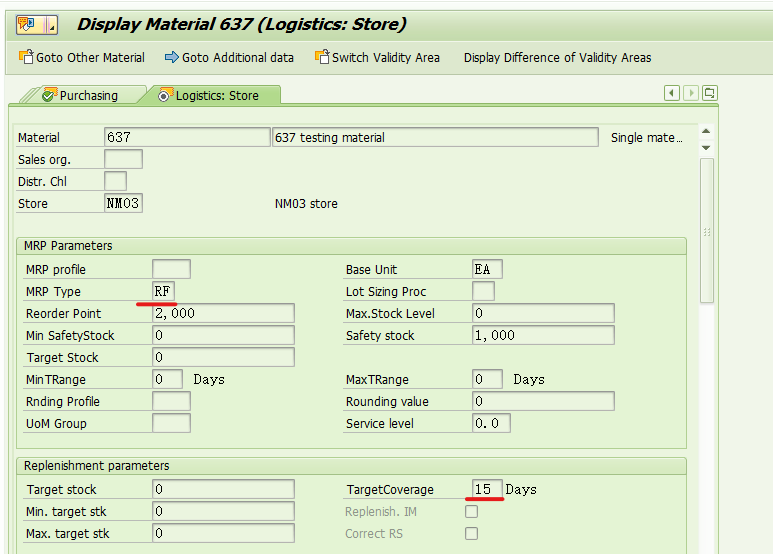
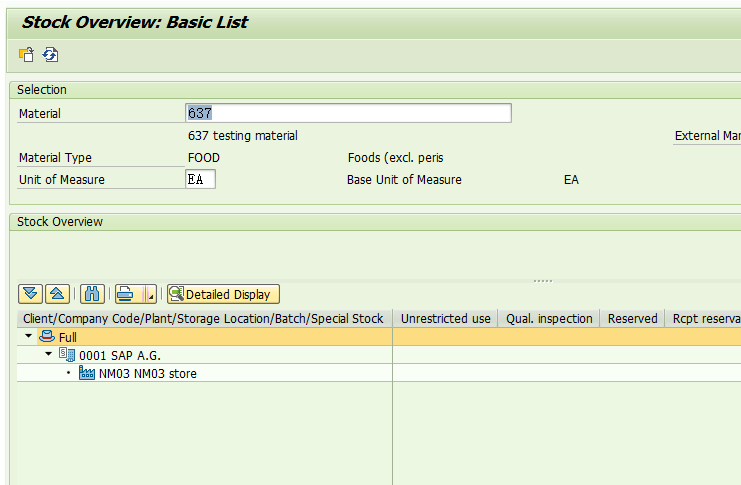
The material has no inventory,
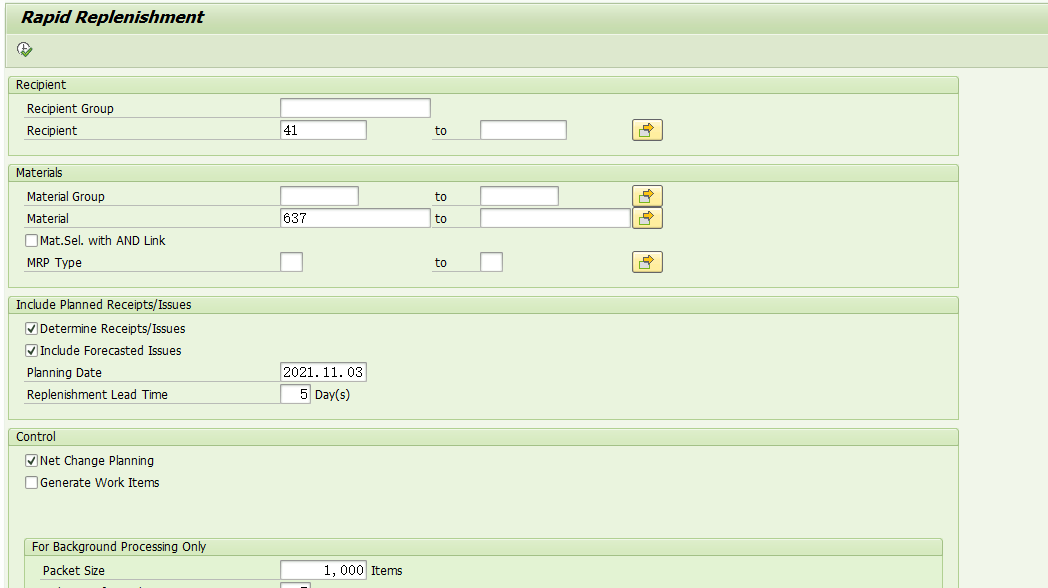
Execute automatic replenishment transaction code wrp1r,
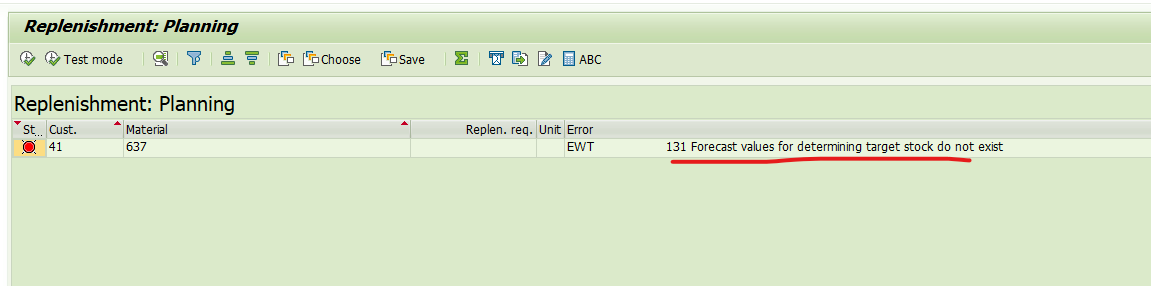
Error: EWT 131 forecast values for determining target stock do not exist, as shown in the figure above.
The reason is that the forecast data is not maintained for materials. MM42 modifies the master data,
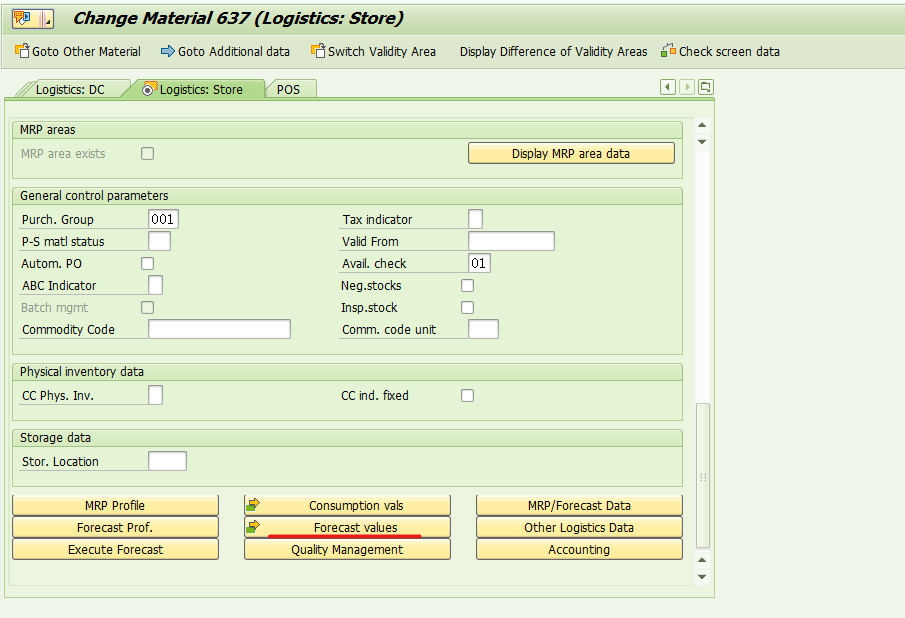
Click the forecast values button,
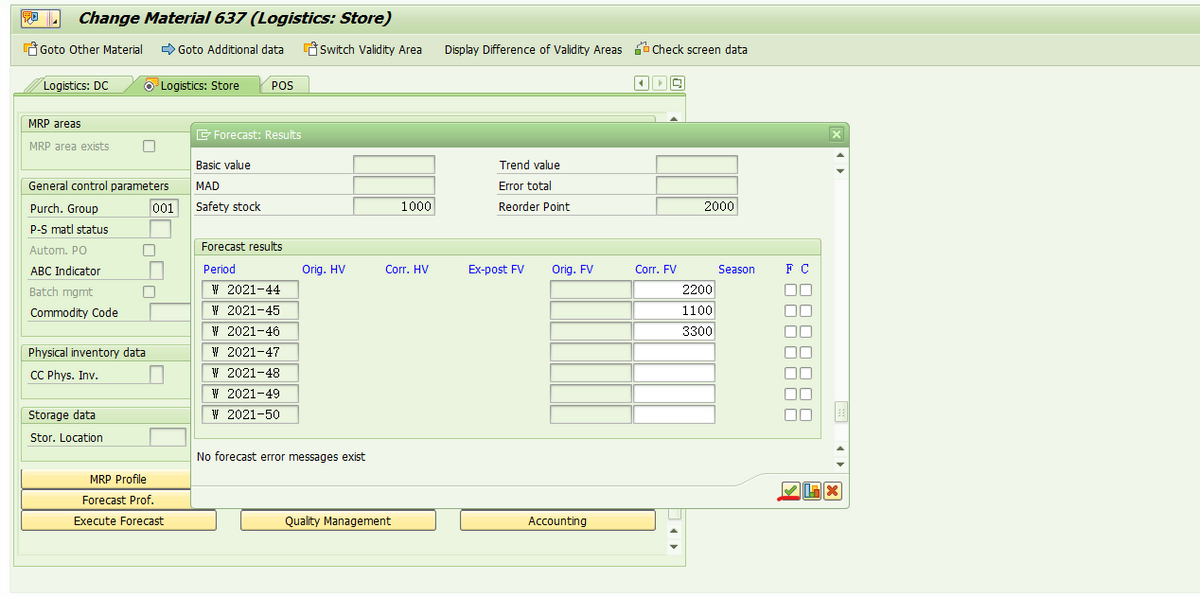
Maintain forecast data by week and save.
If you execute the transaction code wrp1r again, you will no longer report an error,
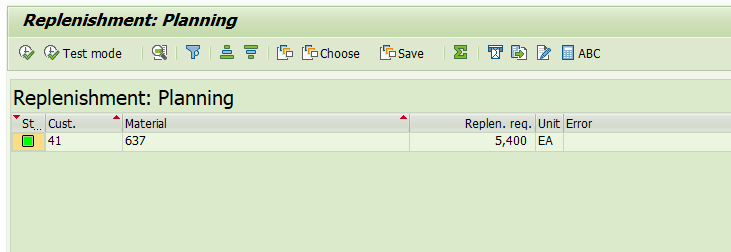
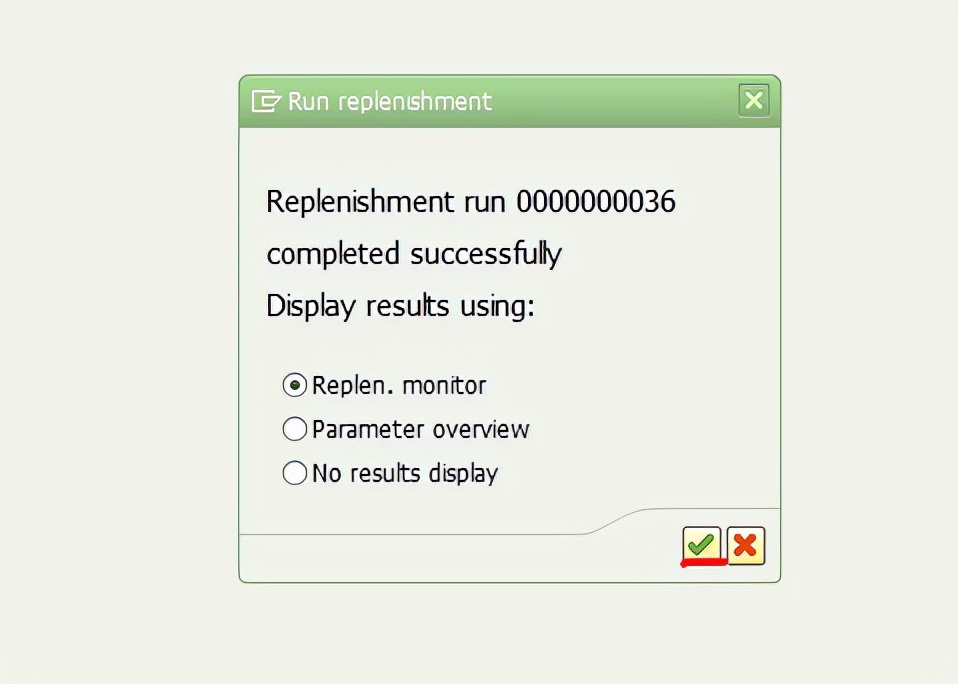
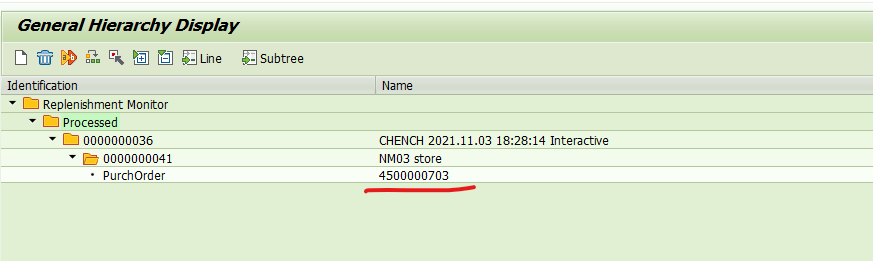
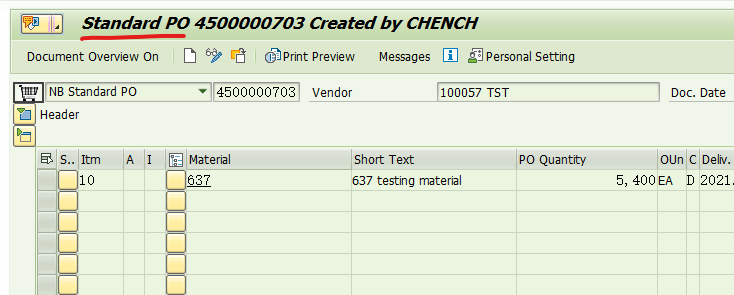
Successfully triggered the replenishment order!!!
I also checked some blogs and found that it can be solved in this way. Record it here.
Cause finding
When building the fabric 1.4.4 environment, bootstrap.sh reported an error and forgot the screenshot. The error should be this course not resolve host: nexus.Hyperledger.Org
the reason is that nexus.hyperledger.org is no longer maintained
analysis bootstrap.Sh shows that it is the download of binary files, and an error is reported here, You can’t connect and download
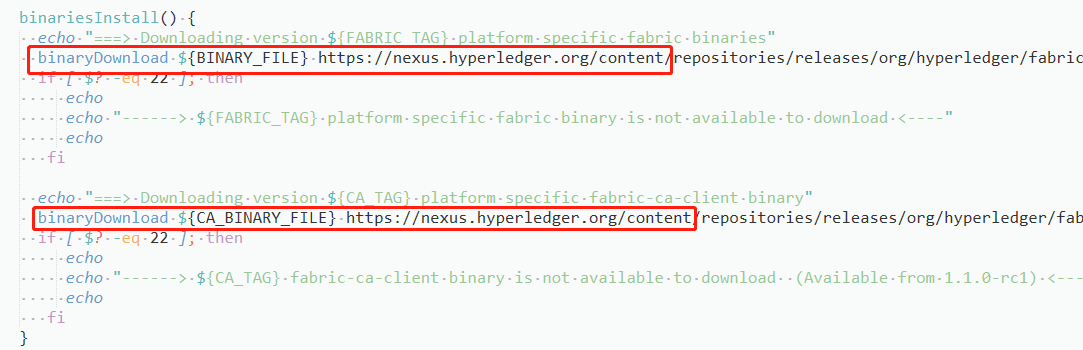
and then further analyze the bootstrap.Shfile. You can see that this file mainly does three things: downloading fabric sample, binary script file and docker image
when downloading binary files, call the binariesinstall function, that is, the function reporting an error in the figure above
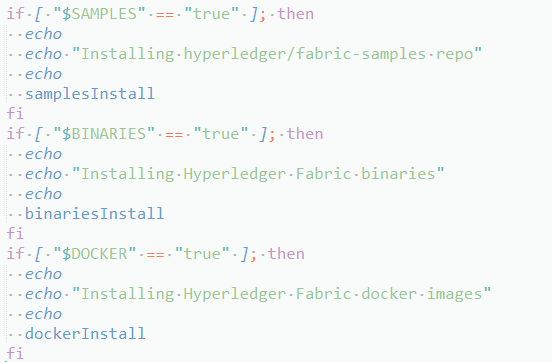
Solution:
Found the problem and how to solve it
that is, modify the bootstrap.Hfile to automatically download fabric sample and docker images, manually download binary script files, and then upload them to the specified path
step1 modify the bootstrap.H file
comment download the binary file module
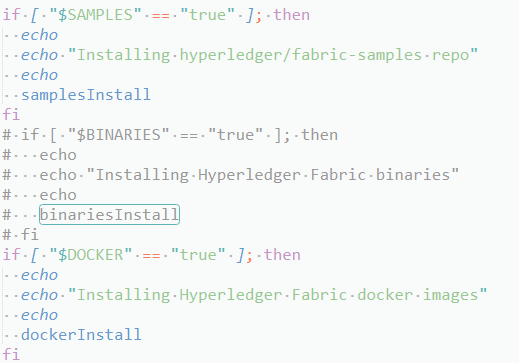
and then execute ./bootstrap. Sh , there may be an error when downloading the image

I don’t know the specific reason, but just pull it manually. It’s not a big problem
Pull first and then add tags
docker pull hyperledger/fabric-peer:1.4.4
docker image tag hyperledger/fabric-peer:1.4.4 hyperledger/fabric-peer:latest
Step 2 download binary files
the download path is as follows
https://github.com/hyperledger/fabric/releases/download/v1.4.4/hyperledger-fabric-linux-amd64-1.4.4.tar.gz
https://github.com/hyperledger/fabric-ca/releases/download/v1.4.4/hyperledger-fabric-ca-linux-amd64-1.4.4.tar.gz
if you don’t surf the Internet scientifically, The download speed will be very slow. Here I also uploaded resources. You can download
upload the downloaded files to the /fabric/scripts/fabric samples/first network/ folder and unzip them
tar -xzvf hyperledger-fabric-linux-amd64-1.4.4.tar.gz
tar -xzvf hyperledger-fabric-ca-linux-amd64-1.4.4.tar.gz
In fact, there seems to be another solution. I haven’t tried. Please refer to this blog: Ubuntu 18.04 configuring hyperledger fabric 1.4.4 environment (basic)
Background
An error is reported when the shell script runs the python write data script task:
  File "./xxx.py", line 59, in xxx
    cur.execute(insert_sql(col_string, str(data_list)))
psycopg2.ProgrammingError: column "it’s adj for sb and it's adj of sb" does not exist
LINE 1: ...1', 'student', 16, '八年级下册', 20211028, 50347, "it’s adj ...
reason
After print output, it is found that this number is written with an error:
the difference between it’s adj for sb & it's adj of sb
It can be seen that it is actually a mixture of ' and ' (as an obsessive-compulsive disorder patient who writes in accordance with internet writing norms, I really can’t stand this mixture).
Then the related problem is found on stackoverflow: insert text with single quotes in PostgreSQL. However, in my opinion, its solution still does not meet my requirements. After all, the data written to PG cannot be forcibly converted from a single ' to ' ' because of an error. Therefore, I replaced ' with ' , found that the execution was still an error, and realized that the key problem was not here.
Then I found the reason in this blog. According to the official website of wiki.postgresql:
PostgreSQL uses only single quotes for this (i.e. WHERE name = 'John'). Double quotes are used to quote system identifiers; field names, table names, etc. (i.e. WHERE "last name" = 'Smith').
MySQL uses ` (accent mark or backtick) to quote system identifiers, which is decidedly non-standard.
Because the complete format of the data written above is:
insert into xxx (field1, field2, field3) values ('student', "The difference between it's adj for sb and it's adj of sb", 'Concept class')
It is found that only field 2 is ", while the double quotation marks " of PG represent the system identifier and cannot be written into PG at all. In fact, I guess it is because there is ' inside the string, resulting in the external quotation marks becoming ".
So I made character replacement in Python code:
str.replace("\"", "\'").replace("\'s ", "’s ")
First replace the external " with ', and then replace ' with '. However, it should be noted that 's may match ' student ', so I matched one more space and replaced 's empty with 's empty .
Phenomenon
Previously, an nginx image was run with docker without any error, but when the image was started with k8s, the error “nginx: [emerg] mkdir()”/var/cache/Nginx/client_temp “failed (13: permission denied)” was reported This error occurs only under a specific namespace. The normal docker version is 17.03.3-ce the abnormal docker version is docker 19.03.4 which uses the overlay 2 storage driver
reflection
According to the error message, it is obvious that it is a user permission problem. Similar nginx permission problems have been encountered before, but they are caused by the setting of SELinux. After closing SELinux, it returns to normal. For the setting method, refer to “CentOS 7. X closing SELinux”
to find k8s startup or failure, I also saw a blog “unable to run Nginx docker due to” 13: permission denied “to delete the container by executing the following command_t added to SELinux, but failed
semanage permissive -a container_t
semodule -l | grep permissive
other
In addition, I try to solve this problem by configuring the security context for pod or container. yaml the configuration of security context is
  securityContext:
    fsGroup: 1000
    runAsGroup: 1000
    runAsUser: 1000
    runAsNonRoot: true
last
In the end, you can only directly make an nginx image started by a non root user. Follow https://github.com/nginxinc/docker-nginx-unprivileged Create your own image for the project
first view the user ID and group ID of your starting pod. You can use ID <User name>, for example:
[deploy@host ~]$ id deploy
uid=1000(deploy) gid=1000(deploy) Team=1000(deploy),980(docker)
You need to modify the uid and GID in the dockerfile in the project to the corresponding ID of your user. My user ID and group ID are 1000
I also added a line of settings for using alicloud image, otherwise it will be particularly slow to build the image. You can also add some custom settings yourself, It should be noted that the image exposes the 8080 port instead of the 80 port. Non root users cannot directly start the 80port
Dockerfile:
#
# NOTE: THIS DOCKERFILE IS GENERATED VIA "update.sh"
#
# PLEASE DO NOT EDIT IT DIRECTLY.
#
ARG IMAGE=alpine:3.13
FROM $IMAGE

LABEL maintainer="NGINX Docker Maintainers <[email protected]>"

ENV NGINX_VERSION 1.20.1
ENV NJS_VERSION   0.5.3
ENV PKG_RELEASE   1

ARG UID=1000
ARG GID=1000

RUN set -x \
    && sed -i 's/dl-cdn.alpinelinux.org/mirrors.aliyun.com/g' /etc/apk/repositories \
# create nginx user/group first, to be consistent throughout docker variants
    && addgroup -g $GID -S nginx \
    && adduser -S -D -H -u $UID -h /var/cache/nginx -s /sbin/nologin -G nginx -g nginx nginx \
    && apkArch="$(cat /etc/apk/arch)" \
    && nginxPackages=" \
        nginx=${NGINX_VERSION}-r${PKG_RELEASE} \
        nginx-module-xslt=${NGINX_VERSION}-r${PKG_RELEASE} \
        nginx-module-geoip=${NGINX_VERSION}-r${PKG_RELEASE} \
        nginx-module-image-filter=${NGINX_VERSION}-r${PKG_RELEASE} \
        nginx-module-njs=${NGINX_VERSION}.${NJS_VERSION}-r${PKG_RELEASE} \
    " \
    && case "$apkArch" in \
        x86_64|aarch64) \
# arches officially built by upstream
            set -x \
            && KEY_SHA512="e7fa8303923d9b95db37a77ad46c68fd4755ff935d0a534d26eba83de193c76166c68bfe7f65471bf8881004ef4aa6df3e34689c305662750c0172fca5d8552a *stdin" \
            && apk add --no-cache --virtual .cert-deps \
                openssl \
            && wget -O /tmp/nginx_signing.rsa.pub https://nginx.org/keys/nginx_signing.rsa.pub \
            && if [ "$(openssl rsa -pubin -in /tmp/nginx_signing.rsa.pub -text -noout | openssl sha512 -r)" = "$KEY_SHA512" ]; then \
                echo "key verification succeeded!"; \
                mv /tmp/nginx_signing.rsa.pub /etc/apk/keys/; \
            else \
                echo "key verification failed!"; \
                exit 1; \
            fi \
            && apk del .cert-deps \
            && apk add -X "https://nginx.org/packages/alpine/v$(egrep -o '^[0-9]+\.[0-9]+' /etc/alpine-release)/main" --no-cache $nginxPackages \
            ;; \
        *) \
# we're on an architecture upstream doesn't officially build for
# let's build binaries from the published packaging sources
            set -x \
            && tempDir="$(mktemp -d)" \
            && chown nobody:nobody $tempDir \
            && apk add --no-cache --virtual .build-deps \
                gcc \
                libc-dev \
                make \
                openssl-dev \
                pcre-dev \
                zlib-dev \
                linux-headers \
                libxslt-dev \
                gd-dev \
                geoip-dev \
                perl-dev \
                libedit-dev \
                mercurial \
                bash \
                alpine-sdk \
                findutils \
            && su nobody -s /bin/sh -c " \
                export HOME=${tempDir} \
                && cd ${tempDir} \
                && hg clone https://hg.nginx.org/pkg-oss \
                && cd pkg-oss \
                && hg up ${NGINX_VERSION}-${PKG_RELEASE} \
                && cd alpine \
                && make all \
                && apk index -o ${tempDir}/packages/alpine/${apkArch}/APKINDEX.tar.gz ${tempDir}/packages/alpine/${apkArch}/*.apk \
                && abuild-sign -k ${tempDir}/.abuild/abuild-key.rsa ${tempDir}/packages/alpine/${apkArch}/APKINDEX.tar.gz \
                " \
            && cp ${tempDir}/.abuild/abuild-key.rsa.pub /etc/apk/keys/ \
            && apk del .build-deps \
            && apk add -X ${tempDir}/packages/alpine/ --no-cache $nginxPackages \
            ;; \
    esac \
# if we have leftovers from building, let's purge them (including extra, unnecessary build deps)
    && if [ -n "$tempDir" ]; then rm -rf "$tempDir"; fi \
    && if [ -n "/etc/apk/keys/abuild-key.rsa.pub" ]; then rm -f /etc/apk/keys/abuild-key.rsa.pub; fi \
    && if [ -n "/etc/apk/keys/nginx_signing.rsa.pub" ]; then rm -f /etc/apk/keys/nginx_signing.rsa.pub; fi \
# Bring in gettext so we can get `envsubst`, then throw
# the rest away. To do this, we need to install `gettext`
# then move `envsubst` out of the way so `gettext` can
# be deleted completely, then move `envsubst` back.
    && apk add --no-cache --virtual .gettext gettext \
    && mv /usr/bin/envsubst /tmp/ \
    \
    && runDeps="$( \
        scanelf --needed --nobanner /tmp/envsubst \
            | awk '{ gsub(/,/, "\nso:", $2); print "so:" $2 }' \
            | sort -u \
            | xargs -r apk info --installed \
            | sort -u \
    )" \
    && apk add --no-cache $runDeps \
    && apk del .gettext \
    && mv /tmp/envsubst /usr/local/bin/ \
# Bring in tzdata so users could set the timezones through the environment
# variables
    && apk add --no-cache tzdata \
# Bring in curl and ca-certificates to make registering on DNS SD easier
    && apk add --no-cache curl ca-certificates \
# forward request and error logs to docker log collector
    && ln -sf /dev/stdout /var/log/nginx/access.log \
    && ln -sf /dev/stderr /var/log/nginx/error.log \
# create a docker-entrypoint.d directory
    && mkdir /docker-entrypoint.d

# implement changes required to run NGINX as an unprivileged user
RUN sed -i 's,listen       80;,listen       8080;,' /etc/nginx/conf.d/default.conf \
    && sed -i '/user  nginx;/d' /etc/nginx/nginx.conf \
    && sed -i 's,/var/run/nginx.pid,/tmp/nginx.pid,' /etc/nginx/nginx.conf \
    && sed -i "/^http {/a \    proxy_temp_path /tmp/proxy_temp;\n    client_body_temp_path /tmp/client_temp;\n    fastcgi_temp_path /tmp/fastcgi_temp;\n    uwsgi_temp_path /tmp/uwsgi_temp;\n    scgi_temp_path /tmp/scgi_temp;\n" /etc/nginx/nginx.conf \
# nginx user must own the cache and etc directory to write cache and tweak the nginx config
    && chown -R $UID:0 /var/cache/nginx \
    && chmod -R g+w /var/cache/nginx \
    && chown -R $UID:0 /etc/nginx \
    && chmod -R g+w /etc/nginx

COPY docker-entrypoint.sh /
COPY 10-listen-on-ipv6-by-default.sh /docker-entrypoint.d
COPY 20-envsubst-on-templates.sh /docker-entrypoint.d
COPY 30-tune-worker-processes.sh /docker-entrypoint.d
RUN  chmod 755 /docker-entrypoint.sh \
     && chmod 755 /docker-entrypoint.d/*.sh

ENTRYPOINT ["/docker-entrypoint.sh"]

EXPOSE 8080

STOPSIGNAL SIGQUIT

USER $UID

CMD ["nginx", "-g", "daemon off;"]
10-listen-on-ipv6-by-default.sh:
#!/bin/sh
# vim:sw=4:ts=4:et

set -e

ME=$(basename $0)
DEFAULT_CONF_FILE="etc/nginx/conf.d/default.conf"

# check if we have ipv6 available
if [ ! -f "/proc/net/if_inet6" ]; then
    echo >&3 "$ME: info: ipv6 not available"
    exit 0
fi

if [ ! -f "/$DEFAULT_CONF_FILE" ]; then
    echo >&3 "$ME: info: /$DEFAULT_CONF_FILE is not a file or does not exist"
    exit 0
fi

# check if the file can be modified, e.g. not on a r/o filesystem
touch /$DEFAULT_CONF_FILE 2>/dev/null || { echo >&3 "$ME: info: can not modify /$DEFAULT_CONF_FILE (read-only file system?)"; exit 0; }

# check if the file is already modified, e.g. on a container restart
grep -q "listen  \[::]\:8080;" /$DEFAULT_CONF_FILE && { echo >&3 "$ME: info: IPv6 listen already enabled"; exit 0; }

if [ -f "/etc/os-release" ]; then
    . /etc/os-release
else
    echo >&3 "$ME: info: can not guess the operating system"
    exit 0
fi

echo >&3 "$ME: info: Getting the checksum of /$DEFAULT_CONF_FILE"

case "$ID" in
    "debian")
        CHECKSUM=$(dpkg-query --show --showformat='${Conffiles}\n' nginx | grep $DEFAULT_CONF_FILE | cut -d' ' -f 3)
        echo "$CHECKSUM  /$DEFAULT_CONF_FILE" | md5sum -c - >/dev/null 2>&1 || {
            echo >&3 "$ME: info: /$DEFAULT_CONF_FILE differs from the packaged version"
            exit 0
        }
        ;;
    "alpine")
        CHECKSUM=$(apk manifest nginx 2>/dev/null| grep $DEFAULT_CONF_FILE | cut -d' ' -f 1 | cut -d ':' -f 2)
        echo "$CHECKSUM  /$DEFAULT_CONF_FILE" | sha1sum -c - >/dev/null 2>&1 || {
            echo >&3 "$ME: info: /$DEFAULT_CONF_FILE differs from the packaged version"
            exit 0
        }
        ;;
    *)
        echo >&3 "$ME: info: Unsupported distribution"
        exit 0
        ;;
esac

# enable ipv6 on default.conf listen sockets
sed -i -E 's,listen       8080;,listen       8080;\n    listen  [::]:8080;,' /$DEFAULT_CONF_FILE

echo >&3 "$ME: info: Enabled listen on IPv6 in /$DEFAULT_CONF_FILE"

exit 0
20-envsubst-on-templates.sh:
#!/bin/sh

set -e

ME=$(basename $0)

auto_envsubst() {
  local template_dir="${NGINX_ENVSUBST_TEMPLATE_DIR:-/etc/nginx/templates}"
  local suffix="${NGINX_ENVSUBST_TEMPLATE_SUFFIX:-.template}"
  local output_dir="${NGINX_ENVSUBST_OUTPUT_DIR:-/etc/nginx/conf.d}"

  local template defined_envs relative_path output_path subdir
  defined_envs=$(printf '${%s} ' $(env | cut -d= -f1))
  [ -d "$template_dir" ] || return 0
  if [ ! -w "$output_dir" ]; then
    echo >&3 "$ME: ERROR: $template_dir exists, but $output_dir is not writable"
    return 0
  fi
  find "$template_dir" -follow -type f -name "*$suffix" -print | while read -r template; do
    relative_path="${template#$template_dir/}"
    output_path="$output_dir/${relative_path%$suffix}"
    subdir=$(dirname "$relative_path")
    # create a subdirectory where the template file exists
    mkdir -p "$output_dir/$subdir"
    echo >&3 "$ME: Running envsubst on $template to $output_path"
    envsubst "$defined_envs" < "$template" > "$output_path"
  done
}

auto_envsubst

exit 0
30-tune-worker-processes.sh:
#!/bin/sh
# vim:sw=2:ts=2:sts=2:et

set -eu

LC_ALL=C
ME=$( basename "$0" )
PATH=/usr/local/sbin:/usr/local/bin:/usr/sbin:/usr/bin:/sbin:/bin

[ "${NGINX_ENTRYPOINT_WORKER_PROCESSES_AUTOTUNE:-}" ] || exit 0

touch /etc/nginx/nginx.conf 2>/dev/null || { echo >&2 "$ME: error: can not modify /etc/nginx/nginx.conf (read-only file system?)"; exit 0; }

ceildiv() {
  num=$1
  div=$2
  echo $(( (num + div - 1)/div ))
}

get_cpuset() {
  cpusetroot=$1
  cpusetfile=$2
  ncpu=0
  [ -f "$cpusetroot/$cpusetfile" ] || return 1
  for token in $( tr ',' ' ' < "$cpusetroot/$cpusetfile" ); do
    case "$token" in
      *-*)
        count=$( seq $(echo "$token" | tr '-' ' ') | wc -l )
        ncpu=$(( ncpu+count ))
        ;;
      *)
        ncpu=$(( ncpu+1 ))
        ;;
    esac
  done
  echo "$ncpu"
}

get_quota() {
  cpuroot=$1
  ncpu=0
  [ -f "$cpuroot/cpu.cfs_quota_us" ] || return 1
  [ -f "$cpuroot/cpu.cfs_period_us" ] || return 1
  cfs_quota=$( cat "$cpuroot/cpu.cfs_quota_us" )
  cfs_period=$( cat "$cpuroot/cpu.cfs_period_us" )
  [ "$cfs_quota" = "-1" ] && return 1
  [ "$cfs_period" = "0" ] && return 1
  ncpu=$( ceildiv "$cfs_quota" "$cfs_period" )
  [ "$ncpu" -gt 0 ] || return 1
  echo "$ncpu"
}

get_quota_v2() {
  cpuroot=$1
  ncpu=0
  [ -f "$cpuroot/cpu.max" ] || return 1
  cfs_quota=$( cut -d' ' -f 1 < "$cpuroot/cpu.max" )
  cfs_period=$( cut -d' ' -f 2 < "$cpuroot/cpu.max" )
  [ "$cfs_quota" = "max" ] && return 1
  [ "$cfs_period" = "0" ] && return 1
  ncpu=$( ceildiv "$cfs_quota" "$cfs_period" )
  [ "$ncpu" -gt 0 ] || return 1
  echo "$ncpu"
}

get_cgroup_v1_path() {
  needle=$1
  found=
  foundroot=
  mountpoint=

  [ -r "/proc/self/mountinfo" ] || return 1
  [ -r "/proc/self/cgroup" ] || return 1

  while IFS= read -r line; do
    case "$needle" in
      "cpuset")
        case "$line" in
          *cpuset*)
            found=$( echo "$line" | cut -d ' ' -f 4,5 )
            break
            ;;
        esac
        ;;
      "cpu")
        case "$line" in
          *cpuset*)
            ;;
          *cpu,cpuacct*|*cpuacct,cpu|*cpuacct*|*cpu*)
            found=$( echo "$line" | cut -d ' ' -f 4,5 )
            break
            ;;
        esac
    esac
  done << __EOF__
$( grep -F -- '- cgroup ' /proc/self/mountinfo )
__EOF__

  while IFS= read -r line; do
    controller=$( echo "$line" | cut -d: -f 2 )
    case "$needle" in
      "cpuset")
        case "$controller" in
          cpuset)
            mountpoint=$( echo "$line" | cut -d: -f 3 )
            break
            ;;
        esac
        ;;
      "cpu")
        case "$controller" in
          cpu,cpuacct|cpuacct,cpu|cpuacct|cpu)
            mountpoint=$( echo "$line" | cut -d: -f 3 )
            break
            ;;
        esac
        ;;
    esac
done << __EOF__
$( grep -F -- 'cpu' /proc/self/cgroup )
__EOF__

  case "${found%% *}" in
    "/")
      foundroot="${found##* }$mountpoint"
      ;;
    "$mountpoint")
      foundroot="${found##* }"
      ;;
  esac
  echo "$foundroot"
}

get_cgroup_v2_path() {
  found=
  foundroot=
  mountpoint=

  [ -r "/proc/self/mountinfo" ] || return 1
  [ -r "/proc/self/cgroup" ] || return 1

  while IFS= read -r line; do
    found=$( echo "$line" | cut -d ' ' -f 4,5 )
  done << __EOF__
$( grep -F -- '- cgroup2 ' /proc/self/mountinfo )
__EOF__

  while IFS= read -r line; do
    mountpoint=$( echo "$line" | cut -d: -f 3 )
done << __EOF__
$( grep -F -- '0::' /proc/self/cgroup )
__EOF__

  case "${found%% *}" in
    "")
      return 1
      ;;
    "/")
      foundroot="${found##* }$mountpoint"
      ;;
    "$mountpoint")
      foundroot="${found##* }"
      ;;
  esac
  echo "$foundroot"
}

ncpu_online=$( getconf _NPROCESSORS_ONLN )
ncpu_cpuset=
ncpu_quota=
ncpu_cpuset_v2=
ncpu_quota_v2=

cpuset=$( get_cgroup_v1_path "cpuset" ) && ncpu_cpuset=$( get_cpuset "$cpuset" "cpuset.effective_cpus" ) || ncpu_cpuset=$ncpu_online
cpu=$( get_cgroup_v1_path "cpu" ) && ncpu_quota=$( get_quota "$cpu" ) || ncpu_quota=$ncpu_online
cgroup_v2=$( get_cgroup_v2_path ) && ncpu_cpuset_v2=$( get_cpuset "$cgroup_v2" "cpuset.cpus.effective" ) || ncpu_cpuset_v2=$ncpu_online
cgroup_v2=$( get_cgroup_v2_path ) && ncpu_quota_v2=$( get_quota_v2 "$cgroup_v2" ) || ncpu_quota_v2=$ncpu_online

ncpu=$( printf "%s\n%s\n%s\n%s\n%s\n" \
               "$ncpu_online" \
               "$ncpu_cpuset" \
               "$ncpu_quota" \
               "$ncpu_cpuset_v2" \
               "$ncpu_quota_v2" \
               | sort -n \
               | head -n 1 )

sed -i.bak -r 's/^(worker_processes)(.*)$/# Commented out by '"$ME"' on '"$(date)"'\n#\1\2\n\1 '"$ncpu"';/' /etc/nginx/nginx.conf
docker-entrypoint.sh:
#!/bin/sh
# vim:sw=4:ts=4:et

set -e

if [ -z "${NGINX_ENTRYPOINT_QUIET_LOGS:-}" ]; then
    exec 3>&1
else
    exec 3>/dev/null
fi

if [ "$1" = "nginx" -o "$1" = "nginx-debug" ]; then
    if /usr/bin/find "/docker-entrypoint.d/" -mindepth 1 -maxdepth 1 -type f -print -quit 2>/dev/null | read v; then
        echo >&3 "$0: /docker-entrypoint.d/ is not empty, will attempt to perform configuration"

        echo >&3 "$0: Looking for shell scripts in /docker-entrypoint.d/"
        find "/docker-entrypoint.d/" -follow -type f -print | sort -V | while read -r f; do
            case "$f" in
                *.sh)
                    if [ -x "$f" ]; then
                        echo >&3 "$0: Launching $f";
                        "$f"
                    else
                        # warn on shell scripts without exec bit
                        echo >&3 "$0: Ignoring $f, not executable";
                    fi
                    ;;
                *) echo >&3 "$0: Ignoring $f";;
            esac
        done

        echo >&3 "$0: Configuration complete; ready for start up"
    else
        echo >&3 "$0: No files found in /docker-entrypoint.d/, skipping configuration"
    fi
fi

exec "$@"
Run a couple of files at the same catalog and then run docker build -t nginxinc/docker-nginx-unprivileged:latest
Target: import.sh data
$ ./get_datasets.sh
report errors:
zsh: permission denied: ./get_datasets.sh
Reason: .Sh does not have permission
Solution: give permission at the terminal
$ chmod +x get_datasets.shTry again
$ ./get_datasets.shJust.
$came out of my Zsh setting terminal. Don’t call.
Error reporting: NPM err! Cannot read property ‘parent’ of null npm ERR! A complete log of this run can be found in: npm ERR! C:\Users\Aren\AppData\Local\npm-cache_logs\2021-04-06T02_00_29_654z-debug.log
reason: in the project dependency package, the node-sass module requires node-gyp
and node-gyp; It also needs to rely on Python 2.7 and Microsoft’s VC + + build tools for compilation, but Windows operating system will not install Python 2.7 and VC + + build tools by default
Solution:
1. Use the administrator to open CMD
2. Install node-gyp
command
npm install -g node-gyp
3. Configure and install python2.7 and VC + + build tools
because node-gyp needs to rely on python2.7 and Microsoft’s VC + + build tools for compilation, but Windows operating system will not install python2.7 and VC + + build tools by default
Install python2.7 and VC + + build tools dependencies for node-gyp configuration:
npm install --global --production windows-build-tools
4. Check whether the installation is successful and restart NPM install
1. This problem is reported when importing the ecarts plug-in in the project

2. Without saying a word, the reason is that the version is too high

3. Solution: downgrade the version
This problem occurs because after elasticsearch configures the password, the connection es encounters authentication problems when logstash starts. The solution requires configuring the account password in the logstash configuration file
vim /app/logstash/config/beat_es.conf
input {
   beats {
     port => 5044
   }
}
filter {
    #Only do json parsing on nginx json logs, system messages are in other formats, no need to handle
    if [fields][log_type] == "nginx"{
      json {
         source => "message"
         remove_field => ["beat","offset","tags","prospector"] #Remove fields, no collection required
      }
      date {
        match => ["timestamp", "dd/MMM/yyyy:HH:mm:ss Z"] # match the timestamp field
        target => "@timestamp" # write the matched data to the @timestamp field
      }
  }
}

output {

       if [fields][log_type] == "ruoyi" {
         elasticsearch {
            hosts => ["node1:9200","node2:9200"]
            user => elastic
            password => "123123"
            index => "ruoyi_log"
            timeout => 300
        }
       }
}Usually the red report after import is because there is no module, use pip install cv2 to download the module, it will appear:
Could not find a version that satisfies the requirement cv2 (from versions: )
No matching distribution found for cv2
You are using pip version 18.1, however version 19.0.2 is available.
You should consider upgrading via the ‘python -m pip install –upgrade pip’ command.
At this point you need to type python -m pip install –upgrade pip
When the installation is complete, run this line “pip install opencv-python”, this line is to install the cv2 module, wait until the download is complete
To install the numpy module, you only need to pip install numpy
The summary is as follows:
python -m pip install --upgrade pip
pip install opencv-python
pip install numpyIf Hyper-V of the system is turned on, it only needs to be run as an administrator
bcdedit /set hypervisorlaunchtype Auto
Then restart the computer and docker will start successfully
Question:
2020-11-12 15:15:14.082  WARN 15972 --- [           main] ConfigServletWebServerApplicationContext : Exception encountered during context initialization - cancelling refresh attempt: org.springframework.beans.factory.BeanCreationException: Error creating bean with name 'liquibase' defined in class path resource [cn/yihuazt/metadata/config/MetaDataConfig.class]: Invocation of init method failed; nested exception is liquibase.exception.ValidationFailedException: Validation Failed:
     1 change sets check sum
          classpath:metadata/db/atmp_service.sql::init-table(pla_log)::[email protected] was: 8:9a740f35c65933423ab693677c08a00c but is now: 8:a4ace2e4bab8493391e401fdff807762

2020-11-12 15:15:14.084  INFO 15972 --- [           main] com.zaxxer.hikari.HikariDataSource       : HikariPool-1 - Shutdown initiated...
2020-11-12 15:15:14.095  INFO 15972 --- [           main] com.zaxxer.hikari.HikariDataSource       : HikariPool-1 - Shutdown completed.
2020-11-12 15:15:14.096  INFO 15972 --- [           main] o.apache.catalina.core.StandardService   : Stopping service [Tomcat]
2020-11-12 15:15:14.115  INFO 15972 --- [           main] ConditionEvaluationReportLoggingListener :

Error starting ApplicationContext. To display the conditions report re-run your application with 'debug' enabled.
2020-11-12 15:15:14.133 ERROR 15972 --- [           main] o.s.boot.SpringApplication               : Application run failed

org.springframework.beans.factory.BeanCreationException: Error creating bean with name 'liquibase' defined in class path resource [cn/yihuazt/metadata/config/MetaDataConfig.class]: Invocation of init method failed; nested exception is liquibase.exception.ValidationFailedException: Validation Failed:
     1 change sets check sum
          classpath:metadata/db/atmp_service.sql::init-table(pla_log)::[email protected] was: 8:9a740f35c65933423ab693677c08a00c but is now: 8:a4ace2e4bab8493391e401fdff807762

    at org.springframework.beans.factory.support.AbstractAutowireCapableBeanFactory.initializeBean(AbstractAutowireCapableBeanFactory.java:1769) ~[spring-beans-5.1.17.RELEASE.jar:5.1.17.RELEASE]
    at org.springframework.beans.factory.support.AbstractAutowireCapableBeanFactory.doCreateBean(AbstractAutowireCapableBeanFactory.java:592) ~[spring-beans-5.1.17.RELEASE.jar:5.1.17.RELEASE]
    at org.springframework.beans.factory.support.AbstractAutowireCapableBeanFactory.createBean(AbstractAutowireCapableBeanFactory.java:514) ~[spring-beans-5.1.17.RELEASE.jar:5.1.17.RELEASE]
    at org.springframework.beans.factory.support.AbstractBeanFactory.lambda$doGetBean$0(AbstractBeanFactory.java:321) ~[spring-beans-5.1.17.RELEASE.jar:5.1.17.RELEASE]
    at org.springframework.beans.factory.support.AbstractBeanFactory$$Lambda$144/584698209.getObject(Unknown Source) ~[na:na]
    at org.springframework.beans.factory.support.DefaultSingletonBeanRegistry.getSingleton(DefaultSingletonBeanRegistry.java:226) ~[spring-beans-5.1.17.RELEASE.jar:5.1.17.RELEASE]
    at org.springframework.beans.factory.support.AbstractBeanFactory.doGetBean(AbstractBeanFactory.java:319) ~[spring-beans-5.1.17.RELEASE.jar:5.1.17.RELEASE]
    at org.springframework.beans.factory.support.AbstractBeanFactory.getBean(AbstractBeanFactory.java:199) ~[spring-beans-5.1.17.RELEASE.jar:5.1.17.RELEASE]
    at org.springframework.beans.factory.support.AbstractBeanFactory.doGetBean(AbstractBeanFactory.java:308) ~[spring-beans-5.1.17.RELEASE.jar:5.1.17.RELEASE]
    at org.springframework.beans.factory.support.AbstractBeanFactory.getBean(AbstractBeanFactory.java:199) ~[spring-beans-5.1.17.RELEASE.jar:5.1.17.RELEASE]
    at org.springframework.context.support.AbstractApplicationContext.getBean(AbstractApplicationContext.java:1106) ~[spring-context-5.1.17.RELEASE.jar:5.1.17.RELEASE]
    at org.springframework.context.support.AbstractApplicationContext.finishBeanFactoryInitialization(AbstractApplicationContext.java:868) ~[spring-context-5.1.17.RELEASE.jar:5.1.17.RELEASE]
    at org.springframework.context.support.AbstractApplicationContext.refresh(AbstractApplicationContext.java:550) ~[spring-context-5.1.17.RELEASE.jar:5.1.17.RELEASE]
    at org.springframework.boot.web.servlet.context.ServletWebServerApplicationContext.refresh(ServletWebServerApplicationContext.java:141) ~[spring-boot-2.1.16.RELEASE.jar:2.1.16.RELEASE]
    at org.springframework.boot.SpringApplication.refresh(SpringApplication.java:744) [spring-boot-2.1.16.RELEASE.jar:2.1.16.RELEASE]
    at org.springframework.boot.SpringApplication.refreshContext(SpringApplication.java:391) [spring-boot-2.1.16.RELEASE.jar:2.1.16.RELEASE]
    at org.springframework.boot.SpringApplication.run(SpringApplication.java:312) [spring-boot-2.1.16.RELEASE.jar:2.1.16.RELEASE]
    at org.springframework.boot.SpringApplication.run(SpringApplication.java:1215) [spring-boot-2.1.16.RELEASE.jar:2.1.16.RELEASE]
    at org.springframework.boot.SpringApplication.run(SpringApplication.java:1204) [spring-boot-2.1.16.RELEASE.jar:2.1.16.RELEASE]
    at cn.yihuazt.atmp.AtmpServiceApplication.main(AtmpServiceApplication.java:28) [classes/:na]
Caused by: liquibase.exception.ValidationFailedException: Validation Failed:
     1 change sets check sum
          classpath:metadata/db/atmp_service.sql::init-table(pla_log)::[email protected] was: 8:9a740f35c65933423ab693677c08a00c but is now: 8:a4ace2e4bab8493391e401fdff807762

    at liquibase.changelog.DatabaseChangeLog.validate(DatabaseChangeLog.java:288) ~[liquibase-core-3.8.8.jar:na]
    at liquibase.Liquibase.update(Liquibase.java:198) ~[liquibase-core-3.8.8.jar:na]
    at liquibase.Liquibase.update(Liquibase.java:179) ~[liquibase-core-3.8.8.jar:na]
    at liquibase.integration.spring.SpringLiquibase.performUpdate(SpringLiquibase.java:366) ~[liquibase-core-3.8.8.jar:na]
    at liquibase.integration.spring.SpringLiquibase.afterPropertiesSet(SpringLiquibase.java:314) ~[liquibase-core-3.8.8.jar:na]
    at org.springframework.beans.factory.support.AbstractAutowireCapableBeanFactory.invokeInitMethods(AbstractAutowireCapableBeanFactory.java:1828) ~[spring-beans-5.1.17.RELEASE.jar:5.1.17.RELEASE]
    at org.springframework.beans.factory.support.AbstractAutowireCapableBeanFactory.initializeBean(AbstractAutowireCapableBeanFactory.java:1765) ~[spring-beans-5.1.17.RELEASE.jar:5.1.17.RELEASE]
    ... 19 common frames omitted

Disconnected from the target VM, address: '127.0.0.1:61091', transport: 'socket'

Process finished with exit code 1
reason:
Modified menu profile
Solution:
Modify the 8:9a740f35c65933423ab693677c08a00c in the column pla_log in the databasechangelog table to 8:a4ace2e4bab8493391e401fdff807762