qt Error:
//usr/local/lib/libvtkCommonCore-9.1.so.1: error adding symbols: DSO missing from command line
Solution:
Add the following library:
LIBS += /usr/local/lib/libvtkCommonCore-9.1.so.1
qt Error:
//usr/local/lib/libvtkCommonCore-9.1.so.1: error adding symbols: DSO missing from command line
Solution:
Add the following library:
LIBS += /usr/local/lib/libvtkCommonCore-9.1.so.1
Problem phenomenon
Using sftp to load large files reports an error, loading small files is normal.
Cause Analysis
When the number of concurrent loading tasks of the cluster and the maximum number of loading machines of a single task is large, the situation of sftp file loading failure will occur.
Solution
Make sure that the parameter gcluster_loader_max_data_processors is set too large, and no error is reported after the parameter is reduced.
The reason is that the form item uses v-if control and appears to be between two normal el-form-items. As follows.
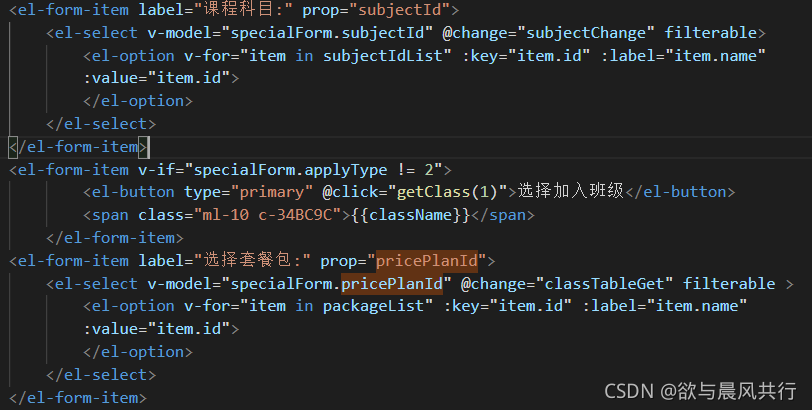
Then when you use this.$refs[“specialForm”].resetFields(); to reset the form, it reports an error: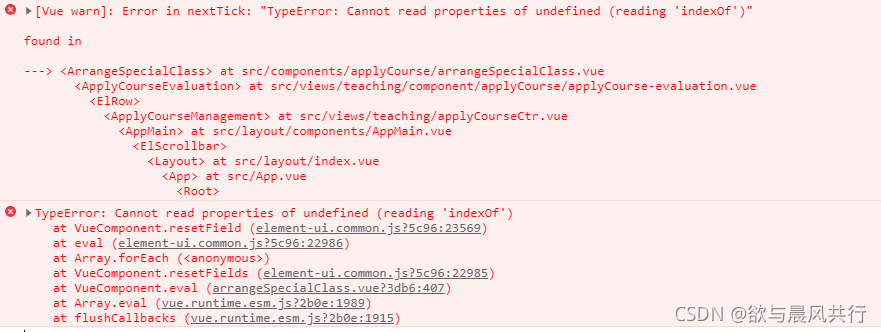
Solution:
Wrap a div outside el-form-item and use it as an if judgment to avoid it.
Check the official website document to know
The introduction path of CSS has been changed
import 'element-plus/lib/theme-chalk/index.css'
Changed to the following path
import 'element-plus/dist/index.css'
Error content:
tried to access field com.mysql.cj.CharsetMapping.COLLATION_INDEX_TO_COLLATION_NAME from class io.debezium.connector.mysql.antlr.MySqlAntlrDdlParser
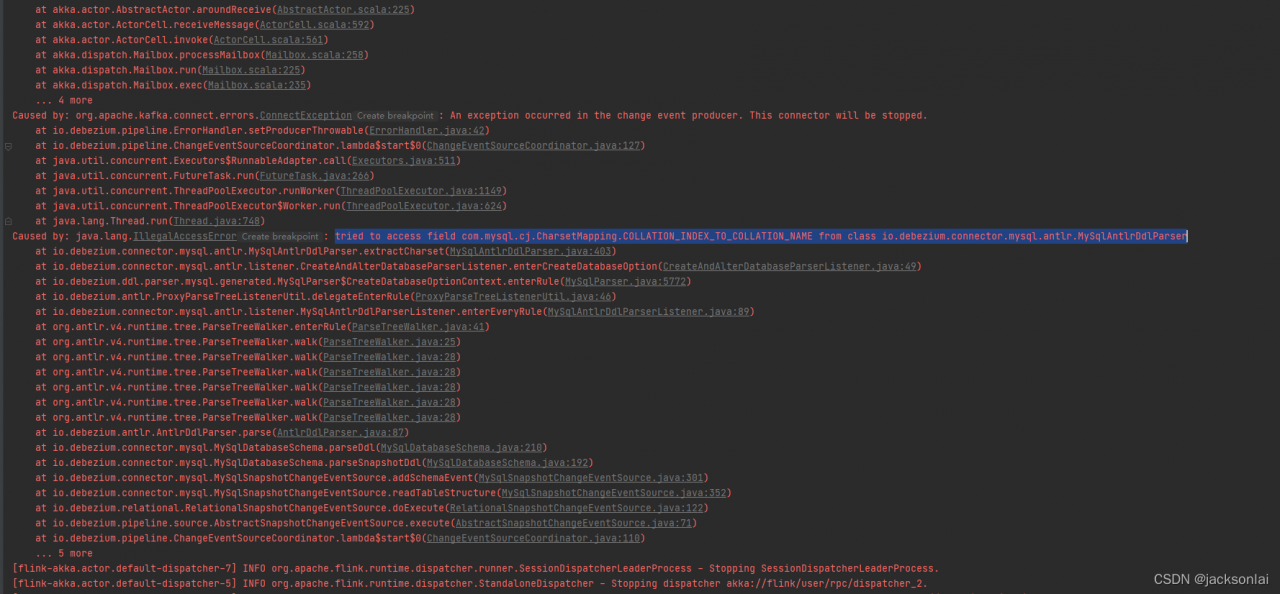
Solution:
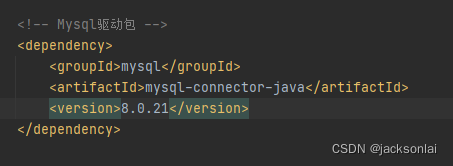
When I reported an error, I used version 8.0.27 and changed it to 8.0.21
tip: here is a brief description of the project background:
Problem Scenario: Error on startup after installing nacos
Problem description
tip: describe the project here
Nacos startup error
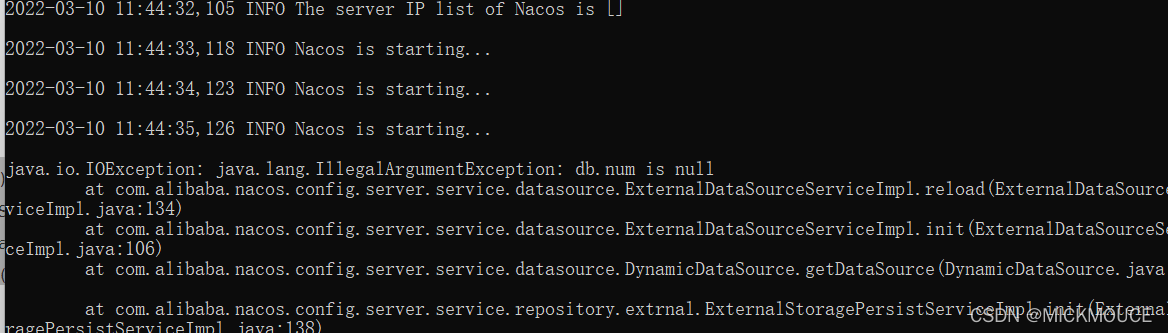
Cause analysis:
Nacos defaults to cluster startup. Here is a startup error in the windows stand-alone environment
–
Solution:
Line 26 Modify set MODE="cluster" to MODE="standalone" and the problem is solved
import mxnet times an error:
OSError: libcudart.so.8.0: cannot open shared object file: No such file or directory
Cause:
Multiple versions of CUDA are installed on the computer, and the mxnet used is based on CUDA version 8.0. The default CUDA version of the computer at this time is 11.4.
Solution:
Change the CUDA soft connection to change the default CUDA version to 8.0. change the method reference.
Error Messages:
Process: com.example.provider, PID: 31612
    java.lang.RuntimeException: Unable to start activity ComponentInfo{com.example.provider/com.example.provider.MainActivity}: java.lang.IllegalStateException: Not allowed to start service Intent { cmp=com.example.provider/.MyService }: app is in background uid UidRecord{9c06385 u0a69 TPSL idle change:idle|cached procs:1 seq(0,0,0)}
        at android.app.ActivityThread.performLaunchActivity(ActivityThread.java:3270)
        at android.app.ActivityThread.handleLaunchActivity(ActivityThread.java:3409)
        at android.app.servertransaction.LaunchActivityItem.execute(LaunchActivityItem.java:83)
        at android.app.servertransaction.TransactionExecutor.executeCallbacks(TransactionExecutor.java:135)
        at android.app.servertransaction.TransactionExecutor.execute(TransactionExecutor.java:95)
        at android.app.ActivityThread$H.handleMessage(ActivityThread.java:2016)
        at android.os.Handler.dispatchMessage(Handler.java:107)
        at android.os.Looper.loop(Looper.java:214)
        at android.app.ActivityThread.main(ActivityThread.java:7356)
        at java.lang.reflect.Method.invoke(Native Method)
        at com.android.internal.os.RuntimeInit$MethodAndArgsCaller.run(RuntimeInit.java:492)
        at com.android.internal.os.ZygoteInit.main(ZygoteInit.java:930)
     Caused by: java.lang.IllegalStateException: Not allowed to start service Intent { cmp=com.example.provider/.MyService }: app is in background uid UidRecord{9c06385 u0a69 TPSL idle change:idle|cached procs:1 seq(0,0,0)}
        at android.app.ContextImpl.startServiceCommon(ContextImpl.java:1616)
        at android.app.ContextImpl.startService(ContextImpl.java:1571)
        at android.content.ContextWrapper.startService(ContextWrapper.java:669)
        at android.content.ContextWrapper.startService(ContextWrapper.java:669)
        at com.example.provider.MainActivity.onCreate(MainActivity.java:15)
        at android.app.Activity.performCreate(Activity.java:7817)
        at android.app.Activity.performCreate(Activity.java:7806)
        at android.app.Instrumentation.callActivityOnCreate(Instrumentation.java:1306)
        at android.app.ActivityThread.performLaunchActivity(ActivityThread.java:3245)
Solution:
After Android 8.0, background processes are no longer allowed to start services directly through the startService method.:
startForegroundService
Compiling kernel modules
$ make M=/home/liyongjun/project/c/linux-4.4.1/net/mac80211/ modules
Installation error
$ sudo insmod net/mac80211/mac80211.ko
insmod: ERROR: could not insert module net/mac80211/mac80211.ko: Invalid module format
dmesg
$ dmesg
...
[ 3187.509374] mac80211: no symbol version for module_layout
Solution:
Add the -C /lib/modules/`uname -r`/build option
$ make -C /lib/modules/`uname -r`/build M=/home/liyongjun/project/c/linux-4.4.1/net/mac80211/ modules
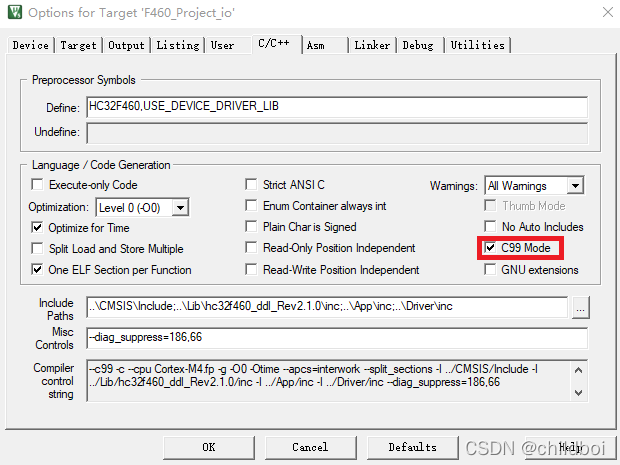
1. error: #29: expected an expression
1. Error in compiling the following statement
for(int i=0; i<16; i++)
2. MDK uses C90 by default. It can support C99 after configuration. Modify it according to the following figure
2. error: #223-D: function “BSP_CLK_Init” declared implicitly
F460:
After initializing the BSP_CLK_Init function in main.c and calling it in the main function, this error is reported, indicating that the declaration is not legal.
Referring to the following article, I made a declaration at the beginning of main.c to call extern void BSP_CLK_Init(void);
after which the error disappears.
Rman-08137 reports an error when Oracle deletes the archive.
RMAN-08137: warning: archived log not deleted, needed for standby or upstream capture process
archived log file name=/u02/prod/archivelog/1_938000_1004292720.dbf thread=1 sequence=938000
RMAN-08137: warning: archived log not deleted, needed for standby or upstream capture process
archived log file name=/u02/prod/archivelog/1_938001_1004292720.dbf thread=1 sequence=938001
RMAN-08137: warning: archived log not deleted, needed for standby or upstream capture process
archived log file name=/u02/prod/archivelog/1_938002_1004292720.dbf thread=1 sequence=938002
RMAN-08137: warning: archived log not deleted, needed for standby or upstream capture process
archived log file name=/u02/prod/archivelog/1_938003_1004292720.dbf thread=1 sequence=938003
RMAN-08137: warning: archived log not deleted, needed for standby or upstream capture process
archived log file name=/u02/prod/archivelog/1_938004_1004292720.dbf thread=1 sequence=938004
RMAN-08137: warning: archived log not deleted, needed for standby or upstream capture process
archived log file name=/u02/prod/archivelog/1_938005_1004292720.dbf thread=1 sequence=938005
RMAN-08137: warning: archived log not deleted, needed for standby or upstream capture process
archived log file name=/u02/prod/archivelog/1_938006_1004292720.dbf thread=1 sequence=938006
RMAN-08137: warning: archived log not deleted, needed for standby or upstream capture process
archived log file name=/u02/prod/archivelog/1_938007_1004292720.dbf thread=1 sequence=938007
The error message shows that the archive to be deleted cannot be deleted because the backup database still needs to be deleted. Check the archive number applied to the backup database
SQL> select open_mode,database_role from v$database;

OPEN_MODE                           DATABASE_ROLE
----------------------------------- ------------------------------------------------
READ ONLY WITH APPLY                PHYSICAL STANDBY

SQL> select process,sequence# from v$managed_standby;

PROCESS                      SEQUENCE#
--------------------------- ----------
DGRD                                 0
ARCH                            939246
DGRD                                 0
ARCH                            939252
ARCH                            939248
ARCH                            939253
RFS                                  0
MRP0                            939254
DGRD                                 0
RFS                                  0
RFS                                  0
Deleting 938000 from the main database shows that the standby database still needs to be, and the standby database query has been applied to the 939254 archive
query the status of the standby database on the primary database:
SQL> select open_mode,database_role from v$database;

OPEN_MODE                                     DATABASE_ROLE
--------------------------------------------- ------------------------------------------------
READ WRITE                                    PRIMARY

SQL> select dest_name,PROTECTION_MODE,GAP_STATUS,APPLIED_THREAD#,APPLIED_SEQ# from gV$ARCHIVE_DEST_STATUS where type='PHYSICAL';

DEST_NAME                 PROTECTION_MODE                                              GAP_STATUS                APPLIED_THREAD# APPLIED_SEQ#
------------------------- ------------------------------------------------------------ ------------------------- --------------- ------------
LOG_ARCHIVE_DEST_2        MAXIMUM PERFORMANCE                                          RESOLVABLE GAP                          1       939258
The main library shows that the backup library has GAP and the status is RESOLVABLE_GAP
Through the related information query, the solution is:
Issue the following SQL statement at the primary database:
SQL> ALTER SYSTEM FLUSH REDO TO <target_db_name>;
target_db_name is the db_unique_name of the backup database
View the backup db_unique_name
SQL> select open_mode,database_role from v$database;

OPEN_MODE                           DATABASE_ROLE
----------------------------------- ------------------------------------------------
READ ONLY WITH APPLY                PHYSICAL STANDBY

SQL> show parameter db_unique_name

NAME                                 TYPE                              VALUE
------------------------------------ --------------------------------- ------------------------------
db_unique_name                       string                            standby
Discuss the downtime with the business and restart the production database to mount status
SQL> select open_mode,database_role from v$database;

OPEN_MODE                                     DATABASE_ROLE
--------------------------------------------- ------------------------------------------------
MOUNTED                                          PRIMARY

SQL> ALTER SYSTEM FLUSH REDO TO standby;

System alted.

SQL> alter database open;

 Database alted.
Query gap status of Zhu Bei database on the main database
SQL> select open_mode,database_role from v$database;

OPEN_MODE                                     DATABASE_ROLE
--------------------------------------------- ------------------------------------------------
READ WRITE                                    PRIMARY

SQL> select dest_name,PROTECTION_MODE,GAP_STATUS,APPLIED_THREAD#,APPLIED_SEQ# from gV$ARCHIVE_DEST_STATUS where type='PHYSICAL';

DEST_NAME                 PROTECTION_MODE                                              GAP_STATUS                APPLIED_THREAD# APPLIED_SEQ#
------------------------- ------------------------------------------------------------ ------------------------- --------------- ------------
LOG_ARCHIVE_DEST_2        MAXIMUM PERFORMANCE                  NO GAP                          1       939258
GAP_STATUS is now NO GAP, continue to execute the archive delete command, the deletion is normal
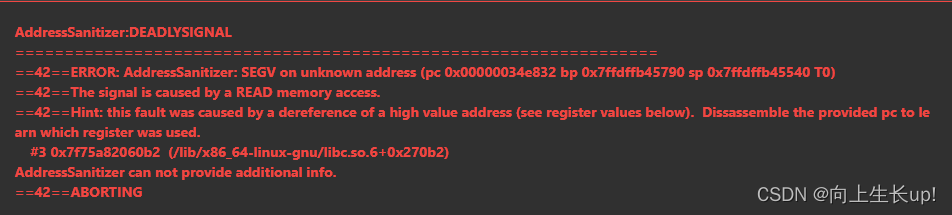
LeetCode Error: AddressSanitizer:DEADLYSIGNAL
AddressSanitizer:DEADLYSIGNAL
AddressSanitizer:DEADLYSIGNAL
42ERROR: AddressSanitizer: SEGV on unknown address (pc 0x00000034e832 bp 0x7ffdffb45790 sp 0x7ffdffb45540 T0)
42The signal is caused by a READ memory access.
42Hint: this fault was caused by a dereference of a high value address (see register values below). Dissassemble the provided pc to learn which register was used.
#3 0x7f75a82060b2 (/lib/x86_64-linux-gnu/libc.so.6+0x270b2)
AddressSanitizer can not provide additional info.
42ABORTING
class Solution {
public:
    bool isValid(string s) {
          int n = s.size();
          if(n % 2 == 1){
              return false;
          }
          unordered_map<char, char> pairs = {
              {')','('},//key value
              {']','['},
              {'}','{'}
          };
          stack<char> stk;
          for(char ch:s){
              if(pairs.count(ch)){//Intrinsically check whether the pairs have elements with the given key ch
                  if(stk.top() != pairs[ch] || stk.empty()){
                      return false;
                  }
                  stk.pop();
              }else{
                  stk.push(ch);
              }
          }
          return stk.empty();
    }
};
Error reporting:
modification:
if(stk.empty() || stk.top() != pairs[ch])