Category Archives: Linux

Set the cursor of Ubuntu terminal to turn on automatic display

directory
Terminal cursor disappearance causes echo and hide cursor methods boot automatic echo cursor summary

The reason the terminal cursor disappears
When I was using the Ubuntu subsystem terminal, the cursor would often disappear after a single action. Now I suddenly found the reason for the switch between Chinese and English input. When I just entered the terminal, because it was Chinese input, I did not pay attention to typing a few words, so I switched to English with shift casually, and then the cursor disappeared. If you want to retrieve the cursor, press shift to switch the input method to see the cursor.
Echo and hide cursor methods

# Hide the cursor
echo -e "\033[?25l"

# Show cursor
echo -e "\033[?25h"

Power on auto echo cursor
I mainly encountered the following problems in the process of using the Ubuntu subsystem. Although the above command can be normally displayed back to the cursor each time, once the terminal is closed, the cursor is not opened again, so I need to continue typing the above command, but it is very troublesome to go one after another, so I have the following solution ideas.
write shell script, named cursor_show.sh :

#!/bin/bash

echo -e "\033[?25h"

Set automatic startup execution, /etc/init.d/ directory is stored in the program of automatic startup execution:

>$ chmod +x cursor_show.sh
>$ sudo mv cursor_show.sh /etc/init.d/cursor_show.sh

conclusion
This is my personal solution to the ubuntu subsystem, but if you have the same problem on other Linux systems, try it.

Android converts a view to bitmap + to handle the black edge of the view with rounded corners

Recently, the company has been working on a poster production function, which is to write a layout and plug in various data locally, and then save the whole layout as an image to the phone, so you need to turn a view into a bitmap.
Convert a View into a Bitmap

public static Bitmap createBitmapFromView(View view) {
      //If the ImageView is getting directly
        if (view instanceof ImageView) {
            Drawable drawable = ((ImageView) view).getDrawable();
            if (drawable instanceof BitmapDrawable) {
                return ((BitmapDrawable) drawable).getBitmap();
            }
        }
        view.clearFocus();
        Bitmap bitmap = Bitmap.createBitmap(view.getWidth(), view.getHeight(), Bitmap.Config.ARGB_8888);
        if (bitmap != null) {
            Canvas canvas = new Canvas(bitmap);
            view.draw(canvas);
            canvas.setBitmap(null);
        }
        return bitmap;
}

The above method can be used to turn a view into a bitmap, which can meet the needs of most people
However, in my actual development, the layout had rounded corners, and all the pictures saved by this method were filled with black. After trying many methods, I finally solved my problem by drawing a background color with canvas. The code is as follows.
Handle the black edge of the rounded View

  public static Bitmap createBitmapFromView(View view) {
        if (view instanceof ImageView) {
            Drawable drawable = ((ImageView) view).getDrawable();
            if (drawable instanceof BitmapDrawable) {
                return ((BitmapDrawable) drawable).getBitmap();
            }
        }
        view.clearFocus();
        Bitmap bitmap = Bitmap.createBitmap(view.getWidth(), view.getHeight(), Bitmap.Config.ARGB_8888);
        if (bitmap != null) {
            Canvas canvas = new Canvas(bitmap);
            canvas.drawColor(Color.WHITE);//Here you can change to other colors
            view.draw(canvas);
        }
        return bitmap;
    }

Vue uses localstorage and sessionstorage to store data

What is localStorage
For browsers, using Web Storage to store key values is more intuitive than storing cookies, and has a larger capacity, which includes two types: localStorage and sessionStorage

    sessionStorage (temporary storage) : maintains a storage area for each data source that exists during browser opening, including page reloading of localStorage (long-term storage) : the same as sessionStorage, but the data will still exist

after the browser is closed
Ii. Usage
Note: The usage of sessionStorage and localStorage is basically the same. The value of the reference type needs to be converted to JSON, so only localStorage is listed here
1 save

//object
const info = { name: 'hou', age: 24, id: '001' };
//String
 const str="haha";
localStorage.setItem('hou', JSON.stringify(info));
localStorage.setItem('zheng', str);
 const str="haha";
localStorage.setItem('hou', JSON.stringify(info)); 
localStorage.setItem('zheng', str);

2 for

var data1 = JSON.parse(localStorage.getItem('hou'));
 
var data2 = localStorage.getItem('zheng');

3 remove

//detel one
 
localStorage.removeItem('hou');
//Detel all
localStorage.clear();

4 listening

Storage Triggered when a change (add, update, delete) occurs, changes on the same page will not be triggered, but will only listen for changes on other pages in the same domain. Storage
window.addEventListener('storage', function (e) {
  console.log('key', e.key); console.log('oldValue', e.oldValue);
  console.log('newValue', e.newValue); console.log('url', e.url);
})

5. Practice in VUE
A default based on what I want to do, remember what I did last time, very simple
when I add data, remember what I did last time
when I add or commit,

localStorage.setItem('projectId',me.workhourData.projectId+","+me.workhourData.projectManager);

Just grab it when you open the new page, and just make sure it’s not empty

//Remember the last selected auditor
            if(localStorage.length>0){
                var mydata = localStorage.getItem('projectId');
                if(mydata!=null){
                    var arr3=mydata.split(",");
                    if(arr3[0]==me.workhourData.projectId){
                        me.workhourData.projectManager=arr3[1];
                    }
                }
            }

Note 6 points

The localStorage expiration date is permanent. The average browser can store around 5MB. The sessionStorage API is the same as localStorage.
sessionStorage defaults to the session time of the browser (that is, after the TAB closes, it disappears).
localStorage scope is the protocol, hostname, port.
sessionStorage scope is window, protocol, hostname, port.
once you know these points, your problem will be solved easily.
localStorage is on the window. So you don’t need to write this.localstorage, in vue if you write this, it means the vUE instance. complains

Installation, Configuration and Simple Use of Rancher

Container choreography platform Ranche
Ranche is an open source enterprise-class full stack container deployment and management platform, host management, load balancing, firewalls, and more
Rancher Quick start
The

    1. installation rancher
# Download rancher
docker pull rancher/server

# Create the rancher container
docker run -d --name=myrancher -p 9091:8080 rancher/server

# View Brancher Logs
docker logs -f myranche

# Access
http://ip:9091/

Configure the environment

1. Top left corner default-->Environment Management-->Go to the Environment Add page.
2. Set the environment name and description, and check the template.
    Example: pro, production environment, Cattle template

Add the host

1. Go inside an environment.
2.Click Add Host
3. Confirm the ip where the current rancher is located.
4. Fill in the IPs of all hosts to be managed.
5. Copy the instructions for registering the rancher to each host.
6. After the command is executed, refresh the list of hosts waiting to be displayed in the brancher.

Showing active means that the current state of the server is available, if it is red or shows reconnecting, then it is reconnected.

New application adds service container based on application

Rancher operates capacity expansion
Select the application, enter the list of containers under the application, and select the container to be expanded. After entering the application, directly click the + sign on the right menu to enlarge the container to be expanded. When creating the container to be expanded, the port number cannot be specified, otherwise it cannot be expanded
Rancher load balancing
The container can be expanded without specifying a port number, which requires access, and which can be used for load balancing

    click apply, enter the container list page and click the add load balancer button in the upper right corner, fill in the following order: name, description, [exposed] port, target, [container] port load balancer container startup time is very long, please be patient, please pay attention to open redis mapping port, otherwise you cannot access

Demo service upgrade [without notice]

    modify the code on the git commit to git using Jenkins find build tasks, click build immediately rancher to apply the service list, click update icon, check the first start after stop click ok in the process of upgrading, page access page before may be, it is possible that the page after only when all the upgrade is complete, all new service starts, the old service all stop, click on the icon in the top right corner of the upgrade completed again, it will delete all service, the upgrade is done

You might want to save ‘/run/in itramf s/rdsosreport.txt“ to a USB stick or bootaf ter mounting

Error when VMware starts CenTOS virtual machine:

Enter ing emergency mode. Exit the shell to cont inue .

Type " journalctl" to view system logs .

You might want to save ' /run/ in itramf s/rdsosreport. txt" to a USB stick or bootaf ter mounting them and attach it to a bug report .

:/#

Solutions:

xfs_repair /dev/mapper/centos-root -L
then reboot

Nginx configuration 80 can be accessed by forcing jump 443 or not

In our production configuration, we did not configure the configuration of 80 mandatory jump 443
configuration as follows

server {
  listen 80 default_server;
  listen 443 ssl;
  server_name domain;
  server_name_in_redirect off;
  ssl_certificate /etc/nginx/ssl/full_chain_rsa.crt;
  ssl_certificate_key /etc/nginx/ssl/证书.key;
  ssl_ciphers ECDHE-RSA-AES128-GCM-SHA256:ECDHE:ECDH:AES:HIGH:!NULL:!aNULL:!MD5:!ADH:!RC4:!DH:!DHE;
  ssl_protocols TLSv1 TLSv1.1 TLSv1.2;
}

There is also a forced jump to do

server {
    listen 80;
    server_name www.domain.com;
    rewrite ^(.*)$ https://${server_name}$1 permanent; 
}
server {
    listen 443;
    server_name www.domain.com;
    root /home/wwwroot;
    ssl on;
    ssl_certificate /etc/nginx/certs/server.crt;
    ssl_certificate_key /etc/nginx/certs/server.key;
    ....
}

The prefix “mvc” for element “mvc:view-controller” is not bound

In the Spring configuration file, the DispatcherServlet-servlet.xml configuration is as follows.

<!-- Configuring the interface for direct forwarding ->
    <! -- can respond directly to forwarded pages without having to go through Handler's methods. -->
    <mvc:view-controller path="/success" view-name="success" />

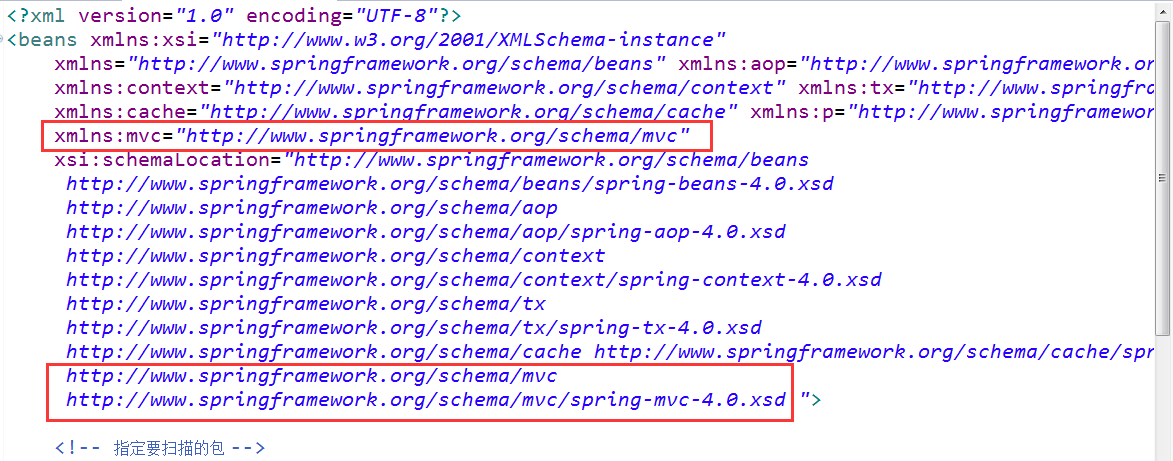
The following error usually occurs at this time:

The solution

xmlns:mvc="http://www.springframework.org/schema/mvc"

xsi:schemaLocation="
    http://www.springframework.org/schema/mvc
    http://www.springframework.org/schema/mvc/spring-mvc-4.0.xsd"

How to Use Apt get Command Under Mac OSX

Since I have been in contact with the Ubuntu system before, I am quite familiar with the command sudo apt-get install XXX for a convenient installation software package. I have always felt that Mac is also a Linux system and there should be little difference between Ubuntu. However, today, when using the command sudo apt-get install libxml2, the Mac system reported -bash:apt-get:command not found. Later, I found out that the original apt-get is debian(Ubuntu) package manager, so I continued to query the solution.
Solution 1: Brew is used instead of Apt-GET
What is brew?
Homebrew is a software package management tool on Mac OSX that can be easily installed or uninstalled on the Mac.
How to install?
All you need to do to install is type the following command on the terminal (the Mac comes with Ruby and you don’t need to install it)

ruby -e "$(curl -fsSL https://raw.githubusercontent.com/Homebrew/install/master/install)"

After installation, use brew install libxml2. For more brew features, please use brew --help to view its help documentation.
Solution 2: Fink
What is Fink?
The Fink project hopes to bring a variety of open source software on Unix to the Darwin and Mac OS X platforms. We modified Unix software to compile and run (” port “) on Mac OS X, and provided a convenient distribution system so that everyone could download and use it. Fink USES tools in Debian such as DPKG and Apt-get to provide powerful binary package management. (The above content is from Fink’s official website)
How to install?
1. Open the following link to find the installation method of the corresponding version of OSX
http://www.finkproject.org/download/srcdist.php?PhpLang =zh
my system version is 10.10.3
can be in the upper left corner of the system apple -> About the local view system version
terminal input

More/System/Library/CoreServices/SystemVersion plist output

& lt; key> ProductVersion< /key>
< string> 10.10.3 & lt; /string>

2. Install
As mentioned in the link above, there are two ways to install version 10.10, one is to use a script provided by Fink for automatic installation, and the other is to download the zip for manual installation. I chose the first method, easy and quick 🙂

this address is a github address, I am not familiar with github, I have not found the way to download this file directly –So when I got to the link, I chose to copy the code and pasted it into a file called Install_Fink

chmod +x ./Install_Fink  // Modify the file as an executable
./Install_Fink  // Run the File

The script then checks to see if there are pre-installed xcode-select /Java/XQuartz programs in the system, without prompting for installation, and prompts you to continue by clicking any key or to exit by using Ctrl+ C and entering a password during the run. When the script downloads the Fink installation, it will be prompted with some configuration options. If it is not clear, Enter directly USES the default configuration or selects Y.
our prompt you to some basic installation is complete we lift upgrade has been completed, please run fink update – all take a look at what other have not upgraded, you may find this time after the input prompt can not find fink this command, if in the previous tip configuration Path when you don’t have refused to him, then only need to restart the terminal fink can use before ~ if you turned him down, and run which fink command what all can’t find the words, So you can run the Shell script /sw/bin/pathsetup.sh to configure the Path 🙂
(2) download the installed package
this method I don’t have a try, the installation process and order is the same as the script, specific please refer to the above gives a version of the installation address, probably look at the main steps include install xcode – select – & gt; Decompression package — & GT; Run./the bootstrap – & gt; Set the Path – & gt; Download the description file and the patch
After the installation is complete in terminal input sudo apt - get the install libxml2 </ code> surprise you will find that you can use ~ another Fink is not only a package manager, it also provides many other functions, so far I haven't to explore XD, another during installation to download command select features to install, I don't have to explore deeply ~ everything is waiting for you to read a text to dig too ~ if you have any questions about this article can give me a message, I will try my best to help solve ^. ^

CentOS/RHEL 7: How to Reinstall GRUB2 from Rescue Mode (EFI)

CentOS/RHEL 7 now includes GRUB2 which uses a new way of installing to the MBR of your boot device. You may have to reinstall the GRUB2 bootloader if your system is not bootable after a failure. In order to reinstall GRUB2 you have to boot into rescue mode. Follow the steps below to boot into rescue mode and reinstall GRUB2 bootloader.
Booting into rescue mode and reinstalling GRUB2
1. Boot from the RHEL7 installation DVD by altering the boot order in Bios and selecting DVD media as the first booting preference.
Note : Older version of RHEL 7 DVD will not work here. So make sure you have latest version RHEL 7 DVD with you.
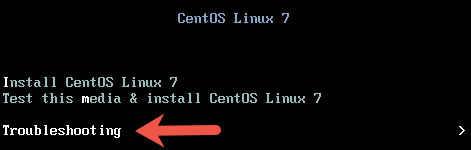
2. At the boot screen, Select the Troubleshooting option at the end of the screen.


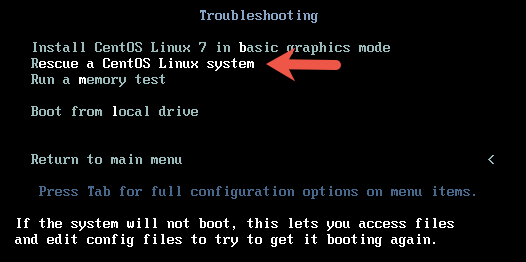
3. At the next screen, select the option Rescue a CentOS Linux system.

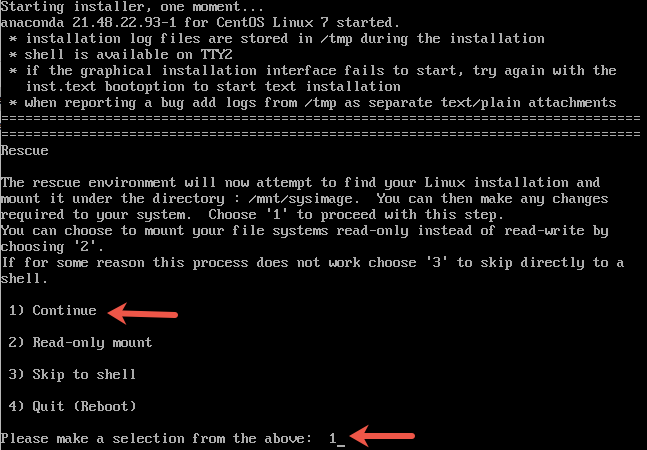
4. On the next screen, press enter to continue. When asked if you would like Rescue to find your installation, choose Continue.

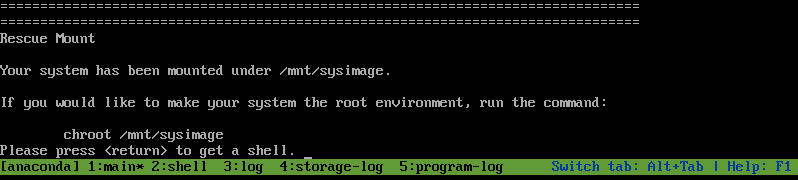
If you run into trouble detecting your install, retry using the Skip option and manually detect and mount your storage. You would get a message shown in the picture below if the rescue mode has detected the correct installation.

5. Next step is to change your root directory to /mnt/sysimage using the chroot command. This makes your system the root environment.

# chroot /mnt/sysimage

6. Use the grub2-install command to re-write the MBR to your boot device. The boot device is usually /dev/sda.

# grub2-install /dev/sda

You should get a successful installation message as shown below.

To reboot the system first exit from the chroot environment and the run reboot command.
Reinstalling grub2 on UEFI-based machines
If you are on an UEFI-based machine, make sure you add the below 2 steps as well before you re-install GRUB2 using “grub2-install” command.
1. If the EFI System Partition has been recreated or damaged, these files can be recovered by reinstalling the grub2-efi, grub2-efi-modules and shim packages.

# yum reinstall grub2-efi grub2-efi-modules  shim

2. If /boot/efi/EFI/redhat/grub. cfg has been removed or damaged, it can be restored with the following command:

# grub2-mkconfig -o /boot/efi/EFI/redhat/grub.cfg

Filed Under: CentOS/RHEL 7, Linux
Some more articles you might also be interested in …

    lvcreate/lvremove Failed with Error “Can’t remove merging snapshot logical volume”CentOS/RHEL : How to configure vsftpd to use ports other than the default ports 20 and 21How to shrink root filesystem on CentOS/RHEL 6How to Move Swap From Disk Partition to LVM Volume in LinuxCentOS/RHEL LVM : Backing Up Volume Group MetadataCentOS/RHEL 7 : How to install and configure ftp server (vsftpd)CentOS/RHEL 7 : systemctl replacements of legacy commands service and chkconfigHow to Enable/Disable CPUs (Limiting CPU count) in CentOS/RHELHow to Create a Custom Log File Rotation by logrotate in LinuxHow to Remove/ Disable Bash shell Command History on Linux

How to Download APK Files from Google Play Store

Evozi, an Android app developer, offers a one-click online APK download app that lets you download the APK installed of any Android app that’s listed on the Google Play store. The downloader app can be accessed at apps.evozi.com.
To get started, enter the web URL of any app listed on the Google Play store and click the “Generated Download Link” button. The APK download app will fetch the APK file from the Google Play store and will host it on its own servers from where you downlaod the file.
Since the APK files are directly fetched from the Google Play Store, it’s unlikely that the Android App will be infected with any malware. Also, to prevent app piracy, the APK downloader only lets you download free apps and games from the Google Play store, not the paid ones.
http://www.labnol.org/internet/download-apk-from-google-play/28303/


The difference between removeall() and clear() in ArrayList

The difference between removeAll() and clear() in ArrayList

boolean removeAll(Collection<?> c)
Remove all elements of a given collection from the list (optional action).

removeAll(Collection< ?> C) can pass a Collection type parameter, which is intended to clear the current list with all the elements contained in the passed Collection. That is to say, removeAll is actually an operation that first intersects with c and then fills.
And clear() clears all the elements in the current list. Although the names are somewhat similar, they are actually completely different operations.
Note:

    1. removeAll is similar to retainAll by taking the intersection of the current list and the incoming Collection. That is to say, the current list does not necessarily contain all the elements of the incoming Collection. The incoming Collection may contain some elements that are not in the current list, but it does not affect the work of removeAll and retainAll. Most collections can use these two methods and pass the Collection as a parameter, not just to List or ArrayList, but to be aware of element type compatibility. RemoveAll removes all elements from the current list that intersect with the passed Collection, rather than just removing the first element from the list, as removeAll does. So, when you want to removeAll the element a from the list, you can use removeAll:
arrayList.removeAll(new ArrayList<Integer>(Arrays.asList(a)));

RetainAll is similar to removeAll in that when an element a is included in the passed Collection, multiple a’s in the list retain both removeAll and retainAll’s behavior depending on the equals() method. You must be aware of the changes

‘s behavior when using
The attached:

boolean retainAll(Collection<?> c)
Keep only those elements of this collection that are also included in the specified collection (optional action). In other words, remove all elements from this collection that are not included in the specified collection.