Category Archives: Linux

[Nginx] Solve the problem of being blocked by CORS policy: No’Access-Control-Allow-Origin’ header is present on the requested resource.

When a cross-domain request interface is required, it will appear

been blocked by CORS policy: No’Access-Control-Allow-Origin’ header is present on the requested resource.

It can be solved in code or directly in nginx

Similar to the code deployed by GOFLY under nginx

Just add the header header

                add_header Access-Control-Allow-Origin * ;
                add_header Access -Control-Allow-Methods ' GET, POST, OPTIONS ' ;


server{
       listen 80 ;
        server_name gofly.sopans.com;
        access_log   / var /log/nginx/ gofly.sopans.com.access.log main;
        location / static {
                root / var /www/html/go-fly; // Own deployment path 
        }        
        location / {
                add_header Access -Control-Allow-Origin * ;
                add_header Access -Control-Allow-Methods ' GET, POST, OPTIONS ' ;
                proxy_pass http: // 127.0.0.1:8081; 
                    proxy_http_version 1.1 ;
                    proxy_set_header X -Real- IP $remote_addr;
                    proxy_set_header Upgrade $http_upgrade;
                    proxy_set_header Connection " upgrade " ;
                    proxy_set_header Origin "" ;
        }
}

[Linux] ps+awk +while View process memory usage in real time

Sometimes you need to see how much memory the process occupies

You can use my shell, you can view each process you want to see and the total memory

The red part is my process, here you can come according to your needs

while true;do clear;date;ps aux|grep go-fly-pro |grep -v grep|awk’BEGAIN{sum=0}{sum+=$6;print $6/1014 “M” “\t” $0;} END{print “sum:” sum/1024 “M”}’;sleep 1;done


This sentence is to check the process memory of my online customer service, which accounts for a total of 45M, and the main work child process accounts for 29M

[SSH error] ssh_exchange_identification: read: Connection reset by peer

When logging in remotely, the following error occurred in ssh root@xxxxxxxxx

ssh_exchange_identification: read: Connection reset by peer

Solution: Log in to the remote server to change the configuration file and add

[root@localhost ~]# vi /etc/ hosts.allow
########################

##Allow all ip hosts to be able to connect to this machine·
sshd: ALL 

[root@localhost ~]# systemctl restart sshd

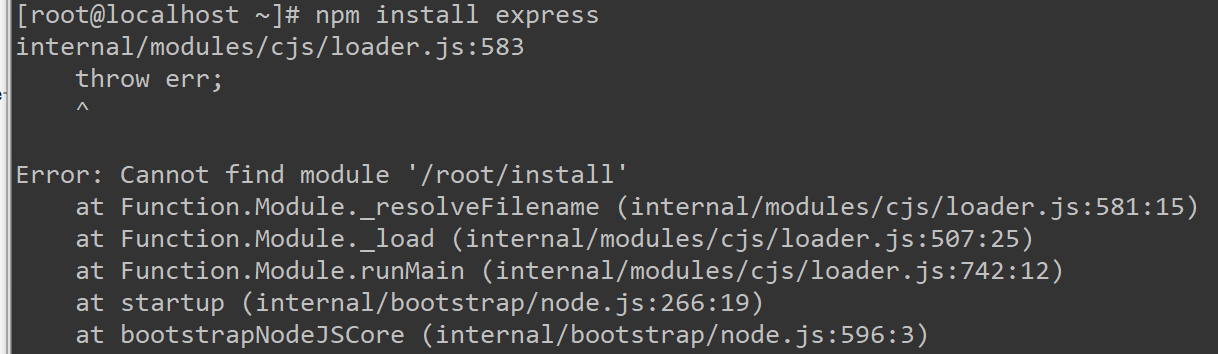
Configure the node environment under Linux, internal/modules/cjs/loader.js:583 throw err; solution

When installing node using the direct deployment method, internal/modules/cjs/loader.js:583 appears

After downloading the node package and decompressing it, establish a soft connection

Configure node
ln -s /root/node-v10.16.3-linux-x64/bin/node /usr/local/bin/node

Configure npm
ln -s /root/node-v10.16.3-linux-x64/bin/npm /usr/local/bin/npm

But when using npm install “XX”, I got a crazy error. I saw that it was an error when establishing a soft connection on the Internet.
Error: Cannot find module’/root/install’

Solution:
ln -sf /root/node-v10.16.3-linux-x64/bin/npm /usr/local/bin/npm

OK, solve

Install and start the tftp-server server and possible solutions to Redirecting to /bin/systemctl restart xinetd.service problems

1) First, check the tftp-server installed on the server
        using the command: rpm -qa | grep tftp-server
        If there is an installed tftp, it will be listed here
2) Install tftp-server and xinetd
        using the following commands to perform corresponding services Installation:
        $yum -y install tftp-server
        $yum -y install xinetd
3) Modify the tftp configuration file
    using the following command:
        $vi /etc/xinetd.d/tftp Open the configuration file
        service tftp
        {
            socket_type = dgram
            protocol = udp
            wait = yes
            user = root
            server = /usr/sbin/in.tftpd
            server_args = -s /var/lib/tftpboot
            disable = no //The place that needs to be modified, the initial time is yes
            per_source = 11
            cps = 100 2
            flags = IPv4
        }
4) To restart the service,
        use the following command to restart the service
        $/bin/systemctl restart xinetd.service
        If it does not work, use the following command
        $/bin/systemctl enable xinetd.service / /Start the service
        $/bin/systemctl start xinetd.service //Start the service to
        view the service startup status
        $ps aux | grep xinetd or $ps -ef|grep xinetd or ps -a | grep tftp
5) Possible problems
        5.1) In When starting xinetd.service, it prompts
            Redirecting to /bin/systemctl restart xinetd.service
            Failed to issue method call: Unit xinetd.service failed to load: No such file or directory.
            Help system is not installed xinetd, the need to use yum -y instal xinetd.service serving install
        5.2) occurs when you start xinetd.service:
            Redirecting to / bin / systemctl restart xinetd.service
            command may be initiated systemctl restart xinetd.service
            more These are the steps I took to install tftp and some of the problems I encountered. Maybe the reader has other problems during the installation process, but the problem should not be big.

6) xinetd started successfully, you can check the running status of xinetd

         netstat -tnlp 

The solution to the crash loop back off error of coredns in k8s deployment

The solution to the crash loop back off error of coredns in k8s deployment

Problem description

Before doing the project, we need to use k8s to build a cluster. I’m a novice Xiaobai, and I’m going to do it step by step according to the online building steps (refer to the link website for the deployment process)
when I check the status of each pod in the cluster, I find that coredns has not been started successfully, and has been in the crashloopback off state, falling into the dead cycle of non-stop error restart

[root@k8s-master a1zMC2]# kubectl get pods -n kube-system
NAME                                 READY   STATUS             RESTARTS   AGE
coredns-bccdc95cf-9wd9n              0/1     CrashLoopBackOff   19         19h
coredns-bccdc95cf-qsf9f              0/1     CrashLoopBackOff   19         19h
etcd-k8s-master                      1/1     Running            3          19h
kube-apiserver-k8s-master            1/1     Running            3          19h
kube-controller-manager-k8s-master   1/1     Running            11         19h
kube-flannel-ds-amd64-sgqsm          1/1     Running            1          16h
kube-flannel-ds-amd64-swqhf          1/1     Running            1          16h
kube-flannel-ds-amd64-tnbmc          1/1     Running            1          16h
kube-proxy-259l8                     1/1     Running            0          16h
kube-proxy-qcnpt                     1/1     Running            0          16h
kube-proxy-rp7qx                     1/1     Running            3          19h
kube-scheduler-k8s-master            1/1     Running            11         19h

Solutions

Check the log file of coredns. The content is as follows

[root@k8s-master a1zMC2]# kubectl logs -f coredns-bccdc95cf-9wd9n -n kube-system
E0512 01:59:03.825489       1 reflector.go:134] github.com/coredns/coredns/plugin/kubernetes/controller.go:317: Failed to list *v1.Endpoints: Get https://10.96.0.1:443/api/v1/endpoints?limit=500&resourceVersion=0: dial tcp 10.96.0.1:443: connect: no route to host
log: exiting because of error: log: cannot create log: open /tmp/coredns.coredns-bccdc95cf-9wd9n.unknownuser.log.ERROR.20210512-015903.1: no such file or directory

再通过kubectl describe pod coredns-bccdc95cf-9wd9n -n kube-system命令查看详情

Events:
  Type     Reason            Age                  From                 Message
  ----     ------            ----                 ----                 -------
  Warning  FailedScheduling  16h (x697 over 17h)  default-scheduler    0/1 nodes are available: 1 node(s) had taints that the pod didn't tolerate.
  Warning  Unhealthy         15h (x5 over 15h)    kubelet, k8s-master  Readiness probe failed: Get http://10.244.0.2:8080/health: net/http: request canceled while waiting for connection (Client.Timeout exceeded while awaiting headers)
  Warning  Unhealthy         15h (x5 over 15h)    kubelet, k8s-master  Liveness probe failed: Get http://10.244.0.2:8080/health: net/http: request canceled while waiting for connection (Client.Timeout exceeded while awaiting headers)

I feel that there should be a problem connecting with the host, so I enter cat/etc/resolv. Conf to view the configuration file. It is found that the nameserver column is not the address of the host master.

With a try attitude, modify it to the IP address of the master node, and then restart docker and kubenet

[root@k8s-master a1zMC2]# systemctl stop kubelet
[root@k8s-master a1zMC2]# systemctl stop docker
[root@k8s-master a1zMC2]# iptables --flush
[root@k8s-master a1zMC2]# iptables -tnat --flush
[root@k8s-master a1zMC2]# systemctl start kubelet
[root@k8s-master a1zMC2]# systemctl start docker

Check the status and find that all pods can work normally!

[root@k8s-master a1zMC2]# kubectl get pods -n kube-system
NAME                                 READY   STATUS    RESTARTS   AGE
coredns-bccdc95cf-9wd9n              1/1     Running   21         20h
coredns-bccdc95cf-qsf9f              1/1     Running   21         20h
etcd-k8s-master                      1/1     Running   4          19h
kube-apiserver-k8s-master            1/1     Running   4          19h
kube-controller-manager-k8s-master   1/1     Running   12         19h
kube-flannel-ds-amd64-sgqsm          1/1     Running   1          17h
kube-flannel-ds-amd64-swqhf          1/1     Running   1          17h
kube-flannel-ds-amd64-tnbmc          1/1     Running   2          17h
kube-proxy-259l8                     1/1     Running   0          17h
kube-proxy-qcnpt                     1/1     Running   0          17h
kube-proxy-rp7qx                     1/1     Running   4          20h
kube-scheduler-k8s-master            1/1     Running   12         19h

Because I haven’t learned the content of cloud computing, there are some mistakes in the blog. Please correct them in the comments area.

How to Solve “Error: source file could not be loaded“ [Ubuntu Use LibreOffice]

#Accident scene

Use libreoffice under Ubuntu to convert txt to PDF. The command is as follows:

libreoffice  --invisible --convert-to pdf   /home/parasaga/resource/testtxt.txt --outdir /home/parasaga/resource/

report errors:

Error: source file could not be loaded

#Causes and Solutions

1. Reason:

To install libreoffice, use the following command:

sudo apt-get install libreoffice-common

In this way, the libreoffice writer module will not be installed, resulting in the above error;

2. Solution:

Install the libreoffice writer module.

sudo apt-get install libreoffice-writer

subprocess installed post-installation script returned error exit status 1

If apt-get has the error “Script returned error exit status 1 after subprocess install”
dpkg:error handling util-linux (-configure):
Script returned error exit status 1 after subprocess install
An error was encountered while processing:
util-linux
E:Subprocess /usr/bin/dpkg returned error code (1)
Go to /var/lib/dpkg/info directory
Delete the stuck package file
apt-get autoclean
apt-get autoremove
apt-get update
apt-get upgrade

How to open X Display on the server side (locally operable remote interface)

The problem is this:
processes some photos on the server, and sometimes you want to look directly at the images on the server. But the server is Ubuntu Server, with no graphical interface. If we use feH, or cv2.imshow(), the error will be reported as follows:
Feh ERROR: Can’t open X display. It is running, yeah?
Solutions:
It should be in the server side ~/.bashrc file

export DISPLAY=localhost=10.0
On the server side the /etc/ssh/ssh_config file should be set to :

Host *
ForwardX11 yes

Use the following parameters when sshing to the server.
ssh -CAXY your-server-name@your-server-ip

Solution to IO error encountered in Rsync: skipping file deletion

Previously it was synchronous:

rsync error: some files/attrs were not transferred (see previous errors) (code 23) at main.c(1650) [generator=3.1.2]

So I add the r and force parameters to the sync script.

# cat mirrors.sh
#!/bin/bash
###End an existing rsync process
killall `ps aux|grep rsync|awk -F" " '{print $11}'`
echo Ending time `date +%F_%H%M%S`                                  >> /tmp/rsync_process.log
echo '###################Ending time ######################' >> /tmp/rsync_process.log
#http://mirrors.ustc.edu.cn/help/rsync-guide.html
URL="rsync://mirrors.tuna.tsinghua.edu.cn"
#URL="rsync://rsync.mirrors.ustc.edu.cn/repo"
rsync -ravzPH --delete  --force                $URL/centos/ /data/centos/ >> /tmp/rsync_centos.log 
rsync -ravzPH --delete  --force                $URL/epel/   /data/epel    >> /tmp/rsync_epel.log   
#rsync -avzPH --delete                  $URL/ceph/ /data/ceph >> /tmp/rsync_ceph.log
echo Completion time `date +%F_%H%M%S`                                  >> /tmp/rsync_process.log
echo '###################Completion time ######################' >> /tmp/rsync_process.log

IO error and blade file deletion appeared synchronously

[root@mirrors tmp]# tail -f rsync_centos.log
|   Service Provided by                            |
|      neomirrors                                  |
|                                                  |
+==================================================+

 Note: This service is provided with a modified
 version of rsync. For detailed information, please
 visit: https://github.com/tuna/rsync

receiving incremental file list
IO error encountered -- skipping file deletion

Meanwhile another error still exists:

rsync: readlink_stat("7.7.1908/isos/x86_64/.CentOS-7-x86_64-Everything-1908.iso.RjFDl5" (in centos)) failed: Permission denied (13)
rsync error: some files/attrs were not transferred (see previous errors) (code 23) at main.c(1650) [generator=3.1.2]

Taking a closer look at the parameters of rsync, one of the options is:
Delete even if I/O errors occur
(Delete even if I/O error occurs)

[root@mirrors bin]# cat mirrors.sh
#!/bin/bash
###End an existing rsync process
killall `ps aux|grep rsync|awk -F" " '{print $11}'`
echo Ending time `date +%F_%H%M%S`                                  >> /tmp/rsync_process.log
echo '###################Ending time ######################' >> /tmp/rsync_process.log
#http://mirrors.ustc.edu.cn/help/rsync-guide.html
URL="rsync://mirrors.tuna.tsinghua.edu.cn"
#URL="rsync://rsync.mirrors.ustc.edu.cn/repo"
rsync -ravzPH --delete  --force   --ignore-errors             $URL/centos/ /data/centos/ >> /tmp/rsync_centos.log 
rsync -ravzPH --delete  --force   --ignore-errors             $URL/epel/   /data/epel    >> /tmp/rsync_epel.log   
#rsync -avzPH --delete                  $URL/ceph/ /data/ceph >> /tmp/rsync_ceph.log
echo Completion time `date +%F_%H%M%S`                                  >> /tmp/rsync_process.log
echo '###################Completion time ######################' >> /tmp/rsync_process.log

OK, so far there is no error.