Category Archives: JAVA

Error in make when installing redis6.0 in centos7

Install Redis
server system as centos7 on a cloud server, directly look up the address of Redis official website, wget, tar, execute mark command, find error report

             serverLog(LL_NOTICE,"The server is now ready to accept connections at %s", server.unixsocket);
                                                                                              ^
server.c:5103:19: error: ‘struct redisServer’ has no member named ‘supervised_mode’
         if (server.supervised_mode == SUPERVISED_SYSTEMD) {
                   ^
server.c:5104:24: error: ‘struct redisServer’ has no member named ‘masterhost’
             if (!server.masterhost) {
                        ^
server.c:5117:15: error: ‘struct redisServer’ has no member named ‘maxmemory’
     if (server.maxmemory > 0 && server.maxmemory < 1024*1024) {
               ^
server.c:5117:39: error: ‘struct redisServer’ has no member named ‘maxmemory’
     if (server.maxmemory > 0 && server.maxmemory < 1024*1024) {
                                       ^
server.c:5118:176: error: ‘struct redisServer’ has no member named ‘maxmemory’
         serverLog(LL_WARNING,"WARNING: You specified a maxmemory value that is less than 1MB (current value is %llu bytes). Are you sure this is what you really want?", server.maxmemory);
                                                                                                                                                                                ^
server.c: In function ‘hasActiveChildProcess’:
server.c:1476:1: warning: control reaches end of non-void function [-Wreturn-type]
 }
 ^
server.c: In function ‘allPersistenceDisabled’:
server.c:1482:1: warning: control reaches end of non-void function [-Wreturn-type]
 }
 ^
server.c: In function ‘writeCommandsDeniedByDiskError’:
server.c:3747:1: warning: control reaches end of non-void function [-Wreturn-type]
 }
 ^
server.c: In function ‘iAmMaster’:
server.c:4914:1: warning: control reaches end of non-void function [-Wreturn-type]
 }
 ^
make[1]: *** [server.o] Error 1
make[1]: Leaving directory `/usr/src/redis-6.0.1/src'
make: *** [install] Error 2

GCC and other environments have been installed, and the ways of recompiling after clearing compilation information and deleting decompressed files and redecompressing compilation have been tried without improvement. Later, it was found that it was related to the version of GCC

//Check gcc Version
gcc -v

Centos7 default version for 4.8.5
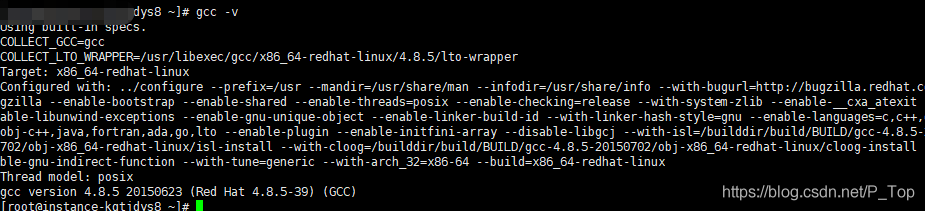
and redis6.0 + need GCC version 5.3 and above, so upgrade GCC can be

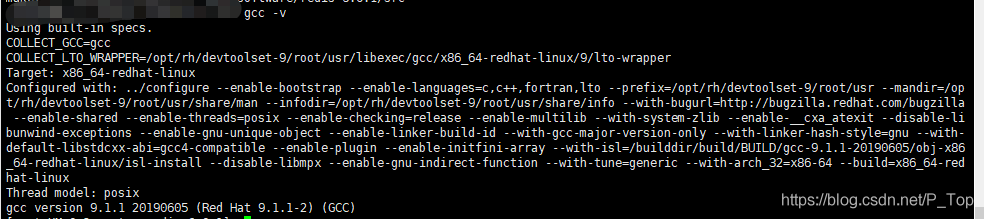
//Upgrade gcc to V9 or high
yum -y install centos-release-scl
yum -y install devtoolset-9-gcc devtoolset-9-gcc-c++ devtoolset-9-binutils

You also need to execute the command

//change the current gcc version to 9
scl enable devtoolset-9 bash
//or change permanetly
echo "source /opt/rh/devtoolset-9/enable" >>/etc/profile
Configuration of springboot + Druid connection pool

# These 4 parameters key without druid can also be used, that is, you can also use the above 4 parameters
spring.datasource.druid.url=jdbc:mysql://localhost:3306/test?useUnicode=true&characterEncoding=utf-8&useSSL=false&serverTimezone=UTC
spring.datasource.druid.username=root
spring.datasource.druid.password=123456
spring.datasource.druid.driver-class-name=com.mysql.jdbc.Driver

# The number of physical connections established at initialization
spring.datasource.druid.initial-size=5
# Maximum number of connection pools
spring.datasource.druid.max-active=30
# Minimum number of connection pools
spring.datasource.druid.min-idle=5
# Maximum wait time in milliseconds when getting a connection timeout link timeout
spring.datasource.druid.max-wait=60000
# Configure how long between detections for idle connections that need to be closed, in milliseconds Timeout for detecting non-core links
# Both as the interval for detection and as the basis for testWhileIdel execution
spring.datasource.druid.time-between-eviction-runs-millis=60000
# Minimum time for a connection to remain idle and not be evicted
spring.datasource.druid.min-evictable-idle-time-millis=300000
# The sql used to check if the connection is valid, requires a query statement 8 hour question 8 hours without communication with mysql mysql will actively close the link
spring.datasource.druid.validation-query=SELECT 1 FROM DUAL
# It is recommended to configure to true to not affect performance and to ensure security. detects when a connection is requested.
# If idle time is greater than min-evictable-idle-time-millis, execute validationQuery to check if the connection is valid.
spring.datasource.druid.test-while-idle=true
# Execute validationQuery when requesting a connection to check if the connection is valid.
spring.datasource.druid.test-on-borrow=false
# Execute validationQuery when returning a connection to check if the connection is valid.
spring.datasource.druid.test-on-return=false
# Whether to cache the preparedStatement, or PSCache, which is a huge performance boost for databases that support cursors, such as oracle.
# For example, oracle. it is recommended to turn it off under mysql. Not mysql side, link side, select * from student query cache

spring.datasource.druid.pool-prepared-statements=true
# To enable PSCache, you must configure it to be greater than 0. When it is greater than 0, poolPreparedStatements automatically triggers a change to true.
spring.datasource.druid.max-pool-prepared-statement-per-connection-size=50

#Tuning related: basically any project performance bottleneck 1.io 2.cpu computing volume
# configure monitoring statistics intercepted filters, after removing the monitoring interface sql can not be counted
spring.datasource.druid.filters=stat,wall

# connectProperties property to open mergeSql function; slow SQL record Slow query: add delete change check
spring.datasource.druid.connection-properties=druid.stat.mergeSql=true;
spring.datasource.druid.filter.stat.slow-sql-millis=1

# Merge monitoring data from multiple DruidDataSource
spring.datasource.druid.use-global-data-source-stat=true
# druid connection pool monitoring
spring.datasource.druid.stat-view-servlet.login-username=admin
spring.datasource.druid.stat-view-servlet.login-password=123
# exclude some static resources for efficiency
spring.datasource.druid.web-stat-filter.exclusions=*.js,*.gif,*.jpg,*.png,*.css,*.ico,/druid/*

Multipartfiletofileutils (multipartfile to file)

import org.springframework.stereotype.Component;
import org.springframework.web.multipart.MultipartFile;
import java.io.File;
import java.io.FileOutputStream;
import java.io.InputStream;
import java.io.OutputStream;

@Component
public class MultipartFileToFileUtils {
    /**
     * MultipartFile 转 File
     *
     * @param file
     * @throws Exception
     */
    public static File multipartFileToFile(MultipartFile file) throws Exception {

        File toFile = null;
        if (file.equals("") || file.getSize() <= 0) {
            file = null;
        } else {
            InputStream ins = null;
            ins = file.getInputStream();
            toFile = new File(file.getOriginalFilename());
            inputStreamToFile(ins, toFile);
            ins.close();
        }
        return toFile;
    }

    //Get the stream file
    private static void inputStreamToFile(InputStream ins, File file) {
        try {
            OutputStream os = new FileOutputStream(file);
            int bytesRead = 0;
            byte[] buffer = new byte[8192];
            while ((bytesRead = ins.read(buffer, 0, 8192)) != -1) {
                os.write(buffer, 0, bytesRead);
            }
            os.close();
            ins.close();
        } catch (Exception e) {
            e.printStackTrace();
        }
    }

    /**
     * Del Local Files
     * @param file
     */
    public static void delteTempFile(File file) {
        if (file != null) {
            File del = new File(file.toURI());
            del.delete();
        }
    }

}

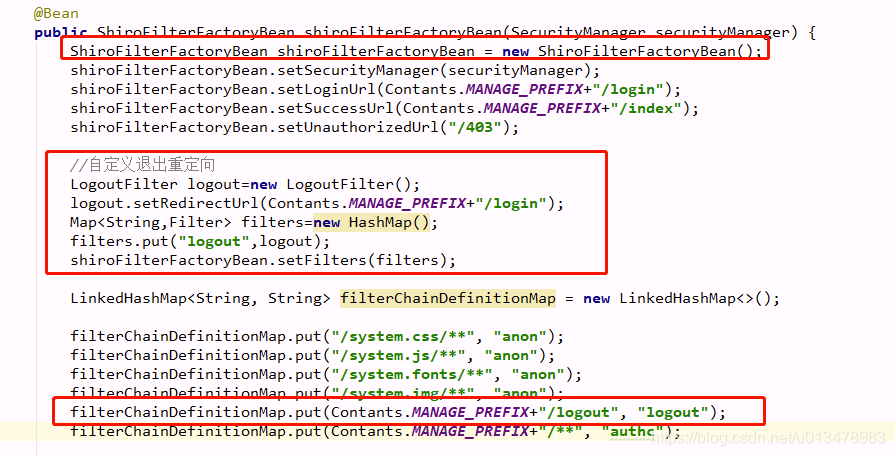
Customize the jump address after Shiro logout

Customize the jump address after Shiro logout
1. Modify the LogoutFilter redirect address

LogoutFilter logout=new LogoutFilter();
logout.setRedirectUrl(Contants.MANAGE_PREFIX+"/login");

2. Modify ShiroFilterFactoryBean’s filters

Map<String,Filter> filters=new HashMap();
filters.put("logout",logout);
shiroFilterFactoryBean.setFilters(filters);

3. Modify the FilterChainDefinitionMap of ShiroFilterFactoryBean

LinkedHashMap<String, String> filterChainDefinitionMap = new LinkedHashMap<>();
filterChainDefinitionMap.put(Contants.MANAGE_PREFIX+"/logout", "logout");


@Bean
public ShiroFilterFactoryBean shiroFilterFactoryBean(SecurityManager securityManager) {
      ShiroFilterFactoryBean shiroFilterFactoryBean = new ShiroFilterFactoryBean();
      shiroFilterFactoryBean.setSecurityManager(securityManager);
      shiroFilterFactoryBean.setLoginUrl(Contants.MANAGE_PREFIX+"/login");
      shiroFilterFactoryBean.setSuccessUrl(Contants.MANAGE_PREFIX+"/index");
      shiroFilterFactoryBean.setUnauthorizedUrl("/403");
//Custom Exit Redirection
LogoutFilter logout=new LogoutFilter();
logout.setRedirectUrl(Contants.MANAGE_PREFIX+"/login");
Map<String,Filter> filters=new HashMap();
filters.put("logout",logout);
shiroFilterFactoryBean.setFilters(filters);

LinkedHashMap<String, String> filterChainDefinitionMap = new LinkedHashMap<>();
filterChainDefinitionMap.put("/system.css/**", "anon");
filterChainDefinitionMap.put("/system.js/**", "anon");
filterChainDefinitionMap.put("/system.fonts/**", "anon");
filterChainDefinitionMap.put("/system.img/**", "anon");
filterChainDefinitionMap.put(Contants.MANAGE_PREFIX+"/logout", "logout");
filterChainDefinitionMap.put(Contants.MANAGE_PREFIX+"/**", "authc");
shiroFilterFactoryBean.setFilterChainDefinitionMap(filterChainDefinitionMap);
return shiroFilterFactoryBean;
}

See the picture below

Android startup page (solve the problem of starting black and white screen)

Android Startup page (solve the problem of starting black and white screen)

The theme

<style name="SplashTheme" parent="Theme.AppCompat.Light.NoActionBar">
    <!-- Background JPG -->
    <item name="android:background">@mipmap/splash_bg</item>
    <item name="android:windowNoTitle">true</item>
    <item name="android:windowFullscreen">true</item>
    <item name="windowActionBar">false</item>
    <item name="windowNoTitle">true</item>
</style>

Layout 1 and 2 choose one
layout 1 and layout 2 choose one
layout 1 and layout 2
Layout 1

<?xml version="1.0" encoding="utf-8"?>
<LinearLayout xmlns:android="http://schemas.android.com/apk/res/android"
    android:layout_width="match_parent"
    android:layout_height="match_parent"
    android:background="@mipmap/splash_bg"
    android:orientation="vertical">

    <RelativeLayout
        android:layout_width="match_parent"
        android:layout_height="0dp"
        android:layout_weight="1"
        android:background="#00000000">

        <!-- logo -->
        <ImageView
            android:layout_width="100dp"
            android:layout_height="100dp"
            android:layout_centerInParent="true"
            android:background="#00000000"
            android:src="@drawable/home_icon" />

    </RelativeLayout>

    <View
        android:layout_width="match_parent"
        android:layout_height="0dp"
        android:layout_weight="1"
        android:background="#00000000" />

</LinearLayout>

Layout 2

<?xml version="1.0" encoding="utf-8"?>
<LinearLayout xmlns:android="http://schemas.android.com/apk/res/android"
    android:layout_width="match_parent"
    android:layout_height="match_parent"
    android:background="@mipmap/splash_bg"
    android:orientation="vertical"/>

Java code

/**
 * Launch page
 */
public class LauncherActivity extends RongRTCBaseActivity {
    private CountDownTimer mTimer = new CountDownTimer(800, 800) {
        @Override
        public void onTick(long millisUntilFinished) {

        }

        @Override
        public void onFinish() {
            Intent intent = new Intent(LauncherActivity.this, LoginActivity.class);
            startActivity(intent);
            // overridePendingTransition(R.anim.act_in, R.anim.act_out);// activity Go to animation
            finish();
        }
    };

    @Override
    protected void onCreate(Bundle savedInstanceState) {
        super.onCreate(savedInstanceState);
        setContentView(R.layout.activity_launcher);
        // Here you can do logo pop-up animation
        mTimer.start();
    }
}

How to Fix Error Caused by: java.util.MissingResourceException: Can‘t find bundle for base name xxx, locale zh_CN

Error reading propertied configuration file appears as follows:
may have a problem:

    uses resourcebundle.getbundle () with a file suffix, such as resourcebundle.getbundle (” jedis.properties “). The path to the.properties configuration file is incorrect.

How to Fix this error:

    drop the suffix, such as resourcebund.getbundle (” jedis “). The JavaSE project configuration files (such as Jedis.properties) need to be placed in the SRC directory, and the JavaWeb project needs to be placed in the Resource directory.

Caused by: java.lang.IllegalStateException (How to Fix)

Post a complete error first

Caused by: java.lang.IllegalStateException: Detected both log4j-over-slf4j.jar AND bound slf4j-log4j12.jar on the class path, preempting StackOverflowError. See also http://www.slf4j.org/codes.html#log4jDelegationLoop for more details.
	at org.slf4j.impl.Log4jLoggerFactory.<clinit>(Log4jLoggerFactory.java:54)
	... 13 more

Then a word about my environment and requirements, my requirement is to use Spark to calculate data in SpringBoot and display it on the front end, here are my Maven dependencies

  <parent>
        <groupId>org.springframework.boot</groupId>
        <artifactId>spring-boot-starter-parent</artifactId>
        <version>1.5.9.RELEASE</version>
    </parent>


    <!--spark-->
    <dependencies>
        <dependency>
            <groupId>org.apache.spark</groupId>
            <artifactId>spark-core_2.11</artifactId>
            <version>2.1.1</version>
        </dependency>

        <dependency>
            <groupId>org.apache.spark</groupId>
            <artifactId>spark-sql_2.11</artifactId>
            <version>2.1.1</version>
        </dependency>

        <!--json-->
        <dependency>
            <groupId>net.sf.json-lib</groupId>
            <artifactId>json-lib</artifactId>
            <version>2.4</version>
            <classifier>jdk15</classifier>
        </dependency>

        <!--springboot-->
        <dependency>
            <groupId>org.springframework.boot</groupId>
            <artifactId>spring-boot-starter-web</artifactId>
        </dependency>

Here I used JSON and made this error because log4j-over-SLf4J and SLf44j-log4J12 are two Jars associated with the Java logging system that can cause a stack overflow exception when they appear together under clasSPath. Because Spring has built-in logging dependencies
Understand the problem and you’ll solve it: Add it to Maven

<!--Global exclusion of all dependencies within spring-boot-starter-logging.-->
        <dependency>
            <groupId>org.springframework.boot</groupId>
            <artifactId>spring-boot-starter-logging</artifactId>
            <exclusions>
                <exclusion>
                    <groupId>*</groupId>
                    <artifactId>*</artifactId>
                </exclusion>
            </exclusions>
        </dependency>

Remove all springboot log dependencies. If you need Springboot logs, manually configure log4j-over-SLf4J and SLf44J-log4J12 to not appear in the classpath at the same time
I hope it helped you

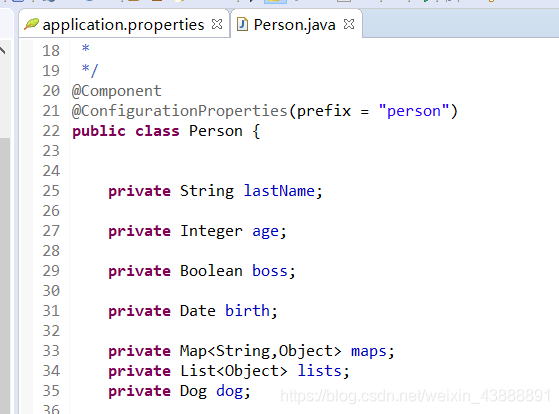
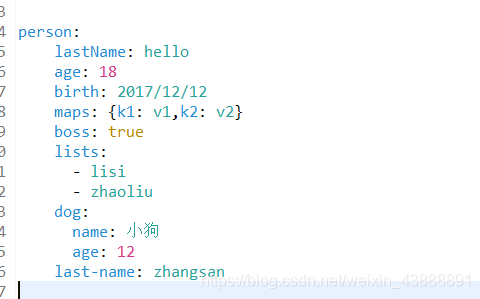
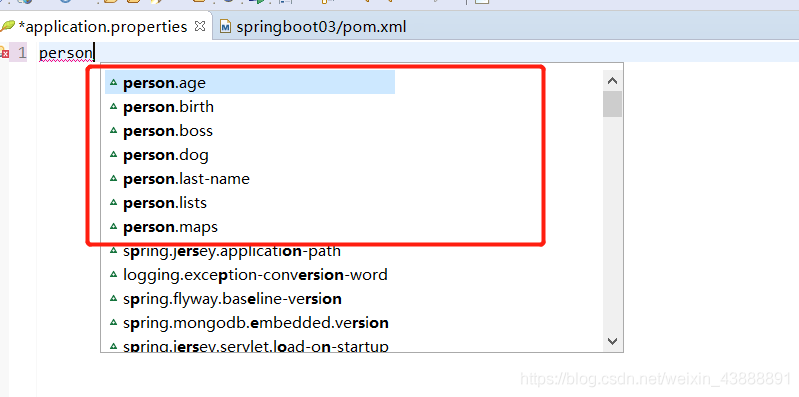
Eclipse relies on spring boot configuration processor, and there is no prompt for writing properties and YML

Problem description:
In eclipse, the Spring-boot-Configuration-Processor dependency has been added to the SpringBoot project through the @configurationProperties (Prefix = “person”) annotation and the YML file for data binding but still does not raise the issue.

<!--Import the configuration file processor, and the configuration file will be prompted for binding.-->
<dependency>
	<groupId>org.springframework.boot</groupId>
	<artifactId>spring-boot-configuration-processor</artifactId>
	<optional>true</optional>
</dependency>

Solution process:
Add the following dependencies

<properties>
	<project.build.sourceEncoding>UTF-8</project.build.sourceEncoding>
	<project.reporting.outputEncoding>UTF-8</project.reporting.outputEncoding>
	<java.version>1.8</java.version>
</properties>

Then update project
right click – “maven-” update project
Maven install
right click – “run as -” maven install

Jtextfield cannot be displayed normally when added to JPanel

JTextField added to JPanel does not display properly.
(There is a problem analysis in the back, after reading will definitely help you solve the problem oh!!)
Code examples:

package CSDN;

import javax.swing.*;

public class JtextjoinJpanel {
    public static void main(String[] args) {
        JFrame f=new JFrame("Text Box Add Panel");
        JPanel jp = new JPanel();
        JTextField jt = new JTextField(). f.setBounds(400,400,500,500); // Set the window position size;

        f.setBounds(400,400,500,500); // set window position size
        jp.setSize(200,200); //set panel size
        jt.setSize(100,100); //set textbox size

        jp.add(jt); //add the text box to the panel
        f.add(jp);

        f.setDefaultCloseOperation(JFrame.EXIT_ON_CLOSE);
        f.setVisible(true);
    }
}

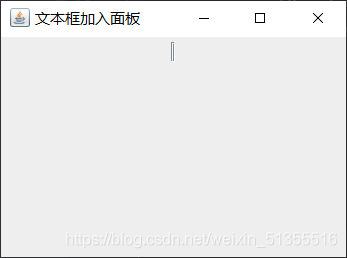
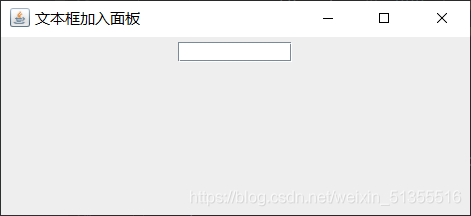
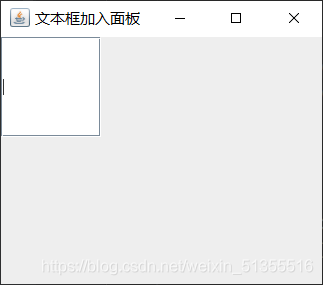
Results:

solution:

    sets textbox parameters.
JTextField jt = new JTextField();
Change to:JTextField jt = new JTextField(10);
    set the panel layout to null.
Add jp.setLayout(null);

Results:


Note :10 means the number of characters that can be entered in a text box.
Reasons for the problem (personal opinion):
Due to the panel USES is flow layout, create a text box, if no input default arguments (string), then the text box default is empty, will cover its flow way, leaving only border (so see like a vertical bar, click can still input characters), if 10 to its input parameters, is equivalent to 10 characters have been input, so will not cover; Not setting it to flow layout also solves the problem.
Therefore, if

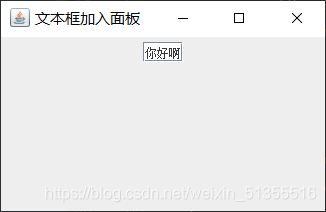
TextField jt = new JTextField();
to TextField jt = new JTextField("Hello");

The result is

JAVA: Random access file is always garbled

This article is based on the possibility that when you use randomAccessFile to read and write a file, you can be sure that the transcoding form is not wrong, but the random code still appears.

package ABC;

import java.io.*;

public class markdown {
	public static void main(String[] argv) {
		try {
			RandomAccessFile br = new RandomAccessFile("D:\\officePC\\onedirve\\OneDrive\\桌面\\1.txt","rw");
			
			String str;
			long position = 0;
			long next_position = 0;
			while((str = br.readLine())!=null) {
				position = br.getFilePointer();
				String str1 = new String(str.getBytes("ISO-8859-1"));
				String str2 = new String("##".getBytes("ISO-8859-1")) + str1;
				br.seek(next_position);
				System.out.println(str2);
				br.write(str2.getBytes());
				br.write(new String("\n").getBytes());
				next_position = position;
			}
			br.close();
		}catch(IOException e) {
			e.printStackTrace();
		}
	}
}

After the above code has executed two loops, this situation occurs:

As you can see, I first read a position, position, and then change each line (add). The length of each line changes, but the memory length of each line does not change, so the system sends its extra characters to the next line, and the next line is overwritten.
solution: you must read the rest in and modify it.

How to Fix COM Surrogate has stopped working in Windows 7


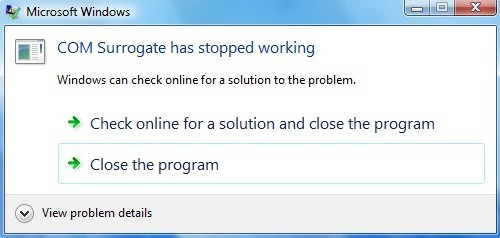
A client of mine started having a strange problem when browsing pictures and videos on his Windows 7 PC: it would popup with the following error message:

COM Surrogate has stopped working


The odd thing was that the error only came up when browsing video or picture files, not any other type of file. After doing some research, we managed to fix the problem, but had to try a couple of different things before it finally worked. In this post, I’ll write out the different possible solutions and hopefully one of them will work for you.
Method 1 – Update Codecs
Obviously since it was a video/picture problem, we thought it could be something with the current set of codecs installed. This client in particular liked to copy and rip stuff, so he had ffdshow installed plus some other codecs. We manually updated all the codecs to their latest versions including ffdshow, Windows 7 Codec Pack and others.  You can download the latest version of Windows 7 Codec Pack here.
If you have DivX or Nero installed on your computer, go ahead and update those to the latest versions too. In some cases, you may have to uninstall a program and then reinstall it later on.
Method 2 – Kaspersky Antivirus
There has been a known issue with Kaspersky antivirus that cases this problem to occur. If you’re using Kaspersky, you need to make sure you update the actual Kaspersky software, not just the antivirus definitions. You can also test to see if this is really causing the issue by disabling the program altogether and seeing if the issue goes away.
Method 3 – Commands
There are a few commands you can try to run in Windows to see if it fixes the problem. You have to run these in the command prompt. Click on Start, type cmd and then right-click and choose Run as Administrator. Now type in the following commands, pressing enter after each one:

regsvr32 vbscript.dll
regsvr32 jscript.dll

That will re-register a few dlls with Windows and possibly fix the COM surrogate error. If not, keep reading!
Method 4 – Check Disk for Errors
If you’re seeing this problem only on a particular drive like an external USB device, then it could be that there are some bad sectors on the hard drive. It’s a good idea to run a chkdsk to make sure the drive is functioning properly. You can read my previous post on how to use the chkdsk utility.
Method 5 – Disable DEP for dllhost.exe
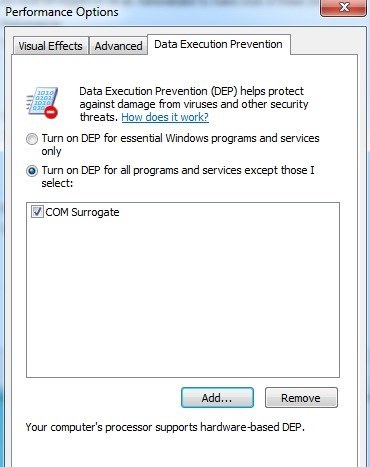
Another fix that has been mentioned numerous times is adding dllhost.exe to the exclusion list for DEP (Data Execution Protection). You can read my previous post on how to turn off DEP in Windows. On the last step in that article, click Add and then add the following exe file in Windows 7 32-bit:

C:\Windows\System32\dllhost.exe

For Windows 7 64-bit, you have to exclude the dllhost.exe file in this path:

C:\Windows\SysWOW64\dllhost.exe


Method 6 – Display/Printer Driver
This can be a little tricky, but if you recently updated a driver for your display or even some other hardware on your computer, try to roll back the driver to the previous version. It’s usually more so with the display driver than anything else. In some cases, updating to the most recent version of the display driver can also fix the issue, so you’ll have to play around with either upgrading the driver or rolling back the driver.
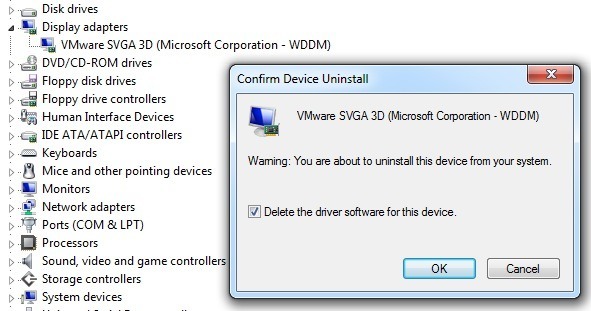
To rollback the display driver, go to Device Manager, expand Display Adapters and then right-click on the display device and choose Uninstall. You’ll see a pop up window where you need to check the Delete the driver software for this device box.

In the same light, you should also check out your printer drivers and update all of them, if updates are available.
Hopefully, one of these methods will fix the COM Surrogate error in Windows 7. If not, post a comment here and let us know your specs and what you’ve tried and we’ll try to help. Enjoy!


JAVA 8: How to Convert List to Map

Several Java 8 examples show how to put a collection of objects (List) into a Map and how to handle multiple duplicate keys.Hosting.java

package com.mkyong.java8

public class Hosting {

    private int Id;
    private String name;
    private long websites;

    public Hosting(int id, String name, long websites) {
        Id = id;
        this.name = name;
        this.websites = websites;
    }

    //getters, setters and toString()
}

1. List toMap — Collectors. ToMap ()
Create a Hosting object collection, and use Collectors. ToMap to convert it to a Map.

TestListMap.java

package com.mkyong.java8

import java.util.ArrayList;
import java.util.List;
import java.util.Map;
import java.util.stream.Collectors;

public class TestListMap {

    public static void main(String[] args) {

        List<Hosting> list = new ArrayList<>();
        list.add(new Hosting(1, "liquidweb.com", 80000));
        list.add(new Hosting(2, "linode.com", 90000));
        list.add(new Hosting(3, "digitalocean.com", 120000));
        list.add(new Hosting(4, "aws.amazon.com", 200000));
        list.add(new Hosting(5, "mkyong.com", 1));

        // key = id, value - websites
        Map<Integer, String> result1 = list.stream().collect(
                Collectors.toMap(Hosting::getId, Hosting::getName));

        System.out.println("Result 1 : " + result1);

        // key = name, value - websites
        Map<String, Long> result2 = list.stream().collect(
                Collectors.toMap(Hosting::getName, Hosting::getWebsites));

        System.out.println("Result 2 : " + result2);

        // Same with result1, just different syntax
        // key = id, value = name
        Map<Integer, String> result3 = list.stream().collect(
                Collectors.toMap(x -> x.getId(), x -> x.getName()));

        System.out.println("Result 3 : " + result3);
    }
}

Output

Result 1 : {1=liquidweb.com, 2=linode.com, 3=digitalocean.com, 4=aws.amazon.com, 5=mkyong.com}
Result 2 : {liquidweb.com=80000, mkyong.com=1, digitalocean.com=120000, aws.amazon.com=200000, linode.com=90000}
Result 3 : {1=liquidweb.com, 2=linode.com, 3=digitalocean.com, 4=aws.amazon.com, 5=mkyong.com}


2. List to Map – Duplicated Key!
2.1 Run below code, and duplicated key errors will be thrown!

TestDuplicatedKey.java

package com.mkyong.java8;

import java.util.ArrayList;
import java.util.List;
import java.util.Map;
import java.util.stream.Collectors;

public class TestDuplicatedKey {

    public static void main(String[] args) {

        List<Hosting> list = new ArrayList<>();
        list.add(new Hosting(1, "liquidweb.com", 80000));
        list.add(new Hosting(2, "linode.com", 90000));
        list.add(new Hosting(3, "digitalocean.com", 120000));
        list.add(new Hosting(4, "aws.amazon.com", 200000));
        list.add(new Hosting(5, "mkyong.com", 1));

        list.add(new Hosting(6, "linode.com", 100000)); // new line

        // key = name, value - websites , but the key 'linode' is duplicated!?
        Map<String, Long> result1 = list.stream().collect(
                Collectors.toMap(Hosting::getName, Hosting::getWebsites));

        System.out.println("Result 1 : " + result1);

    }
}

Output: This error is somewhat misleading. It should show the value of “linode” instead of key.

Exception in thread "main" java.lang.IllegalStateException: Duplicate key 90000
	at java.util.stream.Collectors.lambda$throwingMerger$0(Collectors.java:133)
	at java.util.HashMap.merge(HashMap.java:1245)
	//...

2.2 In order to solve the problem of repeating key above, the third parameter is added to solve:

Map<String, Long> result1 = list.stream().collect(
                Collectors.toMap(Hosting::getName, Hosting::getWebsites,
                        (oldValue, newValue) -> oldValue
                )
        );

Output

Result 1 : {..., aws.amazon.com=200000, linode.com=90000}

Note

(oldValue, newValue) -> OldValue </ code> = = & gt; If the key is repeated, do you choose oldKey or newKey?

3.3 the Try newValue

Map<String, Long> result1 = list.stream().collect(
                Collectors.toMap(Hosting::getName, Hosting::getWebsites,
                        (oldValue, newValue) -> newvalue
                )
        );

Output

Result 1 : {..., aws.amazon.com=200000, linode.com=100000}


3. List to Map – Sort & Collect

TestSortCollect.java

package com.mkyong.java8;

import java.util.*;
import java.util.stream.Collectors;

public class TestSortCollect {

    public static void main(String[] args) {

        List<Hosting> list = new ArrayList<>();
        list.add(new Hosting(1, "liquidweb.com", 80000));
        list.add(new Hosting(2, "linode.com", 90000));
        list.add(new Hosting(3, "digitalocean.com", 120000));
        list.add(new Hosting(4, "aws.amazon.com", 200000));
        list.add(new Hosting(5, "mkyong.com", 1));
        list.add(new Hosting(6, "linode.com", 100000));

        //example 1
        Map result1 = list.stream()
                .sorted(Comparator.comparingLong(Hosting::getWebsites).reversed())
                .collect(
                        Collectors.toMap(
                                Hosting::getName, Hosting::getWebsites, // key = name, value = websites
                                (oldValue, newValue) -> oldValue,       // if same key, take the old key
                                LinkedHashMap::new                      // returns a LinkedHashMap, keep order
                        ));

        System.out.println("Result 1 : " + result1);

    }
}

Output

Result 1 : {aws.amazon.com=200000, digitalocean.com=120000, linode.com=100000, liquidweb.com=80000, mkyong.com=1}

In the above example, the stream has been sorted before collect so that “linode.com= 100,000” becomes “oldValue”.
References

    Java 8 Collectors JavaDocJava 8 — How to sort a MapJava 8 Lambda: Comparator example