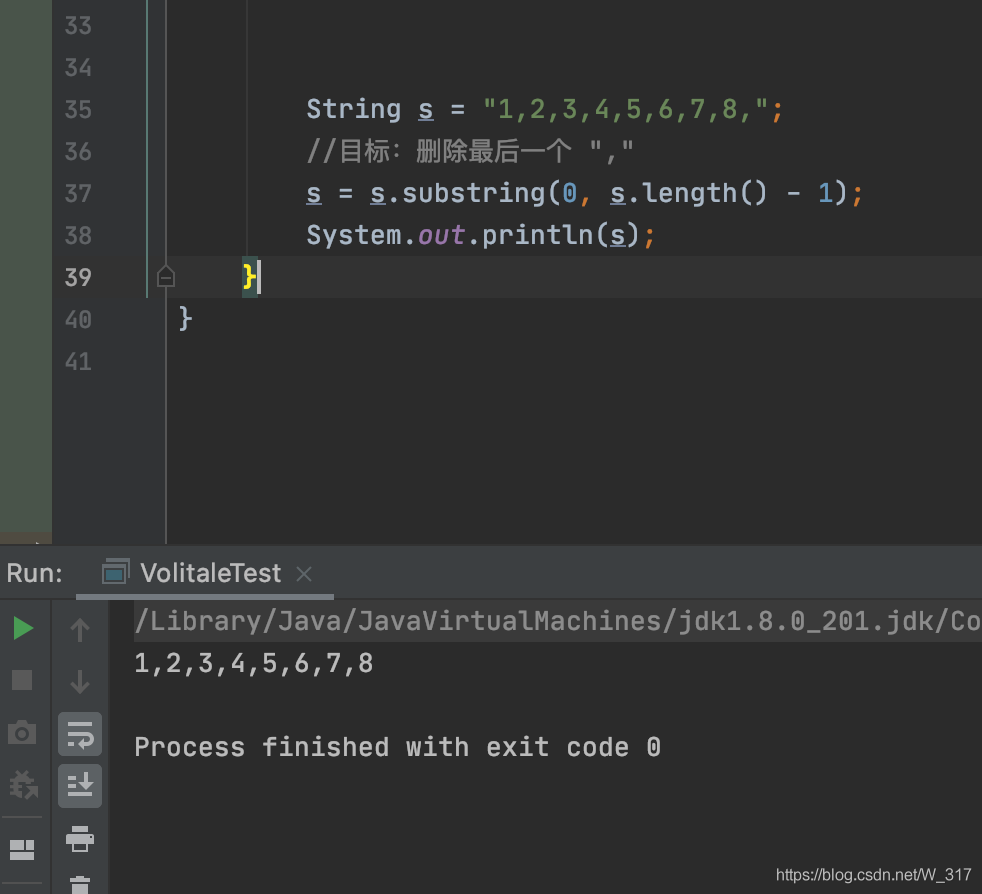
        String s = "1,2,3,4,5,6,7,8,";
        //goal: how to delete the last one ","
        s = s.substring(0, s.length() - 1);
System.out.println(s); String s = "1,2,3,4,5,6,7,8,";
//goal: how to delete the last one ","
s = s.substring(0, s.length() - 1);
System.out.println(s);Recently, there was an error when working with the spring boot framework:
Error starting ApplicationContext. To display the auto-configuration report re-run your application with 'debug' enabled.
2018-05-08 10:11:20.975 ERROR 11344 --- [           main] o.s.b.d.LoggingFailureAnalysisReporter   :

***************************
APPLICATION FAILED TO START
***************************

Description:

Cannot determine embedded database driver class for database type NONE

Action:

If you want an embedded database please put a supported one on the classpath. If you have database settings to be loaded from a particular profile you may need to active it (no profiles are currently active).


Process finished with exit code 1
Several methods of searching on the Internet have no effect, on the contrary, new errors appear
later, when I checked carefully, I found that my controller package and application package are in parallel position
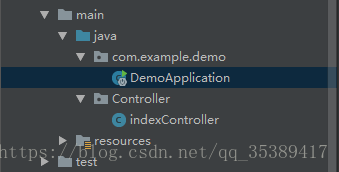
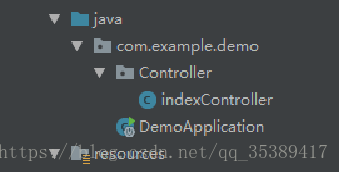
But in fact, the controller package must be scanned in the application package to run the program normally, so as long as you move the controller package into the application package, there will be no error
Error information:
Error assembling WAR: webxml attribute is required (or pre-existing WEB-INF/ web.xml
The project started by springboot reported an error.
Solution:
<!-- Building a WAR without a web.xml file
            <plugin>
                <artifactId>maven-war-plugin</artifactId>
                <version>3.0.0</version>
            </plugin>
            -->
            <plugin>
                <artifactId>maven-war-plugin</artifactId>
                <version>2.6</version>
                <configuration>
                    <!--Set to false if you want to build the WAR without the web.xml file.-->
                    <failOnMissingWebXml>false</failOnMissingWebXml>
                </configuration>
</plugin>1. Questions
The node server requests the java interface with the following code. The local host name in the project is localhost, so it will not report an error, but it will report an error after it is deployed to the formal environment error:getaddrinfo ENOTFOUND www.xxxx.com www.xxxx.com :8080
var opt = {
        hostname: 'http://www.xxxx.com',
        port: '8080',
        method: 'POST',
        path: path,
        headers: {
            "Content-Type": 'application/json;charset=utf-8',
        }
    }
2. Solution
Because the host name only fills in the actual host name, remove the http:// or HTTPS:// in the host name (fill in the specific path in the path), and you can request normally.
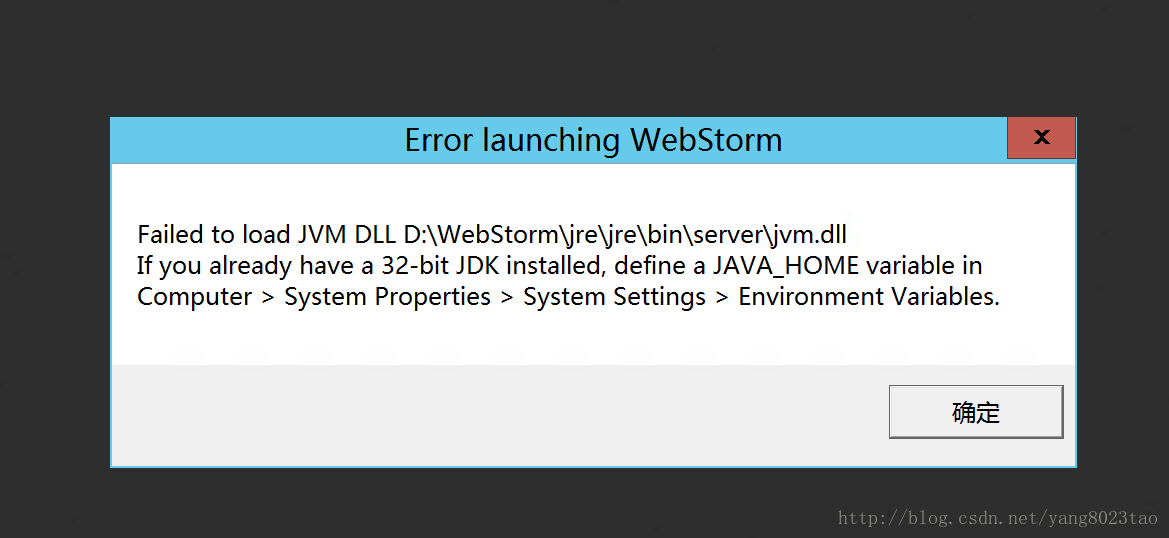
 The problem is as follows.
   1. first check the java environment variables set successfully
   2. virtual memory is not enough, set the computer's virtual memory
preface
recently, I saw the interview questions about redis when I visited the blog. It was mentioned that redis will use LRU and other elimination mechanisms when its memory reaches the maximum limit. Then I found some information about this to share with you. LRU is generally like this: the most recently used ones are put in the front, and the most recently unused ones are put in the back. If a new number comes and the memory is full at this time, the old number needs to be eliminated. In order to move data conveniently, you must use a data structure similar to linked list. In addition, to judge whether the data is the latest or the oldest, you should also use keys such as HashMap -Data structure in the form of value.
Implementation of the first method using HashMap
public class LRUCache {

    int capacity;
    Map<Integer,Integer> map;

    public LRUCache(int capacity){
        this.capacity = capacity;
        map = new LinkedHashMap<>();
    }

    public int get(int key){
        //If not found
        if (!map.containsKey(key)){
            return -1;
        }
        //refresh data if found
        Integer value = map.remove(key);
        map.put(key,value);
        return value;
    }

    public void put(int key,int value){
        if (map.containsKey(key)){
            map.remove(key);
            map.put(key,value);
            return;
        }
        map.put(key,value);
        //exceeds the capacity, delete the longest useless that is the first, or you can override the removeEldestEntry method
        if (map.size() > capacity){
            map.remove(map.entrySet().iterator().next().getKey());
        }
    }

    public static void main(String[] args) {
        LRUCache lruCache = new LRUCache(10);
        for (int i = 0; i < 10; i++) {
            lruCache.map.put(i,i);
            System.out.println(lruCache.map.size());
        }
        System.out.println(lruCache.map);
        lruCache.put(10,200);
        System.out.println(lruCache.map);
    }

The second implementation (double linked list + HashMap)
public class LRUCache {

    private int capacity;
    private Map<Integer,ListNode>map;
    private ListNode head;
    private ListNode tail;

    public LRUCache2(int capacity){
        this.capacity = capacity;
        map = new HashMap<>();
        head = new ListNode(-1,-1);
        tail = new ListNode(-1,-1);
        head.next = tail;
        tail.pre = head;
    }

    public int get(int key){
        if (!map.containsKey(key)){
            return -1;
        }
        ListNode node = map.get(key);
        node.pre.next = node.next;
        node.next.pre = node.pre;
        return node.val;
    }

    public void put(int key,int value){
        if (get(key)!=-1){
            map.get(key).val = value;
            return;
        }
        ListNode node = new ListNode(key,value);
        map.put(key,node);
        moveToTail(node);

        if (map.size() > capacity){
            map.remove(head.next.key);
            head.next = head.next.next;
            head.next.pre = head;
        }
    }

    //Move the node to the tail
    private void moveToTail(ListNode node) {
        node.pre = tail.pre;
        tail.pre = node;
        node.pre.next = node;
        node.next = tail;
    }

    //Define bidirectional linked table nodes
    private class ListNode{
        int key;
        int val;
        ListNode pre;
        ListNode next;

        //Initializing a two-way linked table
        public ListNode(int key,int val){
            this.key = key;
            this.val = val;
            pre = null;
            next = null;
        }
    }
}
like the first method, it will be easier to copy removeeldestentry. Here is a brief demonstration
public class LRUCache extends LinkedHashMap<Integer,Integer> {


    private int capacity;

    @Override
    protected boolean removeEldestEntry(Map.Entry<Integer, Integer> eldest) {
        return size() > capacity;
    }
}
Java using the third-party font library method, using the third-party TTF/TTC font library method
Sometimes we use Java fonts in our programs, but not in all font systems. We may use external custom fonts, so we will work less in program migration and deployment. Recently, we used custom font files in a project. If we straighten them out, remember them.
class Loadfont
{
    public static Font loadFont(String fontFileName, float fontSize)  //The first parameter is the external font name, the second is the font size
    {
        try
        {
            File file = new File(fontFileName);
            FileInputStream aixing = new FileInputStream(file);
            Font dynamicFont = Font.createFont(Font.TRUETYPE_FONT, aixing);
            Font dynamicFontPt = dynamicFont.deriveFont(fontSize);
            aixing.close();
            return dynamicFontPt;
        }
        catch(Exception e)
        {
            e.printStackTrace();
            return new java.awt.Font("宋体", Font.PLAIN, 12);
        }
    }
    public static java.awt.Font Font(){
        String root=System.getProperty("user.dir");//Project root path
        System.out.println(root);
        Font font = Loadfont.loadFont(root+"/simsun.ttc", 12f);//call
        return font;//return the font
    }
    public static java.awt.Font Font2(){
        String root=System.getProperty("user.dir");//Project root path
        System.out.println(root);
        Font font = Loadfont.loadFont(root+"/simsun.ttc", 12f);
        return font;//return the font
    }
}
usage method:
String root= System.getProperty (” user.dir “);
String fontname = “Droid Serif”;
Font font = Loadfont.loadFont (root+”/ xx.ttf “, 16F); — & gt; to the required xx.ttf Font library file.
If not, you can try to double-click the TTF file, install it (the previous question is Windows system), the above internal class, test can, do not need to install the TTF file.
Or directly put the TTF file into the JRE/lib/fonts directory. If there is no directory, you can MKDIR
In new font (“DDD”, XX, XX); – & gt; DDD is double-click aa.ttf The file font name, not the file name.
Error report in automatic meter building
Spring boot configuration file to configure such a section
#jpa Configuration
jpa:
  #console display sql statements
  show-sql: true
  database: mysql
  hibernate:
    ddl-auto: update
  open-in-view: true
  #error: Error executing DDL
  database-platform: org.hibernate.dialect.MySQL5InnoDBDialect
Error phenomenon
UT005023: Exception handling request to /actuator/ hystrix.stream
Issues on GitHub
Solution
Looking at the GitHub code, we find that this problem has been fixed on the master branch, but it is not fixed in the latest jar package 1.5.18 of Maven central warehouse.
Solution 1: I created a jar package to cover the original jar package
I created a 1.5.19 jar package and uploaded it to the company’s private Maven warehouse
<dependency>
      <groupId>org.springframework.cloud</groupId>
      <artifactId>spring-cloud-starter-netflix-hystrix</artifactId>
</dependency>
<dependency>
      <groupId>com.netflix.hystrix</groupId>
      <artifactId>hystrix-metrics-event-stream</artifactId>
      <version>1.5.19</version>
</dependency>
Solution 2:
use jetty container instead, because org.eclipse.jetty . server.ResponseWriter Synchronization lock is added in all methods. Note that I didn’t practice here. It’s better to speak based on facts
Analyze the reasons
Hystrix metrics event stream 1.5.18 source code HYS trixSampleSseServlet.java
The reason for the problem is: observeon( Schedulers.io ()) a sub thread is set up to print the monitoring data, and the main thread prints Ping in the while loop, Both threads do the same writer writer.print () and writer.checkError () operation. Different thread operations result in output buffer exception. The code solution on the master branch is to add a synchronized (responsewritelock) lock.
 sampleSubscription = sampleStream
                        .observeOn(Schedulers.io())
                        .subscribe(new Subscriber<String>() {
                            @Override
                            public void onCompleted() {
                                logger.error("HystrixSampleSseServlet: ({}) received unexpected OnCompleted from sample stream", getClass().getSimpleName());
                                moreDataWillBeSent.set(false);
                            }

                            @Override
                            public void onError(Throwable e) {
                                moreDataWillBeSent.set(false);
                            }

                            @Override
                            public void onNext(String sampleDataAsString) {
                             // Here is a sub-thread of RxJava constantly printing data
                                if (sampleDataAsString != null) {
                                    writer.print("data: " + sampleDataAsString + "\n\n");
                                    // explicitly check for client disconnect - PrintWriter does not throw exceptions
                                    if (writer.checkError()) {
                                        moreDataWillBeSent.set(false);
                                    }
                                    writer.flush();
                                }
                            }
                        });
                // Here is the main thread doing a while loop, constantly printing pings
                while (moreDataWillBeSent.get() && !isDestroyed) {
                    try {
                        Thread.sleep(pausePollerThreadDelayInMs);
                        //in case stream has not started emitting yet, catch any clients which connect/disconnect before emits start
                        writer.print("ping: \n\n");
                        // explicitly check for client disconnect - PrintWriter does not throw exceptions
                        if (writer.checkError()) {
                            moreDataWillBeSent.set(false);
                        }
                        writer.flush();
                    } catch (InterruptedException e) {
                        moreDataWillBeSent.set(false);
                    }
                }
Why won’t exceptions occur when using jetty containers
because org.eclipse.jetty . server.ResponseWriter All methods have synchronization locks on them.
the key codes are as follows:
package org.eclipse.jetty.server;

public class ResponseWriter extends PrintWriter {

    public boolean checkError() {
        synchronized(this.lock) {
            return this._ioException != null || super.checkError();
        }
    }

    public void flush() {
        try {
            synchronized(this.lock) {
                this.isOpen();
                this.out.flush();
            }
        } catch (Throwable var4) {
            this.setError(var4);
        }

    }

    public void write(int c) {
        try {
            synchronized(this.lock) {
                this.isOpen();
                this.out.write(c);
            }
        } catch (InterruptedIOException var5) {
            LOG.debug(var5);
            Thread.currentThread().interrupt();
        } catch (IOException var6) {
            this.setError(var6);
        }

    }

    public void write(char[] buf, int off, int len) {
        try {
            synchronized(this.lock) {
                this.isOpen();
                this.out.write(buf, off, len);
            }
        } catch (InterruptedIOException var7) {
            LOG.debug(var7);
            Thread.currentThread().interrupt();
        } catch (IOException var8) {
            this.setError(var8);
        }

    }

    public void write(String s, int off, int len) {
        try {
            synchronized(this.lock) {
                this.isOpen();
                this.out.write(s, off, len);
            }
        } catch (InterruptedIOException var7) {
            LOG.debug(var7);
            Thread.currentThread().interrupt();
        } catch (IOException var8) {
            this.setError(var8);
        }

    }
}
writer.flush() this line of code can theoretically be deleted in Tomcat and undertow containers
Because in writer.checkError The () method has already been called this.flush () method org.apache.catalina.connector.CoyoteWriter#checkError
package org.apache.catalina.connector;

public class CoyoteWriter extends PrintWriter {

    public boolean checkError() {
        this.flush();
        return this.error;
    }
}
io.undertow.servlet.spec.ServletPrintWriterDelegate#checkError
package io.undertow.servlet.spec;

public final class ServletPrintWriterDelegate extends PrintWriter {

    public boolean checkError() {
        return this.servletPrintWriter.checkError();
    }
}

public class ServletPrintWriter {

    public boolean checkError() {
        this.flush();
        return this.error;
    }
}
Compiling pit with hystrix source code
1. The project must be a git project. Packages downloaded directly from GitHub cannot be compiled. Git init is required to be the GIT directory initially. It is recommended to directly git clone [email protected] :Netflix/ Hystrix.git
2. I used gradle4.0
3 nebula.netflixoss ’Change the version to ‘4.1.0’
4. Use Alibaba’s Maven warehouse
the following is my build.gradle
buildscript {
    repositories {
         maven { url 'http://maven.aliyun.com/nexus/content/groups/public/' }
    }
    dependencies {
         classpath 'com.netflix.nebula:gradle-extra-configurations-plugin:3.0.3'
    }
}

plugins {
    id 'nebula.netflixoss' version '4.1.0'
    id 'me.champeau.gradle.jmh' version '0.3.1'
    id 'net.saliman.cobertura' version '2.2.8'
}

ext {
    githubProjectName = rootProject.name
    project.version='1.5.19'
}

allprojects {
    repositories {
         maven { url 'http://maven.aliyun.com/nexus/content/groups/public/' }
    }

    apply plugin: 'net.saliman.cobertura'
}

subprojects {
    apply plugin: 'nebula.netflixoss'
    apply plugin: 'java'
    apply plugin: 'nebula.provided-base'
	apply plugin: 'nebula.compile-api'

    sourceCompatibility = 1.8
    targetCompatibility = 1.8


    group = "com.netflix.${githubProjectName}"

    eclipse {
        classpath {
            // include 'provided' dependencies on the classpath
            plusConfigurations += [configurations.provided]
            downloadSources = true
            downloadJavadoc = true
        }
    }

    idea {
        module {
            // include 'provided' dependencies on the classpath
            scopes.COMPILE.plus += [configurations.provided]
        }
    }
}
mvn install和mvn deploy
mvn install:install-file
-Dfile=\data\hystrix\hystrix-contrib\hystrix-metrics-event-stream\build\libs\hystrix-metrics-event-stream-1.5.19.jar
-DgroupId=com.netflix.hystrix
-DartifactId=hystrix-metrics-event-stream
-Dversion=1.5.19
-Dpackaging=jar
mvn deploy:deploy-file
-Dfile=\data\hystrix\hystrix-contrib\hystrix-metrics-event-stream\build\libs\hystrix-metrics-event-stream-1.5.19.jar
-DgroupId=com.netflix.hystrix
-DartifactId=hystrix-metrics-event-stream
-Dversion=1.5.19
-Dpackaging=jar
-DrepositoryId=custom-releases
-Durl=http://host:port/nexus/content/repositories/custom_releases
Jar package
The path of the jar package is in the boot-inf/lib directory
Create a jar folder under the Resources folder and paste the jar package in.
Enter POM file to join
        <dependency>
            <groupId>com.jayZhou</groupId>
            <artifactId>aaaa-client-sso</artifactId>
            <version>1.0-1.0</version>
            <scope>system</scope>
            <systemPath>${project.basedir}/src/main/resources/jar/aaaa-client-sso-1.0-1.0.jar</systemPath>
        </dependency>
Groupid, artifactid and version can be written freely
You also need to add it on the last side and type it in when you pack it
<build>
        <plugins>
            <plugin>
                <groupId>org.springframework.boot</groupId>
                <artifactId>spring-boot-maven-plugin</artifactId>
                <!--Add-->
                <configuration>
                    <includeSystemScope>true</includeSystemScope>
                </configuration>
            </plugin>
        </plugins>
</build>
So far, the jar package has been successfully introduced
War package
(this method is not attempted)
The jar package is in the WEB-INF/lib directory
You need to add the following to the POM file
     <plugin>
                    <groupId>org.apache.maven.plugins</groupId>
                    <artifactId>maven-war-plugin</artifactId>
                    <version>2.4</version>
                    <configuration>
                        <webResources>
                            <resource>
                                <directory>src/main/resources/jar/</directory>
                                <targetPath>WEB-INF/lib/</targetPath>
                                <includes>
                                    <include>**/*.jar</include>
                                </includes>
                            </resource>
                        </webResources>
                    </configuration>
</plugin>Introducing Maven dependency into POM file
 <build>
        <pluginManagement>
            <plugins>
                <plugin>
                    <groupId>org.apache.maven.plugins</groupId>
                    <artifactId>maven-jar-plugin</artifactId>
                    <version>2.4</version>
                    <configuration>
                        <archive>
                            <manifest>
                                <addClasspath>true</addClasspath>
                                <classpathPrefix>lib/</classpathPrefix>
                                <mainClass>com.pro.main</mainClass>
                            </manifest>
                        </archive>
                    </configuration>
                </plugin>
            </plugins>
        </pluginManagement>
    </build>
Code in main method
 if(args.length !=2){
            System.out.println("Please enter the path");
            System.exit(-1);
        }
        Job job = Job.getInstance();
        Configuration conf = new Configuration();

        //1. encapsulate the position of the parameter jarbao
        job.setJarByClass(Submitter.class);
        //2. Wrapping parameters The position of the current job mapper implementation class in the position of the reduce implementation class
        job.setMapperClass(WordCountMapper.class);
        job.setReducerClass(WordConutReduce.class);
        //3. encapsulate the parameters of the current job map output
        job.setMapOutputKeyClass(Text.class);
        job.setMapOutputValueClass(IntWritable.class);
        //4. encapsulate the parameters What is the output of this job reduce
        job.setOutputKeyClass(Text.class);
        job.setOutputKeyClass(IntWritable.class);
        // determine whether there is an output folder
        Path path = new Path(args[1]);
        FileSystem fileSystem = path.getFileSystem(conf);// find this file according to path
        if (fileSystem.exists(path)) {
            fileSystem.delete(path, true);// true means that even if output has something, it is deleted along with it
        }


        //5. encapsulate the parameters where the dataset to be processed by this job is generated paths
        FileInputFormat.setInputPaths(job, new Path(args[0]));
        FileOutputFormat.setOutputPath(job, new Path(args[1]));
        //6. Wrap parameters Number of multiple reduce tasks started
        job.setNumReduceTasks(1);
        //7. Submit the job
        boolean b = job.waitForCompletion(true);
        System.exit(b ?0 : 1);
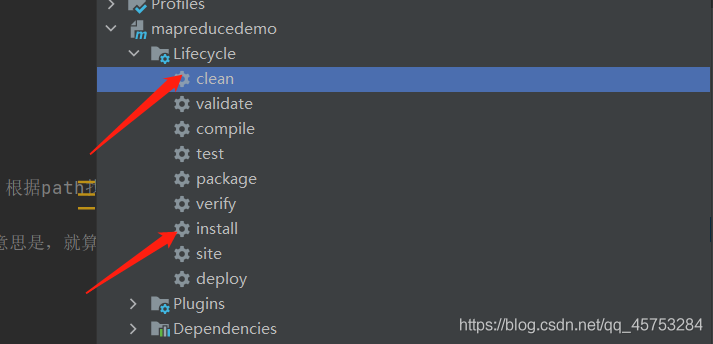
Maven is packaged as a jar package and put into the Hadoop environment
Upload text to Hadoop file
hadoop fs -put xxx.info /input
Enter the Hadoop environment and enter the command to start
hadoop jar mapreducedemo-1.0-SNAPSHOT.jar /input /output
Mybatis plus paging plugin and auto-fill
Configuration details
@EnableTransactionManagement
@Configuration
@MapperScan("com.itoyoung.dao")
public class MybatisPlusConfig {

    /**
     * Page Break Plugin
     */
    @Bean
    public PaginationInterceptor paginationInterceptor() {
        PaginationInterceptor paginationInterceptor = new PaginationInterceptor();
         paginationInterceptor.setLimit(-1);
        return paginationInterceptor;
    }

    /**
     * Automatic filling function
     * @return
     */
    @Bean
    public GlobalConfig globalConfig() {
        GlobalConfig globalConfig = new GlobalConfig();
        globalConfig.setMetaObjectHandler(new MetaHandler());
        return globalConfig;
    }
}

@Component
@Slf4j
public class MetaHandler implements MetaObjectHandler {

    /**
     * New Data Execution
     * @param metaObject
     */
    @Override
    public void insertFill(MetaObject metaObject) {
        this.setFieldValByName("createTime", new Date(), metaObject);
        this.setFieldValByName("updateTime", new Date(), metaObject);
    }

    /**
     * Update data execution
     * @param metaObject
     */
    @Override
    public void updateFill(MetaObject metaObject) {
        this.setFieldValByName("updateTime", new Date(), metaObject);
    }

}
application
Add an annotation to the entity class @ tablefield (value = create)_ time", fill = FieldFill.INSERT ), the time is automatically filled in when inserting or updating
@Data
@Accessors(chain = true)
public class Channel implements Serializable {

    @TableId(type = IdType.AUTO)
    private Long id;

    /**
     * Channel Code
     */
    @NotEmpty(message = "Channel code cannot be null")
    private String channelCode;

    /**
     * Channel Name
     */
    @NotEmpty(message = "Channel name cannot be empty")
    private String channelName;

    /**
     * creat time
     */
    @TableField(value = "create_time", fill = FieldFill.INSERT)
    private Date createTime;

    /**
     * update time
     */
    @TableField(value = "update_time", fill = FieldFill.INSERT_UPDATE)
    private Date updateTime;
}
Paging query
@Service(version = "${provider.service.version}")
@Slf4j
@Component
public class ChannelServiceImpl extends ServiceImpl<ChannelMapper, Channel> implements IChannelService {

    @Override
    public Page<Channel> selectChannelPageByQuery(ChannelListGetQuery query) {
        Page<Channel> channelPage = new Page<>();
        channelPage.setCurrent(query.getCurrentPage());
        channelPage.setSize(query.getPageSize());

        QueryWrapper<Channel> queryWrapper = new QueryWrapper<>();
        if (StringUtil.isNotBlank(query.getChannelName())) {
            queryWrapper.lambda().like(Channel::getChannelName, query.getChannelName());
        }
        queryWrapper.lambda().orderByDesc(Channel::getId);

        IPage<Channel> page = page(channelPage, queryWrapper);
        channelPage.setTotal(page.getTotal());
        channelPage.setRecords(page.getRecords());
        return channelPage;
    }
}