Category Archives: JAVA

How to Solve Error occurred during initialization of boot layer

problem

When using jdk9 or above, eclipse will report an error when running the program, indicating: error occurred during initialization of boot layer, that is, an error occurred during initialization of boot layer
this is because we cannot execute a single class

solve

Delete module directly- info.java This document

Java Running Error: Could not find or load main class

[problem description]

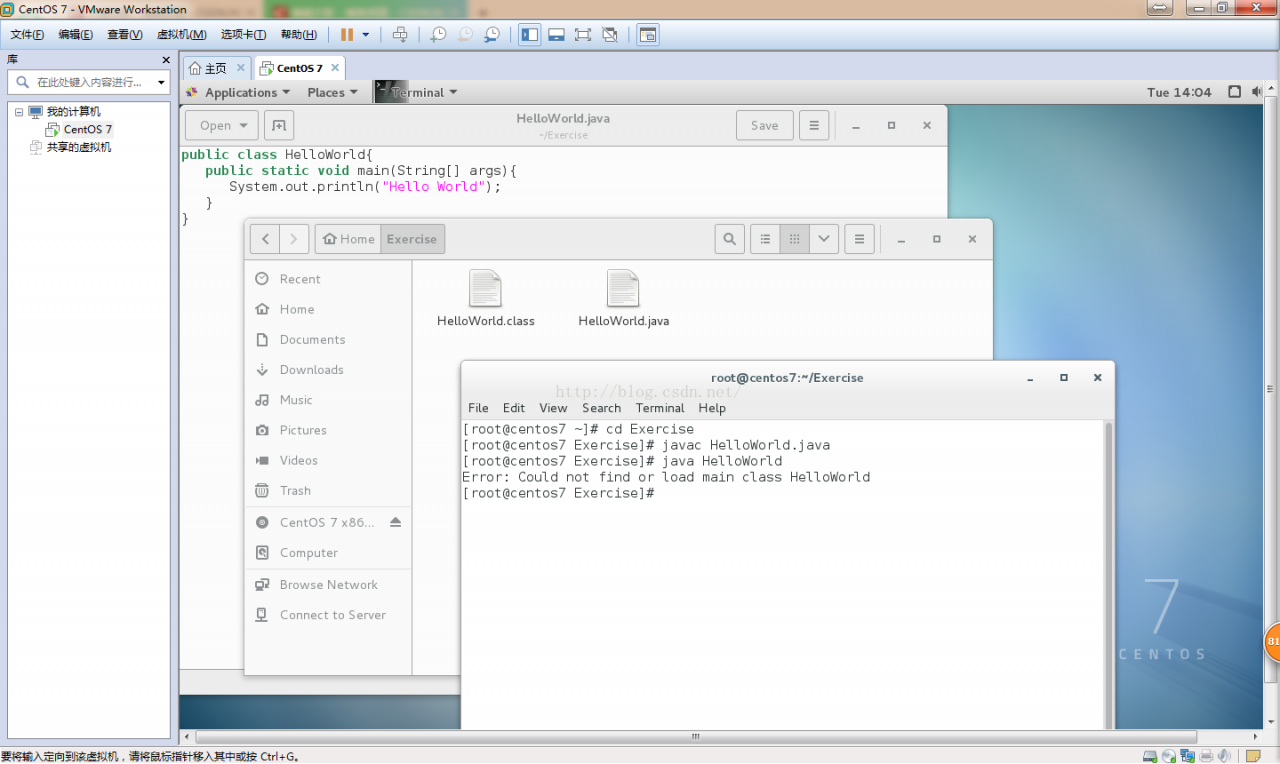
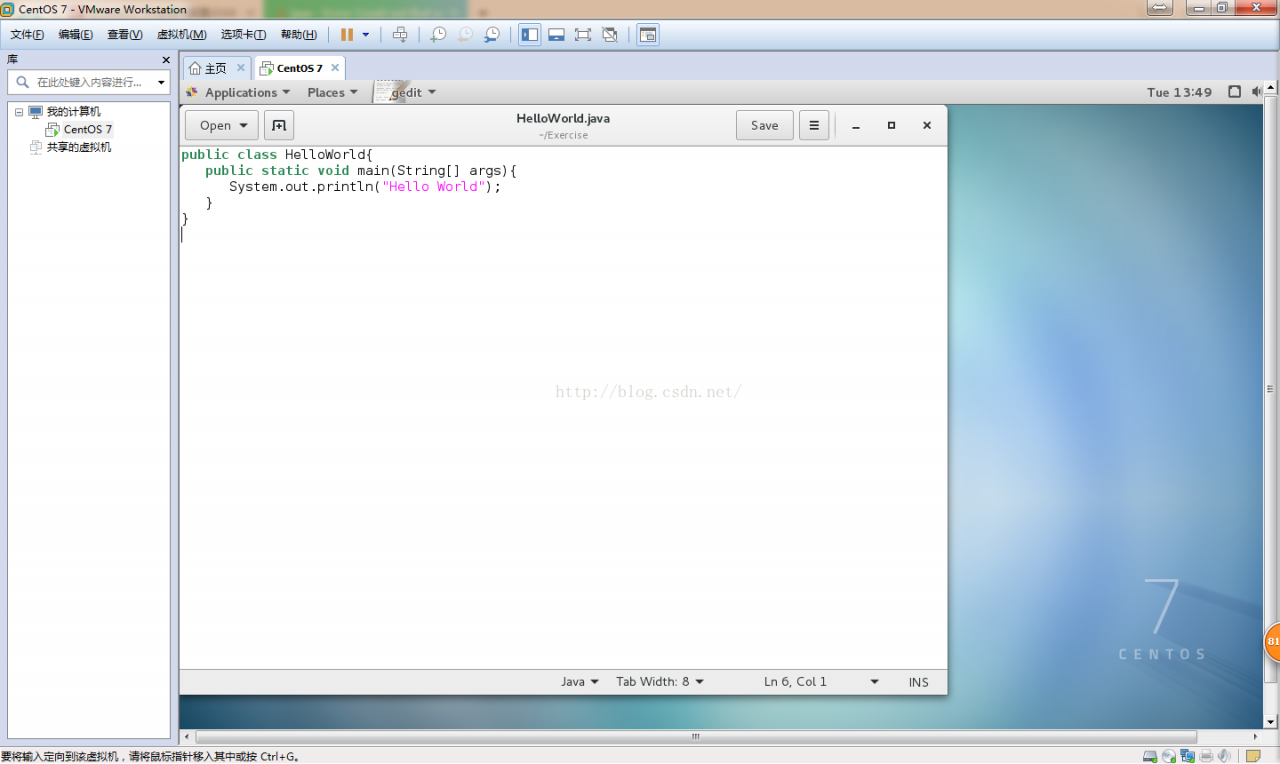
User root is created in the/root/exercise folder HelloWorld.java The code is as follows:

Compile and run the file as follows:

Compile HelloWorld.java Generate bytecode file HelloWorld.class , running HelloWorld.class Error: could not find or load main class.


[cause analysis]

The current directory is the directory where the. Class file is located. To run the. Class bytecode file, you need to add the current directory to the system variable classpath to find the Java class in the current directory.


[solution]

Step 1: add the classpath system variable at the end of the profile file in/etc.:,. To represent the current path.

The classpath in the original/etc/profile file is:

CLASSPATH=$JAVA_ HOME/jre/lib/ext:$JAVA_ HOME/lib/ dt.jar :$JAVA_ HOME/lib/ tools.jar .

The added classpath is: classpath =.: $Java_ HOME/jre/lib/ext:$JAVA_ HOME/lib/ dt.jar :$JAVA_ HOME/lib/ tools.jar

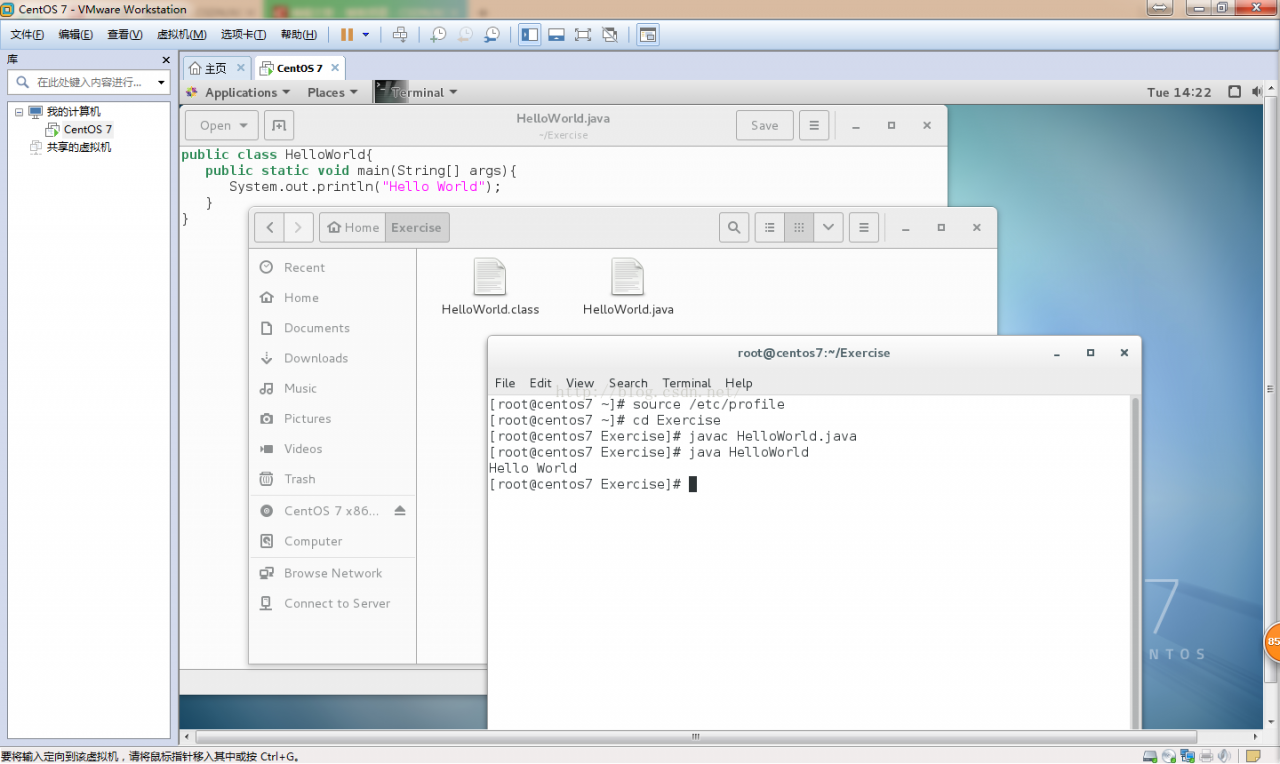
Step 2: input source/etc/profile on the command line to make the system variables in/etc/profile effective and then run.

Note: you can modify system variables only if the current user is root. If you enter source/etc/profile on the command line, the system variable will only take effect temporarily. If you close terminal, the system variable will be restored to its original state. Because the system variable is loaded at system startup, the system variable will be loaded automatically only at the next system restart, so you don’t need to enter source/etc/profile again.

The results are as follows

Tensorflow Error raise RuntimeError(‘The Session graph is empty.  Add operations to the ‘ RuntimeError:

Raise runtimeerror (‘the session graph is empty. Add operations to the ‘

RuntimeError: The Session graph is empty.  Add operations to the graph before calling run().

This is when installing tensorflow, in order to test whether the installation is successful, and then use the online method, but there is an error when running the following code

import tensorflow as tf

import os

# os.environ [“TF_ CPP_ MIN_ LOG_ Level “] =’1 ‘# this is the default display level, displaying all information

os.environ [“TF_ CPP_ MIN_ LOG_ LEVEL”]=’2’

sess = tf.Session ()

a = tf.constant (2)

b = tf.constant (2)

print( sess.run (a+b))

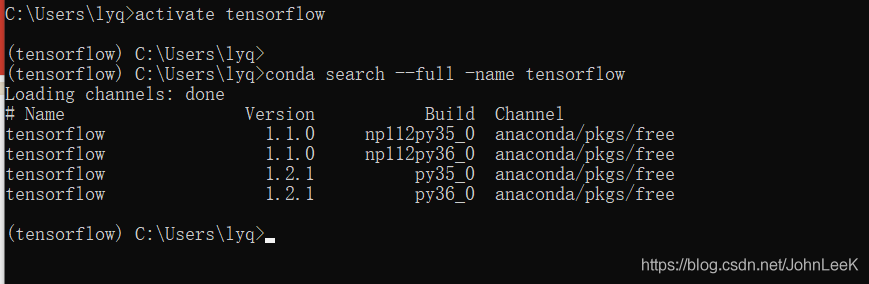
At first, I suspected that my local problem, tensorflow, had not been completely downloaded. Later, baidu did not solve it. Then I thought whether there was an error in the installation process. The problem really lies here. After I created the tensorflow environment, I executed PIP install tensorflow The default download is version 2.0.0, but CONDA does not support it, so we need to see the tensorflow supported by CONDA before downloading

Version, execute the following command CONDA search — full – name tensorflow, as shown in the figure

Well, here we choose according to our Python version of tensorflow, and then execute

PIP install tensorflow = = 1. X.x

Spring Aop error creating bean with name ‘org.springframework.aop.config.internalAutoProxyCreator

In addition to spring AOP jar package, spring AOP should also be included in spring AOP programming aspectjrt.jar , aspectjweaver.jar , and aopalliance_ 1.0.jar, otherwise an error is reported:

org.springframework.beans . factory.BeanCreationExcspring -aopeption: Error creating bean with name ‘ org.springframework.aop . config.internalAutoProxyCreator ‘: Instantiation of bean failed; nested exception is org.springframework.beans .BeanInstantiationException: Could not instantiate bean class [ org.springframework.aop . aspectj.annotation.AnnotationAwareAspectJAutoProxyCreator ]: Constructor threw exception; nested exception is java.lang.NoClassDefFoundError : org/aopalliance/intercept/MethodInterceptor


aopalliance_ 1.0.jar download address:

http://mirrors.ibiblio.org/pub/mirrors/maven2/aopalliance/aopalliance/1.0/


The thread implementation of timer in Java

  1. js
    $(function(){
                 initTodoInfo(true);
      
                 })

//Get the scheduling command information and assign it to the prompt button findDcmdSize
        function initDcmdInfo(showWindow){
            var url = 'nnmis/view/dcmd/findDcmdSizeDCMD.tg';
             $.post(url, {}, function (data) {
              if(data != ""){
                     //From JSON data, parse quantity and new alarms
                     var response = eval("("+ data +")");
                     var totalCount = response[0].TOTALCNT;
                     //Update the displayed value of the quantity
                     $("#dcmd_info_label").html("Command["+totalCount+"]");


                 }
             });    
        }

//Number of regular updates
        var getRealData = self.setInterval("initTodoInfo(true);", 60000);

2. action

@Autowired
    private DcmdData ddata;

/**
     * Returns the number of unprocessed items for the day
     */
    public void findDcmdSize() {

        String dataGridStr = "";
        // List<Map> dcmdlist = dcmdService.findDcmdListNumByCondtion(dcmd);
        List<Map> dcmdlist = ddata.getDcmdList();
        if (dcmdlist.size() == 0) {
            dcmdlist = dcmdService.findDcmdListNumByCondtion(dcmd);
        }
        dataGridStr = super.autoDMapLst2DgJson(dcmdlist);

        returnJson(dataGridStr, response);

    }


3. to do data cache class

package com.casco.csmis.dcmd.data;

import java.util.ArrayList;
import java.util.List;
import java.util.Map;

import org.springframework.beans.factory.annotation.Autowired;
import org.springframework.stereotype.Repository;
import org.springframework.stereotype.Service;

import com.casco.csmis.dcmd.service.IDcmdInfoService;
import com.casco.csmis.dcmd.vo.DcmdInfo;

/**
 * <b> To-Do Data Cache Class<b>
 * <p>
 * Created by 60847
 */
@Repository(value = "dcmdData")
@Service
public class DcmdData {
	@Autowired
	private IDcmdInfoService dcmdService;

	private static List<Map> dcmdList = new ArrayList<Map>();

	private DcmdInfo dcmd;

	public static List<Map> getDcmdList() {
		return dcmdList;
	}

	public static void setDcmdList(List<Map> dcmdList) {
		DcmdData.dcmdList = dcmdList;
	}

	public DcmdData() {

	}

	public DcmdData(IDcmdInfoService dcmdService) {
		this.dcmdService = dcmdService;
	}

	/**
	 * Initialization
	 */
	public void init() {
		try {
			dcmdList = dcmdService.findDcmdListNumByCondtion(dcmd);

		} catch (Exception e) {
			e.printStackTrace();
		}
	}
}

4. Call the thread to start the thread when the server starts


/**
 * @Title: MemoryListener.java
 * @Package com.casco.csmis.listener
 * @Description:
 * @author ligangying [email protected]
 * @date 2013-10-2 AM 9:56:33
 * @version V1.0
 */

package com.casco.csmis.permissions.listener;

import javax.servlet.ServletContextEvent;
import javax.servlet.ServletContextListener;

import org.apache.commons.logging.Log;
import org.apache.commons.logging.LogFactory;
import org.springframework.context.ApplicationContext;
import org.springframework.web.context.support.WebApplicationContextUtils;

import com.casco.csm.casco.core.tools.util.ReadProperty;

import com.casco.csmis.dcmd.data.DcmdData;

/**
 * @ClassName: MemoryListener
 * @Description: Initialize global parameters and system dictionary
 * @author sunct [email protected]
 * @date 2013-10-6 下午3:03:16
 */
public class MemoryListener implements ServletContextListener {

	private DcmdData dcmdData;

	Log logger = LogFactory.getLog(MemoryListener.class);

	@Override
	public void contextDestroyed(ServletContextEvent arg0) {

		logger.debug("tomcat Done");
	}

	@Override
    public void contextInitialized(ServletContextEvent arg0) {
        ApplicationContext ctx = WebApplicationContextUtils.getWebApplicationContext(arg0.getServletContext());

       
            this.setDcmdData((DcmdData) ctx.getBean("dcmdData"));
           

            logger.debug("tomcat start running");

            Thread dcmdThread = new Thread(new DcmdThread(this.getDcmdData()));
            dcmdThread.start();


    }

	public DcmdData getDcmdData() {
		return dcmdData;
	}

	public void setDcmdData(DcmdData dcmdData) {
		this.dcmdData = dcmdData;
	}

}

5. Thread call cache class

package com.casco.csmis.dcmd.util;

import com.casco.csmis.dcmd.data.DcmdData;

/*
 * Receiving server responsible for receiving data sent from C++
 */
public class DcmdThread implements Runnable {

	private DcmdData dcmdData;

	public DcmdData getDcmdData() {
		return dcmdData;
	}

	public void setDcmdData(DcmdData dcmdData) {
		this.dcmdData = dcmdData;
	}

	public DcmdThread(DcmdData dcmdData) {
		this.setDcmdData(dcmdData);
	}

	@Override
	public void run() {
		while (true) {
			// Reading the datas
			try {
				dcmdData.init();
				Thread.sleep(30000);
			} catch (Exception e) {
				e.printStackTrace();
			}
		}
	}
}


6 server class configuration in web.xml

<listener>
        <listener-class>com.casco.csmis.permissions.listener.MemoryListener</listener-class>
    </listener>


IntelliJ idea compilation error: Error:java : Compilation failed: internal java compiler error

When using IntelliJ idea for java development, the following errors are occasionally reported:

IntelliJ IDEA comlilation error:
Error:java: Compilation failed: internal java compiler error

The solution to this problem is as follows:

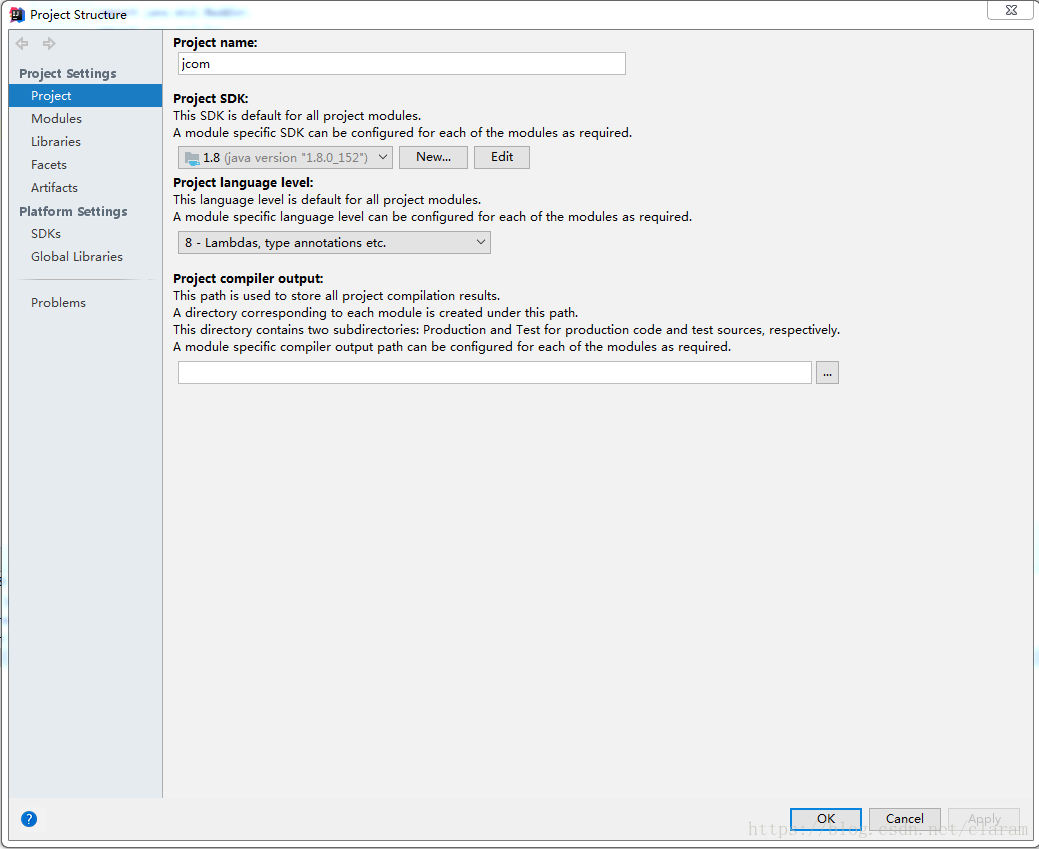
Confirm the JDK of the project

File> project structure> Project Settings> project view the project SDK and project language level of the project. My settings are project SDK = 1.8 and project language level = 8

Modify compiler settings

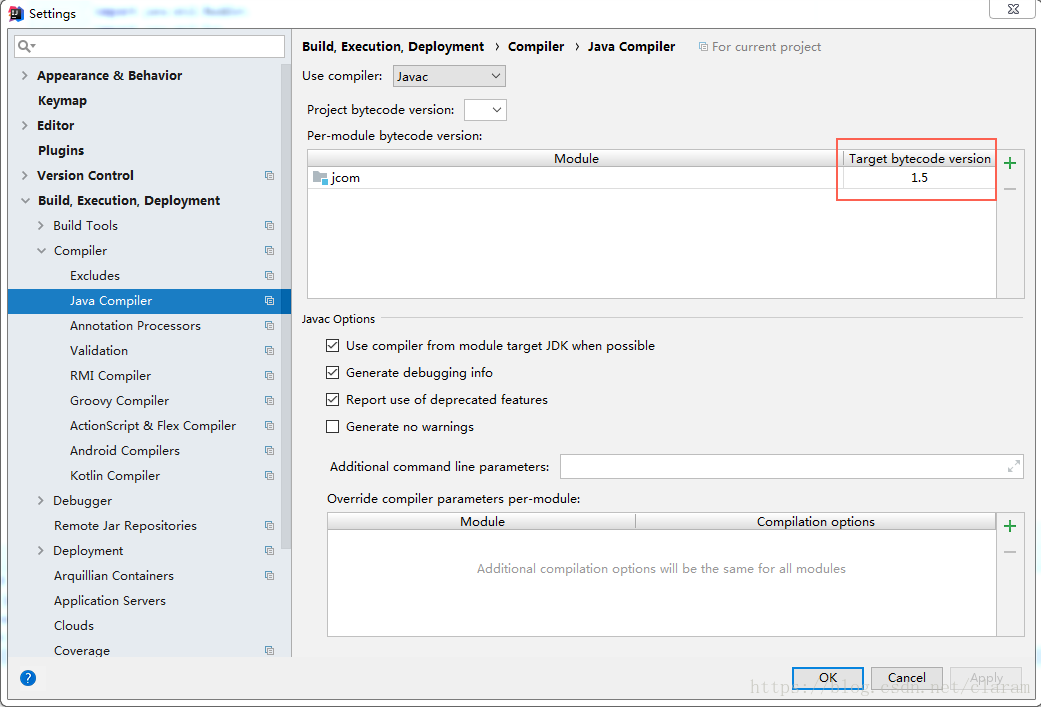
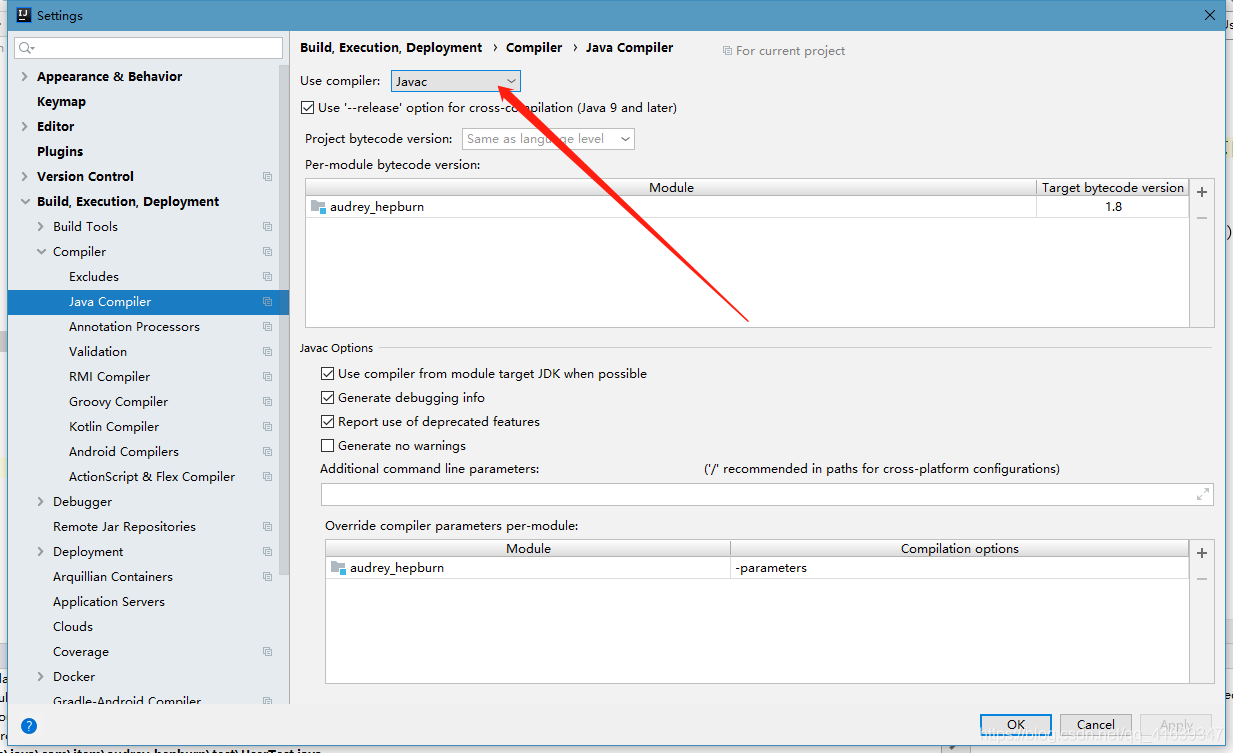
File> setting> build, execution, deployment> compiler> java compiler, modify the target bytecode version to 1.8, compile the project again, and the error disappears.

Problems in springboot upgrade 2.4.0: when allowcredentials is true, allowedorigins cannot contain the specia

    When allowCredentials is true, allowedOrigins cannot contain the special value “*“since that cannot be set on the “Access-Control-Allow-Origin” response header. To allow credentials to a set of origins, list them explicitly or consider using”allowedOriginPatterns” instead.

The translation is as follows:

Solution: cross domain configuration error, replace . Allowedorigins with . Allowedoriginpatterns .

Before revision:

@Configuration
public class WebMvcConfig implements WebMvcConfigurer {

    /**
     * Open cross-domain
     */
    @Override
    public void addCorsMappings(CorsRegistry registry) {
        // Set the routes that are allowed across the domain
        registry.addMapping("/**")
                // Set the domain name that allows cross-domain requests
                .allowedOrigins("*")
                // whether to allow certificates (cookies)
                .allowCredentials(true)
                // set the allowed methods
                .allowedMethods("*")
                // Allowed time across domains
                .maxAge(3600);
    }

}

After modification:

@Configuration
public class WebMvcConfig implements WebMvcConfigurer {

    /**
     * Open cross-domain
     */
    @Override
    public void addCorsMappings(CorsRegistry registry) {
        // Set the routes that are allowed across the domain
        registry.addMapping("/**")
                // Set the domain name that allows cross-domain requests
                .allowedOriginPatterns("*")
                // whether to allow certificates (cookies)
                .allowCredentials(true)
                // Set the allowed methods
                .allowedMethods("*")
                // Allowed time across domains
                .maxAge(3600);
    }

}

Initializingbean Interface & Applicationcontextaware Interface in Springboot

1. InitializingBean

There is only one method in this interface initializingbean, afterpropertieset. This method refers to the method that the spring container actively calls the interface after starting. If a bean implements initializingbean, the method will call the afterpropertieset method after the container instantiates the bean and initializes the bean’s properties. AfterPropertiesSet knows the meaning by the name of the method: it is called after the property of bean is set.

The initialization bean interface source code is as follows:

public interface InitializingBean {

    /**
     * This method is called by the BeanFactory when the bean's properties have been set.
     * This method allows the instance of the bean to perform some initialization actions, which are executed when all the bean properties are finished being set.   
     */
    void afterPropertiesSet() throws Exception;
}

2. ApplicationContextWare

Name with aware, you can know that this interface is actively notified and called by the spring container. The spring container injects the context ApplicationContext when it notifies the implementation class of the interface. There is only one method in the interface:
void setapplicationcontext (ApplicationContext) throws beansexception, that is, after the container is started, ApplicationContext is injected into the method.

The source code of interface applicationcontextware is as follows:

public interface ApplicationContextAware extends Aware {
    void setApplicationContext(ApplicationContext var1) throws BeansException;
}

3. Examples

3.1 enumeration class familyenum

package com.example.demo.blogTest;

public enum FamilyEnum {
    FATHER(45, "father"),
    MOTHER(42, "mother"),
    SON(18, "son");

    private Integer age;
    private String name;
    FamilyEnum(Integer age, String name) {
        this.age = age;
        this.name = name;
    }

    public Integer getAge() {
        return age;
    }

    public String getName() {
        return name;
    }
}

3.2 user defined injection class familyholder

package com.example.demo.blogTest;

import com.example.demo.service.BaseService;
import org.springframework.beans.BeansException;
import org.springframework.beans.factory.InitializingBean;
import org.springframework.context.ApplicationContext;
import org.springframework.context.ApplicationContextAware;
import org.springframework.stereotype.Component;

import java.util.HashMap;
import java.util.Map;
import java.util.function.Function;
import java.util.stream.Collectors;

@Component
public class FamilyHolder implements InitializingBean, ApplicationContextAware {
    private ApplicationContext applicationContext;
    private Map<FamilyEnum, BaseService> map = new HashMap<>();

    public BaseService getEnum(FamilyEnum familyEnum) {
        return map.get(familyEnum);
    }

    @Override
    public void afterPropertiesSet() throws Exception {
        map = applicationContext.getBeansOfType(BaseService.class)
                .values()
                .stream()
                .collect(Collectors.toMap(BaseService::getEnum, Function.identity()));
    }

    @Override
    public void setApplicationContext(ApplicationContext applicationContext) throws BeansException {
        this.applicationContext = applicationContext;
    }
}

3.3 abstract class BaseService

package com.example.demo.service;

import com.example.demo.blogTest.FamilyEnum;

public abstract class BaseService {
    // abstract working class, specific implementation by its successor
    public abstract void myJob();

    public abstract FamilyEnum getEnum();

    // Generic methods, which can also be overridden by inheritors
    public String getName(FamilyEnum person) {
        return person.getName();
    }
}

3.4 Abstract inheritance class fatherservice

package com.example.demo.service;

import com.example.demo.blogTest.FamilyEnum;
import org.springframework.stereotype.Service;

@Service
public class FatherService extends BaseService{
    @Override
    public void myJob() {
        System.out.println("I am a engineer!");
    }

    @Override
    public FamilyEnum getEnum() {
        return FamilyEnum.FATHER;
    }
}

3.5 Abstract inheritance class motherservice

package com.example.demo.service;

import com.example.demo.blogTest.FamilyEnum;
import org.springframework.stereotype.Service;

@Service
public class MotherService extends BaseService{
    @Override
    public void myJob() {
        System.out.println("I am a teacher!");
    }

    @Override
    public FamilyEnum getEnum() {
        return FamilyEnum.MOTHER;
    }
}

3.6 Abstract inheritance class myservice

package com.example.demo.service;

import com.example.demo.blogTest.FamilyEnum;
import org.springframework.stereotype.Service;

@Service
public class MyService extends BaseService{
    @Override
    public void myJob() {
        System.out.println("I am a student!");
    }

    @Override
    public FamilyEnum getEnum() {
        return FamilyEnum.SON;
    }
}

3.7 test class demoapplicationtests

package com.example.demo;

import com.example.demo.blogTest.FamilyEnum;
import com.example.demo.blogTest.FamilyHolder;
import com.example.demo.service.BaseService;
import org.junit.jupiter.api.Test;
import org.junit.runner.RunWith;
import org.springframework.beans.factory.annotation.Autowired;
import org.springframework.boot.test.context.SpringBootTest;
import org.springframework.test.context.junit4.SpringRunner;

@RunWith(SpringRunner.class)
@SpringBootTest
class DemoApplicationTests {
    @Autowired
    private FamilyHolder familyHolder;

    @Test
    void contextLoads() throws ClassNotFoundException {
        // Get all enumeration elements by reflection
        Class<FamilyEnum> clazz = (Class<FamilyEnum>) Class.forName("com.example.demo.blogTest.FamilyEnum");
        FamilyEnum[] enumConstants = clazz.getEnumConstants();
        for (FamilyEnum familyEnum : enumConstants) {
            BaseService baseService = familyHolder.getEnum(familyEnum);
            baseService.myJob();
        }
    }
}

Output results

I am a engineer!
I am a teacher!
I am a student!
Using mybatis statement.getGenreatedKeys(); usegeneratedkeys = “true”; using self incrementing primary key to get primary key value policy and Oracle do not support self incrementing, Oracle uses sequence

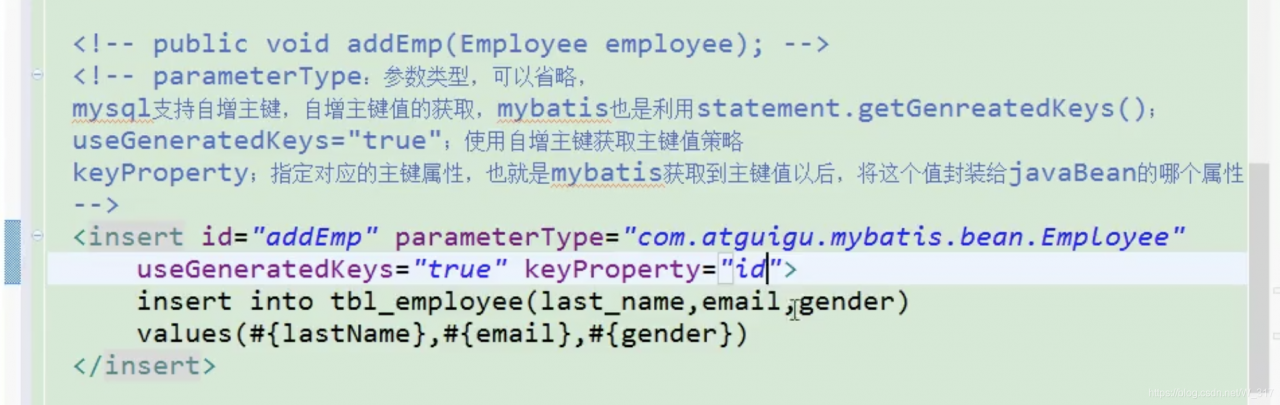
Parametertype: parameter type, which can be omitted
MySQL supports auto-incrementing primary key, which is also used by mybatis statement.getGenreatedKeys ();
usegeneratedkeys = “true”; use self incrementing primary key to get the primary key value strategy
keyproperty; specify the corresponding primary key property, that is, after mybatis gets the primary key value, which property of JavaBean encapsulates the value

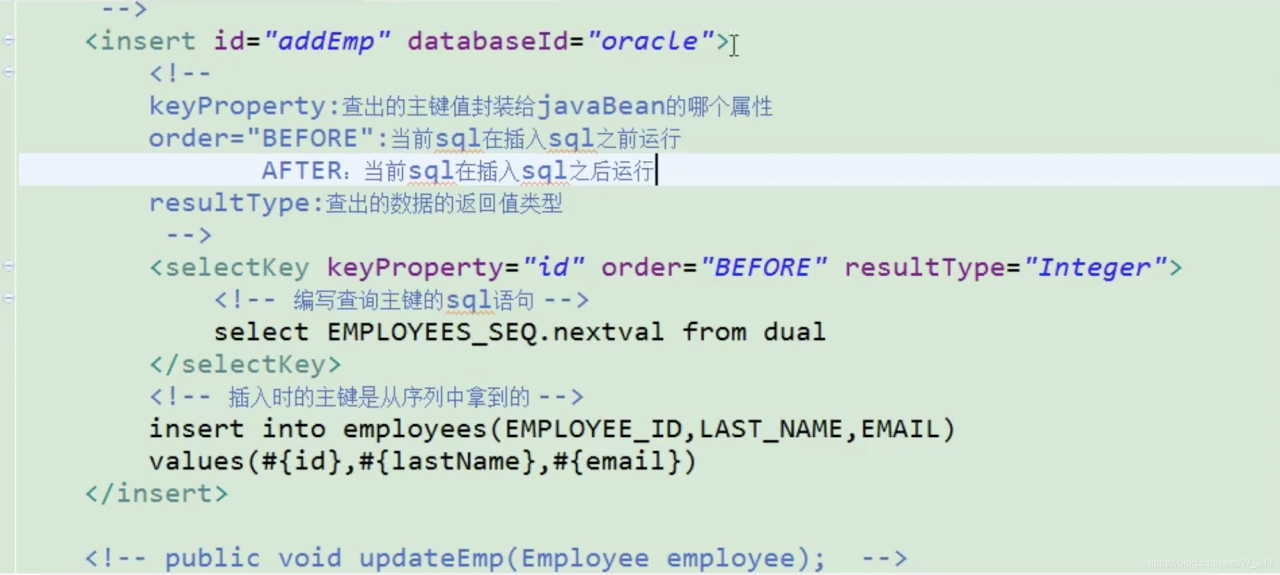
Oracle does not support self incrementing; Oracle uses sequence to simulate self incrementing;
the primary key of data inserted each time is the value obtained from the sequence; how to get this value

<insert id="addEmp" databaseId="oracle">
        <!-- 
        keyProperty:Which property of the javaBean the primary key value is encapsulated to find out
        order="BEFORE":the current sql is run before inserting sql
               AFTER: the current sql is run after the insert sql
        resultType:the return value type of the checked out data

        BEFORE running order.
            first run selectKey query id sql; find out the id value encapsulated to the id property of the javaBean
            In the run insert sql; you can take out the value corresponding to the id property
        AFTER running order.
            Run the insert sql first (take the new value from the sequence as id)
            then run the selectKey query sql for id.
         -->
        <selectKey keyProperty="id" order="BEFORE" resultType="Integer">
            <!-- Write sql statement to query primary key -->
            <!-- BEFORE-->
            select EMPLOYEES_SEQ.nextval from dual 
            <!-- AFTER:
             select EMPLOYEES_SEQ.currval from dual -->
        </selectKey>

        <!-- The primary key at the time of insertion is obtained from the sequence -->
        <!-- BEFORE:-->
        insert into employees(EMPLOYEE_ID,LAST_NAME,EMAIL) 
        values(#{id},#{lastName},#{email<!-- ,jdbcType=NULL -->}) 
        <!-- AFTER:
        insert into employees(EMPLOYEE_ID,LAST_NAME,EMAIL) 
        values(employees_seq.nextval,#{lastName},#{email}) -->
    </insert>

NPM Run Build ERROR in static/js/balabala.js from UglifyJs

NPM run build error in static/JS/ balabala.js from UglifyJs

The project added a small requirement, and an error was reported when it was ready to be deployed to the developer for testing.

ERROR in static/js/1.e54ac17.js from UglifyJs
Unexpected token: name (FusionClass) [static/js/1.e54ac17.js:55,6]

ERROR in static/js/vendor.bd8bfa0.js from UglifyJs
Unexpected token: name (ret) [static/js/vendor.bd8bfa0.js:11551,6]

From the error message, we can see that the syntax of ES6 in JS has not been converted to Es5. I think a new dependency has been added. It may be that part of the syntax of ES6 is used in the dependency, but there is no escape.

{
    test: /\.js$/,
    loader: 'babel-loader',
    options: {
        presets: ['es2015']
    },
    include: [resolve('src'), resolve('test')]
}

The above is the configuration of webpack. It can be found that the ES6 conversion in the dependency file is not supported, so we can write in the new dependency.

{
    test: /\.js$/,
    loader: 'babel-loader',
    options: {
        presets: ['es2015']
    },
    include: [resolve('src'), resolve('test'), resolve('/node_modules/your package')]
}

Just repack it.

Springboot controls the startup of rabbitmq through configuration files

No, beep, code

Mainly for consumers to add configuration

1.Put the configuration in the configuration center (it can also be put on the consumer service)

listener.direct.auto -Startup is set to false,

Then add rabbitmq.start As startup property


spring:
  rabbitmq:
    host: 127.0.0.1
    port: 5672
    username: guest
    password: guest
    listener:
      direct:
        auto-startup: false

rabbitmq:
  start: true

Then in the consumer service startup class xxxxxApplication.class Add in

package com.test.service1;

import com.test.rabbitmq.RabbitmqApplication;
import org.springframework.amqp.rabbit.listener.RabbitListenerEndpointRegistry;
import org.springframework.beans.factory.annotation.Value;
import org.springframework.boot.SpringApplication;
import org.springframework.boot.autoconfigure.SpringBootApplication;
import org.springframework.cloud.netflix.eureka.EnableEurekaClient;
import org.springframework.context.ApplicationContext;
import org.springframework.context.annotation.Bean;
import org.springframework.data.jpa.repository.config.EnableJpaRepositories;
import springfox.documentation.swagger2.annotations.EnableSwagger2;

import javax.annotation.Resource;

@SpringBootApplication
@EnableEurekaClient
public class Service1Application {
    public static void main(String[] args) {
        ApplicationContext context=SpringApplication.run(Service1Application.class, args);
        RabbitMQStart rabbitMQRun = context.getBean(RabbitMQStart.class);
        rabbitMQRun.start();
    }

    @Bean
    public RabbitMQStart rabbitMQRun() {
        return new RabbitMQStart();
    }
    private static class RabbitMQStart {
        //In order to use the @value annotation in the static method in main only this way can be used
        @Value("${rabbitmq.start}")
        private Boolean rabbitmqStart;

        @Resource
        RabbitListenerEndpointRegistry rabbitListenerEndpointRegistry;
        public void start() {
            if(rabbitmqStart)
                rabbitListenerEndpointRegistry.start();
            else
                rabbitListenerEndpointRegistry.stop();
            System.out.println("=================== Rabbitmq:"+rabbitmqStart+"===================");
        }
    }
}

2.Test:

rabbitmq.start =When true

rabbitmq.start =When false