Category Archives: JAVA

springboot jsp: There was an unexpected error (type=Not Found, status=404). No message available

There was an unexpected error (type=Not Found, status=404). No message
available

Today, I encountered a very wordless bug. When I visited it, I found that this path did not find the file. The main reason is that springboot uses the template with HTML suffix by default instead of JSP. Therefore, after adding the dependency package and startup mode, I need to add these two sentences to the configuration file.

spring.mvc.view.prefix=/
spring.mvc.view.suffix=.jsp

When suffix suffix is added, the file can be found according to the path, but this error will occur

There was an unexpected error (type=Not Found, status=404). / #
ǰ׺��j��jsp/user- list.jsp

Then add the prefix and suffix together and you can access them.

But the most pit is coming!!!

Yesterday, I configured the integrated JSP mode, and it can be accessed normally. Today, I opened the computer access program, but it didn’t work. I’ve been looking at it. It should be the problem of path. Then I looked at the path of the controller, the name of the template, and the configuration file,

spring.mvc.view .prefix=/
spring.mvc.view .suffix=.jsp

After looking for it for a long time, I didn’t believe it. I first repeated the suffix, received it, didn’t copy it, and then restarted the scope of the project. The error report became a garbled error report. Then I changed the prefix and restarted the access. It was OK. I felt that the most pitiful thing was this. I found the bug for more than an hour, just because springboot couldn’t reload the configuration that had been written File?? It’s strange, but it’s always done. I’ll find out the reason later.

[How to Solve Error]java.util.Date cannot be cast to java.sql.Date

Error message:

java.lang.ClassCastException: class java.util.Date cannot be cast to class java.sql.Date (java.util.Date is in module java.base of loader 'bootstrap'; java.sql.Date is in module java.sql of loader 'platform')
	at per.czt.dao.MessageDaoImpl.insertMessage(MessageDaoImpl.java:19)
	at per.czt.service.impl.MessageServiceImpl.addMessage(MessageServiceImpl.java:23)
	at per.czt.web.servlet.MessageServlet.doPost(MessageServlet.java:25)
	at javax.servlet.http.HttpServlet.service(HttpServlet.java:661)
	at javax.servlet.http.HttpServlet.service(HttpServlet.java:742)
	at org.apache.catalina.core.ApplicationFilterChain.internalDoFilter(ApplicationFilterChain.java:231)
	at org.apache.catalina.core.ApplicationFilterChain.doFilter(ApplicationFilterChain.java:166)
	at org.apache.tomcat.websocket.server.WsFilter.doFilter(WsFilter.java:52)
	at org.apache.catalina.core.ApplicationFilterChain.internalDoFilter(ApplicationFilterChain.java:193)
	at org.apache.catalina.core.ApplicationFilterChain.doFilter(ApplicationFilterChain.java:166)
	at per.czt.web.filter.CodeFilter.doFilter(CodeFilter.java:44)
	at org.apache.catalina.core.ApplicationFilterChain.internalDoFilter(ApplicationFilterChain.java:193)
	at org.apache.catalina.core.ApplicationFilterChain.doFilter(ApplicationFilterChain.java:166)
	at org.apache.catalina.core.StandardWrapperValve.invoke(StandardWrapperValve.java:198)
	at org.apache.catalina.core.StandardContextValve.invoke(StandardContextValve.java:96)
	at org.apache.catalina.authenticator.AuthenticatorBase.invoke(AuthenticatorBase.java:493)
	at org.apache.catalina.core.StandardHostValve.invoke(StandardHostValve.java:140)
	at org.apache.catalina.valves.ErrorReportValve.invoke(ErrorReportValve.java:81)
	at org.apache.catalina.valves.AbstractAccessLogValve.invoke(AbstractAccessLogValve.java:650)
	at org.apache.catalina.core.StandardEngineValve.invoke(StandardEngineValve.java:87)
	at org.apache.catalina.connector.CoyoteAdapter.service(CoyoteAdapter.java:342)
	at org.apache.coyote.http11.Http11Processor.service(Http11Processor.java:800)
	at org.apache.coyote.AbstractProcessorLight.process(AbstractProcessorLight.java:66)
	at org.apache.coyote.AbstractProtocol$ConnectionHandler.process(AbstractProtocol.java:806)
	at org.apache.tomcat.util.net.NioEndpoint$SocketProcessor.doRun(NioEndpoint.java:1498)
	at org.apache.tomcat.util.net.SocketProcessorBase.run(SocketProcessorBase.java:49)
	at java.base/java.util.concurrent.ThreadPoolExecutor.runWorker(ThreadPoolExecutor.java:1128)
	at java.base/java.util.concurrent.ThreadPoolExecutor$Worker.run(ThreadPoolExecutor.java:628)
	at org.apache.tomcat.util.threads.TaskThread$WrappingRunnable.run(TaskThread.java:61)
	at java.base/java.lang.Thread.run(Thread.java:834)

Error code:

pst.setDate(3, (java.sql.Date)message.getCreatedTime());

reason: util.Date Cannot convert directly to sql.Date
Solution:

new java.sql.Date(message.getCreatedTime().getTime())

[How to Solve]Repeated column in mapping for entity,should be mapped with insert=“false“ update=“false“

This blog post records a bug encountered in the actual development of the project.

Error background and details

The background of the problem is when a field in the database is of type longtext and JPA mapping is used

   /**
     * Product Introduction Related URL
     */
    @Basic(fetch=LAZY)
    @Lob
    @Column(name = "goods_introduce",columnDefinition = "longtext")
    private String goodsIntroduceUrl;

The error is as follows:

Repeated column in mapping for entity: com.xxx.business.goods.bean.GoodsEntity column: goods_introduce (should be mapped with insert="false" update="false")

The detailed error information is as follows:

Caused by: javax.persistence.PersistenceException: [PersistenceUnit: default] Unable to build Hibernate SessionFactory; nested exception is org.hibernate.MappingException: Repeated column in mapping for entity: com.xxx.business.goods.bean.GoodsEntity column: goods_introduce (should be mapped with insert="false" update="false")
	at org.springframework.orm.jpa.AbstractEntityManagerFactoryBean.buildNativeEntityManagerFactory(AbstractEntityManagerFactoryBean.java:403)
	at org.springframework.orm.jpa.AbstractEntityManagerFactoryBean.afterPropertiesSet(AbstractEntityManagerFactoryBean.java:378)
	at org.springframework.orm.jpa.LocalContainerEntityManagerFactoryBean.afterPropertiesSet(LocalContainerEntityManagerFactoryBean.java:341)
	at org.springframework.beans.factory.support.AbstractAutowireCapableBeanFactory.invokeInitMethods(AbstractAutowireCapableBeanFactory.java:1855)
	at org.springframework.beans.factory.support.AbstractAutowireCapableBeanFactory.initializeBean(AbstractAutowireCapableBeanFactory.java:1792)
	... 16 common frames omitted
Caused by: org.hibernate.MappingException: Repeated column in mapping for entity: com.xxx.business.goods.bean.GoodsEntity column: goods_introduce (should be mapped with insert="false" update="false")
	at org.hibernate.mapping.PersistentClass.checkColumnDuplication(PersistentClass.java:862)
	at org.hibernate.mapping.PersistentClass.checkPropertyColumnDuplication(PersistentClass.java:880)
	at org.hibernate.mapping.PersistentClass.checkColumnDuplication(PersistentClass.java:902)
	at org.hibernate.mapping.PersistentClass.validate(PersistentClass.java:634)
	at org.hibernate.mapping.RootClass.validate(RootClass.java:267)
	at org.hibernate.boot.internal.MetadataImpl.validate(MetadataImpl.java:351)
	at org.hibernate.boot.internal.SessionFactoryBuilderImpl.build(SessionFactoryBuilderImpl.java:464)
	at org.hibernate.jpa.boot.internal.EntityManagerFactoryBuilderImpl.build(EntityManagerFactoryBuilderImpl.java:1249)
	at org.springframework.orm.jpa.vendor.SpringHibernateJpaPersistenceProvider.createContainerEntityManagerFactory(SpringHibernateJpaPersistenceProvider.java:58)
	at org.springframework.orm.jpa.LocalContainerEntityManagerFactoryBean.createNativeEntityManagerFactory(LocalContainerEntityManagerFactoryBean.java:365)
	at org.springframework.orm.jpa.AbstractEntityManagerFactoryBean.buildNativeEntityManagerFactory(AbstractEntityManagerFactoryBean.java:391)
	... 20 common frames omitted

Solution

The problem is that a long text type field is customized in the database, and then spring data JPA customizes a type, causing duplicate fields.

The solution is very simple, that is to disable the functions of inserting and updating table fields in spring data JPA for this field.

   /**
     * Product Introduction Related URL
     */
    @Basic(fetch=LAZY)
    @Lob
    @Column(name = "goods_introduce",columnDefinition = "longtext",insertable = false,updatable = false)
    private String goodsIntroduceUrl;

Android solution Java.util.concurrent.ExecutionException: com.Android.ide.common.process.ProcessException: exception

Error:
Error:Execution failed for task ':app:mergeDebugResources'. > Error: 
java.util.concurrent.ExecutionException: com.android.ide.common.process.ProcessException:

After a round of search:

resolvent:

Either make the picture into a dot 9 picture or remove the. 9 in the picture file name;
a friend of mine has this problem because the company’s encryption system encrypts the picture, which leads to the error of as parsing the picture. If the encryption of this kind of graphic file is removed, the problem can also be solved;
the problem can be solved There is also a possibility to see on the Internet: manually change the image and other kinds of mistakes. For example, if the image was originally in JPG format and then forced to change to PNG, there may be problems. Just change it back to the original format.
Remove the PNG legitimacy test, in the build.gradle Add the following two sentences under build tools version in

android {
    
   ......
 
    aaptOptions.cruncherEnabled = false
    aaptOptions.useNewCruncher = false
 
   ......
}

The reason for the error is: Android studio strictly reviews PNG images, that is, PNG does not meet the requirements of Android studio

The above two sentences probably mean
forbid gradle to check the legitimacy of PNG
note: the most important thing is that. 9 diagram should be done strictly

The “. 9” image is a special image form in the application software development of Android platform. The file extension is. 9. PNG. In other words, in the project resource folder, as long as the file suffix of the image is. 9. PNG, it means that it is a point 9 image. When we compile with eclipse, it encounters a file with the file suffix of. 9. PNG. First check whether it is actually a point 9 image If it is, it will be processed according to the point 9 image; if not, it will be processed according to the default image. That is to say, eclipse automatically helps us complete the transformation and tolerates our image format errors.

Android Studio uses the Android Maven plugin plug-in. The reason for the error reported in android studio is that the file declared as the point 9 image is not actually the real point 9 image, and there is an error in parsing the image. Android Maven plugin will strictly check the image format, and report an error if it does not match.

Android studio compilation failed: java.util.concurrent.ExecutionException: com.android.ide.common.process.Process

Android Studio compilation error:

java.util.concurrent.ExecutionException: com.android.ide.common.process.ProcessException: Error while executing process D:\android\sdk\build-tools\26.0.2\aapt.exe with arguments {package -f –no-crunch -I D:\android\sdk\platforms\android-26\android.jar -M \\?\D:\android\test\build\intermediates\manifests\full\debug\AndroidManifest.xml -S D:\android\test\build\intermediates\res\merged\debug -m -J \\?\D:\android\test\build\generated\source\r\debug -F D:\android\test\build\intermediates\res\debug\resources-debug.ap_ -D \\?\D:\android\test\build\intermediates\multi-dex\debug\manifest_keep.txt –custom-package com.test -0 apk –output-text-symbols \\?\D:\android\test\build\intermediates\symbols\debug –no-version-vectors}
com.android.ide.common.process.ProcessException: Error while executing process D:\android\sdk\build-tools\26.0.2\aapt.exe with arguments {package -f –no-crunch -I D:\android\sdk\platforms\android-26\android.jar -M \\?\D:\android\test\build\intermediates\manifests\full\debug\AndroidManifest.xml -S D:\android\test\build\intermediates\res\merged\debug -m -J \\?\D:\android\test\build\generated\source\r\debug -F D:\android\test\build\intermediates\res\debug\resources-debug.ap_ -D \\?\D:\android\test\build\intermediates\multi-dex\debug\manifest_keep.txt –custom-package com.test -0 apk –output-text-symbols \\?\D:\android\test\build\intermediates\symbols\debug –no-version-vectors}
org.gradle.process.internal.ExecException: Process ‘command ‘D:\android\sdk\build-tools\26.0.2\aapt.exe” finished with non-zero exit value 1
java.util.concurrent.ExecutionException: com.android.ide.common.process.ProcessException: Error while executing process D:\android\sdk\build-tools\26.0.2\aapt.exe with arguments {package -f –no-crunch -I D:\android\sdk\platforms\android-26\android.jar -M \\?\D:\android\test\build\intermediates\manifests\full\debug\AndroidManifest.xml -S D:\android\test\build\intermediates\res\merged\debug -m -J \\?\D:\android\test\build\generated\source\r\debug -F D:\android\test\build\intermediates\res\debug\resources-debug.ap_ -D \\?\D:\android\test\build\intermediates\multi-dex\debug\manifest_keep.txt –custom-package com.test -0 apk –output-text-symbols \\?\D:\android\test\build\intermediates\symbols\debug –no-version-vectors}
com.android.ide.common.process.ProcessException: Error while executing process D:\android\sdk\build-tools\26.0.2\aapt.exe with arguments {package -f –no-crunch -I D:\android\sdk\platforms\android-26\android.jar -M \\?\D:\android\test\build\intermediates\manifests\full\debug\AndroidManifest.xml -S D:\android\test\build\intermediates\res\merged\debug -m -J \\?\D:\android\test\build\generated\source\r\debug -F D:\android\test\build\intermediates\res\debug\resources-debug.ap_ -D \\?\D:\android\test\build\intermediates\multi-dex\debug\manifest_keep.txt –custom-package com.test -0 apk –output-text-symbols \\?\D:\android\test\build\intermediates\symbols\debug –no-version-vectors}
org.gradle.process.internal.ExecException: Process ‘command ‘D:\android\sdk\build-tools\26.0.2\aapt.exe” finished with non-zero exit value 1

Execute the following command in the command line to view the detailed error report (you need to switch to the current project directory first):
  Windows: gradlew clean build –stacktrace
  MAC/Linux: ./gradlew clean build –stacktrace To
view the detailed error report, the following error is found:
\\?\D:\android\test\build\intermediates\manifests\full\debug\AndroidManifest.xml:33: AAPT: No resource identifier found for attribute’appComponentFactory’ in package’android’
\\?\D:\ android\test\build\intermediates\manifests\full\debug\AndroidManifest.xml:33: error: No resource identifier found for attribute’appComponentFactory’ in package’android’

Solution:
unify compileSdkVersion for 28

E/Art: failed sending reply to debugger: the solution of broken pipe

E/Art: failed sending a reply to the debugger: the solution of the broken pipe

Explanation error:

E/ART: Failed to send reply to the debugger: the pipe is broken.

What is e/art?

Art is an IME of android (This is the bytecode interpreter on Android phones. E is just the record level of error.)

What is the send reply debugger?

Debugging on Android phone is to use “ADB” (Android debugging bridge). The ADB process runs on your development computer (your laptop or PC), and the daemons run on Android devices (i.e. emulators or mobile phones).

What is a damaged pipe?

Your development machine and Android device communicate like a client-server. The damaged pipeline indicates that the communication has become invalid. For example, the client (Android device) is trying to send a reply to the server (the ADB process running on the development machine), but the server has closed the socket.

How to fix it

First, make sure your application is built correctly by performing cleanup/rebuild

Then, if you use USB to debug and run the application on a real phone, you can usually solve the problem by unplugging the USB cable and then re-inserting it to reestablish the client/server connection.

If this doesn’t work, you can disconnect the USB cable (stop the emulator if necessary) and close the Android studio. This is usually enough to stop the ADB process. Then, when you open Android studio again, it will restart and reestablish the connection.

If this doesn’t work, you can try using the instructions to manually stop the ADB server in this issue. For example, you can try to open a command prompt or terminal, and then go to the SDK /platform-tools directory and enter:
the

adb kill-server
adb start-server

* daemon not running; starting now at tcp:5037
* daemon started successfully

When this appears, It’s done

[How to Fix]java.sql.SQLException: Incorrect string value: ‘\xF0\x9F\x98\x82\xF0\x9F…’

java.sql.SQLException : Incorrect string value: ‘\xF0\x9F\x98\x82\xF0\x9F…’

Problem:
because the emoticons stored in MySQL database string are not compatible with 4-byte Unicode.

Solution:
use the third-party jar to import and store after transformation.

POM introduction:

		 <!-- Expression Switching -->
        <dependency>
            <groupId>com.github.binarywang</groupId>
            <artifactId>java-emoji-converter</artifactId>
            <version>0.1.1</version>
        </dependency>

Specific conversion method:

	String content = "\xF0\x9F\x98\x82\xF0\x9F";
  	EmojiConverter emojiConverter = EmojiConverter.getInstance();
    content= emojiConverter.toAlias(content);//Escaping chat content
    System.out.println(content);

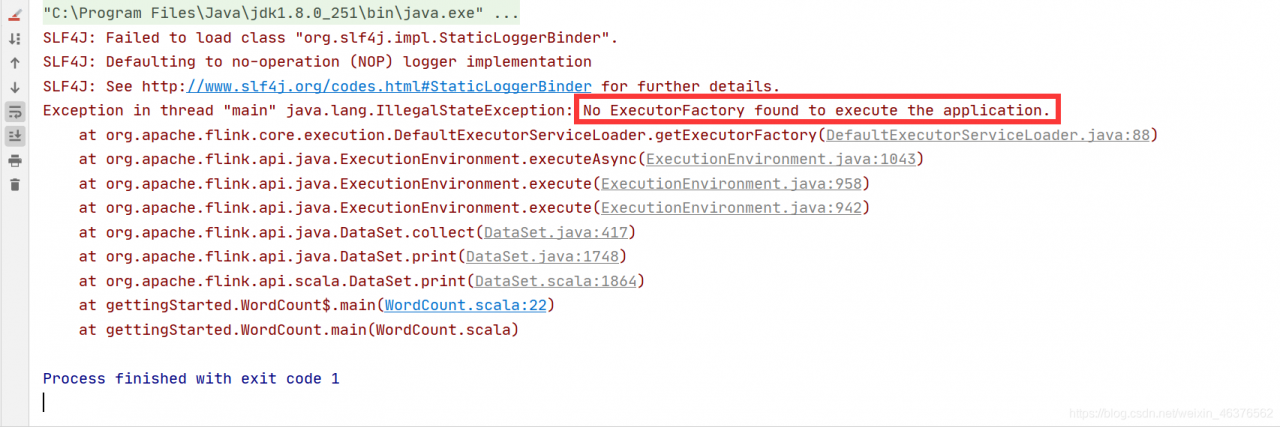
[How to Fix]No executorfactory found to execute the application

Error information

Cause of error

Starting from Flink 1.11, the dependency of flink-streaming-java on flink-clients has been removed and the clients dependency needs to be added manually.

How to Fix

Modify the POM file and add the Flink clients dependency

 <dependency>
        <groupId>org.apache.flink</groupId>
        <artifactId>flink-clients_2.12</artifactId>
        <version>1.12.2</version>
 </dependency>

Java error: unable to find or load main class (package name in source file)

1. Problem orientation

This type of error occurs when compiling (javac) and executing (Java) Java programs: the main class cannot be found or loaded:

First of all, the problem caused by improper configuration of environment variables is excluded. As long as the command line interface can recognize javac / Java commands, there is no problem with the configuration of environment variables. This problem often occurs because there is a package name in the Java source file, such as the file C:: code\ Hello.java :

package com.example;

public class Hello{
    public static void main(String[]args){
        System.out.println("Hello");
    }
}

It seems that there is no problem

C:\code>javac Hello.java
C:\code>java Hello
Error: Main class not found or could not be loaded Hello

2. Solutions

Delete the package name from the source file (not recommended); create a file path structure with the same package name under code (C:: – Code ⁃ com ⁃ example)\ Hello.java )

Compilation:C:\code>javac com/example/Hello.java
Run:C:\code>java com.example.Hello

C# Bug Fixed InvalidCastException: Cannot cast from source type to destination type.

InvalidCastException: Cannot cast from source type to destination type.

Cannot convert from source type to target type.

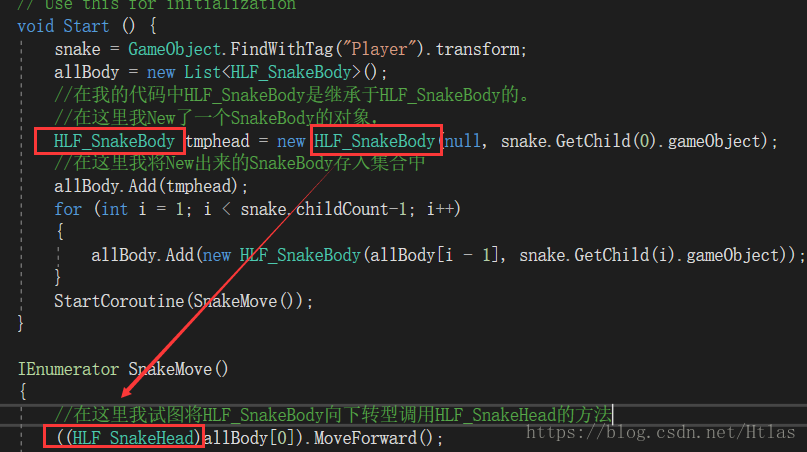
The main reason for this problem is that there are errors in type conversion, one of which is not easy to detect is that there are errors when the parent class is cast to a subclass, that is, there may be errors when the transition is down in polymorphism

What is polymorphism: the pointer of the parent class points to the subclass and calls the method of the subclass

First let’s see where my code problem is, for your reference

Obviously, when I was in new tmphead, the pointer of the parent class did not point to the child class at all, so there would be no downward transformation.

We just need to change my code in this way to create a new subclass object..

How to Fix log4j2 warning: warn unable to identify org.fusesource.jansi.WindowsAnsiOutputStream

First knowledge of log4j2 and log4j

import org.apache.logging.log4j.LogManager;
import org.apache.logging.log4j.Logger;

public class Log4j2Test {
    public static void main(String[] args) {
        System.setProperty("log4j.skipJansi", "true");//2020-02-13 13:41:25,889 main WARN Unable to instantiate org.fusesource.jansi.WindowsAnsiOutputStream
//        Logger logger = LogManager.getLogger(LogManager.ROOT_LOGGER_NAME);
        Logger logger = LogManager.getLogger("mylog");
        logger.trace("trace level");
        logger.debug("debug level");
        logger.info("info level");
        logger.warn("warn level");
        logger.error("error level");
        logger.fatal("fatal level");
    }
}

If there is no log4j2.xml file in this project (recommended resources directory), the error will be reported and the running result will be

ERROR StatusLogger No log4j2 configuration file found. Using default configuration: logging only errors to the console.
14:12:28.891 [main] ERROR mylog - error level
14:12:28.894 [main] FATAL mylog - fatal level

When log4j2.xml is added to the resources directory, the content is

<?xml version="1.0" encoding="UTF-8"?>
<Configuration status="WARN">
    <properties>
        <property name="LOG_HOME">E:/logs</property>
        <property name="FILE_NAME">mylog</property>
        <property name="log.sql.level">info</property>
    </properties>


    <Appenders>
        <Console name="Console" target="SYSTEM_OUT">
            <PatternLayout pattern="%d{HH:mm:ss.SSS} [%t] %-5level %l - %msg%n" />
        </Console>

        <RollingRandomAccessFile name="RollingRandomAccessFile" fileName="${LOG_HOME}/${FILE_NAME}.log" filePattern="${LOG_HOME}/$${date:yyyy-MM}/${FILE_NAME}-%d{yyyy-MM-dd HH-mm}-%i.log">
            <PatternLayout pattern="%d{HH:mm:ss.SSS} [%t] %-5level %l - %msg%n"/>
            <Policies>
                <TimeBasedTriggeringPolicy interval="1"/>
                <SizeBasedTriggeringPolicy size="10 MB"/>
            </Policies>
            <DefaultRolloverStrategy max="20"/>
        </RollingRandomAccessFile>
    </Appenders>

    <Loggers>
        <Root level="warn">
            <AppenderRef ref="Console" />
            <AppenderRef ref="RollingRandomAccessFile" />
        </Root>

        <Logger name="com.dy.hbase2hbase" level="${log.sql.level}" additivity="false">
            <AppenderRef ref="Console" />
        </Logger>
        <Logger name="mylog" level="${log.sql.level}" additivity="false">
            <AppenderRef ref="Console" />
        </Logger>
    </Loggers>
</Configuration>

The location structure is shown in the figure
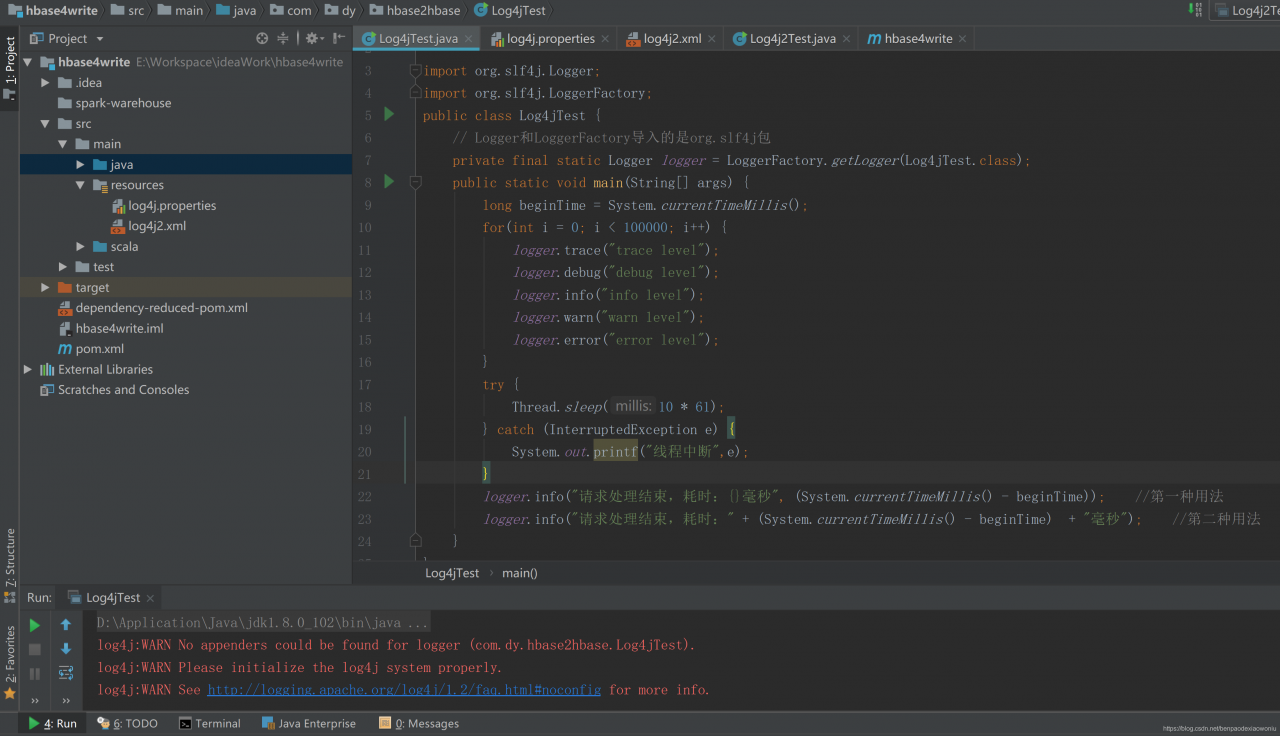
For the above error, just add the log4j.properties file in the resources directory, whose content is

log4j.rootLogger=info, stdout
log4j.appender.stdout=org.apache.log4j.ConsoleAppender
log4j.appender.stdout.layout=org.apache.log4j.PatternLayout
log4j.appender.stdout.layout.ConversionPattern=%d %p [%c] - %m%n
log4j.appender.logfile=org.apache.log4j.FileAppender
log4j.appender.logfile.File=target/spring.log
log4j.appender.logfile.layout=org.apache.log4j.PatternLayout
log4j.appender.logfile.layout.ConversionPattern=%d %p [%c] - %m%n
#1.Applications for consoles
#log4j.appender.CONSOLE = org.apache.log4j.ConsoleAppender 
#log4j.appender.Threshold = DEBUG 
#log4j.appender.CONSOLE.Target = System.out 
#log4j.appender.CONSOLE.layout = org.apache.log4j.PatternLayout 
#log4j.appender.CONSOLE.layout.ConversionPattern = [framework] % d - % c -%- 4r [ % t] %- 5p % c % x - % m % n 

##log4j.appender.CONSOLE.layout.ConversionPattern = [start] % d {DATE} [DATE] % n % p[PRIORITY] % n % x[NDC] % n % t[THREAD] n % c[CATEGORY] % n % m[MESSAGE] % n % n 

# 2.Applications for files
#log4j.appender.FILE = org.apache.log4j.FileAppender 
#log4j.appender.FILE.File = file.log 
#log4j.appender.FILE.Append = false 
#log4j.appender.FILE.layout = org.apache.log4j.PatternLayout 
#log4j.appender.FILE.layout.ConversionPattern = [framework] % d - % c -%- 4r [ % t] %- 5p % c % x - % m % n 

# Use this layout for LogFactor 5 analysis 

# 3.Applications for files
#log4j.appender.FILE = org.apache.log4j.FileAppender 
#log4j.appender.FILE.File = file.log 
#log4j.appender.FILE.Append = false 
#log4j.appender.FILE.layout = org.apache.log4j.PatternLayout 
#log4j.appender.FILE.layout.ConversionPattern = [framework] % d - % c -%- 4r [ % t] %- 5p % c % x - % m % n 

# Use this layout for LogFactor 5 analysis

And the project needs pom.xml by

        <!-- slf4j + log4j begin -->
        <dependency>
            <groupId>org.slf4j</groupId>
            <artifactId>slf4j-api</artifactId>
            <version>1.7.10</version>
        </dependency>

        <dependency>
            <groupId>org.apache.logging.log4j</groupId>
            <artifactId>log4j-api</artifactId>
            <version>${log4j.version}</version>
        </dependency>
        <dependency>
            <groupId>org.apache.logging.log4j</groupId>
            <artifactId>log4j-core</artifactId>
            <version>${log4j.version}</version>
        </dependency>
        <!-- log4j end-->
List: How to de-duplication according to an attribute of an object

List is de-duplicated according to an attribute of an object

public class Test {
    public static void main(String[] args) {
        List<User> list = new Lists.newArrayList();
        list.add(new user(1,"Zhang San", "ShangHai"));
        list.add(new user(2, "Li Si", "Beijing"));
        list.add(new user(3, "Wang Wu", "Jinan"));
        list.add(new user(4, "Li Si", "Beijing"));

        // de-duplicate the list according to the city in the list
        newList = list.stream().filter(distinctByKey(User::getCity)).collect(Collectors.toList());
    }
    
    private static <T> Predicate<T> distinctByKey(Function<? super T, Object> keyExtractor) {
        Map<Object, Boolean> seen = new ConcurrentHashMap<>();
        return t -> seen.putIfAbsent(keyExtractor.apply(t), Boolean.TRUE) == null;
    }
}
