Category Archives: JAVA

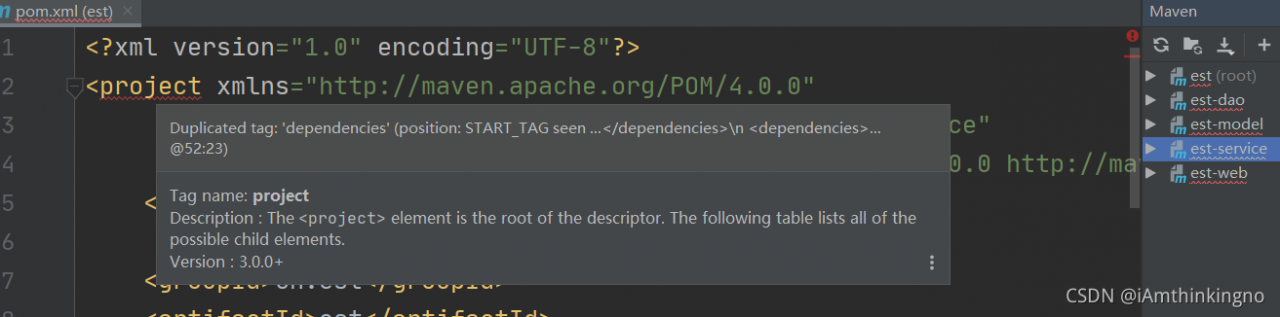
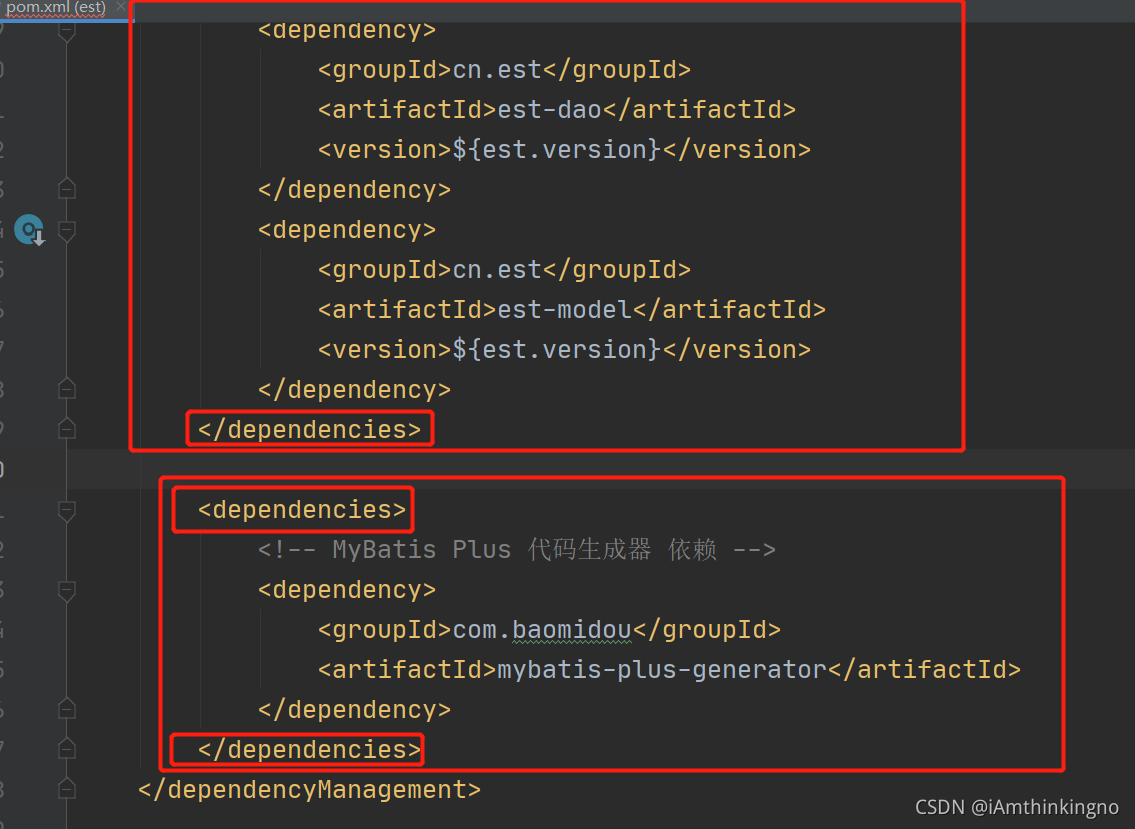
The project tag in the parent project POM file of Maven multi module project reports an error, and the error information is: \n

Error message

Reason: under the dependency management tab in the parent project POM file  <dependencies></dependencies> There are multiple. One is version control dependency, and the other is introduced dependency

Solution:

Add POM file

The dependencies are placed in the dependencies tab. The dependency of version control is placed under the dependency management tab In dependencies.

Note: it’s just to record some mistakes that are easy to ignore or imperceptible.

[Solved] Tomcat Error: org.apache.tomcat.util.digester.Digester.fatalError Parse fatal error at line [40] column [36]

Error Messages:

org.apache.tomcat.util.digester.Digester.fatalError Parse fatal error at line [40] column [36]
org.xml.sax.SAXParseException; lineNumber: 40; columnNumber: 36; The value of attribute “password” associated with an element type “user” must not contain the ‘<‘ character.

Solution:
apache-tomcat-10.0.12\conf\tomcat-users

  <user username=”admin” password=”admin” roles=”manager-gui”/>
<user username=”robot” password=”<must-be-changed>” roles=”manager-script”/>
<user username=”tomcat” password=”admin” roles=”tomcat”/>
<user username=”both” password=”<must-be-changed>” roles=”tomcat,role1″/>
<user username=”role1″ password=”<must-be-changed>” roles=”role1″/>

Change password, e.g.
<user username=”robot” password=”admin” roles=”manager-script”/>

How to Solve JVM Common Errors: outofmemoryerror & stackoverflowerror

OutOfMemoryError

Error cause: java.lang.outofmemoryerror: Java heap space heap memory overflow
solution: adjust the size of the heap memory

// -Xms1m -Xmx10m -XX:+PrintGCDetails
		List<Object> listObject = new ArrayList<>();
		for (int i = 0; i < 10; i++) {
			System.out.println("i:" + i);
			Byte[] bytes = new Byte[1 * 1024 * 1024];
			listObject.add(bytes);
		}
		System.out.println("Added successfully...");

StackOverflowError

Cause of error: java.lang.stackoverflowerror is expressed as stack overflow, which generally occurs in recursive calls
solution: set the maximum thread call depth, which is 1m by default

//-Xss5m Set the maximum call depth
public class StackTest {
	private static int count;
	public static void count(){
		try {
			count++;
			count(); 
		} catch (Throwable e) {
			System.out.println("the maximum depth:"+count);
			e.printStackTrace();
		}
	}
	public static void main(String[] args) {
			 count();
	}
}

[Solved] ERROR org.apache.struts2.dispatcher.Dispatcher – Dispatcher initialization failed

Problem description
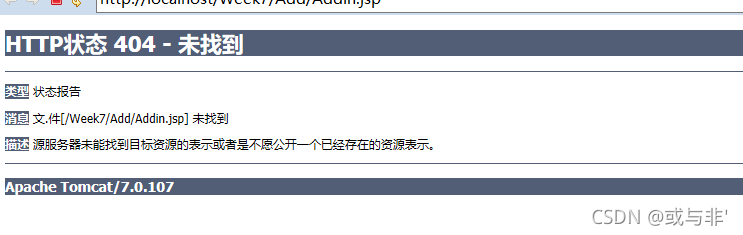
the newly created eclipse project cannot run JSP

the console reports an error, as shown in the figure

ERROR StatusLogger No log4j2 configuration file found. Using default configuration: logging only errors to the console.
09:04:55.281 [localhost-startStop-1] ERROR org.apache.struts2.dispatcher.Dispatcher - Dispatcher initialization failed
com.opensymphony.xwork2.config.ConfigurationException: Unable to load configuration.
	at com.opensymphony.xwork2.config.ConfigurationManager.getConfiguration(ConfigurationManager.java:70) ~[xwork-core-2.3.37.jar:2.3.37]
	at org.apache.struts2.dispatcher.Dispatcher.getContainer(Dispatcher.java:978) ~[struts2-core-2.3.37.jar:2.3.37]
	at org.apache.struts2.dispatcher.Dispatcher.init_PreloadConfiguration(Dispatcher.java:446) ~[struts2-core-2.3.37.jar:2.3.37]
	at org.apache.struts2.dispatcher.Dispatcher.init(Dispatcher.java:490) [struts2-core-2.3.37.jar:2.3.37]
	at org.apache.struts2.dispatcher.ng.InitOperations.initDispatcher(InitOperations.java:74) [struts2-core-2.3.37.jar:2.3.37]
	at org.apache.struts2.dispatcher.ng.filter.StrutsPrepareAndExecuteFilter.init(StrutsPrepareAndExecuteFilter.java:57) [struts2-core-2.3.37.jar:2.3.37]
	at org.apache.catalina.core.ApplicationFilterConfig.initFilter(ApplicationFilterConfig.java:281) [catalina.jar:7.0.107]
	at org.apache.catalina.core.ApplicationFilterConfig.getFilter(ApplicationFilterConfig.java:262) [catalina.jar:7.0.107]
	at org.apache.catalina.core.ApplicationFilterConfig.<init>(ApplicationFilterConfig.java:106) [catalina.jar:7.0.107]
	at org.apache.catalina.core.StandardContext.filterStart(StandardContext.java:4973) [catalina.jar:7.0.107]
	at org.apache.catalina.core.StandardContext.startInternal(StandardContext.java:5672) [catalina.jar:7.0.107]
	at org.apache.catalina.util.LifecycleBase.start(LifecycleBase.java:183) [catalina.jar:7.0.107]
	at org.apache.catalina.core.ContainerBase$StartChild.call(ContainerBase.java:1689) [catalina.jar:7.0.107]
	at org.apache.catalina.core.ContainerBase$StartChild.call(ContainerBase.java:1679) [catalina.jar:7.0.107]
	at java.util.concurrent.FutureTask.run(Unknown Source) [?:1.8.0_51]
	at java.util.concurrent.ThreadPoolExecutor.runWorker(Unknown Source) [?:1.8.0_51]
	at java.util.concurrent.ThreadPoolExecutor$Worker.run(Unknown Source) [?:1.8.0_51]
	at java.lang.Thread.run(Unknown Source) [?:1.8.0_51]
Caused by: com.opensymphony.xwork2.config.ConfigurationException: Action class [Action.complexAction] not found
	at com.opensymphony.xwork2.config.providers.XmlConfigurationProvider.verifyAction(XmlConfigurationProvider.java:486) ~[xwork-core-2.3.37.jar:2.3.37]
	at com.opensymphony.xwork2.config.providers.XmlConfigurationProvider.addAction(XmlConfigurationProvider.java:429) ~[xwork-core-2.3.37.jar:2.3.37]
	at com.opensymphony.xwork2.config.providers.XmlConfigurationProvider.addPackage(XmlConfigurationProvider.java:556) ~[xwork-core-2.3.37.jar:2.3.37]
	at com.opensymphony.xwork2.config.providers.XmlConfigurationProvider.loadPackages(XmlConfigurationProvider.java:295) ~[xwork-core-2.3.37.jar:2.3.37]
	at org.apache.struts2.config.StrutsXmlConfigurationProvider.loadPackages(StrutsXmlConfigurationProvider.java:112) ~[struts2-core-2.3.37.jar:2.3.37]
	at com.opensymphony.xwork2.config.impl.DefaultConfiguration.reloadContainer(DefaultConfiguration.java:264) ~[xwork-core-2.3.37.jar:2.3.37]
	at com.opensymphony.xwork2.config.ConfigurationManager.getConfiguration(ConfigurationManager.java:67) ~[xwork-core-2.3.37.jar:2.3.37]
	... 17 more
十月 22, 2021 9:04:55 上午 org.apache.catalina.core.StandardContext filterStart
Severe: Start filter exception
Unable to load configuration. - action - file:/F:/JavaEE/.metadata/.plugins/org.eclipse.wst.server.core/tmp0/wtpwebapps/Week7/WEB-INF/classes/struts.xml:14:64
	at org.apache.struts2.dispatcher.Dispatcher.init(Dispatcher.java:504)
	at org.apache.struts2.dispatcher.ng.InitOperations.initDispatcher(InitOperations.java:74)
	at org.apache.struts2.dispatcher.ng.filter.StrutsPrepareAndExecuteFilter.init(StrutsPrepareAndExecuteFilter.java:57)
	at org.apache.catalina.core.ApplicationFilterConfig.initFilter(ApplicationFilterConfig.java:281)
	at org.apache.catalina.core.ApplicationFilterConfig.getFilter(ApplicationFilterConfig.java:262)
	at org.apache.catalina.core.ApplicationFilterConfig.<init>(ApplicationFilterConfig.java:106)
	at org.apache.catalina.core.StandardContext.filterStart(StandardContext.java:4973)
	at org.apache.catalina.core.StandardContext.startInternal(StandardContext.java:5672)
	at org.apache.catalina.util.LifecycleBase.start(LifecycleBase.java:183)
	at org.apache.catalina.core.ContainerBase$StartChild.call(ContainerBase.java:1689)
	at org.apache.catalina.core.ContainerBase$StartChild.call(ContainerBase.java:1679)
	at java.util.concurrent.FutureTask.run(Unknown Source)
	at java.util.concurrent.ThreadPoolExecutor.runWorker(Unknown Source)
	at java.util.concurrent.ThreadPoolExecutor$Worker.run(Unknown Source)
	at java.lang.Thread.run(Unknown Source)
Caused by: Unable to load configuration. - action - file:/F:/JavaEE/.metadata/.plugins/org.eclipse.wst.server.core/tmp0/wtpwebapps/Week7/WEB-INF/classes/struts.xml:14:64
	at com.opensymphony.xwork2.config.ConfigurationManager.getConfiguration(ConfigurationManager.java:70)
	at org.apache.struts2.dispatcher.Dispatcher.getContainer(Dispatcher.java:978)
	at org.apache.struts2.dispatcher.Dispatcher.init_PreloadConfiguration(Dispatcher.java:446)
	at org.apache.struts2.dispatcher.Dispatcher.init(Dispatcher.java:490)
	... 14 more
Caused by: Action class [Action.complexAction] not found - action - file:/F:/JavaEE/.metadata/.plugins/org.eclipse.wst.server.core/tmp0/wtpwebapps/Week7/WEB-INF/classes/struts.xml:14:64
	at com.opensymphony.xwork2.config.providers.XmlConfigurationProvider.verifyAction(XmlConfigurationProvider.java:486)
	at com.opensymphony.xwork2.config.providers.XmlConfigurationProvider.addAction(XmlConfigurationProvider.java:429)
	at com.opensymphony.xwork2.config.providers.XmlConfigurationProvider.addPackage(XmlConfigurationProvider.java:556)
	at com.opensymphony.xwork2.config.providers.XmlConfigurationProvider.loadPackages(XmlConfigurationProvider.java:295)
	at org.apache.struts2.config.StrutsXmlConfigurationProvider.loadPackages(StrutsXmlConfigurationProvider.java:112)
	at com.opensymphony.xwork2.config.impl.DefaultConfiguration.reloadContainer(DefaultConfiguration.java:264)
	at com.opensymphony.xwork2.config.ConfigurationManager.getConfiguration(ConfigurationManager.java:67)
	... 17 more

There are many solutions to online search, such as jar package conflict in Tomcat and reinstalling tomcat, but other projects can still run before, so there is no blind operation. Some things still need to see the essence. In fact, where the problem appears has been prompted.

Caused by: com.opensymphony.xwork2.config.ConfigurationException: Action class [Action.complexAction] not found
	at com.opensymphony.xwork2.config.providers.XmlConfigurationProvider.verifyAction(XmlConfigurationProvider.java:486) ~[xwork-core-2.3.37.jar:2.3.37]
	at com.opensymphony.xwork2.config.providers.XmlConfigurationProvider.addAction(XmlConfigurationProvider.java:429) ~[xwork-core-2.3.37.jar:2.3.37]
	at com.opensymphony.xwork2.config.providers.XmlConfigurationProvider.addPackage(XmlConfigurationProvider.java:556) ~[xwork-core-2.3.37.jar:2.3.37]
	at com.opensymphony.xwork2.config.providers.XmlConfigurationProvider.loadPackages(XmlConfigurationProvider.java:295) ~[xwork-core-2.3.37.jar:2.3.37]
	at org.apache.struts2.config.StrutsXmlConfigurationProvider.loadPackages(StrutsXmlConfigurationProvider.java:112) ~[struts2-core-2.3.37.jar:2.3.37]
	at com.opensymphony.xwork2.config.impl.DefaultConfiguration.reloadContainer(DefaultConfiguration.java:264) ~[xwork-core-2.3.37.jar:2.3.37]
	at com.opensymphony.xwork2.config.ConfigurationManager.getConfiguration(ConfigurationManager.java:67) ~[xwork-core-2.3.37.jar:2.3.37]

Yes, complexaction was not found in the action configuration
there is a problem with the action configuration in the struts.xml file. If you also encounter this problem, first see if there is a problem with the configuration file

Springcloud Project Error: web.client.HttpServerErrorException$InternalServerError: 500 Internal Server Error

Question

In the springcloud project, the consumer module uses resttemplate to call the provider module. When accessing a method in the consumer module, the following error occurs:

org.springframework.web.client.HttpServerErrorException$InternalServerError: 500 Internal Server Error
	at org.springframework.web.client.HttpServerErrorException.create(HttpServerErrorException.java:79) ~[spring-web-5.2.1.RELEASE.jar:5.2.1.RELEASE]
	at org.springframework.web.client.DefaultResponseErrorHandler.handleError(DefaultResponseErrorHandler.java:125) ~[spring-web-5.2.1.RELEASE.jar:5.2.1.RELEASE]
	at org.springframework.web.client.DefaultResponseErrorHandler.handleError(DefaultResponseErrorHandler.java:102) ~[spring-web-5.2.1.RELEASE.jar:5.2.1.RELEASE]
	at org.springframework.web.client.ResponseErrorHandler.handleError(ResponseErrorHandler.java:63) ~[spring-web-5.2.1.RELEASE.jar:5.2.1.RELEASE]
	at org.springframework.web.client.RestTemplate.handleResponse(RestTemplate.java:785) ~[spring-web-5.2.1.RELEASE.jar:5.2.1.RELEASE]
	at org.springframework.web.client.RestTemplate.doExecute(RestTemplate.java:743) ~[spring-web-5.2.1.RELEASE.jar:5.2.1.RELEASE]

Solution:

When I first saw the error of 500, I naturally thought it was the problem of background service. However, the log information in the consumer module was relatively general, so it was difficult to locate the problem. After checking, it was found that an error occurred when the consumer used resttemplate to call the provider service , so check the log of the provider module, and sure enough, more detailed error information was found:

java.lang.IllegalArgumentException: Parameter value [2021-10-25] did not match expected type [java.util.Date (n/a)]

Then the problem will be solved

Mybatis Error: The error may exist in xxxxMapper.xml [How to Solve]

After learning mybatis, this exception is reported during one-to-one mapping

### Error building SqlSession.
### The error may exist in StudentMapper.xml
### The error occurred while processing mapper_resultMap[AddressResult]
### Cause: org.apache.ibatis.builder.BuilderException: Error parsing SQL Mapper Configuration. Cause: org.apache.ibatis.builder.BuilderException: Error parsing Mapper XML. The XML location is 'StudentMapper.xml'. Cause: org.apache.ibatis.builder.BuilderException: Error resolving class. Cause: org.apache.ibatis.type.TypeException: Could not resolve type alias 'Address'.  Cause: java.lang.ClassNotFoundException: Cannot find class: Address

In fact, the exception report is quite clear. This is the mapping file, that is, the code in studentmapper.xml

	<resultMap id="selectStudentResult1" type="Student">
		<id property="studId" column="id"/>
		<result property="name" column="name"/>
		<result property="email" column="email"/>
		<result property="dob" column="dob"/>
		<result property="phone" column="phone"/>
		<association property="address" resultMap="AddressResult"/>
	</resultMap>

//Note the type of the following line
	<resultMap id="AddressResult" type="Address">
		<id property="addrId" column="addr_id"/>
		<result property="street" column="street"/>
		<result property="city" column="city"/>
		<result property="state" column="state"/>
		<result property="zip" column="zip"/>
		<result property="country" column="country"/>

	</resultMap>

	<! -- This is used to test one-to-one ResultMap One-to-one mapping of better method nesting results -->
	<select id="selectStudentWithAddress1" parameterType="int" resultMap="selectStudentResult1">
		select id,name,email,dob,phone,
		street,city,state,zip,country from students s left join addresses a
		on s.addr_id = a.addr_id
		where id = #{id}
	</select>

There are also corresponding files

The reason for my error is mybatis-config.xml in the configuration file. There is no alias for address. (because the type attribute in the resultmap uses address, the alias is called address)
(the type attribute is the fully qualified name of the class. Add address)

	<typeAliases>
		<typeAlias type="Full name" alias="Student" />
<!--		<typeAlias type="Full name" alias="Address"/>-->
	</typeAliases>

In this tab, you can also use package to set the default name of all classes in a directory
(if you use package, you don’t need to add the class name)

	<typeAliases>
		<package name="Full qualified name without class name" />
	</typeAliases>

This will work properly.

[Solved] Mvel2 Error: java.lang.VerifyError method: getKnownEgressType signature

Environmental information:

jdk: 8

mvel2: 2.0.19

Exception information:

java.lang.VerifyError: (class: ASMAccessorImpl_3009129941634644382940, method: getKnownEgressType signature: ()Ljava/lang/Class;) Illegal type in constant pool

The methods called are the following methods of the org.mvel2.mvel class:

public static Object executeExpression(Object compiledExpression, Object ctx, Map vars)

Error Messages:

java.lang.VerifyError: (class: ASMAccessorImpl_3009129941634644382940, method: getKnownEgressType signature: ()Ljava/lang/Class;) Illegal type in constant pool
at java.lang.Class.getDeclaredConstructors0(Native Method)
at java.lang.Class.privateGetDeclaredConstructors(Class.java:2671)
at java.lang.Class.getConstructor0(Class.java:3075)
at java.lang.Class.newInstance(Class.java:412)
at org.mvel2.optimizers.impl.asm.ASMAccessorOptimizer._initializeAccessor(ASMAccessorOptimizer.java:698)
at org.mvel2.optimizers.impl.asm.ASMAccessorOptimizer.compileAccessor(ASMAccessorOptimizer.java:832)
at org.mvel2.optimizers.impl.asm.ASMAccessorOptimizer.optimizeAccessor(ASMAccessorOptimizer.java:239)
at org.mvel2.optimizers.dynamic.DynamicGetAccessor.optimize(DynamicGetAccessor.java:83)
at org.mvel2.optimizers.dynamic.DynamicGetAccessor.getValue(DynamicGetAccessor.java:57)
at org.mvel2.ast.ASTNode.getReducedValueAccelerated(ASTNode.java:98)
at org.mvel2.compiler.ExecutableAccessor.getValue(ExecutableAccessor.java:42)
at org.mvel2.MVEL.executeExpression(MVEL.java:996)


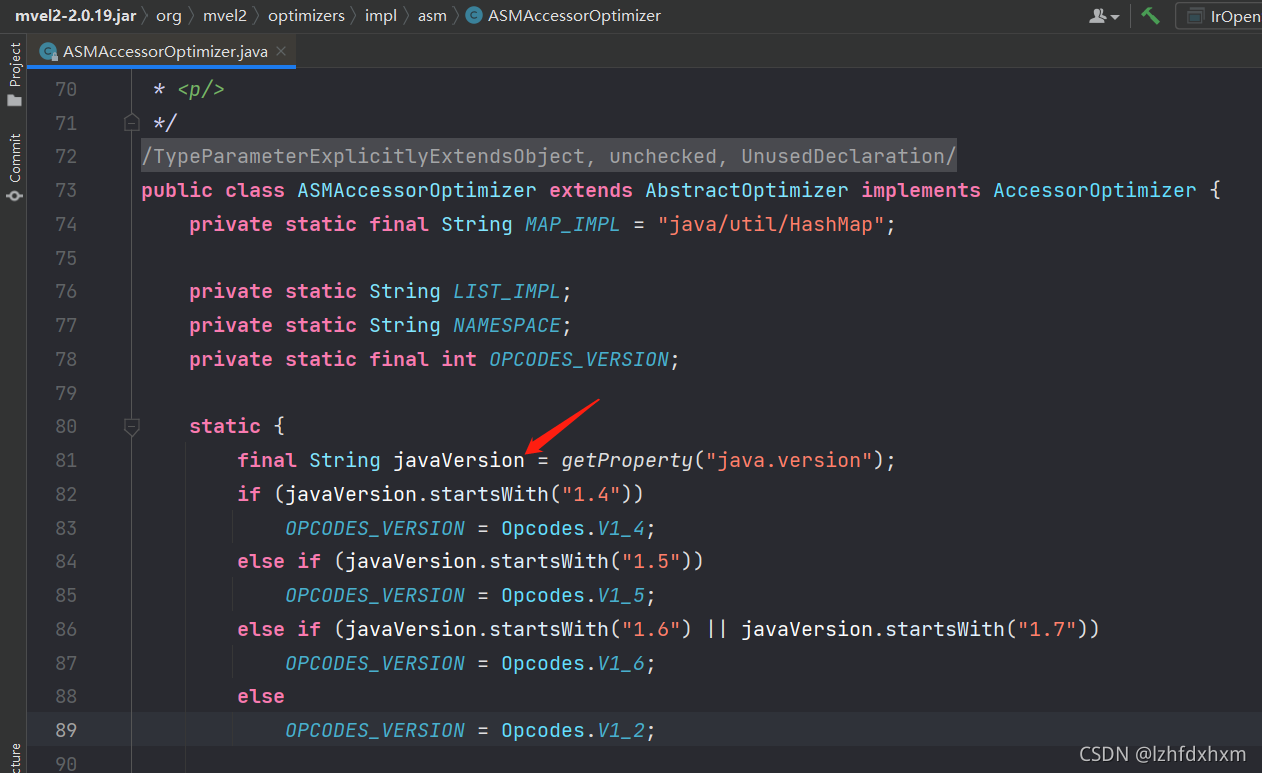
Partial source code of ASMAccessorOptimizer.

It can be seen that this version of mvel2 does not support jdk7 and jdk8, upgrade the version on the good

[Solved] Spring Error: This application has no explicit mapping for /error

Whitelabel Error Page
This application has no explicit mapping for /error, so you are seeing this as a fallback.

Tue Oct 26 14:38:57 CST 2021
There was an unexpected error (type=Not Found, status=404).
No message available

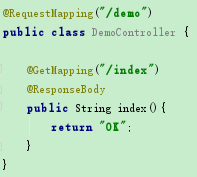
The reason is that the controller did not add @controller

solution: add @controller

[Solved] Initialization of anonymous inner class member variable causes java.lang.stackoverflowerror

Project scenario:

An abstract class A in Java needs to initialize a member variable of the same type anonymously,

public class Main {
  public static void main(String[] args) {
    new B();
  }

}

abstract class A {
   A a = new A() {//Member variables of the same type
     @Override
     void do_sth() {
       System.out.println("do nothing");
     }
   };
  abstract void do_sth();
}

class B extends A{

  @Override
  void do_sth() {
	System.out.println("doing B");
  }
}

Problem Description:

Java.lang.stackoverflowerror directly overflowed the stack


Cause analysis:

When creating object B, the anonymous inner class in object a is also created, and the inner class creates its own inner class, resulting in infinite recursion.


Solution:

Try not to use anonymous inner classes as member variables. If you want to use them, be sure to pay attention to whether they contain the possibility of infinite recursion.

error:unable to access jarfile cracker2017.jar [How to Solve]

Today, I encountered some problems when opening cracker2017.jar file. Please record it.

Command prompt opening method: press Win + R, enter CMD and enter.

First of all, you should use the absolute path to open the jar package!!!

Therefore, it is convenient to open the command prompt directly from the folder. (the file above the jar file)

On the command line, enter:

java -jar cracker2017.jar E:\Baiduwangpan\Myeclipse2017\Activation file

Java – jar the file name you want to open. Jar, and then type the path again

Note: the path is a folder above the jar file

Enter and you’ll open it! oh yeah!

oh,that’s a nice night.

Mybatis reports an error (error building sqlsession.) when using annotations without deleting redundant files

First, the SQL statement is read by using the mapping configuration file
the file is iuserdao.xml, as follows:

package com.wwh.dao;

import com.wwh.domain.User;
import org.apache.ibatis.annotations.Select;

import java.util.List;

/**
 * Created By DELL on 2021/10/21-17:41
 * Persistence layer interface for users
 */
public interface IUserDao {
    /**
     * Query all operations
     * @return
     */
    @Select("select * from user")
    List<User> findAll();
}

The main profile is:


```css
<?xml version="1.0" encoding="UTF-8"?>
<!DOCTYPE configuration
        PUBLIC "-//mybatis.org//DTD Config 3.0//EN"
        "http://mybatis.org/dtd/mybatis-3-config.dtd">
<!--The main configuration file for mybatis - >
<configuration>
    <! --configuration-environments-->
    <environments default="mysql">
        <! --configure the type of mysql -->
        <environment id="mysql">
            <! --configure the type of transaction -->
            <transactionManager type="JDBC"></transactionManager>
            <! -- Configure data source (connection pool) -->
            <dataSource type="POOLED">
                <! -- Configure the four basic information for connecting to the database -- >
                <property name="driver" value="com.mysql.jdbc.Driver"/>
                <property name="url" value="jdbc:mysql://localhost:3306/eesy"/>
                <property name="username" value="root"/>
                <property name="password" value="123456"/>
            </dataSource>

        </environment>
    </environments>

    <! -- Specify the location of the mapping profile, the mapping profile refers to a separate profile for each dao
        If the configuration is done with annotations, the class attribute should be used here to specify the fully qualified class name of the annotated dao
    -->
    <mappers>
        <mapper resource="com/wwh/dao/IUserDao.xml"/>
    </mappers>
</configuration>

Then, the SQL is read by annotation, and the main configuration file is changed to:

<?xml version="1.0" encoding="UTF-8"?>
<!DOCTYPE configuration
        PUBLIC "-//mybatis.org//DTD Config 3.0//EN"
        "http://mybatis.org/dtd/mybatis-3-config.dtd">
<!--The main configuration file for mybatis - >
<configuration>
    <! --configuration-environments-->
    <environments default="mysql">
        <! --configure the type of mysql -->
        <environment id="mysql">
            <! --configure the type of transaction -->
            <transactionManager type="JDBC"></transactionManager>
            <! -- Configure data source (connection pool) -->
            <dataSource type="POOLED">
                <! -- Configure the four basic information for connecting to the database -- >
                <property name="driver" value="com.mysql.jdbc.Driver"/>
                <property name="url" value="jdbc:mysql://localhost:3306/eesy"/>
                <property name="username" value="root"/>
                <property name="password" value="123456"/>
            </dataSource>

        </environment>
    </environments>

    <! -- Specify the location of the mapping profile, the mapping profile refers to a separate profile for each dao
        If the configuration is done with annotations, the class attribute should be used here to specify the fully qualified class name of the annotated dao
    -->
    <mappers>
        <mapper class="com.wwh.dao.IUserDao"/>
    </mappers>
</configuration>

The notes are:

package com.wwh.dao;

import com.wwh.domain.User;
import org.apache.ibatis.annotations.Select;

import java.util.List;

/**
 * Created By DELL on 2021/10/21-17:41
 * Persistence layer interface for users
 */
public interface IUserDao {
    /**
     * Query all operations
     * @return
     */
    @Select("select * from user")
    List<User> findAll();
}

When running the mapping configuration file discovery program, it can run through, but when running the annotation program, it is found that an error is reported:

### Error building SqlSession.
### The error may exist in com/wwh/dao/IUserDao.xml
### Cause: org.apache.ibatis.builder.BuilderException: Error parsing SQL Mapper Configuration. Cause: java.lang.IllegalArgumentException: Mapped Statements collection already contains value for com.wwh.dao.IUserDao.findAll
	at org.apache.ibatis.exceptions.ExceptionFactory.wrapException(ExceptionFactory.java:30)
	at org.apache.ibatis.session.SqlSessionFactoryBuilder.build(SqlSessionFactoryBuilder.java:80)
	at org.apache.ibatis.session.SqlSessionFactoryBuilder.build(SqlSessionFactoryBuilder.java:64)
	at com.wwh.test.MybatisTest.main(MybatisTest.java:27)
Caused by: org.apache.ibatis.builder.BuilderException: Error parsing SQL Mapper Configuration. Cause: java.lang.IllegalArgumentException: Mapped Statements collection already contains value for com.wwh.dao.IUserDao.findAll
	at org.apache.ibatis.builder.xml.XMLConfigBuilder.parseConfiguration(XMLConfigBuilder.java:121)
	at org.apache.ibatis.builder.xml.XMLConfigBuilder.parse(XMLConfigBuilder.java:99)
	at org.apache.ibatis.session.SqlSessionFactoryBuilder.build(SqlSessionFactoryBuilder.java:78)
	... 2 more
Caused by: java.lang.IllegalArgumentException: Mapped Statements collection already contains value for com.wwh.dao.IUserDao.findAll
	at org.apache.ibatis.session.Configuration$StrictMap.put(Configuration.java:872)
	at org.apache.ibatis.session.Configuration$StrictMap.put(Configuration.java:844)
	at org.apache.ibatis.session.Configuration.addMappedStatement(Configuration.java:668)
	at org.apache.ibatis.builder.MapperBuilderAssistant.addMappedStatement(MapperBuilderAssistant.java:302)
	at org.apache.ibatis.builder.annotation.MapperAnnotationBuilder.parseStatement(MapperAnnotationBuilder.java:351)
	at org.apache.ibatis.builder.annotation.MapperAnnotationBuilder.parse(MapperAnnotationBuilder.java:134)
	at org.apache.ibatis.binding.MapperRegistry.addMapper(MapperRegistry.java:72)
	at org.apache.ibatis.session.Configuration.addMapper(Configuration.java:741)
	at org.apache.ibatis.builder.xml.XMLConfigBuilder.mapperElement(XMLConfigBuilder.java:381)
	at org.apache.ibatis.builder.xml.XMLConfigBuilder.parseConfiguration(XMLConfigBuilder.java:119)
	... 4 more

Process finished with exit code 1

Viewing the error information, we can see that the reason is that your iuserdao.xml has not been deleted. After the annotation method is adopted, the relevant mapping configuration file has no effect. If it is not deleted, an error will be reported (even if it is marked as excluded)
after deletion, you can run through:

[Solved] JSON parse error: Cannot deserialize instance of `java.util.ArrayList<..> out of START_OBJECT token;

JSON parse error: Cannot deserialize instance of java.util.ArrayList<com.sangfor.ngsoc.knowledge.to.UserEntity> out of START_OBJECT token;
1. problem replication
① First, configure both knowledge and auth services into eureka.

eureka:
  client:
    serviceUrl:
      defaultZone: http://localhost:8761/eureka/

② The project path of auth service is:

server:
  port: 8081
  servlet.context-path: /ngso/AUTH/

③ Interface of remote auth service:

@Api(tags = "Usersheet")
@Slf4j
@Validated
@RestController
@ResponseResult
@RequestMapping("/api/v2")
public class UserController {

    @Autowired
    private IUserService userService;

    @PostMapping("/users/inner/exact")
    public PageData<UserEntity> exactPageQueryUserList(@Validated @RequestBody UserQo userQo,
                                                       @RequestParam(SessionKey.DOMAIN_ID) String domainId) {
        userQo.setDomainId(domainId);
        return userService.exactPageQueryUserList(userQo);
    }
}

④ Feign interface of knowledge service, calling the interface of remote auth service:

@FeignClient(name = "AUTH")
public interface AuthFeignService {
    @PostMapping("/ngso/AUTH/api/v2/users/inner/exact")
    PageData<UserResp> exactPageQueryUserList(
            @RequestBody UserReqDto userReqDto,
            @RequestParam(SessionKey.DOMAIN_ID) String domainId);
}
(5) calling feign interface in knowledge service:

@Override
public String addDoc() {
    List<String> userIds = new ArrayList<>();
     UserInfo userInfo = UserInfoShareHolder.getUserInfo();
    userIds.add(userInfo.getId());
    UserReqDto userReqDto = new UserReqDto(userIds);
    userReqDto.setPageNum(1);
    userReqDto.setPageSize(1);
    PageData<UserResp> pageDataApiResponse = authFeignService
        .exactPageQueryUserList(userReqDto, UserInfoShareHolder.getUserInfo().getDomainId());
}

Result error:

JSON parse error: Cannot deserialize instance of `java.util.ArrayList<com.sangfor.ngsoc.knowledge.to.UserEntity>` out of START_OBJECT token; 

2. Solutions

① First, directly call the auth service interface without using the remote service: localhost: 8081/NGSO/auth/API/V2/users/inner/exact

There are more code and message messages than the actual response data, indicating that the response data is encapsulated

{
    "code": 0,
    "message": "成功",
    "data": {
        "pageNum": 1,
        "pageSize": 1,
        "totalCount": 1,
        "data": [
            {
                "id": "fx-user-fec844b9e0dc0d80000004",
                "name": "sysadmin",
                "phone": "",
                "email": "",
                "description": "Built-in user: default platform system administrator account",
                "domainId": "fx-domain-fec833bfa0dbcc40000001",
                "projectId": " ",
                "enabled": 1,
                "createTime": "2021-10-18 15:41:17",
                "updateTime": "2021-10-21 16:35:11",
                "changeTime": "2021-10-18 16:44:37",
                "loginTime": "2021-10-21 16:35:11",
                "options": 0,
                "builtIn": 1
            }
        ]
    }
}

② View the code and add a layer of encapsulation:

@FeignClient(name = "AUTH" )
public interface AuthFeignService {
   @PostMapping("/ngso/AUTH/api/v2/users/inner/exact")
    ApiResponse<PageData<UserResp>> exactPageQueryUserList(
            @RequestBody UserReqDto userReqDto,
            @RequestParam(SessionKey.DOMAIN_ID) String domainId);
}