Solution:
The contents of. Idea are inconsistent. Maybe the same. Idea is used for two compilations, so it cannot be recognized. So
Delete the. Idea file and reopen the project to compile and run.
Solution:
The contents of. Idea are inconsistent. Maybe the same. Idea is used for two compilations, so it cannot be recognized. So
Delete the. Idea file and reopen the project to compile and run.
Android 11 reports an error during OTA package:
ExternalError: Failed to run signapk.jar: return code 1:
Error: A JNI error has occurred, please check your installation and try again
Exception in thread "main" java.lang.UnsupportedClassVersionError: com/android/signapk/SignApk has been compiled by a more recent version of the Java Runtime (class file version 53.0), this version of the Java Runtime only recognizes class file versions up to 52.0
	at java.lang.ClassLoader.defineClass1(Native Method)
	at java.lang.ClassLoader.defineClass(ClassLoader.java:756)
	at java.security.SecureClassLoader.defineClass(SecureClassLoader.java:142)
	at java.net.URLClassLoader.defineClass(URLClassLoader.java:468)
	at java.net.URLClassLoader.access$100(URLClassLoader.java:74)
	at java.net.URLClassLoader$1.run(URLClassLoader.java:369)
	at java.net.URLClassLoader$1.run(URLClassLoader.java:363)
	at java.security.AccessController.doPrivileged(Native Method)
	at java.net.URLClassLoader.findClass(URLClassLoader.java:362)
	at java.lang.ClassLoader.loadClass(ClassLoader.java:418)
	at sun.misc.Launcher$AppClassLoader.loadClass(Launcher.java:352)
	at java.lang.ClassLoader.loadClass(ClassLoader.java:351)
	at sun.launcher.LauncherHelper.checkAndLoadMain(LauncherHelper.java:601)
According to the error analysis, it is caused by the jdk version.
1. First check the jdk version: java –version My previous version was openjdk-8
2. Use sudo apt-get install openjdk-11-jdk to install openjdk-11
3. Configure linux default jdk version: sudo update-alternatives –config java, select the JDK version you need
4. Configure the default java version: sudo update-alternatives –config javac, select the java version you need.
Just do the ota package again.
Mybatis generates an error after adding a dependency: org.springframework.core.nestedioexception: failed to parse config resource: class path resource [mybatis/mybatis config. XML]; Needed exception is org.apache.ibatis.builder.builderexception: error parsing SQL mapper configuration. Cause: org.apache.ibatis.logging.logexception: error setting log implementation. Cause: java.lang.reflect.invocationtargetexceptionlog4j
Attachment: springboot running error:
Problem recurrence
After adding logs for mybatis configuration
<settings>
    <setting name="logImpl" value="LOG4J" />
</settings>
Dependencies in Maven will have red wavy lines: log4j:log4j:unknown
Check the dependency of log4j in pom.xml
<dependency>
    <groupId>log4j</groupId>
    <artifactId>log4j</artifactId>
    <scope>compile</scope>
</dependency>
Causes and Solutions
The version number is not written. After consulting the data, it is found that:
Because:
log4j has changed the jar package since version 1.2.17.
for example, the MVN dependency of versions 1.2.17 and earlier is written as follows:
<!-- https://mvnrepository.com/artifact/log4j/log4j -->
<dependency>
    <groupId>log4j</groupId>
    <artifactId>log4j</artifactId>
    <version>1.2.17</version>
</dependency>
However, the MVN dependency of versions after 1.2.17 is written as follows:
<!-- https://mvnrepository.com/artifact/org.apache.logging.log4j/log4j-core -->
<dependency>
    <groupId>org.apache.logging.log4j</groupId>
    <artifactId>log4j-core</artifactId>
    <version>2.13.1</version>
</dependency>
Therefore, the declaration displayed according to the first method uses version 1.2.17, and the problem is solved.
Later, I want to modify the dependency settings in POM to reproduce the problem. I guess the reason is that Maven has handled the relevant dependencies and needs Maven clean operation
Investigate the reasons:
We know that the dependency in springboot does not need to write the version number because of its automatic version arbitration mechanism. We click the parent project of the project
<parent>
    <groupId>org.springframework.boot</groupId>
    <artifactId>spring-boot-starter-parent</artifactId>
    <version>2.5.4</version>
    <relativePath/> <!-- lookup parent from repository -->
</parent>
CTRL + left click spring boot starter parent to find that the project also has a parent project spring boot dependencies
<parent>
  <groupId>org.springframework.boot</groupId>
  <artifactId>spring-boot-dependencies</artifactId>
  <version>2.5.4</version>
</parent>
After entering spring boot dependencies, you can see that it declares the version number and dependencies of jar packages commonly used in the development process
We searched log4j and found that
<log4j2.version>2.14.1</log4j2.version>
It looks like the same reason as we found before.
P.S. SpringBoot runs reporting errors:
org.springframework.beans.factory.UnsatisfiedDependencyException: Error creating bean with name 'bookController': Unsatisfied dependency expressed through field 'bookService'; nested exception is org.springframework.beans.factory.UnsatisfiedDependencyException: Error creating bean with name 'bookService': Unsatisfied dependency expressed through field 'bookMapper'; nested exception is org.springframework.beans.factory.UnsatisfiedDependencyException: Error creating bean with name 'bookMapper' defined in file [D:\tsgl\target\classes\com\by\tsgl\mapper\BookMapper.class]: Unsatisfied dependency expressed through bean property 'sqlSessionFactory'; nested exception is org.springframework.beans.factory.BeanCreationException: Error creating bean with name 'sqlSessionFactory' defined in class path resource [org/mybatis/spring/boot/autoconfigure/MybatisAutoConfiguration.class]: Bean instantiation via factory method failed; nested exception is org.springframework.beans.BeanInstantiationException: Failed to instantiate [org.apache.ibatis.session.SqlSessionFactory]: Factory method 'sqlSessionFactory' threw exception; nested exception is org.springframework.core.NestedIOException: Failed to parse config resource: class path resource [mybatis/mybatis-config.xml]; nested exception is org.apache.ibatis.builder.BuilderException: Error parsing SQL Mapper Configuration. Cause: org.apache.ibatis.logging.LogException: Error setting Log implementation. Cause: java.lang.reflect.InvocationTargetException
Error running tomcat: Can’t find catalina.jar
When idea deploys a web project, an error occurs: error running Tomcat: can’t find Catalina. Jar
Solution: the path to configure Tomcat is wrong

just change it to the installation path of Tomcat
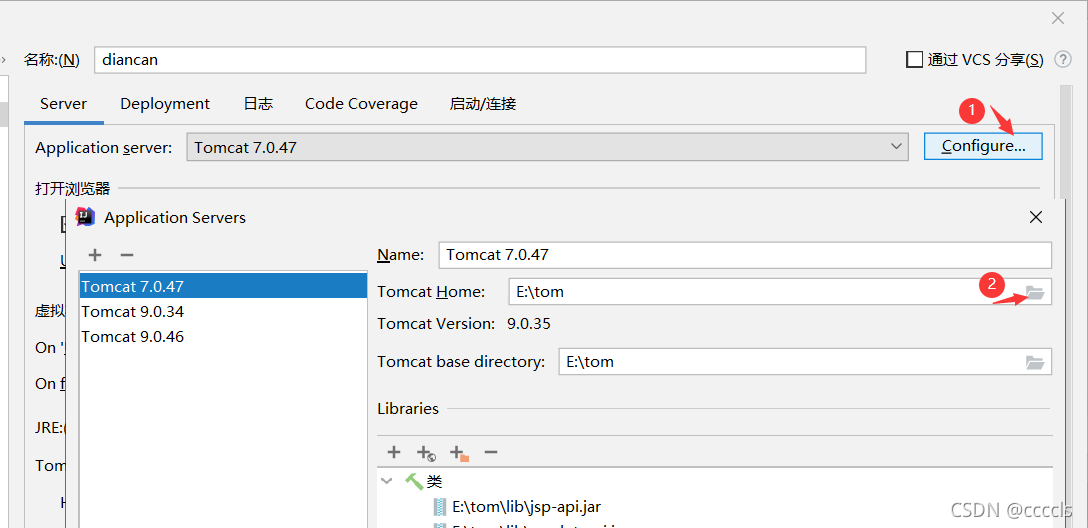
For the record, I created a common project error notification today, but I found that my configuration environment is right. 

Finally, it is found that there is a missing part here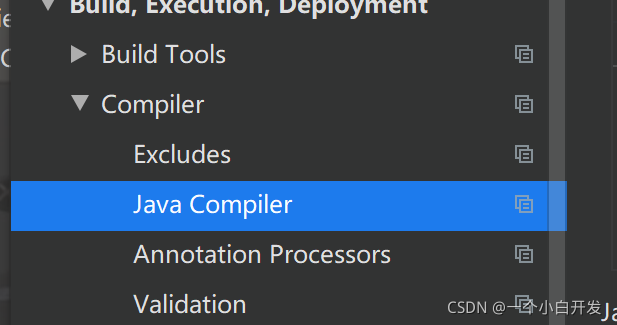
1. Error Messages:
Mapped Statements collection does not contain value for com.lsy.mapper.UsersMapper.selectUsersAll
Exception in thread "main" org.apache.ibatis.exceptions.PersistenceException:
### Error querying database.  Cause: java.lang.IllegalArgumentException: Mapped Statements collection does not contain value for com.lsy.mapper.UsersMapper.selectUsersAll
### Cause: java.lang.IllegalArgumentException: Mapped Statements collection does not contain value for com.lsy.mapper.UsersMapper.selectUsersAll
One of the reasons:
mapper namespace writes the wrong file name:

usersmapper in mapper.xml file is written as usermapper
The correct wording is as follows:
<?xml version="1.0" encoding="UTF-8"?>
<!DOCTYPE mapper
        PUBLIC "-//mybatis.org//DTD Mapper 3.0//EN"
        "http://mybatis.org/dtd/mybatis-3-mapper.dtd">
<mapper namespace="com.lsy.mapper.UsersMapper">
    <select id="selectUsersAll" resultType="com.lsy.pojo.Users">
        select * from users
    </select>
</mapper>
report errors
java.lang.IllegalStateException: Failed to load ApplicationContext

	at org.springframework.test.context.cache.DefaultCacheAwareContextLoaderDelegate.loadContext(DefaultCacheAwareContextLoaderDelegate.java:132)
	at org.springframework.test.context.support.DefaultTestContext.getApplicationContext(DefaultTestContext.java:124)
	at org.springframework.test.context.web.ServletTestExecutionListener.setUpRequestContextIfNecessary(ServletTestExecutionListener.java:190)
	at org.springframework.test.context.web.ServletTestExecutionListener.prepareTestInstance(ServletTestExecutionListener.java:132)
	at org.springframework.test.context.TestContextManager.prepareTestInstance(TestContextManager.java:244)
	at org.springframework.test.context.junit.jupiter.SpringExtension.postProcessTestInstance(SpringExtension.java:138)
	at org.junit.jupiter.engine.descriptor.ClassBasedTestDescriptor.lambda$invokeTestInstancePostProcessors$6(ClassBasedTestDescriptor.java:350)
	at org.junit.jupiter.engine.descriptor.ClassBasedTestDescriptor.executeAndMaskThrowable(ClassBasedTestDescriptor.java:355)
	at org.junit.jupiter.engine.descriptor.ClassBasedTestDescriptor.lambda$invokeTestInstancePostProcessors$7(ClassBasedTestDescriptor.java:350)
	at java.util.stream.ReferencePipeline$3$1.accept(ReferencePipeline.java:193)
	at java.util.stream.ReferencePipeline$2$1.accept(ReferencePipeline.java:175)
	at java.util.ArrayList$ArrayListSpliterator.forEachRemaining(ArrayList.java:1374)
	at java.util.stream.AbstractPipeline.copyInto(AbstractPipeline.java:481)
	at java.util.stream.AbstractPipeline.wrapAndCopyInto(AbstractPipeline.java:471)
	at java.util.stream.StreamSpliterators$WrappingSpliterator.forEachRemaining(StreamSpliterators.java:312)
	at java.util.stream.Streams$ConcatSpliterator.forEachRemaining(Streams.java:743)
	at java.util.stream.Streams$ConcatSpliterator.forEachRemaining(Streams.java:742)
	at java.util.stream.ReferencePipeline$Head.forEach(ReferencePipeline.java:580)
	at org.junit.jupiter.engine.descriptor.ClassBasedTestDescriptor.invokeTestInstancePostProcessors(ClassBasedTestDescriptor.java:349)
	at org.junit.jupiter.engine.descriptor.ClassBasedTestDescriptor.lambda$instantiateAndPostProcessTestInstance$4(ClassBasedTestDescriptor.java:270)
	at org.junit.platform.engine.support.hierarchical.ThrowableCollector.execute(ThrowableCollector.java:73)
	at org.junit.jupiter.engine.descriptor.ClassBasedTestDescriptor.instantiateAndPostProcessTestInstance(ClassBasedTestDescriptor.java:269)
	at org.junit.jupiter.engine.descriptor.ClassBasedTestDescriptor.lambda$testInstancesProvider$2(ClassBasedTestDescriptor.java:259)
	at java.util.Optional.orElseGet(Optional.java:267)
	at org.junit.jupiter.engine.descriptor.ClassBasedTestDescriptor.lambda$testInstancesProvider$3(ClassBasedTestDescriptor.java:258)
	at org.junit.jupiter.engine.execution.TestInstancesProvider.getTestInstances(TestInstancesProvider.java:31)
	at org.junit.jupiter.engine.descriptor.TestMethodTestDescriptor.lambda$prepare$0(TestMethodTestDescriptor.java:101)
	at org.junit.platform.engine.support.hierarchical.ThrowableCollector.execute(ThrowableCollector.java:73)
	at org.junit.jupiter.engine.descriptor.TestMethodTestDescriptor.prepare(TestMethodTestDescriptor.java:100)
	at org.junit.jupiter.engine.descriptor.TestMethodTestDescriptor.prepare(TestMethodTestDescriptor.java:65)
	at org.junit.platform.engine.support.hierarchical.NodeTestTask.lambda$prepare$1(NodeTestTask.java:111)
	at org.junit.platform.engine.support.hierarchical.ThrowableCollector.execute(ThrowableCollector.java:73)
	at org.junit.platform.engine.support.hierarchical.NodeTestTask.prepare(NodeTestTask.java:111)
	at org.junit.platform.engine.support.hierarchical.NodeTestTask.execute(NodeTestTask.java:79)
	at java.util.ArrayList.forEach(ArrayList.java:1249)
	at org.junit.platform.engine.support.hierarchical.SameThreadHierarchicalTestExecutorService.invokeAll(SameThreadHierarchicalTestExecutorService.java:38)
	at org.junit.platform.engine.support.hierarchical.NodeTestTask.lambda$executeRecursively$5(NodeTestTask.java:143)
	at org.junit.platform.engine.support.hierarchical.ThrowableCollector.execute(ThrowableCollector.java:73)
	at org.junit.platform.engine.support.hierarchical.NodeTestTask.lambda$executeRecursively$7(NodeTestTask.java:129)
	at org.junit.platform.engine.support.hierarchical.Node.around(Node.java:137)
	at org.junit.platform.engine.support.hierarchical.NodeTestTask.lambda$executeRecursively$8(NodeTestTask.java:127)
	at org.junit.platform.engine.support.hierarchical.ThrowableCollector.execute(ThrowableCollector.java:73)
	at org.junit.platform.engine.support.hierarchical.NodeTestTask.executeRecursively(NodeTestTask.java:126)
	at org.junit.platform.engine.support.hierarchical.NodeTestTask.execute(NodeTestTask.java:84)
	at java.util.ArrayList.forEach(ArrayList.java:1249)
	at org.junit.platform.engine.support.hierarchical.SameThreadHierarchicalTestExecutorService.invokeAll(SameThreadHierarchicalTestExecutorService.java:38)
	at org.junit.platform.engine.support.hierarchical.NodeTestTask.lambda$executeRecursively$5(NodeTestTask.java:143)
	at org.junit.platform.engine.support.hierarchical.ThrowableCollector.execute(ThrowableCollector.java:73)
	at org.junit.platform.engine.support.hierarchical.NodeTestTask.lambda$executeRecursively$7(NodeTestTask.java:129)
	at org.junit.platform.engine.support.hierarchical.Node.around(Node.java:137)
	at org.junit.platform.engine.support.hierarchical.NodeTestTask.lambda$executeRecursively$8(NodeTestTask.java:127)
	at org.junit.platform.engine.support.hierarchical.ThrowableCollector.execute(ThrowableCollector.java:73)
	at org.junit.platform.engine.support.hierarchical.NodeTestTask.executeRecursively(NodeTestTask.java:126)
	at org.junit.platform.engine.support.hierarchical.NodeTestTask.execute(NodeTestTask.java:84)
	at org.junit.platform.engine.support.hierarchical.SameThreadHierarchicalTestExecutorService.submit(SameThreadHierarchicalTestExecutorService.java:32)
	at org.junit.platform.engine.support.hierarchical.HierarchicalTestExecutor.execute(HierarchicalTestExecutor.java:57)
	at org.junit.platform.engine.support.hierarchical.HierarchicalTestEngine.execute(HierarchicalTestEngine.java:51)
	at org.junit.platform.launcher.core.EngineExecutionOrchestrator.execute(EngineExecutionOrchestrator.java:108)
	at org.junit.platform.launcher.core.EngineExecutionOrchestrator.execute(EngineExecutionOrchestrator.java:88)
	at org.junit.platform.launcher.core.EngineExecutionOrchestrator.lambda$execute$0(EngineExecutionOrchestrator.java:54)
	at org.junit.platform.launcher.core.EngineExecutionOrchestrator.withInterceptedStreams(EngineExecutionOrchestrator.java:67)
	at org.junit.platform.launcher.core.EngineExecutionOrchestrator.execute(EngineExecutionOrchestrator.java:52)
	at org.junit.platform.launcher.core.DefaultLauncher.execute(DefaultLauncher.java:96)
	at org.junit.platform.launcher.core.DefaultLauncher.execute(DefaultLauncher.java:75)
	at com.intellij.junit5.JUnit5IdeaTestRunner.startRunnerWithArgs(JUnit5IdeaTestRunner.java:69)
	at com.intellij.rt.junit.IdeaTestRunner$Repeater.startRunnerWithArgs(IdeaTestRunner.java:33)
	at com.intellij.rt.junit.JUnitStarter.prepareStreamsAndStart(JUnitStarter.java:230)
	at com.intellij.rt.junit.JUnitStarter.main(JUnitStarter.java:58)
Caused by: org.springframework.beans.factory.BeanCreationException: Error creating bean with name 'restHighLevelClient' defined in class path resource [com/spring/es/demo/config/ElasticsearchConfig.class]: Bean instantiation via factory method failed; nested exception is org.springframework.beans.BeanInstantiationException: Failed to instantiate [org.elasticsearch.client.RestHighLevelClient]: Factory method 'restHighLevelClient' threw exception; nested exception is java.lang.NoClassDefFoundError: org/apache/lucene/util/Accountable
	at org.springframework.beans.factory.support.ConstructorResolver.instantiate(ConstructorResolver.java:658)
	at org.springframework.beans.factory.support.ConstructorResolver.instantiateUsingFactoryMethod(ConstructorResolver.java:486)
	at org.springframework.beans.factory.support.AbstractAutowireCapableBeanFactory.instantiateUsingFactoryMethod(AbstractAutowireCapableBeanFactory.java:1334)
	at org.springframework.beans.factory.support.AbstractAutowireCapableBeanFactory.createBeanInstance(AbstractAutowireCapableBeanFactory.java:1177)
	at org.springframework.beans.factory.support.AbstractAutowireCapableBeanFactory.doCreateBean(AbstractAutowireCapableBeanFactory.java:564)
	at org.springframework.beans.factory.support.AbstractAutowireCapableBeanFactory.createBean(AbstractAutowireCapableBeanFactory.java:524)
	at org.springframework.beans.factory.support.AbstractBeanFactory.lambda$doGetBean$0(AbstractBeanFactory.java:335)
	at org.springframework.beans.factory.support.DefaultSingletonBeanRegistry.getSingleton(DefaultSingletonBeanRegistry.java:234)
	at org.springframework.beans.factory.support.AbstractBeanFactory.doGetBean(AbstractBeanFactory.java:333)
	at org.springframework.beans.factory.support.AbstractBeanFactory.getBean(AbstractBeanFactory.java:208)
	at org.springframework.beans.factory.support.DefaultListableBeanFactory.preInstantiateSingletons(DefaultListableBeanFactory.java:944)
	at org.springframework.context.support.AbstractApplicationContext.finishBeanFactoryInitialization(AbstractApplicationContext.java:918)
	at org.springframework.context.support.AbstractApplicationContext.refresh(AbstractApplicationContext.java:583)
	at org.springframework.boot.SpringApplication.refresh(SpringApplication.java:754)
	at org.springframework.boot.SpringApplication.refreshContext(SpringApplication.java:434)
	at org.springframework.boot.SpringApplication.run(SpringApplication.java:338)
	at org.springframework.boot.test.context.SpringBootContextLoader.loadContext(SpringBootContextLoader.java:123)
	at org.springframework.test.context.cache.DefaultCacheAwareContextLoaderDelegate.loadContextInternal(DefaultCacheAwareContextLoaderDelegate.java:99)
	at org.springframework.test.context.cache.DefaultCacheAwareContextLoaderDelegate.loadContext(DefaultCacheAwareContextLoaderDelegate.java:124)
	... 67 more
Caused by: org.springframework.beans.BeanInstantiationException: Failed to instantiate [org.elasticsearch.client.RestHighLevelClient]: Factory method 'restHighLevelClient' threw exception; nested exception is java.lang.NoClassDefFoundError: org/apache/lucene/util/Accountable
	at org.springframework.beans.factory.support.SimpleInstantiationStrategy.instantiate(SimpleInstantiationStrategy.java:185)
	at org.springframework.beans.factory.support.ConstructorResolver.instantiate(ConstructorResolver.java:653)
	... 85 more
Caused by: java.lang.NoClassDefFoundError: org/apache/lucene/util/Accountable
	at java.lang.ClassLoader.defineClass1(Native Method)
	at java.lang.ClassLoader.defineClass(ClassLoader.java:763)
	at java.security.SecureClassLoader.defineClass(SecureClassLoader.java:142)
	at java.net.URLClassLoader.defineClass(URLClassLoader.java:467)
	at java.net.URLClassLoader.access$100(URLClassLoader.java:73)
	at java.net.URLClassLoader$1.run(URLClassLoader.java:368)
	at java.net.URLClassLoader$1.run(URLClassLoader.java:362)
	at java.security.AccessController.doPrivileged(Native Method)
	at java.net.URLClassLoader.findClass(URLClassLoader.java:361)
	at java.lang.ClassLoader.loadClass(ClassLoader.java:424)
	at sun.misc.Launcher$AppClassLoader.loadClass(Launcher.java:331)
	at java.lang.ClassLoader.loadClass(ClassLoader.java:357)
	at java.lang.ClassLoader.defineClass1(Native Method)
	at java.lang.ClassLoader.defineClass(ClassLoader.java:763)
	at java.security.SecureClassLoader.defineClass(SecureClassLoader.java:142)
	at java.net.URLClassLoader.defineClass(URLClassLoader.java:467)
	at java.net.URLClassLoader.access$100(URLClassLoader.java:73)
	at java.net.URLClassLoader$1.run(URLClassLoader.java:368)
	at java.net.URLClassLoader$1.run(URLClassLoader.java:362)
	at java.security.AccessController.doPrivileged(Native Method)
	at java.net.URLClassLoader.findClass(URLClassLoader.java:361)
	at java.lang.ClassLoader.loadClass(ClassLoader.java:424)
	at sun.misc.Launcher$AppClassLoader.loadClass(Launcher.java:331)
	at java.lang.ClassLoader.loadClass(ClassLoader.java:357)
	at com.spring.es.demo.config.ElasticsearchConfig.restHighLevelClient(ElasticsearchConfig.java:33)
	at com.spring.es.demo.config.ElasticsearchConfig$$EnhancerBySpringCGLIB$$5d8dae4a.CGLIB$restHighLevelClient$8(<generated>)
	at com.spring.es.demo.config.ElasticsearchConfig$$EnhancerBySpringCGLIB$$5d8dae4a$$FastClassBySpringCGLIB$$b2eeae73.invoke(<generated>)
	at org.springframework.cglib.proxy.MethodProxy.invokeSuper(MethodProxy.java:244)
	at org.springframework.context.annotation.ConfigurationClassEnhancer$BeanMethodInterceptor.intercept(ConfigurationClassEnhancer.java:331)
	at com.spring.es.demo.config.ElasticsearchConfig$$EnhancerBySpringCGLIB$$5d8dae4a.restHighLevelClient(<generated>)
	at sun.reflect.NativeMethodAccessorImpl.invoke0(Native Method)
	at sun.reflect.NativeMethodAccessorImpl.invoke(NativeMethodAccessorImpl.java:62)
	at sun.reflect.DelegatingMethodAccessorImpl.invoke(DelegatingMethodAccessorImpl.java:43)
	at java.lang.reflect.Method.invoke(Method.java:498)
	at org.springframework.beans.factory.support.SimpleInstantiationStrategy.instantiate(SimpleInstantiationStrategy.java:154)
	... 86 more
Caused by: java.lang.ClassNotFoundException: org.apache.lucene.util.Accountable
	at java.net.URLClassLoader.findClass(URLClassLoader.java:381)
	at java.lang.ClassLoader.loadClass(ClassLoader.java:424)
	at sun.misc.Launcher$AppClassLoader.loadClass(Launcher.java:331)
	at java.lang.ClassLoader.loadClass(ClassLoader.java:357)
	... 121 more
Troubleshooting process
First confirm the compatibility between non-springboot and ES version
and then check whether @bean is configured
Finally, problems are found
It is actually caused by this dependency. As long as it is introduced, an error will be reported. After annotation, it will be normal.
<!-- <When the profile processor is imported and the profile is bound, there will be a prompt to restart&ndash>-->
        <dependency>
            <groupId>org.springframework.boot</groupId>
            <artifactId>spring-boot-configuration-processor</artifactId>
            <optional>true</optional>
        </dependency>
Query condition modification, comment out the old sql, resulting in an error
org.mybatis.spring.MyBatisSystemException: nested exception is org.apache.ibatis.type.TypeException: Could not set parameters for mapping: ParameterMapping{property=’command.bldgLevel’, mode=IN, javaType=class java.lang.Object, jdbcType=VARCHAR, numericScale=null, resultMapId=’null’, jdbcTypeName=’null’, expression=’null’}. Cause: org.apache.ibatis.type.TypeException: Error setting non null for parameter #2 with JdbcType VARCHAR . Try setting a different JdbcType for this parameter or a different configuration property. Cause: org.apache.ibatis.type.TypeException: Error setting non null for parameter #2 with JdbcType VARCHAR . Try setting a different JdbcType for this parameter or a different configuration property. Cause: java.sql.SQLException: Parameter index out of range (2 > number of parameters, which is 1).

Solution:
Remove useless comments
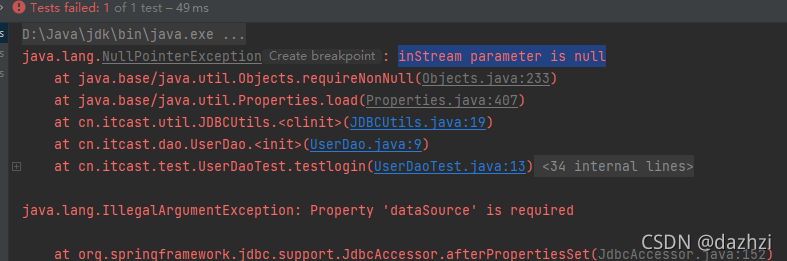
Solution:
Put the druid.properties file in the SRC directory
Change to absolute path:
   Properties pro =new Properties();
//          InputStream is= JDBCUtils.class.getClassLoader().getResourceAsStream("src/main/druid.properties");
//          pro.load(is);
          pro.load(new FileReader("src/druid.properties"));

ds= DruidDataSourceFactory.createDataSource(pro);Solve the mybatis error invalid bound statement (not found)
Reason for this error
1. XML file does not exist
2. The XML file and mapper are not mapped
Namespace specifies the path of mapper. The error ID is inconsistent with the method name in mapper

3. The XML file is in the Java directory instead of the resource directory, so there is no XML in the generated target
Scene
When using the mybatis plus framework, when customizing the mapper interface and XM file, because the MP automatic code generation plug-in is used, the mapper interface and XML file are in the Java directory. During compilation, the XML file under the Java path will not be automatically compiled, and the compilation will only identify the. Java file, Only XML files under resource can be compiled when packaged.
The following figure shows the XML and mapper directories of the MP auto generated code plug-in (no longer in the resource)
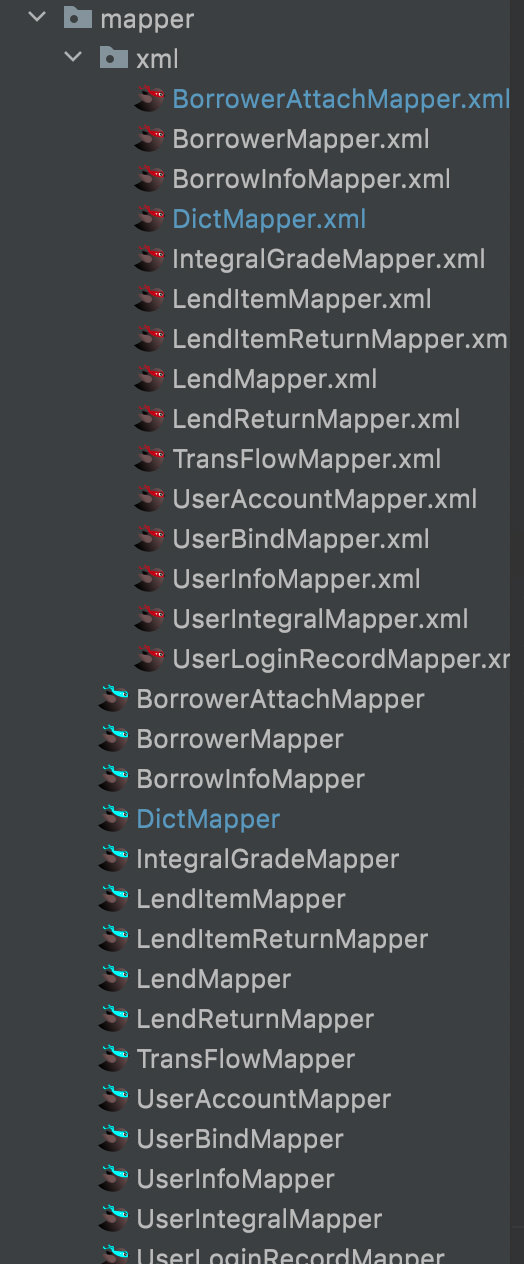
The compiled target directory is as follows:
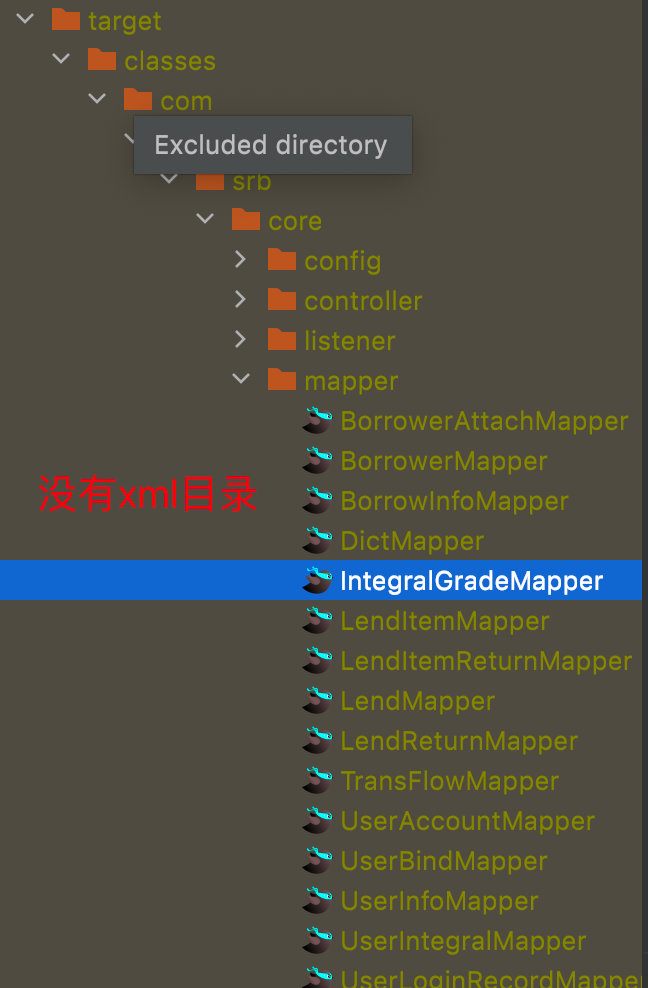
Solution:
1. Add in POM file
    <build>
        <!-- The *.xml file in the java directory will also be packaged when the project is packaged -->
        <resources>
            <resource>
                <directory>src/main/java</directory>
                <includes>
                    <include>**/*.xml</include>
                </includes>
                <filtering>false</filtering>
            </resource>
        </resources>
    </build>
2. Manually move the XML file in the Java directory to the resource directory and add it to the configuration file in spring boot
mybatis-plus:
	mapper-locations: classpath:**/*.xml //After the classpath add the directory of your xml file
The directory in mapper locations must be consistent with the directory where you place XML files, otherwise this error will occur even if there are XML files in target!!!
Description
Execution failed for task ':app:checkDebugAarMetadata'.

> Multiple task action failures occurred:

   > A failure occurred while executing com.android.build.gradle.internal.tasks.CheckAarMetadataWorkAction

      > The minCompileSdk (31) specified in a

        dependency's AAR metadata (META-INF/com/android/build/gradle/aar-metadata.properties)

        is greater than this module's compileSdkVersion (android-30).

        Dependency: androidx.recyclerview:recyclerview:1.3.0-alpha02.
If you upgrade to compilesdk 31 according to the prompt, you are faced with a large number of Android 12 and below are not available, and upgrade the current jdk8 to jdk11 or above, but the set of source code was still available more than 2 months ago. Now it is not available for no reason, which is not in line with the routine.
If the current compilesdk is kept at 30 or 28, gradle compiles and passes, but the above error is reported when running debugging.
I can’t understand it.
Solution:
Take the following three steps to finally solve the problem
1. keep the current compilesdk at 30 or 28.
2. lower the corresponding version number of dependent components, such as dependency: Android. Recyclerview: recyclerview: 1.3.0-alpha02. Change the original version number of the corresponding gradle file from 1. + to 1.2. +, that is, lower the version number by one. Shape such as
The original gradle file is implementation 'androidx.recyclerview:recyclerview:1.+'// means 1.xx latest version, maybe 1.0, 1.1, 1.2, 1.3, 1.4, 1.5 in that order

Now read
implementation 'androidx.recyclerview:recyclerview:1.2.+'// means 1.2.xx latest version, maybe 1.2.0, 1.2.1, 1.2.2, 1.2.3, 1.2.4, 1.2.5 in that order
3. After recompiling, debug and run again, and the prompt of the dependent component does not appear again, indicating that the modification is effective. By analogy, reduce the version number of other dependent components until similar prompt no longer appears, and the problem is solved.
Read the resources resource and convert it to file
Project scenario:
read JSON file from resources directory to get file
Problem Description:
there are no problems in the local project. As a result, an error is reported after the spring boot hits jar
java.io.FileNotFoundException: class path resource [/static/xxxxx.json] cannot be resolved to absolute file path because it does not reside in the file system: jar:file:/app.jar!/ BOOT-INF/classes!/ static/xxxxxxx
Code example:
 Resource resource = new ClassPathResource(PushFcmApnsProperties.androidFilePath);
            FileInputStream serviceAccount = new FileInputStream(resource.getFile());
Cause analysis:
in the development and debugging stage, when there is no package, you can locate the resource file through the path. At this time, the resource file really exists in the local disk of the computer </ font>
After packaging, spring attempts to access the file system path, but cannot access the path in the jar. So report an error. At this time, the resource file is in the classes file in the jar package
for example:
Solution:
//Change the read method first via
InputStream inputStream = Thread.currentThread().getContextClassLoader().getResourceAsStream("relative path");

// Get the inputStream stream of the file and convert it to file to create a temporary file
File bathFile = File.createTempFile("filename", "file format");
            FileUtils.copyInputStreamToFile(inputStream, bathFile);