The version of slf4j-log4j12 I used is 1.7.30, and I encountered an error when using Failed to load class org.slf4j.impl.StaticLoggerBinder:
Failed to load class org.slf4j.impl.StaticLoggerBinder
This warning message is reported when the org.slf4j.impl.StaticLoggerBinder class could not be loaded into memory. This happens when no appropriate SLF4J binding could be found on the class path. Placing one (and only one) of slf4j-nop.jar slf4j-simple.jar, slf4j-log4j12.jar, slf4j-jdk14.jar or logback-classic.jar on the class path should solve the problem.
According to the original statement, any one (and only one) of slf4j-nop.jar slf4j-simple.jar, slf4j-log4j12.jar, slf4j-jdk14.jar or logback-classic.jar can be in the class path, But this is the situation when the error is reported. My solution is to add slf4j-simple.jar 1.7.30 to the Maven dependency, and this error no longer appears.
Category Archives: JAVA
Reason: failed to determine a suitable driver class [Solved]
Reason: failed to determine a suitable driver class error analysis
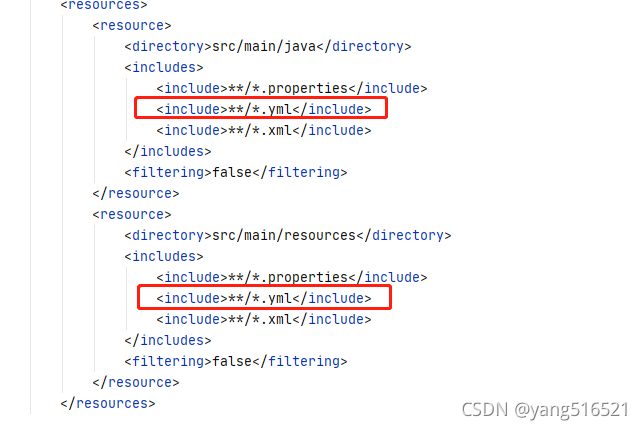
ADD <include>**/*.yml</include> is OK
[Solved] Hadoop failed on connection exception: java.net.ConnectException: Connection refused
First use the following command to check whether the port number is enabled
sudo netstat -ntlp
If you don’t find the port number you want to connect to, go to core-site.xml to see if you have this port number.
I don’t deserve 8020. I haven’t been connected with 8020 for a long time.
<property>
        <name>fs.defaultFS</name>
        <value>hdfs://hadoop131:9820</value>
</property>
You can change the port number of the connection to your own
Springboot Project Error: Failed to execute goal org.apache.maven.plugins
Failed to execute goal org.apache.maven.plugins:maven-resources-plugin:3.1.0:resources (default-resources) on project heima-leadnews-user: Error loading property file ‘D:\Develop\springboot_ project\heima-leadnews\heima-leadnews-user\maven_ test.properties’
When installing the springboot project, the above errors were compiled. Baidu’s reason is that the Maven version, JDK version and packaging program are occupied. My reason is that the parent project of the project has the following profiles:
<!--<profiles>
        <profile>
            <id>dev</id>
            <build>
                <filters>
                    <filter>maven_dev.properties</filter>
                </filters>
            </build>
        </profile>
        <profile>
            <id>test</id>
            <activation>
                <activeByDefault>true</activeByDefault>
            </activation>
            <build>
                <filters>
                    <filter>maven_test.properties</filter>
                </filters>
            </build>
        </profile>
        <profile>
            <id>prod</id>
            <build>
                <filters>
                    <filter>maven_prod.properties</filter>
                </filters>
            </build>
        </profile>
    </profiles>-->
Because my child project inherits the parent project, but there is no corresponding directory under the child project, the above code in the parent project is cancelled (the specific reason is unknown, learning from the teacher), recompiled and packaged successfully
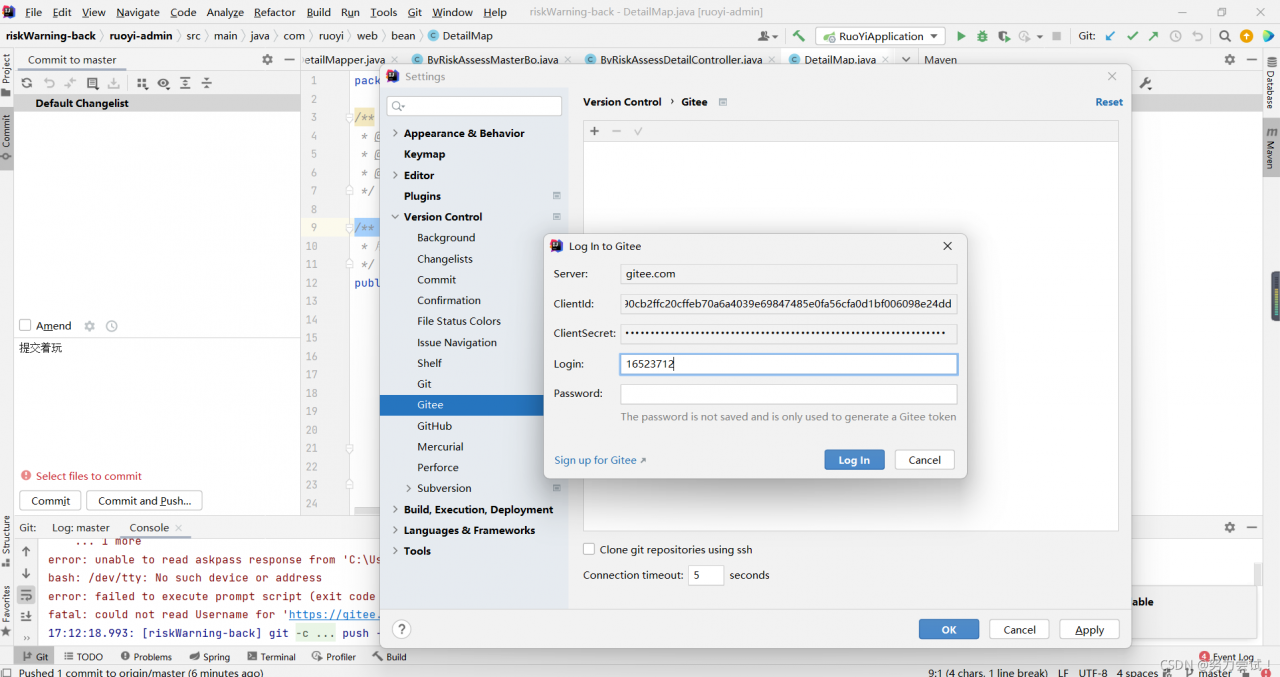
Gitee Idea Push Error: Invocation failed Server returned invalid Response. java.lang.RuntimeException
Invocation failed Server returned invalid Response. java.lang.RuntimeException: Invocation failed Server returned invalid Response. at org.jetbrains.git4idea.GitAppUtil.sendXmlRequest(GitAppUtil.java:22) at org.jetbrains.git4idea.http.GitAskPassApp.main(GitAskPassApp.java:56) Caused by: java.io.IOException: Server returned invalid Response. at org.apache.xmlrpc.LiteXmlRpcTransport.sendRequest(LiteXmlRpcTransport.java:242) at org.apache.xmlrpc.LiteXmlRpcTransport.sendXmlRpc(LiteXmlRpcTransport.java:90) at org.apache.xmlrpc.XmlRpcClientWorker.execute(XmlRpcClientWorker.java:72) at org.apache.xmlrpc.XmlRpcClient.execute(XmlRpcClient.java:194) at org.apache.xmlrpc.XmlRpcClient.execute(XmlRpcClient.java:185) at org.apache.xmlrpc.XmlRpcClient.execute(XmlRpcClient.java:178) at org.jetbrains.git4idea.GitAppUtil.sendXmlRequest(GitAppUtil.java:19) … 1 more unable to read askpass response from ‘C:\Users\WD\AppData\Local\JetBrains\IntelliJIdea2021.1\tmp\intellij-git-askpass-local.sh’ bash: /dev/tty: No such device or address failed to execute prompt script (exit code 1) could not read Username for ‘https://gitee.com’: No such file or directory
Solution:
Click File -> Settings -> Version Control -> Gitee,
and refresh your Gitee account.
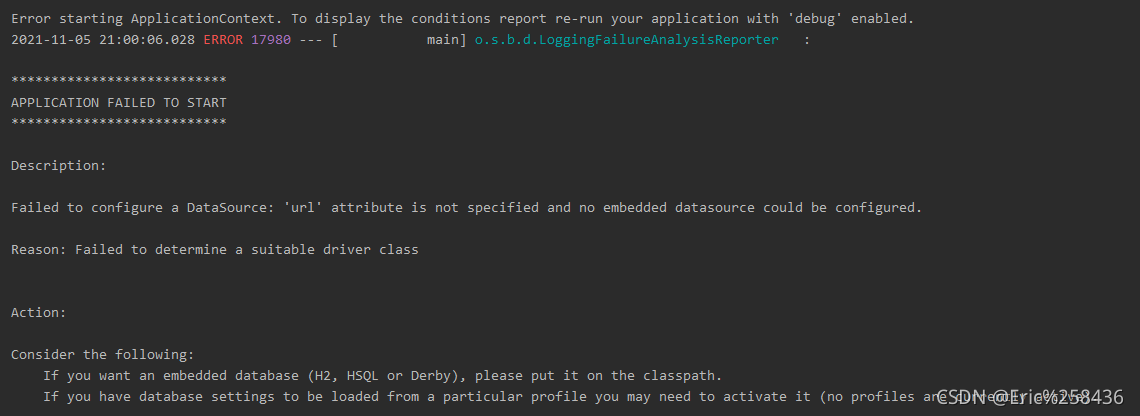
[Solved] Failed to configure a DataSource: ‘url‘ attribute is not specified…bug
Question page

Error message in log
no mybatis mapper was found in ‘[com. Ego]’ package. Please check your
configuration. Will not attempt to authenticate using SASL (unknown error)
Console output
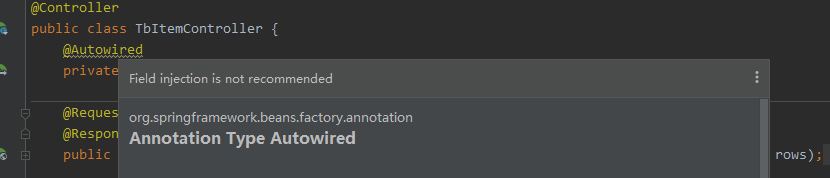
Solution 1
Solution 1. I read many blogs, most of which are this solution. But it didn’t solve my problem
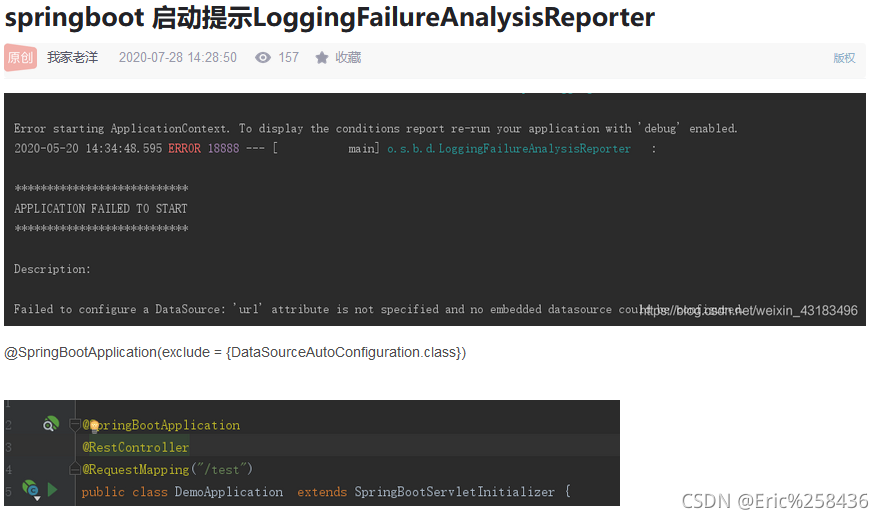
Solution 2
1. Because the versions of spring web and spring webmvc in POM are inconsistent, unify the dependent versions
2. If there are no database related things configured, comment out the POM dependencies of mybatis and MySQL first
I cited the problem caused by mapper’s Maven dependency in the consumermodel. Just delete it.
[Solved] MultipartException: Failed to parse multipart servlet request; nested exception is java.lang.Runtime
1. Error log
org.springframework.web.multipart.MultipartException: Failed to parse multipart servlet request; nested exception is java.lang.RuntimeException: java.nio.file.NoSuchFileException: /tmp/undertow.8081.6091954911906268442/undertow2435234810596519507upload
        at org.springframework.web.multipart.support.StandardMultipartHttpServletRequest.handleParseFailure(StandardMultipartHttpServletRequest.java:124)
        at org.springframework.web.multipart.support.StandardMultipartHttpServletRequest.parseRequest(StandardMultipartHttpServletRequest.java:115)
        at org.springframework.web.multipart.support.StandardMultipartHttpServletRequest.<init>(StandardMultipartHttpServletRequest.java:88)
        at org.springframework.web.multipart.support.StandardServletMultipartResolver.resolveMultipart(StandardServletMultipartResolver.java:87)
        at org.springframework.web.servlet.DispatcherServlet.checkMultipart(DispatcherServlet.java:1178)
        at org.springframework.web.servlet.DispatcherServlet.doDispatch(DispatcherServlet.java:1012)
        at org.springframework.web.servlet.DispatcherServlet.doService(DispatcherServlet.java:943)
        at org.springframework.web.servlet.FrameworkServlet.processRequest(FrameworkServlet.java:1006)
        at org.springframework.web.servlet.FrameworkServlet.doPost(FrameworkServlet.java:909)
2. Cause of problem
After consulting the blog, I know the cause of the problem:
in Linux system, when the spring boot application is started with Java jar command, a Tomcat (or undertow) temporary directory will be generated in the/tmp directory of the operating system. The uploaded files must be converted into temporary files and saved under this folder. Because the files in the temporary/tmp directory are not used for a long time (10 days), the system executes the TMP directory cleaning service (systemd-tmpfiles-clean. Service), resulting in the cleaning of/TMP/undertow… 8090 files. However, when uploading, the undertow server needs to create/TMP/undertow… 8090/undertow… Upload temporary files, However, when calling files. CreateFile (…), you will find that the parent directory cannot be found, which leads to the above error.
3. Solution
1) Restart
cannot be done once and for all
2) the directory specified by the configuration file
needs to be manually created on the server
MKDIR – P/data/tmp
spring:
  servlet:
      multipart:
          location: /data/tmp
3) Add startup parameter – Java.TMP.Dir =/path/to/application/temp/
[Solved] Rocketmq Root Account Startup Error: Permission denied
Specific information
Modify the JVM size in/bin/runserver.sh and/bin/runbroker.sh to 256M
and then command nohup sh bin/mqnamesrv &, check nohup.Out and find the error permission denied . I checked on the Internet and said that non root users cannot use ports below 1000, but what does this have to do with my rocketmq.
// error
java.net.SocketException: Permission denied
        at sun.nio.ch.Net.bind0(Native Method)
        at sun.nio.ch.Net.bind(Net.java:461)
        at sun.nio.ch.Net.bind(Net.java:453)
        at sun.nio.ch.ServerSocketChannelImpl.bind(ServerSocketChannelImpl.java:222)
        at io.netty.channel.socket.nio.NioServerSocketChannel.doBind(NioServerSocketChannel.java:127)
        at io.netty.channel.AbstractChannel$AbstractUnsafe.bind(AbstractChannel.java:501)
        at io.netty.channel.DefaultChannelPipeline$HeadContext.bind(DefaultChannelPipeline.java:1218)
        at io.netty.channel.AbstractChannelHandlerContext.invokeBind(AbstractChannelHandlerContext.java:506)
        at io.netty.channel.AbstractChannelHandlerContext.bind(AbstractChannelHandlerContext.java:491)
        at io.netty.channel.DefaultChannelPipeline.bind(DefaultChannelPipeline.java:965)
        at io.netty.channel.AbstractChannel.bind(AbstractChannel.java:210)
        at io.netty.bootstrap.AbstractBootstrap$2.run(AbstractBootstrap.java:353)
        at io.netty.util.concurrent.SingleThreadEventExecutor.runAllTasks(SingleThreadEventExecutor.java:408)
        at io.netty.channel.nio.NioEventLoop.run(NioEventLoop.java:455)
        at io.netty.util.concurrent.SingleThreadEventExecutor$2.run(SingleThreadEventExecutor.java:140)
        at java.lang.Thread.run(Thread.java:748)
Error reason
The reason for the error is that the Hyper-V function (Windows subsystem) is enabled on the computer and some ports are disabled. Specific view
Windows CMD enter the following command
netsh interface ipv4 show excludedportrange protocol=tcp
//After querying, there will be the following unavailable port range, including 9876, which makes the port unavailable, instead of the common non root account unable to use ports below 1000
 Protocol tcp port exclusion range
 Start port End port
   1064        1163
   1364        1463
   1464        1563
   1564        1663
   2501        2600
   2801        2900
   2901        3000
   3001        3100
   5357        5357
   7639        7738
   7739        7838
   9834        9933
  10034       10133
  10241       10340
  10341       10440
  10441       10540
  10541       10640
  12066       12165
  12166       12265
  50000       50059
  Managed port exclusion.
Other Solution:
Modify the port used by rocketmq to port 9950
Project directory: /software/rocketmq
Create a namesrv.properties file in the /conf directory
The content is listenPort=9950
server startup script start-server.sh
nohup sh /software/rocketmq/bin/mqnamesrv -c /software/rocketmq/conf/namesrv.properties &> ./server.log 2>&1
broker startup script start-broker.sh
nohup sh /software/rocketmq/bin/mqbroker -n localhost:9950 &> ./broker.log 2>&1
[Solved] Redis Error: Unexpected exception while processing command
1. Background
Redis has been running for a long time, and an error is reported one day as follows:
2. Phenomenon
org.redisson.client.RedisException: Unexpected exception while processing command
at org.redisson.command.CommandAsyncService.convertException(CommandAsyncService.java:338)
at org.redisson.command.CommandAsyncService.get(CommandAsyncService.java:140)
at org.redisson.RedissonObject.get(RedissonObject.java:90)
at org.redisson.RedissonBucket.set(RedissonBucket.java:131)
3. Solution
Restart the Java application!
What exactly caused it,
You can only guess the link pool of the redis client. Due to network and other reasons, the redis client has not responded for a long time and collapsed!
perfect
[Solved] Mybatis-Plus Error: Invalid bound statement (not found)
Mybatis plus reports an error: invalid bound statement (not found)
After integrating mybatis plus in the spring boot project, it is found that the user-defined query method will report an error: “invalid bound statement (not found): * * *.” your method “, which means that your user-defined method cannot be found in the XML file. Various methods are tried and the problem is finally solved. This problem exists in the following situations:
1. Mapper file and XML file cannot correspond
1. Check whether mapper file and XML file names are consistent
UserMapper and UserMapper.xml
2. Check whether the attribute configuration of namespace in the XML file corresponds to the corresponding mapper file
<mapper namespace="com.*.*.mapper.UserMapper">
3. Check whether the method binding ID in the XML file is consistent
Mapper:
    List<User> getUserList();
xml:
    <select id="getUserList" resultType="com.*.*.entity.User">
        SELECT * FROM user
    </select>
2. The XML file is placed in the resources directory at different levels and is not packaged into the target
By default, all will be packaged. Check whether the property of not packaging is configured in the POM file, and modify it
Note: this configuration is to package the resources directory and check the differences
	<build>
        <!-- Pack the files in the resources directory -->
        <resources>
            <resource>
                <directory>src/main/resources</directory>
                <includes>
                    <include>**/*.*</include>
                </includes>
            </resource>
        </resources>
     </build>
(focus on configuration, which is also my problem) third, the XML file is placed in the resources directory at different levels and has been packaged into the target, but the corresponding method cannot be found
It is thought that after packaging, you can match according to the name. Finally, it is found that even if the XML file is packaged, it still belongs to a different level from mapper, so check whether the mybatis plus configuration matching the location of the XML file is missing
mybatis-plus.mapper-locations = classpath:mapping/*.xml
# The "mapping" in this configuration corresponds to the name of the directory where your xml is located
Consumer service instance error: HTTP get http://xxx/actuator/health: 503 output: {“status”: “out_of_service”
Phenomenon
Some back-end services register with consumer and report an error HTTP get http://xxx/actuator/health: 503 output: {"status": "out_of_service", but other services can be registered normally. Find a way to print thin error messages on the Internet
Print detailed error information
Configure in the error reporting module: application.YML or bootstrap.YML as follows:
management:
  endpoint:
    health:
      show-details: always
  endpoints:
    web:
      exposure:
        include: '*'
Or add the following configuration in application.Properties :
management.endpoint.health.show-details=always
management.endpoints.web.exposure.include=*
Finally, after printing the detailed error information, I found that it was the ES cluster. I thought it was the problem of the consumer configuration that led to the wrong direction during troubleshooting.
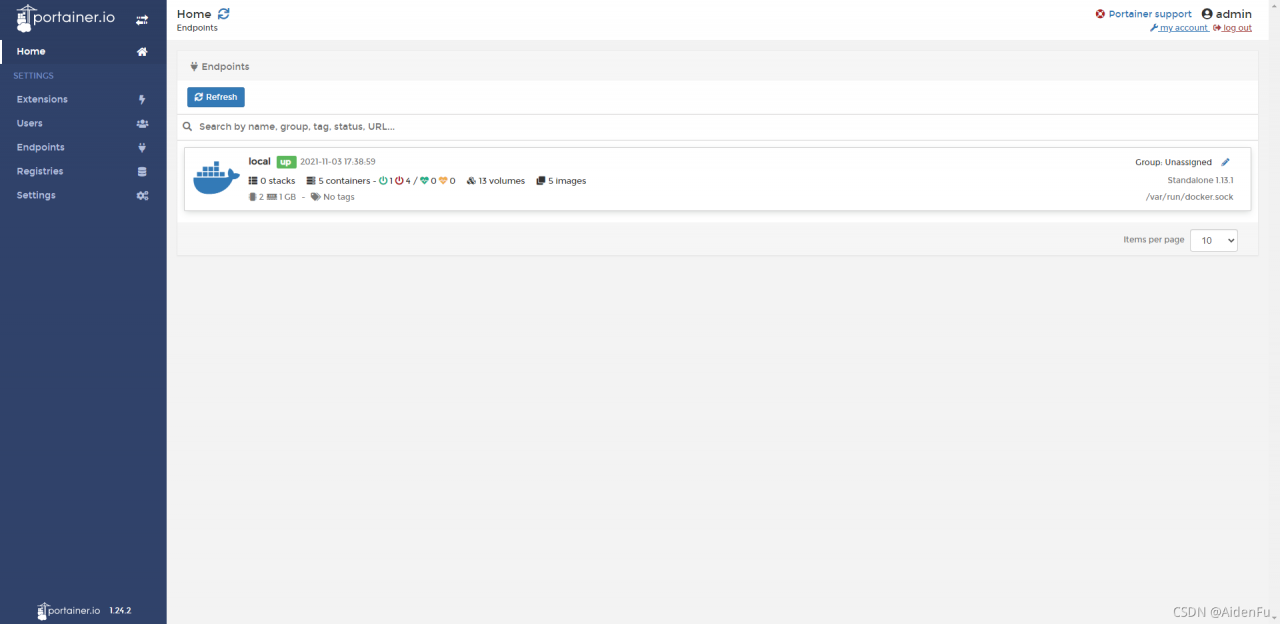
How to Solve Docker Portainer Connect Error
Container startup
[root@shusheng run]# docker run -d -p 9000:9000 --restart=always -v /var/run/docker.sock:/var/run/docker.sock --name prtainer-test portainer/portainer
Portal interface access
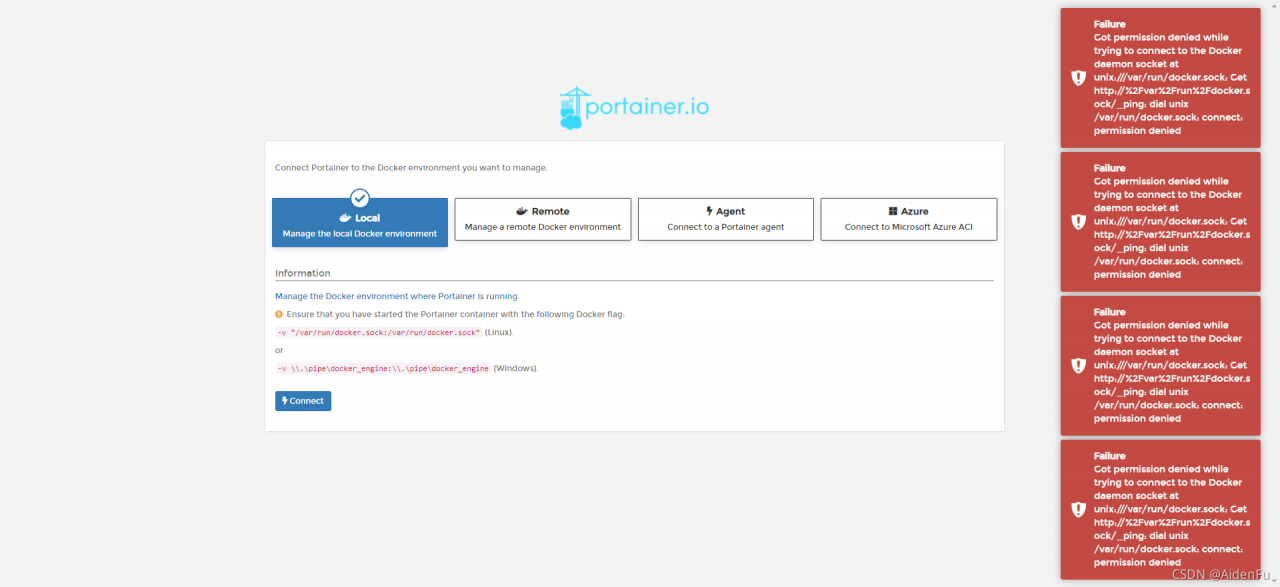
Connect error resolution
Many Google articles talk about permission, but I use root to start it
until later
[root@shusheng run]# setenforce 0
Successfully solved