Category Archives: How to Fix

Distribution setup SQL Server Agent error: “RegCreateKeyEx() returned error 5, ‘Access is denied.'” …

In the Configuration Distribution Wizard, the “Configure SQL Server Agent Auto-Start” step has the following text error:

TITLE: Configure Distribution Wizard
------------------------------
An error occurred configuring SQL Server Agent.
------------------------------
ADDITIONAL INFORMATION:
RegCreateKeyEx() returned error 5, 'Access is denied.' (Microsoft SQL Server, Error: 22002)

This is a very minor error that is not difficult to fix. The wizard is trying to change the “startup mode” of the SQL Server proxy service to “automatic”. You can do this with the SQL Server Configuration Manager

In the Sysinternals process monitor, you may see: Operation:RegCreateKeyResult:AccessDeniedPath: “HKLM\System\CurrentControlSet\Services\SQLAgent$SQL2012 “If you encounter this error, please refer to the Configuration Distribution Wizard’s “Select “No” on the SQL Server Agent Startup page (shown below) and set your agent service to auto-start mode through SQL Server Configuration Manager.

 

R language – error analysis – error in Call.graphics (C_ palette2, .Call(C_ palette2, NULL)) : invalid graphics state

problem description: plot, the error 01

> ggplot(religions_long, 
+        aes(State, value, fill = variable)) +
+     geom_bar(stat = "identity") +
+     coord_flip()
> Error in .Call.graphics(C_palette2, .Call(C_palette2, NULL)) : 
  invalid graphics state

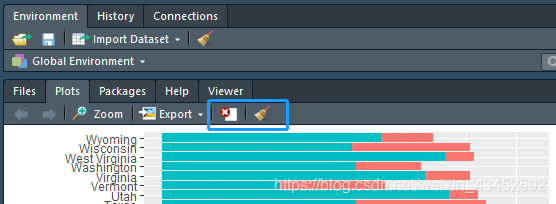
solution: maybe R can’t bear too much drawing, so empty all drawing will

Mac installation opencv brew tap homebrew / Science

MAC use brew to install opencv, look up information when a blog said the need to add the command:

brew tap homebrew/science

always gives an error when trying:

Error: homebrew/science was deprecated. This tap is now empty as all its formulae were migrated.

, meaning homebrew/science has been removed, meaning that the brew tap step is not required.


solution: remove this step, directly brew install xx, xx refers to your package.

above.

Error when loading the SDK: Solutions

error:

when eclipse opens the following window appears (with the following contents)

Error when loading the SDK:

Error: Error parsing \Android\ t-bundle-windows-x86_64-20140702\ SDK \system-images\android-22\android-wear\armeabi-v7a\devices. XML
cdc-complex type. Invalid content starting with element ‘d:skin’ was found. There should be no child elements here. Error: Error: Error D:\Android\adt-bundle-windows-x86_64-20140702\ SDK \system-images\android-22\android-wear\x86\devices. XML
cdc-complex type. Invalid content starting with element ‘d:skin’ was found. There should be no child elements here. balabala

solution:

D:\Android\adt-bundle-windows-x86_64-20140702\ SDK \tools\ devices under lib. XML file replace

D: \ Android \ adt – bundle – Windows – x86_64-20140702 \ \ Android SDK \ system – images – 22 \ Android – wear \ armeabi – v7a and

D:\Android\adt-bundle-windows-x86_64-20140702\ SDK \system-images\android-22\android-wear\ devices under x86. XML file,

restart eclipse.


pd.to_csv,Error: need to escape, but no escapechar set

pd. To_csv,

df3.to_csv('E:\\data\\xxxx.csv',index=False,header= 0,sep='|', encoding="utf-8", quoting=csv.QUOTE_NONE)

Error: Error: need to escape, but no escapechar set

reason: this problem may be due to the fact that the description contains’ |’, ‘|’ is also a delimiter. CSV attempts to escape it, but cannot, because there is no CSV. Escapechars setting

solution:
provides a escapechar, when quoting for QUOTE_NONE, specify a character makes separator without limit, in order to escape.

df3.to_csv('E:\\data\\xxxx.csv',index=False,header= 0,sep='|', encoding="utf-8", quoting=csv.QUOTE_NONE,escapechar='|')

reference:

https://stackoverflow.com/questions/32107790/writing-to-csv-getting-error-need-to-escape-for-a-blank-string

[Java] start eclipse error when loading the SDK

problem:

Windows 10 update SDK: Error when loading the SDK:

[2016-07-31 11:32:39 – Android SDK] Error when loading the SDK:

Error: Error parsing F:\learning\Androidworksapce\Androidsdks\system-images\android-22\android-wear\armeabi-v7a\devices. XML
cvc-complex type.2.4. There should be no child elements here.
Error: Error F:\learning\Androidworksapce\Androidsdks\system-images\android-22\android-wear\x86\devices. XML
focused on the invalid beginning with the element ‘d:skin’. There should be no child elements here.
Error: Error F:\learning\Androidworksapce\Androidsdks\system-images\android-23\android-wear\armeabi-v7a\devices. XML
quiver with an invalid beginning with the element ‘d:skin’.2.4. There should be no child elements here.
Error: Error F:\learning\Androidworksapce\Androidsdks\system-images\android-23\android-wear\ devices. XML
cvc-complex type.2.4.d: found an invalid beginning with the element ‘d:skin’. There should be no child elements here.
Error: Error parsing F:\learning\Androidworksapce\Androidsdks\system-images\android-24\android-wear\armeabi-v7a\devices.xml
cvc-enumeration-valid: For enumeration ‘[LDPI, MDPI, TVDpi, HDPI, XHDpi, XXHDPI, XXXHDpi]’, the value ‘280dpi’ has no surface validity. It must be a value from the enumeration.
Error: Error parsing F:\learning\Androidworksapce\Androidsdks\system-images\android-24\android-wear\x86\devices.xml
cvc-enumeration-valid: For enumeration ‘[LDPI, MDPI, TVDpi, HDPI, XHDpi, XXHDPI, XXXHDpi]’, the value ‘280dpi’ has no surface validity. It must be a value from the enumeration.

solution:

for new projects so far, the Java code does not run, but it is not comfortable to have popovers every time. This can be resolved by replacing the file (the impact is not known at this time, so deleting the file is not recommended) :

Xm devices. Xm devices. Xm

2. Then use D:\android-sdks\tools\lib\ devices. XML copy to the path after backup

3. Restart eclipse

Cannot find module ‘internal / util / types’ appears during gulp build

when I was compiling the compressed file with gulp build, which had always been easy to use before, I ran this error out of nowhere. Because it had been easy to use before, it suddenly became difficult to use, so I wondered if there was something wrong with the code. cannot find module. If you install NPM install XXXXX –save-dev, you will be able to solve the problem.

, I searched again and found that someone said that de-versioning could be solved, so I tried to reduce node’s version from v10 to V8 first, but the problem still existed, then from V8 to v6, and executed again, but found that this was the case. It depends on the version of Node. (If you want to use the latest version of Node, you need to upgrade gulp to the response version as well. You need to uninstall Gulp first and then re-install the new version of Gulp. During the process, a series of error prompts of The Cannot Find Module will appear. It is only necessary to install these missing modules once.

G:\chenqk\app\HAM-Front>gulp build
module.js:549
    throw err;
    ^

Error: Cannot find module 'internal/util/types'
    at Function.Module._resolveFilename (module.js:547:15)
    at Function.Module._load (module.js:474:25)
    at Module.require (module.js:596:17)
    at require (internal/module.js:11:18)
    at evalmachine.<anonymous>:31:26
    at Object.<anonymous> (G:\chenqk\app\HAM-Front\node_modules\vinyl-fs\node_modules\graceful-fs\fs.js:11:1)
    at Module._compile (module.js:652:30)
    at Object.Module._extensions..js (module.js:663:10)
    at Module.load (module.js:565:32)
    at tryModuleLoad (module.js:505:12)

G:\chenqk\app\HAM-Front>npm install internal/util/types --save-dev
npm ERR! code ENOLOCAL
npm ERR! Could not install from "internal\util\types" as it does not contain a package.json file.

npm ERR! A complete log of this run can be found in:
npm ERR!     C:\Users\chenqk\AppData\Roaming\npm-cache\_logs\2019-05-23T02_39_55_270Z-debug.log

After the

downgrade, gulp build

is executed again

G:\chenqk\app\HAM-Front>gulp build
(node:16816) fs: re-evaluating native module sources is not supported. If you are using the graceful-fs module, please update it to a more recent version.
[11:01:45] Using gulpfile G:\chenqk\app\HAM-Front\gulpfile.js
[11:01:45] Starting 'build'...
[11:01:45] Starting 'clean'...
[11:01:45] Finished 'build' after 209 ms
[11:01:45] Finished 'clean' after 235 ms
[11:01:45] Starting 'script-build'...
[11:01:52] Finished 'script-build' after 6.8 s
[11:01:52] Starting 'css-build'...
[11:01:52] Finished 'css-build' after 198 ms

there are different versions of Nodejs. There is a need to be able to download (now resources when the default of five points, no points and want to, you can leave a message, sent in the past)

https://download.csdn.net/download/chenqk_123/11195134

Additional data: error value: 2147750687

Additional Data: Error Value: 2147750687.

work plan task, until now does not work, check the running record:

Additional Data: Error Value: 2147750687.

Google guessed it was due to the short intervals between scheduled tasks and the long execution time.

solution: re-create the scheduled task, repeat the execution interval for longer, and then set how long the execution time, whether or not the completion of the run, directly shut down, the time is best not to exceed the scheduled task interval.


reproduced UL:http://bbs.howtoadmin.com/thread-2005-1-1.html

About errors:! Package natbib error: Bibliography not compatible with author year citations

when uploading articles written in LaTeX to arxiv, because the file .bib cannot be used as a reference, this is very troublesome, mainly because the macro package \usepackage{natbib} will report an error. With the help of overleaf, the solution is to first download and package everything you need for the entire LaTeX compilation, preferably compiled locally, and then replace the content in .tex with the reference section in .tex

	%\bibliographystyle{unsrt}
	%\bibliography{refs}

is actually ok locally, but not on arxiv. The following steps are required:
. Comment out \usepackage{natbib}
2. Comment out the following part of the .sty file :

% load natbib unless told otherwise
% \if@natbib
%   \RequirePackage{natbib}
% \fi

then compiles on arxiv.

error C2065: ‘cout’ : undeclared identifier

question:

online solution:
1. No

added

#include <iostream>
using namespace std;

or
2. The order of the included libraries needs to be adjusted

//These will not work.
#include <iostream>
using namespace std;
int main () {
    cout << "hey" << endl;
    return 0;
}
#include <iostream>
#include "stdafx.h"
using namespace std;
int main () {
    cout << "hey" << endl;
    return 0;
}
//This will do.

#include "stdafx.h"
#include <iostream>
using namespace std;
int main () {
    cout << "hey" << endl;
    return 0;
}

final solution: my own reasons… Orz)
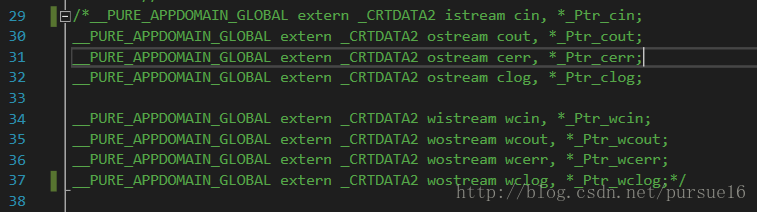
open iostream file. I commented out part of the code for a project…
just uncomment it.