error message
Collecting pyaudio
  Using cached https://files.pythonhosted.org/packages/ab/42/b4f04721c5c5bfc196ce156b3c768998ef8c0ae3654ed29ea5020c749a6b/PyAudio-0.2.11.tar.gz
Building wheels for collected packages: pyaudio
  Running setup.py bdist_wheel for pyaudio ... error
  Complete output from command /usr/bin/python3.5 -u -c "import setuptools, tokenize;__file__='/tmp/pip-install-kg54s8cx/pyaudio/setup.py';f=getattr(tokenize, 'open', open)(__file__);code=f.read().replace('\r\n', '\n');f.close();exec(compile(code, __file__, 'exec'))" bdist_wheel -d /tmp/pip-wheel-nwzkkq3_ --python-tag cp35:
  running bdist_wheel
  running build
  running build_py
  creating build
  creating build/lib.linux-x86_64-3.5
  copying src/pyaudio.py -> build/lib.linux-x86_64-3.5
  running build_ext
  building '_portaudio' extension
  creating build/temp.linux-x86_64-3.5
  creating build/temp.linux-x86_64-3.5/src
  x86_64-linux-gnu-gcc -pthread -DNDEBUG -g -fwrapv -O2 -Wall -Wstrict-prototypes -g -fstack-protector-strong -Wformat -Werror=format-security -Wdate-time -D_FORTIFY_SOURCE=2 -fPIC -I/usr/include/python3.5m -c src/_portaudiomodule.c -o build/temp.linux-x86_64-3.5/src/_portaudiomodule.o
  src/_portaudiomodule.c:29:23: fatal error: portaudio.h: No such file or directory
  compilation terminated.
  error: command 'x86_64-linux-gnu-gcc' failed with exit status 1

  ----------------------------------------
  Failed building wheel for pyaudio
  Running setup.py clean for pyaudio
Failed to build pyaudio
Installing collected packages: pyaudio
  Running setup.py install for pyaudio ... error
    Complete output from command /usr/bin/python3.5 -u -c "import setuptools, tokenize;__file__='/tmp/pip-install-kg54s8cx/pyaudio/setup.py';f=getattr(tokenize, 'open', open)(__file__);code=f.read().replace('\r\n', '\n');f.close();exec(compile(code, __file__, 'exec'))" install --record /tmp/pip-record-1k4o92s5/install-record.txt --single-version-externally-managed --compile:
    running install
    running build
    running build_py
    creating build
    creating build/lib.linux-x86_64-3.5
    copying src/pyaudio.py -> build/lib.linux-x86_64-3.5
    running build_ext
    building '_portaudio' extension
    creating build/temp.linux-x86_64-3.5
    creating build/temp.linux-x86_64-3.5/src
    x86_64-linux-gnu-gcc -pthread -DNDEBUG -g -fwrapv -O2 -Wall -Wstrict-prototypes -g -fstack-protector-strong -Wformat -Werror=format-security -Wdate-time -D_FORTIFY_SOURCE=2 -fPIC -I/usr/include/python3.5m -c src/_portaudiomodule.c -o build/temp.linux-x86_64-3.5/src/_portaudiomodule.o
    src/_portaudiomodule.c:29:23: fatal error: portaudio.h: No such file or directory
    compilation terminated.
    error: command 'x86_64-linux-gnu-gcc' failed with exit status 1

    ----------------------------------------
Command "/usr/bin/python3.5 -u -c "import setuptools, tokenize;__file__='/tmp/pip-install-kg54s8cx/pyaudio/setup.py';f=getattr(tokenize, 'open', open)(__file__);code=f.read().replace('\r\n', '\n');f.close();exec(compile(code, __file__, 'exec'))" install --record /tmp/pip-record-1k4o92s5/install-record.txt --single-version-externally-managed --compile" failed with error code 1 in /tmp/pip-install-kg54s8cx/pyaudio/
Execute the following command:
root@robot:/home/liu# sudo apt-get install portaudio19-dev python-all-dev
Reading package lists... Done
Building dependency tree
Reading state information... Done
python-all-dev is already the newest version (2.7.12-1~16.04).
python-all-dev set to manually installed.
The following packages were automatically installed and are no longer required:
  fonts-lato libruby2.3 linux-headers-4.10.0-28
  linux-headers-4.10.0-28-generic linux-headers-4.13.0-36
  linux-headers-4.13.0-36-generic linux-headers-4.13.0-38
  linux-headers-4.13.0-38-generic linux-headers-4.4.0-124
  linux-headers-4.4.0-124-generic linux-image-4.10.0-28-generic
  linux-image-4.13.0-36-generic linux-image-4.13.0-38-generic
  linux-image-extra-4.10.0-28-generic linux-image-extra-4.13.0-36-generic
  linux-image-extra-4.13.0-38-generic rake ruby ruby-did-you-mean
  ruby-minitest ruby-net-telnet ruby-power-assert ruby-test-unit ruby2.3
  rubygems-integration
Use 'sudo apt autoremove' to remove them.
The following additional packages will be installed:
  libjack-dev libjack0 libportaudiocpp0
Suggested packages:
  jackd1 portaudio19-doc
The following packages will be REMOVED:
  libjack-jackd2-0
The following NEW packages will be installed:
  libjack-dev libjack0 libportaudiocpp0 portaudio19-dev
0 upgraded, 4 newly installed, 1 to remove and 546 not upgraded.
Need to get 359 kB of archives.
After this operation, 2,512 kB of additional disk space will be used.
Do you want to continue?[Y/n] y
Get:1 http://mirrors.sohu.com/ubuntu xenial/universe amd64 libjack0 amd64 1:0.124.1+20140122git5013bed0-3build2 [43.1 kB]
Get:2 http://mirrors.sohu.com/ubuntu xenial/universe amd64 libjack-dev amd64 1:0.124.1+20140122git5013bed0-3build2 [199 kB]
Get:3 http://mirrors.sohu.com/ubuntu xenial/main amd64 libportaudiocpp0 amd64 19+svn20140130-1build1 [15.4 kB]
Get:4 http://mirrors.sohu.com/ubuntu xenial/main amd64 portaudio19-dev amd64 19+svn20140130-1build1 [102 kB]
Fetched 359 kB in 2s (177 kB/s)
dpkg: libjack-jackd2-0:amd64: dependency problems, but removing anyway as you requested:
 simplescreenrecorder depends on libjack-jackd2-0 (>= 1.9.5~dfsg-14) | libjack-0.116; however:
  Package libjack-jackd2-0:amd64 is to be removed.
  Package libjack-0.116 is not installed.
  Package libjack-jackd2-0:amd64 which provides libjack-0.116 is to be removed.
 gstreamer1.0-plugins-good:amd64 depends on libjack-jackd2-0 (>= 1.9.5~dfsg-14) | libjack-0.116; however:
  Package libjack-jackd2-0:amd64 is to be removed.
  Package libjack-0.116 is not installed.
  Package libjack-jackd2-0:amd64 which provides libjack-0.116 is to be removed.
 libavdevice-ffmpeg56:amd64 depends on libjack-jackd2-0 (>= 1.9.5~dfsg-14) | libjack-0.116; however:
  Package libjack-jackd2-0:amd64 is to be removed.
  Package libjack-0.116 is not installed.
  Package libjack-jackd2-0:amd64 which provides libjack-0.116 is to be removed.
 libasound2-plugins:amd64 depends on libjack-jackd2-0 (>= 1.9.5~dfsg-14) | libjack-0.116; however:
  Package libjack-ja
(Reading database ... 494197 files and directories currently installed.)
Removing libjack-jackd2-0:amd64 (1.9.10+20150825git1ed50c92~dfsg-1ubuntu1) ...
Processing triggers for libc-bin (2.23-0ubuntu10) ...
Selecting previously unselected package libjack0:amd64.
(Reading database ... 494188 files and directories currently installed.)
Preparing to unpack .../libjack0_1%3a0.124.1+20140122git5013bed0-3build2_amd64.deb ...
Unpacking libjack0:amd64 (1:0.124.1+20140122git5013bed0-3build2) ...
Selecting previously unselected package libjack-dev.
Preparing to unpack .../libjack-dev_1%3a0.124.1+20140122git5013bed0-3build2_amd64.deb ...
Unpacking libjack-dev (1:0.124.1+20140122git5013bed0-3build2) ...
Selecting previously unselected package libportaudiocpp0:amd64.
Preparing to unpack .../libportaudiocpp0_19+svn20140130-1build1_amd64.deb ...
Unpacking libportaudiocpp0:amd64 (19+svn20140130-1build1) ...
Selecting previously unselected package portaudio19-dev.
Preparing to unpack .../portaudio19-dev_19+svn20140130-1build1_amd64.deb ...
Unpacking portaudio19-dev (19+svn20140130-1build1) ...
Processing triggers for doc-base (0.10.7) ...
Processing 1 added doc-base file...
Setting up libjack0:amd64 (1:0.124.1+20140122git5013bed0-3build2) ...
Setting up libjack-dev (1:0.124.1+20140122git5013bed0-3build2) ...
Setting up libportaudiocpp0:amd64 (19+svn20140130-1build1) ...
Setting up portaudio19-dev (19+svn20140130-1build1) ...
Processing triggers for libc-bin (2.23-0ubuntu10) ...
execute pip3 install PyAudio
again
root@robot:/home/liu# pip3 install pyaudio
Collecting pyaudio
  Using cached https://files.pythonhosted.org/packages/ab/42/b4f04721c5c5bfc196ce156b3c768998ef8c0ae3654ed29ea5020c749a6b/PyAudio-0.2.11.tar.gz
Building wheels for collected packages: pyaudio
  Running setup.py bdist_wheel for pyaudio ... done
  Stored in directory: /root/.cache/pip/wheels/f4/a8/a4/292214166c2917890f85b2f72a8e5f13e1ffa527c4200dcede
Successfully built pyaudio
Installing collected packages: pyaudio
Successfully installed pyaudio-0.2.11
Solve CONDA’s “solving environment: failed” problem
1. Problem code
recently when conda installed the software package, the following problems have been occurring. I found a lot of solutions on the Internet but failed to solve my problem. See the link
Collecting package metadata (current_repodata.json): done
Solving environment: failed with current_repodata.json, will retry with next repodata source.
Collecting package metadata (repodata.json): done
Solving environment: failed
Initial quick solve with frozen env failed.  Unfreezing env and trying again.
Solving environment: failed
2. Cause found
when I later looked at the error message, it turned out that it was caused by two commands for using conda-forge. The culprit is the second sentence.
conda config --add channels conda-forge
conda config --set channel_priority strict
3. Solution
conda config --set channel_priority flexible
“Nsurlsession / nsurlconnection HTTP load failed (kcfstreamerdomainssl, – 9806” appears when afnetworking accesses HTTPS
Failed to read auto-increment value from the storage engine in MySQL
ALTER TABLE `table_name` AUTO_INCREMENT = 1Solve the problem of dynamically applying for permission, but still reporting an error of open failed: eacces (permission denied)
as the android system continues to update, a lot of business code to follow the update, otherwise often unexpected errors will occur. For example, starting with Android Q(10), storage is partitioned. As a result, I have applied for the permission of Android.Permission.WRITE_EXTERNAL_STORAGE, but I still report open Failed: EACCES (Permission denied). You can only turn permissions on manually, and you can also use storage permissions.
without further ado, let’s talk about the solution first, then the principle. The solution is to add
to the manifest’s application tag
android:requestLegacyExternalStorage="true" 标识,问题便解决了。如图:
here’s why: the Android Q file storage mechanism has been modified to sandbox mode, a bit like apple. APP can only access files in its own directory and public media files. Under AndroidQ, use the old file storage method. Android Q still USES READ_EXTERNAL_STORAGE and WRITE_EXTERNAL_STORAGE as storage related runtime permissions, but now access to external storage is limited even if these permissions are obtained.
android:requestLegacyExternalStorage="true" 的意思就是使用旧的存储策略,不使用androidQ的新策略。但这个不是长久之计,很快将会强制都使用新策略。最好的解决策略就是

1.需要长期保存并且卸载也不能删除的,使用公有目录
public directory: Downloads Documents
Downloads Downloads Documents
Downloads Documents Downloads
Sdl2 – importerror: DLL load failed: the specified module was not found.
pip install docutils pygments pypiwin32 kivy.deps.sdl2 kivy.deps.glew
ImportError: DLL load failed: The specified module could not be found
import tensorflow: DLL load failed: The specified module could not be found.
environment: Win10+ GTX960M + CUDA9.0 + Cudnn7.0 + tensorflow 1.13
CUDA 9.0 does not support tensorflow-gpu 1.13 or above, which needs to be downgraded to 1.12
solution:
pip unistall tensorflow-gpu
pip install tensorflow-gpu==1.12.0
Failed cleaning build dir for SciPy
scipy under ARM architecture is itself a difficult package to install
when using pip3 install keras, run scipy setup.py \. Then, Failed cleaning build dir for scipy
popped up
looked up a lot of information, you can install the following dependency package, you can successfully install keras
sudo apt-get install python3-scipy
sudo apt-get install libblas-dev liblapack-dev
sudo apt-get install gfortran
sudo pip3 install keras
1822 – Failed to add the foreign key constraint. Missing index for constraint ‘tb_emp_ibfk_1’ in the
mysql, error reported: 1822-failed to add the foreign key constraint. Missing index for constraint ‘tb_emp_ibfk_1’ in the referenced table ‘tb_dept’
reason: if table A has no primary key set, the fields in table A cannot be used as foreign keys for table B.
solution, on the premise of not deleting table A, add the following SQL text:
ALTER TABLE tb_dept ADD PRIMARY KEY(deptno);
SQL:
DROP DATABASE IF EXISTS tb_test;
CREATE DATABASE tb_test DEFAULT charset utf8;

USE tb_test;
# 部门表
CREATE TABLE tb_dept (
	deptno INT NOT NULL COMMENT '编号',
	deptname VARCHAR ( 10 ) NOT NULL COMMENT '名称',
	deptaddr VARCHAR ( 20 ) NOT NULL COMMENT '地址'
);
INSERT INTO tb_dept VALUES
	( 101, '研发部门', '武汉' ),
	( 127, '会计部门', '上海' );
# 员工表
DROP TABLE IF EXISTS tb_emp;
CREATE TABLE tb_emp (
	empno INT NOT NULL COMMENT '编号',
	empname VARCHAR ( 10 ) NOT NULL COMMENT '姓名',
	empjob VARCHAR ( 10 ) NOT NULL COMMENT '职位',
	empsal INT NOT NULL DEFAULT 3000 COMMENT '薪酬',
	deptno INT NOT NULL COMMENT '所属部门',
	PRIMARY KEY ( empno ),
	FOREIGN KEY ( deptno ) REFERENCES tb_dept ( deptno )
);
INSERT INTO tb_emp VALUES
	(10001,'杨过','研发主管',2000000,101),
	(40001,'张三丰','总裁',90000000,127);
operation result:
DROP DATABASE IF EXISTS tb_test
> OK
> 时间: 0.32s


CREATE DATABASE tb_test DEFAULT charset utf8
> OK
> 时间: 0.991s


USE tb_test
> OK
> 时间: 0.008s


# 部门表
CREATE TABLE tb_dept (
	deptno INT NOT NULL COMMENT '编号',
	deptname VARCHAR ( 10 ) NOT NULL COMMENT '名称',
	deptaddr VARCHAR ( 20 ) NOT NULL COMMENT '地址'
)
> OK
> 时间: 1.74s


INSERT INTO tb_dept VALUES
	( 101, '研发部门', '武汉' ),
	( 127, '会计部门', '上海' )
> Affected rows: 2
> 时间: 0.532s


# 员工表
DROP TABLE IF EXISTS tb_emp
> OK
> 时间: 0.393s


CREATE TABLE tb_emp (
	empno INT NOT NULL COMMENT '编号',
	empname VARCHAR ( 10 ) NOT NULL COMMENT '姓名',
	empjob VARCHAR ( 10 ) NOT NULL COMMENT '职位',
	empsal INT NOT NULL DEFAULT 3000 COMMENT '薪酬',
	deptno INT NOT NULL COMMENT '所属部门',
	PRIMARY KEY ( empno ),
	FOREIGN KEY ( deptno ) REFERENCES tb_dept ( deptno )
)
> 1822 - Failed to add the foreign key constraint. Missing index for constraint 'tb_emp_ibfk_1' in the referenced table 'tb_dept'
> 时间: 0.034s
Centos8 solves SSH secure shell error algorithmic negotiation failures
the new server version has arrived at CentOS8 today, but SSH Secure Shell is still 3.2.9 years ago, so I encountered an error in the title when connecting to the server. This question is a tragic waste of my time.
there are many, many posts on the web that address this problem, and they all go like this:
Sshd_config
sudo vim /etc/ssh/sshd_config
2. at the end of the file add the following information
Ciphers either aes128 – CBC, aes192 – CBC, aes256 – CBC, either aes128 – CTR, aes192 – CTR, aes256 – CTR, 3 des – CBC, arcfour128, arcfour256, arcfour, blowfish – CBC, cast128 – CBC
MACs Hmac – md5, hmac – sha1, [email protected], hmac – ripemd160 digest, hmac – sha1-96, hmac – md5-96
KexAlgorithms diffie-hellman-group1-sha1,diffie-hellman-group14-sha1,diffie-hellman-group-exchange-sha1,diffie-hellman-group-exchange-sha256,ecdh-sha2-nistp256,ecdh-sha2-nistp384,ecdh-sha2-nistp521,diffie-hellman-g roup1-sha1,[email protected]
3. after saving SSH service
sudo /etc/init.d/ SSH restart
everyone said it was good, but after I tried it, it was tragic. After I added the configuration, I could not restart SSH and it would report an error.
these two articles explain the real reason and offer a solution:
https://blog.csdn.net/pgmzyy/article/details/88586101
https://blog.csdn.net/Vertoria/article/details/82226340
, however, I still failed to solve the problem, and finally decided to abandon the outdated SSH Secure Shell Client and replace it with FileZilla to solve the problem: FileZilla also supports SSH protocol to transfer files, and its operation is slightly more humane than SSH Secure Shell Client
Solution to “initializing the Oracle asmlib driver: [failed]”
after installing the corresponding ASM component, execute /etc/init.d /oracleasm enable and display failure. View log
[SQL]
view plain
The copy
- [root @ localhost log] # more/var/log/oracleasm
- Cleaning any stale ASM disks…
- File “/ dev/” is not a block device
- “VOL1” Disk does not exist or is not instantiated
- Writing disk header: done
4 5 directory; Instantiating disk: oracleasm-instantiate disk: we are Unable to manager: No0 1 such file 3 or4 5 directory- failed
- Clearing disk header: done
- “VOL1” Disk does not exist or is not instantiated
- Writing disk header: done
4 5 directory; Instantiating disk: oracleasm-instantiate disk: we are Unable to manager: No0 1 such file 3 or4 5 directory- failed
- Clearing disk header: done
- Creating/dev/oracleasm mount point:/dev/oracleasm
- Loading module “oracleasm” : failed
- Unable to load module “oracleasm”
the oracleasm component oracleasm. Ko
cannot be found
looks for
in the file system
[SQL]
view plain
The copy- [root @ localhost log] # find/- name oracleasm. Ko
- /lib/modules/2.6.18-53.1.21. El5/kernel/drivers/addon/oracleasm/oracleasm ko
manually install ASM components
[SQL]
view plain
The copy- [root @ localhost log] #/sbin/insmod/lib/modules/2.6.18-53.1.21. El5/kernel/drivers/addon/oracleasm/oracleasm ko
re-execute
/etc/init.d/oracleasm enable execute successfully.
- /lib/modules/2.6.18-53.1.21. El5/kernel/drivers/addon/oracleasm/oracleasm ko
- Cleaning any stale ASM disks…
Docker start error: failed to start docker application container engine.
directory
phenomenon: docker does not start
check docker status, as failed.
manually start dockerd
check daemon. Json
modify the daemon. Json
starts the daemon and docker
with systemctl
why does using ipv6:true cause docker to fail to start normally?
phenomenon: docker doesn’t start
to see if elasticsearch service exists
[root@warehouse00 ~]# docker ps|grep elastic
Cannot connect to the Docker daemon at unix:///var/run/docker.sock. Is the docker daemon running?
indicates that docker is not running.
check docker status, as failed.
[root@warehouse00 ~]# service docker status
Redirecting to /bin/systemctl status docker.service
● docker.service - Docker Application Container Engine
   Loaded: loaded (/etc/systemd/system/docker.service; enabled; vendor preset: disabled)
   Active: failed (Result: start-limit) since Mon 2020-06-15 06:30:16 UTC; 1 weeks 1 days ago
     Docs: https://docs.docker.com
  Process: 19410 ExecStart=/usr/bin/dockerd -H fd:// (code=exited, status=1/FAILURE)
 Main PID: 19410 (code=exited, status=1/FAILURE)

Jun 15 06:30:16 warehouse00 systemd[1]: docker.service holdoff time over, scheduling restart.
Jun 15 06:30:16 warehouse00 systemd[1]: Stopped Docker Application Container Engine.
Jun 15 06:30:16 warehouse00 systemd[1]: start request repeated too quickly for docker.service
Jun 15 06:30:16 warehouse00 systemd[1]: Failed to start Docker Application Container Engine.
Jun 15 06:30:16 warehouse00 systemd[1]: Unit docker.service entered failed state.
Jun 15 06:30:16 warehouse00 systemd[1]: docker.service failed.
Jun 15 06:30:33 warehouse00 systemd[1]: start request repeated too quickly for docker.service
Jun 15 06:30:33 warehouse00 systemd[1]: Failed to start Docker Application Container Engine.
Jun 15 06:30:33 warehouse00 systemd[1]: docker.service failed.
Jun 23 07:45:16 warehouse00 systemd[1]: Unit docker.service cannot be reloaded because it is inactive.
manually start dockerd
[root@warehouse00 ~]# dockerd
INFO[2020-06-23T07:46:26.609656620Z] Starting up
INFO[2020-06-23T07:46:26.615956282Z] libcontainerd: started new containerd process  pid=1802
INFO[2020-06-23T07:46:26.616133833Z] parsed scheme: "unix"                         module=grpc
INFO[2020-06-23T07:46:26.616167280Z] scheme "unix" not registered, fallback to default scheme  module=grpc
INFO[2020-06-23T07:46:26.616225318Z] ccResolverWrapper: sending update to cc: {[{unix:///var/run/docker/containerd/containerd.sock 0  <nil>}] <nil>}  module=grpc
INFO[2020-06-23T07:46:26.616255985Z] ClientConn switching balancer to "pick_first"  module=grpc
INFO[2020-06-23T07:46:26.665833586Z] starting containerd                           revision=b34a5c8af56e510852c35414db4c1f4fa6172339 version=v1.2.10
INFO[2020-06-23T07:46:26.667139004Z] loading plugin "io.containerd.content.v1.content"...  type=io.containerd.content.v1
INFO[2020-06-23T07:46:26.667283454Z] loading plugin "io.containerd.snapshotter.v1.btrfs"...  type=io.containerd.snapshotter.v1
WARN[2020-06-23T07:46:26.667700679Z] failed to load plugin io.containerd.snapshotter.v1.btrfs  error="path /var/lib/docker/containerd/daemon/io.containerd.snapshotter.v1.btrfs must be a btrfs filesystem to be used with the btrfs snapshotter"
INFO[2020-06-23T07:46:26.667751093Z] loading plugin "io.containerd.snapshotter.v1.aufs"...  type=io.containerd.snapshotter.v1
WARN[2020-06-23T07:46:26.672276961Z] failed to load plugin io.containerd.snapshotter.v1.aufs  error="modprobe aufs failed: "modprobe: FATAL: Module aufs not found.\n": exit status 1"
INFO[2020-06-23T07:46:26.672329642Z] loading plugin "io.containerd.snapshotter.v1.native"...  type=io.containerd.snapshotter.v1
INFO[2020-06-23T07:46:26.672396890Z] loading plugin "io.containerd.snapshotter.v1.overlayfs"...  type=io.containerd.snapshotter.v1
INFO[2020-06-23T07:46:26.672604691Z] loading plugin "io.containerd.snapshotter.v1.zfs"...  type=io.containerd.snapshotter.v1
INFO[2020-06-23T07:46:26.673060327Z] skip loading plugin "io.containerd.snapshotter.v1.zfs"...  type=io.containerd.snapshotter.v1
INFO[2020-06-23T07:46:26.673097387Z] loading plugin "io.containerd.metadata.v1.bolt"...  type=io.containerd.metadata.v1
WARN[2020-06-23T07:46:26.673137831Z] could not use snapshotter btrfs in metadata plugin  error="path /var/lib/docker/containerd/daemon/io.containerd.snapshotter.v1.btrfs must be a btrfs filesystem to be used with the btrfs snapshotter"
WARN[2020-06-23T07:46:26.673161222Z] could not use snapshotter aufs in metadata plugin  error="modprobe aufs failed: "modprobe: FATAL: Module aufs not found.\n": exit status 1"
WARN[2020-06-23T07:46:26.673185176Z] could not use snapshotter zfs in metadata plugin  error="path /var/lib/docker/containerd/daemon/io.containerd.snapshotter.v1.zfs must be a zfs filesystem to be used with the zfs snapshotter: skip plugin"
INFO[2020-06-23T07:46:26.673528926Z] loading plugin "io.containerd.differ.v1.walking"...  type=io.containerd.differ.v1
INFO[2020-06-23T07:46:26.673583123Z] loading plugin "io.containerd.gc.v1.scheduler"...  type=io.containerd.gc.v1
INFO[2020-06-23T07:46:26.673692715Z] loading plugin "io.containerd.service.v1.containers-service"...  type=io.containerd.service.v1
INFO[2020-06-23T07:46:26.673736540Z] loading plugin "io.containerd.service.v1.content-service"...  type=io.containerd.service.v1
INFO[2020-06-23T07:46:26.673769457Z] loading plugin "io.containerd.service.v1.diff-service"...  type=io.containerd.service.v1
INFO[2020-06-23T07:46:26.673804631Z] loading plugin "io.containerd.service.v1.images-service"...  type=io.containerd.service.v1
INFO[2020-06-23T07:46:26.673839842Z] loading plugin "io.containerd.service.v1.leases-service"...  type=io.containerd.service.v1
INFO[2020-06-23T07:46:26.673903483Z] loading plugin "io.containerd.service.v1.namespaces-service"...  type=io.containerd.service.v1
INFO[2020-06-23T07:46:26.673943174Z] loading plugin "io.containerd.service.v1.snapshots-service"...  type=io.containerd.service.v1
INFO[2020-06-23T07:46:26.673979791Z] loading plugin "io.containerd.runtime.v1.linux"...  type=io.containerd.runtime.v1
INFO[2020-06-23T07:46:26.674145534Z] loading plugin "io.containerd.runtime.v2.task"...  type=io.containerd.runtime.v2
INFO[2020-06-23T07:46:26.674279834Z] loading plugin "io.containerd.monitor.v1.cgroups"...  type=io.containerd.monitor.v1
INFO[2020-06-23T07:46:26.675734289Z] loading plugin "io.containerd.service.v1.tasks-service"...  type=io.containerd.service.v1
INFO[2020-06-23T07:46:26.675851914Z] loading plugin "io.containerd.internal.v1.restart"...  type=io.containerd.internal.v1
INFO[2020-06-23T07:46:26.676034068Z] loading plugin "io.containerd.grpc.v1.containers"...  type=io.containerd.grpc.v1
INFO[2020-06-23T07:46:26.676081089Z] loading plugin "io.containerd.grpc.v1.content"...  type=io.containerd.grpc.v1
INFO[2020-06-23T07:46:26.676117009Z] loading plugin "io.containerd.grpc.v1.diff"...  type=io.containerd.grpc.v1
INFO[2020-06-23T07:46:26.676149377Z] loading plugin "io.containerd.grpc.v1.events"...  type=io.containerd.grpc.v1
INFO[2020-06-23T07:46:26.676180874Z] loading plugin "io.containerd.grpc.v1.healthcheck"...  type=io.containerd.grpc.v1
INFO[2020-06-23T07:46:26.676214131Z] loading plugin "io.containerd.grpc.v1.images"...  type=io.containerd.grpc.v1
INFO[2020-06-23T07:46:26.676245682Z] loading plugin "io.containerd.grpc.v1.leases"...  type=io.containerd.grpc.v1
INFO[2020-06-23T07:46:26.676284266Z] loading plugin "io.containerd.grpc.v1.namespaces"...  type=io.containerd.grpc.v1
INFO[2020-06-23T07:46:26.676316443Z] loading plugin "io.containerd.internal.v1.opt"...  type=io.containerd.internal.v1
INFO[2020-06-23T07:46:26.676440092Z] loading plugin "io.containerd.grpc.v1.snapshots"...  type=io.containerd.grpc.v1
INFO[2020-06-23T07:46:26.676482597Z] loading plugin "io.containerd.grpc.v1.tasks"...  type=io.containerd.grpc.v1
INFO[2020-06-23T07:46:26.676514017Z] loading plugin "io.containerd.grpc.v1.version"...  type=io.containerd.grpc.v1
INFO[2020-06-23T07:46:26.676545815Z] loading plugin "io.containerd.grpc.v1.introspection"...  type=io.containerd.grpc.v1
INFO[2020-06-23T07:46:26.677125349Z] serving...                                    address="/var/run/docker/containerd/containerd-debug.sock"
INFO[2020-06-23T07:46:26.677301919Z] serving...                                    address="/var/run/docker/containerd/containerd.sock"
INFO[2020-06-23T07:46:26.677337263Z] containerd successfully booted in 0.013476s

INFO[2020-06-23T07:46:26.693415067Z] parsed scheme: "unix"                         module=grpc
INFO[2020-06-23T07:46:26.693481428Z] scheme "unix" not registered, fallback to default scheme  module=grpc
INFO[2020-06-23T07:46:26.693528406Z] ccResolverWrapper: sending update to cc: {[{unix:///var/run/docker/containerd/containerd.sock 0  <nil>}] <nil>}  module=grpc
INFO[2020-06-23T07:46:26.693554473Z] ClientConn switching balancer to "pick_first"  module=grpc
INFO[2020-06-23T07:46:26.695436116Z] parsed scheme: "unix"                         module=grpc
INFO[2020-06-23T07:46:26.695494014Z] scheme "unix" not registered, fallback to default scheme  module=grpc
INFO[2020-06-23T07:46:26.695532298Z] ccResolverWrapper: sending update to cc: {[{unix:///var/run/docker/containerd/containerd.sock 0  <nil>}] <nil>}  module=grpc
INFO[2020-06-23T07:46:26.695558869Z] ClientConn switching balancer to "pick_first"  module=grpc
INFO[2020-06-23T07:46:26.747479158Z] Loading containers: start.
INFO[2020-06-23T07:46:26.887145110Z] stopping event stream following graceful shutdown  error="<nil>" module=libcontainerd namespace=moby
INFO[2020-06-23T07:46:26.887630706Z] stopping healthcheck following graceful shutdown  module=libcontainerd
INFO[2020-06-23T07:46:26.887672287Z] stopping event stream following graceful shutdown  error="context canceled" module=libcontainerd namespace=plugins.moby
failed to start daemon: Error initializing network controller: Error creating default "bridge" network: could not find an available, non-overlapping IPv6 address pool among the defaults to assign to the network
misread means daemone.json has a problem with ipv6 configuration .
check daemon. Json
[root@warehouse00 ~]# cat /etc/docker/daemon.json
{
  "insecure-registries": ["registry.local", "127.0.0.1:5001", "10.10.13.42:5000"],
  "registry-mirrors": ["http://mirror.local"],
  "bip": "172.18.18.1/24",
  "data-root": "/var/lib/docker",
  "ipv6": true,
  "storage-driver": "overlay2",
  "live-restore": true,
  "log-opts": {
    "max-size": "500m"
  }
}
modify the daemon. Json
[root@warehouse00 ~]# cat /etc/docker/daemon.json
{
"insecure-registries": ["registry.local", "127.0.0.1:5001", "10.10.13.42:5000"],
"registry-mirrors": ["http://mirror.local"],
"bip": "172.18.18.1/24",
"data-root": "/var/lib/docker",
"ipv6": true,
"storage-driver": "overlay2",
"live-restore": true,
"log-opts": {
"max-size": "500m"
}
}deleted ipv6:true .
manually started daemon validation, modified ipv6:true, found that the problem has not been repeated.
restart docker, error: Job for docker.service invalid.
[root@warehouse00 ~]# systemctl reload docker
Job for docker.service invalid.
starts the daemon with systemctl and docker
// 启动docker dameon
$ sudo systemctl start docker

// 启动docker服务
$ sudo service docker start
problem solved.
why does using ipv6:true cause docker to fail to start normally?
related issue: https://github.com/moby/moby/issues/36954
https://github.com/moby/moby/issues/29443
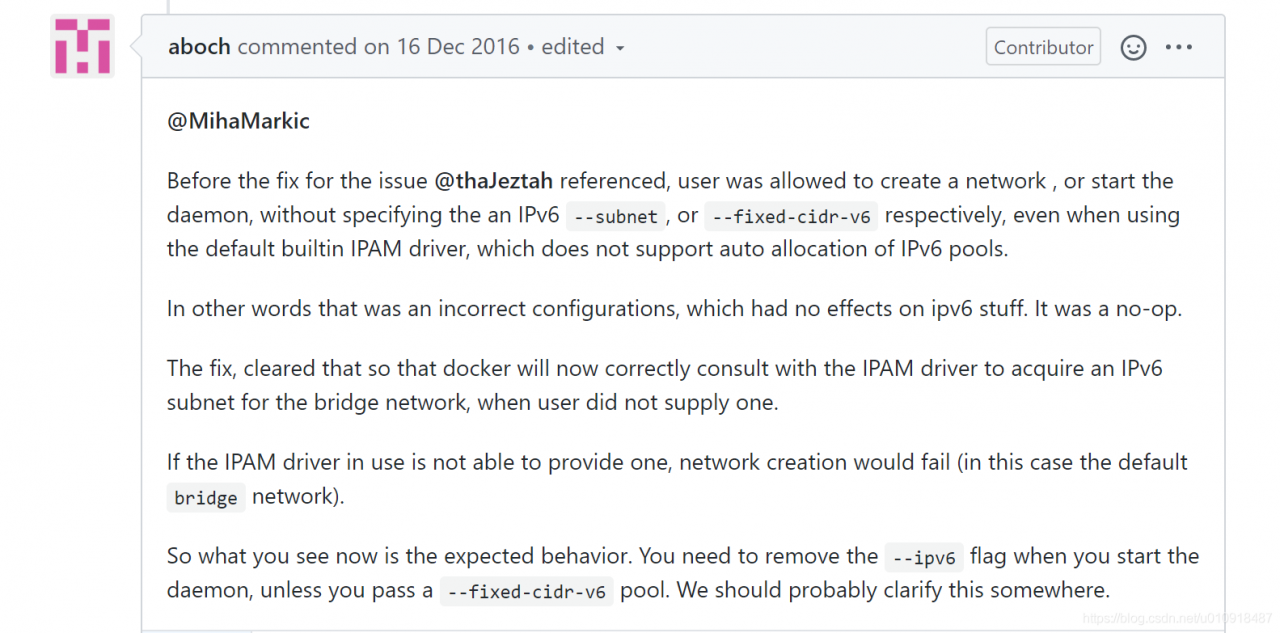
https://github.com/moby/moby/issues/29386
either disable ipv6. That is, ipv6:false, or delete ipv6:true
or fix it with fixed-cidr-v6.