Solution: Yum Install Readline-devel
The detailed process is as follows:
[root@April postgresql-9.2.24]# yum install readline-devel
Loaded plugins: fastestmirror, security
Loading mirror speeds from cached hostfile
 * base: mirrors.163.com
 * extras: mirrors.163.com
 * updates: mirrors.163.com
Setting up Install Process
Resolving Dependencies
--> Running transaction check
---> Package readline-devel.i686 0:6.0-4.el6 will be installed
--> Processing Dependency: ncurses-devel for package: readline-devel-6.0-4.el6.i686
--> Running transaction check
---> Package ncurses-devel.i686 0:5.7-4.20090207.el6 will be installed
--> Processing Dependency: ncurses-libs = 5.7-4.20090207.el6 for package: ncurses-devel-5.7-4.20090207.el6.i686
--> Running transaction check
---> Package ncurses-libs.i686 0:5.7-3.20090208.el6 will be updated
---> Package ncurses-libs.i686 0:5.7-4.20090207.el6 will be an update
--> Processing Dependency: ncurses-base = 5.7-4.20090207.el6 for package: ncurses-libs-5.7-4.20090207.el6.i686
--> Running transaction check
---> Package ncurses-base.i686 0:5.7-3.20090208.el6 will be updated
---> Package ncurses-base.i686 0:5.7-4.20090207.el6 will be an update
--> Finished Dependency Resolution

Dependencies Resolved

===============================================================================================================================
 Package                           Arch                    Version                               Repository               Size
===============================================================================================================================
Installing:
 readline-devel                    i686                    6.0-4.el6                             base                    134 k
Installing for dependencies:
 ncurses-devel                     i686                    5.7-4.20090207.el6                    base                    641 k
Updating for dependencies:
 ncurses-base                      i686                    5.7-4.20090207.el6                    base                     61 k
 ncurses-libs                      i686                    5.7-4.20090207.el6                    base                    249 k

Transaction Summary
===============================================================================================================================
Install       2 Package(s)
Upgrade       2 Package(s)

Total download size: 1.1 M
Is this ok [y/N]: y
Downloading Packages:
(1/4): ncurses-base-5.7-4.20090207.el6.i686.rpm                                                         |  61 kB     00:00
(2/4): ncurses-devel-5.7-4.20090207.el6.i686.rpm                                                        | 641 kB     00:00
(3/4): ncurses-libs-5.7-4.20090207.el6.i686.rpm                                                         | 249 kB     00:00
(4/4): readline-devel-6.0-4.el6.i686.rpm                                                                | 134 kB     00:00
-------------------------------------------------------------------------------------------------------------------------------
Total                                                                                          311 kB/s | 1.1 MB     00:03
Running rpm_check_debug
Running Transaction Test
Transaction Test Succeeded
Running Transaction
  Updating   : ncurses-base-5.7-4.20090207.el6.i686                                                                        1/6
  Updating   : ncurses-libs-5.7-4.20090207.el6.i686                                                                        2/6
  Installing : ncurses-devel-5.7-4.20090207.el6.i686                                                                       3/6
  Installing : readline-devel-6.0-4.el6.i686                                                                               4/6
  Cleanup    : ncurses-libs-5.7-3.20090208.el6.i686                                                                        5/6
  Cleanup    : ncurses-base-5.7-3.20090208.el6.i686                                                                        6/6
  Verifying  : ncurses-base-5.7-4.20090207.el6.i686                                                                        1/6
  Verifying  : ncurses-libs-5.7-4.20090207.el6.i686                                                                        2/6
  Verifying  : readline-devel-6.0-4.el6.i686                                                                               3/6
  Verifying  : ncurses-devel-5.7-4.20090207.el6.i686                                                                       4/6
  Verifying  : ncurses-libs-5.7-3.20090208.el6.i686                                                                        5/6
  Verifying  : ncurses-base-5.7-3.20090208.el6.i686                                                                        6/6

Installed:
  readline-devel.i686 0:6.0-4.el6

Dependency Installed:
  ncurses-devel.i686 0:5.7-4.20090207.el6

Dependency Updated:
  ncurses-base.i686 0:5.7-4.20090207.el6                         ncurses-libs.i686 0:5.7-4.20090207.el6

Complete!
View installation results:
[root@April postgresql-9.2.24]# ls -l /usr/include/ | grep readline
drwxr-xr-x.  2 root root   4096 Apr  2 14:50 readline
c++ error: ‘malloc’ was not declared in this scope
Error: ‘malloc’ was not declared in this scope when using malloc() in c++
Solutions:
Introducing the stdlib. H
#include<stdlib.h>
Syntax error, insert “}” to complete ClassBody
Syntax error, insert ‘} ‘to complete ClassBody
Syntax error, insert’} ‘to complete ClassBody
I copied the content of other Java, did not check the syntax error, also did not miss}, and then delete the} and input, delete part of the code with re-copy, found that the problem can not be solved, I found a lot of tutorials on the Internet are re-typing
*** tried many times, finally found the syntax error, less}, find every {match in the code, see which one is missing.
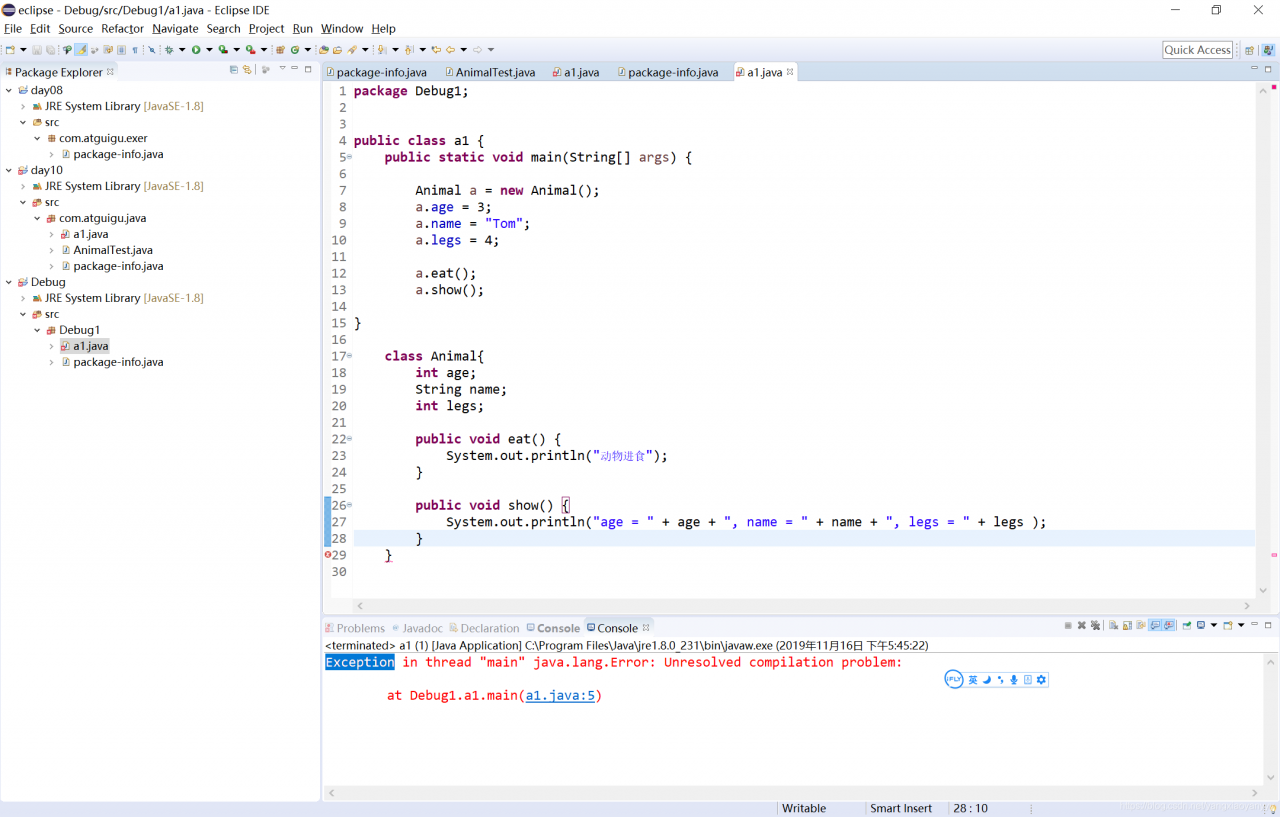
in class a1, the main method has no corresponding}
[picture archived failure outside the chain, the source station might be hotlinking prevention mechanism, proposed to directly upload picture preserved (img – BpYsIwiG – 1573912308800) (* https://img-blog.csdnimg.cn/20191116174957829.png)]
Matlab error “Object returned error code of the xlswrite function: 0x800A03EC
The Object returned error code of “MATLAB error” xlswrite function: 0x800A03EC
(the 2013-07-27 09:43:29)
The  reproduced ▼
The
| tags: xlswrite it | categories: matlab
When using xlswrite in matlab to write data into Excel documents, an Error was sometimes reported: Case 1: There are many reasons for this error: the most common is when the user writes more data to Excel than Excel can accommodate. The working interval for Excel2003 was 65,536 rows and 256 columns. In Excel2010, the working range was increased to 16,384 columns in 1,048,576 rows. So in the event of this error, Resources: Excel2010 specification Situation 2: This error also occurs if the Excel table name has a colon (:) in the sheetname. For example, use the following statement: xlswrite(‘test.xlsx’,0, ‘Sheet1:Sheet2’, ‘A1’); Cause of error: an invalid parameter is introduced to the fourth line “range” of Xlswrite. Xlswrite only supports the use of “A1” of Excel within a specified range. If you do need to store data in different Sheets in Excel, you can take the form of a loop, where num2str can convert numeric types to string types. For I = 1:3 xlswrite(‘test.xls’,1,[‘Sheet’ num2str(i)],’A1′); end Case 3: The size of a single piece of data that a user can store is beyond what Excel can accept if you try Situation 4: This error also occurs if the size of the data field entered into the Excel cell is 0×N. Situation 5: This error occurs if the stored data begins with the equals sign “=”. Because the way Excel is typed in is theta = (PS: Situation 4 and 5 are from the network, not verified personally.) = = = = = = = = = = = = = = = = = = = = = = = = = = = = = = = = = = = = = = = = = = = = = = = = = = = = = = = = = = = = = = = = = = = = = = = = = = = = = = = Resources: [MathWorks] Composer update encountered “Script php artisan optimize handling the post-update-cmd event returne when upgrading laravel
“Script PHP Artisan handling the post-update-CMD event returned with error code 255”
Try: First: Delete the PHP file under bootstrap/ Cache And then: composer dumpautoload composer update Info:Memory module [DIMM] needs attention: Single-bit warning error rate exceeded, Single-bit fai…Why can’t 80% of code farmers be architects?> > >
Please quote from Reproduced in: https://my.oschina.net/766/blog/211381 Error reported in react events.js:160 throw er; // Unhandled’error’ eventThis problem is caused by the occupied port of 99.99%, such as the 8081 port mentioned above, so if you encounter this problem, please don’t be nervous, just find the corresponding port and close the application! How to check which application is used according to the port, this network a search a lot, here is not repeated! If you have any difficulty, please leave a message.) [_ Note] Vue.js reported an error: Cannot read property’validate’ of undefined”Question: Reason ref: Fatal error: Please read “Security” section of the manual to find out how to run mysqld as root!The root of the problem is mysql installed by root and started by default./mysqld Restart reports the following error; Temporary solutions: Or try /usr/local/mysql/bin under the installation directory: Best solution: Without modifying the my.cnF file, execute the following command line python reads csv file is an error _csv.Error: iterator should return strings, not bytes (did you open the file in text)Python reads the CSV file and reports an error
import csv

with open('E:/Selenium2script/DDTModle/test.csv','rb') as f:
    readers = csv.reader(f)
    next(readers,None)
    for line in readers:
        print(line)
_csv.Error: iterator should return strings, not bytes (did you open the file in text mode?) Problem analysis: This CSV file is a text file, not a binary file. Solution: import csv
with open('E:/Selenium2script/DDTModle/test.csv','rt') as f:
readers = csv.reader(f)
next(readers,None)
for line in readers:
print(line)
Or we could replace rt with R. Note: The next statement here does not read the header key value with open(file_name,'wt',newline='') as f: Add newline= “‘, the data written will not be blank. [Fixed]Error executing Jupyter command ‘notebook’: [Errno ‘jupyter-notebook’ not found] 2The problem Then, it started The solution Reference data: https://stackoverflow.com/questions/42648610/error-when-executing-jupyter-notebook-no-such-file-or-directory matlab Error Subscript indices must either be real positive integers or logicals.Matlab errors: Subscript Indices must either be real positive integers or Logicals.Subscript index must be of positive integer type or logical type
Cause of error: in the process of accessing the matrix (including vector, two-dimensional matrix, multidimensional array, same below), the index of the subscript either starts at 0 or has a negative number. Note: The syntax of MATLAB stipulates that the index of the matrix starts from 1, which is different from the habit of programming languages such as C. Solution: Debug the program yourself and fix subscripts that are zero or negative. I made a mistake when I was writing the program. I should have done the transpose of the matrix, but I forgot… |

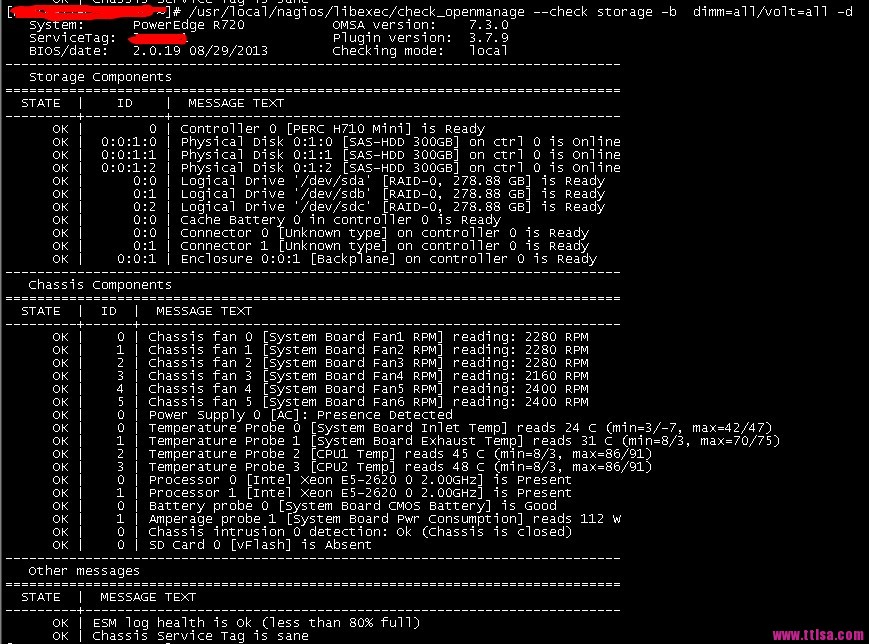 can see that the memory and Voltage are not tested. Memory will be detected without dimm=all.
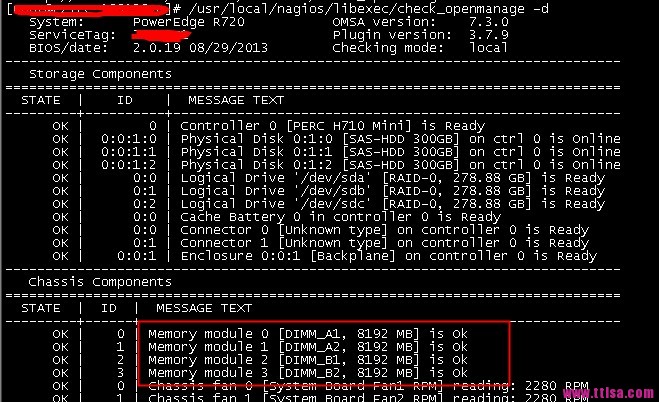 is able to block the detection of relevant hardware. Such as temperature detection and so on. Such as:
