Category Archives: How to Fix

SSHD key_read error report solution

The status quo described
In the afternoon, I found that the connection between my Xshell and the server node was inexplicably broken. After checking the system log, I found a large number of following errors:

May 15 17:58:08 yanta sshd[15213]: error:key_read: uudecode AAAAB3NzaC1yc2...........

The solution
After querying the solution on the network, it is found that the IP in error and the string in the corresponding error message can be found in the file /root/.ssh/known_hosts, and it is ok to delete it
. However, after checking the information on the server again, it is found that there is no corresponding one, and the encoded string is completely different.
After looking at /root/.ssh/authorized_keys, I find that one of the keys is consistent with the error message, so I first backup the file:

# cp authorized_keys authorized_keys.bk

After careful examination of the key, it was found that a complete key was originally divided into several parts, leading to the incomplete key when SSH login, so there was no error message after re-copying and pasting the key information on this machine.

Error: cannot fetch last explain plan from plan_table

OS: Solaris 10
DB: 10.2.0.3
today encountered such a strange thing, using dbms_xplan.display a SQL execution plan, “Error: cannot fetch last explain plan from plan_table”. At the beginning think Plan_table version is out of date, also did not look carefully, then regenerate Plan_table, just run SQL, or report the same error, so it is not Plan_table version of the problem, will it be the SQL itself?Change SQL: select sysdate from Dual, dbMS_xplan.display to display the correct result, run the SQL in question again, the error still remains. Judging from the above phenomenon, that should be the problem with SQL itself.
analyze the SQL in question, mainly several views, these views are based on db link, db link side of the data version is 9.2.0.8, could this be caused by this reason?Delete the 10G plan_table, run the 9i UTlxplan.sql, and run the statement with the problem just now, dbMS_xplan.display displays the result normally.
there is another method, manually update the plan_id field in the 10G plan_table, set the plan_id in the record to a value, dbms_xplan.display can display the result normally.

From “ITPUB blog” link: http://blog.itpub.net/45188/viewspace-1022784/, if you want to reprint, please indicate the source, otherwise will be investigated for legal responsibility.

Reproduced in: http://blog.itpub.net/45188/viewspace-1022784/

Fatal error C1853 error occurs when there are mixed .c files in the VS project

Fatal error C1853 appears in VS project with.c file mixed in
The CPP files in the project after the C file and an error occurs at compile time fatal error C1853: “the debug/1 _1. PCH” is not a precomplied header file with this complier…
Reason for error: This error is because when the.cpP and.c files are mixed in the project, the compiler compiles them differently (mainly because of the way it handles function declarations) and cannot share the same precompiled header file.
In VC++, the default precompiled header is for C++ (stdafx.h and stdafx.cpp), but it is also possible to create precompiled headers for C. Interestingly, in older versions of VC++, the error message was misleading: fatal error C1853: ‘XXX. PCH’ is not a precompiled header file created with this compiler. It’s often confusing. It should be said that this tip in the new edition is an improvement. However, a search of the Internet on this issue is often recommended for the entire project to remove the precompiled header setting. This is clearly not a good solution. For a large project, using precompiled headers can significantly reduce the total compile time. Therefore, it is a better solution to leave the precompiled header Settings. Search MSDN, for different situations, there can be different solutions:
Plan 1
This applies if the vast majority of files are.cpP or.c.
In this case, it would be more balanced to set a few files of different classes to not use precompiled headers by:
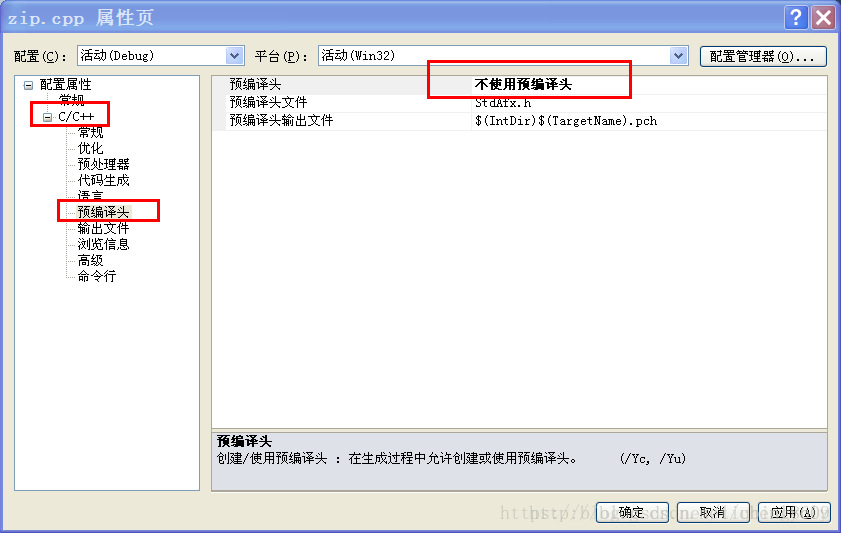
For VC++6.0, right-click the.c (or.cpp) file in the FileView to uncompile, select Settings, and on the right side of the dialog box, select category as precompiled headers, and set the option not using… ;
For VS2005, right-click on the corresponding file in the Solution Explorer and select Properties, and set Not using… under preHeaders. Can.
If you need to set more than one file, hold down the Ctrl key and select both files and set.
Scheme 2
If you have a large number of files affected, disabling precompilation headers on all of them will still make the overall compilation speed of the project much slower than it would otherwise be. Consider creating a dedicated precompiled header for this set of files. In very early versions of VC++ (1.5 and before), it was possible to create precompiled headers for.c and.cpp in a single project, but later versions only supported separate precompiled headers. In this case, we can set up a new Static Library project in the workspace (or Solution), add all.c files to the project and compile them separately, so that we can create a precompiled header for.c files in the Static Library. But to do so requires that the code that is separated logically belongs to the same module in order to be maintainable. From a design point of view, however, this requirement is generally met; otherwise, consider the overall design of the project 😛 And finally, don’t forget to set the original project’s dependency as a separate static library project.
MSP-EXP430F5529LP: Error initializing emulator: No USB FET was found

Under normal circumstances, TI MSP430LaunchPad drivers can be automatically installed after CCS is installed. MSP Application UART and MSP Debug Interface. Of course, the unusual case is a driver installation Error, which naturally happens when you download a program: Error initializing emulator: No USB FET was found.
The MSP430F5529 USB LaunchPad Evaluation Kit is TI’s latest LaunchPad and features the awesome EZ-FET Lite, but the driver aspect may not be complete yet. Msp-exp430f5529lp requires the current latest CCSv5.5 installation. Generally speaking, after installing CCS and connecting MSP-EXP430F5529LP, the driver will be installed successfully automatically, and the LaunchPad can be debugged using CCS normally. You may also be prompted to update or fix firmware, as long as you follow the CCS prompt.

If the automatic installation fails, congratulations. The solution is as follows:

Is under the Win7 system, some computers can not use MSP430 board, computer prompt serial port drive installation problem. The reason is that there is a file in the computer system: USbser.sys, which is placed in the directory C:\Windows\System32\drivers. As long as you copy the USbser.sys file into the previous directory and manually upgrade the driver, the installation file can be directed to browse to the oEM51.inf file in the attachment below, the installation can be successful.

Reference link:

http://bbs.eeworld.com.cn/thread-334052-1-1.html

http://www.deyisupport.com/question_answer/microcontrollers/msp430/f/55/t/52735.aspx

Attachment download:

http://download.csdn.net/detail/wanruoqingkong/6960593

You can also download the attachment in link 1.

Error:Your request produced an error.[newNullResponse]

The reason for this error when entering the AppStore may be that the system time has been manually modified. The solution is to change Settings – general – Date and time – back to “automatic Settings”
Another function method of developing iOS App” Rate my App” by link App Store review page:
itms-apps://itunes.apple.com/app/idXXXXXX
XXXXXX==> Your own appID

The following errors may be reported when testing this feature in an emulator:
LaunchServices: ERROR: There is no registered handler for URL scheme itms-apps
Solution: Just test with a real machine

“%Error opening tftp://255.255.255.255/network config”

Problem: Service Configuration Error Messages

sometimes displays similar Error Messages during Cisco IOS software startup of a Cisco device:
% Error opening TFTP:// 255.255.255.255/network – confg (Socket Error) % Error opening TFTP:// 255.255.255.255 cisconet CFG (Socket Error) % Error opening TFTP:// 255.255.255.255/3620 – confg (Socket Error) % Error opening TFTP:// 255.255.255.255/3620. CFG (Socket Error)
A practical example:
% SYS – 4 – CONFIG_RESOLVE_FAILURE: System config parse the from (TFTP:// 255.255.255.255 cisconet. CFG) failed
These error messages are related to the default service configuration options built into Cisco IOS software, which attempts to access the service configuration file from the (TFTP) server.
View configuration:
Type the show Run command
———————–
Router#show run
Building configuration…

Current configuration : 7722 bytes
!
version 15.4
service config
service timestamps log datetime msec
service password-encryption
.
———————–
Solutions:
To turn this feature off, the router enters global command no Service config

Router#config terminal
Enter configuration commands, one per line.  

Router(config)#no service config

Router(config)#exit

Router#copy running-config startup-config

Which error messages will not appear after the router’s next restart.

Reproduced in: https://www.cnblogs.com/MomentsLee/p/10294016.html

Error while instantiating ‘org.apache.spark.sql.hive.HiveExternalCatalog’:

Using Spark-shell to connect to external Hive, the following error occurs:

[diao@hadoop111 spark-2.1.1]$ bin/spark-shell 
19/08/13 14:15:52 WARN NativeCodeLoader: Unable to load native-hadoop library for your platform... using builtin-java classes where applicable
19/08/13 14:15:57 WARN HiveConf: HiveConf of name hive.conf.hidden.list does not exist
19/08/13 14:15:59 WARN HiveConf: HiveConf of name hive.conf.hidden.list does not exist
java.lang.IllegalArgumentException: Error while instantiating 'org.apache.spark.sql.hive.HiveSessionState':
  at org.apache.spark.sql.SparkSession$.org$apache$spark$sql$SparkSession$$reflect(SparkSession.scala:981)
  at org.apache.spark.sql.SparkSession.sessionState$lzycompute(SparkSession.scala:110)
  at org.apache.spark.sql.SparkSession.sessionState(SparkSession.scala:109)
  at org.apache.spark.sql.SparkSession$Builder$$anonfun$getOrCreate$5.apply(SparkSession.scala:878)
  at org.apache.spark.sql.SparkSession$Builder$$anonfun$getOrCreate$5.apply(SparkSession.scala:878)
  at scala.collection.mutable.HashMap$$anonfun$foreach$1.apply(HashMap.scala:99)
  at scala.collection.mutable.HashMap$$anonfun$foreach$1.apply(HashMap.scala:99)
  at scala.collection.mutable.HashTable$class.foreachEntry(HashTable.scala:230)
  at scala.collection.mutable.HashMap.foreachEntry(HashMap.scala:40)
  at scala.collection.mutable.HashMap.foreach(HashMap.scala:99)
  at org.apache.spark.sql.SparkSession$Builder.getOrCreate(SparkSession.scala:878)
  at org.apache.spark.repl.Main$.createSparkSession(Main.scala:96)
  ... 47 elided
Caused by: java.lang.reflect.InvocationTargetException: java.lang.IllegalArgumentException: Error while instantiating 'org.apache.spark.sql.hive.HiveExternalCatalog':
  at sun.reflect.NativeConstructorAccessorImpl.newInstance0(Native Method)
  at sun.reflect.NativeConstructorAccessorImpl.newInstance(NativeConstructorAccessorImpl.java:62)
  at sun.reflect.DelegatingConstructorAccessorImpl.newInstance(DelegatingConstructorAccessorImpl.java:45)
  at java.lang.reflect.Constructor.newInstance(Constructor.java:423)
  at org.apache.spark.sql.SparkSession$.org$apache$spark$sql$SparkSession$$reflect(SparkSession.scala:978)
  ... 58 more
Caused by: java.lang.IllegalArgumentException: Error while instantiating 'org.apache.spark.sql.hive.HiveExternalCatalog':
  at org.apache.spark.sql.internal.SharedState$.org$apache$spark$sql$internal$SharedState$$reflect(SharedState.scala:169)
  at org.apache.spark.sql.internal.SharedState.<init>(SharedState.scala:86)
  at org.apache.spark.sql.SparkSession$$anonfun$sharedState$1.apply(SparkSession.scala:101)
  at org.apache.spark.sql.SparkSession$$anonfun$sharedState$1.apply(SparkSession.scala:101)
  at scala.Option.getOrElse(Option.scala:121)
  at org.apache.spark.sql.SparkSession.sharedState$lzycompute(SparkSession.scala:101)
  at org.apache.spark.sql.SparkSession.sharedState(SparkSession.scala:100)
  at org.apache.spark.sql.internal.SessionState.<init>(SessionState.scala:157)
  at org.apache.spark.sql.hive.HiveSessionState.<init>(HiveSessionState.scala:32)
  ... 63 more
Caused by: java.lang.reflect.InvocationTargetException: java.lang.reflect.InvocationTargetException: java.lang.RuntimeException: java.lang.RuntimeException: The root scratch dir: /opt/modules/hive on HDFS should be writable. Current permissions are: rwxrwxr-x
  at sun.reflect.NativeConstructorAccessorImpl.newInstance0(Native Method)
  at sun.reflect.NativeConstructorAccessorImpl.newInstance(NativeConstructorAccessorImpl.java:62)
  at sun.reflect.DelegatingConstructorAccessorImpl.newInstance(DelegatingConstructorAccessorImpl.java:45)
  at java.lang.reflect.Constructor.newInstance(Constructor.java:423)
  at org.apache.spark.sql.internal.SharedState$.org$apache$spark$sql$internal$SharedState$$reflect(SharedState.scala:166)
  ... 71 more

Modify the Hive-site.xml file
Prefixes the value with HDFS :// hadoOP111:8020

<property>
    <name>hive.exec.scratchdir</name>
    <value>hdfs://hadoop111:8020/opt/moules/hive</value>
  </property>

It will run successfully after modification

[diao@hadoop111 spark-2.1.1]$ bin/spark-shell 
19/08/13 14:22:32 WARN NativeCodeLoader: Unable to load native-hadoop library for your platform... using builtin-java classes where applicable
19/08/13 14:22:38 WARN HiveConf: HiveConf of name hive.conf.hidden.list does not exist
19/08/13 14:22:40 WARN HiveConf: HiveConf of name hive.conf.hidden.list does not exist
19/08/13 14:22:42 WARN ObjectStore: Failed to get database global_temp, returning NoSuchObjectException
Spark context Web UI available at http://192.168.253.111:4040
Spark context available as 'sc' (master = spark://hadoop111:7077, app id = app-20190813142233-0003).
Spark session available as 'spark'.
Welcome to
      ____              __
    /__/__  ___ _____/ /__
    _\ \/ _ \/ _ `/ __/  '_/
   /___/ .__/\_,_/_/ /_/\_\   version 2.1.1
      /_/
         
Using Scala version 2.11.8 (Java HotSpot(TM) 64-Bit Server VM, Java 1.8.0_202)
Type in expressions to have them evaluated.
Type :help for more information.

Local workspace file (‘angular.json’) could not be found.

The following error was reported while running ng serve

Local workspace file ('angular.json') could not be found.
Error: Local workspace file ('angular.json') could not be found.
    at WorkspaceLoader._getProjectWorkspaceFilePath (D:\nodejs\node_global\node_modules\@angular\cli\models\workspace-loader.js:44:
19)
    at WorkspaceLoader.loadWorkspace (D:\nodejs\node_global\node_modules\@angular\cli\models\workspace-loader.js:31:21)
    at ServeCommand._loadWorkspaceAndArchitect (D:\nodejs\node_global\node_modules\@angular\cli\models\architect-command.js:201:32)
    at ServeCommand.<anonymous> (D:\nodejs\node_global\node_modules\@angular\cli\models\architect-command.js:53:25)
    at Generator.next (<anonymous>)
    at D:\nodejs\node_global\node_modules\@angular\cli\models\architect-command.js:7:71
    at new Promise (<anonymous>)
    at __awaiter (D:\nodejs\node_global\node_modules\@angular\cli\models\architect-command.js:3:12)
    at ServeCommand.initialize (D:\nodejs\node_global\node_modules\@angular\cli\models\architect-command.js:52:16)
    at Object.<anonymous> (D:\nodejs\node_global\node_modules\@angular\cli\models\command-runner.js:127:23)

Error cause: Possible angular/ CLI version mismatch
Solutions:
Upgrade presents/cli
Uninstall Angular/CLI globally

npm uninstall -g @angular/cli

2. Clean up

npm cache verify

Install Angular/CLI globally

npm install -g @angular/cli@latest

4. Uninstall Angluar/CLI under the project path

npm uninstall --save-dev @angular/cli

5. Install under the project path:

npm install --save-dev @angular/[email protected]

6. NPM install or YARN Install under the project path
7. Fix the problem after NPM installation:

npm audit fix

8. Resolve “Angular. Json” related issues:

ng update @angular/cli --migrate-only --from=1.4.9


Reproduced in: https://www.cnblogs.com/shira-t/p/9759142.html

Error resolution: Error: redefinition of class xxx

Error: Redefinition of class XXX
Generally, an error redefinition of class XXX occurs, and there is also an error previous definition of class XXX
Erratum:
In general, the reason for the error is that #ifndef, #define, and #endif are not used in the header file (.h) of the class definition. In other words, there is no macro to prevent the class from being included multiple times.
Alternatively, you may have defined the class repeatedly, so take a closer look at your code to see if there are any duplicate definitions.
Modification:
Add macros for classes that prevent being included more than once:

#ifndef _BASESMOOTHINGALGORITHM_H_
#define _BASESMOOTHINGALGORITHM_H_

#include "BaseSmoothingAlgorithm.h"

#endif

Mysql reports an error Operand should contain 1 column(s)

Mysql error Operand should contain 1 column(s)
1. An error
ERROR 1241 (21000): Operand should contain 1 column(s)
2. Report the cause of the error
This statement mostly occurs because the result set of the SELECT is wrapped in (). It is normal to enclose () with select, but it is possible that the fields are misused, as shown in the following SQL:

select 
 pit_key
,employee_code
,department_id
,value_date
from pit_employee_department ped
where ped.employee_code = 'GSCQ3349'
and ped.value_date < date_format(date_sub(curdate(), interval day(curdate()) - 1 day),'%Y%m%d')
and ped.pit_key not in
(	select 
	pit_key
	,value_date
	from pit_employee_department ped_1
	inner join 
	(
		select 
		max(value_date) as max_date
		from pit_employee_department ped

		where ped.value_date <= date_format(date_sub( date_sub(curdate(), interval day(curdate()) - 1 day),interval 1 month),'%Y%m%d')
		and employee_code = 'GSSH0039'
	)ped_2
	on ped_1.value_date < ped_2.max_date
	and ped_1.employee_code = 'GSSH0039'
);

The reason for executing this error in the above SQL statement is that pit_key and value_date are used in the subquery, and the comparison option is pit_key not in (...). , field inconsistency results in an error.
3. Solutions
Make changes for different reasons.