Category Archives: How to Fix

MySQL Workbench: Error Code: 2013. Lost connection to MySQL server during query solution

MySQL Workbench performs complex operations on large tables as follows: Error Code: 2013. Lost connection to MySQL server during query
Solutions:
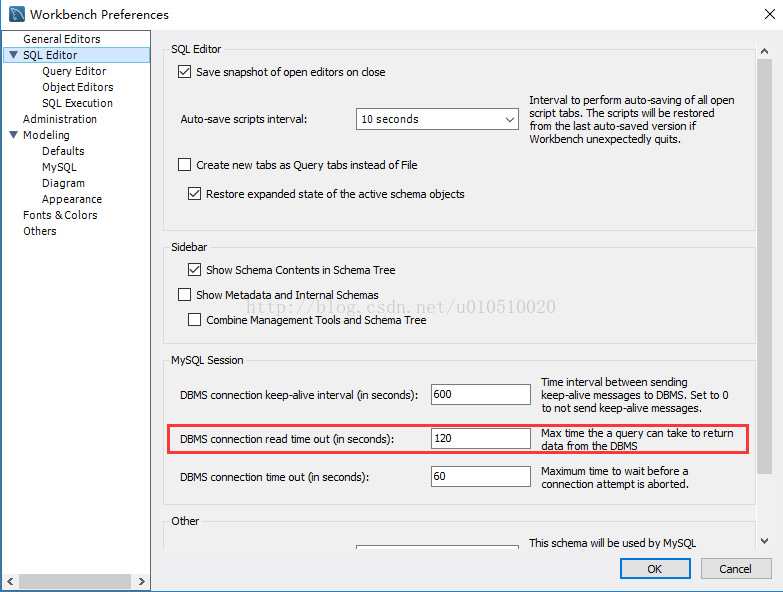
Edit-> Preference-> SQL Editor
Appropriately increase the FOLLOWING DBMS Connection Read Time out(in seconds) :

Resources:
http://bbs.csdn.net/topics/391881939?page=1
https://dev.mysql.com/doc/refman/5.7/en/error-lost-connection.html

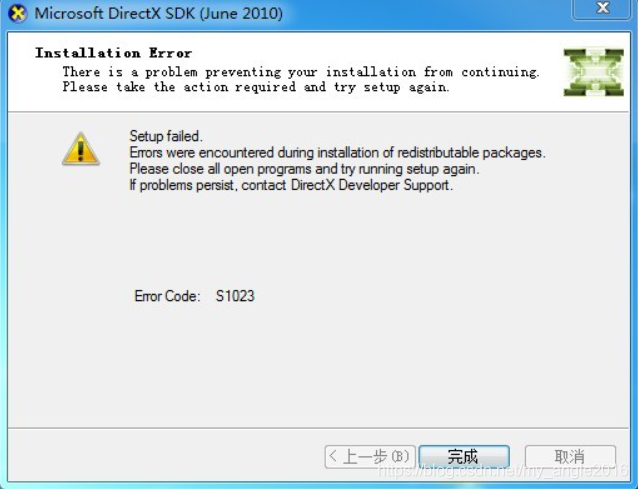
Error Code: S1023 when installing DirectX SDK

When installing DXSDK_Jun10, the following Error occurs, Error Code:S1023

Reason for error:
Also, I continued to distribute Microsoft Visual C++ 2010 Redistributable after I installed the updated Microsoft Visual C++ 2010 Redistributable and opened the program and function control panel on my computer. While DXSDK_Jun installed “Microsoft
Visual C++ 2010 x86 redistributable-1010.0.30319″, the version was lower than the installed version of this machine, so s1023 error occurred in the installation.
Solutions:
Uninstall the higher version of “Microsoft Visual C++ 2010 x86 redistributable-1010.0.40219” and reinstall it.


extract-text-webpack-plugin" loader is used without the corresponding plugin Error (Fixed)

This was a problem that had been bothering me for a long time before the release of the project was that you had to package and it was okay to package at the beginning and all of a sudden it went wrong today and the answers on the web were so weird that I didn’t have to say much about it and I went straight to the code

At first thought it was a plugin version problem some of it was

It doesn’t matter if it’s been tested later or if it’s been tested before or after
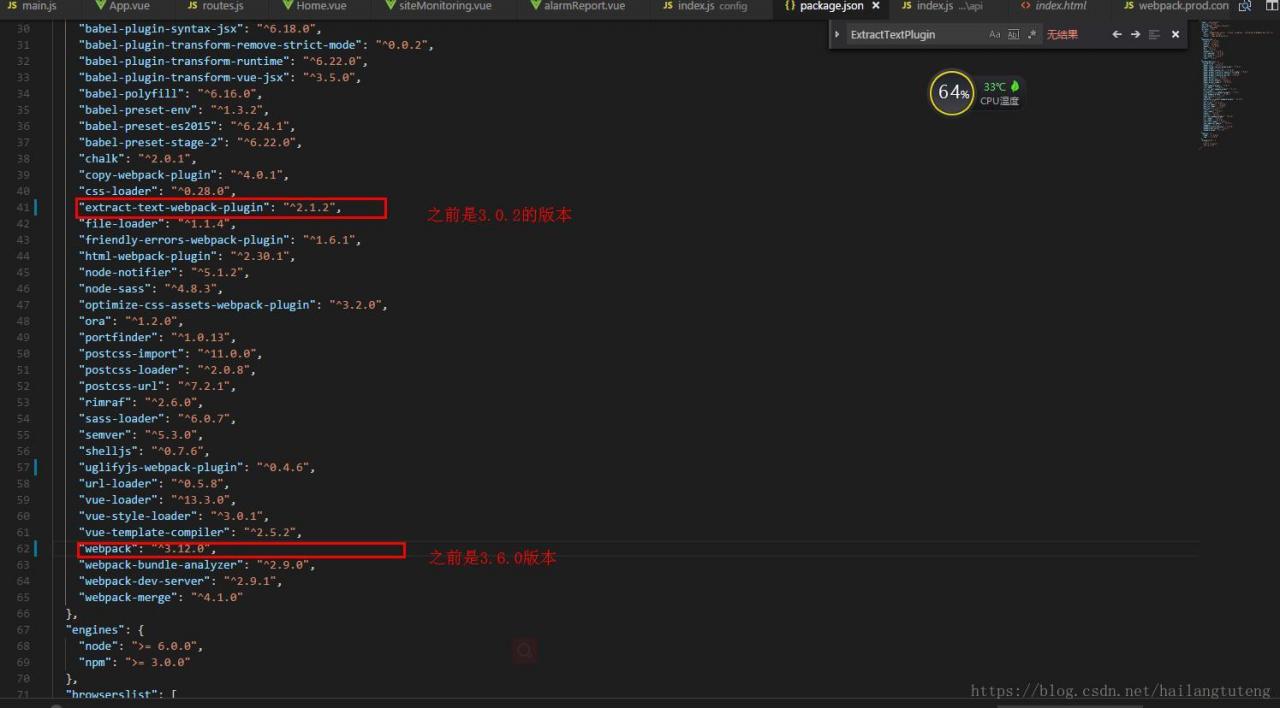
In webpack.prod.conf.js under build, you only need to modify the following configuration// extract css into its own file

new
ExtractTextPlugin({

// filename: assetsPath(‘ CSS /[name].[Contenthash]. CSS ‘),// the original configuration

filename:

utils
.
assetsPath
(
‘[name]/styles.[contenthash].css’
),
//
The changes

// Setting the following option to `false` will not extract CSS from codesplit chunks.

// Their CSS will instead be inserted dynamically with style-loader when the codesplit chunk has been loaded by webpack.

// It’s currently set to `true` because we are seeing that sourcemaps are included in the codesplit bundle as well when it’s `false`,

// increasing file size: https://github.com/vuejs-templates/webpack/issues/1110

allChunks:
true,

}),

And then it’s ok

The reason for this is not clear from the Github forum. If you are interested in what appears to be a plugin patch, check it out

RuntimeError: CUDA error: out of memory solution (valid for pro-test)

Said earlier, I am in the model test and not appear this error when training, as for the model training report this error, please refer to my another blog: runtimeerror: about errors CUDA out of memory. The Tried to the allocate 1.17 GB
actually very simple solution, originally I procedures specify the gpu is 3, run the test code is called the title out of memory error, the diagram below:

I specified the gpus as 2 and 3, and then ran the code without error.

Iphone network data is shared to ubuntu14.04 through ubs, which is a desktop computer and cannot be passed through hotspot

Unable to mount iPhone unhandled lock error
Ayes, 13 Nays, Accept
Here’s what worked for me (from immobiledevice.org):
Close the error when your device is plugged in. Then run the

idevicepair unpair && idevicepair pair

Pro test: I do not know why sometimes the implementation of no use, plug in the computer, restart the computer to go…
Then unplug your device and plug it back in.
Pro can do it
langxw@le:~$ idevicepair unpair & & idevicepair pair
The program ‘idevicepair’ is currently not installed. You can install it by typing:
sudo apt-get install libimobiledevice-utils
langxw@le:~$ sudo apt-get install libimobiledevice-utils

Common causes of Leetcode Runtime Error

The general reason is that it’s not initialized, it’s running as a random number;
Or it returns a wild pointer, which is common in test cases with empty sets and requires a pointer to be returned. Most of the time, it will be like this without attention:

    TreeNode* buildTree(vector<int>& preorder, vector<int>& inorder) {
        TreeNode *result;
        if(preorder.size() == 0 && inorder.size() == 0)
            return result;
        else
            return sub_bT(0, preorder.size()-1, 0, inorder.size()-1, preorder, inorder); 

    }

At this time, we often think that a null pointer is returned, but in fact, it is not initialized. What is returned is a wild pointer, which does not know where to point to. However, when we Run Code, no error will be reported and the result is [], so we think that a null pointer is returned.

    TreeNode* buildTree(vector<int>& preorder, vector<int>& inorder) {
        TreeNode *result(NULL);
        if(preorder.size() == 0 && inorder.size() == 0)
            return result;
        else
            return sub_bT(0, preorder.size()-1, 0, inorder.size()-1, preorder, inorder); 

    }

Eclipse .java File Syntax error, parameterized types are only available if source level is 1.5 or

Error in Eclipse. Java file:
Syntax Error, Parameterized Types are only available if source level is 1.5 or greater
This is a compiler version of the problem, the solution:
1. Right click project –& GT; Properties–> Java Compiler–> Remove the Use Compliance from Executeion Enveronment · check box, and change Compiler ·· to more than 1.5

2, Windows – & gt; preferneces–> JAVA–> compiler–> The window on the right “Compiler Compliance level” is set to more than 1.5

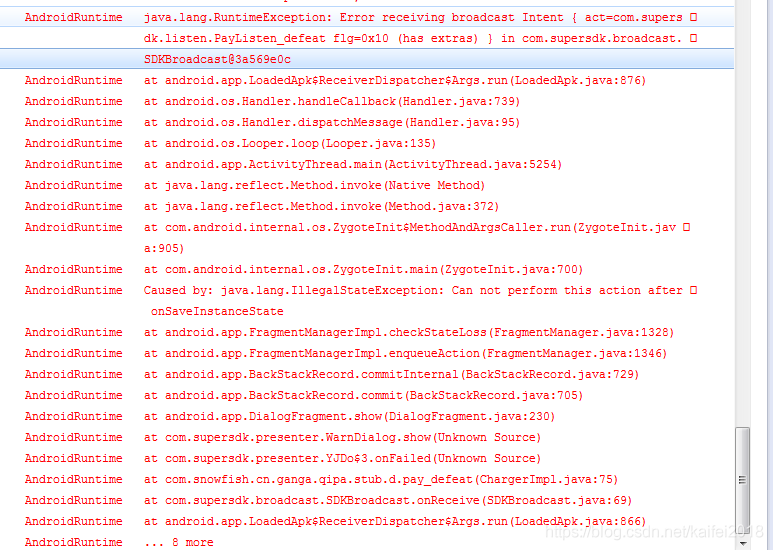
Error receiving broadcast Intent { act=com.supersdk.listen.PayListen_defeat flg=0x10 (has extras)

After sending the broadcast, the redirect activity problem torched over a day.

At first I thought it was a repeat broadcast. Didn’t solve.
Then see under Caused by: Java. Lang. An IllegalStateException: Can not perform this action after onSaveInstanceState
Life cycle issues. I know why
After the broadcast the activity is on the edge of being killed in some scenario, the system calls the onSaveInstanceState method, which calls the FragmentManager saveAllState method, saves the state of the fragment, and after the state is saved, the user actively calls onBackPressed, The method’s superclass super.onbackPressed determines if the FragmentManager has saved state and throws an exception for IllegalStateException if it has. Then the activity cannot be found when the broadcast is received
It’s easy: let me rewrite it
Override
protected void onSaveInstanceState(Bundle outState) {
// TODO auto-generated method stub
}

[How to Fix] error: file ‘/boot/grub/i386-pc/normal.mod’ not found

Error: file ‘/boot/grub/ i386-PC/Normal.mod ‘not found
The partition was formatted when installing The Ubuntu system. After the installation, the boot error appeared: file ‘/boot/ GRUB/i386-PC/Normal.mod ‘not found
grub rescue> Interface,
I tried ls (HD0, MSDOS1) (HD0, MSDOS2) to find the Linux partition, but my computer’s ls (HD0, MSDOS1) returned unknown filesysem, so I could not find the corresponding Linux partition
So we did it in a different way:
Repair with the Boot Repair tool,
Use a usb flash drive with Ubuntu to boot, insert the usb flash drive in the way of installing the system, press ESC (or F11, F12 depending on your computer model) to launch the usb flash drive, and then select TRY Ubuntu (do not install Ubuntu) to enter the Ubuntu system:
1. Connect to the network
2. Open the terminal
3. Enter a command
sudo add-apt-repository ppa:yannubuntu/boot-repair & & sudo apt-get update
sudo apt-get install -y boot-repair & & boot-repair
4, click repair, complete, restart the computer is good
Attached is the Boot Repair website with detailed instructions
https://sourceforge.net/p/boot-repair/home/Home/

cenos Upgrade g++ gcc(cc1plus: error: unrecognized command line option “-std=c++11”)

Building with ‘g++’.

Error using mex

cc1plus: error: unrecognized command line option “-std=c++11”

1, download the source code

is here. To be on the safe side, 4.8.5 is selected. If you need another version, just change the version number

$wget HTTP:// ftp://ftp.gnu.org/gnu/gcc/gcc-4.8.5/gcc-4.8.5.tar.gz
2. Download dependency package & pre-installed

compiling and installing GCC depends on the MPC, MPFR, GMP package. Fortunately, GCC source script can easily download the dependency package.

$tar ZXF gcc-4.8.5.tar. Gz

$CD GCC – 4.8.5

$ ./contrib/download_prerequisites

You can see in this script that the version Numbers of the dependent packages are MPC-0.8.1, MPFR-2.4.2, gMP-4.3.2, in that order.
3, $yum -y install glibc-devel. I686 –setopt=protected_multilib=false
4. Compile and install

$ cd .. // The main reason for doing this is to create the build folder outside of the source code

$mkdir GCC – build – 4.8.5

$mkdir /usr/local/gcc-4.8.5 // include file.

$mkdir/usr/local/GCC// placed bin +.lib file

$CD GCC – build – 4.8.5

$ ../gC-4.8.5 /configure –prefix=/usr/local/ gC-4.8.5 –exec-prefix=/usr/local/ GCC –enable-languages= C, C ++ // To save time, only C and C ++ are compiled here

$ make & & make install

in order to avoid multiple versions of GCC in the system after installation, the directory to compile and install is directly specified under /usr/local/4.8.5 and /usr/local/gcc. If no -prefix is specified, it will be installed under /usr/local by default.

to wait

make after a long wait, done

5, environment variable configuration

rename GCC /g++ and keep the old version

$mv /usr/bin/ GCC /usr/bin/ GCC -4.4.7

$mv /usr/bin/g++ /usr/bin/g++-4.4.7

$export PATH=/usr/local/ GCC /bin:$PATH # use the latest GCC /g++;

confirm version number

$ g++ –version

$ gcc –version

$ which g++

$ which gcc

error

1. Build folder to the wrong location stubs-32. H cannot be found, CentOS is 64 bit

compilation terminated.

make[5]: *** [_muldi3.o] Error 1

make[5]: Leaving directory ‘/home/wei/gcc-4.8.5/gcc-build-4.8.5/x86_64-unknown linux-gnu/32/libgcc’

…………………

solution: install a 32-bit glibb-devel that ignores multiple versions of a piece of software.

$ yum -y install glibc-devel.i686 –setopt=protected_multilib=false

is a new build folder in the source tree and needs to be used in a separate folder. The solution is to create a new folder outside of the source code, the resolved code has been updated to the above.

First, we highly recommend that GCC be built into a separate directory from the sources whichdoes not reside within the source tree. This is how we generally build GCC; Building where srcdir == objdir should still work, but doesn’t get extensive testing; building where objdir is a subdirectory of srcdir is unsupported.
C++ Error: allocating an object of abstract class type

The questions are as follows:
All functions in the parent class Dad are pure virtual functions; defining the subclass Son; allocating an Object of abstract class type “XXX”;
The reasons are as follows:
At instantiation time:
(a) It is important to ensure that all pure virtual functions of the superclass are implemented, otherwise the subclasses still cannot be instantiated;
(b) The inherited virtual function must be guaranteed to have the input type of the function and the return value type is consistent, otherwise the virtual function of the parent class is not instantiated;
(c) When the enumerated type inside the class ACTS as the function parameter type, the subclass needs to define itself, otherwise the type is inconsistent;