Category Archives: How to Fix

Raspberry pie 4B uses adafruit_ Pca9685 report error ioerror: [errno 121] remote I / O error solution

First, make sure that python2 or python3’s Adafruit_PCA9685 library has been downloaded. Then understand that the reason for this error is that Adafruit_PCA9685 could not find the external hardware, so think that you did not open I2C permissions (of course, make sure to open I2C permissions first), and then the error is usually in the following format

File "simpletest.py", line 17, in <module>
    pwm = Adafruit_PCA9685.PCA9685()
  File "/usr/local/lib/python3.7/dist-packages/Adafruit_PCA9685/PCA9685.py", line 81, in __init__
    self._device.write8(MODE1, mode1)
  File "/usr/local/lib/python3.7/dist-packages/Adafruit_GPIO/I2C.py", line 114, in write8
    self._bus.write_byte_data(self._address, register, value)
  File "/usr/local/lib/python3.7/dist-packages/Adafruit_PureIO/smbus.py", line 256, in write_byte_data
    self._device.write(data)
IOError: [Errno 121] Remote I/O error

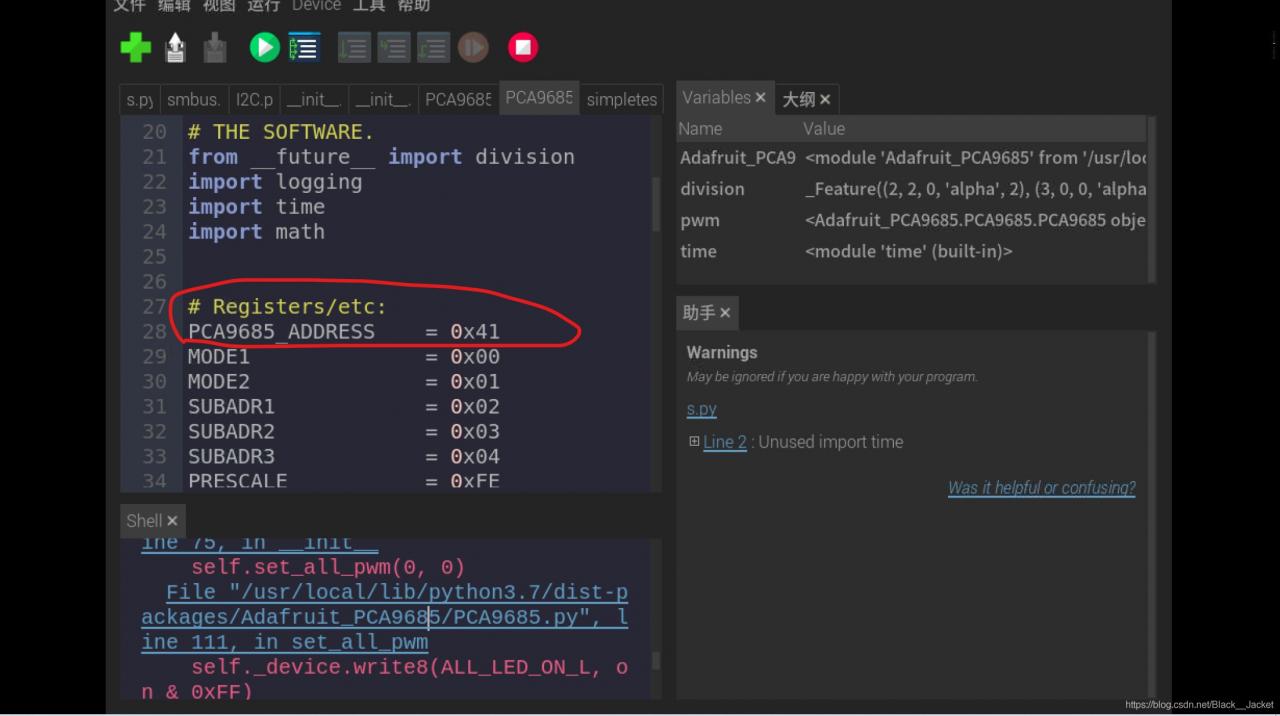
At this time we only need to click on the File "/ usr/local/lib/python3.7/dist - packages/Adafruit_PCA9685/PCA9685 py", line 81, in __init__ self. _device. Write8 (MODE1, MODE1) to enter to PCA9685. Py files, the need to look at the red circle place address, use the command line.
Open the command line for raspberry PI Type B input

sudo i2cdetect -y 1

Type A is A change to 0
appears
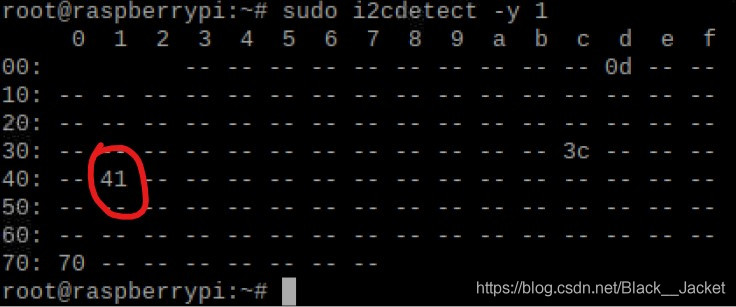
the 70 is gm's address, 41 is our module address some people is 20, or 40, and 0 d, and 3 c is my another equipment (raspberries pie intelligent housekeeper), if only to connect A device is good, look good, let's modify. Just open the PCA9685 py files address 0 x41 or 0 x40, etc., as the case may be, and then save the changes, then you will find
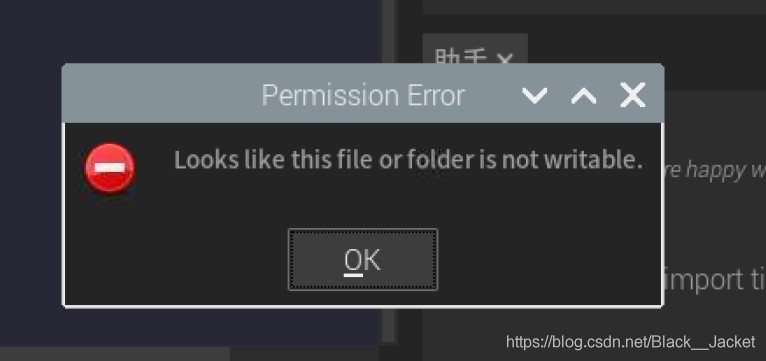
no permissions, so you can open A command line input

su

Enter the password, go to root, copy the address of pCA9685.py just now (mine is 0x41), type CD and address, paste it to the command line, press enter, and go to that directory.
if you are a python3.7 user you can use this one directly

cd /usr/local/lib/python3.7/dist-packages/Adafruit_PCA9685/

Py sudo chmod 777 pca9685.py
modify permission
then edit the pca9685.py file just now, modify the PCA9685_ADDRESS in it to the address you found by using sudo i2cdetect -y 1.
then run it and try it!
Vue start error: listen eadrnotavail

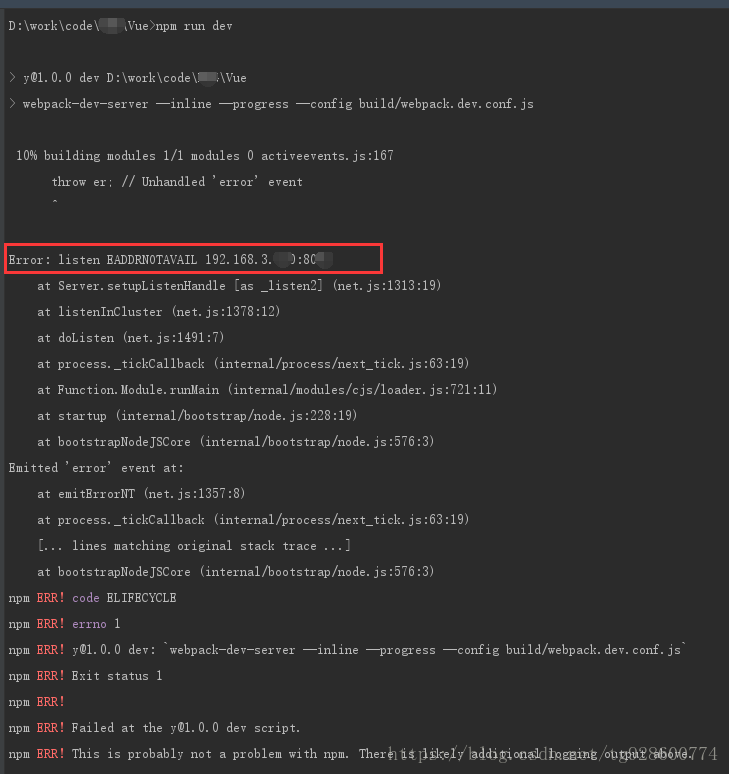
Because of a problem with my computer, I reinstalled my system yesterday. After reinstalling, I used the NPM Run Dev command to start the Vue project, Error: Listen EADDRNOTAVAIL. Screenshot below:

Errors have been framed in the diagram, This EADDRNOTAVAIL I have limited English skills and don’t even know what the translation means, but I did mention that your address and port were a problem.
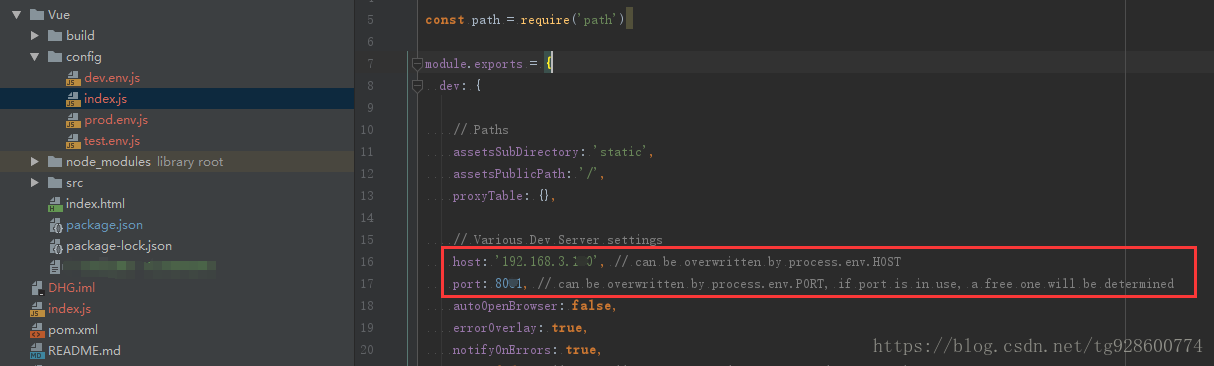
The address configuration in my VUE project looks like this:

If the project created by Webpack-Simple is looking at the IP address here, I’m portal, click me
Later, I found that if host used localhost, the project could start normally, so I fell into confusion again…
See here, you may have found something, I was not until this morning, suddenly a flash of light to remember that my IP was manually bound before, is 192.168.3.xxx, after reinstallation did not modify my local IP address, is automatically acquired, IP is 192.168.5.XXX, ok, until here, the problem is solved.
 
Expand your knowledge:
In vUE project address configuration, we can fill in the following:


1

1

4

6

Host Settings and access paths in vUE projects
Caption>

host set accessible path description
3 localhost 5 localhost 127.0.0.1 7 localhost is mapped with 127.0.0.1 in the host file by default, On behalf of the local so can visit each other between

127.0.0.1

localhost 127.0.0.1

explain ditto

0.0.0.0

localhost 127.0.0.1 192.168 7.0.x.x X

0.0.0.0 we rarely use at ordinary times, Accidentally discovered that I was still can write that we can find a very interesting thing, the other three paths can be accessed, but use 0.0.0.0 but cannot access it is a reserved address, temporarily not delve into the specific principles, but this way can let other default address to visit

192.168 7.0.x.x X

192.168 7.0.x.x X

use this method of LAN IP, the biggest advantage is the others to their own projects can be accessed through the IP address; Of course, 0.0.0.0 can also be implemented, but this way after we start the project, we can directly click the console address to open access (lazy)

Conclusion:
Through the host method above, I have summarized several usage scenarios by myself:
1. When the project is only run and accessed in its own project, the default localhost can be used without modifying anything;
2. The project will be run and debuggable on your own computer, and other members of the team will need to access your page, using 192.168.x.xx. Why not use 0.0.0.0?Because of laziness, every time the project is started, I can directly click on the address of the console to access, why do I have to type the address again?What’s more, with a project like WebPack-Simple, the default browser access is automatically opened upon startup, and it’s a hassle to change the address every time.
 

Error: line contains null byte

A line of content read by CSV contains a null byte
which in Python is \x00

In [1]: a = '\0'
In [2]: a
Out[2]: '\x00'
In [3]: b = '\x00'
In [4]: b
Out[4]: '\x00'
In [5]: a == b
Out[5]: True

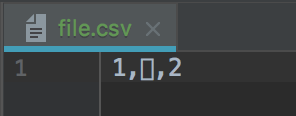
Make an error file like this, print it out in PyCharm, and then copy the printed result to a CSV file

print('1,\x00,2')

OK, the exception file has the

test code

with open('file.csv', 'r') as f:
    reader = csv.reader(f)
    next(reader)

Error: line contains NULL byte
. So, how do you do that
Modify the code

with open('file.csv', 'r') as f:
    reader = csv.reader(_.replace('\x00', '') for _ in f)
    next(reader)

Why this terrible mistake?
1. The data in it has this thing
2. The file is an excel file, but the result is saved as CSV
3. Multiple processes read and write to the same file

IBM MQ Reason 2538(MQRC_ HOST_ NOT_ An example of error reason

Environment:.NET 4.0, MQ.NET client IBm.xMS (V2.0.0.3)
The test code is as follows:

       var factoryFactory = XMSFactoryFactory.GetInstance(XMSC.CT_WMQ);
       var _connFactory = factoryFactory.CreateConnectionFactory();

       _connFactory.SetStringProperty(XMSC.WMQ_HOST_NAME, "192.168.0.65");
       _connFactory.SetIntProperty(XMSC.WMQ_PORT, 1414);
       _connFactory.SetStringProperty(XMSC.WMQ_QUEUE_MANAGER, "XPP_QM");
       _connFactory.SetIntProperty(XMSC.WMQ_CONNECTION_MODE, XMSC.WMQ_CM_CLIENT);
       _connFactory.SetIntProperty(XMSC.WMQ_BROKER_VERSION, XMSC.WMQ_BROKER_V1);
       _connFactory.SetStringProperty(XMSC.CLIENT_ID, string.Empty);

       var conn = _connFactory.CreateConnection();
       conn.Start();

Error:
IBM. XMS. XMSException: CWSMQ0006E: method is called ConnectionFactory. Abnormal received during the CreateConnection: CompCode: 2, Reason: 2538
. During the execution of the specified method, another component throws an exception. For more information, see Linked Exceptions. .
in the IBM XMS. Client. WMQ. WmqConnectionFactory. CreateProviderConnection (XmsPropertyContext connectionProps)
in the IBM, XMS. Client. Impl. XmsConnectionFactoryImpl. The CreateConnection (String userID. String password)
in the IBM, XMS. Client. Impl. XmsConnectionFactoryImpl. The CreateConnection ()
in XRisk. MQ. MQConnection. Open (Boolean needLog) location e: \ xRisk4 – SRC \ XRisk MQ \ MQConnection cs: line number 314
Linked Exception : CompCode: 2, Reason: 2538
The real exception is reported in the following code.

IBM.WMQ.MQTCPConnection ---- < ParseLocalAddress(String) exit [o] rc=OK
IBM.WMQ.MQTCPConnection --- d Exception in method ConnectSocket(string,string,MQLONG)
IBM.WMQ.MQTCPConnection --- X System.Net.Sockets.SocketException (0x80004005): The requested name is valid and was found in the database, but it does not have the correct associated data being resolved for
at System.Net.Dns.InternalGetHostByAddress(IPAddress address, Boolean includeIPv6)
at System.Net.Dns.GetHostEntry(String hostNameOrAddress)
at IBM.WMQ.MQTCPConnection.ConnectSocket(String localAddr, String connectionName, Int32 options)
MQException CompCode: 2 Reason: 2538

The real reason is that in.NET 4.0, Microsoft changed the behavior of the interface Dns.GetHostEntry. When IP is used directly as a parameter, the report is not reported if the machine name or domain name is used.
The solution is as follows
1. Use ipAddres.tryparse () or Dns.Resolve(String) instead of Dns.GetHostEntry.
2. If you are using a third-party library and cannot modify the code, you can use the MACHINE name or domain name code for the IP. The above code can be changed to.

var factoryFactory = XMSFactoryFactory.GetInstance(XMSC.CT_WMQ);
var _connFactory = factoryFactory.CreateConnectionFactory();

_connFactory.SetStringProperty(XMSC.WMQ_HOST_NAME, "hostname");
_connFactory.SetIntProperty(XMSC.WMQ_PORT, 1414);
_connFactory.SetStringProperty(XMSC.WMQ_QUEUE_MANAGER, "XPP_QM");
_connFactory.SetIntProperty(XMSC.WMQ_CONNECTION_MODE, XMSC.WMQ_CM_CLIENT);
_connFactory.SetIntProperty(XMSC.WMQ_BROKER_VERSION, XMSC.WMQ_BROKER_V1);
_connFactory.SetStringProperty(XMSC.CLIENT_ID, string.Empty);

var conn = _connFactory.CreateConnection();
conn.Start();

Reference:
http://connect.microsoft.com/VisualStudio/feedback/details/561083/dns-gethostentry-behaves-differently-in-net-4-0-than-previous-versions
http://stackoverflow.com/questions/2714449/problem-with-system-net-dns-gethostentrydnsserver-on-net-4-0
https://www.ibm.com/developerworks/community/forums/html/topic?id=77777777-0000-0000-0000-000014538533#77777777-0000-0000-0000-000014538832

Reproduced in: https://www.cnblogs.com/jmax/p/3494320.html

Solution to command line option syntax error. Type command /? For help

Problem description
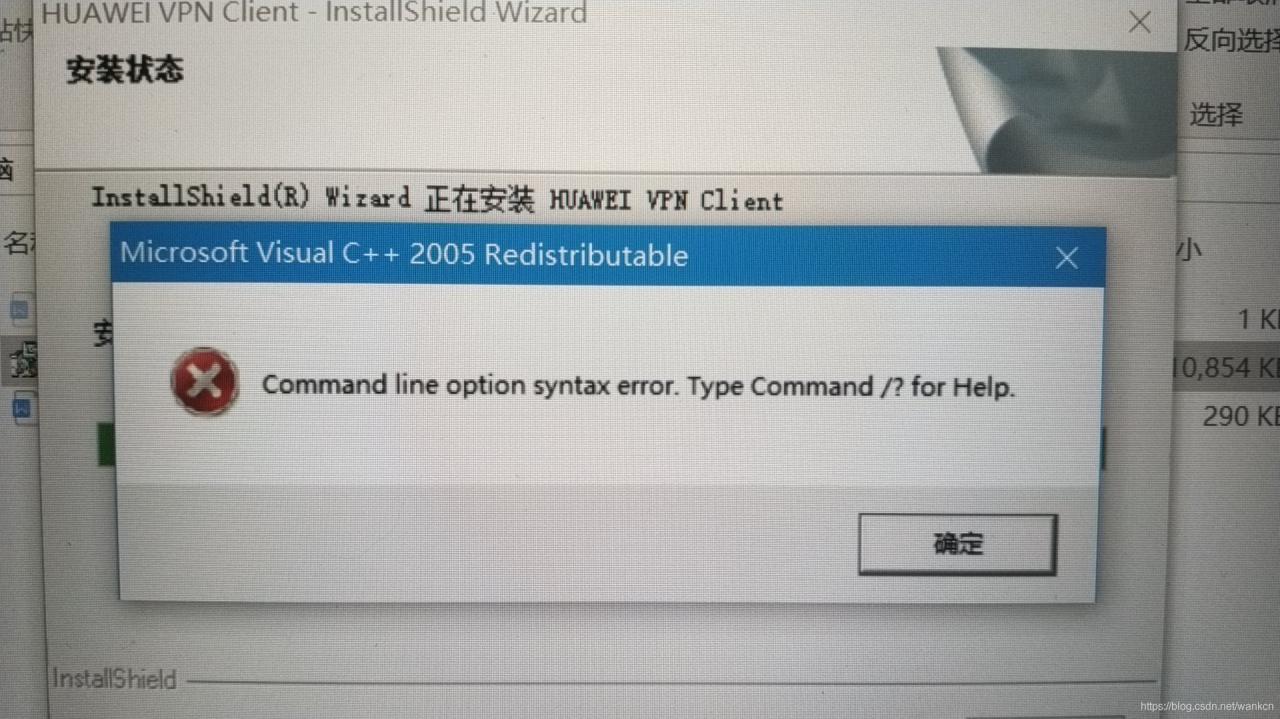
There was an interesting error in the installation of HUAWEI VPN Client today, as shown in the figure below.
Command line option syntax error. Type Command /?For Help.

solution
Refer to baidu https://jingyan.baidu.com/article/2d5afd69cea6b085a2e28e9f.html experience
Command line option syntax error. Type Command /?For Help. command line option syntax error. In fact, when I actually search for this problem, I get some developers’ explanation on baidu:

If the non-unicode language is set in the operating system to a language such as Japanese then the win32 cabinet extractor can’t handle the unicode characters in the username and will fail This means that if a non-Unicode language is set to an operating system language, such as Japanese, the username will fail if the Win32 processor cannot handle Unicode characters.

The meaning of the above is the installation path not contain Chinese and can’t identify characters
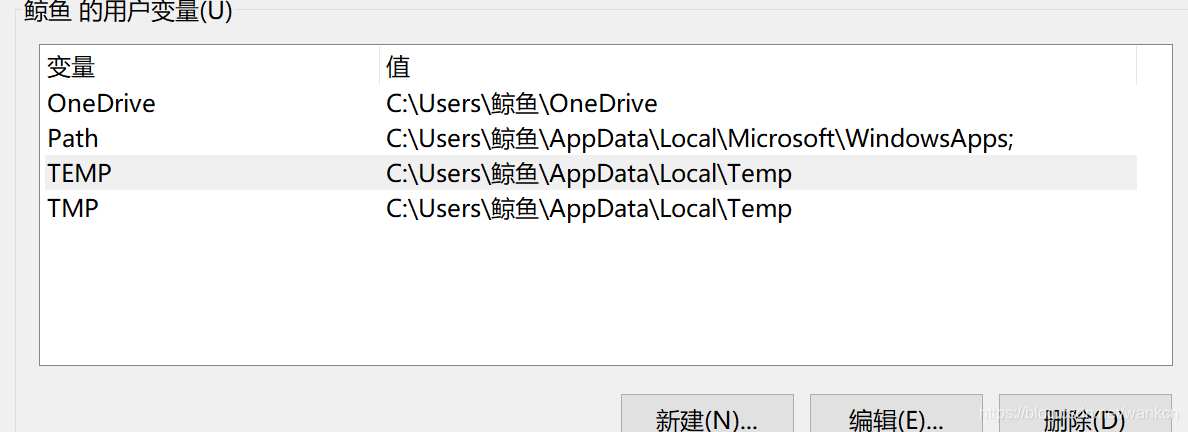
check system environment variables, I found my TEMP and teb variables contain Chinese

when newly installed in the system will be prompted to enter the name of the computer, when the input is in Chinese, also for the later buried under the root of evil.
The solution
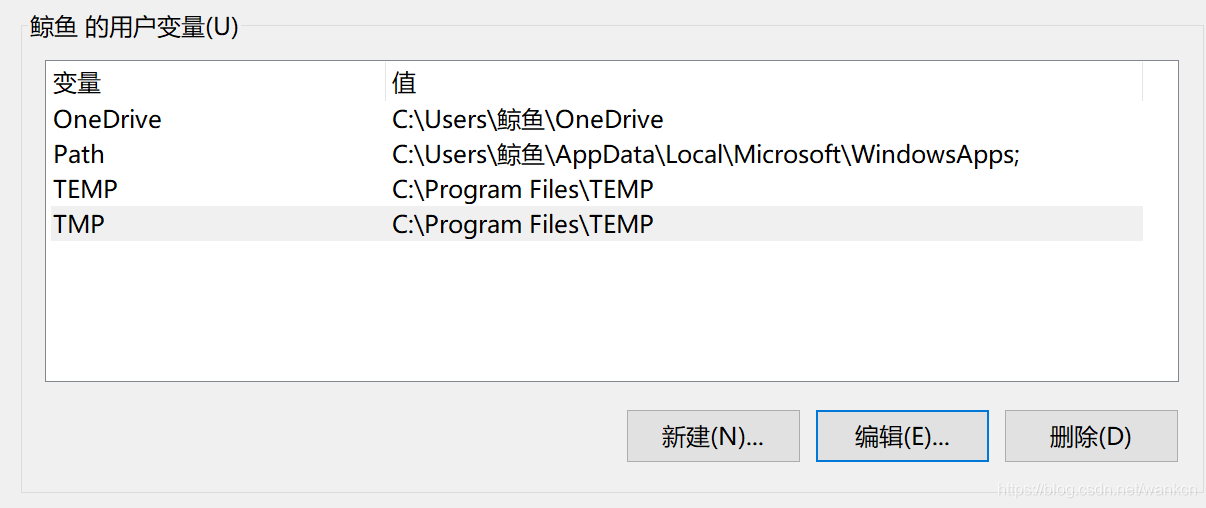
1. Modify user environment variables or create a new temporary folder (I created a new folder here)
Change TEMP TEP
TEP
to C:\TEMP and C:\TMP
TEMP default path is %USERPROFILE%\AppData\Local\ TEMP, I am the new virtual machine here, I directly changed the default path

2. Delete the current computer account and create a new account. Please note that the account name should be in English or pinyin
This method is feasible in theory, but I haven’t actually practiced it. If I have to install a new machine, I will try it.
conclusion
When installing a new system on Windows, it’s best to set your account name to English or pinyin to avoid digging unnecessary holes in the back.

WordPress prompts the solution of “an error occurred while clipping your image.”

Question:
When using crop images in WordPress, it’s “There’s a problem with cropping your images”, or “There has been an error swagging your image”.
The reason:
The PHP GD library is missing
Run under Ubuntu:
sudo apt-get install php5-gd
or
Sudo apt – get the install php7.0 – gd
Run under CentOS:
yum install php-gd
Just restart Apache or Nginx after installation

Error: listen EADDRINUSE :::3000

1. Error description

events.js:167
      throw er; // Unhandled 'error' event
      ^

Error: listen EADDRINUSE :::3000
    at Server.setupListenHandle [as _listen2] (net.js:1286:14)
    at listenInCluster (net.js:1334:12)
    at Server.listen (net.js:1421:7)
    at Object.<anonymous> (F:\Hworkspace\ES6\app.js:5:4)
    at Module._compile (internal/modules/cjs/loader.js:688:30)
    at Object.Module._extensions..js (internal/modules/cjs/loader.js:699:10)
    at Module.load (internal/modules/cjs/loader.js:598:32)
    at tryModuleLoad (internal/modules/cjs/loader.js:537:12)
    at Function.Module._load (internal/modules/cjs/loader.js:529:3)
    at Function.Module.runMain (internal/modules/cjs/loader.js:741:12)
Emitted 'error' event at:
    at emitErrorNT (net.js:1313:8)
    at process._tickCallback (internal/process/next_tick.js:63:19)
    at Function.Module.runMain (internal/modules/cjs/loader.js:744:11)
    at startup (internal/bootstrap/node.js:285:19)
    at bootstrapNodeJSCore (internal/bootstrap/node.js:739:3)

2. Error reason
Since you are running node. js, port 3000 is already listening. If you run it again, an error will appear (it was not closed before).

const  http = require('http')
http.createServer((req,res) => {
	res.writeHead(200, { 'Content-Type': 'text/plain' });
	res.end("huhu");
}).listen(3000);

3. Solutions
Close the previous process first, and then rerun it
 

Error:kCFStreamErrorCodeKey=-2102 Domain=kCFErrorDomainCFNetwork Code=-1001 – iOS

Some new data fields were added to the interface that had been called before due to the new business overlay. Later, when I was debugging the interface again, the following exception occurred when the request waiting was delayed until the timeout was set:

[discovery] errors encountered while discovering extensions: 
            Error Domain=PlugInKit Code=13 "query cancelled" 
            UserInfo={NSLocalizedDescription=query cancelled}

Task <C0BF69B6-6E49-44ED-B1E1-3E03212496EE>.<1> finished with error - code: -1001
Task <C0BF69B6-6E49-44ED-B1E1-3E03212496EE>.<1> load failed with error Error 
      Domain=NSURLErrorDomain 
      Code=-1001 "The request timed out." 
      UserInfo={_kCFStreamErrorCodeKey=-2102, 
                NSUnderlyingError=0x6000011ad8f0 {Error Domain=kCFErrorDomainCFNetwork 
                                                  Code=-1001 "(null)" 
                                                  UserInfo={_kCFStreamErrorCodeKey=-2102, _kCFStreamErrorDomainKey=4}
                }, 
      _NSURLErrorFailingURLSessionTaskErrorKey=LocalUploadTask <C0BF69B6-6E49-44ED-B1E1-3E03212496EE>.
<1>, _NSURLErrorRelatedURLSessionTaskErrorKey=(
    "LocalUploadTask <C0BF69B6-6E49-44ED-B1E1-3E03212496EE>.<1>"), 
     NSLocalizedDescription=The request timed out., 
     NSErrorFailingURLStringKey=https://testEnvironment.xxx.org.cn/cres-api/api/account/app/2a258832847d3c8669755bae6c415b, 
     NSErrorFailingURLKey=https://testEnvironment.xxx.org.cn/uums-api/api/account/app/2a258832847d3c8669755bae6c415b, 
     _kCFStreamErrorDomainKey=4} [-1001]

First of all, from the appearance, I initially suspected that the account timeliness had expired and the authentication of the server had not passed, so I tried to log in the account again, submit the modification again and initiate the request, but still threw back the above exception. Then confirm with the server that the service is in a normal state of activation. Since the interface also has a call somewhere else, it tries to go to another page to make a request for what… Callback successful OMG…
second, start to find the cause of the problem again, because both places need to call the interface, the request method is already packaged for two separate calls, all since there is a business can be successfully called, first of all, eliminate the problem of method packaging;
secondly, because there are some new fields in the new business logic, the interface state is also in normal state before the new fields are added, then try whether there is a correlation between them in turn. After deleting some fields, try to initiate the request again, and receive the callback state in seconds… A flash of insight seems to get something going on, so keep trying this way;
finally, it was found that the callback status could not be returned before the request timeoutInterval due to the server mailbox field validation taking too long. The interface was judged as timeout exception handling by default… After relaxing the timeout period again, it was found that the data could be normally received, but the duration was longer… After feedback to the server for optimization, we have solved…
 
The solution
It’s a little bit more about troubleshooting, but the process of fumbling is interesting;
through the above analysis, the solution is as follows:
1. 2. Try to delay the timeout of timeoutInterval to try whether the interface callback state can be received normally; 3. The server checks whether there is a long validation or similar related business logic in the fields transmitted in the receiving front end, which leads to the slow callback time and ultimately the request timeout.


That’s all we have to share. There are a variety of exceptions and there may still be exceptions that are not covered. Please add more

Solve the problem of syntax error: unexpected end of file or syntax error near unexpected token ` fi ‘error

When editing a file on Linux server, it would be troublesome to edit it directly in Linux environment. The format of large paste is messy, and we have to adjust it line by line, so we will choose to edit the file in our Linux environment with editor. I use NodePad++, You can refer to this blog to learn how to use the http://blog.csdn.net/u012453843/article/details/52987666 NodePad++ to edit the file that Linux system.
The main thing I’m going to talk about today is the problem of running the script error directly after we’ve edited the script file with NodePad++ and uploaded it to the server. For example, I’m going to edit the following script in the NodePad++ editor

#!/bin/sh
A=`ps -C nginx --no-header |wc -l`
if [ $A -eq 0 ];then
	/usr/local/nginx/sbin/nginx
	sleep 2
	if [ `ps -C nginx --no-header |wc -l` -eq 0 ];then
		killall keepalived
	fi
fi

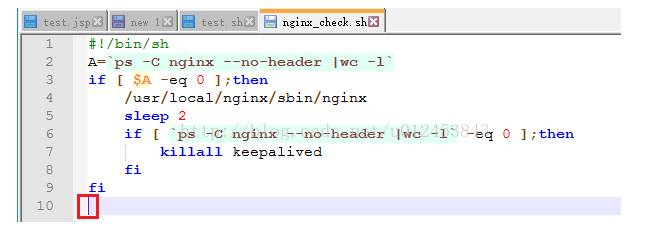
First said the first error: syntax error: unexpected end of file, you can put that script content above script file nginx_check. Of sh (suffix, of course, you can literally a name. Sh is ok), it is important to note the last “fi”, the default is black font, we press enter increase a line, then the last “fi” color to blue, as shown in the figure below.


Editing the script we save, automatically uploaded to a Linux server, below we will execute the script in the Linux server (it is important to note that the script file must have execute permissions, you use without execute permissions chmod + x nginx_check. Sh to add execute permissions to the script), we will see the following error, tip end is illegal.

[root@bhz004 keepalived]# sh ./nginx_check.sh 
./nginx_check.sh: line 10: syntax error: unexpected end of file
[root@bhz004 keepalived]# 

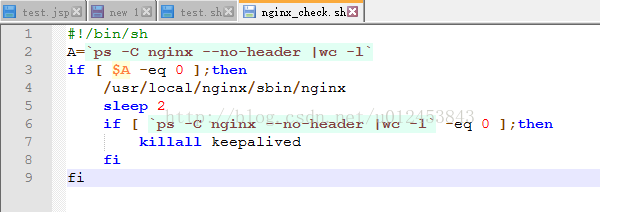
Let’s look at another error: syntax error near token ‘fi’, you can paste the contents of the script directly into the script file, the last’ FI ‘is black at this time, we will not care about it.


when we execute this script, we will see the following error, indicating that line 9 “fi” has a problem.

[root@bhz004 keepalived]# sh ./nginx_check.sh 
./nginx_check.sh: line 9: syntax error near unexpected token `fi'
./nginx_check.sh: line 9: `fi'
[root@bhz004 keepalived]# 

Both of the above problems are due to the format of the.sh file in DOS format. Linux, on the other hand, can only execute scripts in Unix format. Because pressing the enter key once in DOS/Window actually enters “Enter (CR)” and “Line feed (LF)”, and Linux/ Unix only enters “Line feed (LF)”, the modified SH file will have one more CR per line, so it will report an error and not find the command when running under Linux.

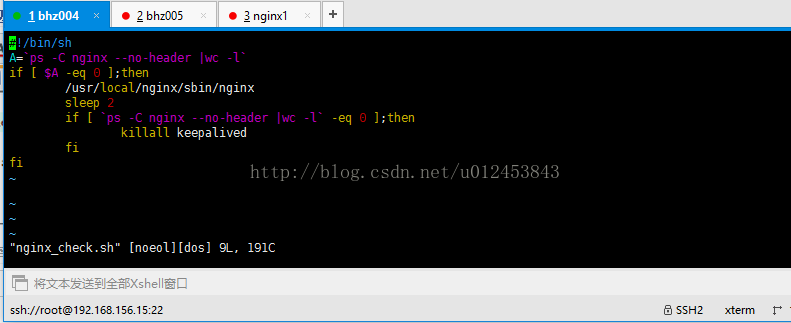
You can view the format of the script file by entering the edit file interface using the command vim nginx_check-sh, as shown below.

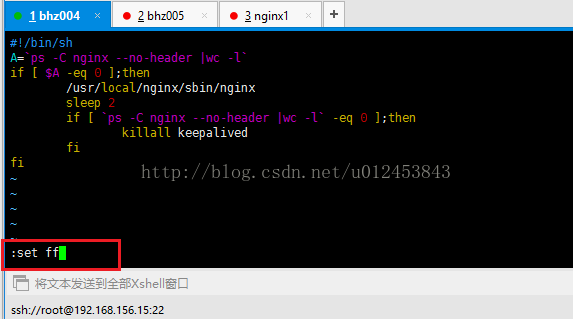
Type “:” directly, then “set FF “after “:” as shown below

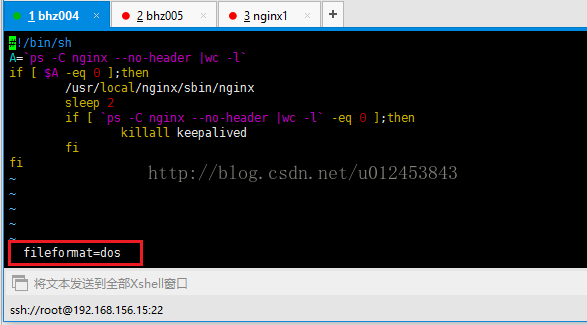
Press enter to see the script format, as shown in the figure below, and you can see that the current script format is DOS.

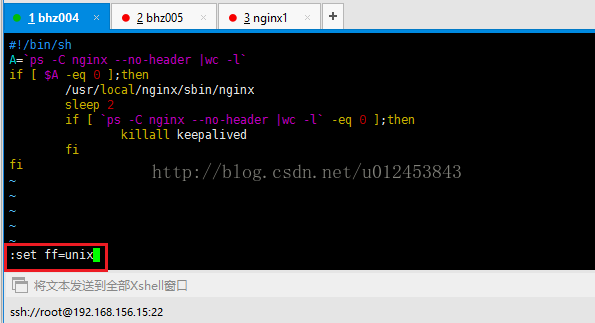
We need to change the format to Unix by either typing “set FF = Unix” or “Set FileFormat = Unix” as shown below.

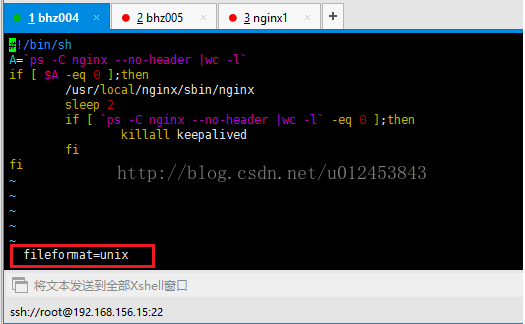
After input, press enter to complete the format switch. Then we type “:set FF “to see the format, as shown in the figure below, and you can see that the current script format is now the” Unix “we want.

Then we can execute nginx_check-sh as shown below.

[root@bhz004 keepalived]# sh ./nginx_check.sh 
[root@bhz004 keepalived]# ps -ef | grep nginx
root       3679      1  0 19:42 ?       00:00:00 nginx: master process /usr/local/nginx/sbin/nginx
nobody     3681   3679  0 19:42 ?       00:00:00 nginx: worker process      
root       3711   1898  0 20:23 pts/0    00:00:00 grep nginx
[root@bhz004 keepalived]#