Category Archives: How to Fix

The sparse matrix of R language is too large to be used as.matrix

A very large matrix, with 320,201 rows and 8189 columns, would require 9.8GB if stored with a normal matrix of all zeros

cols <- 8189
rows <- 320127
mat <- matrix(data = 0, nrow=320127, ncol = 8189)
print(object.size(mat), unit="GB")
# 19.5 Gb
mat <- matrix(data = 0L, nrow=320127, ncol = 8189)
print(object.size(mat), unit="GB")
# 9.8 GbThe 0 here is actually to be distinguished

Here, 0L means that the data type is integer, which by default is numeric. The biggest difference between the two is that when you use 320127L * 8189L, you get a NA, whereas 320127 * 8189 does not
If you save it as a sparse matrix

mat <- Matrix(data = 0L, nrow=320127, ncol = 8189, sparse = TRUE)
print(object.size(mat), unit="GB")
#0 Gb
dim(mat)
#[1] 320127   8189

Although the number of rows and columns is the same, the sparse matrix occupies almost no memory. And the operations that ordinary matrices support, such as row sum, column sum and extraction of elements, are also possible in sparse matrices, but take a little more time. At the same time, there are many R packages that support sparse matrix, such as glmnet, an R package that does lasso regression.
Although sparse matrices look nice, parts of a sparse matrix that big in R can go wrong

> mat2 <- mat + 1
Error in asMethod(object) : 
  Cholmod error 'problem too large' at file ../Core/cholmod_dense.c, line 105

Even if I wanted to convert it back to the normal matrix with as. Matrix , it would still give me an error

> mat3 <- Matrix::as.matrix(mat)
Error in asMethod(object) : 
  Cholmod error 'problem too large' at file ../Core/cholmod_dense.c, line 105

Since the ready-made as. Matrix cannot be processed, what can be done?The simplest and roughest method is to create a new ordinary matrix, then traverse the sparse matrix and put the values of the sparse matrix back to the ordinary matrix one by one.

mat2 <- matrix(data = 0, nrow=320127, ncol = 8189)
for (i in seq_len(nrow(mat))){
    for (j in seq_len(ncol(mat))){
        mat2[i][j] <- mat[i][j]
    }
}

So how long does it take?My computer didn’t run for two hours anyway, so don’t test it.
Is there any way to speed it up?The way to speed up is to reduce the number of for loops, because we are a sparse matrix and most of the space is 0, we only need to assign the parts that are not 0 to the new matrix.
This requires us to understand the data structure of sparse matrices

> str(mat)
Formal class 'dgCMatrix' [package "Matrix"] with 6 slots
  ..@ i       : int(0) 
  ..@ p       : int [1:8190] 0 0 0 0 0 0 0 0 0 0 ...
  ..@ Dim     : int [1:2] 320127 8189
  ..@ Dimnames:List of 2
  .. ..$ : NULL
  .. ..$ : NULL
  ..@ x       : num(0) 
  ..@ factors : list()

@dim </code b> records the dimension information of the matrix, @dimnames </code b> records the row and column names, @x records non-0 values. @i that doesn't record a 0 row index corresponds to @x , all of which are 0, so it's not recorded. @p is more complex, it is not a simple record of non-0 value column index, look at the document also do not know what is, but through searching can find its conversion relationship with non-0 value column index.
Therefore, the code is optimized as

row_pos <- mat@i+1
col_pos <- findInterval(seq(mat@x)-1,mat@p[-1])+1
val <- mat@x
    
for (i in seq_along(val)){
    tmp[row_pos[i],col_pos[i]] <- val[i]
}

You can encapsulate it as a function

as_matrix <- function(mat){

  tmp <- matrix(data=0L, nrow = mat@Dim[1], ncol = mat@Dim[2])
  
  row_pos <- mat@i+1
  col_pos <- findInterval(seq(mat@x)-1,mat@p[-1])+1
  val <- mat@x
    
  for (i in seq_along(val)){
      tmp[row_pos[i],col_pos[i]] <- val[i]
  }
    
  row.names(tmp) <- mat@Dimnames[[1]]
  colnames(tmp) <- mat@Dimnames[[2]]
  return(tmp)
}

If you also need to improve, so may need to play Rcpp. I wrote a simple reference to http://adv-r.had.co.nz/Rcpp.html code, can come to my blog http://xuzhougeng.top/archives/R-Sparse-Matrix-Note to continue reading, can buy to continue reading in this paper.

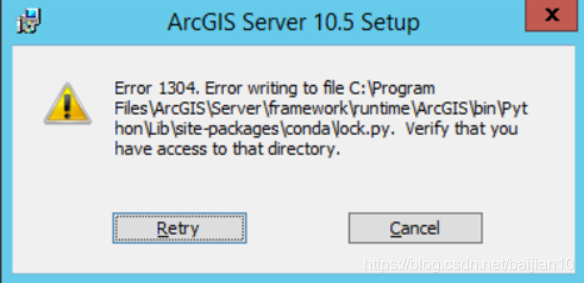
There are errors 1304 and 2350 FDI server errors in ArcGIS Server installation

When I was in arcgis server 10.2 installation error 1304 problems, there is a file that cannot be written to, it’s about the (screenshots because before this is from online, looking for pictures)

Retry after 2350 FDI server error error dialog , Retry not, only can abort the
I checked on the Internet, many of them say system and uninstall the residual, But I just reinstalled the system, so there is no such problem.
later want to isn't me what is the problem of system, because when I right click the computer check management no local users and groups this option, wanted to take the computer in the past let the technician to look at, but a variety of reasons not to

later in my free time and want to try to install again, is suddenly thought of, because of the hard drive because before
because I added a solid-state drives to reinstall the system, when I install the arcgis is according to the previous habit before in mechanical drive, There was no problem when installing arcgis desktop, and then I did not think so much when installing the server. I installed it directly in the mechanical hard disk, and the result was wrong
. This time I installed it in the solid state hard disk, which is the system disk, and the installation went smoothly without any problem.
because I found that error 2350 FDI server error might be installed by the administrator without permission, but it did not work, so I suddenly thought about whether it was because the mechanical hard disk was not the system disk, and it was indeed the problem.
arcgis server can only be installed in the system disk because it needs the account permission of the system

Opening feature class.General function failure

When adding a ShapeFile to ArcMap, the following Error message occurs and the layer cannot be drawn: “Error opening feature class.General Function Failure “.
The reason:
Applockmgr. exe unregistered.ArcMap and ArcCatalog need this to help with shapeFiles.
Solutions:
Register applockmgr. exe.
1. Close ArcMap and ArcCatalog.
2. Open the command window: Start & GT; Application & gt;
3. Find the Bin folder in ArcGIS :
CD c:arcgisarcexe81bin
attention, in ArcGIS 9, the Bin folder is under c: Program FilesArcGIS, so the syntax should be :
CD c:Progra~lArcGISBin
4. Input :
regsvr32 aflockmgr. DLL
5. Input :
applockmgr.exe /regserver
6. Close the command window.

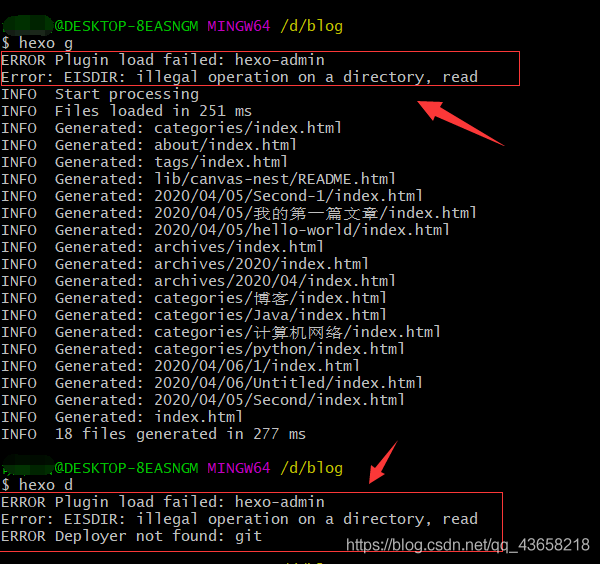
ERROR Plugin load failed: hexo-admin Error: EISDIR: illegal operation on a directory, read ERROR Dep

ERROR Plugin load failed: hexo-admin
Error: EISDIR: illegal operation on a directory, read
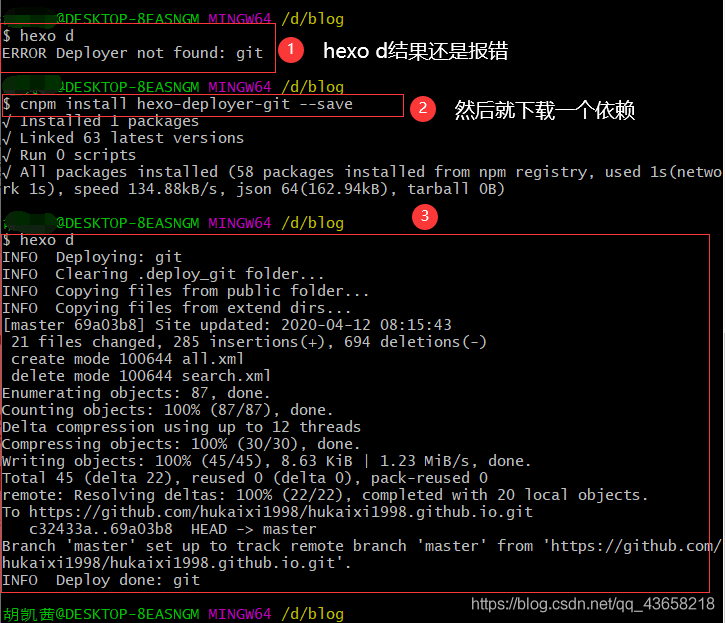
ERROR Deployer not found: Git
git terminal to the wrong, then I am in what cases reported in, is to build a personal blog, the day before is no problem, because the next morning, installation of a library, use the command CNPM install hexo – generator – search – save, after I baidu, some people say that is not ordered, because at that time, no progress has been the card and then cancelled, there may be, I feel CNPM uninstall hexo-generator-search –save. After using this command, I reported an error, too many of which were not saved.
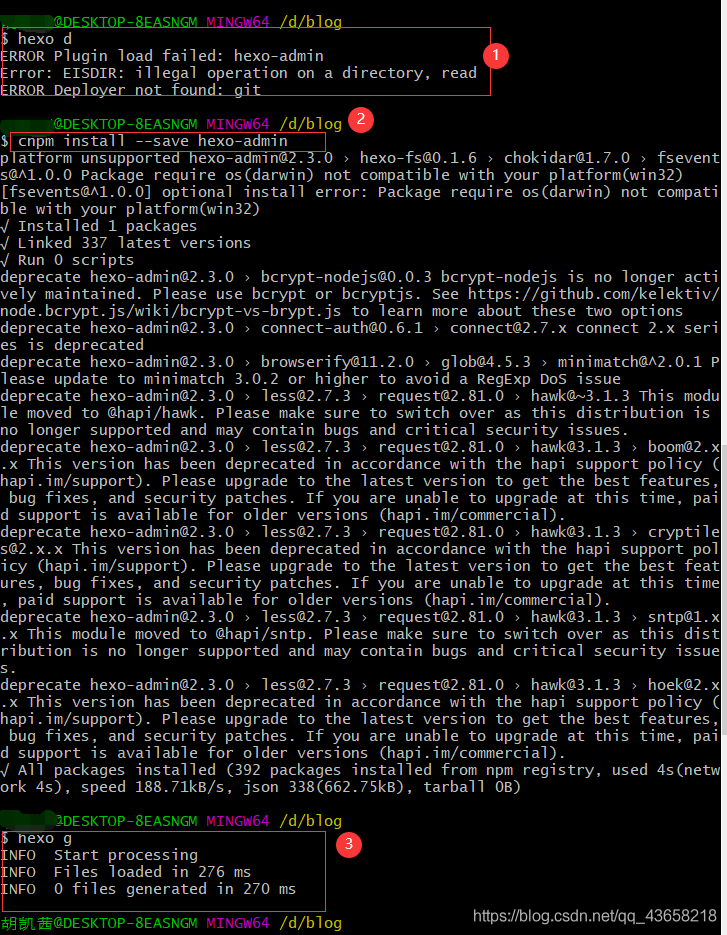
wait until I use the heox d and the hexo g commands again, and I’m going to say the title is wrong
take a look at the picture:
the solution is to put the two packages in the next one:

see after the command is downloaded, the hexo g

if you have any problems, please leave a comment in the comments section

curl https://domasin NSS error – 12286

For those suspected to be related to the NSS version of the above problem, the curl request will be verified in south China VPC and South China grayscale, respectively, below


One, in south China gray level environment test
1. Curl S3 internal domain name (error reporting)

[root@A06-R12-302F0714-I12-86 --PROD-- ~]# curl -I https://s3-internal.cn-south-1.jdcloud-oss.com/a/a -v
* About to connect() to s3-internal.cn-south-1.jdcloud-oss.com port 443 (#0)
*   Trying 100.65.254.35...
* Connected to s3-internal.cn-south-1.jdcloud-oss.com (100.65.254.35) port 443 (#0)
* Initializing NSS with certpath: sql:/etc/pki/nssdb
*   CAfile: /etc/pki/tls/certs/ca-bundle.crt
  CApath: none
* NSS error -12286 (SSL_ERROR_NO_CYPHER_OVERLAP)
* Cannot communicate securely with peer: no common encryption algorithm(s).
* Error in TLS handshake, trying SSLv3...
> HEAD /a/a HTTP/1.1
> User-Agent: curl/7.29.0
> Host: s3-internal.cn-south-1.jdcloud-oss.com
> Accept: */*
> 
* Connection died, retrying a fresh connect
* Closing connection 0
* Issue another request to this URL: 'https://s3-internal.cn-south-1.jdcloud-oss.com/a/a'
* About to connect() to s3-internal.cn-south-1.jdcloud-oss.com port 443 (#1)
*   Trying 100.65.254.35...
* Connected to s3-internal.cn-south-1.jdcloud-oss.com (100.65.254.35) port 443 (#1)
* TLS disabled due to previous handshake failure
*   CAfile: /etc/pki/tls/certs/ca-bundle.crt
  CApath: none
* NSS error -12286 (SSL_ERROR_NO_CYPHER_OVERLAP)
* Cannot communicate securely with peer: no common encryption algorithm(s).
* Closing connection 1
curl: (35) Cannot communicate securely with peer: no common encryption algorithm(s).

2. Test whether port 443 is open (all OK)

[root@A06-R12-302F0714-I12-86 --PROD-- ~]# telnet 127.0.0.1 443
Trying 127.0.0.1...
Connected to 127.0.0.1.
Escape character is '^]'.
^CConnection closed by foreign host.
[root@A06-R12-302F0714-I12-86 --PROD-- ~]# telnet 100.65.254.3 443
Trying 100.65.254.3...
Connected to 100.65.254.3.
Escape character is '^]'.

3. Curl S3 new domain name (results are OK)

[root@A06-R12-302F0714-I12-86 --PROD-- ~]# curl -I https://s3.cn-south-1.jdcloud-oss.com/a/a -v
* About to connect() to s3.cn-south-1.jdcloud-oss.com port 443 (#0)
*   Trying 59.37.144.139...
* Connected to s3.cn-south-1.jdcloud-oss.com (59.37.144.139) port 443 (#0)
* Initializing NSS with certpath: sql:/etc/pki/nssdb
*   CAfile: /etc/pki/tls/certs/ca-bundle.crt
  CApath: none
* SSL connection using TLS_RSA_WITH_AES_128_CBC_SHA
* Server certificate:
* 	subject: CN=*.s3.cn-north-1.jdcloud-oss.com,O="BEIJING JINGDONG SHANGKE INFORMATION TECHNOLOGY CO., LTD.",L=beijing,ST=beijing,C=CN
* 	start date: Jan 29 09:31:09 2019 GMT
* 	expire date: Jan 30 09:31:09 2020 GMT
* 	common name: *.s3.cn-north-1.jdcloud-oss.com
* 	issuer: CN=GlobalSign Organization Validation CA - SHA256 - G2,O=GlobalSign nv-sa,C=BE
> HEAD /a/a HTTP/1.1
> User-Agent: curl/7.29.0
> Host: s3.cn-south-1.jdcloud-oss.com
> Accept: */*
> 
< HTTP/1.1 404 Not Found
HTTP/1.1 404 Not Found
< Server: jfe
Server: jfe
< Date: Mon, 11 Mar 2019 04:53:31 GMT
Date: Mon, 11 Mar 2019 04:53:31 GMT
< Content-Length: 0
Content-Length: 0
< Connection: keep-alive
Connection: keep-alive
< x-req-id: B6E24BAF242EF989
x-req-id: B6E24BAF242EF989

< 
* Connection #0 to host s3.cn-south-1.jdcloud-oss.com left intact

4. Curl S3 old domain name (OK)

[root@A06-R12-302F0714-I12-86 --PROD-- ~]# curl -I https://s3.cn-south-1.jcloudcs.com/a/a -v
* About to connect() to s3.cn-south-1.jcloudcs.com port 443 (#0)
*   Trying 100.65.11.130...
* Connected to s3.cn-south-1.jcloudcs.com (100.65.11.130) port 443 (#0)
* Initializing NSS with certpath: sql:/etc/pki/nssdb
*   CAfile: /etc/pki/tls/certs/ca-bundle.crt
  CApath: none
* SSL connection using TLS_RSA_WITH_AES_128_CBC_SHA
* Server certificate:
* 	subject: CN=*.jdcloud.com,O="BEIJING JINGDONG SHANGKE INFORMATION TECHNOLOGY CO., LTD.",L=beijing,ST=beijing,C=CN
* 	start date: Nov 19 02:26:04 2018 GMT
* 	expire date: Feb 18 09:06:02 2020 GMT
* 	common name: *.jdcloud.com
* 	issuer: CN=GlobalSign Organization Validation CA - SHA256 - G2,O=GlobalSign nv-sa,C=BE
> HEAD /a/a HTTP/1.1
> User-Agent: curl/7.29.0
> Host: s3.cn-south-1.jcloudcs.com
> Accept: */*
> 
< HTTP/1.1 404 Not Found
HTTP/1.1 404 Not Found
< Server: JDCloudOSS
Server: JDCloudOSS
< Date: Mon, 11 Mar 2019 04:53:46 GMT
Date: Mon, 11 Mar 2019 04:53:46 GMT
< Content-Length: 0
Content-Length: 0
< Connection: close
Connection: close
< x-req-id: 8228B04708806DDF
x-req-id: 8228B04708806DDF

< 
* Closing connection 0

Ii. VPC test in South China
1, curl S3, internal network new domain name (OK), test other domain name is also OK here is not posted

[root@domain-cn-south-1 ~]# curl -I https://s3-internal.cn-south-1.jdcloud-oss.com/a/a -v
* About to connect() to s3-internal.cn-south-1.jdcloud-oss.com port 443 (#0)
*   Trying 100.65.254.35...
* Connected to s3-internal.cn-south-1.jdcloud-oss.com (100.65.254.35) port 443 (#0)
* Initializing NSS with certpath: sql:/etc/pki/nssdb
*   CAfile: /etc/pki/tls/certs/ca-bundle.crt
  CApath: none
* SSL connection using TLS_ECDHE_RSA_WITH_AES_256_GCM_SHA384
* Server certificate:
*   subject: CN=*.s3.cn-north-1.jdcloud-oss.com,O="BEIJING JINGDONG SHANGKE INFORMATION TECHNOLOGY CO., LTD.",L=beijing,ST=beijing,C=CN
*   start date: Jan 29 09:31:09 2019 GMT
*   expire date: Jan 30 09:31:09 2020 GMT
*   common name: *.s3.cn-north-1.jdcloud-oss.com
*   issuer: CN=GlobalSign Organization Validation CA - SHA256 - G2,O=GlobalSign nv-sa,C=BE
> HEAD /a/a HTTP/1.1
> User-Agent: curl/7.29.0
> Host: s3-internal.cn-south-1.jdcloud-oss.com
> Accept: */*
> 
< HTTP/1.1 404 Not Found
HTTP/1.1 404 Not Found
< Server: JDCloudOSS
Server: JDCloudOSS
< Date: Mon, 11 Mar 2019 05:13:33 GMT
Date: Mon, 11 Mar 2019 05:13:33 GMT
< Content-Length: 0
Content-Length: 0
< Connection: keep-alive
Connection: keep-alive
< x-req-id: 828EF8FED8952127
x-req-id: 828EF8FED8952127

< 
* Connection #0 to host s3-internal.cn-south-1.jdcloud-oss.com left intact

Third, through the above tests, it is suspected that the NSS version problem caused the failure to load the new certificate
1. Check NSS version (South China Gray Scale machine NSS version is low)
South China gray scale machine

[root@A06-R12-302F0714-I12-86 --PROD-- ~]# curl -V
curl 7.29.0 (x86_64-redhat-linux-gnu) libcurl/7.29.0 NSS/3.15.4 zlib/1.2.7 libidn/1.28 libssh2/1.4.3
Protocols: dict file ftp ftps gopher http https imap imaps ldap ldaps pop3 pop3s rtsp scp sftp smtp smtps telnet tftp 
Features: AsynchDNS GSS-Negotiate IDN IPv6 Largefile NTLM NTLM_WB SSL libz 
[root@A06-R12-302F0714-I12-86 --PROD-- ~]# rpm -qa | grep nss
openssh-server-6.6.1p1-11.el7.x86_64
nss-softokn-freebl-3.16.2.3-9.el7.x86_64
nss-util-3.16.2.3-2.el7.x86_64
openssl-1.0.1e-42.el7.x86_64
openssh-clients-6.6.1p1-11.el7.x86_64
nss-tools-3.16.2.3-5.el7.x86_64
nss-3.16.2.3-5.el7.x86_64
nss-sysinit-3.16.2.3-5.el7.x86_64
jansson-2.4-6.el7.x86_64
openssh-6.6.1p1-11.el7.x86_64
nss-softokn-3.16.2.3-9.el7.x86_64
libsss_nss_idmap-1.12.2-58.el7.x86_64
openssl-devel-1.0.1e-42.el7.x86_64
openssl-libs-1.0.1e-42.el7.x86_64

South China VPC

[root@domain-cn-south-1 ~]# curl -V
curl 7.29.0 (x86_64-redhat-linux-gnu) libcurl/7.29.0 NSS/3.34 zlib/1.2.7 libidn/1.28 libssh2/1.4.3
Protocols: dict file ftp ftps gopher http https imap imaps ldap ldaps pop3 pop3s rtsp scp sftp smtp smtps telnet tftp 
Features: AsynchDNS GSS-Negotiate IDN IPv6 Largefile NTLM NTLM_WB SSL libz unix-sockets 
[root@domain-cn-south-1 ~]# rpm -qa | grep nss
nss-3.36.0-5.el7_5.x86_64
jansson-2.10-1.el7.x86_64
nss-util-3.36.0-1.el7_5.x86_64
nss-pem-1.0.3-4.el7.x86_64
openssl-1.0.2k-12.el7.x86_64
nss-sysinit-3.36.0-5.el7_5.x86_64
nss-tools-3.36.0-5.el7_5.x86_64
openssh-clients-7.4p1-16.el7.x86_64
nss-softokn-freebl-3.36.0-5.el7_5.x86_64
nss-softokn-3.36.0-5.el7_5.x86_64
openssl-libs-1.0.2k-12.el7.x86_64
openssh-7.4p1-16.el7.x86_64
libsss_nss_idmap-1.16.0-19.el7_5.5.x86_64
openssh-server-7.4p1-16.el7.x86_64

Four, update the South China gray scale machine NSS version
1.

[root@A06-R12-302F0714-I12-86 --PROD-- ~]# yum update nss
Loaded plugins: fastestmirror, langpacks
Repodata is over 2 weeks old. Install yum-cron?Or run: yum makecache fast
base                                                                                                                                                                  | 3.6 kB  00:00:00     
extras                                                                                                                                                                | 3.4 kB  00:00:00     
updates                                                                                                                                                               | 3.4 kB  00:00:00     
(1/2): extras/7/x86_64/primary_db                                                                                                                                     | 180 kB  00:00:00     
(2/2): updates/7/x86_64/primary_db                                                                                                                                    | 2.5 MB  00:00:00     
Determining fastest mirrors
Resolving Dependencies
--> Running transaction check
---> Package nss.x86_64 0:3.16.2.3-5.el7 will be updated
--> Processing Dependency: nss = 3.16.2.3-5.el7 for package: nss-sysinit-3.16.2.3-5.el7.x86_64
--> Processing Dependency: nss(x86-64) = 3.16.2.3-5.el7 for package: nss-tools-3.16.2.3-5.el7.x86_64
---> Package nss.x86_64 0:3.36.0-7.1.el7_6 will be an update
--> Processing Dependency: nss-util >= 3.36.0-1.1 for package: nss-3.36.0-7.1.el7_6.x86_64
--> Processing Dependency: nss-softokn(x86-64) >= 3.36.0-1 for package: nss-3.36.0-7.1.el7_6.x86_64
--> Processing Dependency: nspr >= 4.19.0 for package: nss-3.36.0-7.1.el7_6.x86_64
--> Processing Dependency: nss-pem(x86-64) for package: nss-3.36.0-7.1.el7_6.x86_64
--> Processing Dependency: libnssutil3.so(NSSUTIL_3.31)(64bit) for package: nss-3.36.0-7.1.el7_6.x86_64
--> Processing Dependency: libnssutil3.so(NSSUTIL_3.24)(64bit) for package: nss-3.36.0-7.1.el7_6.x86_64
--> Processing Dependency: libnssutil3.so(NSSUTIL_3.21)(64bit) for package: nss-3.36.0-7.1.el7_6.x86_64
--> Running transaction check
---> Package nspr.x86_64 0:4.10.6-3.el7 will be updated
---> Package nspr.x86_64 0:4.19.0-1.el7_5 will be an update
---> Package nss-pem.x86_64 0:1.0.3-5.el7 will be installed
---> Package nss-softokn.x86_64 0:3.16.2.3-9.el7 will be updated
---> Package nss-softokn.x86_64 0:3.36.0-5.el7_5 will be an update
--> Processing Dependency: nss-softokn-freebl(x86-64) >= 3.36.0-5.el7_5 for package: nss-softokn-3.36.0-5.el7_5.x86_64
---> Package nss-sysinit.x86_64 0:3.16.2.3-5.el7 will be updated
---> Package nss-sysinit.x86_64 0:3.36.0-7.1.el7_6 will be an update
---> Package nss-tools.x86_64 0:3.16.2.3-5.el7 will be updated
---> Package nss-tools.x86_64 0:3.36.0-7.1.el7_6 will be an update
---> Package nss-util.x86_64 0:3.16.2.3-2.el7 will be updated
---> Package nss-util.x86_64 0:3.36.0-1.1.el7_6 will be an update
--> Running transaction check
---> Package nss-softokn-freebl.x86_64 0:3.16.2.3-9.el7 will be updated
---> Package nss-softokn-freebl.x86_64 0:3.36.0-5.el7_5 will be an update
--> Finished Dependency Resolution

Dependencies Resolved

=============================================================================================================================================================================================
 Package                                            Arch                                   Version                                             Repository                               Size
=============================================================================================================================================================================================
Updating:
 nss                                                x86_64                                 3.36.0-7.1.el7_6                                    updates                                 835 k
Installing for dependencies:
 nss-pem                                            x86_64                                 1.0.3-5.el7                                         base                                     74 k
Updating for dependencies:
 nspr                                               x86_64                                 4.19.0-1.el7_5                                      base                                    127 k
 nss-softokn                                        x86_64                                 3.36.0-5.el7_5                                      base                                    315 k
 nss-softokn-freebl                                 x86_64                                 3.36.0-5.el7_5                                      base                                    222 k
 nss-sysinit                                        x86_64                                 3.36.0-7.1.el7_6                                    updates                                  62 k
 nss-tools                                          x86_64                                 3.36.0-7.1.el7_6                                    updates                                 515 k
 nss-util                                           x86_64                                 3.36.0-1.1.el7_6                                    updates                                  78 k

Transaction Summary
=============================================================================================================================================================================================
Install             ( 1 Dependent package)
Upgrade  1 Package  (+6 Dependent packages)

Total download size: 2.2 M
Is this ok [y/d/N]: y
Downloading packages:
Delta RPMs disabled because /usr/bin/applydeltarpm not installed.
(1/8): nspr-4.19.0-1.el7_5.x86_64.rpm                                                                                                                                 | 127 kB  00:00:00     
(2/8): nss-pem-1.0.3-5.el7.x86_64.rpm                                                                                                                                 |  74 kB  00:00:00     
(3/8): nss-softokn-freebl-3.36.0-5.el7_5.x86_64.rpm                                                                                                                   | 222 kB  00:00:00     
(4/8): nss-softokn-3.36.0-5.el7_5.x86_64.rpm                                                                                                                          | 315 kB  00:00:00     
(5/8): nss-3.36.0-7.1.el7_6.x86_64.rpm                                                                                                                                | 835 kB  00:00:00     
(6/8): nss-tools-3.36.0-7.1.el7_6.x86_64.rpm                                                                                                                          | 515 kB  00:00:00     
(7/8): nss-sysinit-3.36.0-7.1.el7_6.x86_64.rpm                                                                                                                        |  62 kB  00:00:00     
(8/8): nss-util-3.36.0-1.1.el7_6.x86_64.rpm                                                                                                                           |  78 kB  00:00:00     
---------------------------------------------------------------------------------------------------------------------------------------------------------------------------------------------
Total                                                                                                                                                        4.6 MB/s | 2.2 MB  00:00:00     
Running transaction check
Running transaction test
Transaction test succeeded
Running transaction
  Updating   : nspr-4.19.0-1.el7_5.x86_64                                                                                                                                               1/15 
/sbin/ldconfig: /usr/local/lib/libpcreposix.so.0 is not a symbolic link

  Updating   : nss-util-3.36.0-1.1.el7_6.x86_64                                                                                                                                         2/15 
/sbin/ldconfig: /usr/local/lib/libpcreposix.so.0 is not a symbolic link

  Updating   : nss-softokn-freebl-3.36.0-5.el7_5.x86_64                                                                                                                                 3/15 
  Updating   : nss-softokn-3.36.0-5.el7_5.x86_64                                                                                                                                        4/15 
/sbin/ldconfig: /usr/local/lib/libpcreposix.so.0 is not a symbolic link

  Installing : nss-pem-1.0.3-5.el7.x86_64                                                                                                                                               5/15 
  Updating   : nss-sysinit-3.36.0-7.1.el7_6.x86_64                                                                                                                                      6/15 
  Updating   : nss-3.36.0-7.1.el7_6.x86_64                                                                                                                                              7/15 
/sbin/ldconfig: /usr/local/lib/libpcreposix.so.0 is not a symbolic link

  Updating   : nss-tools-3.36.0-7.1.el7_6.x86_64                                                                                                                                        8/15 
  Cleanup    : nss-tools-3.16.2.3-5.el7.x86_64                                                                                                                                          9/15 
  Cleanup    : nss-sysinit-3.16.2.3-5.el7.x86_64                                                                                                                                       10/15 
  Cleanup    : nss-3.16.2.3-5.el7.x86_64                                                                                                                                               11/15 
/sbin/ldconfig: /usr/local/lib/libpcreposix.so.0 is not a symbolic link

  Cleanup    : nss-softokn-3.16.2.3-9.el7.x86_64                                                                                                                                       12/15 
/sbin/ldconfig: /usr/local/lib/libpcreposix.so.0 is not a symbolic link

  Cleanup    : nss-util-3.16.2.3-2.el7.x86_64                                                                                                                                          13/15 
/sbin/ldconfig: /usr/local/lib/libpcreposix.so.0 is not a symbolic link

  Cleanup    : nspr-4.10.6-3.el7.x86_64                                                                                                                                                14/15 
/sbin/ldconfig: /usr/local/lib/libpcreposix.so.0 is not a symbolic link

  Cleanup    : nss-softokn-freebl-3.16.2.3-9.el7.x86_64                                                                                                                                15/15 
  Verifying  : nss-3.36.0-7.1.el7_6.x86_64                                                                                                                                              1/15 
  Verifying  : nss-pem-1.0.3-5.el7.x86_64                                                                                                                                               2/15 
  Verifying  : nss-tools-3.36.0-7.1.el7_6.x86_64                                                                                                                                        3/15 
  Verifying  : nspr-4.19.0-1.el7_5.x86_64                                                                                                                                               4/15 
  Verifying  : nss-sysinit-3.36.0-7.1.el7_6.x86_64                                                                                                                                      5/15 
  Verifying  : nss-softokn-freebl-3.36.0-5.el7_5.x86_64                                                                                                                                 6/15 
  Verifying  : nss-util-3.36.0-1.1.el7_6.x86_64                                                                                                                                         7/15 
  Verifying  : nss-softokn-3.36.0-5.el7_5.x86_64                                                                                                                                        8/15 
  Verifying  : nss-softokn-freebl-3.16.2.3-9.el7.x86_64                                                                                                                                 9/15 
  Verifying  : nss-util-3.16.2.3-2.el7.x86_64                                                                                                                                          10/15 
  Verifying  : nss-sysinit-3.16.2.3-5.el7.x86_64                                                                                                                                       11/15 
  Verifying  : nss-tools-3.16.2.3-5.el7.x86_64                                                                                                                                         12/15 
  Verifying  : nss-softokn-3.16.2.3-9.el7.x86_64                                                                                                                                       13/15 
  Verifying  : nss-3.16.2.3-5.el7.x86_64                                                                                                                                               14/15 
  Verifying  : nspr-4.10.6-3.el7.x86_64                                                                                                                                                15/15 

Dependency Installed:
  nss-pem.x86_64 0:1.0.3-5.el7                                                                                                                                                               

Updated:
  nss.x86_64 0:3.36.0-7.1.el7_6                                                                                                                                                              

Dependency Updated:
  nspr.x86_64 0:4.19.0-1.el7_5                nss-softokn.x86_64 0:3.36.0-5.el7_5         nss-softokn-freebl.x86_64 0:3.36.0-5.el7_5         nss-sysinit.x86_64 0:3.36.0-7.1.el7_6        
  nss-tools.x86_64 0:3.36.0-7.1.el7_6         nss-util.x86_64 0:3.36.0-1.1.el7_6         

Complete!

2. Re-test the new DOMAIN name OK in South China Intranet

[root@A06-R12-302F0714-I12-86 --PROD-- ~]# curl -I https://s3-internal.cn-south-1.jdcloud-oss.com/a/a -v
* About to connect() to s3-internal.cn-south-1.jdcloud-oss.com port 443 (#0)
*   Trying 100.65.254.3...
* Connected to s3-internal.cn-south-1.jdcloud-oss.com (100.65.254.3) port 443 (#0)
* Initializing NSS with certpath: sql:/etc/pki/nssdb
*   CAfile: /etc/pki/tls/certs/ca-bundle.crt
  CApath: none
* SSL connection using TLS_ECDHE_RSA_WITH_AES_256_CBC_SHA
* Server certificate:
* 	subject: CN=*.s3.cn-north-1.jdcloud-oss.com,O="BEIJING JINGDONG SHANGKE INFORMATION TECHNOLOGY CO., LTD.",L=beijing,ST=beijing,C=CN
* 	start date: Jan 29 09:31:09 2019 GMT
* 	expire date: Jan 30 09:31:09 2020 GMT
* 	common name: *.s3.cn-north-1.jdcloud-oss.com
* 	issuer: CN=GlobalSign Organization Validation CA - SHA256 - G2,O=GlobalSign nv-sa,C=BE
> HEAD /a/a HTTP/1.1
> User-Agent: curl/7.29.0
> Host: s3-internal.cn-south-1.jdcloud-oss.com
> Accept: */*
> 
< HTTP/1.1 404 Not Found
HTTP/1.1 404 Not Found
< Server: JDCloudOSS
Server: JDCloudOSS
< Date: Mon, 11 Mar 2019 04:54:29 GMT
Date: Mon, 11 Mar 2019 04:54:29 GMT
< Content-Length: 0
Content-Length: 0
< Connection: keep-alive
Connection: keep-alive
< x-req-id: ABE7F53066B4B389
x-req-id: ABE7F53066B4B389

< 
* Connection #0 to host s3-internal.cn-south-1.jdcloud-oss.com left intact

Conclusion: NSS version problems cause curl error handling: YUM Update NSS
SQL Error (3621): String or binary data would be truncated The statement has been terminated. */

The error occurred when writing to the SQLServer database is as follows:
SQL Error (3621): String or binary Data would be truncated The statement has been. */
Reason 2.
The length of the field definition in the database table structure is smaller than the actual length of the field content to be written to, so it cannot be written
Iii. Solutions
The table structure fields can be successfully written after the length has been changed
 

Perfectly solve the error loading media: file could not be played error

Recently, I need to use JWplayer plugin to play videos. However, no matter which version or what kind of video I changed, it always prompts Error loading media: File could not be played incorrectly. I finally solved it after a lot of effort.
Solutions:
The IIS default configuration does not add an MP4 file, which results in opening an MP4 file 404.
Open the IIS manager, MIME type

Add, extension mp4, type Video/MP4

Click OK.
The problem is solved, the test address: http://118.190.82.102:8080/
JWplayer 6.1 resources (with logo) to download address: http://www.80cxy.com/Blog/ResourceView?arId=2018071309114468202coMrW
JWplayer resources (logo) 7.10 download address: http://www.80cxy.com/Blog/ResourceView?arId=201807130915499925eixTjy
The original link: http://www.80cxy.com/Blog/ArticleView?arId=201807130908379497ZfgWan

Dxly solves the fatal error of AutoCAD2006: unhandled access violation reading 0x0000 exception at 6532b0h.

dxlary
 
Autocad 2006 often fails to install when directly clicking Setup.exe, which says “AutoCAD2006-simplified Chinese installation has been terminated, please check” C :\DOCUME~1\** \ \ \ “LOCALS~1\Temp\ Autocad 2006 setup.log”. At this point, it can be solved by the following way: directly run AutoCAD2006\Bin\acadFeui\acad.msi to install, but when open CAD2006 after installation, it will encounter the following problems:
This is a fatal error. It has unhandled access to cheesy reading.
On the Internet for a long time do not know how to solve, one of the articles gave me inspiration. So I came to the following conclusion:
1. Click Setup.exe and it won’t install because Autocad2006 requires.net framework 1.1, while Windows 7 usually installs a higher version of.NET. When installing setup.exe, these plug-ins will be installed first. Check the “C :\ me ~1\***\ \LOCALS~1\Temp\AutoCAD 2006 setup.log”.
No plug-in is installed when running the ACad.mSI installation. Even if CAD2006 is installed, net 1.1 that supports CAD2006 is not installed and thus can cause a fatal error unhandled Access Cheesecourse at 6532b0h.
 
Based on the above inference, the problem was successfully solved in the following two ways:
A:
1. Run AutoCAD2006\Bin\acadFeui\ Support \ dotnetFX \ dotnetFx. exe manually install.net 1.1
2. Run setup.exe again to complete the installation.
Method 2:
1. Run AutoCAD2006\Bin\acadFeui\ Support \ dotnetFX \ dotnetFx. exe manually install.net 1.1
2. Run AutoCAD2006\Bin\acadFeui\acad.msi again to complete the installation.

socket.error : [errno 10048] and view PID process number and port number

A socket program recently written in python has run with an error:
socket.error: [Errno 10048] normally each socket address (protocol/network address/port) is allowed only once
After searching, it is found that this prompt appears when the port is in conflict. The possible reason is that after a Socket is created in the server program and a port is opened, the Socket is not closed at the end of the program. Therefore, this error prompt will appear next time the program is started.
1, at the end of the server program to close the Socket
2. Or change the port number
3. Restart the machine
Win7 system quickly check the port number and pid process number:
1. Press Win+R key, enter CMD, open the command line.
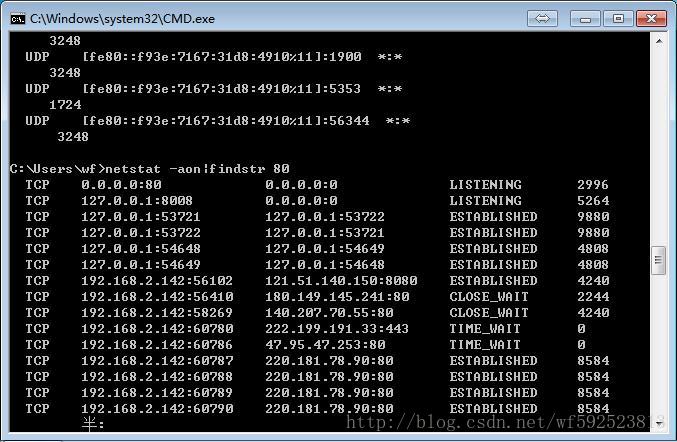
2. Enter netstat -aon|findstr in the CMD window to indicate the port number you want to see. Take netstat -aon|findstr 80 as an example:
3. As can be seen from the figure below, there is a program occupying port 80. On the far right is the process ID occupying the program: 2996;

4. Knowing the process ID, we just need to find out which program 2996 is. Continue typing the following command: tasklist|findstr “2996”, where 2996 is the previous process ID.
closes the corresponding process

    taskkill /F /IM httpd.exe  

View port status

netstat -aon

package R does not exist

This error is usually the result of not writing or incorrectly writing the package name in the source file. Note that this error is consistent with the package name in the Androidmanifest.xml.

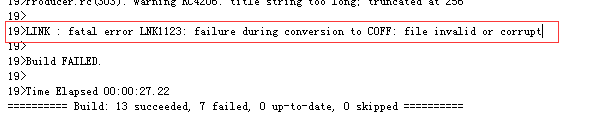
Link: fatal error lnk1123: failure during conversion to coff: file in

After VS2010 went through some updates, there was an error “Error LNK1123” when setting up the Win32 Console Project.

 
The solution is:
Step 1: change: project | project property | configuration property | listing tool | input and output | insert the option “yes” to “no” in the listing, but do this for every new project.
Step 2: change: item | item property | configuration property | connector | manifest file | embed the list option “yes” to “no”.
Step 3: Usually the computer will solve the problem after two steps of setup, but if there is still a problem, then click on the solution:
Is the computer a 64BIT operating system?If so, continue with the following:
Find if there are two Cvtres.exe.
One is C:\Program Files(x86)\Microsoft Visual Studio 10.0\vc\bin\cvtres.exe,
The other is C:\Windows\Microsoft.NET\Framework\v4.0.30319\cvtres.exe. Right-click the property | details to view both version Numbers, delete/rename the older version, or reset the Path variable.
   
Surprisingly, the cure is the third step: after you remove the old version of CVtres.exe, you don’t need to set the configuration every time.
 
Original: http://www.cnblogs.com/Michael282694/p/LNK1123.html
Attention to the public: industrial control technology home, can leave a message to ask questions, there is a need to send source code