Category Archives: How to Fix

[/ usr / share / Doc / pcre-8.32/makefile] error 127 solution

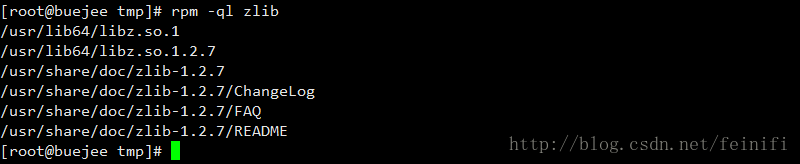
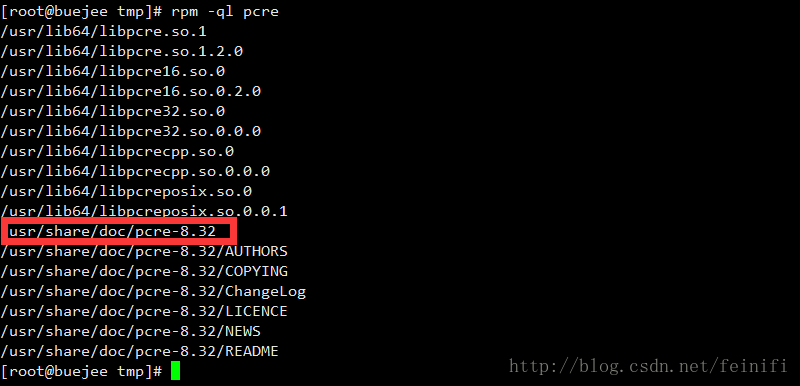
The installation of Nginx prompts the need for pcRE library, which needs to be specified by the parameter — with-PCRE. Check that the system has installed PCRE through the RMP-QL command, as shown in the figure below:

When configuring the nginx option with configurer, specifying the pcRE directory as /usr/share/doc/pcre-8.32 will not make an error, as shown in the question. The reason for this error is that — with-PCRE requires you to specify the source directory of the PCRE, not the installation directory, download the PCRE, unzip it, and then configurer specifies it to the unzip it, and when you run make again, it passes.
Zlib depends on libraries in the same way. Zlib is installed in the system, but the zlib specified by configurer cannot be /usr/share/doc/zlib-1.2.7.

You need to download Zlib and unzip it, specifying –with-zlib=/path/to/zlib-source at configurer

Error converting data type nvarchar to datetime

Today I wrote a stored procedure that executes with the current time as a parameter to the stored procedure, causing a number of problems.

See the original notation
Error. SQL error
Startsyntax near ‘)’ because the function cannot be used as a parameter to the stored procedure. Modified to
In SQL, you assign the return value of the getDate () function to a variable, and then assign it to the stored procedure variable. This error is resolved.


USE [TransferLog]
GO

DECLARE	@return_value int,

        
EXEC	@return_value = [dbo].[SSISLog_InsertQCTransferLog]
        @StartDate = getdate(),
		@LogCategoryId = 2,
		@AffectRows = '',
		@QCLastModifiedDate = N'''',
		@ErrorMessage = N'',
		@MaxAuditLogId = '',
		@MaxAuditPropertyId = ''


SELECT	'Return Value' = @return_value
SELECT CONVERT(datetime, GETDATE(), 120) AS Date
GO
USE [TransferLog]
GO

DECLARE	@return_value int,
        @timee datetime=getdate()
        
EXEC	@return_value = [dbo].[SSISLog_InsertQCTransferLog]
        @StartDate = @timee,
		@LogCategoryId = 2,
		@AffectRows = '',
		@QCLastModifiedDate = N'',
		@ErrorMessage = N'''',
		@MaxAuditLogId = '',
		@MaxAuditPropertyId = ''

SELECT	'Return Value' = @return_value
select @timee
SELECT CONVERT(datetime, GETDATE(), 120) AS Date
GO

But there it is again
The Error converting Data type, nvarchar to datetime, always thought that the Error converting type is still the wrong thing to assign to @startDate. I get a lot of replies on the Internet that say CONVERT(datetime, GETDATE(), 120) conversion type
The type of @qclastModifiedDate is also datetime, but in
Error.sql, I gave it a value
@QCLastModifiedDate=N””

After changing @qclastModifiedDate =N “, the error is gone. The database QCLastModifiedDate was written to the default value ‘1900-01-01 00:00:00 00.000’.

Right at last. True. SQL is the correct script after modification. I really need to be careful

Python calls DLL and reports an error windowserror: [error 126]

The calling code
 
Note: C++ files (CPP) : (Add extern “C” modifiers to function declarations) otherwise the method name will not be recognized by Python
Load it depending on what convention the function you’re going to call conforms to. Windll and CDLL are objects of the windll and CDLL classes, respectively
Stdcall calling convention:
Objdll = ctypes. Windll. LoadLibrary (” dllpath “)
Objdll = ctypes. Windll (” dllpath “)
Cdecl calling convention:
Objdll = ctypes.cdl. LoadLibrary(“dllpath”)
Objdll = ctypes.cdll (“dllpath”)
After the call, you can use the functions in the DLL
print Objdll.Add(1, 102)

Objdll = ctypes.cdl.loadlibrary (“D:\\ DLL \\ \PosterDetector. DLL “)
An error

USES python to call C++ DLL to report an error

Traceback (most recent call last):
File “E:/work/proc/video_web/application.py”, line 157, in < module>
Objdll = ctypes.cdl.loadlibrary (os.path.join(APP_ROOT,” DLL “,”PosterDetector. DLL “)
File “d:\python27\Lib\ctypes\ init__. Py “, line 444, In LoadLibrary
return self._dlltype(name)
File “d:\ Lib\ctypes\ ___, init__ “, line 366, in ___
self._handle = _dlopen(self._name, mode)
WindowsError: [Error 126]
To solve
The reason is that PosterDetector also relies on other DLLS,
Simply putting the two DLL files in the same directory doesn’t work, because the Python process didn’t start on the same directory as PosterDetector.

put the other DLLS and the current PosterDetector. DLL in the same folder and add the code:
os.chdir(D:\\ DLL “))

MySQL:Foreign key fails with error Error Code: 1452.

Today in MySQL, we add foreign keys to A table, the type is int, the name is not wrong, I temporarily want to add foreign keys to Table A table B, that is, the foreign keys in table A are associated with the primary key in table B.
NavigateSQL, however, always saves an operation with an error:
Foreign key fails with error error Code: 1452. Cannot add or update a child row: a Foreign key constraint fails: XXX.< result 2…

Go through Google and solve from StackOverflow!

The original B table I created temporarily had no data. When I added data to B table, I reported the same error again.

Originally, table A associated table B primary key field value, and table B value inconsistent, I manually changed the consistent “content consistent” can be!

StachOverflow:
http://stackoverflow.com/questions/7354032/foreign-key-fails-with-error-error-code-1452-cannot-add-or-update-a-child-row

Record here for accumulation!

【Bug-python】IndexError: list index out of range

IndexError: list index out of range
Error message:

The code is as follows:
with open(“linux_Yue_01.txt”,”r”) as testFile:
testfileList = [splitFileNameAndLabel(filename = v) for v testFile.read().split(“\n”)]
The picture is as follows:

Error analysis:
The “IndexError: list index out of range” error typically occurs in two ways:
The first possible case:
List [index] Index is out of range
The second possibility:
The list is empty, with no elements
Listing [0] will report this error.
Typically, there is a problem with externally entered data, so it is usually processed once after readlines or read.
This avoids empty lines, insufficient fields, and type-casting errors.
Solutions:
For the first case, check the code through debugging, not much to say.
In the second case, there are two ways:
The first: check the data read in is there a problem, such as read in the TXT file whether there is a blank line and so on, but I more advocate the second solution, in the code error correction.
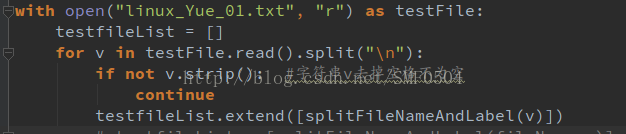
with open(“linux_Yue_01.txt”,”r”) as testFile:
testfileList = []
for v testFile.read().split(“\n”)
If not v.strip(): # string remove the space is not empty
continue
testfileList.extend([splitFileNameAndLabel(v)])
Note: [splitFileNameAndLabel(v)] is square again, otherwise it would not be a nested list in a list
The picture is as follows:

Magento installation error: database connect error

Install Magento, configure the database, report this error, all the database, database name, password are correct, but, still cannot resolve.

Mysql5.6 causes this problem.

Solutions:
More detailed visit http://www.magentocommerce.com/boards/viewthread/228456/
The problem is due to the mySQL5.6.2 deletion of the have_innoDB variable. Cause “Database Connection error” when installing Mangento1.5.
Solution: find the ‘app/code/core/Mage/Install/Model/Installer/Db. PHP’, delete or comments to the following code.
The problem was an evolution from The mysql 5.6.2 which remove ‘have_innodb variable (see http://forums.mysql.com/read.php?3415, 985).
The Magento 1.5.1 Installation wizard doesn’t work with this mysql version, retrieving all The time ‘Database Connection Error’.
For the moment, until the patch, after having checked the innodb format of your db,
you can from this file ‘app/code/core/Mage/Install/Model/Installer/db. PHP’, remove the following code:

// check InnoDB support
/* if (! Isset ($variables [‘ have_innodb ‘]) | | $variables [‘ have_innodb ‘]! = ‘YES’) {
Mage:: Mage::helper(‘ install ‘)-> __ (‘ the Database server does not support the InnoDB storage engine. ‘));
}*/

Error Kernel Pattern

2019 Unicorn enterprise heavily recruited Python engineer standard & GT; > >

Because I saw the word “Error Kernel Pattern” when looking at Akka’s materials, I wanted to check the meaning of the materials.
The concept of Error Kernel is introduced in Roland Kuhn’s Reactive Design Patterns book.
Let me translate this:

“In a supervisory hierarchy, keep important application state or functionality near the root directory while delegating dangerous operations to the leaves.”
This pattern, built on the Simple Component pattern, is suitable for combining components with different failure probabilities and reliability requirements anywhere in a larger system or application — some features of the system must never fail, while others must fail. Applying the simple component pattern usually puts you in this position, so you need to be familiar with the error kernel pattern.
This pattern has been built into The Erlang program for decades, and was one of JonasBoner’s main inspirings for implementing the Actor frame-Akka on the JVM. The name Akka was originally thought to be a palindrome from the Actor Kernel, referring to this core design pattern.

Since this pattern is designed according to the simple component pattern, translate what the author wrote.

“A component can only do one thing, but do it all.”
This pattern applies anywhere the system performs multiple functions, or it performs functions that are so complex that they need to be broken down into different components. An example is a text editor that includes spell checking: two separate functions (editing can be done without spell checking, and spelling can be done on finished text without editing), but on the other hand, these functions are simple.
The simple component pattern originates from the principle of single responsibility proposed by Tom DeMarco in his 1979 book “Structural Analysis and System Specification” (Prentice Hall). In its abstract form, it requires “maximizing cohesion and minimizing coupling.” Applied to object-oriented software design, it is generally stated as follows: “A class should have only one reason to change.”


Reference: https://www.reactivedesignpatterns.com/patterns/error-kernel.html

Reproduced in: https://my.oschina.net/u/2277632/blog/2934056

ERROR 1040 (08004): Too many connections

ERROR 1040 (08004): Too many connections
In the long run, in the lower versions of mysql, too many connections can be tricky when the number of connections increases dramatically. Today, in mysql Community version 8.0.17, the operation is being tested and documented. This feature has been available in previous versions of Percona. You will never have to restart the service again.

mysql> show variables like '%max_conn%';
+------------------------+---------+
| Variable_name          | Value   |
+------------------------+---------+
| max_connect_errors     | 1000000 |
| max_connections        | 1024    |
| mysqlx_max_connections | 100     |
+------------------------+---------+
3 rows in set (0.00 sec)

mysql> set global max_connections=2;
Query OK, 0 rows affected (0.00 sec)

# Administration port

mysql> show variables like '%port%';
+--------------------------+-------+
| Variable_name            | Value |
+--------------------------+-------+
| admin_port               | 33062 |
| large_files_support      | ON    |
| mysqlx_port              | 33060 |
| mysqlx_port_open_timeout | 0     |
| port                     | 3306  |
| report_host              |       |
| report_password          |       |
| report_port              | 3306  |
| report_user              |       |
| require_secure_transport | OFF   |
+--------------------------+-------+
10 rows in set (0.02 sec)

Note: The admin_port parameter does not need to be explicitly specified; if your mysql port is 3306, 33062 is shown here.
# Open the first connection

[root@fudao_db_cluster_001 ~]#  mysql -utest_r -h 10.192.30.53 -p'f9p%VSfXxcY3kHLJmKIi'
mysql: [Warning] Using a password on the command line interface can be insecure.
Welcome to the MySQL monitor.  Commands end with ; or \g.
Your MySQL connection id is 26
Server version: 8.0.17 MySQL Community Server - GPL

Copyright (c) 2000, 2019, Oracle and/or its affiliates. All rights reserved.

Oracle is a registered trademark of Oracle Corporation and/or its
affiliates. Other names may be trademarks of their respective
owners.

Type 'help;' or '\h' for help. Type '\c' to clear the current input statement.

mysql> 

# Open the second connection

[root@fudao_db_cluster_001 local]# mysql -utest_r -h 10.192.30.53 -p'f9p%VSfXxcY3kHLJmKIi'
mysql: [Warning] Using a password on the command line interface can be insecure.
Welcome to the MySQL monitor.  Commands end with ; or \g.
Your MySQL connection id is 27
Server version: 8.0.17 MySQL Community Server - GPL

Copyright (c) 2000, 2019, Oracle and/or its affiliates. All rights reserved.

Oracle is a registered trademark of Oracle Corporation and/or its
affiliates. Other names may be trademarks of their respective
owners.

Type 'help;' or '\h' for help. Type '\c' to clear the current input statement.

mysql> 

Open the third connection

[root@fudao_db_cluster_001 local]#  mysql -utest_r -h 10.192.30.53 -p'f9p%VSfXxcY3kHLJmKIi'
mysql: [Warning] Using a password on the command line interface can be insecure.
ERROR 1040 (08004): Too many connections
[root@fudao_db_cluster_001 local]# 

Log in locally with the admin port

[root@fudao_db_cluster_001 local]# mysql -h 127.0.0.1 -uadmin_m -p'rA75MQy*R*y@KO4z%LZe' -P 33062
mysql: [Warning] Using a password on the command line interface can be insecure.
Welcome to the MySQL monitor.  Commands end with ; or \g.
Your MySQL connection id is 29
Server version: 8.0.17 MySQL Community Server - GPL

Copyright (c) 2000, 2019, Oracle and/or its affiliates. All rights reserved.

Oracle is a registered trademark of Oracle Corporation and/or its
affiliates. Other names may be trademarks of their respective
owners.

Type 'help;' or '\h' for help. Type '\c' to clear the current input statement.

mysql> 

As can be seen above, when the number of connections of ordinary users is full, the super user can only log in with local 127.0.0.1 or localhost.

[root@fudao_db_cluster_001 local]# mysql -h 10.192.30.53 -uadmin_m -p'rA75MQy*R*y@KO4z%LZe' -P 33062
mysql: [Warning] Using a password on the command line interface can be insecure.
ERROR 2003 (HY000): Can't connect to MySQL server on '10.192.30.53' (111)
[root@fudao_db_cluster_001 local]# 


Reproduced in: https://www.cnblogs.com/bjx2020/p/11339780.html
Solve GitHub push error 403 Forbidden while accessing

The business scenario

I originally created a Repository on Github, called Github_test, and Uploaded some files. But in a few years, I want to use the Repository again, update and upload files.

I clone the Repository on a virtual machine, modify and add some files, and want to update to Github.

Here’s how I did it

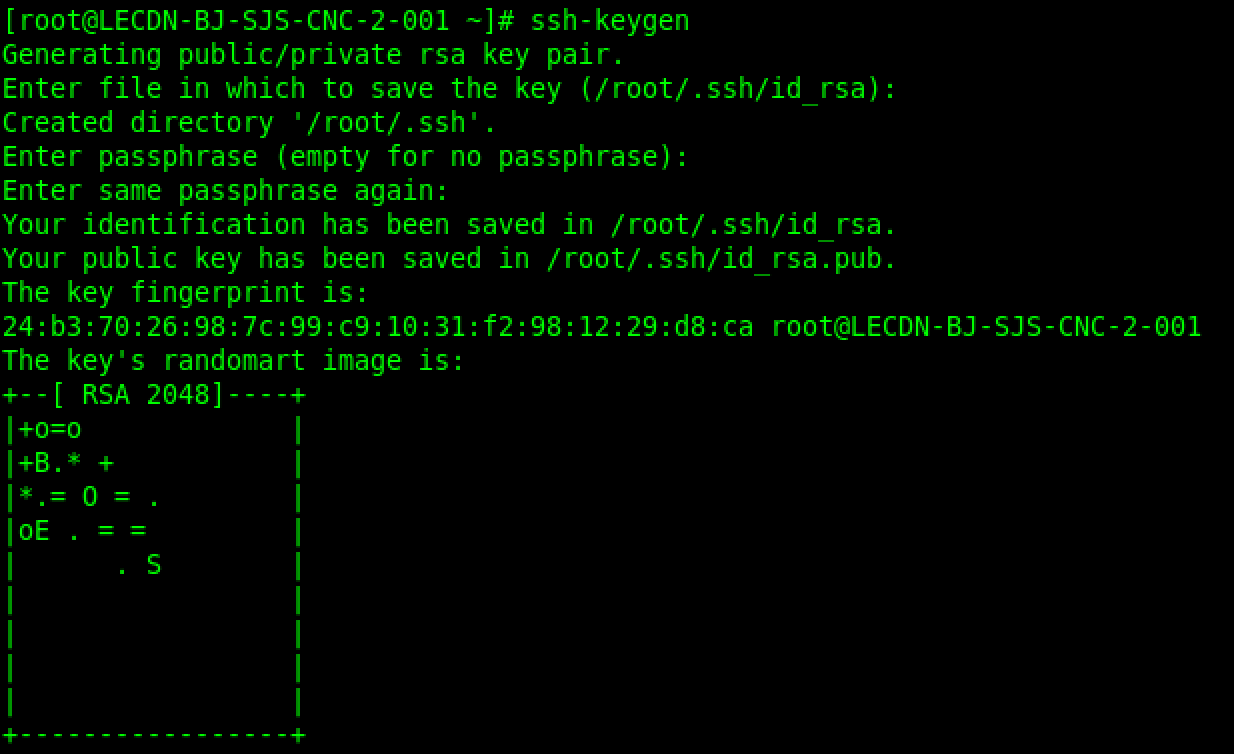
I created the public and private keys using SSH-Keygen,


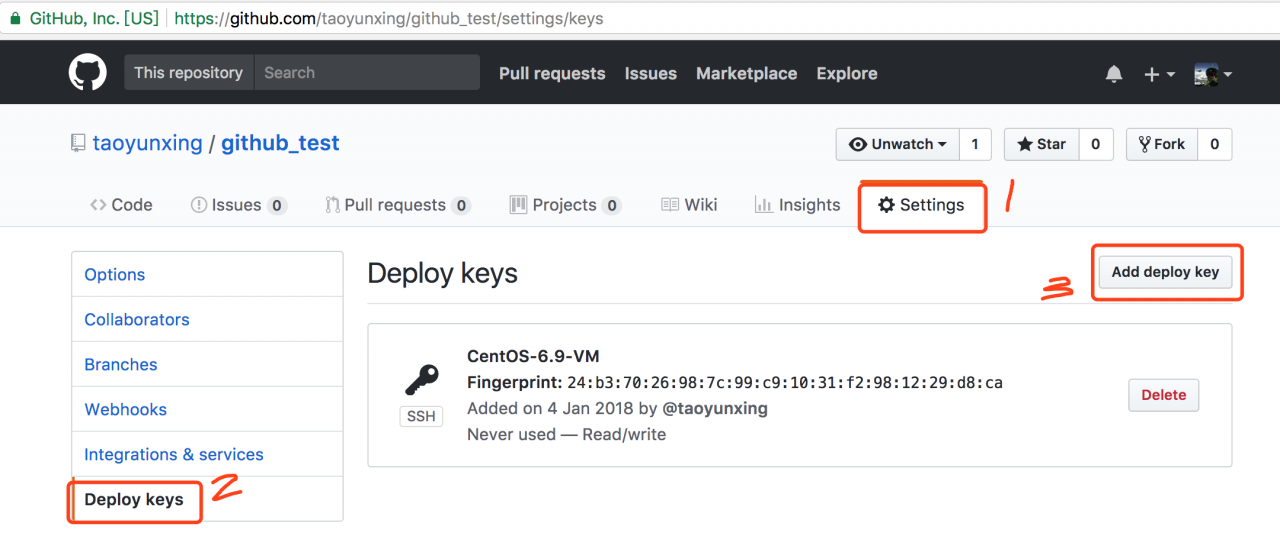
The public key

The cat ~ /. SSH/id_rsa. Pub

To submit to Github, here are the steps


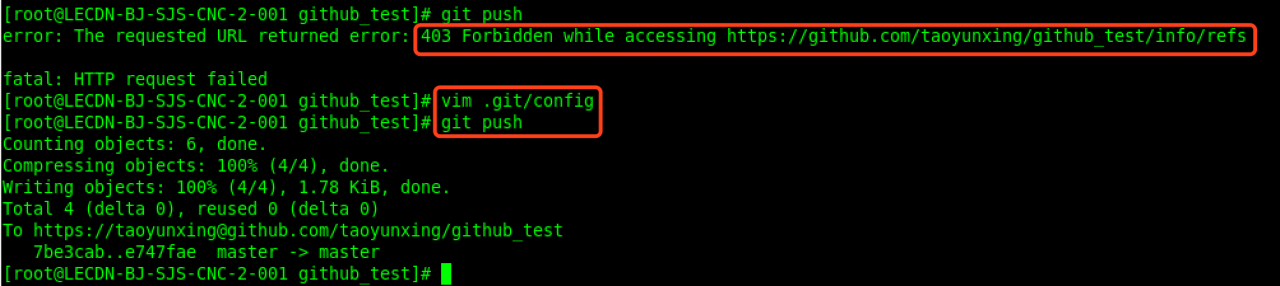
But I encountered the following error on Git Push:

git push

error: The requested URL returned error: 403 Forbidden while accessing https://github.com/taoyunxing/github_test/info/refs

fatal: HTTP request failed

The solution

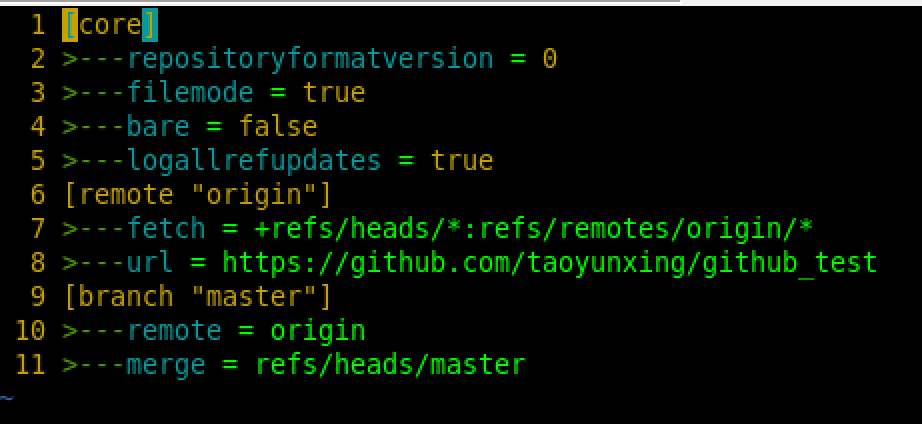
vim .git/config

Modify the

[remote “origin”]

url =
https://github.com/taoyunxing/github_test

To:

[remote “origin”]

url =
https://[email protected]/taoyunxing/github_test

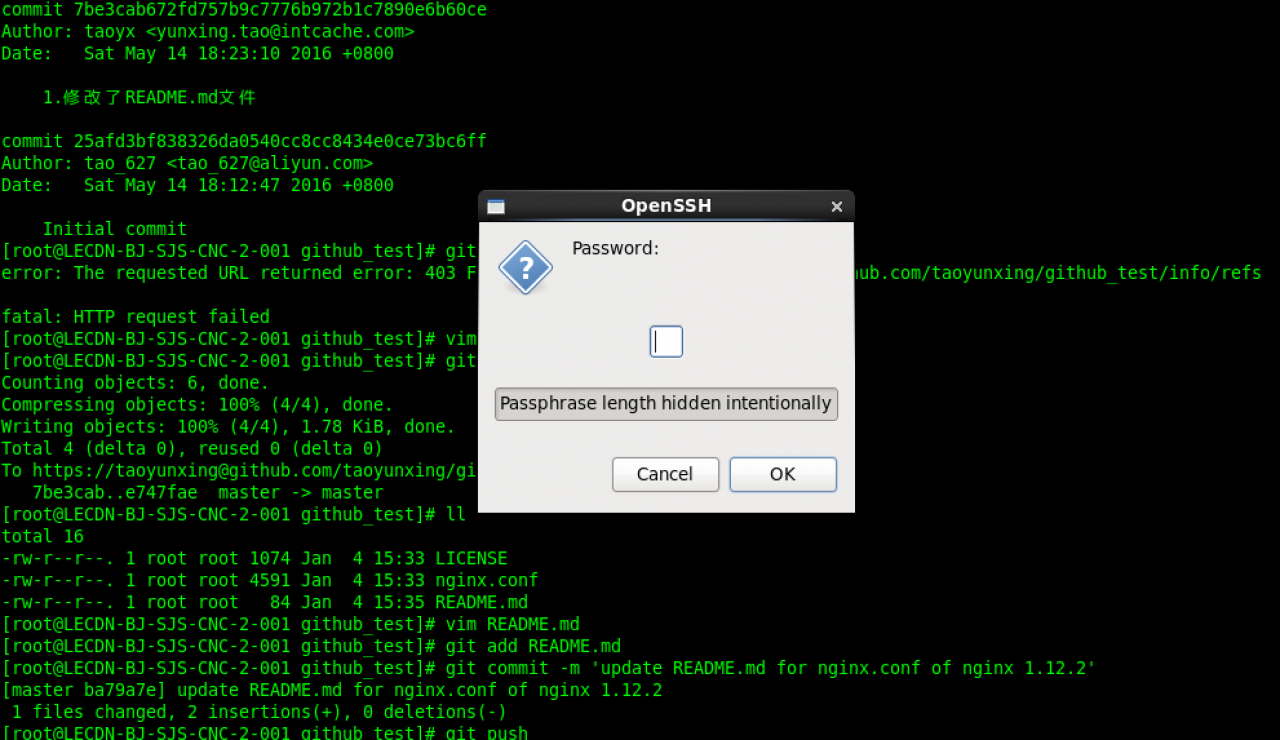
Git push again, enter the password for the entire Github account in the pop-up box, and you can commit


conclusion

Here’s a hint:

Any repository I have on Github, and if I want to commit code on some new terminal machine and I forget about the public key, I can generate a pair of public and private keys locally, upload the public key to the repository, and happily push git code.

reference

[1].
http://blog.csdn.net/happyteafriends/article/details/11554043

Mongodb encountered an error: connect econnreused 127.0.0.1:27017

Node with MongoDB is configured to appear when access is completed
Error: reach econnunion 127.0.0.0.1 :27017, return Error
The reason is that your MongoDB database is not open,
The solution under Node can be turned on by Mongod
 
Here are the links I found:
https://cnodejs.org/topic/5646b746c5dcc06702210adf
https://stackoverflow.com/questions/36400233/connect-econnrefused-127-0-0-127017

Reproduced in: https://www.cnblogs.com/herewego/p/9278904.html