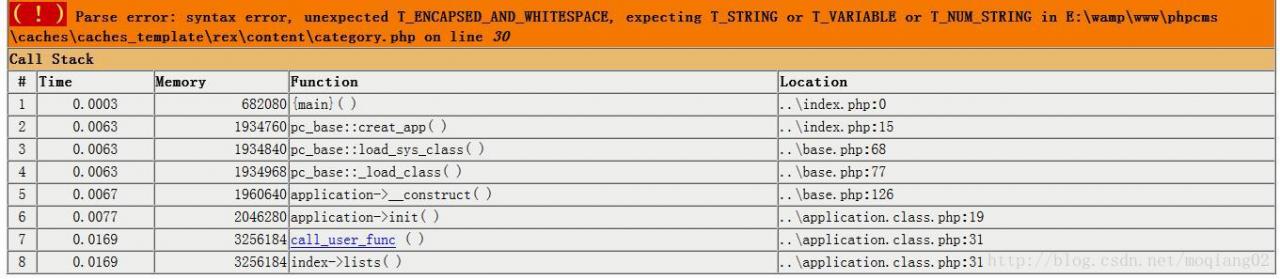
I customized a variable in the PHPCMS template with a value assigned by the PC tag.
< ?php $url=”{$v[url]}”; ?>
Results reported as above error.
You should actually change the PHP statement to:
< ?php $url=$v[url]; ?>
When the application of statsmodels is updated to the latest scipy version, an ImportError: cannot import name ‘factorial and:
attempts to raise an error and fail to find the reason.
There seems to be a problem with one of the functions in the latest version of SCIPY. The solution is to remove the new version and restore SCIPY to version 1.2
The solution removes the previous version
and installs it with PIP
$ pip install scipy==1.2.0 -i https://pypi.doubanio.com/simple/ --trusted-host pypi.doubanio.com django
I’m using the image of douban
gyp ERR! configure error
gyp ERR! stack Error: EACCES: permission denied, mkdir '/Users/wlk_yodinfo/Documents/front_projects/diy-cli/node_modules/fsevents/build'
gyp ERR! System Darwin 18.5.0
gyp ERR! command "/usr/local/bin/node" "/usr/local/lib/node_modules/npm/node_modules/node-gyp/bin/node-gyp.js" "configure" "--fallback-to-build" "--module=/Users/wlk_yodinfo/Documents/front_projects/diy-cli/node_modules/fsevents/lib/binding/Release/node-v64-darwin-x64/fse.node" "--module_name=fse" "--module_path=/Users/wlk_yodinfo/Documents/front_projects/diy-cli/node_modules/fsevents/lib/binding/Release/node-v64-darwin-x64" "--napi_version=4" "--node_abi_napi=napi" "--napi_build_version=0" "--node_napi_label=node-v64"
gyp ERR! cwd /Users/wlk_yodinfo/Documents/front_projects/diy-cli/node_modules/fsevents
gyp ERR! node -v v10.16.0
gyp ERR! node-gyp -v v3.8.0
gyp ERR! not ok
Analysis reason:
packet download security problem, guess NPM download default is to pull a safe package to node_modules, so if it is judged not safe enough, will not be pulled down, and will throw an error record
Solutions:
sudo npm i --unsafe-perm
If not, try this:
sudo rm -rf ~/.node-gyp
sudo npm cache clean -f
sudo npm install -g n
sudo n stable
sudo npm i --unsafe-perm
Finally, I found that in the implementation file.CPP, I used using NAMESPACE STD;
Solutions:
1. Use count instead of ::count (because STD ::count is also in the STD namespace, the compiler is not sure if it is ::count or STD ::count)
Comment out the namespace
3. Or:
using std::cout;
using std::endl;
using std::cin;
Reflection summary:
I. Thinking using NAMESPACE STD
A lot of times it’s not a good idea to use this code (and more importantly: it’s best not to use it in header files)
A good habit is to use STD ::cout and STD ::cin
All the identifiers of the c + + standard library is defined in a namespace called STD, using namespace STD is to import all the system defined identifier, because of the standard library is very large, the programmer when choosing the name of a class or function name is probably has one of the same name, and the standard library that is your own definition of things (variables, methods, classes, etc.) and the system of the identifier name repetition, otherwise there will be a naming conflict error!
C++ definition of global variables
1. It is generally a good idea to declare global variables in a CPP file (if defined in a.h file, multiple layers contain errors that may cause duplication of definitions)
2. Once defined in CPP, you can use the extern keyword in the.h file for an extern declaration (the extern declaration represents the declaration that an externally defined variable is introduced here, rather than another local variable with the same name being declared in this compilation unit)
Then, when other files want to use these variables, just the #include header file is fine, and it won’t cause a double-definition error
3. Comparison of static global variables, global constants (CONST) and ordinary global variables:
1. Static global variables: They can’t be introduced with extern, i.e., extern and static cannot be used together. And static globals are quite different from normal globals.
Static modification of the scope of a global variable is just its own compilation unit (in this compilation unit changes to take effect), when used in other units, the variables have a new memory address, that is, each compilation unit USES it to it opened up a separate space, and make a copy of its original value, so if a unit to modify it, then its value in multiple compilation unit may not be the same
Note:
The static modifier is static, static, static, static, static, static, static, static, static, static, static.
Multiple units contain the static global header file, which doesn’t cause a redefinition error because each unit creates a new space to store it.
2. Global const variable: const like common global variables, global variables to use in a. CPP and initialization, defined in. H header file using extern declaration, then you need to use the place contains. H, its memory address is also different in the multiple compilation unit (this is similar to the static global variable), but because of is constant, not modify the value, so even if the memory address didn’t influence, different values are the same.
Also useless to, refer to: http://blog.csdn.net/jiadebin890724/article/details/40509333
Four, the use of namespaces
To be continued…
Error:Cannot run program “F:\WINDOWS Application Installation \ JRE \bin\ Java “(in directory “C:\Users\ Li Junde \.IntelliJIdea2018.1\ System \ Compile-Server “): CreateProcess Error =2, the system could not find the specified file.

Ii. Problem analysis
By observing the Intellij IDEA error, we know that it was caused by a failure to find the correct installation path for the JDK(Java Development Kit). There are many reasons why Intellij IDEA might not find the JDK: Maybe you accidentally removed it; Or if you install the JDK in a path with Chinese characters, Intellij IDEA does not recognize paths with Chinese characters; Or maybe you accidentally configured the WRONG ENVIRONMENT variable for the JDK on your computer.
The wrong solution
1. Make sure we have the JDK installed on our computer
In 2019, the new version of the JDK(also known as Java) already has the JDK and JRE bundled in it, so installing the JDK is equivalent to installing the JDK and JRE.
Press and hold Windows+R on the computer keyboard, pops out and run program, enter CMD and to confirm. enter Java --version in the black box console to view the Java version number.
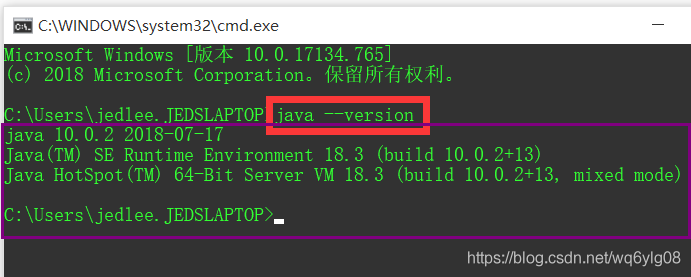
If your computer pops up a prompt like the one above (describing the Java version number, release date, etc.), then your computer has the JDK installed correctly, and we go straight to the next step. Otherwise, it means that your computer did not properly install the JDK, you still have to search the latest version of Java in 2019 Java10 and above Java installation tutorial, the bloggers do not recommend small white users to install the old version of Java, the old version of Java needs to install the Java JDK and JRE, also need to configure environment variables, small white users are easy to make mistakes.
2. Properly set the JDK installation path at Intellij IDEA
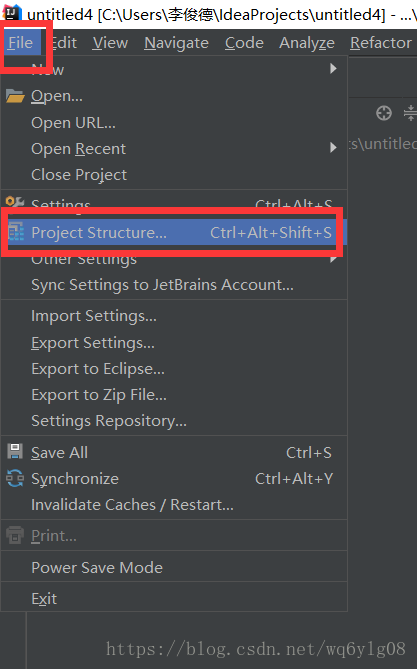
Click the File option in the upper-left menu bar of Intellij IDEA, and then click the Project Structure sub-option.
In the configuration page for Project Structure, the project-JDK must not be red as shown in the figure below, because red indicates that there is no corresponding JDK under the file path.
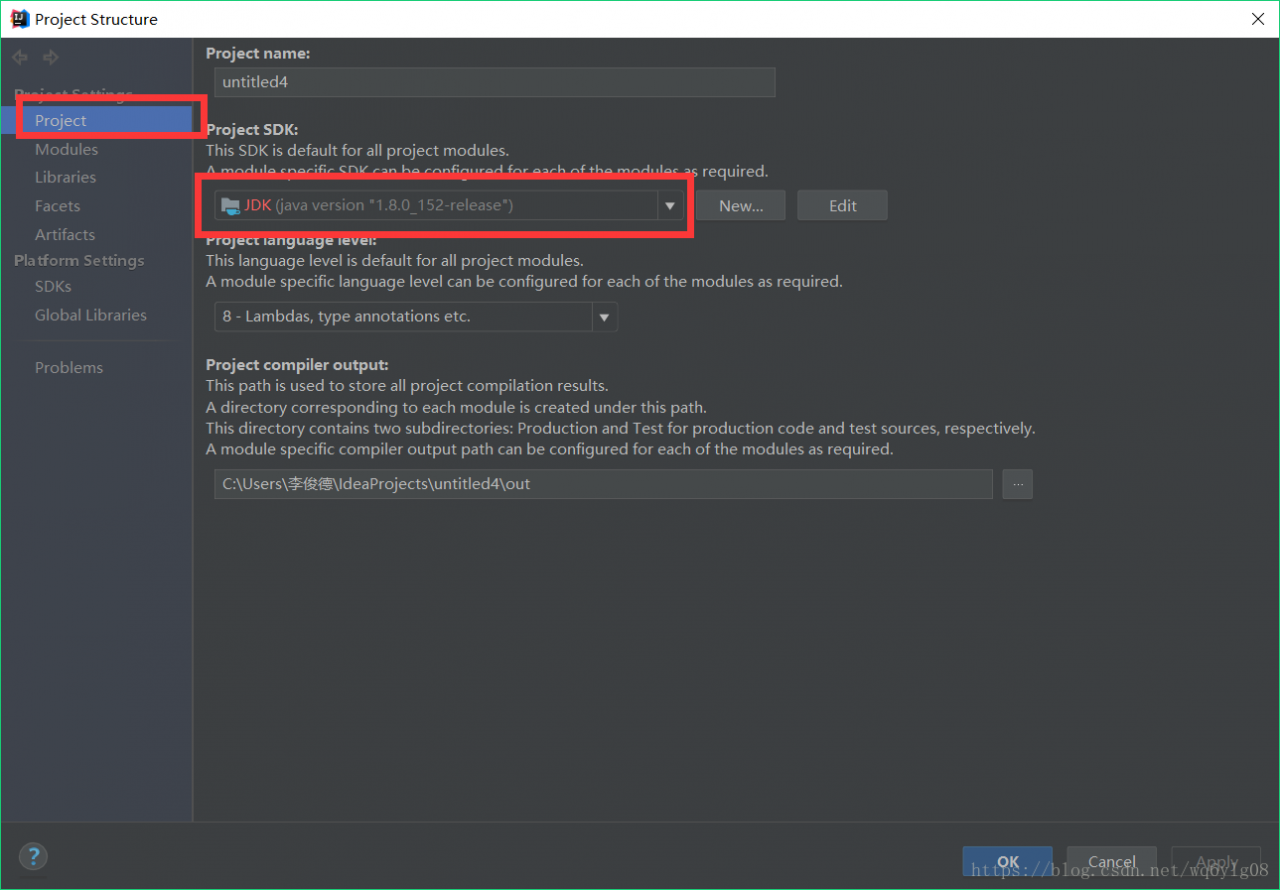
First, make sure that you have followed the first step above to find the current Java version on your computer through the black box command Java — Version. Otherwise, you will have to reinstall the JDK before you see this step. Under the Project SDK TAB, we clicked on the small triangle arrow in the drop-down box to see if Intellij IDEA had helped us find an alternative JDK version. If so, we checked that Intellij IDEA was basically back to normal by selecting the existing JDK in the drop-down box.
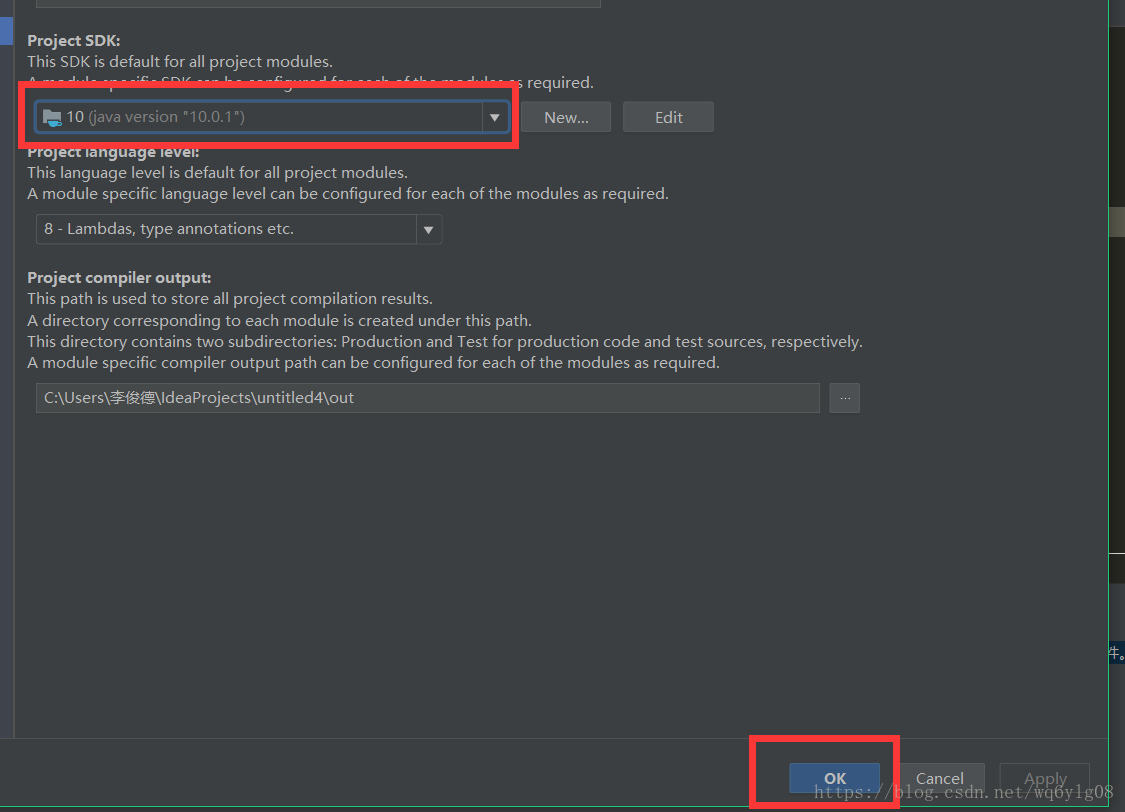
If there is no existing JDK version in the drop-down box, we need to manually click New… , then select the “install the latest JDK on our computer properly” installation path. If you’ve just reinstalled the JDK you must remember the JDK installation path. If you’ve forgotten where you installed the JDK, type Java –verbose — in the black box and the JDK installation path appears at the end of the command line.
3. Save the configuration of Project Structure and recompile it to run the Java program normally
After OK, compile Run again to Run the Java program as normal.


File: http://sub.xxx.com/index.html
& lt; ! doctype html>
< html>
< head>
…
< /head>
< body>
…
& lt; iframe id=”iframe_xxxx” name=”iframe_xxxx” src =”http://www.xxx.com/sub.html” frameborder=”0″ height=”300″ width=”1000″> < /iframe>
< /body>
< /html>
File: http://www.xxx.com/sub.html
& lt; ! doctype html>
< html>
< head>
< script type=”text/javascript”>
// set domain information
document.domain = ‘xxx.com’;
// set domain information
document.domain = ‘xxx.com’;
// set the iframe height of the parent page to reference itself
function setHeight(){
//
if(window.top! = window. Self) {
the parent. The document. The getElementById (‘ iframe_xxxx). Height = document. The body. The scrollHeight + 20
}
} & lt; /script>
< /head>
< Body &western nl &western AD = “setHeight ();” >
…
< /body>
< /html>
= = = = = = = = = = = = = = = = = = = = = = = = = = = = = = = = = = = = = = = = = = = = = = = = = = = = = = = = = = = =
the problem is caused by the browser’s security mechanism,
but it is under the same domain subdomain and secondary subdomain difference, can be solved.
the solution is to change the domain information of the two pages to be the same.
because the default page’s domain information contains the second-level domain, this setting allows the use of the top-level domain as the domain information.
< script type=”text/javascript”>
document.domain = ‘xxx.com’;
< /script>
Note: This method is not feasible if two pages do not belong to the same domain name. Forced setting js will report an error. Addition: if we are not sure whether the referenced page is in the same domain as the referenced page, we can determine this by obtaining the url address of the referenced page
< script type=”text/javascript”>
//document.referrer – returns the URL of the document that was loaded with the current document.
$p_url = document.referrer;
< /script>
//= = = = = = = = = = = = = = = = = = = = = = = = = = = = = = = = = = = = = = = = = = = = = = = = = = = = = = = = = = = =
Reference: http://hi.baidu.com/eecc00/item/7c99477420e9f1345c1789e3
but the following problems will occur:
[color=red]firefox sec_error_untrusted_issuer[/color]
solution
[img]http://dl.iteye.com/upload/picture/pic/122368/d378a637-4b15-3bef-b62d-18be23033245.jpg[/img]
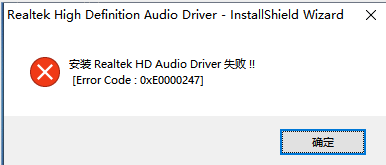
Realtek HD Audio Driver Driver failed to install Error Code:0xE0000247
The problem
After win10 reinstalled, found that the system has no sound, thought it was a driver problem, installed a moving wizard, installed several versions of the sound card drive, egg is not used, but also let me repair this repair that, no egg, has been prompted
why
A little wit, little knowledge
To solve
My motherboard belongs to Asus, so I can find the server support directly on the asus motherboard’s official website:

Search models:
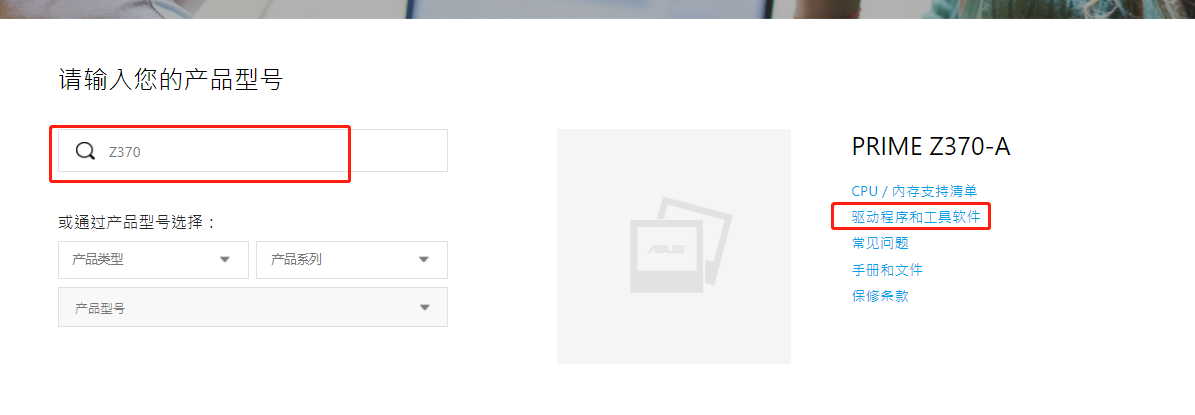
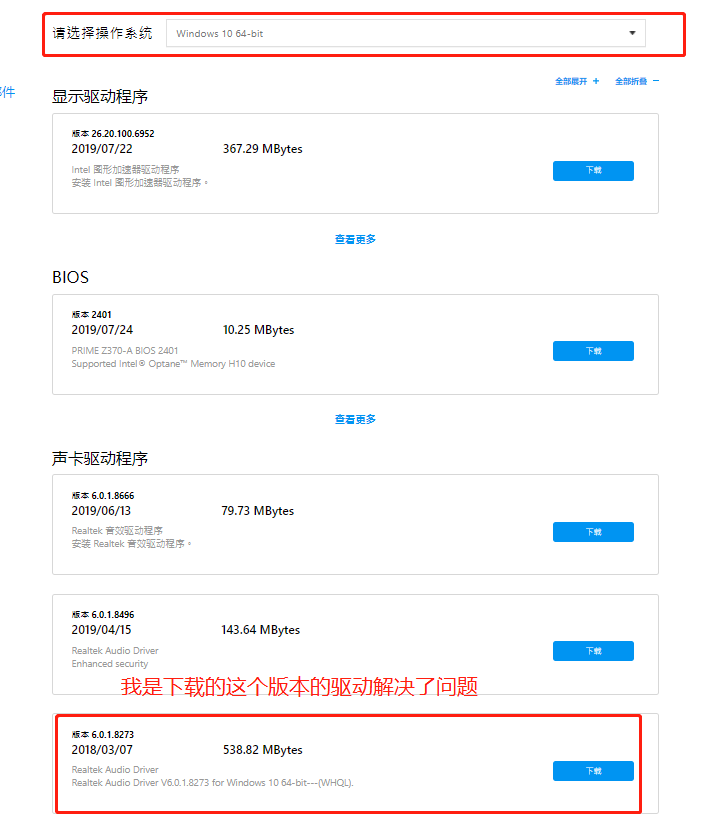
Select the operating system and download the driver: