Category Archives: How to Fix

Stata external commands: the most common and up-to-date commands


Author: lian yu jun (lingnan college, sun yat-sen university)

original text: lian yu jun zhihu column

. Stata highlights ||


The article directories
Listing 3 Most commonly used external commands 4 Newly published external commands 5 Additional instructions

1 the feed

Today, stata is in its 15th release and is getting better and better. Still, diligent Stata users continue to develop new programs every day, narrowing the gap between theoretical metrics and practical applications. Let’s take a look at stata’s resources for external commands, including: Where do you get external commands?What external commands are the most commonly used and popular?What are the latest releases?Paying attention to these external commands can greatly improve the efficiency of our analysis.

The best way to get external commands is to use the -findit – command, and when the search is complete, follow the prompts of Stata to download and install the corresponding command and the sample data or dofiles provided by the author (if any). As you can see, Stata | is Adding user-written commands.


List of external commands
Stata has a complete list of external commands on its website.


3 The most common external commands
Enter SSC hot, n(10) to display the top 10 commands that have attracted the most attention in the past three months:

May 2017                  
Rank  # hits    Package     Author(s)
----------------------------------------------------
        Aug 2018   
  Rank   # hits    Package       Author(s)
  ----------------------------------------------------------------------
     1  331271.0    findname      Nicholas J. Cox                         
     2  19504.6    outreg2       Roy Wada                                
     3  18223.6    estout        Ben Jann                                
     4  11066.7    distinct      Gary Longton, Nicholas J. Cox           
     5   7746.3    winsor        Nicholas J. Cox                         
     6   6881.7    winsor2       Lian Yu-jun                             
     7   6598.7    ivreg2        Mark E Schaffer, et al.                      
     8   6579.3    ivreg210      Mark E Schaffer, et al.                        
     9   6571.1    ivreg28       Mark E Schaffer, et al.                         
    10   6561.8    ivreg29       Christopher F Baum, et al.                        
----------------------------------------------------
(Click on package name for description)

It can be seen that the –outreg2– and –estout-commands used to output regression results and statistics tables are ranked second and second respectively; When dealing with outliers, the most commonly used indentation –winsor– and –winsor2– commands rank 5th and 6th respectively.
These commands can be installed directly to your computer using the – SSC install– command. Of course, you can also directly click the command name (stata window appears in blue with connection), and click click here to install in the following popup interface.

--------------------------------------------------
package winsor2 
from http://fmwww.bc.edu/RePEc/bocode/w
--------------------------------------------------
TITLE
      'WINSOR2': module to winsorize data

DESCRIPTION/AUTHOR(S)

   winsor2 can winsorize a varlist, 
   operate with the by prefix,
   and offers a replace option.

   KW: winsor
   KW: winsorize
   KW: data management

   Requires: Stata version 8

   Distribution-Date: 20141222

   Author: Lian Yu-jun, Department of Finance, 
          Sun Yat-Sen University, China
   Support: email [email protected]


INSTALLATION FILES     (click here to install)
      winsor2.ado
      winsor2.sthlp
--------------------------------------------------
(click here to return to the previous screen)

4 Newly issued external commands
To see what new external commands have been issued in the last month, simply type SSC new. The search page displays dozens of new commands. Here are some of the more interesting ones to explain.
The ddid command is used to implement a more general DID model. Its main feature is to allow multi-period policy shocks, and policy shocks can occur at different time points. CORR2DOCX is published by li chuntao, a teacher of zhongnan economics and law, which is used to output Spearman and Pearson correlation coefficient into word documents. TWITTER2STATA can download the data from Twitter directly to stata. XTGCAUSE command USES Dumitrescu & A method proposed by Hurlin (Economic Modelling, 2012) was used to test whether Granger causality existed in heterogeneous panels.

SSC Stata modules created or 
revised 2017-07-09 to 2017-08-09
--------------------------------
THSEARCH
 module to evaluate threshold search model for non-linear models 
 based on information criterion
 Authors: Ho Fai Chan  Brenda Gannon  David Harris  Mark Harris       
 Req: Stata version 7
 Created: 2017-08-05

DDID
 module to compute pre- and post-treatment estimation of the  
 Average Treatment Effect (ATE) with binary time-varying treatment
 Authors: Giovanni Cerulli       
 Req: Stata version 14
 Created: 2017-07-31

CORR2DOCX
 module to report Pearson & Spearman correlation coefficients 
 to formatted table in DOCX file
 Authors: Chuntao Li   Zijian Li  Yuan Xue       
 Req: Stata version 15
 Revised: 2017-08-04

SICFF
 module to create Fama French Industry Variable from SIC Code
 Authors:   Tyson Van Alfen       
 Req: Stata version 10
 Created: 2017-07-24

TWITTER2STATA
 module to import data from Twitter
 Authors: Kevin Crow       
 Req: Stata version 15
 Revised: 2017-07-31

SMCLPRES
 module to create a SMCL presentation from a do file
 Authors: Maarten L. Buis       
 Req: Stata version 8
 Revised: 2017-07-16

XTGCAUSE
 module to test for Granger non-causality in heterogeneous panels
 Authors: Luciano Lopez  Sylvain Weber       
 Req: Stata version 13.1
 Revised: 2017-07-31

To view all external commands issued by SSC, you can browse the Boston College Department of Economics or view them in the Stata command window. The command is: net from Index of /RePEc/bocode


5 Other Instructions
To view all external commands that have been installed, just type – ado-command; To update these external commands, use –adoupdate-; To uninstall these external commands, you can use –ado uninstall-; In addition to SSC, the UCLA website also provides a number of Stata external commands (all of which can be searched in the Stata command window using the findit command). The Stata column at UCLA provides a number of resources for learning about Stata.


Author: Lian Yujun (Associate Professor of Finance department, Lingnan College, Sun Yat-sen University)
Online course: | online Stata course for lian yu jun, | special subject course for youku Stata open course


check a tree is balanced or not

Question:
Given a binary tree, check whether it is balanced or not.
Analyze:

Consider a height-balancing scheme where following conditions should be checked to determine if a binary tree is balanced.
An empty tree is height-balanced. A non-empty binary tree T is balanced if:
1) Left subtree of T is balanced
2) Right subtree of T is balanced
3) The difference between heights of left subtree and right subtree is not more than 1.
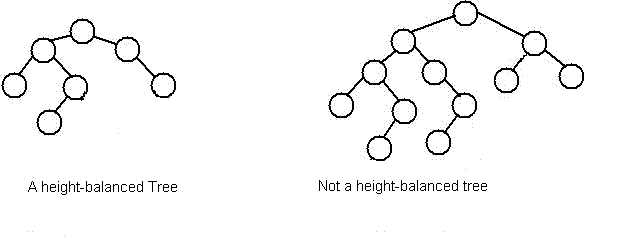
The above height-balancing scheme is used in AVL trees. The diagram below shows two trees, one of them is height-balanced and other is not. The second tree is not height-balanced because height of left subtree is 2 more than height of right subtree.

To check if a tree is height-balanced, get the height of left and right subtrees. Return true if difference between heights is not more than 1 and left and right subtrees are balanced, otherwise return false.
Code:

/**
 * Definition for binary tree
 * public class TreeNode {
 *     int val;
 *     TreeNode left;
 *     TreeNode right;
 *     TreeNode(int x) { val = x; }
 * }
 */
public class Solution {
    public boolean isBalanced(TreeNode root) {
        if (root == null) return true;
        if (Math.abs(height(root.left) - height(root.right)) > 1) return false;
        return isBalanced(root.left) && isBalanced(root.right);
    }
    
    public int height(TreeNode root) {
        if (root == null) return 0;
        return Math.max(height(root.left), height(root.right)) + 1;
    }
}

The complexity of the code above is O(N^2). However, some interviewers may ask to provide solution with O(N) complexity. Below is the solution with O(N) complexity. The main idea is if the subtree is balanced, return the true height, else, return -1. Therefore, the parent node of that unbalanced subtree also has -1 height.

public class Solution {
    public boolean isBalanced(TreeNode root) {
        return getDepth(root) >= 0;
    }
    
    public int getDepth(TreeNode node) {
        if (node == null) return 0;
        int leftDepth = getDepth(node.left);
        if (leftDepth < 0) return -1;
        
        int rightDepth = getDepth(node.right);
        if (rightDepth < 0) return -1;
        
        if (Math.abs(leftDepth - rightDepth) > 1) return -1;
        return Math.max(leftDepth, rightDepth) + 1;
    }
}

Reference: 

http://www.geeksforgeeks.org/how-to-determine-if-a-binary-tree-is-balanced/
http://blog.theliuy.com/2012/balanced-binary-tree/

How to uninstall IDM (Internet Download Manager)

Reason: IDM is too much trouble. It pops up every time you download it. Some pages don’t need it, but it pops up anyway
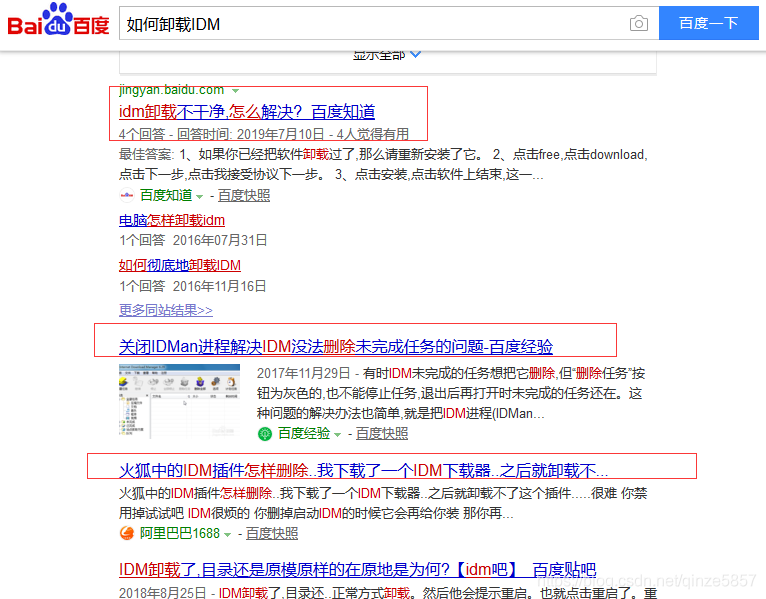
Search Baidu results:

Solutions:
1 download IDM official download software package;
Start installing the package

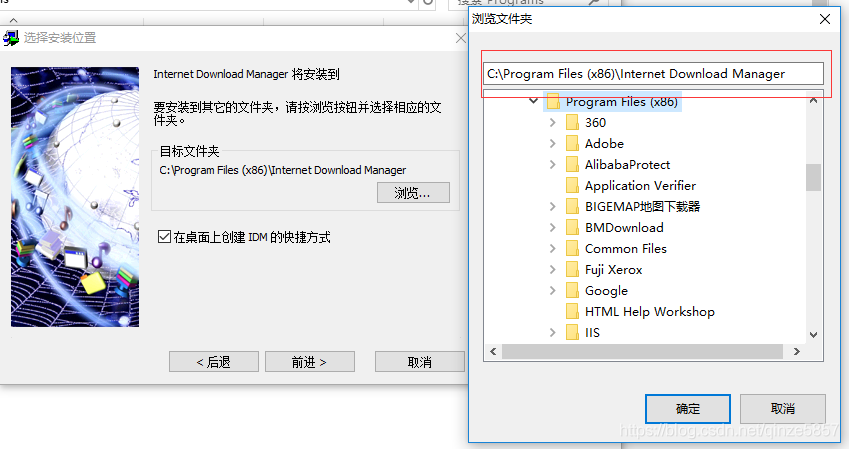
3 Copy the installation path shown above (starting with the IDM you have installed) and exit the installation
4, enter the above path, find uninstall. Exe, after the execution of automatically restart the computer, OK uninstall finished
Conclusion: the bell must be tied

Import sys module

First, we enter the SYS module using an import statement. Basically, this statement tells Python that we want to use this module. The SYS module contains functions related to the Python interpreter and its environment.

When Python executes an import sys statement, it looks for the sys.py module in the directory listed in the sys.path variable. If the file is found, the statements in the module’s main block will be run, and the module will be available to you. Note that the initialization process takes place only when we first enter the module. Also, “sys” is short for “system”.

Sys has so many module functions that I can only list a few that I think are useful. Using jack Ma’s saying to find employees, “find the most suitable rather than the most talented”, I personally think I can adapt to it in many aspects, and it is no problem to learn. Sys modules do have a lot of features, but we should focus on those features that are most suitable for us. For this reason, the functions I have listed are those That I think are more suitable for my future development.

(1)sys.argv

A lot of people think, how do I pass parameters outside of my program?This one, you can do it. Such as:

Tesy.py

Import sys

Print sys.argv[number]

In general, the number 0 is the name of the script, 1,2… Is the argument passed under the command line. Such as:

Test.py script content:

import sys


print sys.argv[0]

print sys.argv[1]

print sys.argv[2]

print sys.argv[3]

then

[root@databak scripts]# python test.py arg1 arg2 arg3

test.py

arg1

arg2

arg3

See, what’s the corresponding relationship?

The argv variable in the SYS module is indicated by the use of a dot — sys.argv — one advantage of this method is that the name does not conflict with any argv variables used in your program. In addition, it makes it clear that the name is part of the SYS module. The

sys.argv variable is a list of strings (the list is explained in more detail in a later section). In particular, sys.argv contains a list of command-line arguments that are passed to your program using the command line. Here, when we execute python using_sys.py we are arguments, we use the python command to run the using_sys.py module, which is then passed to the program as arguments. Python stores it for us in the sys.argv variable. Remember that the name of the script is always the first argument in the list of sys.argv. So here, ‘using_sys.py’ is sys.argv[0], ‘we’ is sys.argv[1], ‘are’ is sys.argv[2], and ‘arguments’ is sys.argv[3]. Note that Python counts from zero, not one.

(2)sys.platform

As you all know, today’s programs are more popular across platforms. Simply put, the program can run on Windows, Linux or without modification, and it sounds great. So that’s where this function comes in handy.

Let’s say we want to implement a clear terminal, clear for Linux and CLS for Windows

Ostype=sys.platform()

If the or ostype ostype = = “Linux” = = “linux2” :

Cmd = “clear”

Else:

Cmd = “CLS”

(3) sys. Exit (n)

At the end of the main program, the interpreter exits automatically, but if you need to exit the program halfway, you can call the sys.exit function, which returns an optional integer argument to the calling program. This means that you can capture the call to sys.exit from the main program. (Note: 0 is normal exit, others are abnormal, abnormal events can be thrown for capture!)

Sys. exit from the Python program will raise a systemExit exception, which you can do to clear out. The default normal exit status of this optional parameter is 0, and the range of numerical parameters is 0-127. There’s another type, which is the strings object type that’s shown here.

(4)sys.path

You all know something about modules, right?Do you need to import one of the modules before you can use it?The answer is yes. A: Then import, import__import__ the order need not be carried. So what happens inside Python when you execute import module_name?Simply put, search for module_name. Search module.name based on the path of sys.path

> > > sys.path

[‘ ‘, ‘/ usr/local/lib/python24. Zip’, ‘/ usr/local/lib/python2.4’, ‘/ usr/local/lib/python2.4/platt – freebsd4’, ‘/ usr/local/lib/python2.4/lib – tk’, ‘/ usr/local/lib/python2.4/lib – dynload’, ‘/ usr/local/lib/python2.4/site – packages’]

You later write the module can be put above a directory, you can search correctly. You can also add your own module path. Sys. Path. Append (” mime the module path “).

Sys. path contains a list of directory names for input modules. You can observe that the first string of sys.path is empty — this empty string indicates that the current directory is also part of sys.path, which is the same as the PYTHONPATH environment variable. This means that you can directly enter the module located in the current directory. Otherwise, you will have to place your modules in one of the directories listed on sys.path. First, we enter the SYS module using an import statement. Basically, this statement tells Python that we want to use this module. The SYS module contains functions related to the Python interpreter and its environment.

(5)sys.modules

This is a dictionary that maps module names to modules which have already been loaded. This can be manipulated to force reloading of modules and other tricks.

Python.org
That’s pretty clear in the manual.

For names in sys.modules.keys():

If names ! = “sys” :

(6)sys.stdin,sys.stdout,sys.stderr

Stdin, stdout, and stderr variable contains corresponding with the standard I/O flow stream objects. If you need to better control the output, and the print can’t meet your request, they may be just what you need. You’ll also be able to replace them, then you can redirect output and input to the other devices (device), or in a standard way of dealing with them

When Python executes an import sys statement, it looks for the sys.py module in the directory listed in the sys.path variable. If the file is found, the statements in the module’s main block will be run, and the module will be available to you. Note that the initialization process takes place only when we first enter the module. Also, “sys” is short for “system”.

sys module argv variables are indicated by using the dot notation — sys. Argv — one advantage of this method is that the name does not conflict with any argv variables used in your program. In addition, it makes it clear that the name is part of the SYS module. The

sys.argv variable is a list of strings (the list will be explained in more detail in a later section). In particular, sys.argv contains a list of command-line arguments that are passed to your program using the command line.

if you are using an IDE to write and run these programs, look in the menu for a way to specify the command line parameters of the program. Here, when we execute python using_sys.py we are arguments, we use the python command to run the using_sys.py module, which is then passed to the program as arguments. Python stores it for us in the sys.argv variable.

remember that the name of the script is always the first argument in the list of sys.argv. So here, ‘using_sys.py’ is sys.argv[0], ‘we’ is sys.argv[1], ‘are’ is sys.argv[2], and ‘arguments’ is sys.argv[3]. Note that Python counts from zero, not one.

sys.path contains a list of directory names for the input modules. You can observe that the first string of sys.path is empty — this empty string indicates that the current directory is also part of sys.path, which is the same as the PYTHONPATH environment variable. This means that you can directly enter the module located in the current directory. Otherwise, you will have to place your modules in one of the directories listed on sys.path.

The 11th Zhejiang Provincial Collegiate Programming Contest

A.Pokemon Master
portal

#include <bits/stdc++.h>
using namespace std;
typedef long long ll;
typedef unsigned long long ull;
typedef pair<int, int> pii;
template <typename T>
inline void rd(T& x)
{
	ll tmp = 1; char c = getchar(); x = 0;
	while (c > '9' || c < '0') { if (c == '-')tmp = -1; c = getchar(); }
	while (c >= '0' && c <= '9') { x = x * 10 + c - '0'; c = getchar(); }
	x *= tmp;
}
const int inf = 0x3f3f3f3f;
const int mod = 1e9 + 7;
const int N = 1e5 + 10;
const int M = 1e7 + 10;
const double eps = 1e-8;
int main() {
	ios::sync_with_stdio(false); cin.tie(nullptr); cout.tie(nullptr);
	//FILE* _INPUT = freopen("input.txt", "r", stdin);
	//FILE* _OUTPUT = freopen("output.txt", "w", stdout);
	int T; rd(T);
	while (T--) {
		int n, m; rd(n), rd(m);
		ll suml=0,sumr=0;
		for (int i = 1; i <= n; ++i) {
			ll tmp; rd(tmp);
			suml+=tmp;
		}
		for (int i = 1; i <= m; ++i) {
			ll tmp; rd(tmp);
			sumr+=tmp;
		}
		if (suml > sumr) puts("Calem");
		else if (suml == sumr) puts("Draw");
		else puts("Serena");
	}
	return 0;
}


B.Problem Arrangement
Portal
dp, here 12 problems will be binary compression, the bit of 0 means unresolved, 1 means resolved;
Enumeration with state compression properties

0

2

n

1

0-2^{n-1}

Since the number of points M is only 500, considering the violent enumeration number M, the equation of state is easy to derive, as detailed in the code

#include <bits/stdc++.h>
using namespace std;
typedef long long ll;
typedef unsigned long long ull;
typedef pair<int, int> pii;
template <typename T>
inline void rd(T& x)
{
	ll tmp = 1; char c = getchar(); x = 0;
	while (c > '9' || c < '0') { if (c == '-')tmp = -1; c = getchar(); }
	while (c >= '0' && c <= '9') { x = x * 10 + c - '0'; c = getchar(); }
	x *= tmp;
}
const int inf = 0x3f3f3f3f;
const int mod = 7;
const int N = (1 << 13) + 10;
const int M = 1e7 + 10;
const double eps = 1e-8;
ll dp[N][510];
int a[13][13];
ll gcd(ll x, ll y) {
	if (y == 0) return x;
	return gcd(y, x % y);
}
int main() {
	ios::sync_with_stdio(false); cin.tie(nullptr); cout.tie(nullptr);
//	FILE* _INPUT = freopen("input.txt", "r", stdin);
//	FILE* _OUTPUT = freopen("output.txt", "w", stdout);
	int T; rd(T);
	while (T--) {
		memset(dp, 0, sizeof dp);
		int n, m; rd(n), rd(m);
		for (int i = 0; i < n; ++i) {
			for (int j = 0; j < n; ++j) rd(a[i][j]);
		}
		dp[0][0] = 1;
		for (int i = 0; i < (1 << n); ++i) {
			int cnt = 0;
			for (int j = 0; j < n; ++j) {
				if (i & (1 << j)) ++cnt;
			}
			for (int j = 0; j < n; ++j) {
				if (i & (1 << j)) continue;
				for (int k = 0; k <= m; ++k) {
					int tmp = k + a[j][cnt];
					if (tmp >= m) {
						dp[i ^ (1 << j)][m] += dp[i][k];
					}
					else dp[i ^ (1 << j)][tmp] += dp[i][k];
				}
			}
		}
		if (dp[(1 << n) - 1][m] == 0) puts("No solution");
		else {
			ll ans = 1;
			for (int i = 1; i <= n; ++i) ans = ans * i;
			ll tmp = gcd(ans, dp[(1 << n) - 1][m]);
			printf("%lld/%lld\n", ans/tmp, dp[(1 << n) - 1][m]/tmp);
		}
	}
	return 0;
}

C.Talented Chef
portal
Needs to be done in the shortest time cooking, clearly need to split the time step by step, this is the average time required to take up the whole, but also consider a bit when a fish cooking time for a long time, even more than the average amount of time, this time will need to take a larger one, namely with single cooking time of the fish

#include <bits/stdc++.h>
using namespace std;
typedef long long ll;
typedef unsigned long long ull;
typedef pair<int, int> pii;
template <typename T>
inline void rd(T& x)
{
	ll tmp = 1; char c = getchar(); x = 0;
	while (c > '9' || c < '0') { if (c == '-')tmp = -1; c = getchar(); }
	while (c >= '0' && c <= '9') { x = x * 10 + c - '0'; c = getchar(); }
	x *= tmp;
}
const int inf = 0x3f3f3f3f;
const int mod = 7;
const int N = 1e5 + 10;
const int M = 1e7 + 10;
const double eps = 1e-8;
int main() {
	ios::sync_with_stdio(false); cin.tie(nullptr); cout.tie(nullptr);
//	FILE* _INPUT = freopen("input.txt", "r", stdin);
//	FILE* _OUTPUT = freopen("output.txt", "w", stdout);
	int T; rd(T);
	while (T--) {
		int n, m; rd(n), rd(m);
		ll sum = 0; ll maxn = 0;
		for (int i = 1; i <= n; ++i) {
			int tmp; rd(tmp);
			sum += tmp;
			maxn = max(maxn, 1LL*tmp);
		}
		ll ans = sum/m;
		if (sum % m) ++ans;
		printf("%lld\n", max(ans,maxn));
	}
	return 0;
}

E.Paint the Grid Again
portal
The meaning is to brush a wall to have a rule, horizontal can only brush black, longitudinal can brush white, so the problem is good to solve now only see each line, according to the rule should be a line of black, if appeared white, explain first transverse brush black, again longitudinal brush the white of that column, namely

R

[

i

]

>

C

[

j

]

.

set

the

point

sit

mark

for

(

i

.

j

)

R[i]-> C[j], let the coordinate of this point be (I,j)

R [I] – & gt; C[j], let the coordinate of this point be (I,j), also only look at each column, if black appears in a column, then that means

C

[

j

]

>

R

[

i

]

C[j]-> R[i]

C [j] – & gt; R[I] according to the above rules, build the edge, and then run through the topological order, but the answer needs to output the minimum dictionary order, first column

C

C

C dictionary sequence

<

R

< R

< R; The Numbers go from small to large, so when you build the edge, you build the edge as

j

[

1

.

n

]

j\in[1,n]

J ∈[1,n], set the edge of the row as

i

[

n

+

1

.

2

x

n

]

I \ [in the n * n + 1, 2]

I ∈ [n + 1, 2 * n] finally in the topological order will point in the priority queue, small in first out queue can figure no solution is the first sign all painted rows and columns, and then in the topology sequence of time for a new round of tags, when we have painted columns or rows did not appear in the topological order, there is no solution, similar to form a ring

#include <bits/stdc++.h>
using namespace std;
typedef long long ll;
typedef unsigned long long ull;
typedef pair<int, int> pii;
template <typename T>
inline void rd(T& x)
{
	ll tmp = 1; char c = getchar(); x = 0;
	while (c > '9' || c < '0') { if (c == '-')tmp = -1; c = getchar(); }
	while (c >= '0' && c <= '9') { x = x * 10 + c - '0'; c = getchar(); }
	x *= tmp;
}
const int inf = 0x3f3f3f3f;
const int mod = 7;
const int N = 1e3 + 10;
const int M = 1e7 + 10;
const double eps = 1e-8;
int head[N], cnt;
struct edge {
	int next, to;
}e[M];
void add(int u, int v) {
	e[cnt].next = head[u];
	e[cnt].to = v;
	head[u] = cnt++;
}
char mp[505][505];
int degree[N];
bool row[505], col[505], vis[N];
vector<int>ans;
bool check(int n) {
	memset(vis, false, sizeof vis);
	priority_queue<int,vector<int>,greater<int> >que;
	for (int i = 1; i <= n; ++i) {
		if (col[i] && !degree[i]) {
			que.push(i);
		}
	}
	for (int i = 1; i <= n; ++i) {
		if (row[i] && !degree[i+n]) {
			que.push(i+n);
		}
	}
	if (que.empty()) return 0;
	while (!que.empty()) {
		int u = que.top(); que.pop();
		vis[u] = true;
		if (u > n) {
			ans.push_back(u);
			vis[u] = true;
		}
		else {
			ans.push_back(u);
			vis[u] = true;
		}
		for (int i = head[u]; ~i; i = e[i].next) {
			int v = e[i].to;
			if (!(--degree[v])) {
				que.push(v);
			}
		}
	}
	for (int i = 1; i <= n; ++i) {
		if (col[i]&&!vis[i]) return false;
	}
	for (int i = n + 1; i <= 2 * n; ++i) {
		if (row[i - n] && !vis[i]) return false;
	}
	for (int i = 0; i < ans.size(); ++i) {
		if (ans[i] > n) {
			printf("R%d", ans[i] - n);
		}
		else printf("C%d", ans[i]);
		printf("%s", i == ans.size() - 1 ?"\n" : " ");
	}
	return 1;
}
int main() {
	ios::sync_with_stdio(false); cin.tie(nullptr); cout.tie(nullptr);
	//FILE* _INPUT = freopen("input.txt", "r", stdin);
	//FILE* _OUTPUT = freopen("output.txt", "w", stdout);
	int T; rd(T);
	while (T--) {
		int n; rd(n);
		memset(head, -1, sizeof head); cnt = 0;
		memset(row, false, sizeof row);
		memset(col, false, sizeof col);
		memset(degree, 0, sizeof degree);
		ans.clear();
		for (int i = 1; i <= n; ++i) {
			for (int j = 1; j <= n; ++j) {
				scanf(" %c", &mp[i][j]);
				if (mp[i][j] == 'X') row[i] = true;
				else if (mp[i][j] == 'O') col[j] = true;
			}
		}
		for (int i = 1; i <= n; ++i) {
			for (int j = 1; j <= n; ++j) {
				if (row[i]&&mp[i][j] == 'O') {
					add(i + n, j);
					++degree[j];
				}
			}
		} 
		for (int j = 1; j <= n; ++j) {
			for (int i = 1; i <= n; ++i) {
				if (col[j]&&mp[i][j] == 'X') {
					add(j, i + n);
					++degree[i + n];
				}
			}
		}
		if (!check(n)) puts("No solution");
	}
	return 0;
}


F.Paint the Grid Reloaded
Portal
A unicom block can form a unicom block where the upper, lower, left and right are connected in the same color. Then a unicom block nearby must be the unicom block with the opposite color. So if a unicom block reverses color, it must be connected with the nearby unicom block, and then reverse… Therefore, this problem first needs to indent the graph, then enumerate the starting point for BFS to determine the number of reversals, and find the minimum number of reversals

#include <bits/stdc++.h>
using namespace std;
typedef long long ll;
typedef unsigned long long ull;
typedef pair<int, int> pii;
template <typename T>
inline void rd(T& x)
{
	ll tmp = 1; char c = getchar(); x = 0;
	while (c > '9' || c < '0') { if (c == '-')tmp = -1; c = getchar(); }
	while (c >= '0' && c <= '9') { x = x * 10 + c - '0'; c = getchar(); }
	x *= tmp;
}
const int inf = 0x3f3f3f3f;
const int mod = 7;
const int N = 1e4 + 10;
const int M = 1e7 + 10;
const double eps = 1e-8;
int n, m;
char mp[55][55];
bool vis[55][55];
int num[55][55];
int dir[][2] = { 1,0,-1,0,0,1,0,-1 }, cnt;
void bfs(int x,int y) {
	queue<pii>que;
	que.push({ x,y });
	stack<pii>stk;
	while (!que.empty()) {
		pii p = que.front(); que.pop();
		stk.push(p);
		if (vis[p.first][p.second]) continue;
		vis[p.first][p.second] = 1;
		for (int i = 0; i < 4; ++i) {
			int xx = p.first + dir[i][0], yy = p.second + dir[i][1];
			if (xx <= 0 || xx > n || yy <= 0 || yy > m || vis[xx][yy] || mp[xx][yy] != mp[p.first][p.second]) continue;
			que.push({ xx,yy });
		}
	}
	++cnt;
	while (!stk.empty()) {
		pii p = stk.top(); stk.pop();
		num[p.first][p.second] = cnt;
	}
}
int head[N], cntE;
struct edge {
	int next, to;
}e[M];
void add(int u, int v) {
	e[cntE].to = v;
	e[cntE].next = head[u];
	head[u] = cntE++;
}
bool mark[N];
int bfs(int x) {
	queue<pii>que;
	que.push({ x,1 });
	int ans = 0;
	while (!que.empty()) {
		pii p = que.front(); que.pop();
		int u = p.first;
		if (mark[u]) continue;
		mark[u] = true;
		ans = max(ans, p.second);
		for (int i = head[u]; ~i; i = e[i].next) {
			int v = e[i].to;
			if (mark[v]) continue;
			que.push({ v,p.second + 1 });
		}
	}
	return ans-1;
}
int solve() {
	memset(vis, false, sizeof vis); cnt = 0;
	for (int i = 1; i <= n; ++i) {
		for (int j = 1; j <= m; ++j) {
			if (vis[i][j]) continue;
			bfs(i, j);
		}
	}
	memset(head, -1, sizeof head); cntE = 0;
	for (int i = 1; i <= n; ++i) {
		for (int j = 1; j <= m; ++j) {
			for (int k = 0; k < 4; ++k) {
				int x = i + dir[k][0], y = j + dir[k][1];
				if (x <= 0 || x > n || y <= 0 || y > m) continue;
				if (num[x][y] != num[i][j]) add(num[i][j], num[x][y]);
			}
		}
	}
	int minn = inf;
	for (int i = 1; i <= cnt; ++i) {
		for (int j = 1; j <= cnt; ++j) mark[j] = false;
		minn = min(minn, bfs(i));
	}
	return minn;
}
int main() {
	ios::sync_with_stdio(false); cin.tie(nullptr); cout.tie(nullptr);
//	FILE* _INPUT = freopen("input.txt", "r", stdin);
//	FILE* _OUTPUT = freopen("output.txt", "w", stdout);
	int T; rd(T);
	while (T--) {
		rd(n), rd(m);
		for (int i = 1; i <= n; ++i) {
			for (int j = 1; j <= m; ++j) {
				scanf(" %c", &mp[i][j]);
			}
		}
		printf("%d\n", solve());
	}
	return 0;
}


G.Ternary Calculation
Portal
, only three Numbers of operation, direct enumeration of the possibility of only 25

#include <bits/stdc++.h>
using namespace std;
typedef long long ll;
typedef unsigned long long ull;
typedef pair<int, int> pii;
template <typename T>
inline void rd(T& x)
{
	ll tmp = 1; char c = getchar(); x = 0;
	while (c > '9' || c < '0') { if (c == '-')tmp = -1; c = getchar(); }
	while (c >= '0' && c <= '9') { x = x * 10 + c - '0'; c = getchar(); }
	x *= tmp;
}
const int inf = 0x3f3f3f3f;
const int mod = 7;
const int N = 1e5 + 10;
const int M = 1e7 + 10;
const double eps = 1e-8;
char s[N];
int main() {
	ios::sync_with_stdio(false); cin.tie(nullptr); cout.tie(nullptr);
//	FILE* _INPUT = freopen("input.txt", "r", stdin);
//	FILE* _OUTPUT = freopen("output.txt", "w", stdout);
	int T; rd(T);
	while (T--) {
		int a[5]; char b[5];
		scanf("%d %c %d %c %d", &a[1], &b[1], &a[2], &b[2], &a[3]);
		if (b[1] == '-' && (b[2] == '-' || b[2] == '+')) {
			if (b[2] == '+') printf("%d\n", a[1] - a[2] + a[3]);
			else printf("%d\n", a[1] - a[2] - a[3]);
			continue;
		}
		if (b[1] == '+'||b[1]=='-') {
			int ans;
			if (b[2] == '+') ans = a[2] + a[3];
			else if (b[2] == '-') ans = a[2] - a[3];
			else if (b[2] == '*') ans = a[2] * a[3];
			else if (b[2] == '/') ans = a[2]/a[3];
			else ans = a[2] % a[3];
			if (b[1] == '+') printf("%d\n", a[1] + ans);
			else printf("%d\n", a[1] - ans);
		}
		else {
			int ans;
			if (b[1] == '*') ans = a[1] * a[2];
			else if (b[1] == '/') ans = a[1]/a[2];
			else ans = a[1] % a[2];
			if (b[2] == '+') ans = ans + a[3];
			else if (b[2] == '-') ans = ans - a[3];
			else if (b[2] == '*') ans = ans * a[3];
			else if (b[2] == '/') ans = ans/a[3];
			else ans = ans % a[3];
			printf("%d\n", ans);
		}
	}
	return 0;
}

J.What day is that day?
Portal
this problem can be tabulated to find the law, can also use the principle of modulus, found that it happens to be a geometric sequence of sums
L.Access System
Access System
save all the time in seconds and sort it

#include <bits/stdc++.h>
using namespace std;
typedef long long ll;
typedef unsigned long long ull;
typedef pair<int, int> pii;
template <typename T>
inline void rd(T& x)
{
	ll tmp = 1; char c = getchar(); x = 0;
	while (c > '9' || c < '0') { if (c == '-')tmp = -1; c = getchar(); }
	while (c >= '0' && c <= '9') { x = x * 10 + c - '0'; c = getchar(); }
	x *= tmp;
}
const int inf = 0x3f3f3f3f;
const int mod = 1e9 + 7;
const int N = 1e5 + 10;
const int M = 1e7 + 10;
const double eps = 1e-8;
struct node {
	int id, num;
	bool friend operator<(const node& a, const node& b) {
		if (a.num == b.num) return a.id < b.id;
		return a.num < b.num;
	}
}a[N];
vector<int>ans;
int main() {
	ios::sync_with_stdio(false); cin.tie(nullptr); cout.tie(nullptr);
	//FILE* _INPUT = freopen("input.txt", "r", stdin);
	//FILE* _OUTPUT = freopen("output.txt", "w", stdout);
	int T; rd(T);
	while (T--) {
		int n, l; rd(n), rd(l);
		ans.clear();
		for (int i = 1; i <= n; ++i) {
			int x, y, z;
			scanf("%d:%d:%d", &x, &y, &z);
			a[i].num = x * 3600 + y * 60 + z;
			a[i].id = i;
		}
		sort(a + 1, a + 1 + n);
		ans.push_back(a[1].id);
		int now = a[1].num + l;
		for (int i = 2; i <= n; ++i) {
			if (a[i].num < now) continue;
			ans.push_back(a[i].id);
			now = a[i].num + l;
		}
		sort(ans.begin(), ans.end());
		printf("%d\n%d", ans.size(),ans[0]);
		for (int i = 1; i < ans.size();++i) {
			printf(" %d", ans[i]);
		}
		puts("");
	}
	return 0;
}

1

[Windows 7 – how to delete files protected by trustedinstaller win7 force deletion of files]

Did you know that a lot of files in Windows 7 are not owned by you, even if you are the Administrator?They are instead owned by an entity called the “Trusted Installer”. Such a wonderful sounding name eh!
So that’s not a problem most of the time, unless you need to delete certain system files andfolders. You’ll end up getting a message like:

You do not have permission to perform this action.

or something like:

You need authorization from TrustedInstaller in order to perform this action.

Thanks Windows! So in order to delete a file that is owned by TrustedInstaller, you have to first take ownership of the files or folders and then grant yourself full control permissions and rights!
You have to do all of that just to be able to rename, delete, or edit these files and folders. In this article, I’ll walk you through the steps in order to do this.
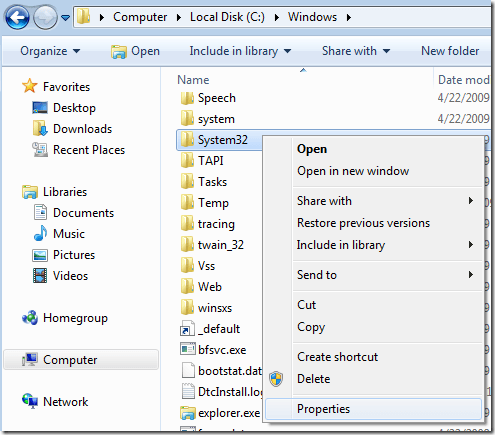
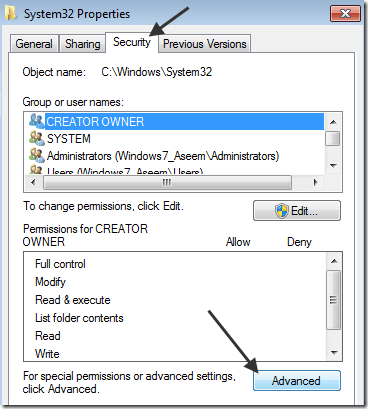
First, go to the folder or set of files that you need to change permissions for, right-click on them and chooseProperties.

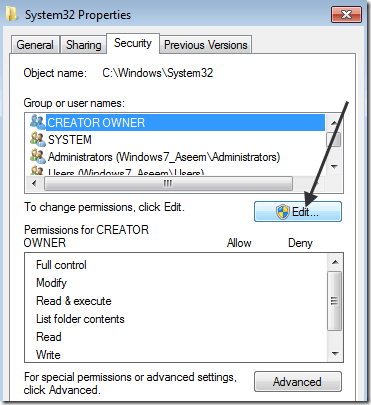
Next click on the Security tab and then click on the Advanced button at the bottom:

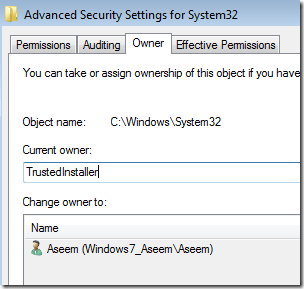
Next click on the Owner tab and you’ll now see that the current owner isTrustedInstaller.

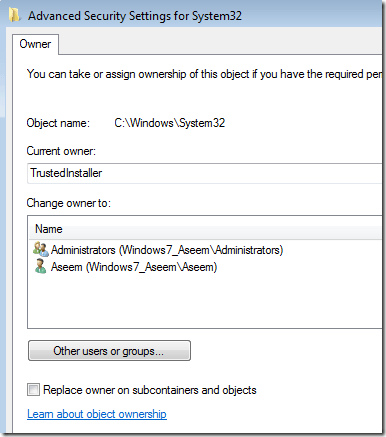
Now click on the Edit button and choose who you would like to change the owner to, either your account or the Administrators. If your account is an Administrator account, I would suggest just picking Administrators.

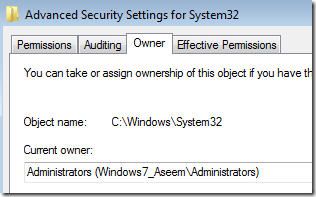
You can also check offReplace owner on subcontainers and objects if you need to delete more than one file in a folder. Go ahead and click OK. Now you will see that the Current owner is the account you picked.

Click OK until you have closed all properties windows and are back to the Windows Explorer screen. Then right-click on the folder or file again and choose Properties again.
Now click on the Securitytab again, but instead of clicking on Advanced, you need to click the Edit button.

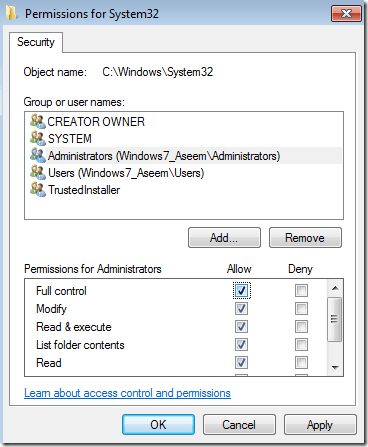
Now click on the user name in the list that you want to change the permissions for, which should be the same as who you changed the current owner too. If the user name is not in the list, click Add, type in the name and click OK.

Since I had changed the current owner to Administrators, I clicked on Administrators here and then clicked on the check box next to Full Control. When you do that, all the other boxes get checked too.
Click OK once and then click OK one more time to get back toWindowsExplorer. Now you can delete those files without any UAC messages telling you that you can’t! Enjoy!
 
http://helpdeskgeek.com/windows-7/windows-7-how-to-delete-files-protected-by-trustedinstaller/

Java 8 Stream – Read a file line by line

In Java 8, you can use Files. lines to read file as Stream.

c://lines.txt – A simple text file for testing

line1
line2
line3
line4
line5

1. Java 8 Read File + Stream

TestReadFile.java

package com.mkyong.java8;

import java.io.IOException;
import java.nio.file.Files;
import java.nio.file.Paths;
import java.util.stream.Stream;

public class TestReadFile {

	public static void main(String args[]) {

		String fileName = "c://lines.txt";

		//read file into stream, try-with-resources
		try (Stream<String> stream = Files.lines(Paths.get(fileName))) {

			stream.forEach(System.out::println);

		} catch (IOException e) {
			e.printStackTrace();
		}

	}

}

Output

line1
line2
line3
line4
line5

2. Java 8 Read File + Stream + Extra
This example shows you how to use Stream to filter content, convert the entire content to upper case and return it as a List.

TestReadFile2.java

package com.mkyong.java8;

import java.io.IOException;
import java.nio.file.Files;
import java.nio.file.Paths;
import java.util.ArrayList;
import java.util.List;
import java.util.stream.Collectors;
import java.util.stream.Stream;

public class TestReadFile2 {

	public static void main(String args[]) {

		String fileName = "c://lines.txt";
		List<String> list = new ArrayList<>();

		try (Stream<String> stream = Files.lines(Paths.get(fileName))) {

			//1. filter line 3
			//2. convert all content to upper case
			//3. convert it into a List
			list = stream
					.filter(line -> !line.startsWith("line3"))
					.map(String::toUpperCase)
					.collect(Collectors.toList());

		} catch (IOException e) {
			e.printStackTrace();
		}

		list.forEach(System.out::println);

	}

}

Output

LINE1
LINE2
LINE4
LINE5

3. BufferedReader + Stream
A new method lines() has been added since 1.8, it lets BufferedReader returns content as Stream.

TestReadFile3.java

package com.mkyong.java8;

import java.io.BufferedReader;
import java.io.IOException;
import java.nio.file.Files;
import java.nio.file.Paths;
import java.util.ArrayList;
import java.util.List;
import java.util.stream.Collectors;

public class TestReadFile3{

	public static void main(String args[]) {

		String fileName = "c://lines.txt";
		List<String> list = new ArrayList<>();

		try (BufferedReader br = Files.newBufferedReader(Paths.get(fileName))) {

			//br returns as stream and convert it into a List
			list = br.lines().collect(Collectors.toList());

		} catch (IOException e) {
			e.printStackTrace();
		}

		list.forEach(System.out::println);

	}

}

Output

line1
line2
line3
line4
line5

4. Classic BufferedReader And Scanner
Enough of Java 8 and Stream, let revisit the classic BufferedReader (JDK1.1) and Scanner (JDK1.5) examples to read a file line by line, it is working still, just developers are moving toward Stream.
4.1 BufferedReader + try-with-resources example.

TestReadFile4.java

package com.mkyong.core;

import java.io.BufferedReader;
import java.io.FileReader;
import java.io.IOException;

public class TestReadFile4{

	public static void main(String args[]) {

		String fileName = "c://lines.txt";

		try (BufferedReader br = new BufferedReader(new FileReader(fileName))) {

			String line;
			while ((line = br.readLine()) != null) {
				System.out.println(line);
			}

		} catch (IOException e) {
			e.printStackTrace();
		}

	}

}

4.2 Scanner + try-with-resources example.

TestReadFile5.java

package com.mkyong.core;

import java.io.File;
import java.io.IOException;
import java.util.Scanner;

public class TestReadFile5 {

	public static void main(String args[]) {

		String fileName = "c://lines.txt";

		try (Scanner scanner = new Scanner(new File(fileName))) {

			while (scanner.hasNext()){
				System.out.println(scanner.nextLine());
			}

		} catch (IOException e) {
			e.printStackTrace();
		}

	}

}

References

    Java 8 File.lines()Java 8 StreamJava BufferedReader

link: https://www.mkyong.com/java8/java-8-stream-read-a-file-line-by-line/

C++ —Return multiple values of different types

we usually use functions that return one or no return value.
More than one different type of return value was recently returned on a project. You can use vector to return multiple parameters of the same type. If you can use the C++11 standard, you can use my method below
(1)import the header file.

#include <tuple>
using namespace std;

(2)defined function,you can refer to the following code:

std::tuple<vector<Mat>, bool,Mat, bool,bool,bool,bool,bool,Mat,Mat,int> Table_Detection(Mat srcImage,double firstblackline_rows_ratio_thresh,bool isHorizonLine,double left_right_cols_ratio_thresh,double up_down_rows_ratio_thresh,Mat srcImageBin);

(3)function,you can refer to the following code:The type returned should be the same as the defined type.

std::tuple<vector<Mat>, bool,Mat, bool,bool,bool,bool,bool,Mat,Mat,int> Table_Detection(Mat srcImage,double firstblackline_rows_ratio_thresh,bool isHorizonLine,double left_right_cols_ratio_thresh,double up_down_rows_ratio_thresh,Mat srcImageBin)
{
;
return std::make_tuple(CUT_Table,table_new,Page_Info,isHorizonLine,table_new_cut,istablerecognition,Integrity_Check_Bottom,Integrity_Check_Top,Bottom_Integrity,Top_Integrity,tablesize);
}

(4)Now,you can call the return value. you can refer to the following code:Define a variable to receive the return parameter,the following code defines is the same as the define function.

std::tuple<vector<Mat>, bool,Mat, bool,bool,bool,bool,bool,Mat,Mat,int> data;

You also can use the auto to define. Auto is an adaptive variable in the C++11 standard.

auto data;

You can use the get method to get the data. you can refer to the following code. The code of the get<0>data actually get is CUT_Table.

std::get<0>(data);
std::get<1>(data);
std::get<2>(data);

I hope I can help you,If you have any questions, please  comment on this blog or send me a private message. I will reply in my free time.

Python: Understanding__ str__

The following is my understanding if there is anything wrong with me. Please do tell me. Thank you very much!
In The Python language, successie __str__ is usually formatted this way.
class A:

def __str__(self):

return “this is in str”

Literally, ___ is called by the print function, usually return something. This thing should be in the form of a string. If you don’t want to use the STR () function. If you print a class, print first calls each ___ by str__, such as STR. Py

#!/usr/bin/env python
                                                                                                                                                                                 
class strtest:
    def __init__(self):
        print "init: this is only test"
    def __str__(self):
        return "str: this is only test"

if __name__ == "__main__":
    st=strtest()
    print st

$./str.pyinit: this is only test

str: this is only test
As you can see from the above example, the function with ___ is called when you print an instance of STRtest st.
By default, the python objects almost always have the __str__ function used by print. S the dictionary with ___, see the red part:
> > > dir({})
[‘__class__’, ‘__cmp__’, ‘__contains__’, ‘__delattr__’, ‘__delitem__’, ‘__doc__’, ‘__eq__’, ‘__format__’, ‘__ge__’, ‘__getattribute__’, ‘__getitem__’, ‘__gt__’, ‘__hash__’, ‘__init__’, ‘__iter__’, ‘__le__’, ‘__len__’, ‘__lt__’, ‘__ne__’, ‘__new__’, ‘__reduce__’, ‘__reduce_ex__’, ‘__repr__’, ‘__setattr__’, ‘__setitem__’, ‘__sizeof__’, ‘__str__’, ‘__subclasshook__’, ‘clear’, ‘copy’, ‘fromkeys’, ‘get’, ‘has_key’, ‘items’, ‘iteritems’, ‘iterkeys’, ‘itervalues’, ‘keys’, ‘pop’, ‘popitem’, ‘setdefault’, ‘update’, ‘values’]
> > > t={}
> > > t[‘1’] = “hello”
> > > t[‘2’] = “world”

> > > t
# is equal to print t

{‘1’: ‘hello’, ‘2’: ‘world’}

> > > t.__str__()

“{‘1’: ‘hello’, ‘2’: ‘world’}”

You can see a dictionary, print t and t. str__() are the same. Simply output the contents of the dictionary as a string.
If it’s not a string returned in the function ___, see str1.py

#!/us/bin/env/python                                                                                                                                                                                        
#__metaclass__ = type
#if __name__ == "__main__":
class strtest:
    def __init__(self):
        self.val = 1
    def __str__(self):
        return self.val

if __name__ == "__main__":
    st=strtest()
    print st

$./str1.py

Traceback (most recent call last):
File “./ STR. Py “, line 12, in < module>
print st
TypeError: ___, returned non-string (type int)
Error message with: ___ returned a non-string. Here’s what we should do: see str2. Py

#!/usr/bin/env python                                                                                                                                                                                        
#__metaclass__ = type
#if __name__ == "__main__":
class strtest:
    def __init__(self):
        self.val = 1
    def __str__(self):
        return str(self.val)

if __name__ == "__main__":
    st=strtest()
    print st

$./str2.py

1
We used STR () to change the integer to a character.

CIN in C + + cin.get ()、 cin.getline (), getline(), gets() function

When learning C++, these input functions are a little confusing; Here’s a summary:
Cin
2 cin. Get ()
3 cin. Getline ()
4 getline()
5 gets()
6 getchar()
Add: cin. Ignore (); Cin. Get ()// skips a character, such as unwanted carriage return, space, etc
1, cin> >          
Usage 1: The most basic and commonly used usage is to enter a number:
#include < iostream>
using namespace std;
main ()
{
int a,b;
cin> > a> > b;
cout< < a+b< < endl;
}
Input: 2[enter]3[enter]
output: 5
Note: & gt; > Is to filter out invisible characters (such as space return, TAB, etc.)
cin> > noskipws> > input[j]; // If you don’t want to skip white space characters, use noskipWS flow control
Usage 2: Accept a string and end with “space”, “TAB”, or “enter”
#include < iostream>
using namespace std;
main ()
{
char a[20];
cin> > a;
cout< < a< < endl;
}
Input: JKLJKLJKL
output: JKLJKLJKL
Input: JKLJKL // end of blank
output: JKLJKL
2, cin. The get ()
Usage 1: Cin. Get (character variable name) can be used to receive characters
#include < iostream>
using namespace std;
main ()
{
char;
ch = cin. The get ();// or cin. Get (ch);
cout< < ch< < endl;
}
Input: JLJKLJKL
output: j
Usage 2: Cin. Get (character array name, number of characters to receive) is used to receive a line of strings and can receive Spaces
#include < iostream>
using namespace std;
main ()
{
char a[20];
cin. Get (a, 20);
cout< < a< < endl;
}
JKL JKL
output: JKL JKL JKL
Input: abcdeabcdeabcdeabcdeabcde 25 characters (input)
output: abcdeabcdeabcdeabcd receive (19 + 1 character ‘\ 0’)
Usage 3: Cin. Get (without parameters) No parameters are mainly used to discard the unnecessary characters in the input stream, or to discard carriage return to make up for the deficiency of Cin. Get (character array name, number of characters received) (because cin. Get () retains the newline character in the input buffer, cin.

3. Cin. Getline () // accepts a string and can receive Spaces and output
#include < iostream>
using namespace std;
main ()
{
char m[20];
cin. Getline (m, 5);
cout< < m< < endl;
}
Input: JKLJKLJKL
output: JKLJ
Accept 5 characters into m, the last of which is ‘\0’, so you only see 4 characters output;
If 5 is changed to 20:
input: JKLJKLJKL
output: JKLJKLJKL
JKLF FJLSJF FJSDKLF
output: JKLF FJLSJF FJSDKLF
Cin getline()
//cin. Getline () actually has three parameters, cin. Getline (accepts string storage space m, accepts 5, ending characters)
// when the third parameter is omitted, the system default is ‘\n’
// if cin. Getline () in the example is changed to cin. When JLKJKLJKL is input, JKLJ is output, while when jkaljkljkl is input, jk is output. At this point, the status flag bit of cin is false (as long as the number of inputs exceeds the number of accepts, cin. Clear () is needed if getline() is used afterwards,
Cin getLine (M [I],20) can also be used when using a multi-dimensional array.
#include< iostream>
#include< string>
using namespace std;

{
char m[3][20];
the for (int I = 0; i< 3; I++)
{
cout< <” \n Please enter “< < i+1< <” The string: “< < endl;
cin. Getline (m [I], 20);
}
Cout< < endl;
the for (int j = 0; j< 3; J++)
cout< <” Output m [” & lt; & lt; j< & lt; “] Value: “& lt; < m[j]< < endl;
}
Please enter the first string:
kskr1
Please enter the second string:
kskr2
Please enter the third string:
kskr3
Output m[0] value :kskr1
output m[1] value :kskr2
output m[2] value :kskr3
Getline () // getLine () // getLine () // getLine () // getLine () // getLine () // getLine () // getLine () // getLine () // getLine () String>”
#include< iostream>
#include< string>
using namespace std;
main ()
{
string STR;
getline (cin, STR);
cout< < str< < endl;
}
Input: JKLJKLJKL
output: JKLJKLJKL
Input: JKL JFKSLDFJ JKLSJFL
output: JKL JFKSLDFJ JKLSJFL
Cin is similar to Cin. Getline (), but cin. Getline () belongs to istream stream while getLine () belongs to String stream and is a different function

Installing flash in MAC environment

1. Open the terminal
2. Python2.7 comes with the Mac, and if PIP is not installed on the Mac, you install PIP first. PIP is a Python package management tool that is used to install packages on PyPI instead of the easy_install tool.
install command: sudo easy_install PIP
install successfully, it appears as follows:
Installed /Library/Python/2.7/site-packages/pip-9.0.1-py2.7.egg
Processing dependencies for PIP
Finished Processing dependencies for PIP
3. Install Flask
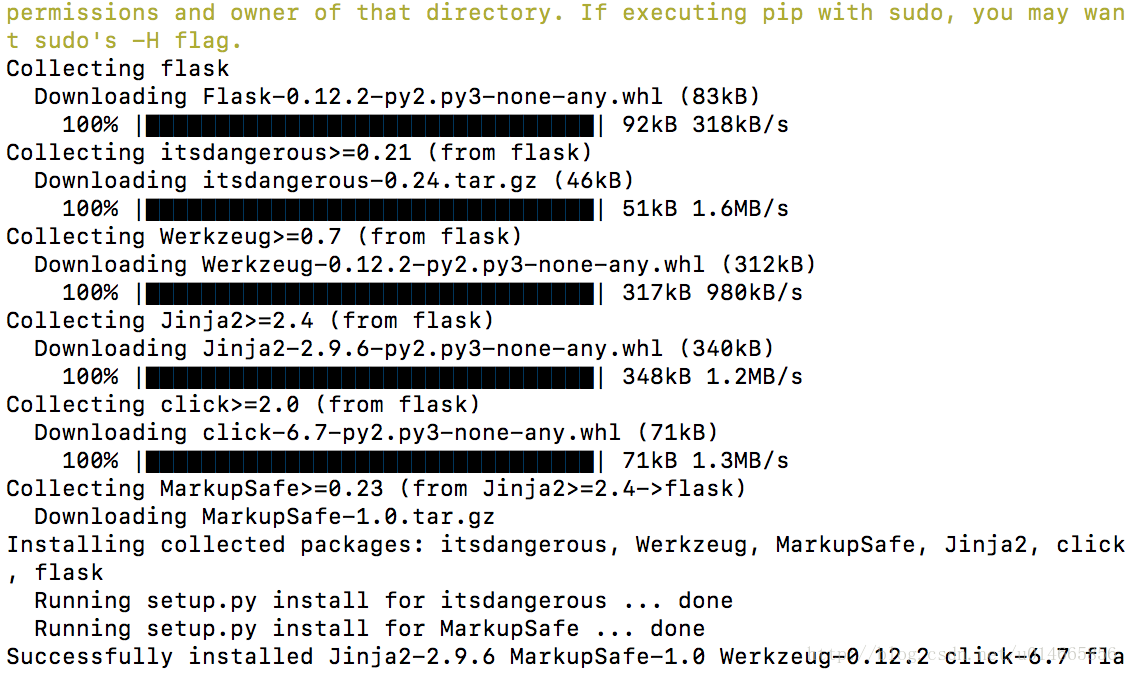
terminal input command: sudo PIP install Flask as shown in the picture:

4. View
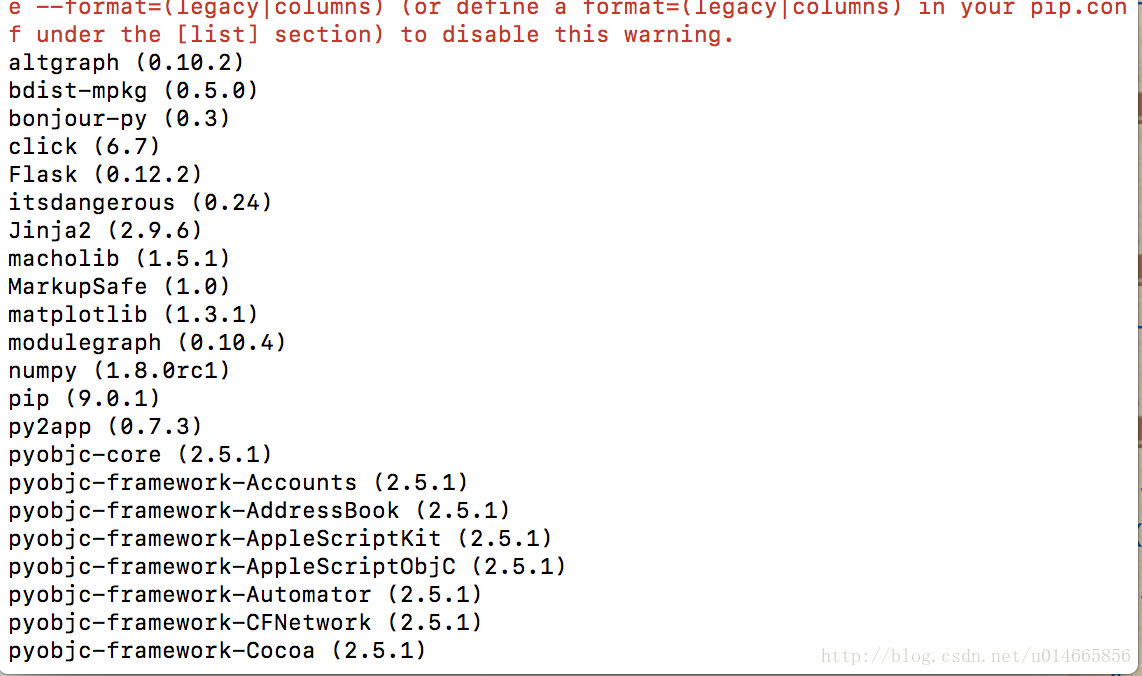
input command: PIP list as follows:

5.
the success of the installation under pyhton, input the import flask as shown below, is installed successfully