Category Archives: How to Fix

/var/run/nginx/nginx.pid” failed (2: No such file or directory)

The nginx server keeps reporting the following error when the server is shut down and restarted:

[root@localhost sbin]# nginx: [emerg] open() "/var/run/nginx/nginx.pid" failed (2: No such file or directory)

Solution:

    /> /local/nginx/conf/

     cd /usr/local/nginx/conf/
    
      Edit the configuration file nginx.conf
    vi nginx.conf
    
      The following code is commented in the configuration file:
    #pid   logs/nginx.pid;
    
      removes the comment, i.e. #, and changes it to the following code:
    pid    /usr/local/nginx/logs/nginx.pid;
    
      Press ESC, enter the following code, save and exit
    :wq
    
      > create logs directory in /usr/local/nginx:
    [root@localhost conf]# mkdir /usr/local/nginx/logs
    
      Start the nginx service:
    /usr/local/nginx/sbin/nginx
    

    Pro test successful!

In the XML configuration file of spring jdbc.properties The connection to the database failed due to garbled code

An unusual problem we encountered today was that getting the configured properties in jdbc.properties failed to connect to the database.
Without further ado, go straight to the code.
Exception in thread “main” org.springframework.jdbc.CannotGetJdbcConnectionException: Could not get JDBC Connection; Nested exception is java.sql. SQLExeption: Access denied for user ‘e £e £’@’localhost’ (using password: YES)
Spring has resolved the value of ${username to the value of my computer’s username. Simply change the username of the jdbc.properties and XML to name.
${JDBC. Username} is not the same as ${JDBC. Username}. Yes, you don’t get that weird question by just writing it like this, but it does.
Invalid bean definition with name ‘dataSource’ defined in class path resource [applicationContext.xml]:
Could not resolve placeholder ‘jdbc.driverClassName’ in value “${jdbc.driverClassName}”;
${JDBC. Username} is not resolved by Spring.

When docker starts tomcat, the access port of the container displays 404, and the source server fails to find the representation of the target resource or is unwilling to disclose an existing one

Solution:
systemctl stop firewalld.
systemctl disable firewalld.
s>mctl disable firewalld.
systemctl disable firewalld.
systemctl disable firewalld If Tomcat is still inaccessible after the firewall is turned off, the webapps folder is empty
2. The problem of webapps folder is empty check the tomcat container ID

docker ps
enter tomcat container terminal
docker exec – it tomcat container ID/bin/bash
enter
CD webapps webapps folder
copy on a webapps directory. All files to the webapps directory under the dist
cp – r.. /webapps.dist/* ./

Using global timing task cronutil in hutool tool class

The original address: https://www.cnblogs.com/xiaolong1996/p/9571645.html
Use the global timing task-cronutil in the Hutool utility class
Spring’s @Autowired annotation is used to inject the required service. When the add method in the service is called, the program raises a null pointer exception. In the thread, it is thread-safe, injection-resistant, and is resolved by the context object instance
 
package com.backstage.config;
import org.springframework.beans.BeansException;
import org.springframework.context.ApplicationContext;
import org.springframework.context.ApplicationContextAware;
import org.springframework.stereotype.Component;
/
* * * @ ProjectName:
* @ Package: com. Runs backstage. Config
* @ the ClassName: ApplicationContextProvider
* @ Description: get bean object tools
* @ Author: wangzhilong @ CreateDate
* :
* @version: 1.0
/
Author: * *
* ZhuShangJin Date:
* 2018/7/3/

* @ Component
public class ApplicationContextProvider implements ApplicationContextAware {

/* * *
the context object instance */
private static ApplicationContext ApplicationContext;
@Override
public void setApplicationContext(ApplicationContext) throws BeansException {
is.ApplicationContext = ApplicationContext;
}
/**
* @return
@return
* @return
publ>tatic ApplicationContext getApplicationContext() {
}

/* * * by the name for the Bean.

* * * @ @ param name
the return/

* public static Object getBean (String name) {
the return getApplicationContext().getBean(name);
}
/
* * * by class get beans.

* * @ param clazz
* @ param & lt; T>
* @ return/

* public static & lt; T> T getBean(Class< T> Clazz) {
return getApplicationContext () getBean (clazz);
}
/ * *
* by name, and the return of the Clazz specified Bean

* * @ param name
* @ param Clazz
* @ param & lt; T>
* @ return/

* public static & lt; T> T getBean(String name, Class< T> Clazz) {
return getApplicationContext().getBean(name, clazz);
}
 
Public TimingMonitoring () {//new injection need bean enclosing detailedDataService = ApplicationContextProvider. GetBean (detailedDataService. Class); }
}

 

MySQL advanced — Explanation of ref field in explain information

1. Explain the ref field in the Explain information
Indicates which column of the index is used, if possible, as a constant. Which columns or constants are used to find values on indexed columns
2. Explain the ref field in the information

From key_len we can see that IDX_COL1_COL2 of table T1 is fully used, that col1 matches col1 of table T2, and that col2 matches a constant, that is, the fields associated with other tables in the ‘AC’ query, and that the foreign key relationship is indexed

The problem that headers [‘content-type ‘] does not work is set in the Axios get method request interface

The request headers are set in the Axios wrapper request method and are not present in the Request Headers

service.interceptors.request.use(
    config => {
        config.data = JSON.stringify(config.data);
        config.headers['Authorization'] = getToken();
        config.headers['Content-Type'] = "application/json;charset=utf-8";
        
        return config;
    },
    error => {
        return Promise.reject();
    }
);

The Axios source code under NPM removes the Content-Type setting when RequestData is not set

// Add headers to the request
if ('setRequestHeader' in request) {
    utils.forEach(requestHeaders, function setRequestHeader(val, key) {
    if (typeof requestData === 'undefined' && key.toLowerCase() === 'content-type') {
      // Remove Content-Type if data is undefined
      delete requestHeaders[key];
    } else {
      // Otherwise add header to the request
      request.setRequestHeader(key, val);
    }
  });
}

Solution:
If (typeof requestData === ‘undefined’ & & Key.tolowerCase () === ‘Content-Type ‘)
2. Assign config.data = true to requestData

service.interceptors.request.use(
    config => {
        config.data = JSON.stringify(config.data);
        config.headers['Authorization'] = getToken();

        config.data = true
        config.headers[ 'Content-Type'] = "application/json;charset=utf-8";

        return config;
    },
    error => {
        return Promise.reject();
    }
);

 
Reference data: https://blog.csdn.net/qq_24729895/article/details/80367460

Solutions to the problem of “Autowired cannot be resolved to a type” in eclipse Maven project

Autowired cannot be resolved to a type;
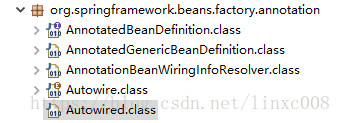
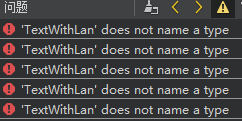
Question screenshot:
First thought: There should be a missing JAR package. Find the corresponding package as follows:

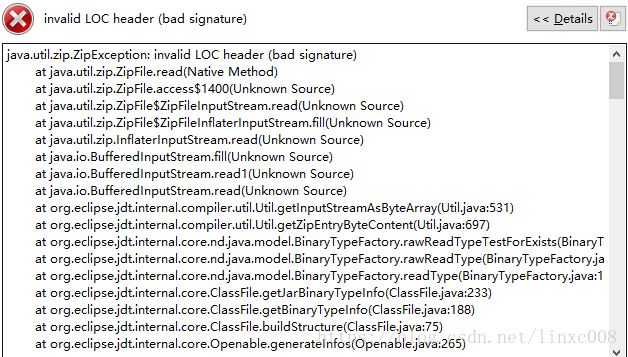
Click the corresponding class to open the problem as follows:

It should be obvious that there is a problem with the JAR, find the local repository, delete the JAR, and download it again. Right-click the project in Eclipse and expand Run As, then select Maven Install and re-download the JAR package.
You can see the JAR package being downloaded in the console window:

Once the JAR package has been downloaded, the problem can be resolved without incident. This solution is personally measured, not necessarily able to solve your problem, do not like spray! Thanks for communicating!

Error resolution of ‘string’ does not name a type

‘string’ does not name a type Although it is not the first time to meet, but still delay for a while, in order not to delay time, so write down the mistake

Example understanding:

#ifndef EMP_H 
#define EMP_H 
#include <string> 
 
struct menuEntry  
{  
    string uID;    //error: 'string' does not name a type 
    string uName;  //error: 'string' does not name a type 
}; 
 
#endif//EMP_H
#ifndef EMP_H 
#define EMP_H 
#include <string> 
 
struct menuEntry  
{  
    std::string uID;      /* ok */       
    std::string uName;    /* ok */
 }; 
 
#endif//EMP_H

using namespace STD; using namespace STD;
don't forget to include the header file. string>