Category Archives: How to Fix

How to Fix “the data of store is lost after Vue refreshes the page”

When the page is refreshed, the VUE instance is reloaded, and the store will be reset. The store can be stored in the local localStorage, sessionStorage and cookie before the definition is refreshed. The localStorage is permanent storage, and the page data that was opened last time will be read when the page is reopened. According to my needs, the most appropriate is sessionStorage.
before upload fires when the page is refreshed. You can listen to this method to store the page to sessionStorage before the page is refreshed. Even when page refresh
of course, read the sessionStorage data into the store, read and stored, are written in the app. Vue.

export default {
  name: 'app',
  created () {
    // Read sessionStorage on page load
    if (sessionStorage.getItem('store')) {
      this.$store.replaceState(Object.assign({}, this.$store.state, JSON.parse(sessionStorage.getItem('store'))))
    }
    // Save the store to sessionStorage when the page is refreshed
    window.addEventListener('beforeunload', () => {
      sessionStorage.setItem('store', JSON.stringify(this.$store.state))
    })
  }
}
How to receive localdatetime type in background

First, we need to introduce it in the Maven parent POM

<dependency>
     <groupId>com.fasterxml.jackson.datatype</groupId>
     <artifactId>jackson-datatype-jsr310</artifactId>
     <version>2.9.7</version>
</dependency>

Add relevant annotations to the entity class definition, as shown below

import com.fasterxml.jackson.annotation.JsonFormat;
import org.springframework.format.annotation.DateTimeFormat;
import java.time.LocalDateTime;


@DateTimeFormat(pattern = "yyyy-MM-dd HH:mm:ss") // To parse the form data (form/data) data
@JsonFormat(shape = JsonFormat.Shape.STRING, pattern = "yyyy-MM-dd HH:mm:ss", timezone = "GMT+8") //To parse json data
private LocalDateTime startTime;

Installing sklearn (scikit learn) module related to Python machine learning in Windows

Refer to the official website:
http://scikit-learn.org/dev/developers/advanced_installation.html#install-bleeding-edge

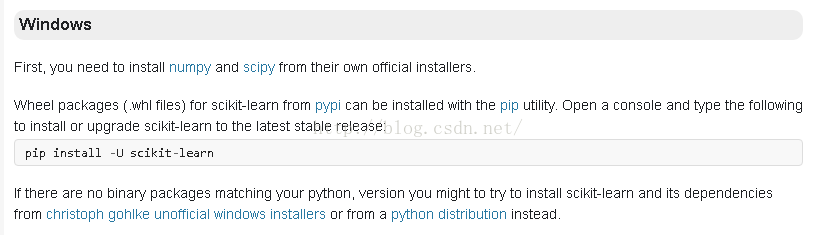
The screenshot is as follows:

Under the CMD window, enter:
PIP install -u scikit-learn PIP install -u scikit-learn

Since I installed Anaconda first, I installed version 0.17 of Scikit-Learn by default, but in IPython interactive mode type:
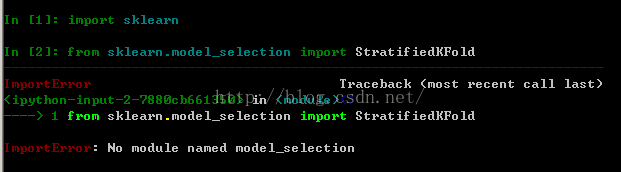
Error from sklearn.model_selection import KFold No module named model_selection
The diagram below:

StratifiedKfold and other classes must be import from sklearn.cross_validation. For example:

from sklearn.cross_validation import KFold

The parameters of this version of KFold etc. are different from those of 0.18. See the documentation on the website for details.

Import Android project Error:Internal error : org.gradle.tooling .BuildException: Could not execute build…

Android import project compilation error:
Error: Internal Error: org. Gradle. Tooling. BuildException: Could not execute build using gradle distribution ‘https://services.gradle.org/distributions/gradle-4.10.1-all.zip’.
Problem:
Version mismatch, loading error reported in the following figure

Solution:
Modify its version (just make it the same as other local projects) :

https\://services.gradle.org/distributions/gradle-4.4-all.zip


Vue uses Axios

Step 1: Install Axios

$ npm install axios

Step 2: Import Axios in main.js

import VueAxios from 'vue-axios';
import axios from 'axios';
Vue.prototype.$axios = axios;

Step 3: Write the Axios request code

created(){
    const  _this = this
    this.$axios.get('http://localhost:8081/book/findall').then(function (resp) {
        _this.books = resp.data;
      })

Node start – create a server listening port.

var http = require(“http”);
function onRequest(request, response) {
nsole. log(” function start “);
response. WriteHead (200, {” content-type “:” text/plain “});
response. Wirte (” hello “);
the response. The end ();
}
http.createServer(onRequest).listen(8888);
console.log(“Server has startsed”)
Get Node’s HTTP module first.
var http = require(“http”);
Write the handler function. onRequest
Create the server and listen on port 8888
http.createServer(onRequest).listen(8888);

DB2 table annotation pull

Application scenarios:
company Intranet data tables built after migrating to customers online, usually cannot be attached to export comments, need further pull
table field notes:

SELECT
	*
FROM
	(
		SELECT
			'comment on column ' || trim(t.TABSCHEMA) || '.' || t.TABNAME || '.' || t.COLNAME || ' is ' || '''' || t.REMARKS || '''' || ' GO' AS COMMENT
		FROM
			syscat. COLUMNS t
	)
WHERE
	COMMENT IS NOT NULL

Table annotation:

SELECT
	*
FROM
	(
		SELECT
			'comment on table ' || trim(t.tabschema) || '.' || t.tabname || ' is ' || '''' || t.REMARKS || '''' || ' GO' AS COMMENT
		FROM
			syscat. TABLES t
	)
WHERE
	COMMENT IS NOT NULL

SQL injection for ASP + access website

SQL injection is used for ASP + Access website

ASP is Active Server Pages, which is a server-side script environment developed by Microsoft Corporation. It can be used to create dynamic interactive web Pages and establish powerful web applications. When the server receives a request for an ASP file, it processes server-side script code that is included in the HTML (Hyper Text Markup Language) Web page file that is built to be sent to the browser. In addition to server-side script code, an ASP file can also contain text, HTML (including related client-side scripts), and COM component calls.
Microsoft Office Access is a relational database management system released by Microsoft. There’s only the concept of tables.
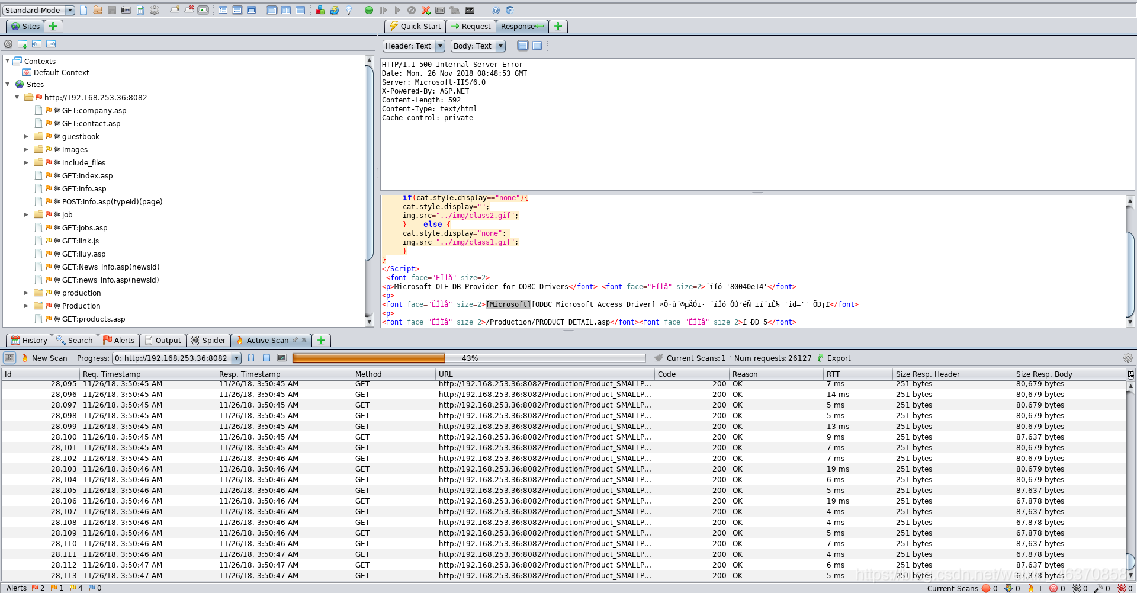
There are many scanning tools for Web applications: AWVS, AppScan, OWASP ZAP, etc. The following is probed using OWASP-ZAP.

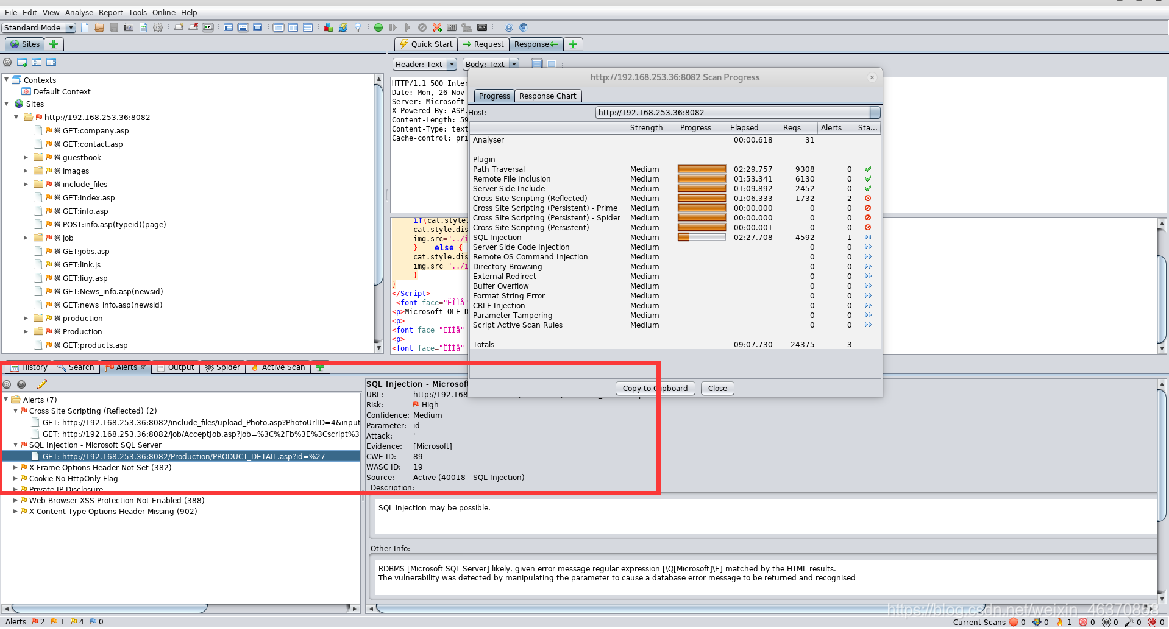
3. Vulnerability Analysis
Analyze the contents marked red in the scan results.

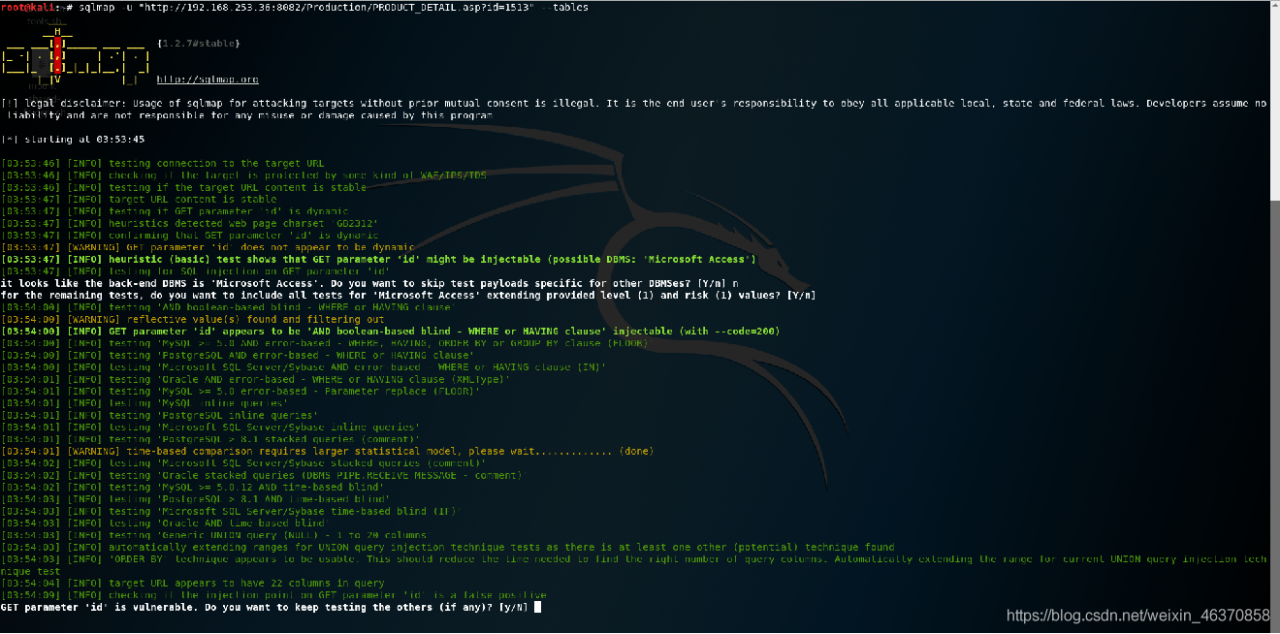
4. SQL injection point using
using SQLMap test. Note: Access only has the concept of a table.