The function is to remove the repeated numbers in the array and sort them before output.
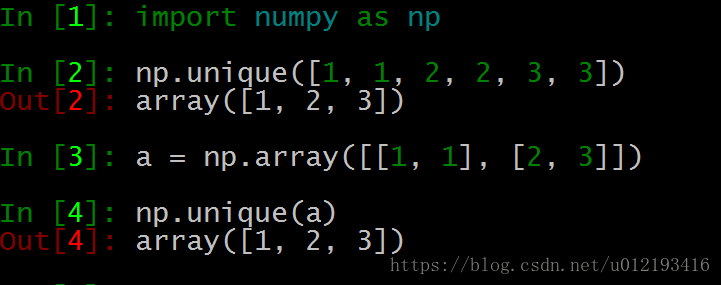
The function is to remove the repeated numbers in the array and sort them before output.
This is probably due to version compatibility. The file is in doc format, while your word version is 07 or higher.
Formulas cannot be inserted when modeling mode is on.
Save as a new docx format.
Sometimes, for some reasons, we need to check the MD5 value of the file. Under Linux, this is very simple. We only need to use the md5sum command, but we don’t know the corresponding command on windows. Today, I checked some on the Internet. Sure enough, windows also has corresponding commands. And the command can also view the SHA1 value and sha256 value function. The order is as follows:
certutil -hashfile filename MD5
certutil -hashfile filename SHA1
certutil -hashfile filename SHA256Some executable files under Linux, such as. Sh ending, etc;
If we want to run such a file, we need to add an executable permission to the file;
Otherwise, this file cannot be executed.
We use VI to build a tomcat.sh File, command ll view
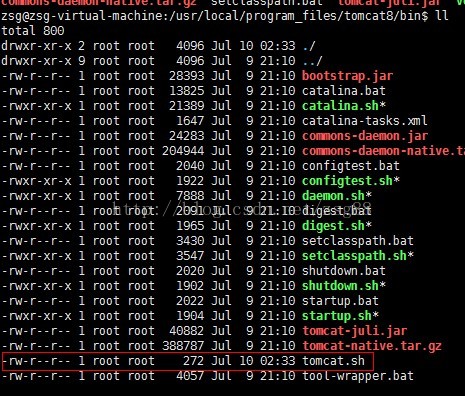
You can see here that there is no executable permission.
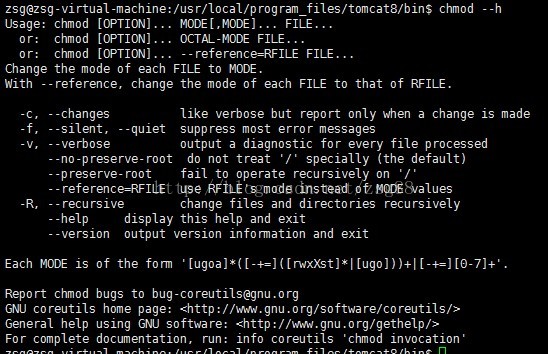
Next, we need to use the Chmod command. Let’s take a look at the help information of the Chmod command.
Enter Chmod — H
to enter Chmod — H
Then we add the executable permission
Chmod 777 tomcat.sh
In executing the LL command, make a comparison with before
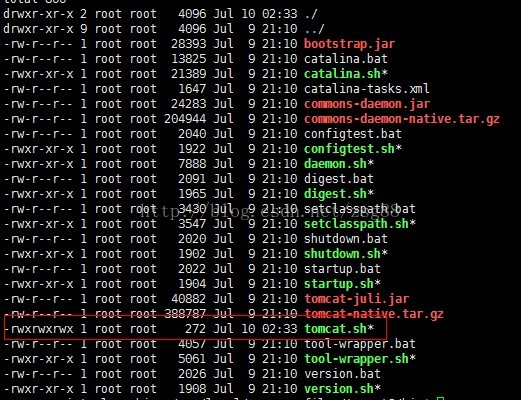
Then it’s ready to run
Input: my_ dict = {‘i’: 1, ‘love’: 2, ‘you’: 3}
Expected output: my_ df
      0
i     1
love  2
you   3
If the key and value in the dictionary are one-to-one, enter my directly_ df = pd.DataFrame (my_ “Value error: if using all scalar values, you must pass an index”.
The solution is as follows:
1. Specifies the index of the dictionary when using the dataframe function
import pandas as pd

my_dict = {'i': 1, 'love': 2, 'you': 3}
my_df = pd.DataFrame(my_dict,index=[0]).T

print(my_df)
2. Convert dictionary dict to list and transfer it to dataframe
import pandas as pd

my_dict = {'i': 1, 'love': 2, 'you': 3}
my_list = [my_dict]
my_df = pd.DataFrame(my_list).T

print(my_df)
3. Use DataFrame.from_ Dict function
For specific parameters, please refer to the official website: https://pandas.pydata.org/pandas-docs/stable/reference/api/pandas.DataFrame.from_ dict.html
import pandas as pd

my_dict = {'i': 1, 'love': 2, 'you': 3}
my_df = pd.DataFrame.from_dict(my_dict, orient='index')

print(my_df)
Output results
      0
i     1
love  2
you 3If you want to set the same initial value and desired length
>>> a=[None]*4
>>> print(a)
[None, None, None, None]
If we know the length of the list in advance, we can initialize the list of that length in advance, and then assign values to each list, which will be faster than each time list.append () more efficient.
If you want the sequence initial value, you can use the range function, but note that the range function returns an iterative object, which needs to be converted into a list
>>> b=list(range(10))
>>> print(b)
[0, 1, 2, 3, 4, 5, 6, 7, 8, 9]

>>> b=range(10)
>>> print(b)
range(0, 10)
If you want to eliminate unwanted data, you can use the list derivation
>>> c=[i for i in range(10) if i%2==0 and i<8]
>>> print(c)
[0, 2, 4, 6]
Life is short, You need Python~
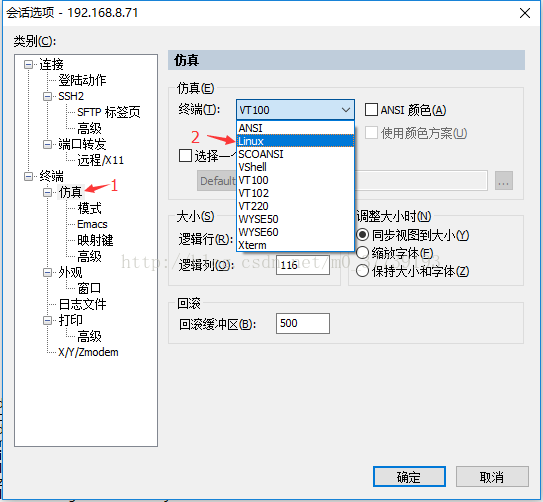
The command terminal in the virtual machine can be deleted with backspace key in HBase shell, but the virtual machine connected with SecureCRT can not be deleted with backspace key in HBase shell (I didn’t encounter this situation in hbase-0.90.6-cdh3u5, but encountered this problem in hbase-1.0.0-cdh5.5.2)
Options — session options — Simulation — terminal — choose Linux
(VT100 by default)
Delete with Ctrl + backspace
Or:
Hold down shift and click Delete to delete.
Or:
Press the ← key to the previous position of the letter you want to delete, and then press the backspace key to delete the last one
Or:
Options — session options — mapping key — check: backspace send delete and delete send backspace
(you can use the backspace key to delete directly)
Original address: http://dtbuluo.com/blog/archives/383
When installing gcc-4.7.0 make under CentOS 6.5, the following error will be prompted:
configure: error: cannot compute suffix of object files: cannot compile
See article: http://dtbuluo.com/blog/archives/381
The solution is:
Add the following in / etc / Profile:
export LD_ LIBRARY_ PATH=$LD_ LIBRARY_ PATH:/usr/local/mpc-0.9/lib:/usr/local/gmp-5.0.1/lib:/usr/local/mpfr-3.1.0/lib
|
one |
|
As shown in the figure:

|
one |
|
Reload the configuration file.
ubuntu/Linux
sudo apt install libopenmpi-dev
pip3 install -i https://pypi.tuna.tsinghua.edu.cn/simple/ mpi4py
mac
brew install mpich
pip install -i https://pypi.tuna.tsinghua.edu.cn/simple/ mpi4py
Install Zsh
Installing and configuring Zsh and oh my Zsh in Ubuntu
Effect display
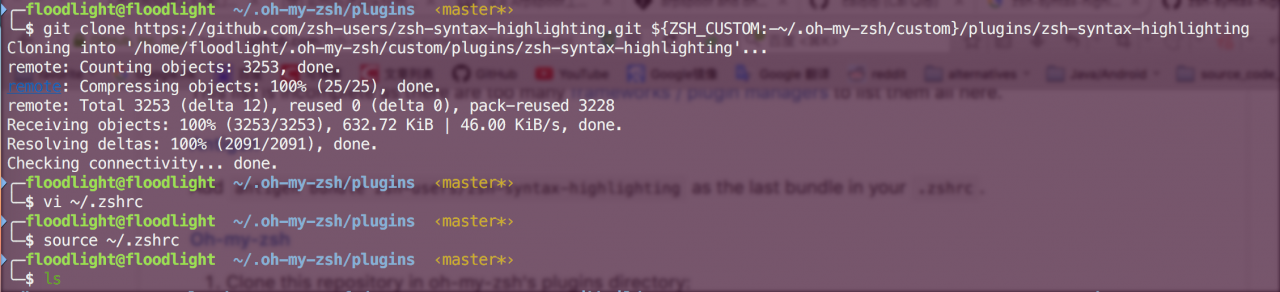
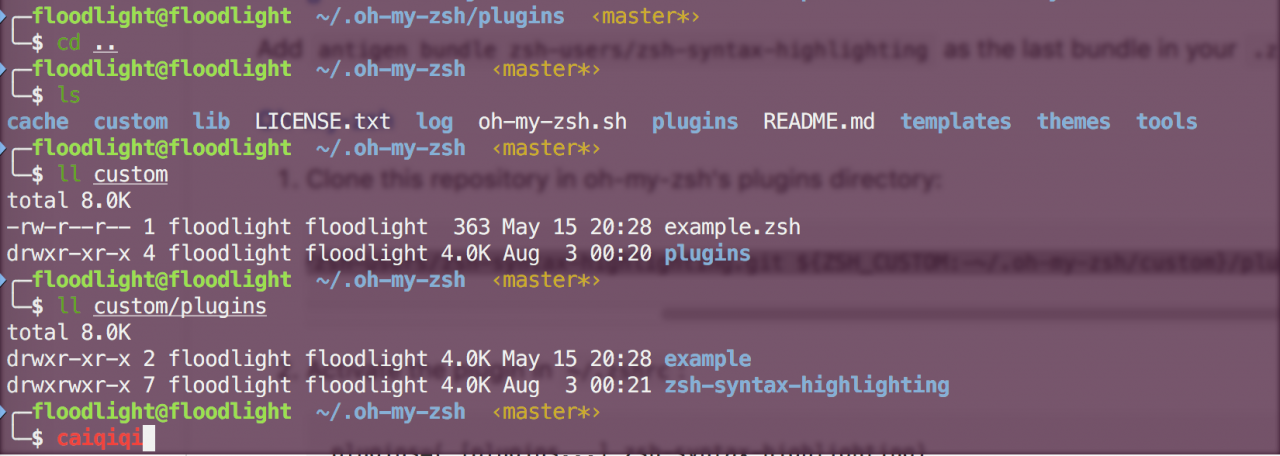
install
For OS X users
direct
brew install zsh-syntax-highlightingThe plug-in will be downloaded automatically and the
source /usr/local/share/zsh-syntax-highlighting/zsh-syntax-highlighting.zshAdd this sentence to your ~ /. Zshrc .
For oh my Zsh users
git clone https://github.com/zsh-users/zsh-syntax-highlighting.git ${ZSH_CUSTOM:-~/.oh-my-zsh/custom}/plugins/zsh-syntax-highlighting
Then activate the plug-in, and add the name of the plug-in to
~ /. Zshrc
plugins = ([plugins...] Zsh syntax highlighting)
to make the change take effect
source ~/.zshrcNote: there are many plug-ins, but they will slow down obviously every time you enter the command prompt. Use with caution.
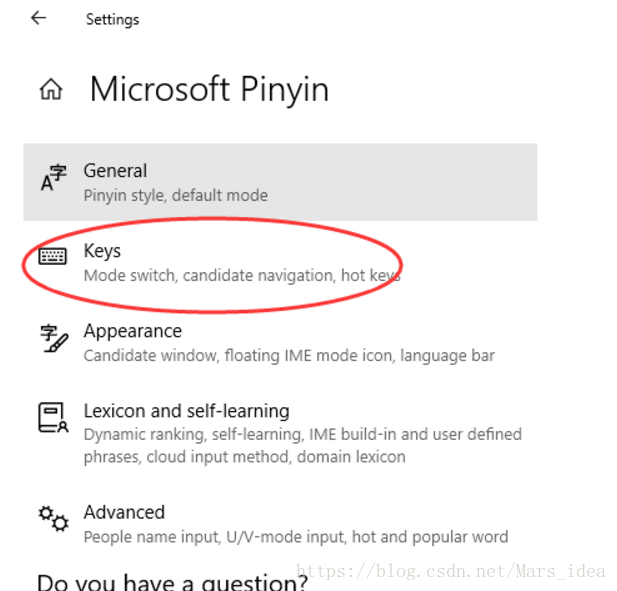
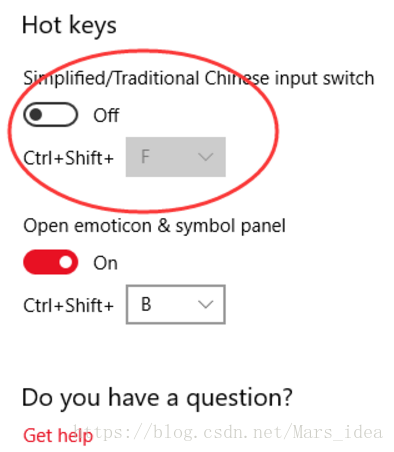
This is because the IDE code format shortcut Ctrl Shift f conflicts with the simplified and traditional shortcut.
Solution, input method settings inside, shortcut key click in, drag to the bottom, turn off the simple and complex switch
And then—————————————
– —-
—-
Datetime: date time module, which provides multiple methods to operate date and time
Strftime: format date and time
Get today’s date, yesterday’s date, formatted date
>>> import datetime
>>> today=datetime.date.today()
>>> print today
2018-01-17
>>> formatted_today=today.strftime('%y%m%d')
>>> print formatted_today
180117
>>> yesterday=int(formatted_today)-1
>>> print yesterday
180116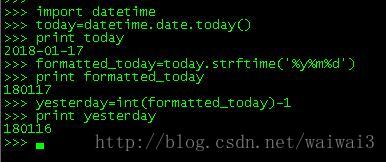
The above content was written on January 17, 2018. Now some problems are found on March 1. When it crosses months, the above code will appear.
yesterday=int(formatted_today)-1After executing this line of code, the day before March 1 becomes March 0
How to change it?
yesterday = (datetime.date.today() + datetime.timedelta(days=-1)).strftime('%Y%m%d')Get today’s date first
Then use the timedetla object of datetime, which represents the difference between the two times, datetime.timedelta (days = – 1) means the time of the day before. The day before March 1 is February 28.
Finally, we use strftime to transform the time format