Category Archives: How to Fix

UTF-8 encoding error when starting robotframework ride

Record the error when starting the robot framework ride

start-up ride.py The following error occurred

D:\Program Files(x86)\python\Scripts>python ride.py
Traceback (most recent call last):
  File “D:\Program Files(x86)\python\lib\site-packages\robotide\application\ application.py “, line 70, in OnInit
    self._ find_ robot_ installation()
  File “D:\Program Files(x86)\python\lib\site-packages\robotide\application\ application.py “, line 124, in _ find_ robot_ installation
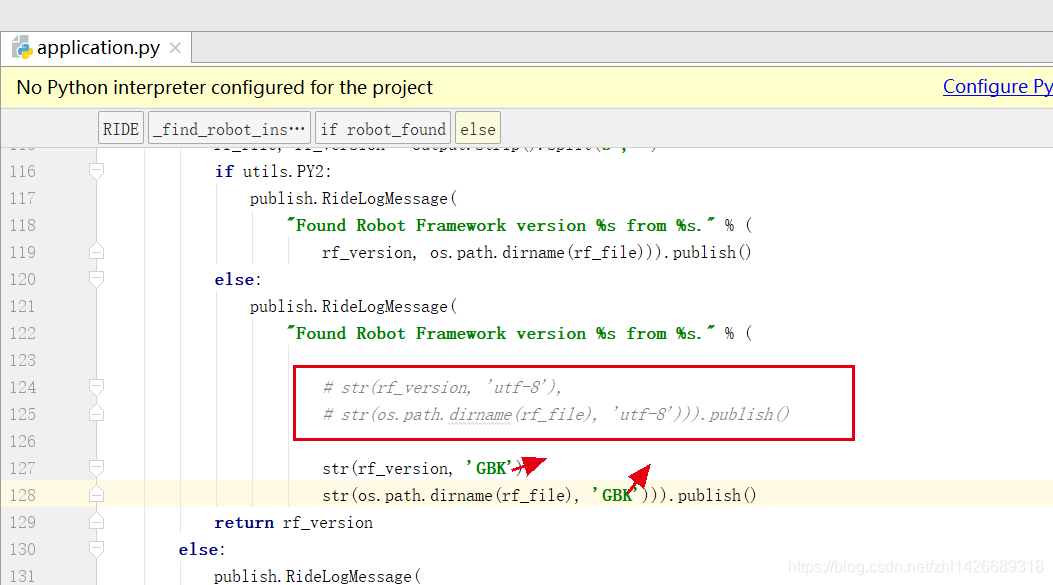
    str( os.path.dirname (rf_ file), ‘utf-8’))).publish()
UnicodeDecodeError: ‘utf-8’ codec can’t decode byte 0xa3 in position 20: invalid start byte
OnInit returned false, exiting…
Error in atexit._ run_ exitfuncs:
wx._ core.wxAssertionError : C++ assertion “GetEventHandler() == this” failed at ..\..\src\common\ wincmn.cpp (478) in wxWindowBase::~wxWindowBase(): any pushed event handlers must have been removed


Check the log. UTF-8 can’t encode 20,

Therefore, we tried the next step application.py The UTF-8 coding form in the file is changed to “GBK”, restart ride.py After that, ride is turned on

Cloning failed using an SSH key for authentication

Cloning failed using an ssh key for authentication, enter your GitHub credentials to access private repos
Head to https://github.com/settings/tokens/new?scopes=repo&description=Composer+on+ Name + time
to retrieve a token. It will be stored in “C”: / users / administrator / appdata / roaming / composer/ auth.json ” for future use by Composer.

Log in to GitHub and open the following link
below https://github.com/settings/tokens
Generate a token
and execute the following code

composer config --global --auth github-oauth.github.com <token>

Correct writing

composer config --global --auth github-oauth.github.com 441be92d716e*****853ec70ffa

Then read the error message in the newspaper

C:/Users/Administrator/AppData/Roaming/Composer/auth.jso

Is there any change in the following file? If so, there will be no problem,

error C4996: ‘inet_addr‘: Use inet_pton() or InetPton() instead or define _WINSOCK_D

[questions]

Vs2015 appears when writing socket client. (this is the second time I have encountered this problem. Last time vs2017, I must remember it to facilitate myself to check in the future: P)

SOCKADDR_ IN ClientAddr;
ClientAddr.sin_ family = AF_ INET;
ClientAddr.sin_ addr.S_ un.S_ addr = inet_ addr(“127.0.0.1”);
ClientAddr.sin_ Port = htons (port);
error c4996: ‘INET_ addr’: Use inet_ pton() or InetPton() instead or define _ WINSOCK_ DEPRECATED_ NO_ WARNINGS to disable deprecated API warnings

[reason]

In the version after vs2013, INET is added_ New functions such as Pton () and inetpton () are used for IP address conversion between “dotted decimal” and “binary integer”, and can handle IPv4 and IPv6. And INET_ Addr is an old function. Higher version vs uses a new function by default when compiling, so this error will be reported.

[solution 1]

Replace INET with the new function suggested_ Addr function.

[solution 2]

Modify the vs configuration and tell it I want the old function

1. Modification method: Item – & gt; attribute – & gt; C / C + + – & gt; general – & gt; SDL check, change “yes” to “no”.
2. Property page of file_ CRT_ SECURE_ NO_ “Warnings” plus
– – –
copyright notice: This is CSDN blogger Rani_ The original article of “ZZ” follows CC 4.0 by-sa copyright agreement. Please attach the link of original source and this statement.
Link to the original text: https://blog.csdn.net/weixin_ 42731241/article/details/96143934

Troubleshooting of ROS rosdep init / update

Problem description
operating system: ubuntu16.04/ubuntu18.04/ubuntu20.04
ROS version: kinetic / melodic / noetic
recently, I was learning how to install and use orb-slam2. During the compilation process, I found that the rosdep command is needed under ROS

sudo rosdep init

The following error is reported:

ERROR: cannot download default sources list from:
https://raw.githubusercontent.com/ros/rosdistro/master/rosdep/sources.list.d/20-default.list
Website may be down.

Gu Yue bloggers have sorted out this problem, but according to the current network environment, there are still problems.
Reference article:
1 https://www.guyuehome.com/12640
https://blog.csdn.net/JanKin_ BY/article/details/105509383

The root cause is that the network is blocked. If the above articles are not helpful, please refer to the following solutions:
1. Take the computer to the University Campus (the suffix of the university website is edu.cn Use its campus network to use the rosdep command;
2. Try to use mobile hot spots (China Mobile, China Unicom and China Telecom).

Hope it helps!

Centos8 modifying the host name

When you modify the host name, you can directly use the tools provided by the system.  

[root@localhost centos]# hostnamectl
   Static hostname: localhost.localdomain
         Icon name: computer-vm
           Chassis: vm
        Machine ID: 89bf177f78dc49f6b4954e1e9511e267
           Boot ID: 8f46edc8b7b648f58d5d4c1f3c15cbee
    Virtualization: vmware
  Operating System: CentOS Linux 8
       CPE OS Name: cpe:/o:centos:centos:8
            Kernel: Linux 4.18.0-240.10.1.el8_3.x86_64
      Architecture: x86-64
[root@localhost centos]# sudo hostnamectl set-hostname k8s-slave
[root@localhost centos]# hostnamectl
   Static hostname: k8s-slave
         Icon name: computer-vm
           Chassis: vm
        Machine ID: 89bf177f78dc49f6b4954e1e9511e267
           Boot ID: 8f46edc8b7b648f58d5d4c1f3c15cbee
    Virtualization: vmware
  Operating System: CentOS Linux 8
       CPE OS Name: cpe:/o:centos:centos:8
            Kernel: Linux 4.18.0-240.10.1.el8_3.x86_64
      Architecture: x86-64
[root@localhost centos]# cat /etc/hostname 
k8s-slave
[root@localhost centos]# cat /etc/hosts
127.0.0.1   localhost localhost.localdomain localhost4 localhost4.localdomain4
::1         localhost localhost.localdomain localhost6 localhost6.localdomain6
[root@localhost centos]# vi /etc/hosts
[root@localhost centos]# cat /etc/hosts
127.0.0.1   localhost localhost.localdomain localhost4 localhost4.localdomain4
::1         localhost localhost.localdomain localhost6 localhost6.localdomain6

192.168.187.151  k8s-slave
[root@localhost centos]#


“NPM err! Error: eperm: operation not permitted” problem solving

Solution of “NPM err! Error: eperm: operation not permitted”


Error occurred when NPM running Vue cli to create project under Windows system

npm ERR! Windows_ NT 10.0.14393
npm ERR! argv “C:\\Program Files\\nodejs\\ node.exe ” “C:\\Program Files\\nodejs\\node_ modules\\npm\\bin\\npm- cli.js ” “uninstall” “express” “-g”
npm ERR! node v6.9.1
npm ERR! npm  v3.10.8
npm ERR! path C:\Program Files\nodejs\node_ cache\_ locks
npm ERR! code EPERM
npm ERR! errno -4048
npm ERR! syscall mkdir
npm ERR! Error: EPERM: operation not permitted, mkdir ‘C:\Program Files\nodejs\node_ cache\_ locks’
npm ERR!     at Error (native)
npm ERR!  { Error: EPERM: operation not permitted, mkdir ‘C:\Program Files\nodejs\node_ cache\_ locks’
npm ERR!     at Error (native)
npm ERR!   errno: -4048,
npm ERR!   code: ‘EPERM’,
npm ERR!   syscall: ‘mkdir’,
npm ERR!   path: ‘C:\\Program Files\\nodejs\\node_ cache\\_ locks’ }
npm ERR!
npm ERR! Please try running this command again as root/Administrator.
npm ERR! Please include the following file with any support request:
npm ERR!     C:\Users\admin\npm- debug.log


The key point is: operation not permitted.


Solution: use Win + X, select the command prompt (administrator), and run the command in it.
 

“ XX.app ”It is damaged and cannot be opened. You should move it to the wastebasket.

    MacOS Mojave 10.14 and the following systems:
    open the terminal.app, enter the following command and enter, enter the power on password and enter
    sudo spctl -- Master disable

    MacOS Catalina 10.15 system:
    open terminal.app, enter the following command and enter, enter the power on password and enter
    sudo xattr - Rd com.apple.quarantine Space software path
    such as Sketch.app
    sudo xattr -rd com.apple.quarantine /Applications/ Sketch.app
    Software path acquisition: drag the software into the “terminal app” to obtain the path

    MacOS Catalina 10.15.4 system:
    if the software exits unexpectedly after updating the 10.15.4 system, you can sign the software according to the following method
    1. Open the “terminal app” and enter the following command:
    Xcode select -- install
    2. Sign the software
    open the terminal tool and enter and execute the following command:
    sudo codesign -- force -- deep -- sign- (application path)

Integration openfeign failed to start

Using the open feign development interface, the direct startup fails, and the following exception is thrown:

nested exception is java.lang.IllegalStateException: No Feign Client for loadBalancing defined. Did you forget to include spring-cloud-starter-loadbalancer?

The problem is obviously that spring cloud starter loadbalancer is not added, so in the pom.xml Add the following dependencies to:

<dependency>
    <groupId>org.springframework.cloud</groupId>
    <artifactId>spring-cloud-loadbalancer</artifactId>
</dependency>

After re importing the dependency, it starts successfully, but the calling interface still reports an error:

java.lang.AbstractMethodError: org.springframework.cloud.netflix.ribbon.RibbonLoadBalancerClient.choose(Ljava/lang/String;Lorg/springframework/cloud/client/loadbalancer/Request;)Lorg/springframework/cloud/client/ServiceInstance;

This is because spring cloud replaces the load balancing component from ribbon to loadbalancer. You need to exclude the ribbon component in spring cloud starter Alibaba Nacos discovery, otherwise loadbalancer will not work.

<dependency>
    <groupId>com.alibaba.cloud</groupId>
    <artifactId>spring-cloud-starter-alibaba-nacos-discovery</artifactId>
    <exclusions>
        <exclusion>
            <groupId>org.springframework.cloud</groupId>
            <artifactId>spring-cloud-starter-netflix-ribbon</artifactId>
        </exclusion>
    </exclusions>
</dependency>

After re importing the dependency, restart the project and call successfully.

Matlab: Three forms of random number generated (Rand, Randi and Randn)

There are three kinds of library functions about random number generation in MATLAB. Let’s take a look at their forms:
1, Rand (…) 
it is to generate pseudo-random numbers with uniform distribution between 0 and 1 (open-loop, excluding 0 and 1), that is, infinite tests, in which the probability of each number is the same.
its function format is as follows:

 R = rand(N)              % Generate an N×N matrix of random numbers, where each element lies between 0 and 1
 R = rand([M,N,P,...])    % Generate M×N×P×... of matrix random numbers
 R = rand(M,N,P,...)      % As above, the brackets are not required
 R = rand(... , CLASSNAME) % Generate a random number of type CLASSNAME, e.g. 'double' or 'single' 

for example, generate a double type of 5 × 3 evenly distributed random number between 0 and 1:

R = rand(5,3,'double');

similarly, we want to generate 100 data between [a, b], which can be expressed as:

R = a + (b-a).*rand(100,1);

2.randi(…)
Randi (n) is a pseudo-random number evenly distributed among the generated (0, n), and the numbers are all integers, so each number is between 1 and n. It can be expressed in the following ways:

R = randi(iMax)            % Generate a uniformly distributed random number between 1:iMax
R = randi(iMax,m,n) % Generate a uniformly distributed random number between 1:iMax for m×n
R = randi([iMin,iMax],m,n) % Generate a uniformly distributed random number between iMin:iMax for m×n

for example:

R1 = randi(10,5,1); % Generate a 5×1 random number between 1:10
R2 = randi([10,20],2,3); % Generate a 2×3 random number between 10:20

3.randn(… )
sometimes we want to generate random numbers with normal distribution instead of random distribution, so we need to use randn function. The overall probability of the random number generated by it is normal distribution, the mean value is 0, and the variance is 1. That is to say, the probability of 0 in the generated number is the largest, and the more infinite or negative infinite the probability is smaller, but the random number may be all real numbers, but the probability of occurrence is different. Its format is as follows:

R = randn(N)   % Generate N x N normally distributed random numbers
R = randn(M,N) % Generate M×N normally distributed random numbers

for example:

R = randi(3); % Generate 3×3 normally distributed random numbers

4. Stable restart distribution RNG
here, let’s see how to make the random number generated by each program run the same, mainly with the help of the Lang function, and the format is as follows: 1

rng('default');
R = rand(1,5); % Generate a constant 1×5 random number per program run

in addition, there are expressions that generate the same distribution:

s = rng;
R1 = rand(1,5);
rng(s);
R2 = rand(1,5); % R1 and R2 random numbers are the same

Latex: How to Set text Center

Click to view the original link

\centerline

Syntax: \centerline{text}
This is the original TeX command for centering short text.

center environment

Syntax
\begin{center}
First line \\\
second line \\\
\end{center}

The center environment allows multiple rows to be centered.
In the center environment, if the "first line" is too long, it will automatically wrap, and the text of the wrap is still centered, so this is a very common way to do it.

How to use Latex to Write Matrices

brief introduction

Latex’s formula function is very powerful. It’s not easy to talk about it all at once. These functions of latex are divided into smaller independent parts, which are convenient for you to consult separately on the one hand; on the other hand, all [CSDN] functions are easy to read_ [markdown] related articles are all put under the same column: CSDN markdown online editing, for your convenience.

This paper mainly introduces how to use latex formula command to obtain matrix in the markdown editor of CSDN.


Simple matrix

Use $$$begin {matrix} \End {matrix} $$ to generate a matrix, where ... represents the matrix command of latex, each line in the matrix command ends with \ \ and the elements of the matrix are separated by & amp; .

For example:

$$
  \begin{matrix}
   1 & 2 & 3 \\
   4 & 5 & 6 \\
   7 & 8 & 9
  \end{matrix} \tag{1}
$$

The results are as follows

147258369(1)


Matrix with brackets

I feel that the matrix in (1) is not very beautiful. You can add brackets to the matrix. There are many ways to add brackets, which can be roughly divided into two kinds: use - left... - right or change matrix in formula command to pMatrix , bMatrix , bMatrix , vmatrix , vmatrix , etc.


Use - left... - right

1. {… }

example:

$$
 \left\{
 \begin{matrix}
   1 & 2 & 3 \\
   4 & 5 & 6 \\
   7 & 8 & 9
  \end{matrix}
  \right\} \tag{2}
$$

The results are as follows

⎧⎩⎨⎪⎪147258369⎫⎭⎬⎪⎪(2)

2. [… ]

example:

$$
 \left[
 \begin{matrix}
   1 & 2 & 3 \\
   4 & 5 & 6 \\
   7 & 8 & 9
  \end{matrix}
  \right] \tag{3}
$$

The results are as follows

⎡⎣⎢147258369⎤⎦⎥(3)


Replace matrix

1. [… ]

example:

$$
 \begin{bmatrix}
   1 & 2 & 3 \\
   4 & 5 & 6 \\
   7 & 8 & 9
  \end{bmatrix} \tag{4}
$$

The results are as follows

⎡⎣⎢147258369⎤⎦⎥(4)

2. {… }

example:

$$
 \begin{Bmatrix}
   1 & 2 & 3 \\
   4 & 5 & 6 \\
   7 & 8 & 9
  \end{Bmatrix} \tag{5}
$$

The results are as follows

⎧⎩⎨⎪⎪147258369⎫⎭⎬⎪⎪(5)


Matrix with Ellipsis

If there are too many elements in the matrix, you can use

\ddots

\vdots

And so on.

For example:

$$
\left[
\begin{matrix}
 1      & 2      & \cdots & 4      \\
 7      & 6      & \cdots & 5      \\
 \vdots & \vdots & \ddots & \vdots \\
 8      & 9      & \cdots & 0      \\
\end{matrix}
\right]
$$

The results are as follows

⎡⎣⎢⎢⎢⎢⎢17⋮826⋮9⋯⋯⋱⋯45⋮0⎤⎦⎥⎥⎥⎥⎥(6)


Matrix with parameters

For example, to write an augmented matrix, you may need to consider the rightmost column separately. You can use the array command to process:

$$ 
\left[
    \begin{array}{cc|c}
      1 & 2 & 3 \\
      4 & 5 & 6
    \end{array}
\right] \tag{7}
$$

The results are as follows

[142536](7)

The C in represents the center aligned element, and | is used as the symbol to split the column.


Inter row matrix

You can use - bigl (,

For example:

We use the matrix $\bigl( \begin{smallmatrix} a & b \\ c & d \end{smallmatrix} \bigr)$ As a factor matrix, then...

The results are as follows

We use matrices

(acbd)

As a factor matrix, it is


summary

This paper mainly introduces how to use latex command to generate matrix in markdown editor. Mainly use and other commands to define the matrix. For more information, please refer to: http://www.ctan.org/pkg/lshort

How to Solve differential equations with MATLAB

1. Solve function

This is the simplest way to solve differential equations – symbolic solution. Generally speaking, there are two methods to solve ordinary differential equations in MATLAB, one is symbolic solution, the other is numerical solution. In the undergraduate stage of differential mathematics problems, basically can be solved by symbolic solution.

The key command of symbolic solution to ordinary differential problem with MATLAB is dslove command. In this command, D can be used to represent the differential symbol, where D2 represents the second order differential, D3 represents the third order differential, and so on. It is worth noting that the differential is derived from the independent variable t by default, and it can be easily changed to other variables in the command.

① Seeking analytic solution

y’‘= a*y+ bx;

s = dsolve(‘D2y=a*y+b*x’,’x’);

D2y is used to represent the second derivative of Y. by default, t is the independent variable, so it is better to indicate that the independent variable is X


② Initial value problem

y’ = y – 2*t / y , y(0) = 1;

s = dsolve(‘Dy == y – 2*t / y’,’y(0) ==1′);


③ Boundary value problem

x*y’’ – 3*y’ = x^2 , y(1) = 0 , y(5) = 0;

s = dsolve(‘x*D2y – 3*Dy ==x^2′,’y(1)=0′,’y(5) == 0′,’x’);

The last argument to the function indicates that the argument is X


④ Higher order equation

The solution is y ‘= cos (2x) – y, y (0) = 1, y’ (0) = 0;

s=dsolve(‘D2y == cos(2*x) – y’,’y(0) =1′,’Dy(0) = 0′,’x’);

simplify(s);


⑤ System of equations problem

f’ = f + g , g’ = -f + g,f(0) = 1, g(0) =2;

[f,g]= dsolve(‘Df == f + g’,’Dg = -f + g’,’f(0)==1′,’g(0) == 2′,’x’);


In addition, for linear differential equations with constant coefficients, especially for higher-order linear differential equations with constant coefficients, the fundamental solutions of the corresponding homogeneous differential equations can be obtained by the eigenvalue method, and then the special solutions can be obtained by the constant variation method.

For example:

The general solution of X ” + 0.2x ‘+ 3.92x = 0

Solution: the characteristic equation is: x ^ 2 + 0.2x + 3.92 = 0

roots( [ 1 0.2 3.92 ] )  

Then work it out and keep doing it.


2.ode45

The common format [T, y] = ode45 (odefun, tspan, Y0)
is as follows:

odefun is used to represent the function handle or inline function I of F (T, y), where t is scalar and Y is scalar or vector
tspan if it is a two-dimensional vector [T0, TF], it represents the initial value t0 and final value TF of the independent variable; if it is a high-dimensional vector [T0, T1, The output node column vector (T0, T1,…, TN) ^ t
Y0 initial value vector Y0
T represents the node column vector (T0, T1,…, TN) ^ t
y numerical solution matrix, and each column corresponds to a component of Y


Ode is the most commonly used instruction to solve differential equations. It adopts variable step Runge Kutta felhberg method of fourth and fifth order, which is suitable for high accuracy problems. Ode23 is similar to ode45, but its accuracy is lower.


For example:
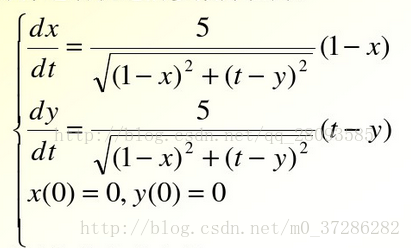
1. Create a function file eq2. M to describe the differential equations of the solution in the function file

%eq2.m File
% Describe the system of differential equations

function dy=eq2(t,y) 
 % illustrate that the differential variables are two-dimensional, such that y(1)=x,y(2)=y
dy=zeros(2,1); 
% System of differential equations
dy(1)=5*(1-y(1))/sqrt((1-y(1))^2+(t-y(2))^2);
dy(2)=5*(1-y(2))/sqrt((1-y(1))^2+(t-y(2))^2);
end


2. Call ode45 function to solve differential equations

[t,y]=ode45(@eq2,[0,2],[0,0]);


Ode45 Function Description: the first parameter is the name of the equation, the second parameter is the range of T when solving, and the third group of parameters is the initial value of each element in y.

[t,y]=ode45(@eq2,[t1,t2],[y1(0),y2(0)]);


Part of it comes from http://blog.csdn.net/qq_ 28093585/article/details/70276454。