Category Archives: How to Fix

Solutions to yarn install error reporting

../vue-hackernews-2.0> yarn
yarn install v1.12.3
[1/5] Validating package.json...
[2/5] Resolving packages...
[3/5] Fetching packages...
info [email protected]: The platform "win32" is incompatible with this module.
info "[email protected]" is an optional dependency and failed compatibility check. Excluding it from installation.
error [email protected]: The engine "node" is incompatible with this module. Expected version ">=4 <=9". Got "10.14.2"
error Found incompatible module
info Visit https://yarnpkg.com/en/docs/cli/install for documentation about this command.

Solution:

yarn config set ignore-engines true

Error processing condition on org.springframework.boot . autoconfigure.context.Property Error report solution

java.lang.IllegalStateException : Error processing condition on org.springframework.boot . autoconfigure.context.PropertyPlaceholderAutoConfiguration . propertysourcesplaceholderconfigurer error resolution

    <dependency>
		<groupId>org.springframework.boot</groupId>
		<artifactId>spring-boot-starter-tomcat</artifactId>
<!--	<scope>provided</scope>-->
	</dependency>

In the POM file, add the scope annotation
and

	<dependency>
		<groupId>javax.servlet</groupId>
		<artifactId>javax.servlet-api</artifactId>
		<version>3.1.0</version>
	</dependency>

Error: EBUSY: resource busy or locked, rmdir ‘

NPM error: EBUSY resource busy or locked

This error occurs because our files are occupied, which is caused by the fact that the folder or file may be used in other places and cannot be deleted,

1. Try NPM cache clean to clear the cache

2. Try to close the project folder and the command line and restart

Python error memoryerror

Python error memoryerror

Python 32bit can only use 2G of memory at most. If the memory is larger than 2G, memoryerror will be reported.

However, 64bit Python has no such limitation, so it is recommended to use 64bit python.
Possible problems: in the past, official libraries of numpy and SciPy only supported 32bit python, but now we should release the corresponding 64bit version.

Postman error: connect econrefused 127.0.0.1:7890

Problem Description: check the consle and find that postman has been crazy to link to the local port 7890, but I didn’t use the port at all. Could not send request has been reported wrong.

Solution: 1. I install postman on one computer, and then link to the same service port. Check the consle and find that the local port 7890 is not connected. Compare the two settings and find that they are the same.

2. But I always think it’s a setting problem. Later, I kept trying to find that I could just remove the check of setting proxy use the system proxy


I guess the local proxy settings of the pot.

Eclipse report error Error:opening registry key ‘Software/JavaSoft/JRE’

I want to taste the latest jdk10, Since Java removed the generation of JRE directory in JDK folder when it was installed from java9, and gradle was not compatible with JDK installation mode without JRE folder, it had to switch back to java8, so after repeatedly unloading and reinstalling JDK, an error occurred when starting eclipse Error:opening registry key ‘Software/JavaSoft/JRE’

The error information is as follows:

Please click to input the picture description

Please click to input the picture description

Please click to input the picture description

Please click to input the picture description

Obviously, the system does not find the JRE, and the current java version is still not displayed in the CMD – & gt; Java – version. Of course, the environment variable Java_ Home and path are checked correctly. It is suspected that Java is not found correctly due to cache or registry_ Then, with the mentality of having a try, compare the previous environment variable name with the “Java” in the path_ The key value of “home” is replaced by the uppercase “Java”_ “Home” has been changed to lowercase “Java”_ Then CMD – & gt; Java – version can display the information of jdk8 normally, restart eclipse, perfect solution! Share here, hope to help you!

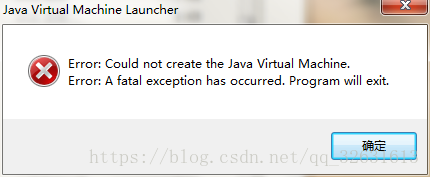
Error: could not create the Java virtual machine Error:A Fatal exception has occurred

The error report is as follows:

Prompt that the Java virtual machine could not be created successfully.

The main reason for the above error is that eclipse can’t find the JDK installed on the machine when it starts (if it doesn’t install, please go to Baidu installation tutorial to install it). At this time, we need to manually guide eclipse to load the JDK path.

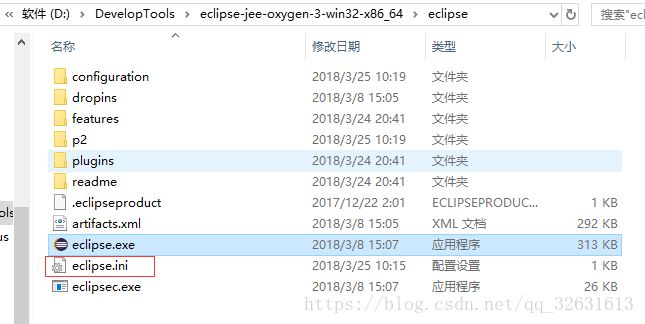
Open the eclipse installation path and find the eclipse.ini File, pay attention to open the file suffix display, as shown in the following figure:

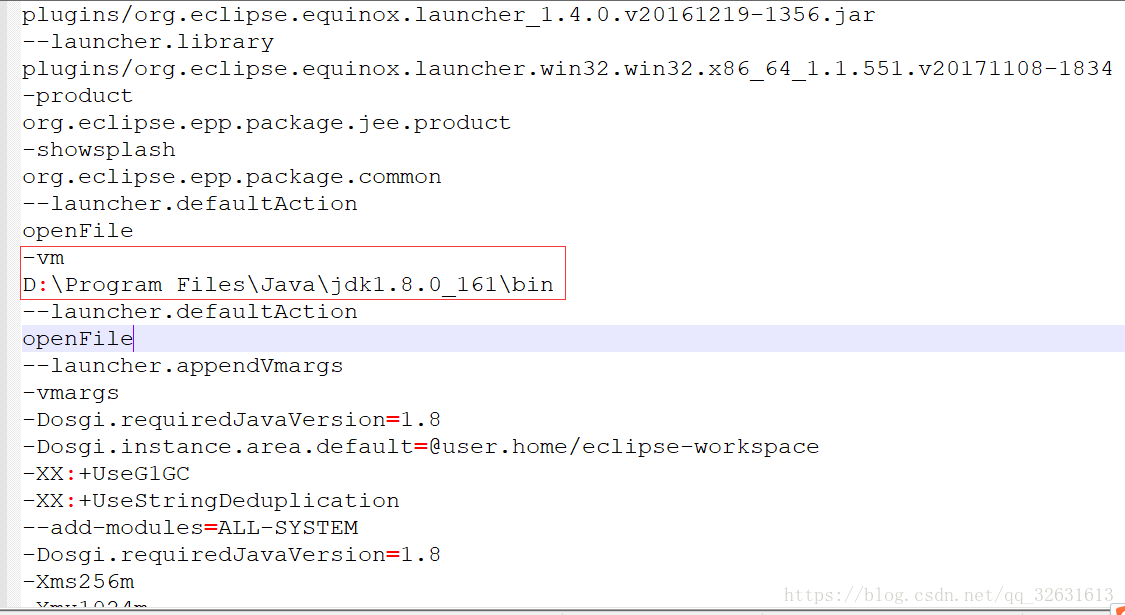
Open with Notepad + + and other text editing tools eclipse.ini File:

Add two lines of code out of the rectangular box in the file, pay attention to the path, fill in the bin directory under the JDK installation path of your own machine, save and restart eclipse. This problem can be solved.

Because the computer is stuck, force to restart the computer and open idea idea to report an error on line 1: no content is allowed in the foreword.

Because the computer is stuck, it is forced to restart the computer and open idea for JUnit unit test

Idea reported an error. Error:Failed to load project configuration: cannot parse xml
file E:\ project.idea \ workspace.xml : error on line 1: content is not allowed in foreword.

Solution:

Search in folder workspace.xml Paste the contents into the workspace.xml It can be
Path:
D::

Android dependency merge rules

  1. Remote dependency merge rule

If multiple modules depend on the library in the way of [implementation + coordinates], only one version will be compiled, and it is the latest version

module A: 
implementation "com.fengma.tool:gradle-tool:2.1.2"
...
module B:
implementation "com.fengma.tool:grdle-tool:2.3.3" //gradle default the latest version

If you want to change the default compile version selection, you can specify a version by using gradle’s dependency selection mechanism

configurations.all {
    resolutionStrategy.eachDependency { DependencyResolveDetails details ->
        if (details.requested.group == 'com.fengma.tool') {
            details.useVersion '2.1.2'
            details.because 'Use Lower version'
        }
    }
}

2. Local plus remote dependency mode

When module a introduces a jar package in the way of [local lib], and module B introduces the same library in the way of [implementation + coordinates], it will cause compilation conflicts and lead to compilation failure. Therefore, it is necessary to unify the dependency mode.

module A:
compile files('libs/fengma-tool-2.1.2-.jar')
...
module B:
compile "com.fengma.tool:grdle-tool:2.3.3"
... Compilation conflicts, class duplication