Category Archives: Error

Failed to connect to driver at XXXXXXx

pyspark –master yarn
http://laptop:8042/node/containerlogs/container_1588409304631_0005_01_000001/appleyuchi/stderr/?start=-4096

led to connect to driver at license.sublimehq.com:41651, retrying ...
2020-05-02 16:53:04 ERROR ApplicationMaster:70 - Failed to connect to driver at license.sublimehq.com:41651, retrying ...

Inspection:

python test.py

And then access the browser license.sublimehq.com:41651

If the browser returns Hello world, the port is open.

After the first step is confirmed,

$SPARK_ HOME/conf/spark- defaults.conf

Add [2]:

spark.driver.port=20002
spark.driver.host=Desktop

#————————————————————

Do not restart spark, directly re-enter:

Pyspark — Master yard

Vue: How to Solve Error uncaught (in promise) cancel

Delete a piece of data
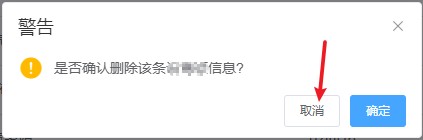
pop up delete prompt box
click Cancel
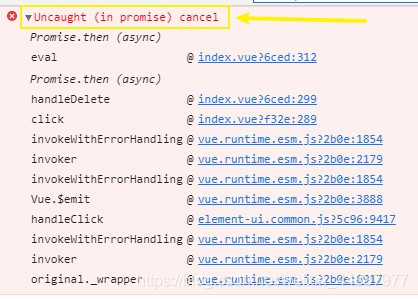
browser console error


error reason:

This.$confirm method has a built-in promise method.
So you can't remove the .catch() (because when the operation is cancelled, it can't be caught))

Solution:
Add catch after delete method, and add method body () = & gt; {} in catch

/** Delete button operation */
handleDelete(row) {
  const eCodes = row.eCode || this.ids;
  this.$confirm('Do you want to confirm the deletion of this data?' , "warning", {
    confirmButtonText: "OK",
    cancelButtonText: "Cancel",
    type: "warning"
  }).then(function() {
    return deleteEquipment(eCodes);
  }).then(() => {
    this.getList();
    this.msgSuccess("Deleted successfully");
  }).catch(()=>{}) //---here's the kicker---
},

Using elementui El-dialog as a subcomponent to close an error

1. Pop up window as a sub component

The parent component opens the pop-up window by clicking the event. However, when clicking the blank area outside the window or the upper right corner fork in the pop-up window, it always reports an error:

Translation: avoid changing a prop directly, because when the parent component re renders, this value will be covered. Instead, use data or calculate properties based on the prop value. “Visible” is happening

2. Cause analysis

From the perspective of translation, the data passed by the parent component cannot be changed directly in the child component, and then the data passed by the parent component will be copied again in both data and computed according to the prompt, and the same error will still be reported.

3. Solutions

Finally, through a line of code successfully solved, in the pop-up window with: before close method successfully solved!
Analyze the reason again:
when closing the pop-up window by this method, you can change the closing directly through the parent component. This method is a callback function before closing the pop-up window. If you do not change the pop-up window status in the child component, you will not report an error!

// Parent Component
<editDialog :edit-visible.sync="editVisible">
</editDialog>

// Sub-components
<el-dialog
      title="My Clue"
      :visible.sync="editVisible"
      :before-close="handleClose"
      top="5vh"
      width="80%">
</el-dialog>

props: {
    editVisible: {
      type: Boolean,
      default: false
    },
};

 handleClose() {
    this.$emit("update:editVisible",!this.editVisible);
 },

Such a simple problem, the road to solve twists and turns, I hope to help you, there are problems can be message exchange!

[How to Solve] Internal: blas sgemm launch failed

1. Error report

Internal: Blas SGEMM launch failed

2. Ideas & Solutions

Thinking:
I checked all kinds of blogs for GPU and cudnn problems
most of the solutions are to restart the kernel, re install cudnn, install cudnn patches and so on
but for me, they are useless

The final solution:
add this paragraph to the running file

#Prevent cuDNN from reporting errors: Option 2
gpus = tf.config.experimental.list_physical_devices('GPU')
if gpus:
    try:
        # Currently, memory growth needs to be the same across GPUs
        for gpu in gpus:
            tf.config.experimental.set_memory_growth(gpu, True)
        logical_gpus = tf.config.experimental.list_logical_devices('GPU')
        print(len(gpus), "Physical GPUs,", len(logical_gpus), "Logical GPUs")
    except RuntimeError as e:
        # Memory growth must be set before GPUs have been initialized
        print(e)

Widgets are not available. Please install widgetsnbextension or ipywidgets 4.0

The browser JS displays: Widgets are not available. Please install widgetsnbextension or ipywidgets 4.0

# Method 1
pip install ipywidgets
jupyter nbextension enable --py widgetsnbextension
# Method 2
conda install -c conda-forge ipywidgets

fastpbkdf2 0.2 out of commission:

E: Package ‘libffi-dev’ has no installation candidate

ubuntu@VM-0-9-ubuntu:~$ sudo apt-get install libffi-dev
Reading package lists... Done
Building dependency tree       
Reading state information... Done
Package libffi-dev is not available, but is referred to by another package.
This may mean that the package is missing, has been obsoleted, or
is only available from another source

E: Package 'libffi-dev' has no installation candidate

Use the following solution

sudo apt-get update
sudo apt-get install libnl-3-dev

The following error:
error: Command ‘x86_ 64 Linux GNU GCC ‘failed with exit status 1
solution:

sudo apt-get install build-essential python3-dev libssl-dev libffi-dev libxml2 libxml2-dev libxslt1-dev zlib1g-dev

Jupyter modify theme

Some problems encountered in the initial construction of Ant Design Pro project, such as cross Env, webpack and so on

    encountered the following webpack problems.
There might be a problem with the project dependency tree.
It is likely not a bug in Create React App, but something you need to fix locally.

The react-scripts package provided by Create React App requires a dependency:

  "webpack": "4.44.2"

Don't try to install it manually: your package manager does it automatically.
However, a different version of webpack was detected higher up in the tree:

  /Users/admin/node_modules/webpack (version: 5.2.6) 

causes: /users/admin/node_ The modules/ folder has a higher version of webpack than the one used when creating create react app .
solution: in the corresponding folder, sudo NPM unified webpack - G and sudo NPM unified webpack cli - G uninstall the manually installed webpack package tools. Because react will generate its own appropriate version of webpack. If it is installed manually, there will be version conflicts.

TheNPM run dev message is not an internal or external command, nor a runnable program or batch file.

> cross-env NODE_ENV=development node_modules/webpack/bin/webpack.js --progress --hide-modules --config=node_modules/laravel-mix/setup/webpack.config.js "--watch" "--watch-poll"
'cross-env' Not an internal or external command, and not a runnable program or batch file. `

reason: is not installed with administrator rights
solution: is installed with administrator rights in the project sudo yard install installation
PS: installation command

yarn create umi mypro //mypro is the project noun
=> Select ant-design-pro
=> Select V5/V4
cd mypro // move to the mypro folder
sudo yarn install
** wait for installation, the process may be slow, it is recommended to set taobao image **
yarn start //start mypro project

Project construction reference:
Ant Design Pro project construction

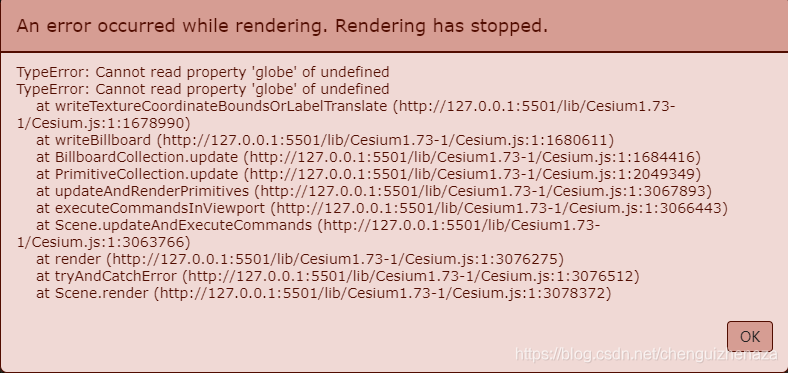
cesium CLAMP_TO_GROUND Error Cannot read property ‘globe‘ of undefined

Billboardcollection needs to add highreference: Cesium.HeightReference.CLAMP_ TO_ GROUND

Statement:

var viewer = new Cesium.Viewer("cesiumContainer", {
  terrainProvider: new Cesium.EllipsoidTerrainProvider({}),
});
viewer.scene.globe.depthTestAgainstTerrain = true;

var billboardCollection = new Cesium.BillboardCollection({});
viewer.scene.primitives.add(billboardCollection);

billboardCollection.add({
		image: "../images/facility.gif",
		height: 20,
		width: 20,
		position: Cesium.Cartesian3.fromDegrees(77.273593, 38.191217),
		scale: 3.0,
		pixelOffset: new Cesium.Cartesian2(0.0, -20.0),
		heightReference: Cesium.HeightReference.CLAMP_TO_GROUND,
	});

In this case, an error will be reported:

Solution: scene: must be added viewer.scene

var billboardCollection = viewer.scene.primitives.add(
  new Cesium.BillboardCollection({
    scene: viewer.scene,
  })
);

Calling Dubbo Service reported the following error (com.alibaba.dubbo.remoting.RemotingException) Causes and Solutions

2017-04-19 23:41:48,333 ERROR [com.alibaba.dubbo.remoting.transport.AbstractClient] –  [DUBBO] Failed to start NettyClient LX-20161101CZVB/169.254.129.62 connect to the server /127.0.0.1:20882 (check == false, ignore and retry later!), cause: client(url: dubbo://127.0.0.1:20882/cn.tengfei.service.product.AdService?application=sportman-console&codec=dubbo&default.check=false&default.timeout=999999&dubbo=2.5.3&heartbeat=60000&interface=cn.tengfei.service.product.AdService&methods=selectAdsJsonListByParent,insertAd,selectAdListByParentId&pid=8020&revision=0.0.1-SNAPSHOT&side=consumer&timestamp=1492616507128) failed to connect to server /127.0.0.1:20882, error message is:Connection refused: no further information, dubbo version: 2.5.3, current host: 169.254.129.62

com.alibaba.dubbo.remoting.RemotingException: client(url: dubbo://127.0.0.1:20882/cn.tengfei.service.product.AdService?application=sportman-console&codec=dubbo&default.check=false&default.timeout=999999&dubbo=2.5.3&heartbeat=60000&interface=cn.tengfei.service.product.AdService&methods=selectAdsJsonListByParent,insertAd,selectAdListByParentId&pid=8020&revision=0.0.1-SNAPSHOT&side=consumer&timestamp=1492616507128) failed to connect to server /127.0.0.1:20882, error message is:Connection refused: no further information

at com.alibaba.dubbo.remoting.transport.netty.NettyClient.doConnect(NettyClient.java:124)

at com.alibaba.dubbo.remoting.transport.AbstractClient.connect(AbstractClient.java:280)

at com.alibaba.dubbo.remoting.transport.AbstractClient.<init>(AbstractClient.java:103)

at com.alibaba.dubbo.remoting.transport.netty.NettyClient.<init>(NettyClient.java:61)

at com.alibaba.dubbo.remoting.transport.netty.NettyTransporter.connect(NettyTransporter.java:37)

at com.alibaba.dubbo.remoting.Transporter$Adpative.connect(Transporter$Adpative.java)

at com.alibaba.dubbo.remoting.Transporters.connect(Transporters.java:67)

at com.alibaba.dubbo.remoting.exchange.support.header.HeaderExchanger.connect(HeaderExchanger.java:37)

at com.alibaba.dubbo.remoting.exchange.Exchangers.connect(Exchangers.java:102)

at com.alibaba.dubbo.rpc.protocol.dubbo.DubboProtocol.initClient(DubboProtocol.java:378)

at com.alibaba.dubbo.rpc.protocol.dubbo.DubboProtocol.getSharedClient(DubboProtocol.java:344)

at com.alibaba.dubbo.rpc.protocol.dubbo.DubboProtocol.getClients(DubboProtocol.java:321)

at com.alibaba.dubbo.rpc.protocol.dubbo.DubboProtocol.refer(DubboProtocol.java:303)

at com.alibaba.dubbo.rpc.protocol.ProtocolListenerWrapper.refer(ProtocolListenerWrapper.java:65)

at com.alibaba.dubbo.rpc.protocol.ProtocolFilterWrapper.refer(ProtocolFilterWrapper.java:62)

at com.alibaba.dubbo.rpc.Protocol$Adpative.refer(Protocol$Adpative.java)

at com.alibaba.dubbo.config.ReferenceConfig.createProxy(ReferenceConfig.java:392)

at com.alibaba.dubbo.config.ReferenceConfig.init(ReferenceConfig.java:300)

at com.alibaba.dubbo.config.ReferenceConfig.get(ReferenceConfig.java:138)

at com.alibaba.dubbo.config.spring.ReferenceBean.getObject(ReferenceBean.java:65)

at org.springframework.beans.factory.support.FactoryBeanRegistrySupport.doGetObjectFromFactoryBean(FactoryBeanRegistrySupport.java:168)

at org.springframework.beans.factory.support.FactoryBeanRegistrySupport.getObjectFromFactoryBean(FactoryBeanRegistrySupport.java:103)

at org.springframework.beans.factory.support.AbstractBeanFactory.getObjectForBeanInstance(AbstractBeanFactory.java:1506)

at org.springframework.beans.factory.support.AbstractBeanFactory.doGetBean(AbstractBeanFactory.java:250)

at org.springframework.beans.factory.support.AbstractBeanFactory.getBean(AbstractBeanFactory.java:193)

at org.springframework.beans.factory.support.DefaultListableBeanFactory.findAutowireCandidates(DefaultListableBeanFactory.java:1127)

at org.springframework.beans.factory.support.DefaultListableBeanFactory.doResolveDependency(DefaultListableBeanFactory.java:1051)

at org.springframework.beans.factory.support.DefaultListableBeanFactory.resolveDependency(DefaultListableBeanFactory.java:949)

at org.springframework.beans.factory.annotation.AutowiredAnnotationBeanPostProcessor$AutowiredFieldElement.inject(AutowiredAnnotationBeanPostProcessor.java:530)

at org.springframework.beans.factory.annotation.InjectionMetadata.inject(InjectionMetadata.java:87)

at org.springframework.beans.factory.annotation.AutowiredAnnotationBeanPostProcessor.postProcessPropertyValues(AutowiredAnnotationBeanPostProcessor.java:331)

at org.springframework.beans.factory.support.AbstractAutowireCapableBeanFactory.populateBean(AbstractAutowireCapableBeanFactory.java:1202)

at org.springframework.beans.factory.support.AbstractAutowireCapableBeanFactory.doCreateBean(AbstractAutowireCapableBeanFactory.java:537)

at org.springframework.beans.factory.support.AbstractAutowireCapableBeanFactory.createBean(AbstractAutowireCapableBeanFactory.java:476)

at org.springframework.beans.factory.support.AbstractBeanFactory$1.getObject(AbstractBeanFactory.java:302)

at org.springframework.beans.factory.support.DefaultSingletonBeanRegistry.getSingleton(DefaultSingletonBeanRegistry.java:230)

at org.springframework.beans.factory.support.AbstractBeanFactory.doGetBean(AbstractBeanFactory.java:298)

at org.springframework.beans.factory.support.AbstractBeanFactory.getBean(AbstractBeanFactory.java:193)

at org.springframework.beans.factory.support.DefaultListableBeanFactory.preInstantiateSingletons(DefaultListableBeanFactory.java:762)

at org.springframework.context.support.AbstractApplicationContext.finishBeanFactoryInitialization(AbstractApplicationContext.java:757)

at org.springframework.context.support.AbstractApplicationContext.refresh(AbstractApplicationContext.java:480)

at org.springframework.web.servlet.FrameworkServlet.configureAndRefreshWebApplicationContext(FrameworkServlet.java:663)

at org.springframework.web.servlet.FrameworkServlet.createWebApplicationContext(FrameworkServlet.java:629)

at org.springframework.web.servlet.FrameworkServlet.createWebApplicationContext(FrameworkServlet.java:677)

at org.springframework.web.servlet.FrameworkServlet.initWebApplicationContext(FrameworkServlet.java:548)

It’s very clear that if the connection fails, you need to find the configuration file of the connection or other related files. My reason is that the zookeeper in Dubbo’s registry is configured in Linux, but I haven’t started Linux, and the zookeeper certainly hasn’t started, so the connection fails
How to Solve ERROR – unregister mbean error javax.management.InstanceNotFoundException: com.alibaba.druid:type=

In the project, Druid is used to manage the database connection pool. There is no problem in the local and test environment. However, after the production environment, when Tomcat is started for the first time, the log does not report an error, but the page can’t come out. When Tomcat is closed, you can see the log and find that the error is as follows:

ERROR [ com.alibaba.druid . stat.DruidDataSourceStatManager ] – unregister mbean error
javax.management.InstanceNotFoundException : com.alibaba.druid :type=DruidDataSourceStat
at com.sun.jmx . interceptor.DefaultMBeanServerInterceptor .getMBean………


Various methods have been found on the Internet, but they are all vague. After many tests, the solution is as follows:

Modify the bin directory of Tomcat catalina.sh File in OS specific support. $var_ must_ Be set to either true or false

JAVA_ OPTS=”- Ddruid.registerToSysProperty=true “OK, as shown in the figure:

After tomcat, just start the deployment project once and don’t report this error again.

Download and save uniapp pictures to Android error reporting app

To save a picture to a mobile photo album, you must download a download file to download the picture. The picture can be saved normally on IOS mobile phone, but it fails to save on an Android mobile phone

the returned address is of unknown type. At this time, saving will fail

Therefore, it is necessary to uni.download file ({filePath: wx.env.USER_ DATA_ PATH + ‘/ file.jpg ’})
add this code to change the address, and then it will be saved successfully

//Save images locally
			savePoster(){
				uni.showLoading({
					title:'Downloading...'
				})
				uni.downloadFile({
					url:this.playBillUrl,//  This is the web image address that the backend gets
					filePath: wx.env.USER_DATA_PATH + '/file.jpg',// This must be written here otherwise Android will download the address after it appears.unknown
					success:res => {
						uni.hideLoading()
						if (res.statusCode === 200) {
						
							uni.saveImageToPhotosAlbum({
								filePath: res.filePath,
								success: function() {
									uni.showToast({
										title:'save sucessfully'
									})
								},
								fail: function(res) {
									console.log(res)
									uni.showToast({
										title:'save failed, please try again later'
									})
								}
							});
						} else {
							uni.showToast({
								title:'Download error'
							})
							uni.hideLoading()	
						}
					
					}
				})

Mavenzai install Error: There are test failures

Error statement: failed to execute goal org.apache.maven . plugins:maven-surefire-plugin :2.12.4:test (default-test) on project web_ nanchang: There are test failures.

Solution:
1. Find the specified project that reports an error, which project will be prompted in the Error statement generally
2. Add a plug-in in the POM file of the project, which can pass through install successfully generally 2 org.apache.maven. plugins Maven surefire plugin true
3. If not, please check whether the service on the virtual machine is enabled and restart

M1 MacBook pod install Report an error chip incompatibility problem

1.Problem analysis

M1 MacBook has no problem in installing cocoapods, but there are many problems in pod install, such as LoadError – dlopen (/ library/RUBY/GEMS/2.6.0/GEMS/ffi-1.14.2/lib/FFI)_ c.bundle, 0x0009): missing compatible arch in /Library/Ruby/Gems/2.6.0/gems/ffi-1.14.2/lib/ffi_ c.bundle – /Library/Ruby/Gems/2.6.0/gems/ffi-1.14.2/lib/ffi_ c.bundle。 This is a compatibility issue

2.Solutions

According to this, the terminal enters the following command:

sudo arch -x86_64 gem install ffi
arch -x86_64 pod install