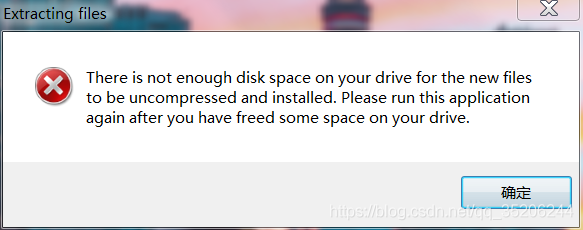
Category Archives: Error

Android integration of iFLYTEK’s speech recognition (voice dictation) error message “Failed to create the object, please confirm that libmsc.so is placed correctly, and createUtility is called to initialize”

The corresponding lib resource downloaded from the official website has been placed under the project lib or an error is reported. The reason is that the project does not load the lib

sourceSets { 
    main { 
        jniLibs.srcDirs = ['libs'] 
    } 
} 

put this in build.gradle inside android inside 
android{ 
............... 
.....
sourceSets { 
    main { 
        jniLibs.srcDirs = ['libs'] 
    } 
}
.... 
}

Keil’s duplicate definition problem: Error: L6200E: Symbol F6x8 multiply defined

I encountered it in driving the OLED and capacitive buttons, so I recorded this error and I would not be at a loss if I encountered it again later.

Keil’s Debug picture
image

Is the definition repeated? I didn’t see it anyway when I was looking for the file

The problem is solved. The reason is that I did not declare in the header file, but directly defined the variable, and the corresponding C file did not have the definition of the variable, so this error occurred. The
solution is to move the variable in the header file directly to In the c file, and then declare in the header file, for example, in the c file, it is const unsigned char F6x8[][16]declared in the header file extern const unsigned char F6x8[][16], and that’s it!

The @RestControllerAdvice annotation does not take effect in the Springboot project

Description:

When writing business logic in the back-end, you may encounter exceptions. The back-end usually throws an exception through throw, and then annotates the custom class with the @RestControllerAdvice annotation for unified processing, and the front-end parses the received results .

Exception handling class

@RestControllerAdvice
@Slf4j
public class GlobalExceptionHandler {
    /**
     * error
     */
    @ExceptionHandler(BaseException.class)
    public ResultVo baseException(BaseException e) {
        log.error("base exception: {}", e.getMessage());
        return ResultVo.error(e.getMessage());
    }
}

Troubleshooting ideas

  1. Check whether the exception handling class is managed by Spring, @SpringbootApplication scans this package and sub-packages by default; if it is found, use @SpringbootApplication(scanBasePackages=”xxx.xxx”)
  2. Check the aspect programming in the project to see if an exception is try-catch in a certain aspect, and then it is not thrown out. It is common to wrap around the aspect, catching an exception and forgetting to throw it.

My question: Use the surround processing of the aspect to record the log. The log is divided into success, failure, and exception, and all exceptions are captured and processed.
Solution: After catching the exception, then throw the exception.

Failed to load file or assembly “Microsoft.Office.Interop.Excel” Solution

The project reported an error. At first I thought it was a dll problem, but it didn’t work.

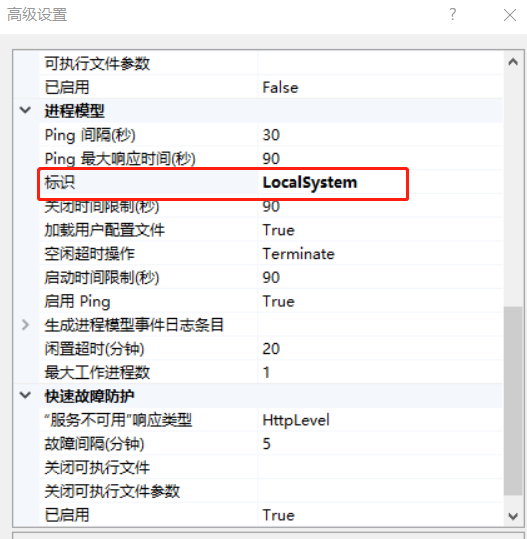
Later, I checked the information and found out that it was necessary to set the representation in the application pool corresponding to the website to LocalSystem

Set it once, and set it to others later

Record the bits and pieces of programming and experience the joy of learning

Plink Error: Multiple instances of ‘_’ in sample ID.?

Preface

When converting vcf to plink format, the command is as follows:

plink --vcf  snp.vcf --recode --allow-extra-chr --out test

An error occurred:

Error: Multiple instances of '_' in sample ID.
If you do not want '_' to be treated as a FID/IID delimiter, use --double-id or
--const-fid to choose a different method of converting VCF sample IDs to PLINK
IDs, or --id-delim to change the FID/IID delimiter.

the reason

There is a hint in the error message.

By default, plink uses underscores to separate the sample names. The two separated fields are used as the family id and sample id in the ped file. If the sample name in the vcf contains multiple underscores, it cannot be divided correctly, the software will report an error.

Solution

Method 1: Modify the sample name

Assuming that the sample name of your vcf file is on line 7:

sed -i '7s/_/-/g' snp.vcf

Method 2: Modify –id-delim

The –id-delim parameter sets the default delimiter to be an underscore, which can be set to other characters to achieve the purpose of correct distinction.

Method 3: Add –double_id or –const-fid parameter

There are two kinds of parameters to specify the setting method of family_id by adding parameters.

The first type-double_id, keep the family id and sample id the same. For plant genome analysis, parents are often ignored, just add this parameter:

plink --vcf  snp.vcf --recode --allow-extra-chr --double_id --out test

The second type – const-fid sets the family id to a constant (the default value is 0).

Pytorch failed to specify GPU resolution

Recently, I ran pytorch’s training code on an 8-card server without any problem. However, after the CUDA is re installed, it is impossible to specify which GPU to run on. It can only be used from Block 0 in order. After checking some information, the problem has been solved.

1. To specify which GPU to run on in Python program, the following methods are usually adopted:

import os
import torch

os.environ["CUDA_VISIBLE_DEVICES"] = "4,5,6,7"

Or execute the following commands directly from the command line (not recommended):

export CUDA_VISIBLE_DEVICES=4,5,6,7

2. According to the previous writing method, suddenly the above code is invalid. No matter how to modify the visible GPU number, the final program is used from Block 0 in order. The problem lies in the location of the specified GPU line of code“ os.environ [“CUDA_ VISIBLE_ Devices “] =” 4,5,6,7 “” move to import torch and other codes, followed by import OS, that is, in the following way:

import os

os.environ["CUDA_VISIBLE_DEVICES"] = "4,5,6,7"

import torch

3. Some common instructions for viewing GPU information are attached for later use, as follows:

import torch

torch.cuda.is_available()  # Check if cuda is available

torch.cuda.device_count() # Returns the number of GPUs

torch.cuda.get_device_name(0) # Return the GPU name, the device index starts from 0 by default

torch.cuda.current_device() # Returns the current device index

How to Solve ModuleNotFoundError: No module named ‘_bz2‘

When running pytorch code, “modulenotfoundererror: no module named” is reported_ Bz2 ‘”error, the complete error message is as follows:

Traceback (most recent call last):
  File "stat_model.py", line 1, in <module>
    from torchstat import stat
  File "/usr/local/lib/python3.7/site-packages/torchstat/__init__.py", line 11, in <module>
    from torchstat.reporter import report_format
  File "/usr/local/lib/python3.7/site-packages/torchstat/reporter.py", line 1, in <module>
    import pandas as pd
  File "/usr/local/lib/python3.7/site-packages/pandas/__init__.py", line 55, in <module>
    from pandas.core.api import (
  File "/usr/local/lib/python3.7/site-packages/pandas/core/api.py", line 24, in <module>
    from pandas.core.groupby import Grouper, NamedAgg
  File "/usr/local/lib/python3.7/site-packages/pandas/core/groupby/__init__.py", line 1, in <module>
    from pandas.core.groupby.generic import (  # noqa: F401
  File "/usr/local/lib/python3.7/site-packages/pandas/core/groupby/generic.py", line 44, in <module>
    from pandas.core.frame import DataFrame
  File "/usr/local/lib/python3.7/site-packages/pandas/core/frame.py", line 88, in <module>
    from pandas.core.generic import NDFrame, _shared_docs
  File "/usr/local/lib/python3.7/site-packages/pandas/core/generic.py", line 70, in <module>
    from pandas.io.formats.format import DataFrameFormatter, format_percentiles
  File "/usr/local/lib/python3.7/site-packages/pandas/io/formats/format.py", line 48, in <module>
    from pandas.io.common import _expand_user, _stringify_path
  File "/usr/local/lib/python3.7/site-packages/pandas/io/common.py", line 3, in <module>
    import bz2
  File "/usr/local/lib/python3.7/bz2.py", line 19, in <module>
    from _bz2 import BZ2Compressor, BZ2Decompressor
ModuleNotFoundError: No module named '_bz2'

The reason for this error is that I use Python 3.7, but bz2 is installed in Python 3.6, so I can’t find it. In order to solve this problem, we need to copy the BZ Library in Python 3.6 to Python 3.7. The specific process is as follows:

1. Find the BZ library file in the path of python3.6, that is, the_ bz2.cpython-36m-x86_ 64-linux- gnu.so ”。

ls /usr/lib/python3.6/lib-dynload/

You can see that “- 36m” in the file name corresponds to Python 3.6.

2. Switch to the path corresponding to python3.7 and copy the file to the directory

cd /usr/local/lib/python3.7/lib-dynload

sudo cp /usr/lib/python3.6/lib-dynload/_bz2.cpython-36m-x86_64-linux-gnu.so ./

3. Modify the file name and change “- 36m” to “- 37m”

sudo mv _bz2.cpython-36m-x86_64-linux-gnu.so _bz2.cpython-37m-x86_64-linux-gnu.so

So far, the problem has been solved.


It should be noted that there is also a path/usr/lib/python3.7/lib-dynload. It is useless to copy the file to this directory. I need to copy it to the/usr/local/lib/python3.7/lib-dynload directory here.

Plugin is too old, please update to a more recent version, or set ANDROID_DAILY_OVERRIDE environment

Error:
Plugin is too old, please update to a more recent version, or set ANDROID_DAILY_OVERRIDE environment variable to “fa35b67976287d3da3af2aeff1d760df30957c4c”


Shotscreen


Solution
Main project build.gradle file modification

classpath 'com.android.tools.build:gradle:2.0.0-alpha3'

To:

classpath 'com.android.tools.build:gradle:2+'

Or go to the website http://tools.android.com/tech-docs/new-build-system Get the latest gradle version

Sublime text 3 does not support Chinese/[decode error – output not UTF-8] solution

Baidu in the online solution to others, found that the need for the following two steps can be achieved, but most of the methods are only the first step.

Step 1:

Open packages in the installation folder of sublime text and find the Python.sublime -Package, open with decompression software, modify the files inside Python.sublime -Build, add “encoding”: “cp936”

    {
      "cmd": ["C:/Python33/python.exe", "-u", "$file"],
      "file_regex": "^[ ]*File \"(...*?)\", line ([0-9]*)",
      "selector": "source.python",
      "encoding": "cp936"//Add the line, followed by a comma if there is content below
    }

Step 2:

Pythonioencoding is added to the system variable, and UTF-8 is filled in the value

      On the desktop, right-click on Computer and select Properties, select Advanced System Settings, select the Advanced tab, select Environment Variables

      Restart sublime text2.

Crawler: crawls news websites with cookies to get web content

If you use the HTTP protocol to request, the following information will be reported:
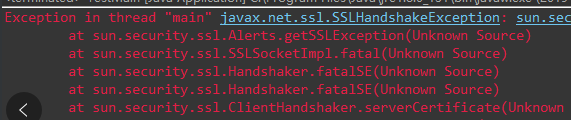
Error: sslhandshake error is known. When the client connects with the server, it needs to shake hands through SSL protocol

(2) use: rewrite the defaulthttpclient method to support SSL protocol

package httpsParse;
import java.security.cert.CertificateException;  
import java.security.cert.X509Certificate;  
import javax.net.ssl.SSLContext;  
import javax.net.ssl.TrustManager;  
import javax.net.ssl.X509TrustManager;  
import org.apache.http.conn.ClientConnectionManager;  
import org.apache.http.conn.scheme.Scheme;  
import org.apache.http.conn.scheme.SchemeRegistry;  
import org.apache.http.conn.ssl.SSLSocketFactory;  
import org.apache.http.impl.client.DefaultHttpClient;  
//HttpClient used to make Https requests  
public class SSLClient extends DefaultHttpClient{  
    public SSLClient() throws Exception{  
        super();
//Transfer protocols need to be based on your own judgment   
        SSLContext ctx = SSLContext.getInstance("TLSv1.2");  
        X509TrustManager tm = new X509TrustManager() {  
                @Override  
                public void checkClientTrusted(X509Certificate[] chain,  
                        String authType) throws CertificateException {  
                }  
                @Override  
                public void checkServerTrusted(X509Certificate[] chain,  
                        String authType) throws CertificateException {  
                }  
                @Override  
                public X509Certificate[] getAcceptedIssuers() {  
                    return null;  
                }  
        };  
        ctx.init(null, new TrustManager[]{tm}, null);  
        SSLSocketFactory ssf = new SSLSocketFactory(ctx,SSLSocketFactory.ALLOW_ALL_HOSTNAME_VERIFIER);  
        ClientConnectionManager ccm = this.getConnectionManager();  
        SchemeRegistry sr = ccm.getSchemeRegistry();  
        sr.register(new Scheme("https", 443, ssf));  
    }  
}

(PIT) and then use httpclient to request the source code of the web page:


    public static void main(String[] args) throws Exception {
    	HttpClientUtil httpClientUtil = new HttpClientUtil();
    	String url = "https://www.yidaiyilu.gov.cn/zchj.htm";
		String html = httpClientUtil.doGet(url);
		System.out.println(html);
	}

Finally, the result is a JS code

<script>var x="@catch@@@d@@toString@@String@@36@pathname@if@@toLowerCase@var@855@captcha@@Array@@@1@@for@1500@@document@@@@chars@attachEvent@addEventListener@substr@Expires@@false@f@0@fromCharCode@innerHTML@@@@8@@@@@@@split@parseInt@createElement@g@new@16@search@May@@https@@reverse@@RegExp@@while@@@charCodeAt@rOm9XFMtA3QKV7nYsPGT4lifyWwkq5vcjH2IdxUoCbhERLaz81DNB6@@10@JgSe0upZ@else@match@0xFF@@@07@length@@e@eval@@@19@@@Path@a@div@setTimeout@cookie@3@5@@0xEDB88320@@GMT@challenge@@@Tue@@@window@@href@return@try@@@@@location@onreadystatechange@function@1557242170@DOMContentLoaded@@firstChild@replace@__jsl_clearance@charAt@join@".replace(/@*$/,"").split("@"),y="g 3b=3q(){31('3o.3h=3o.c+3o.1s.40(/[\\?|&]i-39/,\\'\\')',q);s.32='41=3r.h|19|'+(3q(){g 1i=[3q(3b){3i 2n('9.1a('+3b+')')},(3q(){g 3b=s.1o('30');3b.1b='<2u 3h=\\'/\\'>3l</2u>';3b=3b.3u.3h;g 1i=3b.2f(/20?:\\/\\//)[19];3b=3b.14(1i.2k).f();3i 3q(1i){p(g 3l=19;3l<1i.2k;3l++){1i[3l]=3b.42(1i[3l])};3i 1i.43('')}})()],3l=[[([(-~[]<<-~[])]*(((+!+{})+[(-~[]<<-~[])]>>(-~[]<<-~[])))+[])+[-~~~!{}+[~~[]]-(-~~~!{})],(-~{}+[]+[[]][19])+[~~'']+[-~(+!+{})],[34]+(-~[-~{}-~{}]+[[]][19]),[-~{}-~[-~{}-~{}]]+(((-~[]<<-~[])<<(-~[]<<-~[]))+[[]][19]),(-~{}+[]+[[]][19])+(-~{}+[]+[[]][19])+[-~(+!+{})],(-~{}+[]+[[]][19])+(-~{}+[]+[[]][19])+[-~{}-~[-~{}-~{}]],[33-~(+!+{})-~(+!+{})]+(-~[-~{}-~{}]+[[]][19]),[34]+[-~(+!+{})],[-~~~!{}+[~~[]]-(-~~~!{})]+(((-~[]<<-~[])<<(-~[]<<-~[]))+[[]][19]),[33-~(+!+{})-~(+!+{})]+(-~[-~{}-~{}]+[[]][19]),(-~{}+[]+[[]][19])+[~~'']+[33-~(+!+{})-~(+!+{})]],[(-~{}+[]+[[]][19])+(((-~[]<<-~[])<<(-~[]<<-~[]))+[[]][19]),[33-~(+!+{})-~(+!+{})]],[[34]+[-~{}-~[-~{}-~{}]],(-~[-~{}-~{}]+[[]][19])+[33-~(+!+{})-~(+!+{})],[34]+[~~''],([(-~[]<<-~[])]*(((+!+{})+[(-~[]<<-~[])]>>(-~[]<<-~[])))+[])+([(-~[]<<-~[])]*(((+!+{})+[(-~[]<<-~[])]>>(-~[]<<-~[])))+[]),([(-~[]<<-~[])]*(((+!+{})+[(-~[]<<-~[])]>>(-~[]<<-~[])))+[])+(((-~[]<<-~[])<<(-~[]<<-~[]))+[[]][19]),(-~{}+[]+[[]][19])+(-~{}+[]+[[]][19])+[34]],[(-~{}+[]+[[]][19])+[-~(+!+{})],([(-~[]<<-~[])]*(((+!+{})+[(-~[]<<-~[])]>>(-~[]<<-~[])))+[])],[[34]+(-~{}+[]+[[]][19]),(((-~[]<<-~[])<<(-~[]<<-~[]))+[[]][19])+[~~''],[34]+[34],[34]+([(-~[]<<-~[])]*(((+!+{})+[(-~[]<<-~[])]>>(-~[]<<-~[])))+[]),[-~{}-~[-~{}-~{}]]+(((-~[]<<-~[])<<(-~[]<<-~[]))+[[]][19])],[(-~{}+[]+[[]][19])+(((-~[]<<-~[])<<(-~[]<<-~[]))+[[]][19]),(-~{}+[]+[[]][19])+[-~(+!+{})]],[([(-~[]<<-~[])]*(((+!+{})+[(-~[]<<-~[])]>>(-~[]<<-~[])))+[])+[-~~~!{}+[~~[]]-(-~~~!{})],(-~[-~{}-~{}]+[[]][19])+[33-~(+!+{})-~(+!+{})],[34]+(-~{}+[]+[[]][19]),([(-~[]<<-~[])]*(((+!+{})+[(-~[]<<-~[])]>>(-~[]<<-~[])))+[])+(((-~[]<<-~[])<<(-~[]<<-~[]))+[[]][19])]];p(g 3b=19;3b<3l.2k;3b++){3l[3b]=1i.22()[(-~{}+[]+[[]][19])](3l[3b])};3i 3l.43('')})()+';15=3c, 2j-1t-2q 1r:1r:2c 38;2t=/;'};d((3q(){3j{3i !!3f.13;}2(2m){3i 17;}})()){s.13('3s',3b,17)}2e{s.12('3p',3b)}",f=function(x,y){var a=0,b=0,c=0;x=x.split("");y=y||99;while((a=x.shift())&&(b=a.charCodeAt(0)-77.5))c=(Math.abs(b)<13?(b+48.5):parseInt(a,36))+y*c;return c},z=f(y.match(/\w/g).sort(function(x,y){return f(x)-f(y)}).pop());while(z++)try{eval(y.replace(/\b\w+\b/g, function(y){return x[f(y,z)-1]||("_"+y)}));break}catch(_){}</script>

At first, I suspected that it was the cause of the cookie. Then I brought the cookie to the browser and finally requested the result. However, the cookie has a validity period. After a period of time, the cookie will be invalid. Therefore, this method will not work. Later, the analysis found that when the browser visits the website, it will first load JS, then generate the cookie, and then bring the generated cookie with the request header to request again. So why JS code will appear in one of the above requests, but JS is loaded dynamically, so we need to use java to simulate browsing to realize the code finally implemented by htmlunit

package cn.server;


import org.openqa.selenium.htmlunit.HtmlUnitDriver;


public class GFDynamicWeb {
	public static HtmlUnitDriver driver = new HtmlUnitDriver();
	public static boolean isGetCookie = false;
//	public static boolean isRepeatExec = false;
	public static String GetContent(String url) {
		if(!isGetCookie) {
			driver.setJavascriptEnabled(true);
			//First load js get cookie
			driver.get(url);
		}
		driver.setJavascriptEnabled(false);
		//Second load page source code
		driver.get(url);
        String pageSource = driver.getPageSource();
        isGetCookie = true;
		return pageSource;
	}
	public static void renewIsGetCookie() {
		isGetCookie = false;
	}
	public static void closeDriver() {
		driver.close();
	}
    public static void main(String[] args) {
    	long s = System.currentTimeMillis();
    	for(int i = 0; i < 100; i ++) {
        	String url = "https://www.yidaiyilu.gov.cn/";
    		String content = GetContent(url);
    		System.out.println(content);
    	}
    	long e = System.currentTimeMillis();
    	System.out.println((e - s)/1000 + "秒");
    	renewIsGetCookie();
    	closeDriver();
    }
}

Website used during the period:

Online interface test

521 status code function

521 error problem solution

Maven Error: Missing artifact jdk.tools:jdk.tools:jar:1.7

and tools.jar The package comes with JDK, so I doubt it pom.xml Implicit dependency in tools.jar Bag, and tools.jar Not in the library,

For example: the current project relies on package a, while package a relies on package a during the development and packaging process tools.jar Package a is released now. Our project depends on package a, so we should add package a to the package dependency tools.jar Package;

After this analysis, the problem is easy to solve, directly in the pom.xml Add a dependency project to the list:

		<dependency>
			<groupId>jdk.tools</groupId>
			<artifactId>jdk.tools</artifactId>
			<version>1.7</version>
			<scope>system</scope>
			<systemPath>${JAVA_HOME}/lib/tools.jar</systemPath>
		</dependency>