Baidu does not have the answer to this question, to Google: reference https://github.com/luncliff/NdkCamera/issues/1 As mentioned in
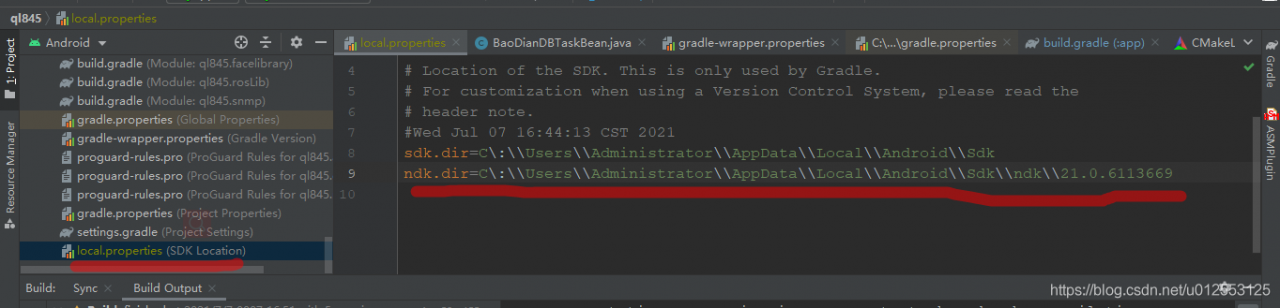
the path to add NDK, you need to pay attention to a NDK version number. At the beginning, I directly referred to NDK, but I couldn’t do it without the following 21.0.6113669
so make a record in CSDN to facilitate future generations to find out, without going over the wall.
Category Archives: Error
[Solved] Mac Runjmeter WARNING: package sun.awt.X11 not in java.desktop
Solution:
1. Input Java – version in the terminal to check your JDK version

2. Uninstall JDK
3. Install JDK1.8
4. Restart JMeter
Start up steps:
Terminal: LS view all files
CD folder
cd apache-jmeter-5.4.1\ 2
sh jmeter
[Solved] Zsh: one of the solutions to parse error near ‘\n’
There are unnecessary branches in the remote warehouse. You want to delete them locally
Input command:
git push origin --delete <feature/yuh_add_authority>

feature/yuh_add_authority --- for the remote repository branch name
Then report an error:
zsh: parse error near `\n'
Solution: do not add <>
git push origin --delete feature/yuh_add_authority
Successfully deleted remote warehouse branch:

[Solved] Faceswap Error: CRITICAL An unexpected crash has occurred.You MUST provide this file if seeking assistan
When using faceswap to extract a face, it stops abnormally and prompts an error: critical an unexpected crash has occurred. Crash report written to ‘xxx. Log’. You must provide this file if seeking assistance. Please verify you are running the latest version of faceswap before reporting. The crash report is written to “XXX. Log”. If you need help, you must provide this file. Before reporting, please verify that you are running the latest version of faceswap
Problem analysis: it may be because there is something wrong with the setting of input dir or output dir directory. Note that it cannot contain Chinese; It may also be because the version is not the latest version.
Solution: first confirm whether there is a problem with the selected file directory, which cannot be in Chinese. If it is caused by this problem, it can be solved after changing. If it is still not solved, you need to update the version. The operation is as follows:
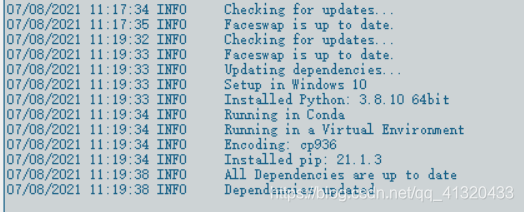
Solution: Download and install the latest dependency, but be sure to pay attention to all the installation, there is a red letter on the failure
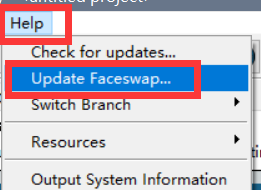
steps: help → update faceswap
make sure that the updated items do not fail:
[Solved] App.vue{ parser: “babylon“ } is deprecated; we no 95% emitting
This prompt is often encountered in Vue projects
Solution:
This error is directly caused by the prettier version in the project:
cnpm install prettier@~1.12.0 -D
perhaps
cnpm install prettier@~1.12.0 --save-dev
Then npm run dev
It’s OK
Vue Error reported after introduction of path: Already included file name ‘××ב differs from file name ‘××ב only in casing.
Vue Error reported after introduction of path: Already included file name ‘××ב differs from file name ‘××ב only in casing.
Solution:
The title can first remove the suffix. Vue
If it doesn’t work, turn off the service and restart the compiler
ktor org.jetbrains:kotlin-css-jvm Dependency Failure [Solved]
1, upgrade the version number of css-jvm
//    implementation "org.jetbrains:kotlin-css-jvm:1.0.0-pre.31-kotlin-1.2.41"
    implementation "org.jetbrains:kotlin-css-jvm:1.0.0-pre.122-kotlin-1.4.10"
2. Gradle uses a higher version. When I started to compile it, I used 5.6.4-all. There were many problems that I couldn’t download it. Later, I changed it to 6.7.1-all
3. You can also start without relying on this library
[Solved] OpenGL PowerVR SDK Compiling Error: Could NOT find X11 (missing: X11_X11_INCLUDE_PATH X11_X11_LIB)
Project scenario:
Compiling powervr SDK
Problem Description:
In the process of cmake powervr SDK, the error message is as follows:
CMake Error at /usr/share/cmake-3.16/Modules/FindPackageHandleStandardArgs.cmake:146 (message):
  Could NOT find X11 (missing: X11_X11_INCLUDE_PATH X11_X11_LIB)
Call Stack (most recent call first):
  /usr/share/cmake-3.16/Modules/FindPackageHandleStandardArgs.cmake:393 (_FPHSA_FAILURE_MESSAGE)
  /usr/share/cmake-3.16/Modules/FindX11.cmake:366 (find_package_handle_standard_args)
  framework/PVRShell/CMakeLists.txt:92 (find_package)


-- Configuring incomplete, errors occurred!
See also "/mnt/f/CG21S/Native_SDK-R21.1-v5.7/build/CMakeFiles/CMakeOutput.log".
See also "/mnt/f/CG21S/Native_SDK-R21.1-v5.7/build/CMakeFiles/CMakeError.log
Cause analysis:
Search for could not find X11 (missing: X11)_ X11_ INCLUDE_ PATH X11_ X11_ The following blog posts were obtained:
in this study, we found that https://blog.csdn.net/quantum7/article/details/93484972
Indicates that xtest. H is missing
Solution:
After testing, the following codes are valid:
sudo apt-get install libx11-dev libxext-dev libxrender-dev libxtst-dev libxt-dev
[Solved] Leetcode Error: AddressSanitizer: SEGV on unknown address 0x55eb765425b8 (pc 0x55eb76542b86 bp 0x7ffd1bd2
Hi, I’ve come back to the article ᕕ (ᐛ) ᕗ
recently, I’m brushing leetcode, and there’s an error report about stack
 AddressSanitizer:DEADLYSIGNAL
=================================================================
==42==ERROR: AddressSanitizer: SEGV on unknown address 0x55eb765425b8 (pc 0x55eb76542b86 bp 0x7ffd1bd27d50 sp 0x7ffd1bd27d00 T0)
==42==The signal is caused by a WRITE memory access.
    #2 0x7fe2bd0fe0b2 in __libc_start_main (/lib/x86_64-linux-gnu/libc.so.6+0x270b2)
AddressSanitizer can not provide additional info.
==42==ABORTING
My code is as follows
bool isValid(char * s){
    bool answer;
    int i=0;
    char tem;
    stack S=creatstack;  //Something is wrong here, it should be a function but I forgot to add the brackets
    while(s[i]!='\0'){
        if(s[i]=='('||s[i]=='['||s[i]=='{') push(s[i],S);
        else{
            tem=pop(S);
            if((tem=='('&&s[i]==')')||(tem=='['&&s[i]==']')||(tem=='{'&&s[i]=='}')) ;
            else return false;
        }
        i++;
    }
    return true;
}
Change to
stack S=creatstack();
After that, the problem was solved
Can’t read property ‘push’ of undefined [How to Solve]
Can read property ‘push’ of undefined in Vue.
Please check pages. JSON and Is there a path you filled in in router/index.js.
In router/index.js The path in the file must correspond to the address in pages.json, and must be preceded by the/symbol
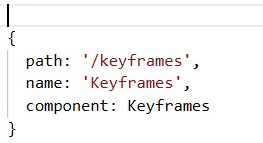
{
        path: '/pages/index',
		name: 'index',
},
Page. JSON file
{
            "path" : "pages/index locaton",
            "style" :


        }
There is no/sign in front of the path here.
Can be used in the page, the method is not unique( (not recommended)
this.$Router.push({
					name: 'name',
				});
this.$Router.push({path:'/name'});IText The document has no pages [How to Solve]
Problem Description:
com.itextpdf.text.ExceptionConverter: The document has no pages.
Caused by: java.io.IOException: The document has no pages.
Problem analysis:
1. When using the template to export PDF file, the template is not read to generate content because there is no data.
public void getTemplatePDF(HttpServletResponse response) {
        try {
            // Template Path
            String templatePath = "doc/Template.pdf";
            ServletOutputStream os = null;
            ByteArrayOutputStream bos = new ByteArrayOutputStream();
            PdfStamper stamper = null;
            PdfReader reader = null;// Read pdf Template
            Document doc = null;
            response.setContentType("multipart/form-data");
            response.setHeader("Content-Disposition", "attachment;fileName=测试.pdf");
            os = response.getOutputStream();// Output Stream
            doc = new Document();
            PdfCopy copy = new PdfCopy(doc, os);
            doc.open();
            List<String> resultList = new ArrayList<>();
            for (int i = 0; i < resultList.size(); i++) {
                reader = new PdfReader(templatePath);
                bos = new ByteArrayOutputStream();
                stamper = new PdfStamper(reader, bos);
                AcroFields form = stamper.getAcroFields();
                // Add Chinese fonts to the form. The system font is used here. If not set, Chinese may not be displayed (use the font in iTextAsian.jar)
                BaseFont bf = BaseFont.createFont("STSong-Light", "UniGB-UCS2-H", BaseFont.EMBEDDED);
                form.addSubstitutionFont(bf);
                // If false then the generated PDF file can also be edited, must be set to true
                stamper.setFormFlattening(true);
                stamper.close();
                reader.close();
                PdfImportedPage importPage = copy.getImportedPage(new PdfReader(bos.toByteArray()), 1);
                copy.addPage(importPage);
            }
            doc.close();
            try {
                os.flush();
                os.close();
            } catch (IOException e) {
                e.printStackTrace();
            }
            try {
                bos.flush();
                bos.close();
            } catch (IOException e) {
                e.printStackTrace();
            }
        } catch (Exception e) {
            e.printStackTrace();
        }
    }
Solution: generate default content when there is no data.
public void getTemplatePDF(HttpServletResponse response) {
        try {
            // Template Path
            String templatePath = "doc/Template.pdf";
            ServletOutputStream os = null;
            ByteArrayOutputStream bos = new ByteArrayOutputStream();
            PdfStamper stamper = null;
            PdfReader reader = null;// Read pdf Template
            Document doc = null;
            response.setContentType("multipart/form-data");
            response.setHeader("Content-Disposition", "attachment;fileName=测试.pdf");
            os = response.getOutputStream();// Output Stream
            doc = new Document();
            PdfCopy copy = new PdfCopy(doc, os);
            doc.open();
            List<String> resultList = new ArrayList<>();
            for (int i = 0; i < resultList.size(); i++) {
                reader = new PdfReader(templatePath);
                bos = new ByteArrayOutputStream();
                stamper = new PdfStamper(reader, bos);
                AcroFields form = stamper.getAcroFields();
                // Add Chinese fonts to the form. The system font is used here. If you don't set it, Chinese may not be displayed (use the font in iTextAsian.jar)
                BaseFont bf = BaseFont.createFont("STSong-Light", "UniGB-UCS2-H", BaseFont.EMBEDDED);
                form.addSubstitutionFont(bf);
                // if false then the generated PDF file can also be edited, must be set to true
                stamper.setFormFlattening(true);
                stamper.close();
                reader.close();
                PdfImportedPage importPage = copy.getImportedPage(new PdfReader(bos.toByteArray()), 1);
                copy.addPage(importPage);
            }
            // no data case
            if (resultList == null || resultList.size() <= 0) {
                reader = new PdfReader(templatePath);
                bos = new ByteArrayOutputStream();
                stamper = new PdfStamper(reader, bos);
                AcroFields form = stamper.getAcroFields();
                // add Chinese fonts to the form here using the system font. Not set, Chinese may not be able to display (using iTextAsian.jar in the font)
                BaseFont bf = BaseFont.createFont("STSong-Light", "UniGB-UCS2-H", BaseFont.EMBEDDED);
                form.addSubstitutionFont(bf);
                // If false then the generated PDF file can also be edited, must be set to true
                stamper.setFormFlattening(true);
                stamper.close();
                reader.close();
                PdfImportedPage importPage = copy.getImportedPage(new PdfReader(bos.toByteArray()), 1);
                copy.addPage(importPage);
            }
            doc.close();
            try {
                os.flush();
                os.close();
            } catch (IOException e) {
                e.printStackTrace();
            }
            try {
                bos.flush();
                bos.close();
            } catch (IOException e) {
                e.printStackTrace();
            }
        } catch (Exception e) {
            e.printStackTrace();
        }
}Iterator calling next method: Stopiteration [How to Solve]
Solution:
When using next() to access an iterator that has been iterated, there will be such an error: stopiteration
the solution is to give a default value: next (ITER, default) , which will be output after the iteration is completed
suppose that the original writing method of the loop is:
a = next(iter_test) # Iteration completion will report an error StopIteration
print(a)
Change to:
a = next(iter_test,None)
if a is not None:
	print(a)
Problem analysis
The following code will report an error:
iter_list = iter([1, 2, 3, 4])

for i in range(10):
    print(next(iter_list))
Error will be reported after outputting 1234, which can be changed to:
iter_list = iter([1, 2, 3, 4])

for i in range(10):
    a = next(iter_list, None)
    if a is not None:
        print(a)
This will output: 1 2 3 4