Category Archives: Error

[Solved] PostgreSQL Error: ERROR: CURRENT TRANSACTION IS ABORTED, COMMANDS IGNORED UNTIL END OF TRANSA

Error occurred:

Current transaction is aborted, commands ignored until end of transaction block

analysis:

The transaction contains errors. When the DML is executed again, the transaction cannot proceed normally.

When automatic transaction submission is turned off in PG database, we often encounter such problems
error:   Current transaction is aborted, commands ignored until end of transaction block
the reason why this problem is caused is that
in the Postgres database, if an error occurs in a database operation in the same transaction, the database after the transaction will make an error
let’s take a very simple example
test = # select * from test1
ERROR:   relation “test1” does not exist
LINE 1: select * from test1;
^
time: 0.376 MS
at this time, because there is no operation error, all subsequent operations in this session will report
error:   Current transaction is aborted, commands ignored until end of transaction block
to solve this problem, we can only use rollback or commit
PG is not user-friendly
Solution:

1. Try connection.setautocommit (true); Cannot execute

2. Commit directly, execute the insert statement after submitting, and insert successfully.

Refer to the stackoverflow solution:

postgresql – PSQLException: current transaction is aborted, commands ignored until end of transaction block – Stack Overflow

[Solved] Zookeeper3.6.0 Error: Error contacting service. It is probably not running

Zookeeper 3.6.0 error contacting service. It is probable not running

Record the errors encountered when installing zookeeper. I searched for a long time and didn’t find a specific solution

Maybe it’s because I’m too lazy to read the log. I also remind myself that if there is a problem, I shouldn’t think about going to Baidu immediately. I should look at the log first

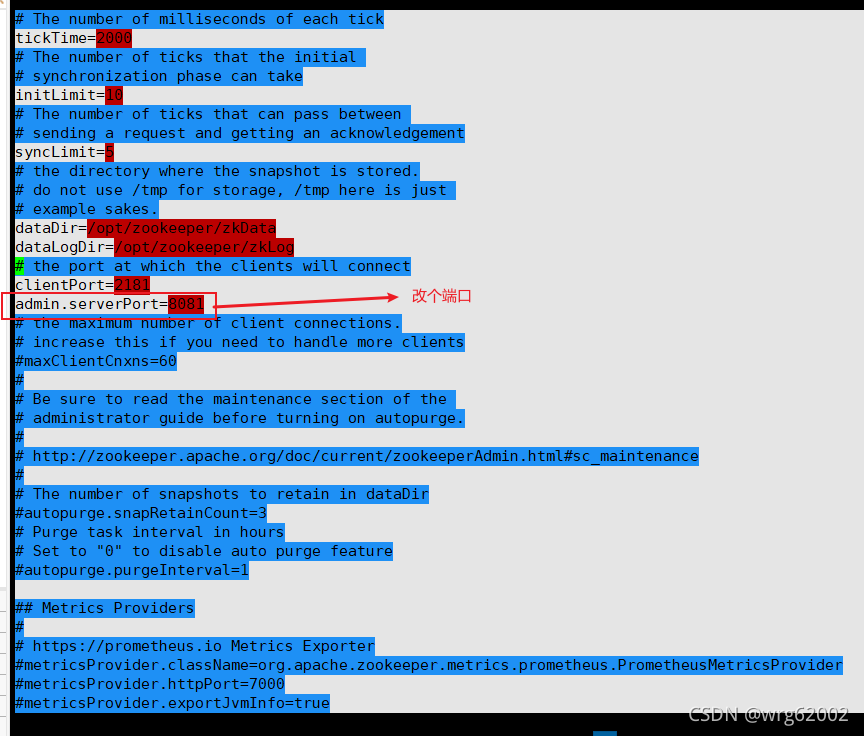
The virtual machine itself starts tomcat, and zookeeper will have conflicts when starting adminserver

there are many solutions:
I modified the zoo.cfg file myself

Just restart zookeeper again

[Solved] Redis Error: Creating Server TCP listening socket *:6379: bind: No error

Error:
the redis service starts under the window, and an error is reported:
Creating server TCP listening socket *: 6379: bind: no error

Reason:
port 6379 has been bound. It should be because the service was not closed last time

Solution:
① enter the command in sequence:

Redis cli.exe
(start the redis client, connect to port 6379 of the local machine (127.0.0.1) and start the redis service) shutdownexit

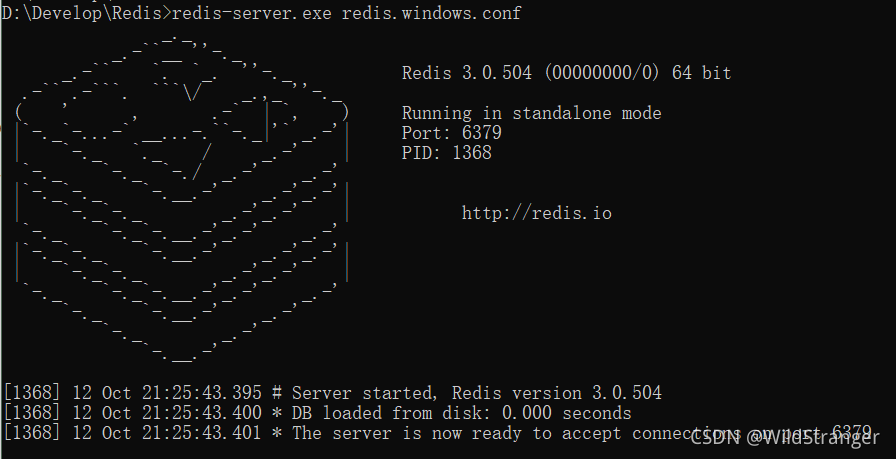
② Start redis service: redis-server.exe redis. Windows.conf

[after configuring the service, start the service command redis server — service start close the service redis server — service stop]

WPF path = (validation. Errors) [0]. Errorcontent reports a binding error

System.Windows.Data Error: 17 : Cannot get ‘Item[]’ value (type ‘ValidationError’) from ‘(Validation.Errors)’ (type ‘ReadOnlyObservableCollection`1′). BindingExpression:Path=AdornedElement.(0)[0].ErrorContent; DataItem=’AdornedElementPlaceholder’ (Name=’customAdorner’); target element is ‘TextBlock'(Name=”); target property is ‘Text’ (type ‘String’) ArgumentOutOfRangeException:’System.ArgumentOutOfRangeException: The specified parameter is out of the range of valid values.

Correct binding method:

Path=(Validation.Errors)/ErrorContent

[Solved] Git error: refname refs/heads/master not found

Problems encountered

Create a project and associate it to a git remote warehouse

$ git init
$ git remote add origin [email protected]:abeelan/vue_demo.git
$ git branch -M main
$ git push -u origin main

Execute the third line of command, and an error occurs when changing the branch name

error: refname refs/heads/master not found
fatal: Branch rename failed

Solution:

$ git init
$ git remote add origin [email protected]:abeelan/vue_demo.git
$ git add .
$ git commit -m "demo finished"
$ git branch -M main
$ git push -u origin main

To modify the branch name, you need to have a commit before you can change it.

[Solved] RuntimeError: cuDNN error: CUDNN_STATUS_INTERNAL_ERROR

This problem has been solved for a day….

Train the code well. If you change a machine, you will report an error.

I thought it was cuda11. I was worried that the CUDA version did not match the pytorch version. I reinstalled it, but it didn’t solve the problem.

Problem phenomenon:

raceback (most recent call last):
  File "train.py", line 100, in <module>
    main(opt)
  File "train.py", line 71, in main

……

  File "/home/xxxx/.local/lib/python3.8/site-packages/torch/nn/modules/conv.py", line 395, in _conv_forward
    return F.conv2d(input, weight, bias, self.stride,
RuntimeError: cuDNN error: CUDNN_STATUS_INTERNAL_ERROR
You can try to repro this exception using the following code snippet. If that doesn't trigger the error, please include your original repro script when reporting this issue.

import torch
torch.backends.cuda.matmul.allow_tf32 = True
torch.backends.cudnn.benchmark = True
torch.backends.cudnn.deterministic = False
torch.backends.cudnn.allow_tf32 = True
data = torch.randn([1, 64, 80, 144], dtype=torch.float, device='cuda', requires_grad=True)
net = torch.nn.Conv2d(64, 64, kernel_size=[3, 3], padding=[1, 1], stride=[1, 1], dilation=[1, 1], groups=1)
net = net.cuda().float()
out = net(data)
out.backward(torch.randn_like(out))
torch.cuda.synchronize()

ConvolutionParams
    data_type = CUDNN_DATA_FLOAT
    padding = [1, 1, 0]
    stride = [1, 1, 0]
    dilation = [1, 1, 0]
    groups = 1
    deterministic = false
    allow_tf32 = true
input: TensorDescriptor 0xaa030590
    type = CUDNN_DATA_FLOAT
    nbDims = 4
    dimA = 1, 64, 80, 144,
    strideA = 737280, 11520, 144, 1,
output: TensorDescriptor 0xaa0d6560
    type = CUDNN_DATA_FLOAT
    nbDims = 4
    dimA = 1, 64, 80, 144,
    strideA = 737280, 11520, 144, 1,
weight: FilterDescriptor 0xaa0d0360
    type = CUDNN_DATA_FLOAT
    tensor_format = CUDNN_TENSOR_NCHW
    nbDims = 4
    dimA = 64, 64, 3, 3,
Pointer addresses:
    input: 0x567e50000
    output: 0x568120000
    weight: 0x550a2da00

Solution:

Save CUDA’s prompt to a file,

import torch
torch.backends.cuda.matmul.allow_tf32 = True
torch.backends.cudnn.benchmark = True
torch.backends.cudnn.deterministic = False
torch.backends.cudnn.allow_tf32 = True
data = torch.randn([1, 64, 80, 144], dtype=torch.float, device='cuda', requires_grad=True)
net = torch.nn.Conv2d(64, 64, kernel_size=[3, 3], padding=[1, 1], stride=[1, 1], dilation=[1, 1], groups=1)
net = net.cuda().float()
out = net(data)
out.backward(torch.randn_like(out))
torch.cuda.synchronize()

When Python runs it, it will report the same error, then select the switch to adjust it, and try again whether it still reports an error.

For my code, modifying the following is work.

torch.backends.cudnn.benchmark = False

Then put this in front of the problem code.

[Solved] org.apache.spark.SparkException: Kryo serialization failed: Buffer overflow

The following errors are reported when running spark task:

21/10/09 14:56:32 ERROR Executor: Exception in task 1.0 in stage 2.0 (TID 4)
org.apache.spark.SparkException: Kryo serialization failed: Buffer overflow. Available: 0, required: 93. To avoid this, increase spark.kryoserializer.buffer.max value.
	at org.apache.spark.serializer.KryoSerializerInstance.serialize(KryoSerializer.scala:299)
	at org.apache.spark.executor.Executor$TaskRunner.run(Executor.scala:265)
	at java.util.concurrent.ThreadPoolExecutor.runWorker(ThreadPoolExecutor.java:1149)
	at java.util.concurrent.ThreadPoolExecutor$Worker.run(ThreadPoolExecutor.java:624)
	at java.lang.Thread.run(Thread.java:748)
21/10/09 14:56:32 INFO TaskSetManager: Starting task 2.0 in stage 2.0 (TID 5, localhost, partition 2,NODE_LOCAL, 2262 bytes)
21/10/09 14:56:32 INFO Executor: Running task 2.0 in stage 2.0 (TID 5)
21/10/09 14:56:32 INFO ShuffleBlockFetcherIterator: Getting 1 non-empty blocks out of 1 blocks
21/10/09 14:56:32 WARN TaskSetManager: Lost task 1.0 in stage 2.0 (TID 4, localhost): org.apache.spark.SparkException: Kryo serialization failed: Buffer overflow. Available: 0, required: 93. To avoid this, increase spark.kryoserializer.buffer.max value.
	at org.apache.spark.serializer.KryoSerializerInstance.serialize(KryoSerializer.scala:299)
	at org.apache.spark.executor.Executor$TaskRunner.run(Executor.scala:265)
	at java.util.concurrent.ThreadPoolExecutor.runWorker(ThreadPoolExecutor.java:1149)
	at java.util.concurrent.ThreadPoolExecutor$Worker.run(ThreadPoolExecutor.java:624)
	at java.lang.Thread.run(Thread.java:748)

21/10/09 14:56:32 INFO ShuffleBlockFetcherIterator: Started 0 remote fetches in 1 ms
21/10/09 14:56:32 ERROR TaskSetManager: Task 1 in stage 2.0 failed 1 times; aborting job

Solution:

### Task submission plus parameters
--conf  spark.kryoserializer.buffer.max=2048m  spark.kryoserializer.buffer=512m 

[Solved] Fabric_sdk_go:QueryBlockConfig failed: QueryBlockConfig failed: target(s) required

Fabric_sdk_go:[Solved]event service creation failed: could not get chConfig cache reference: QueryBlockConfig failed: QueryBlockConfig failed: target(s) required
Error Message:

Configuration file config_test: channel name is mychannel, in the demo it is orgchannel.
[Solution] Comment out orgchannel in config_test:

  # Mychannel overrides initialBackoff for discovery
  mychannel:
    policies:
      discovery:
        retryOpts:
          #[Required for override] number of retry attempts
          attempts: 4
          initialBackoff: 1s

  # multi-org test channel
  # orgchannel:  //remove

    # orderers:
    #  - orderer.example.com

    peers:
      peer0.org1.example.com:
        endorsingPeer: true
        chaincodeQuery: true
        ledgerQuery: true
        eventSource: true

      peer0.org2.example.com:
        endorsingPeer: true
        chaincodeQuery: true
        ledgerQuery: true
        eventSource: true

Problem-solving:

[Solved] Failed to install the following Android SDK packages as some licences have not been accepted

Question:
Using the Android SDK outside of Android Studio may explode with the following error

Failed to install the following Android SDK packages as some licences have not been accepted.
patcher;v4 SDK Patch Applier v4
emulator Android Emulator
platforms;android-30 Android SDK Platform 30
tools Android SDK Tools
build-tools;29.0.2 Android SDK Build-Tools 29.0.2
To build this project, accept the SDK license agreements and install the missing components using the Android Studio SDK Manager.
Alternatively, to transfer the license agreements from one workstation to another, see http://d.android.com/r/studio-ui/export-licenses.html

Solution:
input. /sdkmanager --licenses in android/sdk/tools/bin
After authorization you can

[Solved] Android Studio Manifest merger failed with multiple errors, see logs

When the message “manifest merge failed with multiple errors, see logs” is reported, and there is no other prompt, open manifest first to see if there is any error. If there is any error, there will be a red prompt
if there is no error, run the following command on the terminal: gradlew processdebugmanifest — stacktrace
. After running, an error will be displayed. Follow the prompts to modify. The wireframe is marked with an error message.