Author Archives: Robins

Call to undefined function mysql_ Connect() solution summary

A:
Use the phpinfo() function in your PHP code to see PHP basics
Mysql_connect () has been deprecated since PHP5.0, and is deprecated in PHP7.0. Mysqli_connect () is used instead if PHP is 7.0 or higher
Method 2:
Missing MySQL module caused by PHP installation
Mysql> install mysql from CentOs
yum install php-mysql -y
If installed, report the following warning
Headers and client library minor version mismatch. Headers:
This is due to the higher version of MySQL, the lower version of the MySQL Client API
You can uninstall php-mysql first
yum remove php-mysql -y
then
yum install php-mysqlnd -y
Finally, restart Apache
systemctl restart httpd
Ubuntu install MySQL module:
Apt to get the install php5 – mysql
Sudo DPKG — reconfigure php5 – mysql
sudo /etc/init.d/mysql restart
sudo /etc/init.d/apache2 restart
Three:
If the first two methods fail, try opening the MySQL module extension in the php.ini configuration file
Php.ini = php.ini; Extension =” related MySQL module “; To get rid of
Then make sure that the dir of extension points to the directory where the extension resides
Windows is usually under Ext and CentOS is under /usr/lib64/php.modules
The above information can be found in the PHPINFO printed information
However, when I encountered this problem, I just needed to install the PHP-MySQL module, and I didn’t need to modify php.ini
My environment is Centos7 and PHP version is PHP5.4
 

Fatal error: Uncaught Error: Call to undefined function mysql_ Connect() problem solving

Fatal error: Uncaught error: Call to undefined function mysql_connect() : Fatal error: Uncaught error: Call to undefined function mysql_connect() when connecting to the database using PHP validation code. This is because the version of PHP you are using does not support the older version of join statement writing. The PHP version used in this study is PHP-7.4.2-NTS-Win32-VC15-x64, and the verification code is:
< ?PHP
the mysql_connect (‘ 127.0.0.1 ‘, ‘runner_db_user’, ‘runner_db_password’)
the OR die (” Could not connect to the database. ‘);
the mysql_select_db (‘ hfjq_race_info ‘);
echo “Connected!” ;
?>
After inquiry, this writing method is the previous version of 5. X, the following code is as follows:
< ?php
$con=mysqli_connect(“127.0.0.1”, “runner_db_user”, “hfjq_race_info”)
OR die(‘Could not connect to database.’);
echo “Connected!” ;
?>
You can connect to the database normally. If you have extension=mysqli, change the semicolon “;” before extension=mysqli. You can connect to the MySQL database normally if you remove it

Uncaught error: call to undefined function MySQL when building sqli lab environment with phpstudy_ Connect() error

The problem

Uncaught Error: Call to undefined function mysql_connect()

why
In PHP 5+, you can use both mysql_connect() and mysqli_conncet() instead of mysqli_conncet().
The solution
In the PHPStudy environment, you can downgrade the PHP version by selecting the PHP5 + version.
>
>

Web site – & gt; Management – & gt; PHP version. (You can choose to replace an older version of PHPStudy.)
If you want to use php7 without changing the code, you can use the admin ->; For PHP extensions, check the box before php_mysql.

Composer require — dev barryvdh / laravel ide helper error resolution

Your requirements could not be resolved to an installable set of packages.

  Problem 1
    - barryvdh/laravel-ide-helper[dev-master, v2.9.0] require illuminate/console ^8 -> found illuminate/console[v8.0.0, ..
., 8.x-dev] but it conflicts with another require.
    - barryvdh/laravel-ide-helper 2.9.x-dev is an alias of barryvdh/laravel-ide-helper dev-master and thus requires it to
be installed too.
    - Root composer.json requires barryvdh/laravel-ide-helper ^2.9 -> satisfiable by barryvdh/laravel-ide-helper[v2.9.0, 2
.9.x-dev (alias of dev-master)].


Installation failed, reverting ./composer.json and ./composer.lock to their original content.

Since PHP 8 is out, this support depends on the version, and I currently have Laravel 7 installed, so the default version of Laravel-id-helper is not supported, we will install the lower version

composer require --dev barryvdh/laravel-ide-helper 2.8

Python – annotate and uncomment multiline programs

The article directories
Python Comment and Uncomment multiline programs 1, Method 1 (recommended) 1, Comment 2, Uncomment 2, Method 2

Python annotation and uncomment multiline programs
In the program, sometimes you want to comment out the multi-line program, line by line comment is more troublesome, so can you comment more lines, yes, there are several methods:
1. Method 1 (recommended)
1, comments,
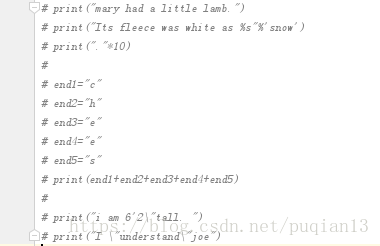
Select the paragraph you want to comment, press Ctrl +/, and the effect looks like this:

2. Uncomment
Click Ctrl +/ again to uncomment
Second, method 2
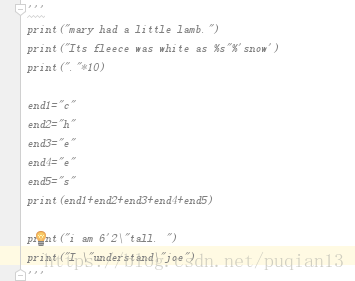
Enclose the entire paragraph in three double or multiple quotes, as shown in the figure

Nginx startup error: nginx: [error] open() “/ var / run / nginx/ nginx.pid The solution of “failed (2: no such file or directory)”

Question:
Nginx: [error] open() “/var/run/nginx/nginx.pid” failed (2: No such file or directory)
Cause of the problem:
The nginx.pid file cannot be found in /var/run/nginx/. There are two ways to do this:
The default directory is /var/run/nginx/.
The second way: Modify the nginx.conf file to specify the directory where the PID file resides. Let’s demonstrate the second way. As follows:
Solution:
(1) to CD/usr/local/nginx/conf/directory, edit the configuration file nginx. Conf.
#pid logs/nginx.pid; #pid logs/nginx.pid;

(3) the annotation, go out and amended as: pid/usr/local/nginx/logs/nginx pid;

Mkdir /usr/local/nginx/logs = ‘/usr/local/nginx/logs’
CD /usr/local/nginx/sbin/ CD /usr/local/nginx/sbin

/var/run/nginx/nginx.pid” failed (2: No such file or directory)

The nginx server keeps reporting the following error when the server is shut down and restarted:

[root@localhost sbin]# nginx: [emerg] open() "/var/run/nginx/nginx.pid" failed (2: No such file or directory)

Solution:

    /> /local/nginx/conf/

     cd /usr/local/nginx/conf/
    
      Edit the configuration file nginx.conf
    vi nginx.conf
    
      The following code is commented in the configuration file:
    #pid   logs/nginx.pid;
    
      removes the comment, i.e. #, and changes it to the following code:
    pid    /usr/local/nginx/logs/nginx.pid;
    
      Press ESC, enter the following code, save and exit
    :wq
    
      > create logs directory in /usr/local/nginx:
    [root@localhost conf]# mkdir /usr/local/nginx/logs
    
      Start the nginx service:
    /usr/local/nginx/sbin/nginx
    

    Pro test successful!

In the XML configuration file of spring jdbc.properties The connection to the database failed due to garbled code

An unusual problem we encountered today was that getting the configured properties in jdbc.properties failed to connect to the database.
Without further ado, go straight to the code.
Exception in thread “main” org.springframework.jdbc.CannotGetJdbcConnectionException: Could not get JDBC Connection; Nested exception is java.sql. SQLExeption: Access denied for user ‘e £e £’@’localhost’ (using password: YES)
Spring has resolved the value of ${username to the value of my computer’s username. Simply change the username of the jdbc.properties and XML to name.
${JDBC. Username} is not the same as ${JDBC. Username}. Yes, you don’t get that weird question by just writing it like this, but it does.
Invalid bean definition with name ‘dataSource’ defined in class path resource [applicationContext.xml]:
Could not resolve placeholder ‘jdbc.driverClassName’ in value “${jdbc.driverClassName}”;
${JDBC. Username} is not resolved by Spring.

When docker starts tomcat, the access port of the container displays 404, and the source server fails to find the representation of the target resource or is unwilling to disclose an existing one

Solution:
systemctl stop firewalld.
systemctl disable firewalld.
s>mctl disable firewalld.
systemctl disable firewalld.
systemctl disable firewalld If Tomcat is still inaccessible after the firewall is turned off, the webapps folder is empty
2. The problem of webapps folder is empty check the tomcat container ID

docker ps
enter tomcat container terminal
docker exec – it tomcat container ID/bin/bash
enter
CD webapps webapps folder
copy on a webapps directory. All files to the webapps directory under the dist
cp – r.. /webapps.dist/* ./