Performing encryption behind Java. Security. InvalidKeyException: illegal Key Size
Because the key is more than 128, sell Java. Security. InvalidKeyException: Illegal key size. Because the key length is limited, the Java runtime environment reads restricted policy files.
solution :
lution A:
g> the official download of the JCE unrestricted permission policy file, and replace the corresponding file
JDK7 download address: http://www.oracle.com/technetwork/java/javase/downloads/jce-7-download-432124.html
JDK8 download address: http://www.oracle.com/technetwork/java/javase/downloads/jce8-download-2133166.html
Download after decompression can see local_policy. Jar and US_export_policy jar and readme. TXT
if installed JRE, put the two jar files in % JRE_HOME % \ lib \ security directory under the cover of the original file
if installed JDK, and put the two jar files are in % JDK_HOME % \ JRE \ lib \ security directory to cover the original file
Option B:
Replace Oracle JDK with OpenJDK, the free and open source Java version of Oracle. OpenJDK does not have this limitation, and most Java services run on the OpenJDK environment
Author Archives: Robins
Hexo + next add bilibilibili icon through custom style
Next uses the Font Awesome library as the icon library by default. However, some Chinese social network ICONS are not available in the Font Awesome library, including the familiar ones Bilibili, Douban, and Jianshu. So if we want to use these ICONS, we need to manually add them using local ICONS.
First, you can find the icon you need on a site like Alibaba’s Vector Icon Library and download it in SVG format. Bilibili, for example, the SVG files placed in hexo engineering/source/images/Bilibili SVG.
Edit the source/_data/styles.styl file (create your own if you don’t) and add the following styles:
.fa-bilibili {
  background: url(/images/bilibili.svg);
  background-position: 50% 75%;
  background-repeat: no-repeat;
  height: 1rem;
  width: 1rem;
}
Note: Source under the Hexo project directory, not the source under the theme
Next, uncomment the style section of custom_file_path in the theme configuration file (such as theme/next/_config.yml).
custom_file_path:
  style: source/_data/styles.styl
Finally, reference it in the social link of the theme configuration file (such as theme/next/_config.yml).
social:
  Bilibili: https://space.bilibili.com/userid/ || fab fa-bilibili
I failed with hexo-cli 4.2.0 and NexT 8.2.1. Can anyone tell me how?
Reference reading:
https://theme-next.js.org/docs/advanced-settings/custom-files.html#Custom-Icon-Imagehttps://www.zywvvd.com/2020/03/28/next/20_custom_style/custom-style/
A convenient method to count the total number of query results in MySQL
MYSQL keywords:
SQL_CALC_FOUND_ROWS
to check the manual and found this keyword is used in the query result of statistical filtering conditions when the total number of (not restricted by Limit)
For example:
SQL_CALC_FOUND_ROWS
to check the manual and found this keyword is used in the query result of statistical filtering conditions when the total number of (not restricted by Limit)
For example:
SELECT SQL_CALC_FOUND_ROWS tid FROM cdb_threads WHERE fid=14 LIMIT 1,10;Let’s say there are 1,000 that satisfy our condition, and we return 10.
for immediate use
SELECT found_rows() AS rowcount;Return rowcount = 1000;
this saved a SELECT count (*) AS the rowcount repeat query, can save considerable time.
From: http://ginew.blog.163.com/
Problems that Vue project manager can’t open
Vue UI must version to 3.0.0 or above to use
if you install version below 3.0.0, so the command line (CMD) under arbitrary path input (uninstall current version) : the vue -v
see version 2.9.6 so sure to uninstall:
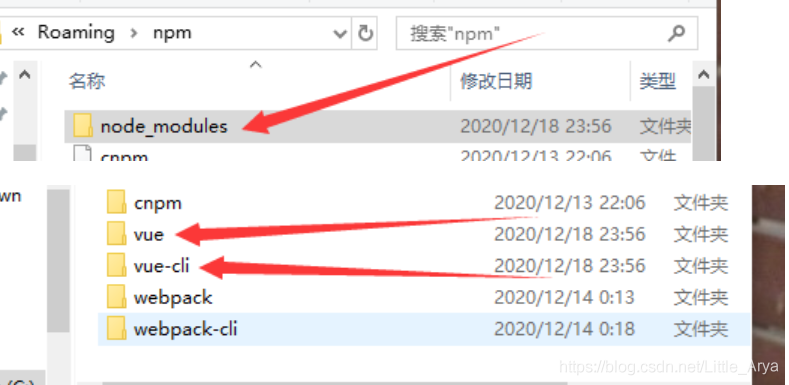
enter the command: after first CMD where vue
after entering the specified directory delete all of the vue related files,
with a vue delete all
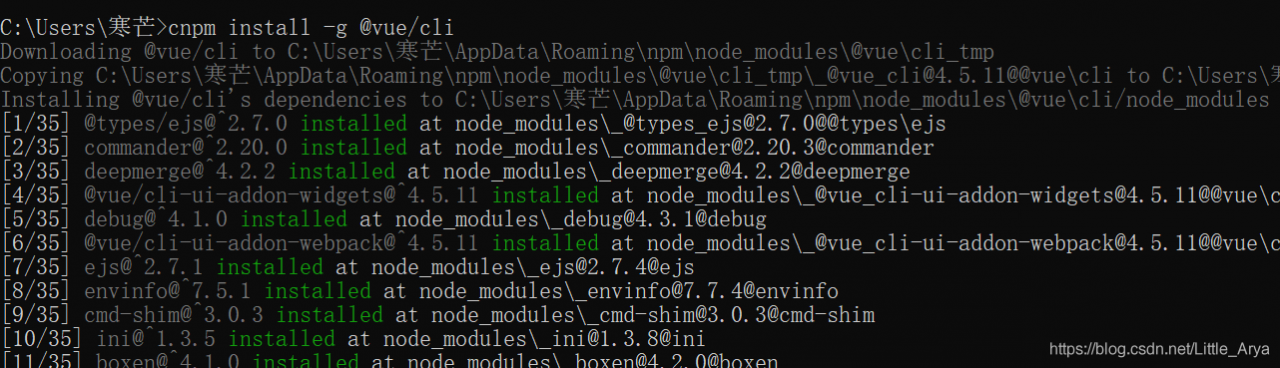
Then type: CNPM install – g @ vue/cli
then find see the latest version of the

in the specified file open visual tools input vue UI
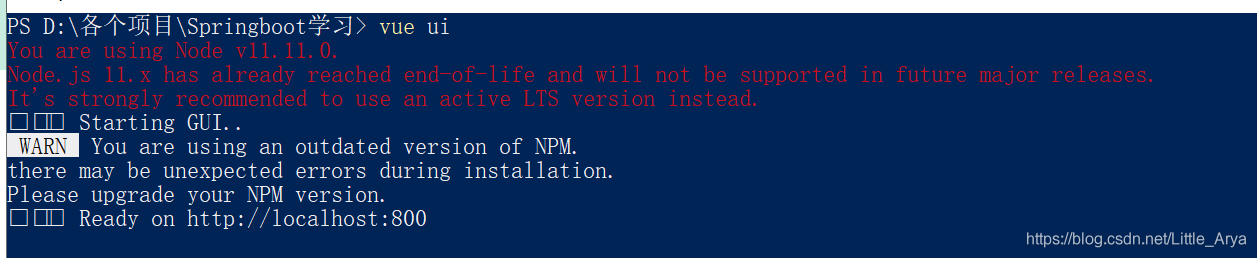
jump 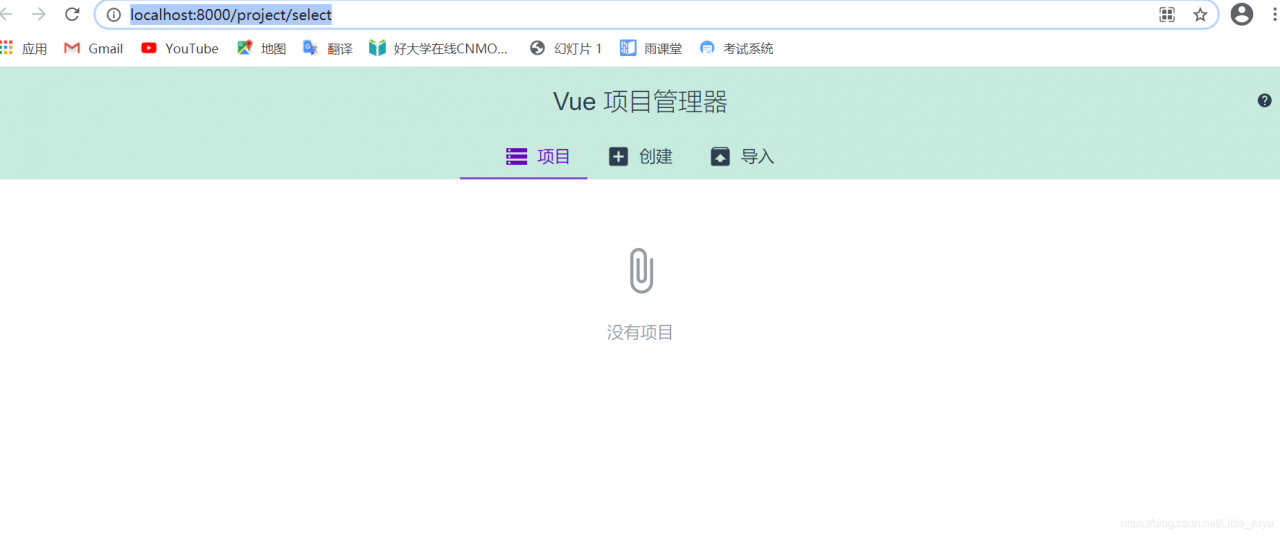 out successfully
ValueError: need more than 0 values to unpack
Split () error, valueError: need more than 0 values to unpack

Check the data, it is found that the number of variables on the left and right sides is inconsistent. Carefully check, it is found that there is an empty behavior in the TXT read at the end, so that there is no value after the split at the end, so it cannot be copied to the two variables on the left.
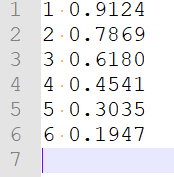
As shown in the figure, delete the last line of space and rerun it.
Therefore, when this error occurs, make sure that the content on both sides is correct.
Check the data, it is found that the number of variables on the left and right sides is inconsistent. Carefully check, it is found that there is an empty behavior in the TXT read at the end, so that there is no value after the split at the end, so it cannot be copied to the two variables on the left.
As shown in the figure, delete the last line of space and rerun it.
Therefore, when this error occurs, make sure that the content on both sides is correct.
[solved] error: valueerror: expected 2D array, got scalar array instead
Error code:
new_x = 84610
pre_y = model.predict(new_x)
print(pre_y)
Error result:
ValueError: Expected 2D array, got scalar array instead:
array=84610.
Reshape your data either using array.reshape(-1, 1) if your data has a single feature or array.reshape(1, -1) if it contains a single sample.
Solution:
Reshape data using array
Reshape data using array
Reshape data using array If the data has a single function or array, resize the shape (-1, 1). If the data contains a single example, resize the shape (1, -1).
Solution:
add
new_x = np.array(new_x).reshape(1, -1)Modified code:
new_x = 84610
new_x = np.array(new_x).reshape(1, -1)
pre_y = model.predict(new_x)
print(pre_y)
Reproduced in: https://www.cnblogs.com/hankleo/p/11310272.html
ValueError: need at least one array to concatenate
keywords
python
Content of the error
ValueError: need at least one array to concatenate
why
Wrong path
Possible places to start
1. Check the path written in the running py file
2. If you are a PyCharm remote connection, it is recommended to check whether “Automatic synchronization to the server” is enabled (open method: Tools — Deployment — Automatic Upload).
When starting Vue project: cannot find module ‘webpack cli/bin/config yargs’ error [How to Fix]
Cannot find module ‘webpack-cli/bin/config-yargs’ :
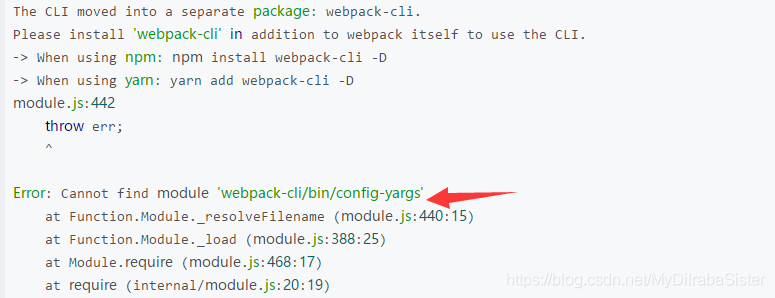
Webpack is not compatible with the webpack-dev-server version:
Under this vue project, type :
npm uninstall  webpack -g
npm uninstall -g webpack-dev-server
Uninstall and reinstall:
npm install [email protected] --save-dev
npm install [email protected] --save-dev
Restart the project, success!
vue VM682:1 Uncaught SyntaxError: Unexpected token u in JSON at position 0
VM682:1 Uncaught SyntaxError: Unexpected token u in JSON at position 0

To solve
Clear the cache The opened tag page full It is ok to try again
[How to Fix]Spring 3.0 could not find acceptable representation
When using Spring 3.0.5 MVC development, JSON interface data development, using JSONObject.fromobObject (Object) to return JSON data. Problems with “org. Springframework. Web. HttpMediaTypeNotAcceptableException: Could not find acceptable representation” error.
Solution 1:
The @responseBody method’s return type is changed from JSONObject to Object.
Modify SpringMVC-servlet.xml to add MessageConverters
<bean class="org.springframework.web.servlet.mvc.annotation.AnnotationMethodHandlerAdapter">
<!-- Object->json -->
<property name="messageConverters">
<list>
<bean class="org.springframework.http.converter.json.MappingJacksonHttpMessageConverter" />
</list>
</property>
</bean>
JacksonJar package support is required: jackson-core-lgpl-1.2.1.jar and jackson-core-lgpl-1.2.1.jar.
Solution 2:
The @responseBody method returns a String instead of a JSONObject, and returns JSONObject.fromobObject (Object).toString();
At this time, if there is Chinese, there will be garbled code, the solution is as follows:
 <bean class="org.springframework.web.servlet.mvc.annotation.AnnotationMethodHandlerAdapter">
	    <!-- Object->json -->
	    <!-- <property name="messageConverters">
		    <list>
		         <bean class="org.springframework.http.converter.json.MappingJacksonHttpMessageConverter" />
		    </list>
	    </property> -->
	    <!-- default is ISO you should set utf-8 -->
	    <property name="messageConverters">
        <list>
            <bean
                class="org.springframework.http.converter.StringHttpMessageConverter">
                <property name="supportedMediaTypes">
                    <list>
                        <bean class="org.springframework.http.MediaType">
                            <constructor-arg index="0" value="text" />
                            <constructor-arg index="1" value="plain" />
                            <constructor-arg index="2" value="UTF-8" />
                        </bean>
                    </list>
                </property>
            </bean>
        </list>
    </property>
    </bean>
Solution 3:
The return type is JSONObject. Write your own Converter.
package javacommon.util;

import java.io.BufferedReader;
import java.io.IOException;
import java.io.InputStream;
import java.io.InputStreamReader;
import java.io.OutputStream;
import java.nio.charset.Charset;

import org.springframework.http.HttpInputMessage;
import org.springframework.http.HttpOutputMessage;
import org.springframework.http.MediaType;
import org.springframework.http.converter.AbstractHttpMessageConverter;
import org.springframework.http.converter.HttpMessageNotReadableException;
import org.springframework.http.converter.HttpMessageNotWritableException;

public class JaksonConverter extends AbstractHttpMessageConverter<Object> {
	public static final Charset DEFAULT_CHARSET = Charset.forName("UTF-8");

	public JaksonConverter() {
		super(new MediaType("application", "json", DEFAULT_CHARSET));
	}

	@Override
	protected boolean supports(Class<?> clazz) {
		// TODO Auto-generated method stub
		return false;
	}

	@Override
	protected Object readInternal(Class<?extends Object> clazz,
			HttpInputMessage inputMessage) throws IOException,
			HttpMessageNotReadableException {
		logger.info(clazz.getSimpleName());
		InputStream inputStream=inputMessage.getBody();
		StringBuilder stringBuilder = new StringBuilder();
		BufferedReader bufferedReader = new BufferedReader(new InputStreamReader(inputStream));
		String line = null;
		while((line = bufferedReader.readLine()) != null){
			stringBuilder.append(line);
		}
		logger.info(stringBuilder.toString());
		return stringBuilder;
	}

	@Override
	protected void writeInternal(Object t, HttpOutputMessage outputMessage)
			throws IOException, HttpMessageNotWritableException {
		logger.info(t.getClass().getSimpleName());

		// HashMap
		// JSONObject
		logger.info(t.toString());
		OutputStream os=outputMessage.getBody();

		os.write(t.toString().getBytes("utf-8"));
		os.flush();

	}

}
Replace the Converter in Scenario 1 with a written one.
Cmake Error The C compiler identification is GNU 7.5.0 — The CXX compiler identification is unknown
-- The C compiler identification is GNU 7.5.0
-- The CXX compiler identification is unknown
-- Check for working C compiler: /usr/bin/cc
-- Check for working C compiler: /usr/bin/cc -- works
-- Detecting C compiler ABI info
-- Detecting C compiler ABI info - done
-- Detecting C compile features
-- Detecting C compile features - done
CMake Error at CMakeLists.txt:2 (project):
  No CMAKE_CXX_COMPILER could be found.

  Tell CMake where to find the compiler by setting either the environment
  variable "CXX" or the CMake cache entry CMAKE_CXX_COMPILER to the full path
  to the compiler, or to the compiler name if it is in the PATH.


-- Configuring incomplete, errors occurred!
See also "/home/xxx/train_lianxi/build/CMakeFiles/CMakeOutput.log".
See also "/home/xxx/train_lianxi/build/CMakeFiles/CMakeError.log".
Install GCC, g++
sudo apt-get install gcc g++
How to Fix Node SASS Error in Vue + webpack project after nodejs upgrade
Upgrade to the v8 ^ above to the environment of the node, the node-sass error solution
Today, I upgraded the system of my colleague’s computer and also upgraded all the software. I found that there was an error in the original project. The general error message is as follows:
 ERROR  Failed to compile with 1 errors                                                                      PM 1:56:26

 error  in ./src/components/Hello.vue

Module build failed: Error: Missing binding /Users/fungleo/Sites/MyWork/vuedemo2/node_modules/node-sass/vendor/darwin-x64-57/binding.node
Node Sass could not find a binding for your current environment: OS X 64-bit with Node.js 8.x

Found bindings for the following environments:
  - OS X 64-bit with Node.js 6.x

This usually happens because your environment has changed since running `npm install`.
Run `npm rebuild node-sass --force` to build the binding for your current environment.
    at module.exports (/Users/fungleo/Sites/MyWork/vuedemo2/node_modules/node-sass/lib/binding.js:15:13)
    at Object.<anonymous> (/Users/fungleo/Sites/MyWork/vuedemo2/node_modules/node-sass/lib/index.js:14:35)
    at Module._compile (module.js:635:30)
    at Object.Module._extensions..js (module.js:646:10)
    at Module.load (module.js:554:32)
    at tryModuleLoad (module.js:497:12)
    at Function.Module._load (module.js:489:3)
    at Module.require (module.js:579:17)
    at require (internal/module.js:11:18)
    at Object.<anonymous> (/Users/fungleo/Sites/MyWork/vuedemo2/node_modules/sass-loader/lib/loader.js:3:14)
    at Module._compile (module.js:635:30)
    at Object.Module._extensions..js (module.js:646:10)
    at Module.load (module.js:554:32)
    at tryModuleLoad (module.js:497:12)
    at Function.Module._load (module.js:489:3)
    at Module.require (module.js:579:17)

 @ ./~/vue-style-loader!./~/css-loader?{"minimize":false,"sourceMap":false}!./~/vue-loader/lib/style-compiler?{"vue":true,"id":"data-v-2d1bdf0c","scoped":false,"hasInlineConfig":false}!./~/sass-loader/lib/loader.js?{"sourceMap":false}!./~/vue-loader/lib/selector.js?type=styles&index=0!./src/components/Hello.vue 4:14-394 13:3-17:5 14:22-402
 @ ./src/components/Hello.vue
 @ ./src/router/index.js
 @ ./src/main.js
 @ multi ./build/dev-client ./src/main.js

> Listening at http://localhost:8080
This code was copied on my computer after I upgraded Node. But that’s the general idea, depending on the location of the project and so on, it will be different.
node-sass not compatible with n>v8 version> That’s easy to solve. Execute under the current project
npm i node-sass -DThen the project went back to normal.
When the project error, do not worry, carefully look at the error code, it is not possible to use the translation tool to translate. Generally speaking, a solution can be found quickly.
This article by Fungleo original, allow to reprint, but reprint must retain the first link.