Author Archives: Robins

Hadoop 3.2.0 idea development environment construction and HDFS read write API operation

First of all, we need to build a Hadoop server

Please refer to: Hadoop 3.2.0 fully distributed cluster building and wordcount running

Create a new Maven project and add Hadoop related jar package

        <dependency>
            <groupId>org.apache.hadoop</groupId>
            <artifactId>hadoop-common</artifactId>
            <version>3.2.0</version>
        </dependency>
        <dependency>
            <groupId>org.apache.hadoop</groupId>
            <artifactId>hadoop-hdfs</artifactId>
            <version>3.2.0</version>
        </dependency>
        <dependency>
            <groupId>org.apache.hadoop</groupId>
            <artifactId>hadoop-client</artifactId>
            <version>3.2.0</version>
        </dependency>
        <dependency>
            <groupId>org.apache.hadoop</groupId>
            <artifactId>hadoop-mapreduce-client-core</artifactId>
            <version>3.2.0</version>
        </dependency>
        <dependency>
            <groupId>commons-logging</groupId>
            <artifactId>commons-logging</artifactId>
            <version>1.2</version>
        </dependency>

Write HDFS tool class

import org.apache.hadoop.conf.Configuration;
import org.apache.hadoop.fs.FSDataInputStream;
import org.apache.hadoop.fs.FSDataOutputStream;
import org.apache.hadoop.fs.FileSystem;
import org.apache.hadoop.fs.Path;

import java.net.URI;

/**
 * @author LionLi
 * @date 2019-2-7
 */
public class HDFSUtils {

    /** hdfs Server Address */
    private static final String hdfsUrl = "hdfs://192.168.0.200:8020/";
    /** Access users */
    private static final String username = "root";

    public static void main(String[] args) throws Exception {
        String filePath = "/user/root/demo.txt";
        StringBuilder sb = new StringBuilder();
        for (int i = 1; i < 100001; i++) {
            sb.append("hadoop demo " + i + "\r\n");
        }
        HDFSCreateAndWriteFileValue(hdfsUrl,username, filePath,sb.toString());
        HDFSReadFileValue(hdfsUrl,username, filePath);
    }

    /**
     * Read the contents of the file
     * @param url server address
     * @param user access user
     * @param filePath file path
     */
    private static void HDFSReadFileValue(
            String url,String user, String filePath) throws Exception {
        Configuration conf = new Configuration();
        try (FileSystem fileSystem = FileSystem.get(new URI(url), conf, user)) {
            Path demo = new Path(filePath);
            if (fileSystem.exists(demo)) {
                System.out.println("/user/root/demo.txt file exist");
                FSDataInputStream fsdis = fileSystem.open(demo);
                byte[] bytes = new byte[fsdis.available()];
                fsdis.readFully(bytes);
                System.out.println(new String(bytes));
            } else {
                System.out.println("/user/root/demo.txt file not exist");
            }
        }
    }

    /**
     * Create and write the contents of the file
     * @param url server address
     * @param user Access user
     * @param filePath The path to the file to be created
     * @param value The value to be written
     */
    private static void HDFSCreateAndWriteFileValue(
            String url,String user,String filePath,String value) throws Exception {
        Configuration conf = new Configuration();
        try (FileSystem fileSystem = FileSystem.get(new URI(url), conf, user)) {
            Path demo = new Path(filePath);
            if (fileSystem.exists(demo)) {
                System.out.println("/user/root/demo.txt file exist");
                if (fileSystem.delete(demo, false)) {
                    if (fileSystem.exists(demo)) {
                        System.out.println("/user/root/demo.txt failed to delete file");
                    } else {
                        System.out.println("/user/root/demo.txt success to delete file");
                        FSDataOutputStream fsdos = fileSystem.create(demo);
                        fsdos.write(value.getBytes());
                    }
                }
            } else {
                System.out.println("/user/root/demo.txt file not exist");
                FSDataOutputStream fsdos = fileSystem.create(demo);
                fsdos.write(value.getBytes());
            }
        }
    }
}

test run
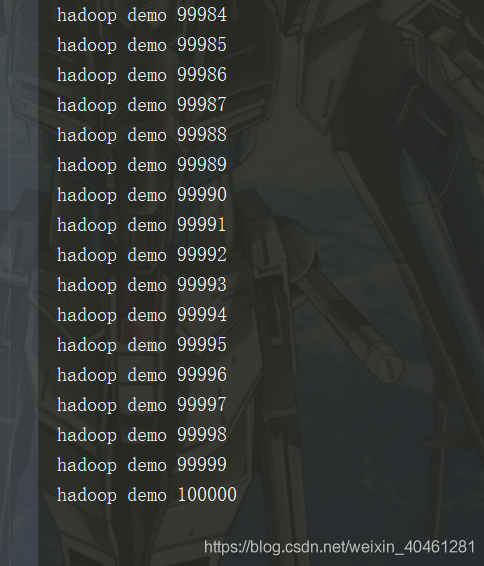
The test was successful
Tensorflow: How to use expand_Dim() to add dimensions

In tensorflow, you can use to add one dimension to the dimension tf.expand_ Dims (input, dim, name = none) function. Of course, we often use it tf.reshape (input, shape = []) can also achieve the same effect, but sometimes in the process of building a graph, the placeholder is not fed with a specific value, and the following error will be included: type error: expected binary or Unicode string, got 1
in this case, we can consider using expand_ Dims to add one dimension. For example, in the case of my own code, when the image dimension is reduced to two dimensions, I need to restore it to four dimensions [batch, height, width, channels], and add one dimension before and after. If reshape is used, an error will be reported for the above reasons

one_img2 = tf.reshape(one_img, shape=[1, one_img.get_shape()[0].value, one_img.get_shape()[1].value, 1])

It can be realized by the following methods:

one_img = tf.expand_dims(one_img, 0)
one_img = tf.expand_dims(one_img, -1) #-1 denotes the last dimension

In the end, an official example is given

# 't' is a tensor of shape [2]
shape(expand_dims(t, 0)) ==> [1, 2]
shape(expand_dims(t, 1)) ==> [2, 1]
shape(expand_dims(t, -1)) ==> [2, 1]

# 't2' is a tensor of shape [2, 3, 5]
shape(expand_dims(t2, 0)) ==> [1, 2, 3, 5]
shape(expand_dims(t2, 2)) ==> [2, 3, 1, 5]
shape(expand_dims(t2, 3)) ==> [2, 3, 5, 1]

Args:
input: A Tensor.
dim: A Tensor. Must be one of the following types: int32, int64. 0-D (scalar). Specifies the dimension index at which to expand the shape of input.
name: A name for the operation (optional).
Returns:
A Tensor. Has the same type as input. Contains the same data as input, but its shape has an additional dimension of size 1 added.

VUE: Property or method “deleteFun“ is not defined on the instance but referenced during render. [How to Fix]

A few days ago, I found a giant cow’s AI learning website, which is easy to understand, funny and humorous. I can’t help sharing it with you. Click to jump to the tutorial.

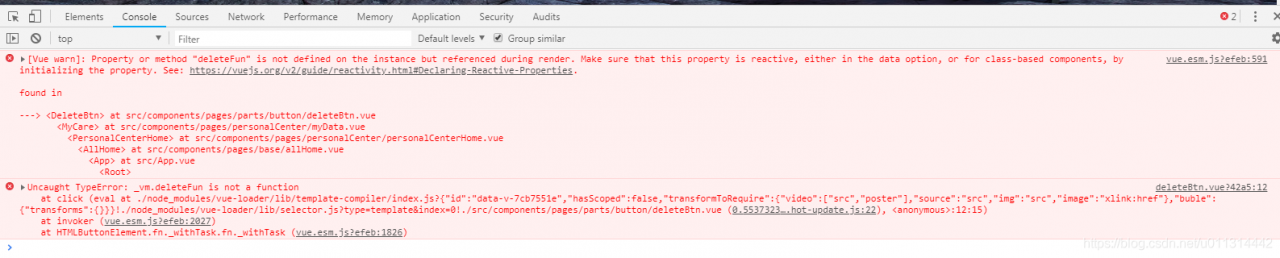
1. A click event reports an error:

Property or method "deleteFun" is not defined on the instance but referenced during render. Make sure that this property is reactive, either in the data option, or for class-based components, by initializing the property

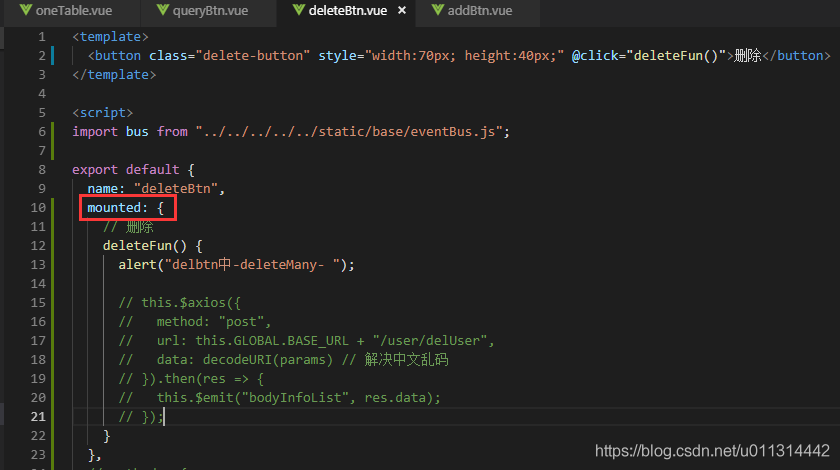
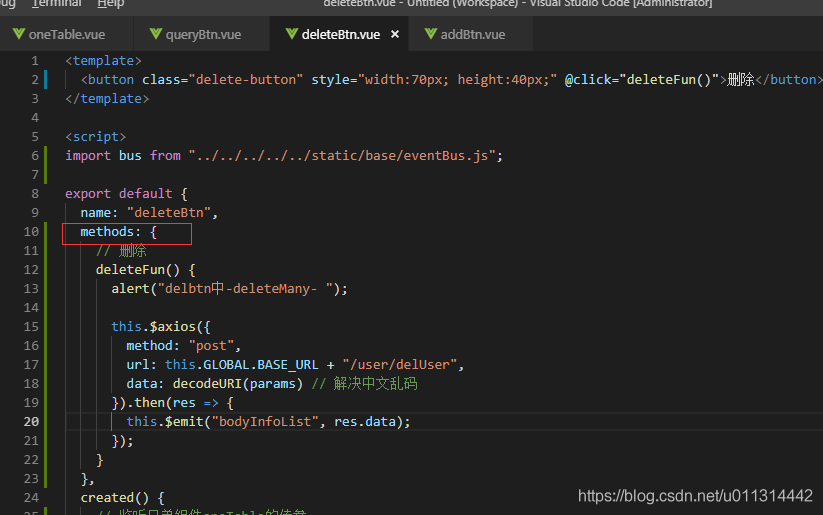
2. Error reason: this method is undefined. I thought it was written in methods, but it’s not. My original writing:

3. Solution: correct the location code in the red box.

That’s it.

Importerror: DLL load failed: unable to find the specified module in Python

Environmental description

Window 7, Python 3.6.5

Problem description

When importing based on python, the following error is reported:

>> from PIL import Image
Traceback (most recent call last):
  File "<ipython-input-12-0f6709e38f49>", line 1, in <module>
    from PIL import Image

  File "d:\ProgramData\Anaconda3\lib\site-packages\PIL\Image.py", line 58, in <module>
    from . import _imaging as core

ImportError: DLL load failed: The specified module could not be found.

Sometimes, similar errors are reported:

>> from PIL import Image
Traceback (most recent call last):

  File "<ipython-input-13-0f6709e38f49>", line 1, in <module>
    from PIL import Image

ImportError: cannot import name 'Image'

problem analysis

This kind of problem is usually when installing the library, the security is not complete, or the installed library is covered or damaged, so the corresponding class library cannot be known.

Problem solving

C:\Users\xxxx\>pip install Pillow
Requirement already satisfied: Pillow in d:\programdata\anaconda3\lib\site-packages (5.0.0)


C:\Users\xxxx>pip show Pillow
Name: Pillow
Version: 5.2.0
Summary: Python Imaging Library (Fork)
Home-page: http://python-pillow.org
Author: Alex Clark (Fork Author)
Author-email: [email protected]
License: Standard PIL License
Location: d:\programdata\anaconda3\lib\site-packages
Requires:
Required-by:

It can be seen from the above instructions that the class library has been installed. However, due to its problems, it needs to be re installed.
Uninstall first

pip uninstall Pillow

Uninstalling Pillow-5.0.0:
  Would remove:
    d:\programdata\anaconda3\lib\site-packages\pillow-5.0.0.dist-info\*
Proceed (y/n)? y
  Successfully uninstalled Pillow-5.0.0

Then re install:

pip install Pillow

Collecting Pillow
  Downloading https://files.pythonhosted.org/packages/1b/50/869910cd7110157fbefd0fed3db3656c1951f1bceecdd00e3716aa269609/Pillow-5.2.0-cp36-cp36m-win_amd64.whl (1.6MB)
    100% |████████████████████████████████| 1.6MB 69kB/s
Installing collected packages: Pillow
Successfully installed Pillow-5.2.0

verification

Then re import the image to find that everything is OK.

summary

If it has been installed but cannot be found, it is likely that the installation is damaged and needs to be re installed.

Python errors: valueerror: if using all scalar values, you must pass an index (four solutions)


1. Error scenarios:

import pandas as pd
dict = {'a':1,'b':2,'c':3}
data = pd.DataFrame(dict)

2. Error reason:

When passing in the dictionary with nominal attribute value directly, you need to write index, that is, you need to set index when creating the dataframe object.

3. Solution:

It is a common requirement to create dataframe objects through dictionaries, but there may be different writing methods for different object forms. Looking at the code, the following four methods can correct this error and produce the same correct results. Just choose which method to use according to your own needs.

import pandas as pd

#Method 1: Directly set the index when creating the DataFrame
dict = {'a':1,'b':2,'c':3}
data = pd.DataFrame(dict,index=[0])
print(data)

#Method 2: Convert the dictionary with value as nominal variable to DataFrame object by from_dict function
dict = {'a':1,'b':2,'c':3}
pd.DataFrame.from_dict(dict,orient='index').T
print(data)

#Method 3: When entering the dictionary, do not let the Value be the nominal property, convert the Value to a list object and then pass it in.
dict = {'a':[1],'b':[2],'c':[3]}
data = pd.DataFrame(dict)
print(data)

#Method 4: directly take out the key and value, are converted to list objects
dict = {'a':1,'b':2,'c':3}
pd.DataFrame(list(dict.items()))
print(data)

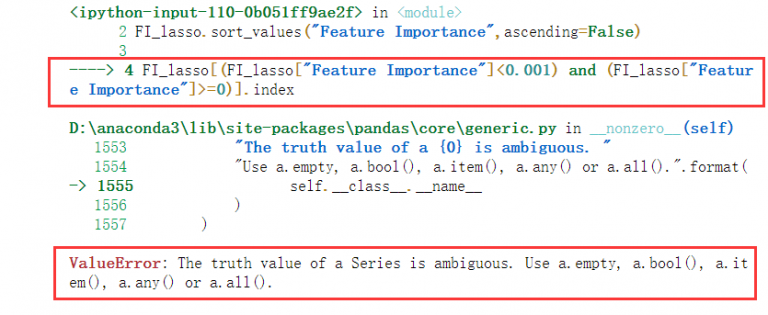
[How to Fix]The truth value of a series is ambiguous

The truth value of a series is ambiguous

It is estimated that you are using pandas when this problem occurs. If so, congratulations on finding a solution. Ha ha~

#General Purpose Example

FI_lasso[(FI_lasso["columns"]<0.001) and (FI_lasso["columns"]>=0)]

If you also encounter such a problem, Congratulations, the solution is very simple

The core meaning is to use & amp; instead of and or
for logical judgment in dataframe|

Like this


FI_lasso[(FI_lasso["columns"]<0.001) & (FI_lasso["columns"]>=0)]

Solve the problem and leave~

How to Block a frame with origin from accessing a cross origin frame

When the iframe is nested in different port numbers or even different IP addresses, an error is reported when the parent page calls the method of the child page

SecurityError: Blocked a frame with origin from accessing a cross-origin frame…

Cause of the problem

Under different port numbers, the traditional iframe nested method cannot be used.

document.getElementById("mainFrame").contentWindow.xxxx();

Cause

Homologous security policy
you can’t use JavaScript to access an <iframe>, if you can, it will be a huge security flaw. Prevent scripts from trying to access frames with different sources for the same source policy browser.

If at least one part of the address is not reserved, the source is considered different:

<protocol>://<hostname>:<port>/path/to/page.html

To access an iframe, the protocol, host name, and port must be the same as the domain.

Examples

Here’s what happens when you try to access the following URL

http://www.example.com/home/index.html

URL                                            RESULT 
http://www.example.com/home/other.html         -> Success 
http://www.example.com/dir/inner/another.php   -> Success 
http://www.example.com:80                      -> Success (default port for HTTP) 
http://www.example.com:2251                    -> Failure: different port 
http://data.example.com/dir/other.html         -> Failure: different hostname 
https://www.example.com/home/index.html.html   -> Failure: different protocol 
ftp://www.example.com:21                       -> Failure: different protocol & port 
https://google.com/search?q=james+bond         -> Failure: different hostname & protocol

How to Fix

Although the same origin policy prevents scripts from accessing the content of different origin sites, if you have both pages, you can use to window.postmessageand its related message events send messages between two pages to solve this problem.

On the main page:

var frame = document.getElementById('your-frame-id'); 
frame.contentWindow. postMessage (data, '*');

data can be string, boolean, number, array, object

In the iframe subpage
window. addEventListener ('message', function(event) { 
    //event.data gets the data passed to it
});

Note: the PostMessage of the parent page triggers the addeventlistener

Pandas ValueError: The truth value of a Series is ambiguous. Use a.empty, a.bool(), a.item(), a.an

When performing data comparison, pandas reports an error:

ValueError: The truth value of a Series is ambiguous. Use a.empty, a.bool(), a.item(), a.any() or a.all().

The selected truth value is not clear, that is, the given value and the comparison value are of different types.

It should be a problem caused by comparing and matching a value with multiple values or values in a list

You can use one of its recommended methods before comparing

1)a.empty

if(a.empty):

    print("!!")  

Judge whether a is empty

2)a.item()

a. Item (I) represents the ith node

3)a.any()

if(a.any() in [1,2,3,4]):

print("!!") 

Judge whether any value in a is in [1,2,3,4]

4)a.all()

if(a.all() in [1,2,3,4]):
    print("!!") 

Judge whether all the values in a are in [1,2,3,4]

Maven skip unit test- maven.test.skip And skipstests


-Dskiptests: do not execute test cases, but compile test case classes to generate corresponding class files under target / test classes.

– Dmaven.test.skip=true , do not execute test cases, and do not compile test case classes.

Do not execute the test case, but compile the test case class to generate the corresponding class file to target / test classes.

I. use maven.test.skip To skip not only the running of unit tests, but also the compiling of test code.

mvn package -Dmaven.test.skip=true  

It can also be in the pom.xml File modification

<plugin>  
    <groupId>org.apache.maven.plugin</groupId>  
    <artifactId>maven-compiler-plugin</artifactId>  
    <version>2.1</version>  
    <configuration>  
        <skip>true</skip>  
    </configuration>  
</plugin>  
<plugin>  
    <groupId>org.apache.maven.plugins</groupId>  
    <artifactId>maven-surefire-plugin</artifactId>  
    <version>2.5</version>  
    <configuration>  
        <skip>true</skip>  
    </configuration>  
</plugin> 

Second, use MVN package – dskipstests to skip the unit test, but will continue to compile; if there is no time to modify the unit test bug, or the unit test compilation error. Use the one above, not this one

<plugin>  
    <groupId>org.apache.maven.plugins</groupId>  
    <artifactId>maven-surefire-plugin</artifactId>  
    <version>2.5</version>  
    <configuration>  
        <skipTests>true</skipTests>  
    </configuration>  
</plugin> 

=