Author Archives: Robins

How to open a page in a new window by Vue router

1. <router link>tag to open a new window:

The official document says that the V-link directive has been replaced by a new & lt; router link & gt; component directive, which has been completed by the component in Vue 2.

Note: <router link> does not support target = "_Blank ", if you want to open a new tab, you must use the <a> tab.

But in fact, vue2 version of <router link>supports target = “_The “blank” attribute (tag = “a”) is as follows:

1 <router-link target="_blank" :to="{path:'/home',params:{id:'8'}}">open home in a new page</router-link>

2. Programming navigation:

Sometimes it is necessary to realize page Jump in click event or function, so you can use the example method of router to realize it by writing code.

What we often use is$ router.push And$ router.go However, after vue2.0, this method does not support the properties of new window opening. This is the time to use this$ router.resolve , as follows

 1    goToLoanOrderDetail(loanOrderId, userId) {
 2       let routeData = this.$router.resolve({
 3         name: 'orderDetail',
 4         params: { loanOrderId, userId }
 5       });
 6       window.open(routeData.href, '_blank');
11     }

Just click the event to call this method
Python: How to Processe “return multiple values”

def load_datasets():

    train_file = r'D:\CNMU\AI\1X\datasets\train_catvnoncat.h5'
    test_file = r'D:\CNMU\AI\1X\datasets\test_catvnoncat.h5'

    train_datasets = h5py.File(train_file,'r')
    # train_datasets.keys()
    # <KeysViewHDF5 ['list_classes', 'train_set_x', 'train_set_y']>
    train_set_x = np.array(train_datasets['train_set_x'])
    train_set_y = np.array(train_datasets['train_set_y'])
    
    
    test_datasets = h5py.File(test_file,'r')
    test_set_x = np.array(test_datasets['test_set_x'])
    test_set_y = np.array(test_datasets['test_set_y'])
    
    classes = np.array(test_datasets['list_classes'])
    
    train_set_y = train_set_y.reshape(1,train_set_x.shape[0])
    test_set_y = test_set_y.reshape(1,test_set_x.shape[0])
    
    return train_set_x,train_set_y,test_set_x,test_set_y,classes

Here, return returns five arrays and a tuple of five elements;

train_set_x,train_set_y,test_set_x,test_set_y,classes = load_datasets()

With this assignment, you can call each array directly

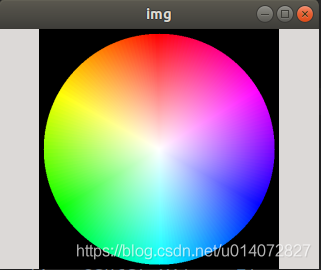
Opencv: How to Draw Palette

code implementation

# -*- coding:utf-8 -*-
import cv2
import numpy as np


r_range = 255

image_wh = 530
center_xy = image_wh // 2
image = np.zeros((image_wh, image_wh, 3), dtype=np.uint8)

for x in range(image_wh):
    for y in range(image_wh):
        # whether xy is inside the circle
        if (x - center_xy) ** 2 + (y - center_xy) ** 2 <= r_range ** 2:
            r = np.sqrt((x - center_xy) ** 2 + (y - center_xy) ** 2)
            theta = np.rad2deg(np.arctan2((y - center_xy), (x - center_xy)))
            theta += 180
            # [int(theta // 2), int(r), 255] hsv
            bgr = cv2.cvtColor(np.array([[[int(theta // 2), int(r), 255]]], dtype=np.uint8), cv2.COLOR_HSV2BGR)
            color = tuple([int(x) for x in bgr[0][0]])
            image[x, y] = color

cv2.namedWindow('img', 0)
cv2.imshow('img', image)
cv2.waitKey()

Effect display

Pytorch ValueError: Expected more than 1 value per channel when training, got input size [1, 768

Traceback (most recent call last):
  File "train_ammeter_twoclass.py", line 189, in <module>
    train(epoch)
  File "train_ammeter_twoclass.py", line 133, in train
    outputs = net(inputs)
  File "/home/iot/miniconda2/envs/pytorch3/lib/python3.6/site-packages/torch/nn/modules/module.py", line 477, in __call__
    result = self.forward(*input, **kwargs)
  File "/home/iot/chenjun/1_program/classifer/src/model.py", line 79, in forward
    x = self.net(x)             # inception will return two matrices
  File "/home/iot/miniconda2/envs/pytorch3/lib/python3.6/site-packages/torch/nn/modules/module.py", line 477, in __call__
    result = self.forward(*input, **kwargs)
  File "/home/iot/miniconda2/envs/pytorch3/lib/python3.6/site-packages/torchvision/models/inception.py", line 109, in forward
    aux = self.AuxLogits(x)
  File "/home/iot/miniconda2/envs/pytorch3/lib/python3.6/site-packages/torch/nn/modules/module.py", line 477, in __call__
    result = self.forward(*input, **kwargs)
  File "/home/iot/miniconda2/envs/pytorch3/lib/python3.6/site-packages/torchvision/models/inception.py", line 308, in forward
    x = self.conv1(x)
  File "/home/iot/miniconda2/envs/pytorch3/lib/python3.6/site-packages/torch/nn/modules/module.py", line 477, in __call__
    result = self.forward(*input, **kwargs)
  File "/home/iot/miniconda2/envs/pytorch3/lib/python3.6/site-packages/torchvision/models/inception.py", line 326, in forward
    x = self.bn(x)
  File "/home/iot/miniconda2/envs/pytorch3/lib/python3.6/site-packages/torch/nn/modules/module.py", line 477, in __call__
    result = self.forward(*input, **kwargs)
  File "/home/iot/miniconda2/envs/pytorch3/lib/python3.6/site-packages/torch/nn/modules/batchnorm.py", line 66, in forward
    exponential_average_factor, self.eps)
  File "/home/iot/miniconda2/envs/pytorch3/lib/python3.6/site-packages/torch/nn/functional.py", line 1251, in batch_norm
    raise ValueError('Expected more than 1 value per channel when training, got input size {}'.format(size))
ValueError: Expected more than 1 value per channel when training, got input size [1, 768, 1, 1]

Problem analysis: batch nomolization is used in the model. When batch is used in training, there should be an odd number. For example, the total number of samples of dataset is 17, and your batch number is 0_ If the size is 8, such an error will be reported.
Solution: delete a sample from the dataset.

Converted from: valueerror: expected more than 1 value per channel when training, got input size torch.Size ([1, 768, 1, 1])

Bug: unable to download source code in idea, error cannot download sources sources not found for:XXX

Bug Description: idea can’t download the source code, click choose Resource & gt; [select source code package] to confirm and report an error.
Solution: enter the project in the command line interface pom.xml File folder, execute the following command:

mvn dependency:resolve -Dclassifier=sources

Note: do not directly execute the command in terminal in the lower left corner of idea, but in DOS interface.

VC + + compiler can not find the header file and rebuild failure

1. The header file cannot be found

If the associated path of the header file is not set properly, you need to add both the root directory and the subdirectory to the additional header file directory. For example, if there are two header files in the root directory and the subdirectories sub1 and sub2 that need to be referenced elsewhere, you should add the header file path to the additional package directory in this way:

$(SolutionDir)root

$(SolutionDir)root\sub1

$(SolutionDir)root\sub2

2. It is successful to compile a library alone, but rebuild prompts that the related projects fail to compile

In this case, the lazy relationship between project references is not set well. You should right-click on the solution, – gt; common properties – & gt; project dependencies, and set the lazy relationship between project references without omission. In this way, the rebuild will succeed on the top-level project. At the same time, the compilation of dynamic library and other similar problems can also be solved.


tf.gradients is not supported when eager execution is enabled. Use tf.GradientTape instead.

After learning Chapter 5 of deep learning with Python, deeply learn the thermodynamic diagram for computer vision
5.4.3 visualization class activation
when running the code in tensorflow 2.0 environment

grads = K.gradients(african_elephant_output, last_conv_layer.output)[0]

replace with

grads = tf.keras.backend.gradients(african_elephant_output, last_conv_layer.output)[0]

The following errors still occur

tf.gradients is not supported when eager execution is enabled. Use tf.GradientTape instead.

Solution

with tf.GradientTape() as gtape:
    grads = gtape.gradient(african_elephant_output, last_conv_layer.output)

Full code reference

reference resources:

https://stackoverflow.com/questions/58322147/how-to-generate-cnn-heatmaps-using-built-in-keras-in-tf2-0-tf-keras

ValueError: Expected more than 1 value per channel when training, got input size torch.Size([1, 256,

When testing the trained network, python finds the above problems and adds them after loading the network model.eval (), the problem is solved.

model = nn.DataParallel(model).cpu()
model.load_state_dict(torch.load(path, map_location=torch.device('cpu')), False)
model.eval()

There are three things to note about this code snippet

 nn.DataParallel(model)

If you add this function to the training network, you also need to add this function to the training network

model.load_state_dict(torch.load(path, map_location=torch.device('cpu')), False)

If the network framework is not saved when the network is saved and only parameters are available, the network can be loaded by the above method. If the GPU is used when the network is trained and the parameter map is added on the CPU when the network is used_ location= torch.device (‘cpu’)

model.eval()

The third is the problem of the topic. After loading the network, add the above function to solve the problem

Solution of modulenotfounderror in running pychar

Solution of modulenotfounderror in running pychar

You need to load the corresponding module file in pychar. The specific steps are as follows: left click in file, select settings, and select【 python:xxx 】Click [Python interperter] in the toolbar to open the page and select [add] in the toolbar, After the page appears, select [existing environment] to load python.exe File my python.exe The file is in the following location: C: users, administrator, appdata, local, programs, python, python38

Common problems

one python.exe There is no required module file in the file

At this time, you need to use pip to install the corresponding files. The installation steps are as follows:
1. Open CMD
2. Enter the CD in the folder (the following is my path) C:: (users / administrator / appdata / local / programs / Python / python38 / scripts)
3. Start to install the file PIP install flash (take installing flash as an example)
4. Check if the installation is complete, you can use pip to install flash List to determine whether the installed file is in the list

2. “PIP” is not an internal or external command

1. Confirm that “PIP” is not an internal or external command, nor a runnable program or batch file.

2. Solution 1: go to the folder where pip is located, and copy the path
my path is: C:: (users, administrator, appdata, local, programs, python, python38, scripts)

3. Switch the working directory to the path of PIP
CD

4. Execute PIP again, method 1, success!

5. Method 2: add pip to environment variables
right click my computer and select properties

6. Select: Advanced – environment variable

7. Open path to edit, and add the directory path of PIP at the end

8. After confirming the setting of environment variables, method 2 is successful!