Both U32 and S32 indicate that your numpy array is a string array, not a number array. Check whether there are strings in the dataset. If there are, just delete them. In numpy array, as long as one item is string, the type returned by the array is string array.
If you need to convert numpy to floating-point number, please refer to the code:
train= train.astype (float)
train_ target = train_ target.astype (float)
Author Archives: Robins
Python Error: _csv.Error sequence expected
Today, I encountered an error when writing a script in Python. The specific code is as follows:
csv_write.writerow( strings )
And my string is: base_ Name, Nd, Lev , which is similar to a tuple. It seems that when the script is running, it will report an error like this. I found a reference on the Internet and just modified it as follows:
1、
csv_write.writerow( [strings] )
2、
It is also possible that the part in front of you is wrongly written, leading to an error in the back. In fact, it should be used when there are multiple lines first
csv_write.writerow( strings )
So when this kind of error occurs, you can also check whether the previous code has errors, or whether the file used for extraction has errors
RuntimeWarning: overflow encountered in ubyte_Scalars pixel addition and subtraction overflow exception
When using Python to process an image, it may involve the addition and subtraction between the pixel values of two images. Here, it should be noted that the pixel value of the image is of ubyte type, and the data range of ubyte type is 0-255. If the operation results in a negative value or exceeds 255, an exception will be thrown. Let’s take a look at an example of the exception
from PIL import Image
import numpy as np
image1 = np.array(Image.open("1.jpg"))
image2 = np.array(Image.open("2.jpg"))
# Exception statement
temp = image1[1, 1] - image2[1, 1] # Overflow if this is a negative value

# The correct way to write
temp = int(image1[1, 1]) - int(image2[1, 1]) # force to integer and then calculate without overflowing
The above code is the exception runtimewarning: overflow accounted in ubyte_ Scalars of the reasons and solutions, I hope to help friends who encounter this problem.
Three ways of latex supporting Chinese
Cjkutf8ctex’s utf8 option (I use) xelatex compilation
We know that latex generally uses CJK and CTeX macro package to support Chinese editing. The default encoding of CJK and CTeX is GBK, while the silent encoding under windows is GBK. Therefore, CJK and CTeX can directly support Chinese latex compilation without special configuration, just save the file with GBK encoding. But if the character encoding of the file is changed to UTF-8, which is more common now, how should it be operated? There are three ways to use it.
CJKutf8
CJK has two basic macro packages: CJK and cjkutf8. The latter is oriented to UTF-8 encoding, and its general usage is as follows:
\usepackage{CJKutf8}
\begin{document}
\begin{CJK}{UTF8}{}
…
\end{CJK}
\end{document}
%test.tex
\documentclass{article}
\usepackage{CJKutf8}
\begin{document}
\begin{CJK}{UTF8}{gbsn}
This is an example of CJKutf8, and the font used is gbsn.
\end{CJK}
\end{document}
The output result can be obtained by compiling tex file with pdflatex.

Utf8 option of CTeX (I use it)
Cjkutf8 above only provides two kinds of fonts, so the choice is too small. We can directly use utf8 option to make CTeX support UTF-8 encoding. CTeX’s rich fonts and Chinese settings can better edit latex Chinese text, and its syntax format is as follows:
\documentclass[UTF8]{article}
\usepackage{CTEX}
\begin{document}
…
\end{document}
Or, use ctexart directly
\documentclass[UTF8]{ctexart}
\begin{document}
…
\end{document}
% ctex_test.tex
\documentclass[UTF8]{ctexart}
\begin{document}
This is a CTEX utf-8 encoding example, {\kaishu is shown here in italic}, {\songti is shown here in Song}, {\heiti is shown here in bold}, {\fangsong is shown here in imitation Song}.
\end{document}

Xelatex compilation
Xetex is a tex typesetting engine that uses Unicode. It supports Unicode natively and its input file is UTF-8 by default. Xetex can directly use fonts installed in the operating system without additional configuration. Xelatex is a typesetting engine that uses latex. It also has the advantages of xetex. If you use xelatex * *. Tex directly under the command, the corresponding PDF file will be generated. Here is a simple example of how to compile CTeX with xelatex (also save the Tex file in UTF-8 format)
% xelatex_test.tex
\documentclass{article}
\usepackage{CTEX}
\begin{document}
This is a CTEX utf-8 encoding example, {\kaishu is shown here in italic}, {\songti is shown here in Song}, {\heiti is shown here in bold}, {\fangsong is shown here in imitation Song}.
\end{document}
Mingyan’s students found that compared with the CTeX code in Item 2 above, this product lacks a utf8 option! Well, on the surface, it looks like this, but if you just put xelatex_ test.tex Compile with pdflatex, the system will report an error. This is because without the utf8 option, pdflatex silently processes the Tex file according to the GBK encoding, and this file is encoded with UTF-8, which will cause decoding failure. If you directly compile with xelatex, it will be compiled successfully, because the default input file of xelatex is UTF-8 encoding. Switch to the directory where the Tex file is located, and directly compile the Tex file with xelatex: xelatex xelatex_ test.tex The following output results can be obtained,

Python Valueerror: cannot index with vector containing Na / Nan values
Problem description;
when using dataframe, perform the following operations:
df[df.line.str.contains('G')]
The purpose is to find out all the lines in the line column of DF that contain the character ‘g’
---------------------------------------------------------------------------
ValueError                                Traceback (most recent call last)
<ipython-input-3-10f8503f73f2> in <module>()
---->  df.line.str.contains('G')

D:\Anaconda3\lib\site-packages\pandas\core\frame.py in __getitem__(self, key)
   2983
   2984         # Do we have a (boolean) 1d indexer?
-> 2985         if com.is_bool_indexer(key):
   2986             return self._getitem_bool_array(key)
   2987

D:\Anaconda3\lib\site-packages\pandas\core\common.py in is_bool_indexer(key)
    128             if not lib.is_bool_array(key):
    129                 if isna(key).any():
--> 130                     raise ValueError(na_msg)
    131                 return False
    132             return True

ValueError: cannot index with vector containing NA / NaN values
Obviously, it means that there are Na or Nan values in the line column, so Baidu has a lot of methods on the Internet to teach you how to delete the Na / Nan values in the line column.
However, deleting the row containing Na / Nan value in the line column still can’t solve the problem!! What shall I do?
Solution:
it’s very simple. In fact, it’s very likely that the element formats in the line column are not all STR formats, and there may be int formats, etc.
so you just need to unify the format of the line column into STR format!
The operation is as follows:
df['line'] = df['line'].apply(str) #Change the format of the line column to str

df[df.line.str.contains('G')] #Execute your corresponding statement
solve the problem!!
Linux: How to Fix undefined reference to `itoa’
I wrote a simple C program in Linux, which used Itoa. But when compiling, I prompted “undefined reference to ` Itoa ‘”, I thought it would be OK to add – LC, but the result was the same. Internet found that some people say that this function does not exist in Linux, generally use sprintf to replace it. Look at the following code and comments:
#include <stdio.h>
#include <stdlib.h>
//#include <unistd.h>
#include <string.h>

int num = 0;
char namebuf[100];
char prefix[] = "/tmp/tmp/p";

char* gentemp()
{
    int length, pid;

    pid = getpid();
    strcpy(namebuf, prefix);
    length = strlen(namebuf);
    //itoa(pid, &namebuf[length], 10);      // Unix version: itoa() does not exist in header file <stdlib.h>
    sprintf(namebuf+length, "%d", pid);     // Converting integers to strings using sprintf
    strcat(namebuf, ".");
    length = strlen(namebuf);
    printf("before do...while\n");
    char command[1024] = {0};
    do
    {
        //itoa(num++, &namebuf[length], 10);
        sprintf(namebuf+length, "%d", num++);
        sprintf(command, "touch %s", namebuf);  // Creating files via touch
        system(command);
        printf("command = %s, namebuf[%d]=%d\n", command, num-1, num-1);
    } while (num < 50 && access(namebuf, 0) != -1); // access to determine whether a file exists
    printf("end of do...while\n");

    return namebuf;
}

int main( void )
{
    char *p = gentemp();
    printf("%s\n", p);

    return 0;
}Type error: must use keyword argument for key function
The reason may be the version problem of Python 2 and 3
chestnut 1: call sorted() and pass in reversed()_ CMP can achieve reverse order sorting
def reversed_cmp(x, y):
    if x > y:
        return 1
    if x < y:
        return -1
    return 0

L1 = [16, 5, 120, 9, 66]
print(sorted(L1, reversed_cmp))
terms of settlement:
L1 = [16, 5, 120, 9, 66]
print(sorted(L1, reverse=True))
The results were as follows
[120, 66, 16, 9, 5]
Maybe it’s too simple. Python doesn’t bother to use custom functions…
in continuous update...
Chestnut 2: using sorted() higher-order function to realize the algorithm of ignoring case sorting
def cmp_ignore_case(s1, s2):
    if s1[0].lower() > s2[0].lower():
        return -1
    if s1[0].lower() < s2[0].lower():
        return 1
    return 0

print(sorted(['haha', 'about', 'TIM', 'Credit'], cmp_ignore_case))
terms of settlement:
def com_flag(s):
    return s.lower()
# key represents the key function, the default is None, reverse represents whether to reverse the order, the default is False
# The following functions are arranged in reverse order
print(sorted(['haha', 'about', 'TIM', 'Credit'], key=com_flag, reverse=True))
The results were as follows
['Zoo', 'Credit', 'bob', 'about']
come on.
Max must be larger than min in range parameter
Use plt.show () draw histogram and report error as Max must be larger than min in range parameter.
Try to get rid of the null.
Duplicate modifier for the method XXX in type XXX
A very low-level error when writing code. At that time, I didn’t carefully look at the method I wrote. As a result, the constructor wrote more permission modifiers. The record is as follows:
private final ExecutionEnvironment env;
    private final String jobId;
    private final CalJobParam.JdbcParam dataSink;

	public public IndicatorParamFunction(ExecutionEnvironment env, String jobId, CalJobParam.JdbcParam dataSink) {
		this.env = env;
		this.jobId = jobId;
		this.dataSink = dataSink;
	}
More public………….. zero
TypeError: object of type ‘builtin_function_or_method’ has no len()
TypeError: object of type ‘builtin_ function_ or_ method’ has no len()
When this error occurs, the most common one is that the introduced function needs to be followed by ()
for example, s.strip ()
About error:! Package natbib error: Bibliography not compatible with author year citations
When uploading an article written in latex to arXiv, it is very troublesome because the . Bib file cannot be used as a reference. The main reason is that the macro package - usepackage {natbib} will report an error With the help of overleaf, you can get an answer, that is, first download and package all the things needed for the whole latex compilation, and it’s better to compile locally, and then replace the references in . BBL with the contents in . Tex , that is
	%\bibliographystyle{unsrt}
	%\bibliography{refs}
At this time, it is OK locally, but not arXiv. The following steps are needed:
1. Comment out
2. Comment out the following part in . Sty file:
% load natbib unless told otherwise
% \if@natbib
%   \RequirePackage{natbib}
% \fi
Then you can compile on arXiv
Module ‘Seaborn’ has no attribute ‘scatterplot’ solution
First, Seaborn contains the scatterplot module. However, running the corresponding sentence without syntax error will report an error, because the current Seaborn version is 0.8 or below.
Examples of errors are as follows:
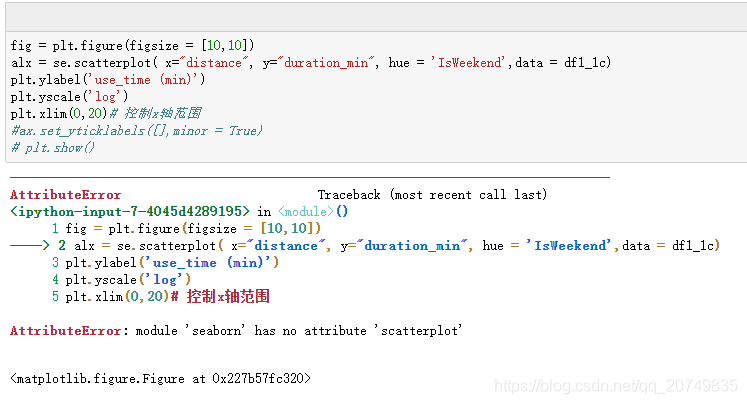
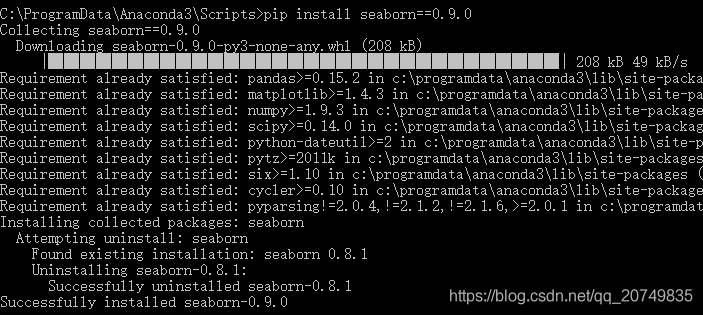
Solution: upgrade Seaborn version! The corresponding statement is: PIP install Seaborn = = number of corresponding versions, for example: PIP install Seaborn = = 0.9.0
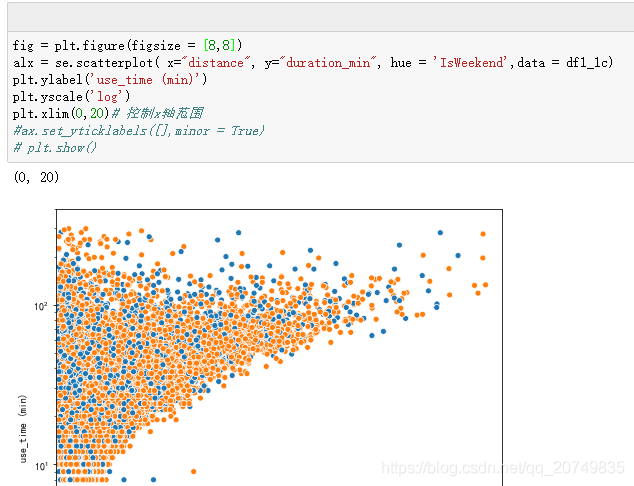
Rerun the statement to draw a normal diagram
During this period, CMD may require upgrading, and run for many times: Python – M PIP install — upgrade PIP may be invalid
Error, feedback similar permission problems, specific debugging methods can refer to the following:
https://blog.csdn.net/weixin_ 43870646/article/details/90020874
If: no module named pip.basecommand

It is suggested that you can uninstall the old version and re install the new version. The corresponding steps are as follows. Or you can refer to the author’s method https://blog.csdn.net/GuaPiQ/article/details/100593848
After reloading pip, you can upgrade Seaborn according to the first step above.
How to install CONDA can refer to this article: https://www.jianshu.com/p/edaa744ea47d