Author Archives: Robins

pd.to_csv Error: need to escape, but no escapechar set

pd.to_ In the case of CSV,

df3.to_csv('E:\\data\\xxxx.csv',index=False,header= 0,sep='|', encoding="utf-8", quoting=csv.QUOTE_NONE)

Error: need to escape, but no escape set

Reason: this problem may be because the description contains’ | ‘,’ | ‘is also a separator, and the CSV tries to escape it, but it can’t, because there is no separator csv.escapechars set up

Solution:
provide an escape char when quoting is quote_ When none, specify a character so that it is not restricted by the separator for escape.

df3.to_csv('E:\\data\\xxxx.csv',index=False,header= 0,sep='|', encoding="utf-8", quoting=csv.QUOTE_NONE,escapechar='|')

Reference:
https://stackoverflow.com/questions/32107790/writing-to-csv-getting-error-need-to-escape-for-a-blank-string

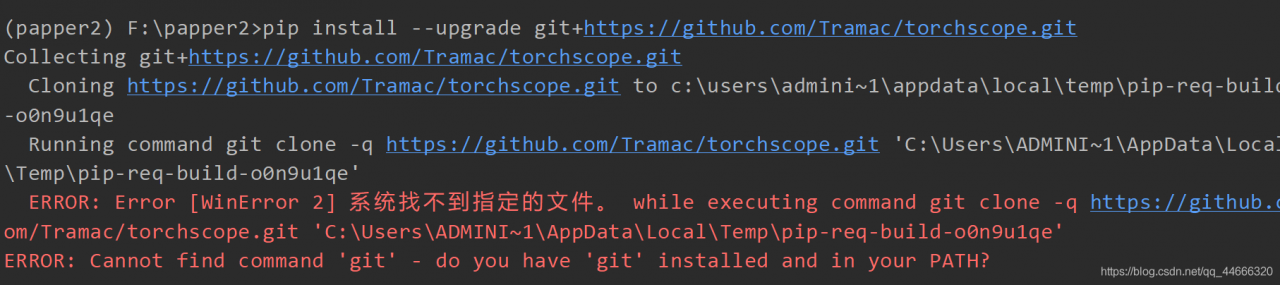
Could not find an NgModule. Use the skip-import option to skip importing in NgModule

Could not find an NgModule. Use the skip-import option to skip importing in NgModule

Error recurrence

Create a login component according to the scaffold provided by ng-zorro

ng g ng-zorro-antd:form-normal-login login

For details, click the link to enter the official website and select scaffolding to see the tutorial

Cause of error

Because there are many modules under the project, he doesn’t know where to create them. So a description like the title will appear. So we need to specify where to create it, so that there will be no case that the command does not know where to create it.

Solution

For example, a module is welcome.module.ts . And you want to create one login.module.ts It’s the same level as this module.

|`pages 
|	|`welcome
| 		welcome.module.ts
|	|`login  # This is the following you want to create
|    	login.module.ts  

1. Go to the pages folder

cd pages

2. Use — module = welcome to determine the installation location

ng g ng-zorro-antd:form-normal-login --module=welcome     

3. And then there’s a message

? What should be the name of the component? login

4. Prompt information after success

CREATE src/app/pages/login/login.component.css (239 bytes)
CREATE src/app/pages/login/login.component.html (1187 bytes)
CREATE src/app/pages/login/login.component.spec.ts (602 bytes)
CREATE src/app/pages/login/login.component.ts (751 bytes)
UPDATE src/app/pages/welcome/welcome.module.ts (389 bytes)

5. Let’s explain why this can be done successfully.
Step 2 is to specify the location of the component you want to create. That is to say, you – module = are followed by the modules that can be found in the current path. If you can’t find them, you won’t succeed in creating them.
Step 3 asks you to fill in the name of the component you want to create.

Detailed explanation of basic lstmcell in tensorflow learning

tf.contrib.rnn .BasicLSTMCell

Inherited from: layerrnncell

Aliases:

Class tf.contrib.rnn .BasicLSTMCellClass tf.nn.rnn_ cell.BasicLSTMCellThe basic LSTM cycle network unit is based on http://arxiv.org/abs/1409.2329 . Implementation. Will forget_ Bias (default: 1) is added to the bias of forgetting the door to reduce the previous scale at the beginning of the training. This neuron does not allow cell clipping, projection layer and peep hole connection. It is a basic LSTM neuron. If you want a more advanced model, you can use: tf.nn.rnn_ cell.LSTMCell .

__init__(

    num_units,

    forget_bias=1.0,

    state_is_tuple=True,

    activation=None,

    reuse=None,

    name=None,

    dtype=None

)

Parameter Description:

num_ units:int Type, the number of neurons in LSTM unit, that is, the number of output neurons_ bias:float Type, offset added to forget gate. When recovering from the checkpoint of cudnnlstm training, it must be manually set to 0.0. state_ is_ Tuple: if true, the accepted and returned status is C_ State and M_ State; if false, they join along the column axis. The latter is about to be abandoned. Activation: activation function of internal state. The default is tanhreuse: Boolean type, which describes whether to reuse variables in an existing scope. If it is not true and the existing scope already has the given variable, an error is thrown. name:String Type, the name of the layer. Layers with the same name will share weights, but to avoid errors, reuse is needed in this case= True.dtype : the default data type of this layer. The default value is none, which means that the type of the first input is used. This parameter is required if build is called before call.

Source code:

class BasicLSTMCell(LayerRNNCell):

  """Basic LSTM recurrent network cell.


  The implementation is based on: http://arxiv.org/abs/1409.2329.


  We add forget_bias (default: 1) to the biases of the forget gate in order to

  reduce the scale of forgetting in the beginning of the training.


  It does not allow cell clipping, a projection layer, and does not

  use peep-hole connections: it is the basic baseline.


  For advanced models, please use the full @{tf.nn.rnn_cell.LSTMCell}

  that follows.

  """


  def __init__(self, num_units, forget_bias=1.0,

               state_is_tuple=True, activation=None, reuse=None, name=None):

    """Initialize the base LSTM cell.


    Args:

      num_units:int type, the number of neurons in the LSTM cell, i.e. the number of output neurons

forget_bias:float type, bias adds the forget gate. It must be manually set to 0.0 when recovering from the checkpoints (checkpoints) of CudnnLSTM training.

state_is_tuple:If True, the accepted and returned states are 2-tuples of c_state and m_state; if False, they are connected along the column axis. The latter is about to be deprecated.

activation:The activation function for the internal state. Default is tanh

reuse:Boolean type describing whether to reuse the variable in an existing scope. If not True, and the existing scope already has the given variable, an error will be raised.

name:String type, the name of the layer. Layers with the same name will share weights, but to avoid errors, reuse=True is required in this case.


      When restoring from CudnnLSTM-trained checkpoints, must use

      `CudnnCompatibleLSTMCell` instead.

    """

    super(BasicLSTMCell, self).__init__(_reuse=reuse, name=name)

    if not state_is_tuple:

      logging.warn("%s: Using a concatenated state is slower and will soon be "

                   "deprecated.  Use state_is_tuple=True.", self)


    # Inputs must be 2-dimensional.

    self.input_spec = base_layer.InputSpec(ndim=2)


    self._num_units = num_units

    self._forget_bias = forget_bias

    self._state_is_tuple = state_is_tuple

    self._activation = activation or math_ops.tanh


  @property

  def state_size(self):

    return (LSTMStateTuple(self._num_units, self._num_units)

            if self._state_is_tuple else 2 * self._num_units)


  @property

  def output_size(self):

    return self._num_units


  def build(self, inputs_shape):

    if inputs_shape[1].value is None:

      raise ValueError("Expected inputs.shape[-1] to be known, saw shape: %s"

                       % inputs_shape)


    input_depth = inputs_shape[1].value

    h_depth = self._num_units

    self._kernel = self.add_variable(

        _WEIGHTS_VARIABLE_NAME,

        shape=[input_depth + h_depth, 4 * self._num_units])

    self._bias = self.add_variable(

        _BIAS_VARIABLE_NAME,

        shape=[4 * self._num_units],

        initializer=init_ops.zeros_initializer(dtype=self.dtype))


    self.built = True


  def call(self, inputs, state):

    """Long short-term memory cell (LSTM).


    Args:

      inputs: `2-D` tensor with shape `[batch_size, input_size]`.

      state: An `LSTMStateTuple` of state tensors, each shaped

        `[batch_size, self.state_size]`, if `state_is_tuple` has been set to

        `True`.  Otherwise, a `Tensor` shaped

        `[batch_size, 2 * self.state_size]`.


    Returns:

      A pair containing the new hidden state, and the new state (either a

        `LSTMStateTuple` or a concatenated state, depending on

        `state_is_tuple`).

    """

    sigmoid = math_ops.sigmoid

    one = constant_op.constant(1, dtype=dtypes.int32)

    # Parameters of gates are concatenated into one multiply for efficiency.

    if self._state_is_tuple:

      c, h = state

    else:

      c, h = array_ops.split(value=state, num_or_size_splits=2, axis=one)


    gate_inputs = math_ops.matmul(

        array_ops.concat([inputs, h], 1), self._kernel)

    gate_inputs = nn_ops.bias_add(gate_inputs, self._bias)


    # i = input_gate, j = new_input, f = forget_gate, o = output_gate

    i, j, f, o = array_ops.split(

        value=gate_inputs, num_or_size_splits=4, axis=one)


    forget_bias_tensor = constant_op.constant(self._forget_bias, dtype=f.dtype)

    # Note that using `add` and `multiply` instead of `+` and `*` gives a

    # performance improvement. So using those at the cost of readability.

    add = math_ops.add

    multiply = math_ops.multiply

    new_c = add(multiply(c, sigmoid(add(f, forget_bias_tensor))),

                multiply(sigmoid(i), self._activation(j)))

    new_h = multiply(self._activation(new_c), sigmoid(o))


    if self._state_is_tuple:

      new_state = LSTMStateTuple(new_c, new_h)

    else:

      new_state = array_ops.concat([new_c, new_h], 1)

    return new_h, new_state

The following operations are implemented
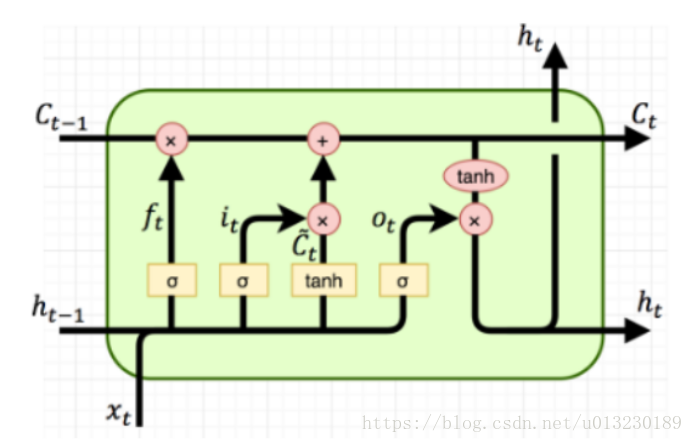
The formula is as follows:
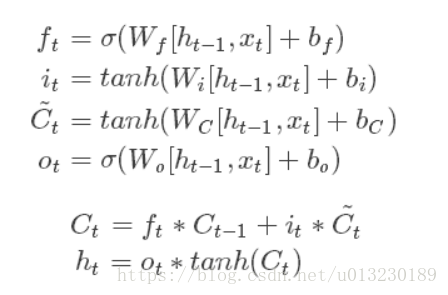
It can be seen from the pictures and formulas that LSTM unit has a single input (CT-1, HT-1, XT) and three outputs (CT, HT, HT).

Constructor init has a state_ is_ Tuple = true. If it is true, the accepted and returned status is C_ State and M_ State; if false, they join along the column axis.

if self._state_is_tuple:
  new_state = LSTMStateTuple(new_c, new_h)
else:
  new_state = array_ops.concat([new_c, new_h], 1)

The hidden state of LSTM unit is (CT, HT) tuple.

Let’s look at the call function. The following line of code is to calculate the forgetting gate, input gate, and output gate (without activating the function).

# i = input_gate, j = new_input, f = forget_gate, o = output_gate

    i, j, f, o = array_ops.split(

        value=gate_inputs, num_or_size_splits=4, axis=one)

The output CT and HT: are calculated

new_c = add(multiply(c, sigmoid(add(f, forget_bias_tensor))),

                multiply(sigmoid(i), self._activation(j)))

    new_h = multiply(self._activation(new_c), sigmoid(o))

Code example:

import tensorflow as tf


output_dim=128

lstm=tf.nn.rnn_cell.BasicLSTMCell(output_dim)

batch_size=10 #Batch size

timesteps=40 #time steps

embedding_dim=300 #word vector dimension

inputs=tf.Variable(tf.random_normal([batch_size,embedding_dim]))

previous_state = (tf.random_normal(shape=(batch_size, output_dim)), tf.random_normal(shape=(batch_size, output_dim)))

output,(new_h, new_state)=lstm(inputs,previous_state)


print(output.shape) #(10, 128)

print(new_h.shape) #(10, 128)

print(new_state.shape) #(10, 128)
How to Solve “/usr/bin/ld: skipping incompatible”

Today, when I was working on a project, I used the make command to solve the problem of / usr/bin/LD: skipping incompatible.

The essence of this problem is that when linking library files, the library file version does not correspond to the platform version.

Solution: objdump – P libmylib. A. check whether the library version is 32-bit or 64 bit, or arm version or… And so on. Analyze it carefully. You’ll be in the fog. (the problem I encountered is that the compiler chooses version 64, but XXX. A is version 32, which is not compatible)
conclusion: problems are beneficial but not harmful. Only by solving problems can we improve ourselves!

Typeerror: UFUNC ‘isn’t supported for the input types

It took me a lot of time to find the wrong problem, so I hope you can be inspired.

Look at the code explanation

da1
Out[1]: 
          a   b  c        aa
0  0.200000  a1  1  0.200000
1  0.500000  a2  2  0.500000
2  0.428571  a3  3  0.428571
3       NaN  a2  4       NaN
4  0.833333  a1  5  0.833333
5  0.750000  a1  6  0.750000
6  0.777778  a3  7  0.777778
7       NaN  a1  8       NaN
8      test  a3  9       NaN

In [2]: ddn1 = da1['a'].values

In [3]: ddn1
Out[3]: 
array([0.2, 0.5, 0.42857142857142855, nan, 0.8333333333333334, 0.75,
       0.7777777777777778, nan, 'test'], dtype=object)

The type dtype of numpy array is object

In [4]: np.isnan(ddn1)
---------------------------------------------------------------------------
TypeError                                 Traceback (most recent call last)
<ipython-input-414-406cd3e92434> in <module>
----> 1 np.isnan(ddn1)

TypeError: ufunc 'isnan' not supported for the input types, and the inputs could not be safely coerced to any supported types according to the casting rule ''safe''

The reason for the error is that the type dtype of numpy is object, not number.

In [5]: type(ddn1[:8])
Out[5]: numpy.ndarray
In [6]: type(ddn1[8])
Out[6]: str

Although the previous values are all numbers, the last value is a string, and all values of the array are not of the same type.

In [7]: ddn1 = ddn1[:8]

In [8]: ddn1
Out[8]: 
array([0.2, 0.5, 0.42857142857142855, nan, 0.8333333333333334, 0.75,
       0.7777777777777778, nan], dtype=object)

Even if the last string is truncated by slicing, the type of the array does not change.

ddn1 = ddn1.astype('float')

ddn1
Out[9]: 
array([0.2       , 0.5       , 0.42857143,        nan, 0.83333333,
       0.75      , 0.77777778,        nan])

np.isnan(ddn1)
Out[10]: array([False, False, False,  True, False, False, False,  True])

Need to display the array into a numeric type line (here is converted to float).

In [11]: ddn1 = np.append(ddn1,'test')

In [12]: ddn1
Out[12]: 
array(['0.2', '0.5', '0.42857142857142855', 'nan', '0.8333333333333334',
       '0.75', '0.7777777777777778', 'nan', 'test'], dtype='<U32')
In [13]: np.isnan(np.append(ddn1,'test'))
---------------------------------------------------------------------------
TypeError                                 Traceback (most recent call last)
<ipython-input-440-26598f53c9e6> in <module>
----> 1 np.isnan(np.append(ddn1,'test'))

TypeError: ufunc 'isnan' not supported for the input types, and the inputs could not be safely coerced to any supported types according to the casting rule ''safe''

When a text value is appended, the type dtype of the array is changed again, which is not numeric. Reuse np.isnan There must be a mistake.

The conclusion is that to avoid errors, the value type in the array must be float or int.

cannot import name ‘_validate_lengths’ from ‘numpy.lib.arraypad’

Error in importing skimage:

>>> import skimage
Traceback (most recent call last):
  File "<stdin>", line 1, in <module>
  File "/opt/AI/AN/lib/python3.7/site-packages/skimage/__init__.py", line 157, in <module>
    from .util.dtype import *
  File "/opt/AI/AN/lib/python3.7/site-packages/skimage/util/__init__.py", line 8, in <module>
    from .arraycrop import crop
  File "/opt/AI/AN/lib/python3.7/site-packages/skimage/util/arraycrop.py", line 8, in <module>
    from numpy.lib.arraypad import _validate_lengths
ImportError: cannot import name '_validate_lengths' from 'numpy.lib.arraypad' (/opt/AI/AN/lib/python3.7/site-packages/numpy/lib

Because it doesn’t match the numpy version, my numpy is 1.16

The version of numpy can be reduced or the version of skimage can be improved. When I finally use the latter, the former will report an error

ValueError: numpy.ufunc has the wrong size, try recompiling. Expected 192, got 216

resolvent:

1) View version:

[root@localhost datasets]# pip install scikit-image==9999
Looking in indexes: https://pypi.tuna.tsinghua.edu.cn/simple
ERROR: Could not find a version that satisfies the requirement scikit-image==9999 (from versions: 0.7.2, 0.8.0, 0.8.1, 0.8.2, 0.9.0, 0.9.1, 0.9.3, 0.10.0, 0.10.1, 0.11.2, 0.11.3, 0.12.0, 0.12.1, 0.12.2, 0.12.3, 0.13.0, 0.13.1, 0.14.0, 0.14.1, 0.14.2, 0.14.3, 0.14.4, 0.14.5, 0.15.0, 0.16.1, 0.16.2)
ERROR: No matching distribution found for scikit-image==9999

2) Install the latest

[root@localhost datasets]# pip install scikit-image==0.16.2
Looking in indexes: https://pypi.tuna.tsinghua.edu.cn/simple
Collecting scikit-image==0.16.2
  Downloading https://pypi.tuna.tsinghua.edu.cn/packages/dc/48/454bf836d302465475e02bc0468b879302145b07a005174c409a5b5869c7/scikit_image-0.16.2-cp37-cp37m-manylinux1_x86_64.whl (26.5MB)
     |████████████████████████████████| 26.5MB 1.8MB/s 
Requirement already satisfied: matplotlib!=3.0.0,>=2.0.0 in /opt/AI/AN/lib/python3.7/site-packages (from scikit-image==0.16.2) (2.2.3)
Requirement already satisfied: scipy>=0.19.0 in /opt/AI/AN/lib/python3.7/site-packages (from scikit-image==0.16.2) (1.1.0)
Requirement already satisfied: networkx>=2.0 in /opt/AI/AN/lib/python3.7/site-packages (from scikit-image==0.16.2) (2.1)
Requirement already satisfied: imageio>=2.3.0 in /opt/AI/AN/lib/python3.7/site-packages (from scikit-image==0.16.2) (2.4.1)
Requirement already satisfied: PyWavelets>=0.4.0 in /opt/AI/AN/lib/python3.7/site-packages (from scikit-image==0.16.2) (1.0.0)
Requirement already satisfied: pillow>=4.3.0 in /opt/AI/AN/lib/python3.7/site-packages (from scikit-image==0.16.2) (5.2.0)
Requirement already satisfied: numpy>=1.7.1 in /opt/AI/AN/lib/python3.7/site-packages (from matplotlib!=3.0.0,>=2.0.0->scikit-image==0.16.2) (1.16.0)
Requirement already satisfied: cycler>=0.10 in /opt/AI/AN/lib/python3.7/site-packages (from matplotlib!=3.0.0,>=2.0.0->scikit-image==0.16.2) (0.10.0)
Requirement already satisfied: pyparsing!=2.0.4,!=2.1.2,!=2.1.6,>=2.0.1 in /opt/AI/AN/lib/python3.7/site-packages (from matplotlib!=3.0.0,>=2.0.0->scikit-image==0.16.2) (2.4.5)
Requirement already satisfied: python-dateutil>=2.1 in /opt/AI/AN/lib/python3.7/site-packages (from matplotlib!=3.0.0,>=2.0.0->scikit-image==0.16.2) (2.7.3)
Requirement already satisfied: pytz in /opt/AI/AN/lib/python3.7/site-packages (from matplotlib!=3.0.0,>=2.0.0->scikit-image==0.16.2) (2018.5)
Requirement already satisfied: six>=1.10 in /opt/AI/AN/lib/python3.7/site-packages (from matplotlib!=3.0.0,>=2.0.0->scikit-image==0.16.2) (1.13.0)
Requirement already satisfied: kiwisolver>=1.0.1 in /opt/AI/AN/lib/python3.7/site-packages (from matplotlib!=3.0.0,>=2.0.0->scikit-image==0.16.2) (1.0.1)
Requirement already satisfied: decorator>=4.1.0 in /opt/AI/AN/lib/python3.7/site-packages (from networkx>=2.0->scikit-image==0.16.2) (4.3.0)
Requirement already satisfied: setuptools in /opt/AI/AN/lib/python3.7/site-packages (from kiwisolver>=1.0.1->matplotlib!=3.0.0,>=2.0.0->scikit-image==0.16.2) (41.0.0)
Installing collected packages: scikit-image
  Found existing installation: scikit-image 0.14.0
    Uninstalling scikit-image-0.14.0:
      Successfully uninstalled scikit-image-0.14.0
Successfully installed scikit-image-0.16.2

3) Try:

[root@localhost datasets]# python
Python 3.7.0 (default, Jun 28 2018, 13:15:42) 
[GCC 7.2.0] :: Anaconda, Inc. on linux
Type "help", "copyright", "credits" or "license" for more information.
>>> import skimage
>>> 

Absolutely OK

Error report of xv6 operating system make Makefile:192 : * * solutions to receive comments before first target. Stop

Error report of xv6 operating system make Makefile:192 : * * solutions to receive comments before first target. Stop

Hello everyone, my name is Qi Guanjie (Q í Gu ā NJI é). I record the learning process in CSDN. Time flies and the future is promising. Come on ~ the blog address is Qi Guanjie’s blog, and the nickname of station B is Qi Guanjie , and the address is Qi Guanjie’s station B

This article is original for Qi Guanjie, please support the original, part of the platform has been stealing articles from bloggers!!!


   there are many small partners who often encounter errors when doing experiments with the xv6 operating system Makefile:192 : *** recipe commences before first target. Stop. , and then I don’t know where the error is. Here is a possible error reporting situation and the solution (at present, only this method is used to review the error reporting. If there are other errors, you can send a makefile file to have a look).

Here, I will review the contents of makefile for error reporting

OBJS = \
	bio.o\
	console.o\
	exec.o\
	file.o\
	fs.o\
	ide.o\
	ioapic.o\
	kalloc.o\
	kbd.o\
	lapic.o\
	log.o\
	main.o\
	mp.o\
	picirq.o\
	pipe.o\
	proc.o\
	sleeplock.o\
	spinlock.o\
	string.o\
	swtch.o\
	syscall.o\
	sysfile.o\
	sysproc.o\
	trapasm.o\
	trap.o\
	uart.o\
	vectors.o\
	vm.o\

# Cross-compiling (e.g., on Mac OS X)
# TOOLPREFIX = i386-jos-elf

# Using native tools (e.g., on X86 Linux)
#TOOLPREFIX = 

# Try to infer the correct TOOLPREFIX if not set
ifndef TOOLPREFIX
TOOLPREFIX := $(shell if i386-jos-elf-objdump -i 2>&1 | grep '^elf32-i386$$' >/dev/null 2>&1; \
	then echo 'i386-jos-elf-'; \
	elif objdump -i 2>&1 | grep 'elf32-i386' >/dev/null 2>&1; \
	then echo ''; \
	else echo "***" 1>&2; \
	echo "*** Error: Couldn't find an i386-*-elf version of GCC/binutils." 1>&2; \
	echo "*** Is the directory with i386-jos-elf-gcc in your PATH?" 1>&2; \
	echo "*** If your i386-*-elf toolchain is installed with a command" 1>&2; \
	echo "*** prefix other than 'i386-jos-elf-', set your TOOLPREFIX" 1>&2; \
	echo "*** environment variable to that prefix and run 'make' again." 1>&2; \
	echo "*** To turn off this error, run 'gmake TOOLPREFIX= ...'." 1>&2; \
	echo "***" 1>&2; exit 1; fi)
endif

# If the makefile can't find QEMU, specify its path here
# QEMU = qemu-system-i386

# Try to infer the correct QEMU
ifndef QEMU
QEMU = $(shell if which qemu > /dev/null; \
	then echo qemu; exit; \
	elif which qemu-system-i386 > /dev/null; \
	then echo qemu-system-i386; exit; \
	elif which qemu-system-x86_64 > /dev/null; \
	then echo qemu-system-x86_64; exit; \
	else \
	qemu=/Applications/Q.app/Contents/MacOS/i386-softmmu.app/Contents/MacOS/i386-softmmu; \
	if test -x $$qemu; then echo $$qemu; exit; fi; fi; \
	echo "***" 1>&2; \
	echo "*** Error: Couldn't find a working QEMU executable." 1>&2; \
	echo "*** Is the directory containing the qemu binary in your PATH" 1>&2; \
	echo "*** or have you tried setting the QEMU variable in Makefile?" 1>&2; \
	echo "***" 1>&2; exit 1)
endif

CC = $(TOOLPREFIX)gcc
AS = $(TOOLPREFIX)gas
LD = $(TOOLPREFIX)ld
OBJCOPY = $(TOOLPREFIX)objcopy
OBJDUMP = $(TOOLPREFIX)objdump
CFLAGS = -fno-pic -static -fno-builtin -fno-strict-aliasing -O2 -Wall -MD -ggdb -m32 -Werror -fno-omit-frame-pointer
CFLAGS += $(shell $(CC) -fno-stack-protector -E -x c /dev/null >/dev/null 2>&1 && echo -fno-stack-protector)
ASFLAGS = -m32 -gdwarf-2 -Wa,-divide
# FreeBSD ld wants ``elf_i386_fbsd''
LDFLAGS += -m $(shell $(LD) -V | grep elf_i386 2>/dev/null | head -n 1)

# Disable PIE when possible (for Ubuntu 16.10 toolchain)
ifneq ($(shell $(CC) -dumpspecs 2>/dev/null | grep -e '[^f]no-pie'),)
CFLAGS += -fno-pie -no-pie
endif
ifneq ($(shell $(CC) -dumpspecs 2>/dev/null | grep -e '[^f]nopie'),)
CFLAGS += -fno-pie -nopie
endif

xv6.img: bootblock kernel
	dd if=/dev/zero of=xv6.img count=10000
	dd if=bootblock of=xv6.img conv=notrunc
	dd if=kernel of=xv6.img seek=1 conv=notrunc

xv6memfs.img: bootblock kernelmemfs
	dd if=/dev/zero of=xv6memfs.img count=10000
	dd if=bootblock of=xv6memfs.img conv=notrunc
	dd if=kernelmemfs of=xv6memfs.img seek=1 conv=notrunc

bootblock: bootasm.S bootmain.c
	$(CC) $(CFLAGS) -fno-pic -O -nostdinc -I. -c bootmain.c
	$(CC) $(CFLAGS) -fno-pic -nostdinc -I. -c bootasm.S
	$(LD) $(LDFLAGS) -N -e start -Ttext 0x7C00 -o bootblock.o bootasm.o bootmain.o
	$(OBJDUMP) -S bootblock.o > bootblock.asm
	$(OBJCOPY) -S -O binary -j .text bootblock.o bootblock
	./sign.pl bootblock

entryother: entryother.S
	$(CC) $(CFLAGS) -fno-pic -nostdinc -I. -c entryother.S
	$(LD) $(LDFLAGS) -N -e start -Ttext 0x7000 -o bootblockother.o entryother.o
	$(OBJCOPY) -S -O binary -j .text bootblockother.o entryother
	$(OBJDUMP) -S bootblockother.o > entryother.asm

initcode: initcode.S
	$(CC) $(CFLAGS) -nostdinc -I. -c initcode.S
	$(LD) $(LDFLAGS) -N -e start -Ttext 0 -o initcode.out initcode.o
	$(OBJCOPY) -S -O binary initcode.out initcode
	$(OBJDUMP) -S initcode.o > initcode.asm

kernel: $(OBJS) entry.o entryother initcode kernel.ld
	$(LD) $(LDFLAGS) -T kernel.ld -o kernel entry.o $(OBJS) -b binary initcode entryother
	$(OBJDUMP) -S kernel > kernel.asm
	$(OBJDUMP) -t kernel | sed '1,/SYMBOL TABLE/d; s/ .* / /; /^$$/d' > kernel.sym

# kernelmemfs is a copy of kernel that maintains the
# disk image in memory instead of writing to a disk.
# This is not so useful for testing persistent storage or
# exploring disk buffering implementations, but it is
# great for testing the kernel on real hardware without
# needing a scratch disk.
MEMFSOBJS = $(filter-out ide.o,$(OBJS)) memide.o
kernelmemfs: $(MEMFSOBJS) entry.o entryother initcode kernel.ld fs.img
	$(LD) $(LDFLAGS) -T kernel.ld -o kernelmemfs entry.o  $(MEMFSOBJS) -b binary initcode entryother fs.img
	$(OBJDUMP) -S kernelmemfs > kernelmemfs.asm
	$(OBJDUMP) -t kernelmemfs | sed '1,/SYMBOL TABLE/d; s/ .* / /; /^$$/d' > kernelmemfs.sym

tags: $(OBJS) entryother.S _init
	etags *.S *.c

vectors.S: vectors.pl
	./vectors.pl > vectors.S

ULIB = ulib.o usys.o printf.o umalloc.o

_%: %.o $(ULIB)
	$(LD) $(LDFLAGS) -N -e main -Ttext 0 -o $@ $^
	$(OBJDUMP) -S $@ > $*.asm
	$(OBJDUMP) -t $@ | sed '1,/SYMBOL TABLE/d; s/ .* / /; /^$$/d' > $*.sym

_forktest: forktest.o $(ULIB)
	# forktest has less library code linked in - needs to be small
	# in order to be able to max out the proc table.
	$(LD) $(LDFLAGS) -N -e main -Ttext 0 -o _forktest forktest.o ulib.o usys.o
	$(OBJDUMP) -S _forktest > forktest.asm

mkfs: mkfs.c fs.h
	gcc -Werror -Wall -o mkfs mkfs.c

# Prevent deletion of intermediate files, e.g. cat.o, after first build, so
# that disk image changes after first build are persistent until clean.  More
# details:
# http://www.gnu.org/software/make/manual/html_node/Chained-Rules.html
.PRECIOUS: %.o

UPROGS=\
	_cat\
	_echo\
	_forktest\
	_grep\
	_init\
	_kill\
	_ln\
	_ls\
	_mkdir\
	_rm\
	_sh\
	_stressfs\
	_usertests\
	_wc\
	_zombie\
fs.img: mkfs README $(UPROGS)
	./mkfs fs.img README $(UPROGS)

-include *.d

clean: 
	rm -f *.tex *.dvi *.idx *.aux *.log *.ind *.ilg \
	*.o *.d *.asm *.sym vectors.S bootblock entryother \
	initcode initcode.out kernel xv6.img fs.img kernelmemfs \
	xv6memfs.img mkfs .gdbinit \
	$(UPROGS)

# make a printout
FILES = $(shell grep -v '^\#' runoff.list)
PRINT = runoff.list runoff.spec README toc.hdr toc.ftr $(FILES)

xv6.pdf: $(PRINT)
	./runoff
	ls -l xv6.pdf

print: xv6.pdf

# run in emulators

bochs : fs.img xv6.img
	if [ ! -e .bochsrc ]; then ln -s dot-bochsrc .bochsrc; fi
	bochs -q

# try to generate a unique GDB port
GDBPORT = $(shell expr `id -u` % 5000 + 25000)
# QEMU's gdb stub command line changed in 0.11
QEMUGDB = $(shell if $(QEMU) -help | grep -q '^-gdb'; \
	then echo "-gdb tcp::$(GDBPORT)"; \
	else echo "-s -p $(GDBPORT)"; fi)
ifndef CPUS
CPUS := 2
endif
QEMUOPTS = -drive file=fs.img,index=1,media=disk,format=raw -drive file=xv6.img,index=0,media=disk,format=raw -smp $(CPUS) -m 512 $(QEMUEXTRA)

qemu: fs.img xv6.img
	$(QEMU) -serial mon:stdio $(QEMUOPTS)

qemu-memfs: xv6memfs.img
	$(QEMU) -drive file=xv6memfs.img,index=0,media=disk,format=raw -smp $(CPUS) -m 256

qemu-nox: fs.img xv6.img
	$(QEMU) -nographic $(QEMUOPTS)

.gdbinit: .gdbinit.tmpl
	sed "s/localhost:1234/localhost:$(GDBPORT)/" < $^ > $@

qemu-gdb: fs.img xv6.img .gdbinit
	@echo "*** Now run 'gdb'." 1>&2
	$(QEMU) -serial mon:stdio $(QEMUOPTS) -S $(QEMUGDB)

qemu-nox-gdb: fs.img xv6.img .gdbinit
	@echo "*** Now run 'gdb'." 1>&2
	$(QEMU) -nographic $(QEMUOPTS) -S $(QEMUGDB)

# CUT HERE
# prepare dist for students
# after running make dist, probably want to
# rename it to rev0 or rev1 or so on and then
# check in that version.

EXTRA=\
	mkfs.c ulib.c user.h cat.c echo.c forktest.c grep.c kill.c\
	ln.c ls.c mkdir.c rm.c stressfs.c usertests.c wc.c zombie.c\
	printf.c umalloc.c\
	README dot-bochsrc *.pl toc.* runoff runoff1 runoff.list\
	.gdbinit.tmpl gdbutil\

dist:
	rm -rf dist
	mkdir dist
	for i in $(FILES); \
	do \
		grep -v PAGEBREAK $$i >dist/$$i; \
	done
	sed '/CUT HERE/,$$d' Makefile >dist/Makefile
	echo >dist/runoff.spec
	cp $(EXTRA) dist

dist-test:
	rm -rf dist
	make dist
	rm -rf dist-test
	mkdir dist-test
	cp dist/* dist-test
	cd dist-test; $(MAKE) print
	cd dist-test; $(MAKE) bochs || true
	cd dist-test; $(MAKE) qemu

# update this rule (change rev#) when it is time to
# make a new revision.
tar:
	rm -rf /tmp/xv6
	mkdir -p /tmp/xv6
	cp dist/* dist/.gdbinit.tmpl /tmp/xv6
	(cd /tmp; tar cf - xv6) | gzip >xv6-rev10.tar.gz  # the next one will be 10 (9/17)

.PHONY: dist-test dist

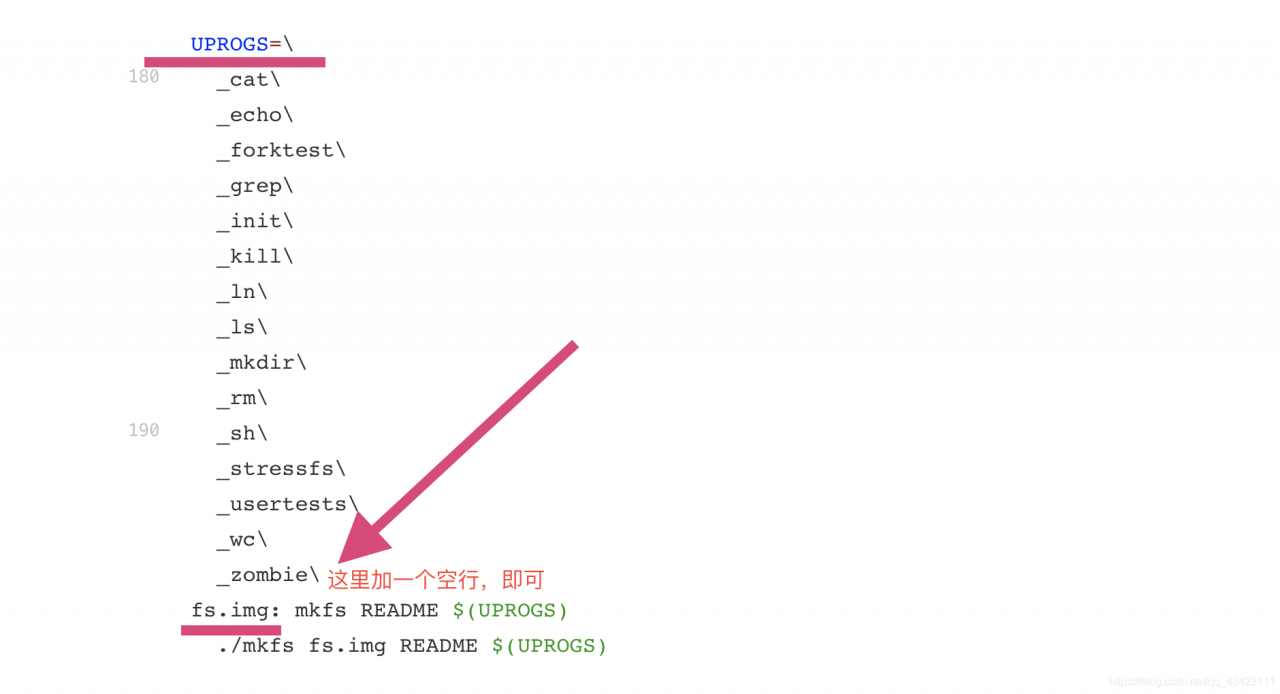
Solution: it’s actually very simple, because you’re in fs.img : a blank line is missing, which may be due to the careless deletion of the blank line during modification, resulting in his error. Add a blank line at the end of uprogs in the position shown in the figure.


Hello everyone, my name is Qi Guanjie (Q í Gu ā NJI é). I record the learning process in CSDN. Time flies and the future is promising. Come on ~ the blog address is Qi Guanjie’s blog, and the nickname of station B is Qi Guanjie , and the address is Qi Guanjie’s station B

This article is original for Qi Guanjie, please support the original, part of the platform has been stealing articles from bloggers!!!

Go run error go run: cannot run non main package

I was born in Java. Recently I became interested in go language, so I will learn it with go in the future.

After the go environment is installed and configured, the vscode development tool is installed, and the first go program is written. It’s very simple, just a simple output statement, but it does

Go run: cannot run non main package. The code is as follows:

package test
import "fmt"
func main() {
  fmt.Println("cainiaobulan testing go")
}

The error message of go is very straightforward. The main method can only be placed in package main. Go run is to execute the command and a main must be used to call it. Install can be directly compiled into a package file or an EXE (if there is a main function)

Change the code and run OK

package main
import "fmt"
func main() {
  fmt.Println("cainiaobulan testing go")
}

Just take this mistake as the first step for me to learn go. In the future, I can cross the pit step by step. I hope that children’s shoes with the same interest can learn together and carry forward go. At the same time, I also want to seek guidance from the boss. I am ready to develop in the direction of go web.

One of the common mistakes of tex

1: “Latex” is reported in compile! paragraph complete ended before \align was complete”,

Compile code:

\begin{align}\label{LL:01}
q_ s(o_ s(t))=(1+\phi_ s(t))o_ s(t) \\
\end{align}

\begin{align*}\label{LL:01}
q_ s(o_ s(t))=(1+\phi_ s(t))o_ s(t)
\end{align*}

Solution:

\Usepackage {amsmath}
is used in formula environment.

This example can be changed to:
– begin {equation} label {LL: 01}
– begin {aligned}

q_ s(o_ s(t))=(1+\phi_ s(t))o_ s(t) \\
\end{aligned}
\end{equation}

Effect of operation

Appendix:

Latex Download Center: http://www.ctex.org/CTeXDownload/

Code::Blocks 12.11 error: ‘nullptr’ was not declared in this scope&GNU GCC -std=gnu++0x


Code::Blocks 12.11 error: ‘nullptr’ was not declared in this scope&GNU GCC -std=gnu++0x

Aleeee’s blog
 

C + + primer English Version (Fifth Edition) P54 null points chapter: Modern C + + programs should generally use null and use nullptr instead. So we use code:: blocks to type the code, and the problem comes.

error: ‘nullptr’ was not declared in this scope

So Google answers on the Internet, a lot of English, and finally probably understand that it’s the GNU gcc compiler problem, not the IDE problem of code:: blocks. You just need to type the command line – STD = GNU + + 0x in the compiler. Solution: Code:: blocks integrates GNU gcc compiler, so menu bar – & gt; setting – & gt; compiler , select the global compiler settings page, select GNU gcc compiler at the top of the page, select compiler settings – & gt; compiler flags at the middle of the page, and check have G + + follow the coming C + + 0x ISO C + + language standard [- STD = GNU + + 0x]

Well, the next compilation will be successful! O(∩_ ∩)O~

