Author Archives: Robins

[How to Solve]Warning: connect.static is not a function

grant contrib connect is not supported since version 0.11. X connect.static And connect.directory

you should install serve static (load static files) and serve index (load directory)

npm install --save-dev grunt-contrib-connect serve-static 


Examples


var serveStatic = require('serve-static');
var serveIndex = require('serve-index');

grunt.initConfig({
    connect: {
        options: {
            test: {
               directory: 'somePath',
               middleware: function(connect, options){
                    var _staticPath = path.resolve(options.directory);
                    return [serveStatic(_staticPath), serveIndex(_staticPath)]
               }
            }
        }
    }
})


Reference link
http://stackoverflow.com/questions/32961124/warning-connect-static-is-not-a-function-use-force-to-continue

Android solution Java.util.concurrent.ExecutionException: com.Android.ide.common.process.ProcessException: exception

Error:
Error:Execution failed for task ':app:mergeDebugResources'. > Error: 
java.util.concurrent.ExecutionException: com.android.ide.common.process.ProcessException:

After a round of search:

resolvent:

Either make the picture into a dot 9 picture or remove the. 9 in the picture file name;
a friend of mine has this problem because the company’s encryption system encrypts the picture, which leads to the error of as parsing the picture. If the encryption of this kind of graphic file is removed, the problem can also be solved;
the problem can be solved There is also a possibility to see on the Internet: manually change the image and other kinds of mistakes. For example, if the image was originally in JPG format and then forced to change to PNG, there may be problems. Just change it back to the original format.
Remove the PNG legitimacy test, in the build.gradle Add the following two sentences under build tools version in

android {
    
   ......
 
    aaptOptions.cruncherEnabled = false
    aaptOptions.useNewCruncher = false
 
   ......
}

The reason for the error is: Android studio strictly reviews PNG images, that is, PNG does not meet the requirements of Android studio

The above two sentences probably mean
forbid gradle to check the legitimacy of PNG
note: the most important thing is that. 9 diagram should be done strictly

The “. 9” image is a special image form in the application software development of Android platform. The file extension is. 9. PNG. In other words, in the project resource folder, as long as the file suffix of the image is. 9. PNG, it means that it is a point 9 image. When we compile with eclipse, it encounters a file with the file suffix of. 9. PNG. First check whether it is actually a point 9 image If it is, it will be processed according to the point 9 image; if not, it will be processed according to the default image. That is to say, eclipse automatically helps us complete the transformation and tolerates our image format errors.

Android Studio uses the Android Maven plugin plug-in. The reason for the error reported in android studio is that the file declared as the point 9 image is not actually the real point 9 image, and there is an error in parsing the image. Android Maven plugin will strictly check the image format, and report an error if it does not match.

Tensorflow: Common Usage of tf.get_variable_scope()

We know that tensorflow, once constructed, cannot be changed during training. And once the input is added to the graph, the data will flow in a series of parameters, and this series of parameters can only act on the data sent in from this input interface. If we get a group of data or a queue at this time, we want to make the data of this queue go through the same route as the previous input queue. In other words, we want to achieve this operation:

input_1 = tf.placeholder(...)
out_1 = model(input_1)
input_2 = tf.placeholder(...)
out_2 = model(input_2)

This will make a mistake. Let’s look at the following code:

import tensorflow as tf
import vgg

inputs_1 = tf.random_normal([10,224,224,3])
inputs_2 = tf.random_normal([10,224,224,3])
with tf.variable_scope('vgg_16') :
    net ,end_points = vgg.vgg_16(inputs_1,100,False)
    # tf.get_variable_scope().reuse_variables()
    net_, end_points_ = vgg.vgg_16(inputs_2,100,False)

with tf.Session() as sess:
    print("no error")

If the above code is correct, the final output is no error

But the error message is this:

ValueError: Variable vgg_16/vgg_16/conv1/conv1_1/weights already exists, disallowed. 
Did you mean to set reuse=True or reuse=tf.AUTO_REUSE in VarScope? Originally defined at:

This means that a variable already exists and cannot be generated again. In fact, the first input generates a series of variables, which can only be used for the data sent by the first input. Now the second input also wants to use the parameter corresponding to the first input, which is not OK. The solution is to add that line of comment:

import tensorflow as tf
import vgg

inputs_1 = tf.random_normal([10,224,224,3])
inputs_2 = tf.random_normal([10,224,224,3])
with tf.variable_scope('vgg_16') :
    net ,end_points = vgg.vgg_16(inputs_1,100,False)
    tf.get_variable_scope().reuse_variables()
    net_, end_points_ = vgg.vgg_16(inputs_2,100,False)

with tf.Session() as sess:
    print("no error")

tf.get_ variable_ scope().reuse_ Variables() will be in the current variable_ Under scope, set the variable to reuse = true. You can see the meaning of the name, that is, the two inputs can share the variable
[ubuntu14.04]Tensorflow: Could not find any downloads that satisfy the requirement

Issue:
$ pip install   tensorflow
Downloading/unpacking tensorflow
Could not find any downloads that satisfy the requirement tensorflow
Cleaning up…
No distributions at all found for tensorflow
Storing debug log for failure in /home/tommy/.pip/pip.log
Analysis:
pip version is too low, need to upgrade
$ pip –version
pip 1.5.4 from /usr/lib/python2.7/dist-packages (python 2.7)
Solution:
sudo pip install pip -U $ sudo pip install   tensorflow
sudo: unable to resolve host tommy
DEPRECATION: Python 2.7 will reach the end of its life on January 1st, 2020. Please upgrade your Python as Python 2.7 won’t be maintained after that date. A future version of pip will drop support for Python 2.7.
The directory ‘/home/tommy/.cache/pip/http’ or its parent directory is not owned by the current user and the cache has been disabled. Please check the permissions and owner of that directory. If executing pip with sudo, you may want sudo’s -H flag.
The directory ‘/home/tommy/.cache/pip’ or its parent directory is not owned by the current user and caching wheels has been disabled. check the permissions and owner of that directory. If executing pip with sudo, you may want sudo’s -H flag.
Collecting tensorflow
/usr/local/lib/python2.7/dist-packages/pip/_vendor/urllib3/util/ssl_.py:354: SNIMissingWarning: An HTTPS request has been made, but the SNI (Server Name Indication) extension to TLS is not available on this platform. This may cause the server to present an incorrect TLS certificate, which can cause validation failures. You can upgrade to a newer version of Python to solve this. For more information, see https://urllib3.readthedocs.io/en/latest/advanced-usage.html#ssl-warnings
SNIMissingWarning
/usr/local/lib/python2.7/dist-packages/pip/_vendor/urllib3/util/ssl_.py:150: InsecurePlatformWarning: A true SSLContext object is not available. This prevents urllib3 from configuring SSL appropriately and may cause certain SSL connections to fail. You can upgrade to a newer version of Python to solve this. For more information, see https://urllib3.readthedocs.io/en/latest/advanced-usage.html#ssl-warnings
InsecurePlatformWarning
/usr/local/lib/python2.7/dist-packages/pip/_vendor/urllib3/util/ssl_.py:150: InsecurePlatformWarning: A true SSLContext object is not available. This prevents urllib3 from configuring SSL appropriately and may cause certain SSL connections to fail. You can upgrade to a newer version of Python to solve this. For more information, see https://urllib3.readthedocs.io/en/latest/advanced-usage.html#ssl-warnings
InsecurePlatformWarning
Downloading https://files.pythonhosted.org/packages/d2/ea/ab2c8c0e81bd051cc1180b104c75a865ab0fc66c89be992c4b20bbf6d624/tensorflow-1.13.1-cp27-cp27mu-manylinux1_x86_64.whl (92.5MB)
100% |████████████████████████████████| 92.5MB 170kB/s
Collecting numpy>=1.13.3 (from tensorflow)
Downloading https://files.pythonhosted.org/packages/c4/33/8ec8dcdb4ede5d453047bbdbd01916dbaccdb63e98bba60989718f5f0876/numpy-1.16.2-cp27-cp27mu-manylinux1_x86_64.whl (17.0MB)
100% |████████████████████████████████| 17.0MB 987kB/s
Collecting grpcio>=1.8.6 (from tensorflow)
Downloading https://files.pythonhosted.org/packages/b8/be/3bb6d8241b5ed1f8437169df53e7dd6ca986174e022585de15087a848c99/grpcio-1.19.0-cp27-cp27mu-manylinux1_x86_64.whl (10.7MB)
100% |████████████████████████████████| 10.7MB 1.4MB/s
Collecting keras-applications>=1.0.6 (from tensorflow)
Downloading https://files.pythonhosted.org/packages/90/85/64c82949765cfb246bbdaf5aca2d55f400f792655927a017710a78445def/Keras_Applications-1.0.7-py2.py3-none-any.whl (51kB)
100% |████████████████████████████████| 61kB 6.5MB/s
Collecting six>=1.10.0 (from tensorflow)

Android studio compilation failed: java.util.concurrent.ExecutionException: com.android.ide.common.process.Process

Android Studio compilation error:

java.util.concurrent.ExecutionException: com.android.ide.common.process.ProcessException: Error while executing process D:\android\sdk\build-tools\26.0.2\aapt.exe with arguments {package -f –no-crunch -I D:\android\sdk\platforms\android-26\android.jar -M \\?\D:\android\test\build\intermediates\manifests\full\debug\AndroidManifest.xml -S D:\android\test\build\intermediates\res\merged\debug -m -J \\?\D:\android\test\build\generated\source\r\debug -F D:\android\test\build\intermediates\res\debug\resources-debug.ap_ -D \\?\D:\android\test\build\intermediates\multi-dex\debug\manifest_keep.txt –custom-package com.test -0 apk –output-text-symbols \\?\D:\android\test\build\intermediates\symbols\debug –no-version-vectors}
com.android.ide.common.process.ProcessException: Error while executing process D:\android\sdk\build-tools\26.0.2\aapt.exe with arguments {package -f –no-crunch -I D:\android\sdk\platforms\android-26\android.jar -M \\?\D:\android\test\build\intermediates\manifests\full\debug\AndroidManifest.xml -S D:\android\test\build\intermediates\res\merged\debug -m -J \\?\D:\android\test\build\generated\source\r\debug -F D:\android\test\build\intermediates\res\debug\resources-debug.ap_ -D \\?\D:\android\test\build\intermediates\multi-dex\debug\manifest_keep.txt –custom-package com.test -0 apk –output-text-symbols \\?\D:\android\test\build\intermediates\symbols\debug –no-version-vectors}
org.gradle.process.internal.ExecException: Process ‘command ‘D:\android\sdk\build-tools\26.0.2\aapt.exe” finished with non-zero exit value 1
java.util.concurrent.ExecutionException: com.android.ide.common.process.ProcessException: Error while executing process D:\android\sdk\build-tools\26.0.2\aapt.exe with arguments {package -f –no-crunch -I D:\android\sdk\platforms\android-26\android.jar -M \\?\D:\android\test\build\intermediates\manifests\full\debug\AndroidManifest.xml -S D:\android\test\build\intermediates\res\merged\debug -m -J \\?\D:\android\test\build\generated\source\r\debug -F D:\android\test\build\intermediates\res\debug\resources-debug.ap_ -D \\?\D:\android\test\build\intermediates\multi-dex\debug\manifest_keep.txt –custom-package com.test -0 apk –output-text-symbols \\?\D:\android\test\build\intermediates\symbols\debug –no-version-vectors}
com.android.ide.common.process.ProcessException: Error while executing process D:\android\sdk\build-tools\26.0.2\aapt.exe with arguments {package -f –no-crunch -I D:\android\sdk\platforms\android-26\android.jar -M \\?\D:\android\test\build\intermediates\manifests\full\debug\AndroidManifest.xml -S D:\android\test\build\intermediates\res\merged\debug -m -J \\?\D:\android\test\build\generated\source\r\debug -F D:\android\test\build\intermediates\res\debug\resources-debug.ap_ -D \\?\D:\android\test\build\intermediates\multi-dex\debug\manifest_keep.txt –custom-package com.test -0 apk –output-text-symbols \\?\D:\android\test\build\intermediates\symbols\debug –no-version-vectors}
org.gradle.process.internal.ExecException: Process ‘command ‘D:\android\sdk\build-tools\26.0.2\aapt.exe” finished with non-zero exit value 1

Execute the following command in the command line to view the detailed error report (you need to switch to the current project directory first):
  Windows: gradlew clean build –stacktrace
  MAC/Linux: ./gradlew clean build –stacktrace To
view the detailed error report, the following error is found:
\\?\D:\android\test\build\intermediates\manifests\full\debug\AndroidManifest.xml:33: AAPT: No resource identifier found for attribute’appComponentFactory’ in package’android’
\\?\D:\ android\test\build\intermediates\manifests\full\debug\AndroidManifest.xml:33: error: No resource identifier found for attribute’appComponentFactory’ in package’android’

Solution:
unify compileSdkVersion for 28

error: (-215:Assertion failed) size.width>0 && size.height>0 in function ‘cv::imshow‘

import cv2 as cv

import numpy as np

#Read images

img=cv.imread(r'E:\Downloaded\pexels\The sea21471.jpeg',1)

#Get the image's aspect information

sp=img.shape

length=sp[1]

heighth=sp[0]

print('width:{},height:{}'.format(length,height)) of the loaded image

#Display window and picture

cv.namedWindow('original image')

cv.imshow('original image',img)

#convert to grayscale image

img2=cv.cvtColor(img,cv.COLOR_BGR2GRAY)

cv.namedWindow('after conversion')

cv.imshow('after conversion',img2)

#image binarization

cv.threshold(img,280,500,0,img)

cv.namedWindow('image binarization')

cv.imshow('image binarization',img2)

# Set the window wait time, 0 means always display

cv.waitKey(0)

#Manual memory release

cv.destroyAllWindows()

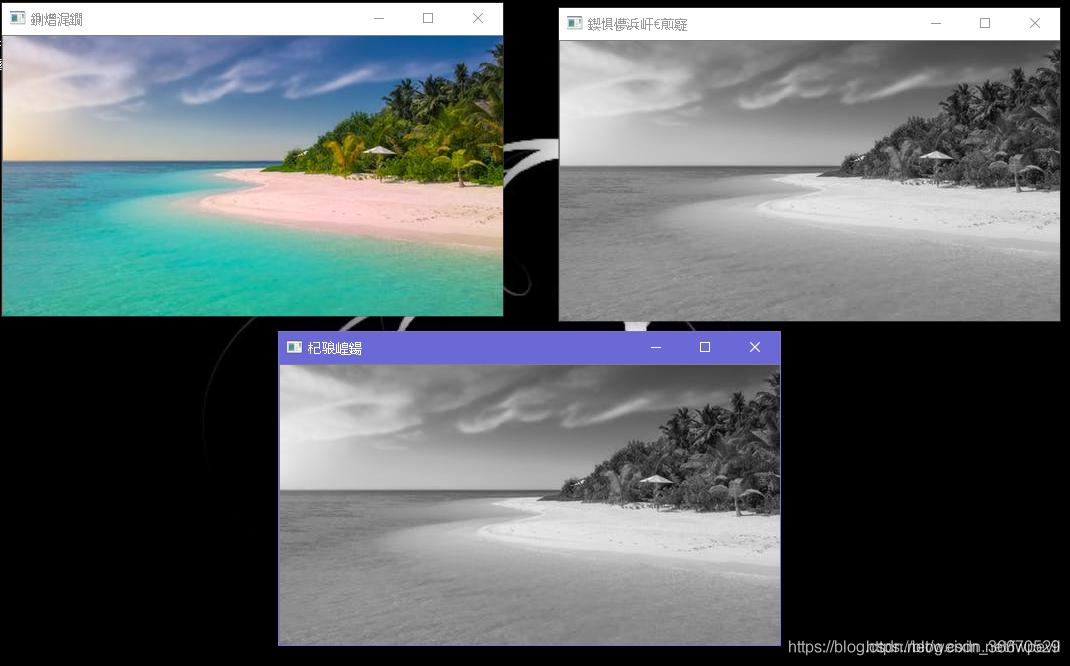
After Baidu saw the answer to a similar question, it was because the path was wrong, that is, the picture could not be found, so it reported an error. After modifying the path, the picture was successfully displayed, and the effect was as follows:

Undertake MATLAB, Python and C + + programming, machine learning, computer vision theory implementation and guidance, undergraduate and master can, salted fish trading,

target is multiclass but average=’binary’. please choose another average setting.

When the sklearn model is referenced and the model is evaluated after fit, the error occurs. The code is as follows:

from sklearn.tree import DecisionTreeClassifier
from sklearn.metrics import f1_score

regressor = DecisionTreeClassifier(random_state=42)
regressor.fit(X_train,y_train)
y_pred = regressor.predict(X_test)

print(f1_score(y_pred,y_test))

After running, it appears:

target is multiclass but average='binary'. please choose another average setting.

In fact, there is no problem with the code. The problem lies in the data type, y here_ The values in test are not binary of 0 and 1, but [123, 23142243 ]Therefore, in essence, it is impossible to carry out hair care_ Score calculation, you will find that if F1_ Change score to accuracy_ Score, the return result is 0
so to predict y of this kind of value type, other evaluation indicators, such as R 2, are needed. The code is as follows:

from sklearn.tree import DecisionTreeClassifier
from sklearn.metrics import r2_score
regressor = DecisionTreeClassifier(random_state=42)
regressor.fit(X_train,y_train)

# TODO: output predicted scores on the test set
y_pred = regressor.predict(X_test)

print(r2_score(y_pred,y_test))

result:

0.12800402751210926

Tensorflow: How to Use static_rnn

tf.nn.static_ rnn

Aliases:

tf.contrib.rnn.static_ rnn

tf.nn.static_ rnn

Use the specified RNN neurons to create a recurrent neural network

tf.nn.static_rnn(

    cell,

    inputs,

    initial_state=None,

    dtype=None,

    sequence_length=None,

    scope=None

)

Parameter Description:

  1. Cell: RNN neuron used in neural network, such as basic RNN cell, basic LSTM cell
  2. inputs: a list of length T, each element in the list is a tensor, which is in the form of: [batch]_ size,input_ size]
  3. initial_ state:RNN The initial state of, if cell.state_ If size is an integer, it must be of the appropriate type and shape, such as [batch]_ size, cell.state_ The tensor of [size]. as cell.state_ If size is a tuple, it should be a tensor tuple cell.state_ S in size should have the form of [batch]_ The tuple of the tensor of [size, S].
  4. Dtype: data type of initial state and expected output. Optional parameters.
  5. sequence_ Length: Specifies the length of each input sequence. The size is batch_ The vector of size.
  6. Scope: variable range

Return value:

A (outputs, state) pair

Outputs: a list of length T, in which each element is the corresponding output of each input. For example, one time step corresponds to one output.

State: the final state

Code example:

import tensorflow as tf


x=tf.Variable(tf.random_normal([2,4,3])) #[batch_size,timesteps,embedding_dim]

x=tf.unstack(x,axis=1) #Expand by time step

n_neurons = 5 # Number of output neurons


basic_cell = tf.contrib.rnn.BasicRNNCell(num_units=n_neurons)

output_seqs, states = tf.contrib.rnn.static_rnn(basic_cell,x, dtype=tf.float32)


print(len(output_seqs)) #Four time steps

print(output_seqs[0]) # Output one tensor per time step

print(output_seqs[1]) # output one tensor per time step

print(states) #Hide states

The output is as follows:

4 Tensor(“rnn/basic_rnn_cell/Tanh:0”, shape=(2, 5), dtype=float32) Tensor(“rnn/basic_rnn_cell/Tanh_1:0”, shape=(2, 5), dtype=float32) Tensor(“rnn/basic_rnn_cell/Tanh_3:0”, shape=(2, 5), dtype=float32)

Error: array bound is not an integer constant before ‘]’ token

Error: array bound is not an integer constant before ‘]’ token

#include<iostream>
#include<cstdio>
using namespace std;
const int N=1010;//(Just because this place forgot to write const !!!!)
int a[N][N],s[N][N];
int main()
{···}

==Just because I forgot to write const!!!! ==And then they report mistakes everywhere, “s’ /” a ‘was not declared in this scope?
children, do you also think it’s very emmm

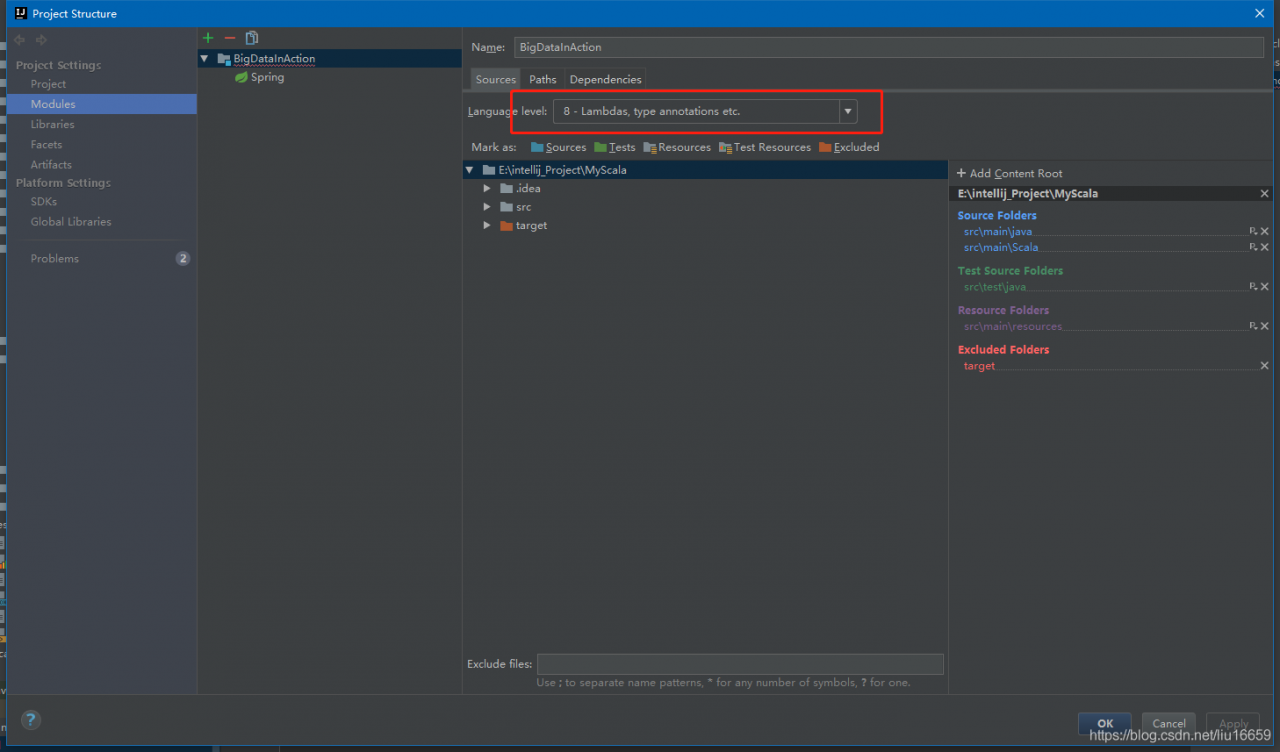
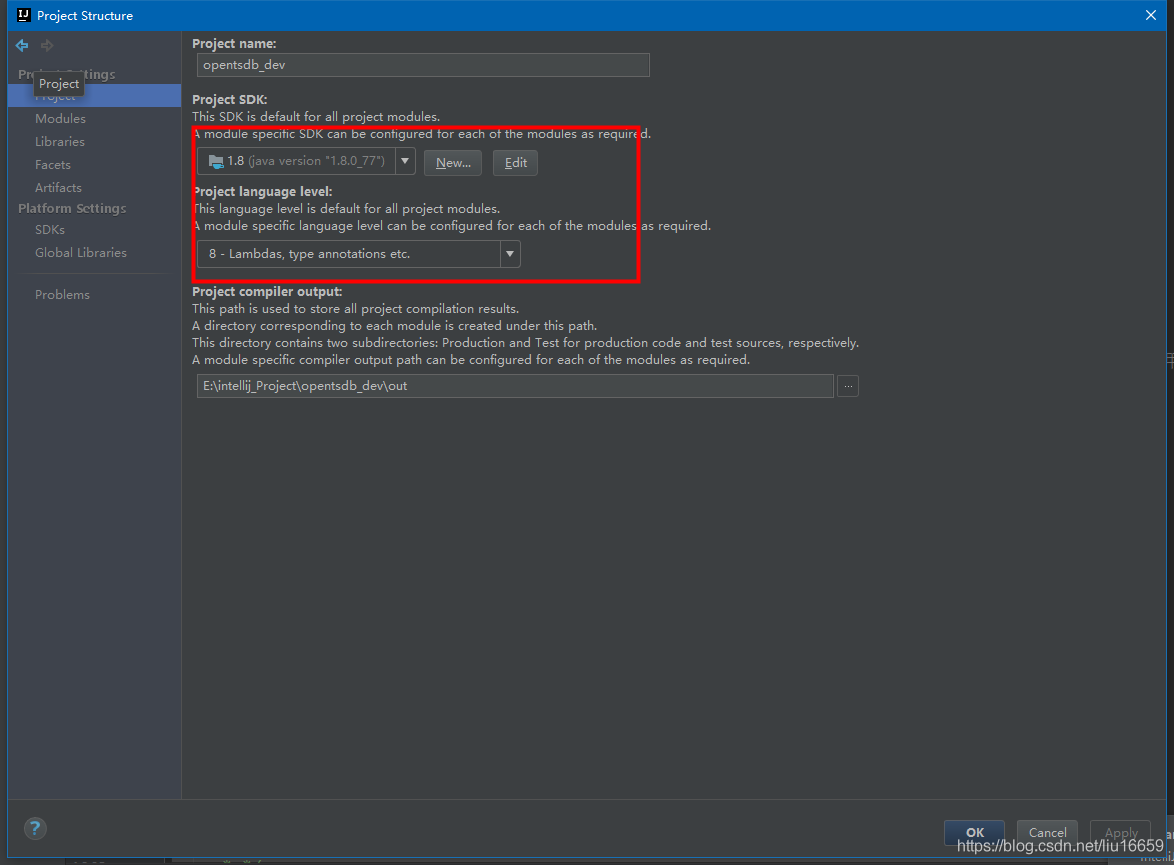
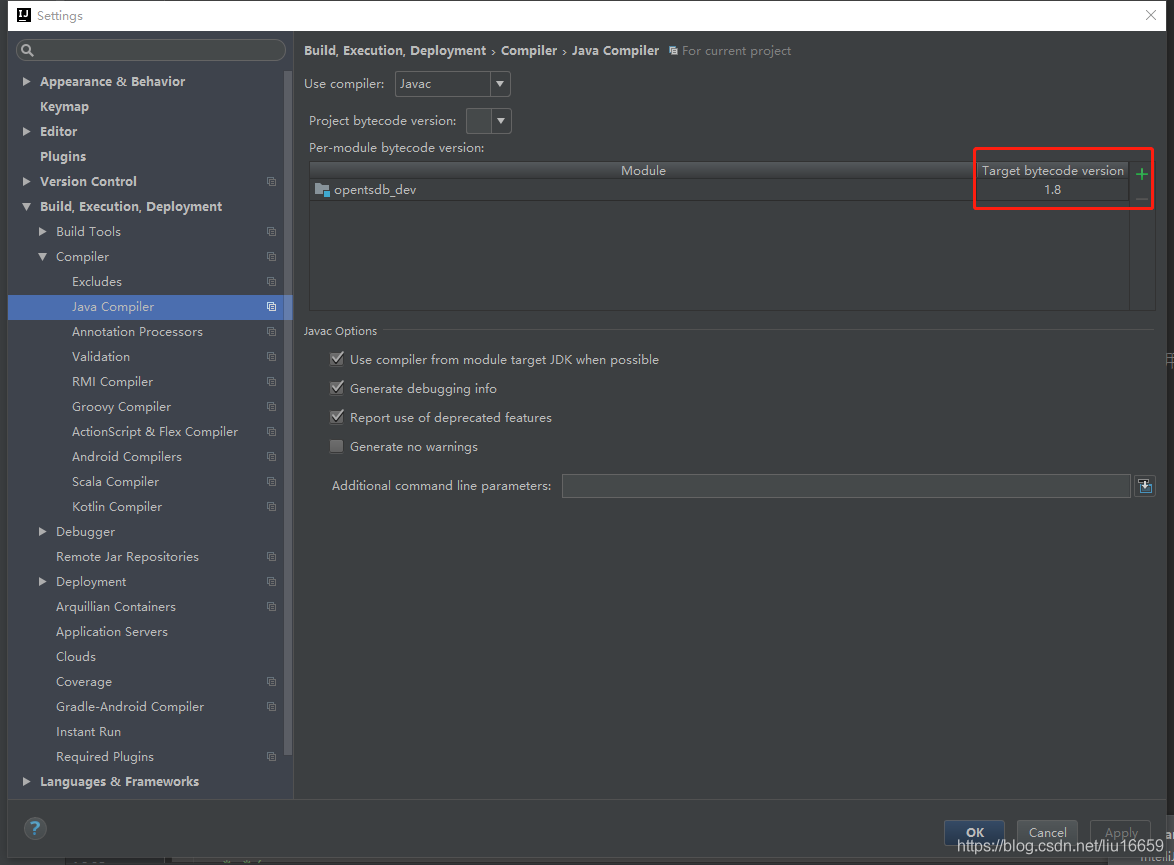
Diamond types are not supported at this language level appears in IntelliJ

Appears in Intellij: Diamond types are not supported at this language level
1. Solution
File->project-> Modules-> Source-> Language Leve-> 8-Lambda,type annotation etc.
File->project-> Project中-> project Language Level-> 8-Lambda,type annotation etc.
Settings-> Build,execution,Deployment-> Compiler->Java Compiler

Win10 ImportError: cannot import name NUMPY_MKL

Questions like title

When I install numpy, I use:

pip install numpy

When installing SciPy, you use:

pip install scipy-0.19.1-cp27-cp27m-win32.whl

Causes the installation source to be inconsistent, therefore appears the above question.

Solution:

http://www.lfd.uci.edu/~gohlke/pythonlibs/

Download numpy-1.13.1 + mkl-cp27-cp27m-win32.whl from the above website

Reuse:

pip install numpy-1.13.1+mkl-cp27-cp27m-win32.whl

Install numpy

The problem can be solved.