Author Archives: Robins

ERROR 1406 (22001): Data Too Long, field len 30, data len 48


It’s strange to encounter a maintenance problem today:

Execute SQL statement insert into test.COLUMNS select * from information_ schema.COLUMNS ; error 1406 (22001): data too long, field len 30, data len 48


The background of the problem is like this:

1. Tidb4.0 distributed database system, de information_ schema.TABLES Copy a table structure as like as two peas, then build a blank table to a temporary library CSDN.

2. Execute insert into on the command line of tidb test.COLUMNS select * from information_ schema.COLUMNS ;

3. Try mysqldump from information_ If you export data from the tables table of the schema and import it into the tables table of the CSDN library, you will still report an error.

4. Two libraries information were checked_ Schema and CSDN libraries have the same table structure.


If there is an error, it should be that the field is only 30 long, but the entered data lacks 48 strings. Then check the table structure carefully

CREATE TABLE `TABLES` (
  `TABLE_CATALOG` varchar(512) DEFAULT NULL,
  `TABLE_SCHEMA` varchar(64) DEFAULT NULL,
  `TABLE_NAME` varchar(64) DEFAULT NULL,
  `COLUMN_NAME` varchar(64) DEFAULT NULL,
  `ORDINAL_POSITION` bigint(64) DEFAULT NULL,
  `COLUMN_DEFAULT` text DEFAULT NULL,
  `IS_NULLABLE` varchar(3) DEFAULT NULL,
  `DATA_TYPE` varchar(64) DEFAULT NULL,
  `CHARACTER_MAXIMUM_LENGTH` bigint(21) DEFAULT NULL,
  `CHARACTER_OCTET_LENGTH` bigint(21) DEFAULT NULL,
  `NUMERIC_PRECISION` bigint(21) DEFAULT NULL,
  `NUMERIC_SCALE` bigint(21) DEFAULT NULL,
  `DATETIME_PRECISION` bigint(21) DEFAULT NULL,
  `CHARACTER_SET_NAME` varchar(32) DEFAULT NULL,
  `COLLATION_NAME` varchar(32) DEFAULT NULL,
  `COLUMN_TYPE` text DEFAULT NULL,
  `COLUMN_KEY` varchar(3) DEFAULT NULL,
  `EXTRA` varchar(30) DEFAULT NULL,
  `PRIVILEGES` varchar(80) DEFAULT NULL,
  `COLUMN_COMMENT` varchar(1024) DEFAULT NULL,
  `GENERATION_EXPRESSION` text NOT NULL
) ENGINE=InnoDB DEFAULT CHARSET=utf8mb4 COLLATE=utf8mb4_bin;


If you see that a field extra is’ extra ‘varchar (30) default null, check whether the value of the data in this field exceeds the value.

mysql-17:31:41> select length(EXTRA) l,EXTRA from information_schema.TABLES order by l desc limit 50;
+----+--------------------------------------------------+
| l  | EXTRA                                            |
+----+--------------------------------------------------+
| 48 | DEFAULT_GENERATED on update CURRENT_TIMESTAMP(3) |
| 48 | DEFAULT_GENERATED on update CURRENT_TIMESTAMP(3) |
| 48 | DEFAULT_GENERATED on update CURRENT_TIMESTAMP(3) |
| 48 | DEFAULT_GENERATED on update CURRENT_TIMESTAMP(3) |
| 48 | DEFAULT_GENERATED on update CURRENT_TIMESTAMP(3) |
| 48 | DEFAULT_GENERATED on update CURRENT_TIMESTAMP(3) |
| 48 | DEFAULT_GENERATED on update CURRENT_TIMESTAMP(3) |
| 48 | DEFAULT_GENERATED on update CURRENT_TIMESTAMP(3) |

Check the length (extra). The maximum length is 48. Is that the reason for the character set?In a database like mysql, the character set is different and the space occupied is different.


First look at the character set of the library. It’s the same:

+----------+------------------------------------------------------------------+
| Database | Create Database                                                  |
+----------+------------------------------------------------------------------+
| csdn     | CREATE DATABASE `csdn` /*!40100 DEFAULT CHARACTER SET utf8mb4 */ |
+----------+------------------------------------------------------------------+

+--------------------+--------------------------------------------------------------------------------+
| Database           | Create Database                                                                |
+--------------------+--------------------------------------------------------------------------------+
| INFORMATION_SCHEMA | CREATE DATABASE `INFORMATION_SCHEMA` /*!40100 DEFAULT CHARACTER SET utf8mb4 */ |
+--------------------+--------------------------------------------------------------------------------+


Let’s look at the definition of character set in the following table again. Is it the same

use information_schema;
CREATE TABLE `TABLES` (
  `TABLE_CATALOG` varchar(512) DEFAULT NULL,
  `TABLE_SCHEMA` varchar(64) DEFAULT NULL,
  `TABLE_NAME` varchar(64) DEFAULT NULL,
  `COLUMN_NAME` varchar(64) DEFAULT NULL,
  `ORDINAL_POSITION` bigint(64) DEFAULT NULL,
  `COLUMN_DEFAULT` text DEFAULT NULL,
  `IS_NULLABLE` varchar(3) DEFAULT NULL,
  `DATA_TYPE` varchar(64) DEFAULT NULL,
  `CHARACTER_MAXIMUM_LENGTH` bigint(21) DEFAULT NULL,
  `CHARACTER_OCTET_LENGTH` bigint(21) DEFAULT NULL,
  `NUMERIC_PRECISION` bigint(21) DEFAULT NULL,
  `NUMERIC_SCALE` bigint(21) DEFAULT NULL,
  `DATETIME_PRECISION` bigint(21) DEFAULT NULL,
  `CHARACTER_SET_NAME` varchar(32) DEFAULT NULL,
  `COLLATION_NAME` varchar(32) DEFAULT NULL,
  `COLUMN_TYPE` text DEFAULT NULL,
  `COLUMN_KEY` varchar(3) DEFAULT NULL,
  `EXTRA` varchar(30) DEFAULT NULL,
  `PRIVILEGES` varchar(80) DEFAULT NULL,
  `COLUMN_COMMENT` varchar(1024) DEFAULT NULL,
  `GENERATION_EXPRESSION` text NOT NULL
) ENGINE=InnoDB DEFAULT CHARSET=utf8mb4 COLLATE=utf8mb4_bin;


use csdn;
CREATE TABLE `TABLES` (
  `TABLE_CATALOG` varchar(512) DEFAULT NULL,
  `TABLE_SCHEMA` varchar(64) DEFAULT NULL,
  `TABLE_NAME` varchar(64) DEFAULT NULL,
  `COLUMN_NAME` varchar(64) DEFAULT NULL,
  `ORDINAL_POSITION` bigint(64) DEFAULT NULL,
  `COLUMN_DEFAULT` text DEFAULT NULL,
  `IS_NULLABLE` varchar(3) DEFAULT NULL,
  `DATA_TYPE` varchar(64) DEFAULT NULL,
  `CHARACTER_MAXIMUM_LENGTH` bigint(21) DEFAULT NULL,
  `CHARACTER_OCTET_LENGTH` bigint(21) DEFAULT NULL,
  `NUMERIC_PRECISION` bigint(21) DEFAULT NULL,
  `NUMERIC_SCALE` bigint(21) DEFAULT NULL,
  `DATETIME_PRECISION` bigint(21) DEFAULT NULL,
  `CHARACTER_SET_NAME` varchar(32) DEFAULT NULL,
  `COLLATION_NAME` varchar(32) DEFAULT NULL,
  `COLUMN_TYPE` text DEFAULT NULL,
  `COLUMN_KEY` varchar(3) DEFAULT NULL,
  `EXTRA` varchar(30) DEFAULT NULL,
  `PRIVILEGES` varchar(80) DEFAULT NULL,
  `COLUMN_COMMENT` varchar(1024) DEFAULT NULL,
  `GENERATION_EXPRESSION` text NOT NULL,
  KEY `idx_pri` (`TABLE_SCHEMA`,`TABLE_NAME`,`COLUMN_KEY`)
) ENGINE=InnoDB DEFAULT CHARSET=utf8mb4 COLLATE=utf8mb4_bin

Of course, the solution is very simple, which is to modify the character length in the tables table of CSDN library

alter table csdn.TABLES modify `EXTRA` varchar(128) DEFAULT NULL;


But why information_ In the tables table of the schema library, why can 48 characters be accessed in ‘extra’ varchar (30) default null?This problem is worthy of further study.
ArcGIS API for JavaScript Error Uncaught(in promise): TypeError: xxx is not a constructor

preface

When using ArcGIS API JavaScript, the following errors are reported:

Cause of error

When we use require to import related packages when using ArcGIS API, the parameters in the following functionshould be consistent with the order of packages in require , otherwise the above errors will be caused.

How to Solve MacOS Big Sur MySQL workbench flashback problem

The program is executed directly from the command line

$ /Applications/MySQLWorkbench.app/Contents/MacOS/MySQLWorkbench
Fatal Python error: initfsencoding: unable to load the file system codec, sys.path = ['/Applications/MySQLWorkbench.app/Contents/Resources/libraries', '/Library/Frameworks/Python.framework/Versions/3.7/lib/python37.zip', '/Library/Frameworks/Python.framework/Versions/3.7/lib/python3.7', '/Library/Frameworks/Python.framework/Versions/3.7/lib/python3.7/lib-dynload']
ModuleNotFoundError: No module named 'encodings'

Current thread 0x000000010a883e00 (most recent call first):
Abort trap: 6

After checking that there is no Python 3.7 on the system, the solution is as follows:

# Install python 3.7
$ brew install [email protected]
# Create a soft connection
$ sudo ln -s /usr/local/Cellar/python\@3.7/3.7.10/Frameworks/Python.framework /Library/Frameworks/Python.framework

Run MySQL workbench again successfully.

[How to Fix] MySQL Workbench for Mac Flashback

After MySQL workbench 8.0.23 Mac version is installed successfully, double-click to open and flash back

Start at the command line and you can see the error:

Fatal Python error: initfsencoding: unable to load the file system codec, sys.path = ['/Users/georgi/Applications/MySQLWorkbench.app/Contents/Resources/libraries', '/Library/Frameworks/Python.framework/Versions/3.7/lib/python37.zip', '/Library/Frameworks/Python.framework/Versions/3.7/lib/python3.7', '/Library/Frameworks/Python.framework/Versions/3.7/lib/python3.7/lib-dynload']
ModuleNotFoundError: No module named 'encodings'

The reason is python

Solution:

1. Scheme 1: command line startup

PYTHONPATH=/Library/Developer/CommandLineTools/Library/Frameworks/Python3.framework/Versions/3.7/lib/python3.7 /Applications/MySQLWorkbench.app/Contents/MacOS/MySQLWorkbench

2. Scheme 2: modify the MySQL workbench running file

cd /Applications/MySQLWorkbench.app/Contents/MacOS
mv MySQLWorkbench MySQLWorkbench.bak
echo "PYTHONPATH=/Library/Developer/CommandLineTools/Library/Frameworks/Python3.framework/Versions/3.7/lib/python3.7 /Applications/MySQLWorkbench.app/Contents/MacOS/MySQLWorkbench.bak" > MySQLWorkbench
chmod +x MySQLWorkbench

After executing the above commands, double-click MySQL workbench to start normally

reference resources: https://bugs.mysql.com/bug.php?id=102364

Download and save uniapp pictures to Android error reporting app

To save a picture to a mobile photo album, you must download a download file to download the picture. The picture can be saved normally on IOS mobile phone, but it fails to save on an Android mobile phone

the returned address is of unknown type. At this time, saving will fail

Therefore, it is necessary to uni.download file ({filePath: wx.env.USER_ DATA_ PATH + ‘/ file.jpg ’})
add this code to change the address, and then it will be saved successfully

//Save images locally
			savePoster(){
				uni.showLoading({
					title:'Downloading...'
				})
				uni.downloadFile({
					url:this.playBillUrl,//  This is the web image address that the backend gets
					filePath: wx.env.USER_DATA_PATH + '/file.jpg',// This must be written here otherwise Android will download the address after it appears.unknown
					success:res => {
						uni.hideLoading()
						if (res.statusCode === 200) {
						
							uni.saveImageToPhotosAlbum({
								filePath: res.filePath,
								success: function() {
									uni.showToast({
										title:'save sucessfully'
									})
								},
								fail: function(res) {
									console.log(res)
									uni.showToast({
										title:'save failed, please try again later'
									})
								}
							});
						} else {
							uni.showToast({
								title:'Download error'
							})
							uni.hideLoading()	
						}
					
					}
				})

ReflectionUtils can not access XXX “private final”

code:

RedisConnection redisConnection = redisConectionFactory.getConnection();
        Field jedisField = ReflectionUtils.findField(JedisConnection.class, "jedis");
        Jedis jedis = (Jedis) ReflectionUtils.getField(jedisField, redisConnection);

Reflection problems
code changes:

RedisConnection redisConnection = redisConectionFactory.getConnection();
        Field jedisField = ReflectionUtils.findField(JedisConnection.class, "jedis");
        // Use only when getting properties modified with private
        jedisField.setAccessible(true);
        Jedis jedis = (Jedis) ReflectionUtils.getField(jedisField, redisConnection);

Vue cannot read property ‘xxx’ of undefined solutions

Problem scenario

Use {} text interpolation to display content through cascade. In the following code, foo returns through the back-end interface.
Before the back-end content returns, the console will not read the property ‘xxx’ of undefined.

<div>
  <h1>{{ foo.title }}</h1>
  <p>{{ foo.description }}</p>
</div>

Solution

<div>
  <h1 v-if="foo.title">{{ foo.title }}</h1>
  <p v-if="foo.description">{{ foo.description }}</p>
</div>

perhaps

<div>
  <template v-if="foo">
    <h1>{{ foo.title }}</h1>
    <p>{{ foo.description }}</p>
  </template>
</div>

perhaps

new Vue({
  foo: {
    title: '',
    description : ''
  },
  created(){
    // Calling the back-end interface
  }
})

HTTP Basic: Access denied

Problem: git push error HTTP basic: access denied

Reason: the user name and password configured by local git are inconsistent with those registered on gitlabs.

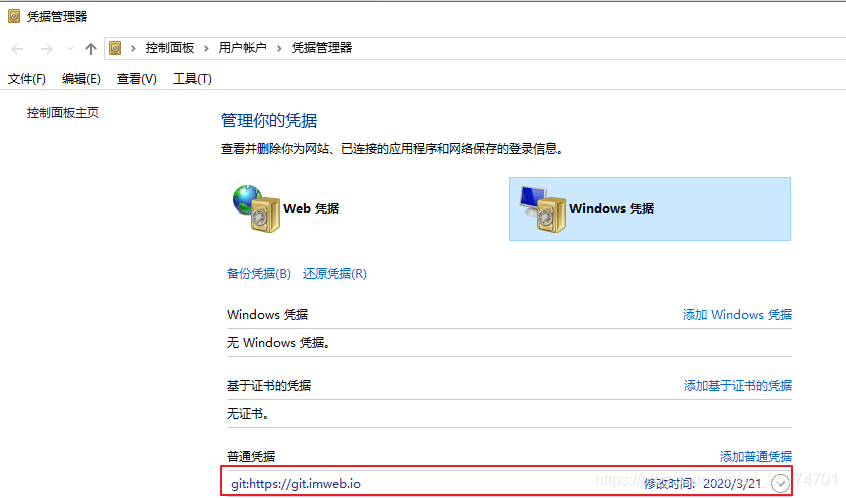
Solution: enter control panel user account credential manager?Windows credentials, find git in it, click Edit password, and update to the latest password

reference

Mavenzai install Error: There are test failures

Error statement: failed to execute goal org.apache.maven . plugins:maven-surefire-plugin :2.12.4:test (default-test) on project web_ nanchang: There are test failures.

Solution:
1. Find the specified project that reports an error, which project will be prompted in the Error statement generally
2. Add a plug-in in the POM file of the project, which can pass through install successfully generally 2 org.apache.maven. plugins Maven surefire plugin true
3. If not, please check whether the service on the virtual machine is enabled and restart