Author Archives: Robins

Solution to the problem of multiple parameters when using pipeline under Linux

When doing the project today, we encountered a problem, that is, how to use the pipeline under the Linux command. We will certainly use the simple pipeline, just like this form

<span style="font-size:18px;">ls -a | grep *test</span>

Today’s problem is a bit complicated. It is to scan the system log in real time, from the last line after scanning to the end of the file, and match keywords. If they match, an alarm will be given. I use awk with grep command to achieve

Awk command is used to select log segment output as the input of grep command

awk 'NR>= beginLineNum&& NR<endLineNum logFileName  | grep -nE  pattern ;

But how to get the total row number of the current log becomes a problem. The command to get the total row number is

wc -l logFileName

But the result after WC is to be placed in the position of Ender linenum, which can not be realized by | method. After query, it is found that it can be realized by using the ‘` symbol (` symbol is the key under the ESC key on the keyboard)

So the way to do it is

awk 'NR>= beginLineNum&& NR<`wc -l logfileName` logFileName  | grep -nE  pattern ;

When executing commands in Linux, the commands in ‘will be executed first, and then other commands will be executed

“As standard input, the return value of the command inside is input into the command outside.

When MyEclipse starts tomcat, the console doesn’t jump out

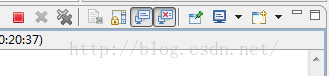
Today, I encountered a problem. Originally, when I started Tomcat through MyEclipse, the tab would automatically jump to the console to display some startup logs, but I couldn’t jump today, as shown in the figure below

The reason is due to the problem of setting, there are two solutions

1、

As shown in the figure above, click on the chart as shown in my picture.

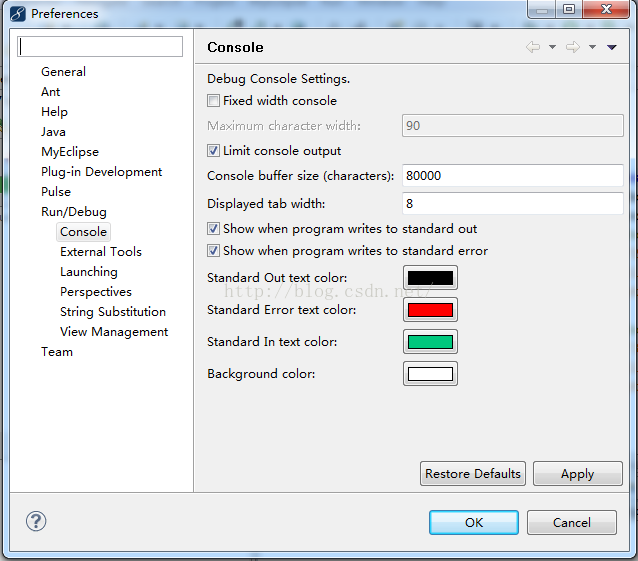
2. Click windows – & gt; preferences – & gt; run/debug – & gt; console

Check the two show’s beginning, and it’s OK.

Just choose one of the two methods above. After setting, you can see that when we start tomcat, the next tab will automatically jump to console

An unable to locate appropriate constructor on class solution appears

Today, when using hibernate operation, the query operation also made this error. I couldn’t figure out the solution. Finally, I found the ending method on the Internet, which should not be regarded as the method. That’s the reason.

First, I use the following HQL statement

String hql="select new PO(。。。。) from 。。。";

This error is largely due to the time format. The reasons are as follows

1. In Oracle, what is the return time of using hibernate query java.util.Date Yes.

2. When using struts1, the time plug-ins in the foreground must be string in the form, otherwise an error will be reported.

3. Use BeanUtils.copyProperties Method, the string time in form can only be converted to java.sql.Date Type.

4. Due to the reason of 3, the time type of Po entity class should be java.sql.Date Type.

5. Oracle return java.util.Date , Po is java.sql.Date So the problem arises.

The current solution is to transform in the construction method, and another method is to implement string to java.util.Date But what I’m doing now is an old project. There was a lot of code before, and it would be troublesome if I made a mistake. So it’s relatively safe to use the construction method to convert.

We have to make complaints about the problems in our project, which are basically caused by the time type related to the database, and the conflict of jar packages in the project.

The solution of Hibernate query returning all null lists

Today, when I was working on a project, I used HQL to look up the database, but all the returned results were null. Note that the returned list is not null, but there are values in the list. The size of the list is the total number of records, but when I traverse the list output, all the elements in the list are null. I suspect that there is something wrong with my conditions. I have removed all the conditions, leaving only one sentence:

String hql = "from CarMaintain t";

It’s worth the rest of the sentence, but it’s still the result. I searched the information on the Internet, and all of them were wrong answers. Without exception, I said it was impossible… Then how did I meet… Others are unreliable, so we have to find our own problems.

I began to analyze, why only this sentence has this situation, and other sentences are OK?I found that the table in question has no primary key. Yes, that’s the reason. When there is no primary key, hibernate’s reverse engineering will automatically construct a composite primary key for us, so I started to check hbm.xml The file and configuration are correct. What’s the problem?I collapsed all afternoon for it. The reason is due to the internal mechanism of hibernate,

In my table without primary key, the fields in the composite primary key constructed by hibernate have null values, so no matter how you look it up, it is null in the end. When you break the point, you will see [null, null, null,….]

resolvent:

1. Create a new field, use it as the primary key, and hbm.xml The file is modified correctly

2. All fields contained in the composite primary key cannot be null in the database

It took a long time to solve this problem. I hope I can help you.

Solving windows error: [error 87] classification: problem summary

Today’s implementation B= webdriver.Firefox () is an error report. My version is 19.0 for Firefox and 2.37 for selenium.

In the following two cases: A, B,

All of them are caused by the incompatibility between the firebox version and selenium version http://docs.seleniumhq.org/about/platforms.jsp Page to view the version information of Microsoft supported by selenium

(it is found that selenium does not support firebox version 19.0)

A.

Traceback (most recent call last):

  File “C:\Users\tomet\Desktop\a.py”, line 10, in <module>

    b =  webdriver.Firefox ()

  File “C:\Python27\lib\site-packages\selenium\webdriver\firefox\ webdriver.py “, line 59, in __ init__

     self.binary , timeout),

File “C:\Python27\lib\site-packages\selenium\webdriver\firefox\extension_ connection.py “, line 47, in __ init__

     self.binary.launch_ browser( self.profile )

  File “C:\Python27\lib\site-packages\selenium\webdriver\firefox\firefox_ binary.py “, line 61, in launch_ browser

    self._ wait_ until_ connectable()

  File “C:\Python27\lib\site-packages\selenium\webdriver\firefox\firefox_ binary.py “, line 105, in _ wait_ until_ connectable

     self.profile.path , self._ get_ firefox_ output()))

WebDriverException: Message: “Can’t load the profile. Profile Dir: c:\\users\\chengh~1.qun\\appdata\\local\\temp\\tmpqdnfky Firefox output: *** LOG  addons.xpi : startup\r\n*** LOG  addons.xpi : Skipping unavailable install location app-system-local\r\n*** LOG  addons.xpi : Skipping unavailable install location app-system-sha re\r\n*** LOG  addons.xpi : checkForChanges\r\n”

B.

startupinfo() error 87

Copyright notice: This article is the original article of the blogger and cannot be reproduced without the permission of the blogger.

Reproduced in: https://www.cnblogs.com/think1988/p/4627912.html

error C1189: #error : Please use the /MD switch for _ Afxdll builds — solutions

The general method found on the Internet is to change “property page – & gt; configuration property – & gt; C/C + + – & gt; code generation – & gt; runtime” from “multi thread (/ MT)” to “multi thread DLL (/ MD)”.
MT is a static compilation option, while MD is a dynamic compilation option. What if you want to compile statically?

In fact, while setting “runtime” to MT, you can change “property page – & gt; configuration property – & gt; general – & gt; use of MFC” to “use MFC in static library”
.
IntelliSense: error instruction: please use the/MD switch for_ Afxdll builds – Solutions – ordinarydilligent – Zhang Sir’s blog

IntelliSense: error instruction: please use the/MD switch for_ Afxdll builds – Solutions – ordinarydilligent – Zhang Sir’s blog

Similarly, if you want to compile dynamically, for:
error 1, error C1189: # error: building MFC application with/MD [D] (CRT DLL version) requires MFC shared DLL version. Please define_ AFXDLL or do not use /MD[d]

You need to set “property page – & gt; configuration property – & gt; general – & gt; use of MFC” to “use MFC in shared DLL”, and set “property page – & gt; configuration property – & gt; C/C + + – & gt; code generation – & gt; runtime” to “multithreaded DLL (/ MD)”

Supplement: (/ MD) and (/ MT) are used to compile release version, (/ MDD) and (/ MTD) are used to compile debug version

Error: Exception was raised when calling per-thread-terminate function in extension lrwreplaymain.dl

Error: exception was raised when calling per thread terminate function in extension occurs when LR is used for stress test lrwreplaymain.dll : System Exceptions: EXCEPTION_ ACCESS_ Message
.

Solution:
create a new temp folder on Disk C (or any other disk)
right click “my computer” & gt; advanced – & gt; environment variables – & gt; edit and modify the directory of all temp variables, and point to the new directory, such as my pointing to C: temp, and save it. [@more@]

From “itpub blog”, link: http://blog.itpub.net/124805/viewspace-1045772/ If you need to reprint, please indicate the source, otherwise you will be investigated for legal responsibility.

Reproduced in: http://blog.itpub.net/124805/viewspace-1045772/

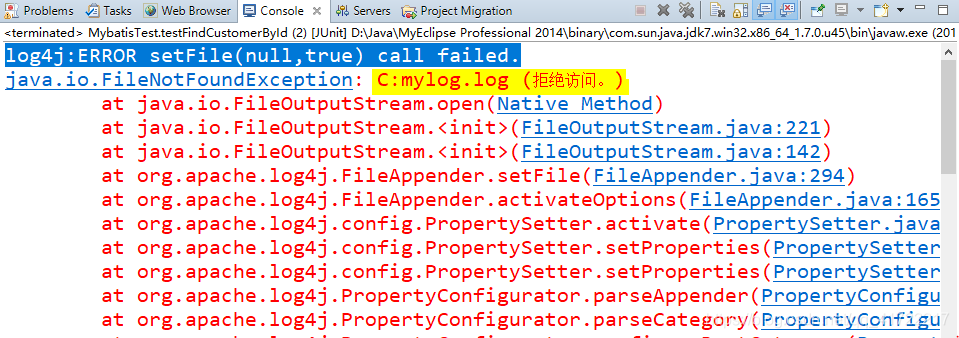
log4j:ERROR

I encountered this problem when writing Java log 4J log

I went to Baidu first. The possible reasons are as follows:

The jar package of 1 ﹣ log4j ﹣ is not correct

2. Install MyEclipse to disk C

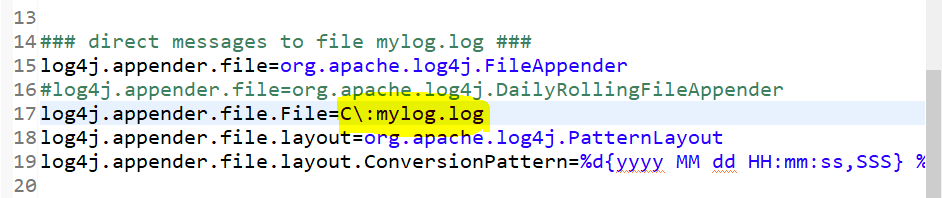
3. The C disk of the computer is set with permission and cannot access the C: mylog.log PS: my problem

Then go to the log4j configuration file and modify the path

Change the path to disk d to solve the problem^-^

Thank you for your help~~~~~~

Solution: windowserror: [error 2]

There is a problem when renaming a file by using the rename() function of python, which prompts windows error: [error 2]. The initial code is as follows:

def renameFile(filename):
    filePre = "D:\\FileDemo\\Python\\pt.py"
    os.rename(filePre, filename)
    print os.listdir(filePre)

if __name__ == '__main__':
    fileNew = "D:\\FileDemo\\Python\\Test.py"
   renameFile(fileNew)

Later, after repeated attempts, the problem was solved~

Before rename, you need to use the chdir() function to enter the path of the target file to tell the python compiler where the file to be renamed is, and then you can modify it;

Python is not a terrible terminator. In fact, she is very young. She can’t find the file herself. We need to tell her where to find the path in detail and patiently os.path.dirname () function

import os
from nt import chdir

def renameF(preName, newName):
    chdir(os.path.dirname(preName))
    os.rename(preName, newName)

if __name__ == '__main__':
    filePre = "D:\FileDemo\Python\PT.py"
    fileNew = "D:\FileDemo\Python\Test.txt"
    renameF(filePre, fileNew)

The code is very simple. You can rename any file by modifying filepre and FileNew.

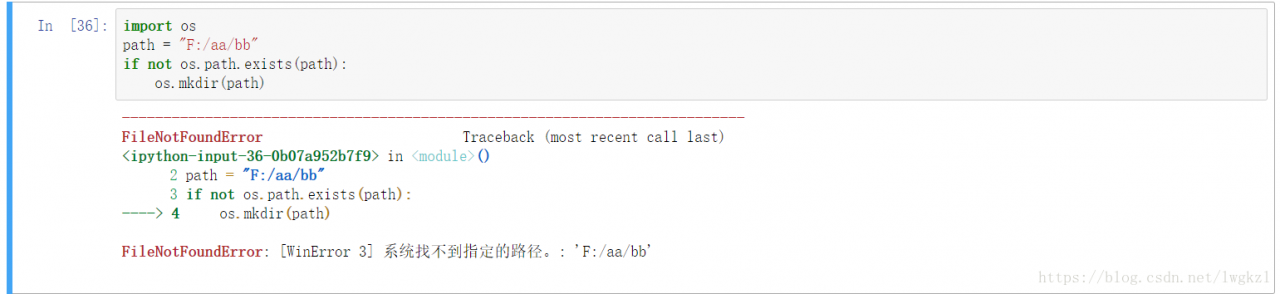
Python windows error: [error 3] and common windows error errors

1、 The common causes and solutions of error3 are as follows

1. The MKDIR function creates several directories in succession. In other words, there is no f/AA/originally. If you need to create f/AA/BB, you will get this error,

Solution, layer by layer detection, or directly use the makedirs function.

2. Lisdir enumerates directories that do not exist.

Solution: before enumerating, judge whether the changed path exists.

3. Creating a file in a read-only folder will also produce the above error.

4. Coding problem: pay attention to the coding format of the file, and modify it in the first line of Py file.

2、 Common windows error and its causes

Windows error: [error 2] does not exist

Windows error: [error 3] does not have this path

Windows error: [error 5] permission problem

Windows error: [error 13] this document is occupied by other programs and cannot be processed

Windows error: [error 123] path syntax error
error

Windows error: [error 145] the directory is not empty. It often appears when deleting a non empty directory

AAPT: error: resource android:attr/colorError not found.

As error:

AAPT: error: resource android:attr/colorError not found.

Solutions:
1 build.gradle Set as follows:

apply plugin: 'com.android.application'

android {
    compileSdkVersion 26
    buildToolsVersion "29.0.2"

    defaultConfig {
        applicationId "com.lgl.answersystem"
        minSdkVersion 15
        targetSdkVersion 26
        versionCode 1
        versionName "1.0"
    }

Later, an error was reported

AAPT: error: resource android:attr/dialogCornerRadius not found.

terms of settlement:

apply plugin: 'com.android.application'

android {
    compileSdkVersion 28
    buildToolsVersion "29.0.2"

    defaultConfig {
        applicationId "com.lgl.answersystem"
        minSdkVersion 15
        targetSdkVersion 28
        versionCode 1
        versionName "1.0"
    }