Author Archives: Robins

How to Solve dyn_small_obs_avoidance Compile Error (eigen version Issue)

Problem description

While Compiling dyn_small_obs_avoidance, catkin_make report an error:

/home/xcs/catkin_ws_dyn/src/dyn_small_obs_avoidance/path_searching/src/kinodynamic_astar.cpp:919:61: error: ‘const class Eigen::ArrayWrapper<const Eigen::CwiseUnaryOp<Eigen::internal::scalar_multiple_op<double>, const Eigen::CwiseBinaryOp<Eigen::internal::scalar_difference_op<double>, const Eigen::Matrix<double, 3, 1>, const Eigen::Matrix<double, 3, 1> > > >’ has no member named ‘floor’
   Vector3i idx = ((pt - origin_) * inv_resolution_).array().floor().cast<int>();
                                                             ^~~~~
/home/xcs/catkin_ws_dyn/src/dyn_small_obs_avoidance/path_searching/src/kinodynamic_astar.cpp:919:74: error: expected primary-expression before ‘int’
   Vector3i idx = ((pt - origin_) * inv_resolution_).array().floor().cast<int>();
   dyn_small_obs_avoidance/path_searching/CMakeFiles/path_searching.dir/build.make:62: recipe for target 'dyn_small_obs_avoidance/path_searching/CMakeFiles/path_searching.dir/src/kinodynamic_astar.cpp.o' failed
make[2]: *** [dyn_small_obs_avoidance/path_searching/CMakeFiles/path_searching.dir/src/kinodynamic_astar.cpp.o] Error 1
CMakeFiles/Makefile2:1260: recipe for target 'dyn_small_obs_avoidance/path_searching/CMakeFiles/path_searching.dir/all' failed
make[1]: *** [dyn_small_obs_avoidance/path_searching/CMakeFiles/path_searching.dir/all] Error 2
Makefile:140: recipe for target 'all' failed
make: *** [all] Error 2
Invoking "make -j8 -l8" failed                                                 

Cause analysis:

By modifying the location where the error occurs, it is found that the error still exists, and the judgment error has nothing to do with the code itself
referring to other posts, I found that the previously installed version of eigen is eigen3.2.1, which may be too low
try upgrading the eigen version.


Solution:

1. Uninstall the  eigen

sudo updatedb  
locate eigen3 
sudo rm -rf /usr/include/eigen3 /usr/lib/cmake/eigen3 /usr/share/doc/libeigen3-dev /usr/share/pkgconfig/eigen3.pc /var/lib/dpkg/info/libeigen3-dev.list /var/lib/dpkg/info/libeigen3-dev.md5sums

2. Installation dependency

sudo apt-get install libopenblas-dev
sudo apt-get install --no-install-recommends libboost1.58-all-dev
sudo apt-get install libx11-dev
sudo apt-get install libgl1-mesa-dev 
sudo apt-get install libglu1-mesa-dev 
sudo apt-get install freeglut3-dev
sudo apt-get install doxygen
sudo apt-get install cmake
sudo wget https://nchc.dl.sourceforge.net/project/glew/glew/2.1.0/glew-2.1.0.tgz --no-check-certificate
sudo tar -xzvf glew-2.1.0.tgz
cd glew-2.1.0/
sudo make 
sudo make install
sudo ldconfig -v

Some may not be installed. I will ignore them and continue with the following steps.

3. Download eigen3.3.7, and extract it to the home directory
download address: eigen3.3.7

4. Installing eigen3.3.7

mkdir build
cd build
cmake ..
make
sudo make install
sudo ldconfig -v

5. Map the path of eigen3 to the /usr/include path.

sudo cp -r /usr/local/include/eigen3 /usr/include/eigen3 
sudo ln -s /usr/include/eigen3/Eigen /usr/include/Eigen

6. Re-enter dyn_small_obs_avoidance workspace catkin_make, compiled successfully.

[ 79%] Building CXX object dyn_small_obs_avoidance/path_planning/CMakeFiles/goal_transform.dir/src/goalpoint_transformer.cpp.o
[ 81%] Building CXX object dyn_small_obs_avoidance/path_planning/CMakeFiles/path_planning_node.dir/src/path_planning.cpp.o
[ 93%] Built target livox_ros_driver_node
[ 95%] Linking CXX executable /home/xcs/catkin_ws_dyn/devel/lib/path_planning/goal_transform
[ 95%] Built target goal_transform
[ 97%] Linking CXX executable /home/xcs/catkin_ws_dyn/devel/lib/path_planning/path_planning_node
[ 97%] Built target path_planning_node
[100%] Linking CXX executable /home/xcs/catkin_ws_dyn/devel/lib/fast_lio/loam_laserMapping
[Solved] Tomcat Server Error: java.lang.NullPointerException Csonsole Error ClassNotFoundException: com.mysql.jdbc.Driver

tomcat Server Error:  java.lang.NullPointerException
Type Exception Report

Description The server encountered an unexpected condition that prevented it from fulfilling the request.

Exception

java.lang.NullPointerException
	com.gxa.login.dbutils.DBUtils.executeQuery(DBUtils.java:26)
	com.gxa.login.dao.LoginDao.queryInfo(LoginDao.java:16)
	com.gxa.login.service.LoginService.login(LoginService.java:15)
	com.gxa.login.service.LoginServlet.doPost(LoginServlet.java:27)
	javax.servlet.http.HttpServlet.service(HttpServlet.java:661)
	javax.servlet.http.HttpServlet.service(HttpServlet.java:742)
	org.apache.tomcat.websocket.server.WsFilter.doFilter(WsFilter.java:52)
Note The full stack trace of the root cause is available in the server logs.


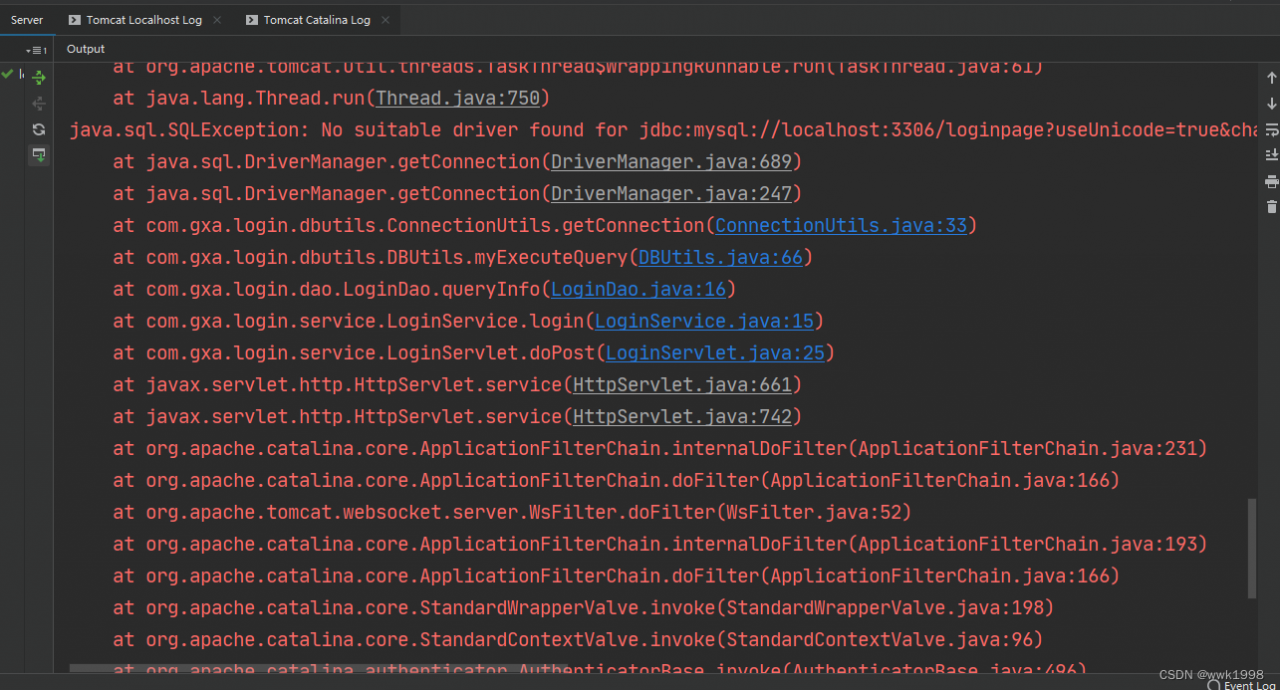
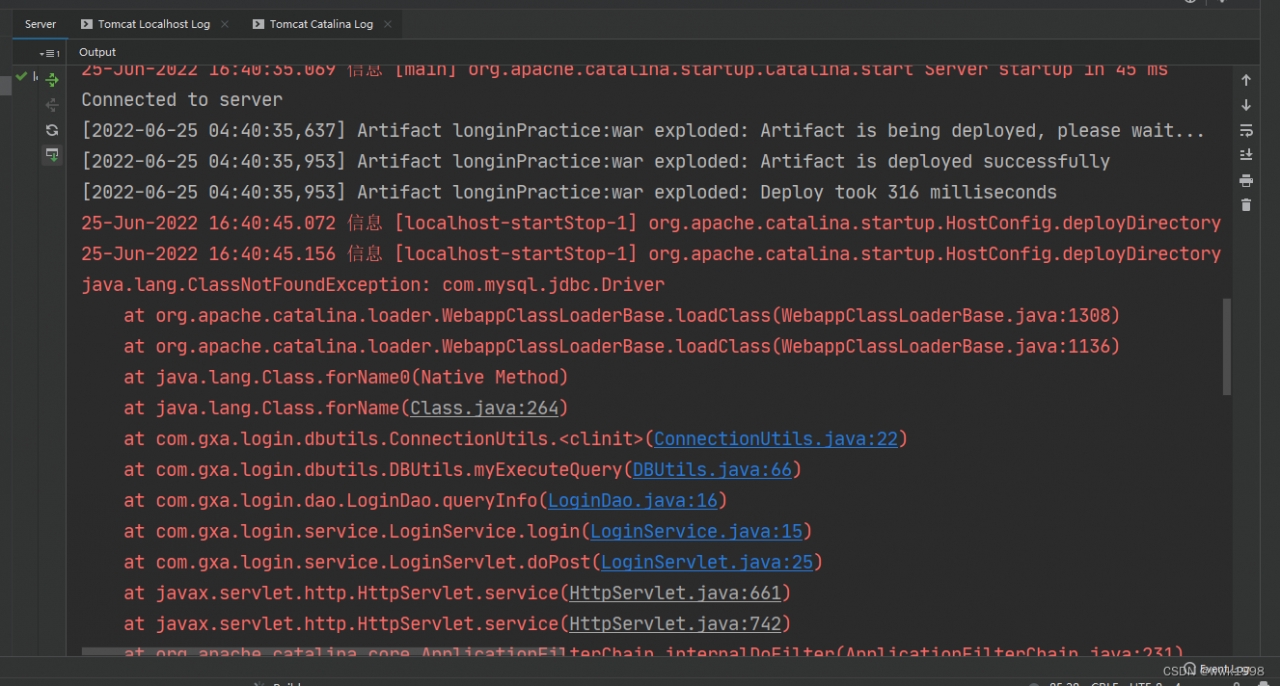
An error is also reported in the console

Obviously, the driver was not found

java.lang.ClassNotFoundException: com.mysql.jdbc.Driver

java.sql.SQLException: No suitable driver found for jdbc: mysql://localhost:3306

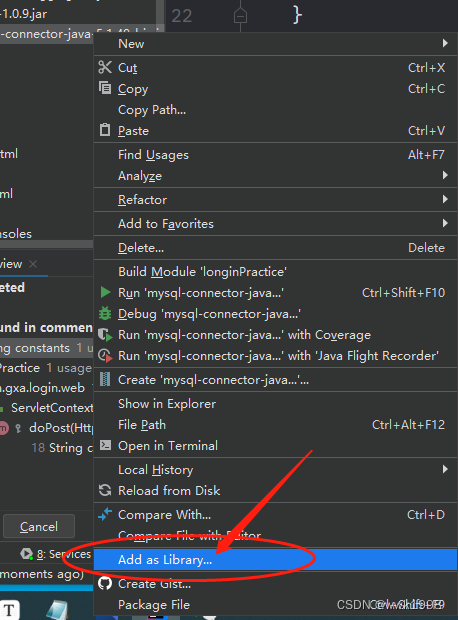
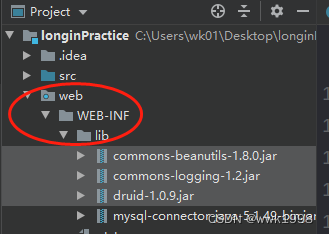
Solution: check whether the jar package is correctly placed under web/WEB-INF/lib

Add to the directory to correctly identify and use:


[Solved] Springcloud Add gateway to Startup Error: Exception encountered during context initialization – cancelling refresh

Springcloud adds gateway startup error

**********************************************************

Spring MVC found on classpath, which is incompatible with Spring Cloud Gateway at this time. Please remove spring-boot-starter-web dependency.

**********************************************************


15.366 WARN  o.s.b.w.s.c.AnnotationConfigServletWebServerApplicationContext:559  Exception encountered during context initialization - cancelling refresh attempt: org.springframework.beans.factory.UnsatisfiedDependencyException: Error creating bean with name 'gatewayConfigurationService' defined in class path resource [org/springframework/cloud/gateway/config/GatewayAutoConfiguration.class]: Unsatisfied dependency expressed through method 'gatewayConfigurationService' parameter 1; nested exception is org.springframework.beans.factory.NoSuchBeanDefinitionException: No qualifying bean of type 'org.springframework.core.convert.ConversionService' available: expected at least 1 bean which qualifies as autowire candidate. Dependency annotations: {@org.springframework.beans.factory.annotation.Qualifier(value=webFluxConversionService)}
15.369 INFO  o.a.c.core.StandardService    :173  Stopping service [Tomcat]
15.385 INFO  o.s.b.a.l.ConditionEvaluationReportLoggingListener:136  

Error starting ApplicationContext. To display the conditions report re-run your application with 'debug' enabled.
15.521 ERROR o.s.boot.SpringApplication    :837  Application run failed
org.springframework.beans.factory.UnsatisfiedDependencyException: Error creating bean with name 'gatewayConfigurationService' defined in class path resource [org/springframework/cloud/gateway/config/GatewayAutoConfiguration.class]: Unsatisfied dependency expressed through method 'gatewayConfigurationService' parameter 1; nested exception is org.springframework.beans.factory.NoSuchBeanDefinitionException: No qualifying bean of type 'org.springframework.core.convert.ConversionService' available: expected at least 1 bean which qualifies as autowire candidate. Dependency annotations: {@org.springframework.beans.factory.annotation.Qualifier(value=webFluxConversionService)}
	at org.springframework.beans.factory.support.ConstructorResolver.createArgumentArray(ConstructorResolver.java:797)
	at org.springframework.beans.factory.support.ConstructorResolver.instantiateUsingFactoryMethod(ConstructorResolver.java:538)
	at org.springframework.beans.factory.support.AbstractAutowireCapableBeanFactory.instantiateUsingFactoryMethod(AbstractAutowireCapableBeanFactory.java:1338)
	at org.springframework.beans.factory.support.AbstractAutowireCapableBeanFactory.createBeanInstance(AbstractAutowireCapableBeanFactory.java:1177)
	at org.springframework.beans.factory.support.AbstractAutowireCapableBeanFactory.doCreateBean(AbstractAutowireCapableBeanFactory.java:557)
	at org.springframework.beans.factory.support.AbstractAutowireCapableBeanFactory.createBean(AbstractAutowireCapableBeanFactory.java:517)
	at org.springframework.beans.factory.support.AbstractBeanFactory.lambda$doGetBean$0(AbstractBeanFactory.java:323)
	at org.springframework.beans.factory.support.DefaultSingletonBeanRegistry.getSingleton(DefaultSingletonBeanRegistry.java:226)
	at org.springframework.beans.factory.support.AbstractBeanFactory.doGetBean(AbstractBeanFactory.java:321)
	at org.springframework.beans.factory.support.AbstractBeanFactory.getBean(AbstractBeanFactory.java:202)
	at org.springframework.beans.factory.support.DefaultListableBeanFactory.preInstantiateSingletons(DefaultListableBeanFactory.java:893)
	at org.springframework.context.support.AbstractApplicationContext.finishBeanFactoryInitialization(AbstractApplicationContext.java:879)
	at org.springframework.context.support.AbstractApplicationContext.refresh(AbstractApplicationContext.java:551)
	at org.springframework.boot.web.servlet.context.ServletWebServerApplicationContext.refresh(ServletWebServerApplicationContext.java:143)
	at org.springframework.boot.SpringApplication.refresh(SpringApplication.java:758)
	at org.springframework.boot.SpringApplication.refresh(SpringApplication.java:750)
	at org.springframework.boot.SpringApplication.refreshContext(SpringApplication.java:397)
	at org.springframework.boot.SpringApplication.run(SpringApplication.java:315)
	at com.course.gateway.GatewayApplication.main(GatewayApplication.java:18)

reason:

<dependency>
    <groupId>org.springframework.cloud</groupId>
    <artifactId>spring-cloud-starter-gateway</artifactId>
</dependency>

It has been introduced

<dependency>
    <groupId>org.springframework.boot</groupId>
    <artifactId>spring-boot-starter-web</artifactId>
</dependency>

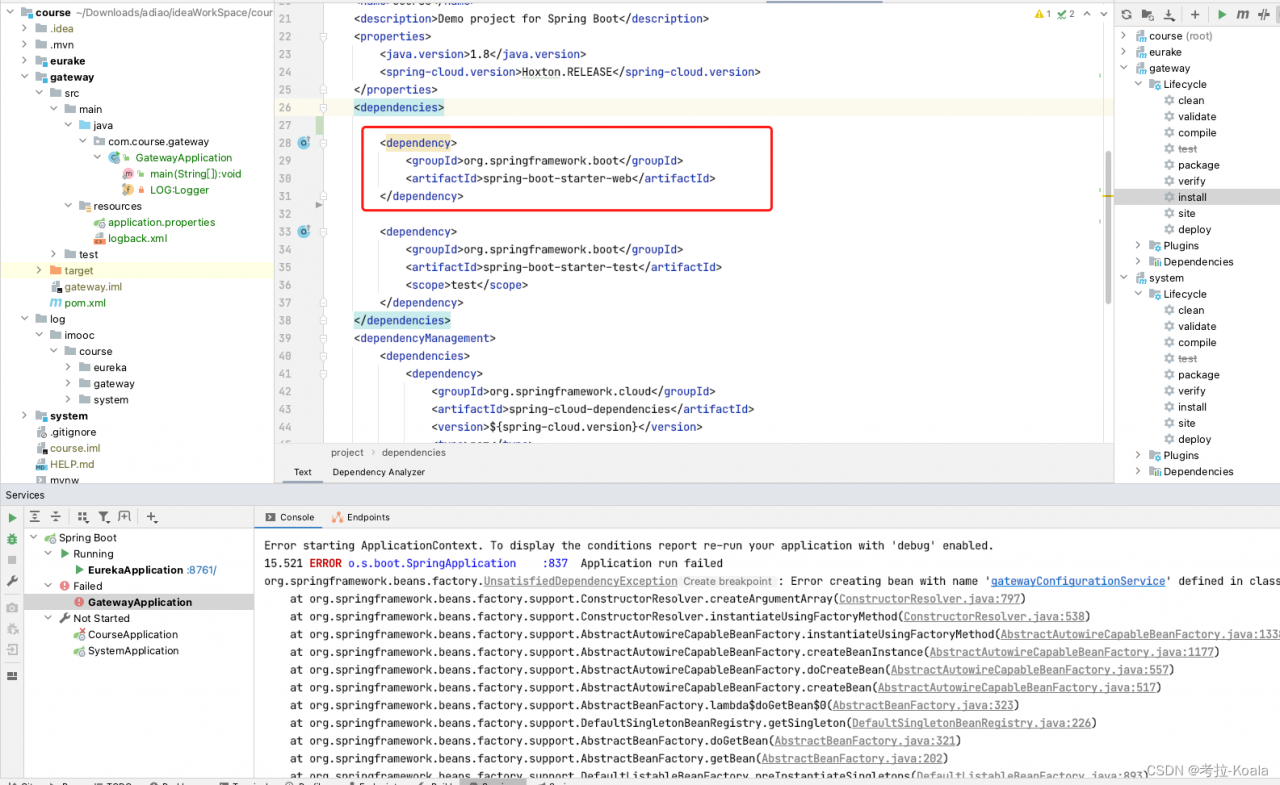
Find the duplicate import in the POM file or the POM file of the parent project, as shown in the following figure:

start the error report at this time
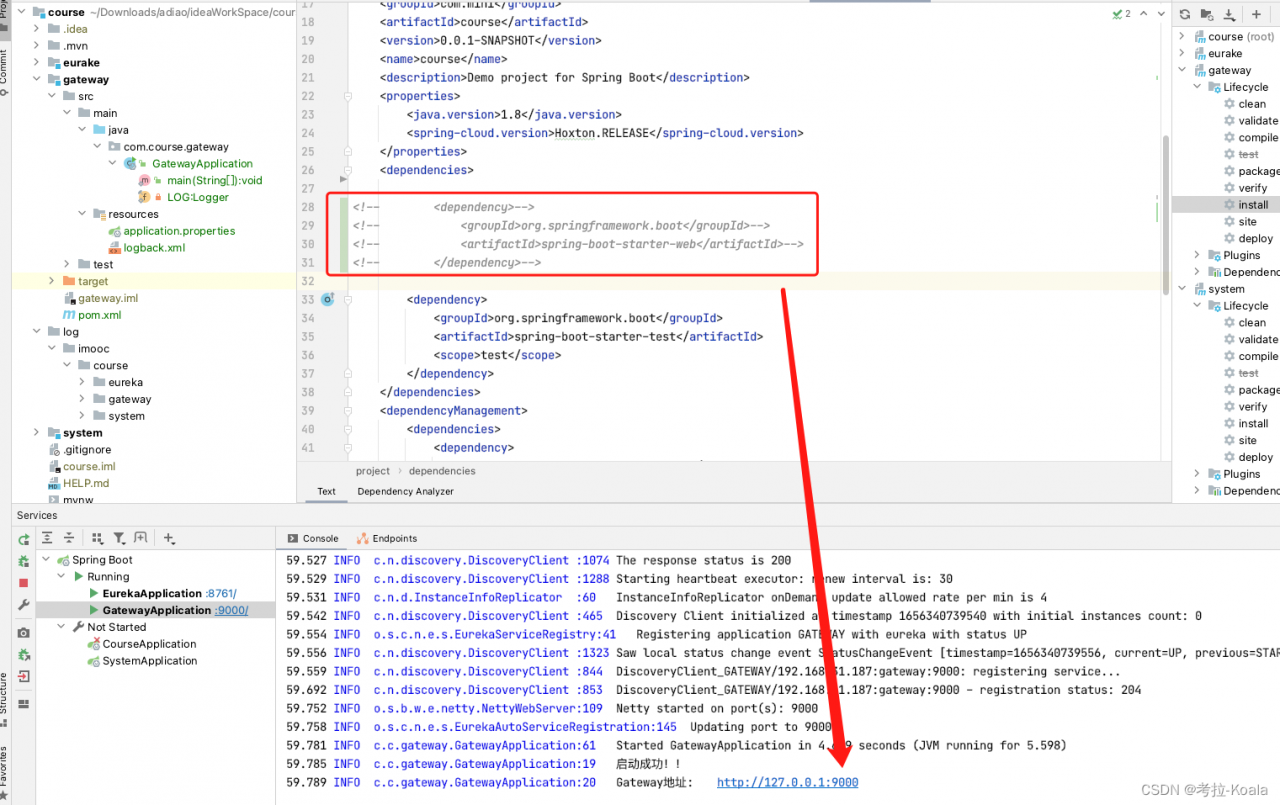
Solution: delete the redundant import

<dependency>  
  <groupId>org.springframework.boot</groupId> 
   <artifactId>spring-boot-starter-web</artifactId>
</dependency>

After deletion, the startup is successful

the deeper original is the gateway. The underlying layer is the weblux framework. Web initialization has been done in spring-cloud-starter-gateway. If springmvc goes to initialize again, it will conflict, resulting in an error

[Solved] gateway Error: reactor.core.Exceptions$ErrorCallbackNotImplemented

The production environment is fine, but suddenly all front-end requests are cross-domain and the requests are 500. gateway reports an error.
reactor.core.Exceptions$ErrorCallbackNotImplemented:java.lang.IndexOutOfBoundsException: Index: 0, Size: 0. All interfaces are reported.
The reason is that the gateway also integrates with springboot-admin, which opens the actuator endpoint of the application, leading to a code injection attack

Solution: Use nginx to intercept the path directly, add the following configuration to conf, and reload nginx.

location /actuator {
    return 404;
}


[Solved] Centos7 Install docker Error: iptables v1.4.21: Couldn‘t load target `DOCKER-ISOLATION‘

Recently, in the process of learning docker, I encountered problems when I started docker in the first step. After the installation is completed according to the steps on the official website, I started it and reported an error: iptables v1.4.21: Couldn’t load target `DOCKER-ISOLATION’, as follows:

 2022-07-01 06:18:25 ERROR: INVALID_TYPE: structure size mismatch 16 != 13
Jul 01 06:18:25 root firewalld[917]: 2022-07-01 06:18:25 ERROR: COMMAND_FAILED: '/sbin/iptables -w2 -t filter -C FORWARD -j DOCKER-ISOLATION' failed: iptables v1.4.21: Couldn't load target `DOCKER-ISOLATION':No such file or directory
                                     
                                     Try `iptables -h' or 'iptables --help' for more information.
Jul 01 06:18:25 root firewalld[917]: 2022-07-01 06:18:25 ERROR: COMMAND_FAILED: '/sbin/iptables -w2 -t nat -D PREROUTING -m addrtype --dst-type LOCAL -j DOCKER' failed: iptables: No chain/target/match by that name.
Jul 01 06:18:25 root firewalld[917]: 2022-07-01 06:18:25 ERROR: COMMAND_FAILED: '/sbin/iptables -w2 -t nat -D OUTPUT -m addrtype --dst-type LOCAL ! --dst 127.0.0.0/8 -j DOCKER' failed: iptables: No chain/target/match by that name.
Jul 01 06:18:25 root firewalld[917]: 2022-07-01 06:18:25 ERROR: COMMAND_FAILED: '/sbin/iptables -w2 -t nat -D OUTPUT -m addrtype --dst-type LOCAL -j DOCKER' failed: iptables: No chain/target/match by that name.
Jul 01 06:18:25 root firewalld[917]: 2022-07-01 06:18:25 ERROR: COMMAND_FAILED: '/sbin/iptables -w2 -t nat -D PREROUTING' failed: iptables: Bad rule (does a matching rule exist in that chain?).
Jul 01 06:18:25 root firewalld[917]: 2022-07-01 06:18:25 ERROR: COMMAND_FAILED: '/sbin/iptables -w2 -t nat -D OUTPUT' failed: iptables: Bad rule (does a matching rule exist in that chain?).
Jul 01 06:18:25 root firewalld[917]: 2022-07-01 06:18:25 ERROR: COMMAND_FAILED: '/sbin/iptables -w2 -t filter -F DOCKER-ISOLATION' failed: iptables: No chain/target/match by that name.
Jul 01 06:18:25 root firewalld[917]: 2022-07-01 06:18:25 ERROR: COMMAND_FAILED: '/sbin/iptables -w2 -t filter -X DOCKER-ISOLATION' failed: iptables: No chain/target/match by that name.
Jul 01 06:18:25 root firewalld[917]: 2022-07-01 06:18:25 ERROR: COMMAND_FAILED: '/sbin/iptables -w2 -t nat -n -L DOCKER' failed: iptables: No chain/target/match by that name.
Jul 01 06:18:25 root firewalld[917]: 2022-07-01 06:18:25 ERROR: COMMAND_FAILED: '/sbin/iptables -w2 -t filter -n -L DOCKER' failed: iptables: No chain/target/match by that name.
Jul 01 06:18:25 root firewalld[917]: 2022-07-01 06:18:25 ERROR: COMMAND_FAILED: '/sbin/iptables -w2 -t filter -n -L DOCKER-ISOLATION-STAGE-1' failed: iptables: No chain/target/match by that name.
Jul 01 06:18:25 root firewalld[917]: 2022-07-01 06:18:25 ERROR: COMMAND_FAILED: '/sbin/iptables -w2 -t filter -n -L DOCKER-ISOLATION-STAGE-2' failed: iptables: No chain/target/match by that name.
Jul 01 06:18:25 root firewalld[917]: 2022-07-01 06:18:25 ERROR: COMMAND_FAILED: '/sbin/iptables -w2 -t filter -C DOCKER-ISOLATION-STAGE-1 -j RETURN' failed: iptables: Bad rule (does a matching rule exist in that chain?).
Jul 01 06:18:25 root firewalld[917]: 2022-07-01 06:18:25 ERROR: COMMAND_FAILED: '/sbin/iptables -w2 -t filter -C DOCKER-ISOLATION-STAGE-2 -j RETURN' failed: iptables: Bad rule (does a matching rule exist in that chain?).
Jul 01 06:18:25 root firewalld[917]: 2022-07-01 06:18:25 ERROR: COMMAND_FAILED: '/sbin/iptables -w2 -t nat -C DOCKER -i docker0 -j RETURN' failed: iptables: Bad rule (does a matching rule exist in that chain?).
Jul 01 06:18:25 root firewalld[917]: 2022-07-01 06:18:25 ERROR: COMMAND_FAILED: '/sbin/iptables -w2 -D FORWARD -i docker0 -o docker0 -j DROP' failed: iptables: Bad rule (does a matching rule exist in that chain?).
Jul 01 06:18:25 root firewalld[917]: 2022-07-01 06:18:25 ERROR: INVALID_ZONE: docker
Jul 01 06:18:25 root dockerd[3099]: time="2022-07-01T06:18:25.949084585-04:00" level=warning msg="could not create bridge network for id c16a1afb8269e0c2975e1fa4f83afa877f5a6892b583196c54dc6b4936644d42 bridge name docker0 while booting up from persi
Jul 01 06:18:25 root dockerd[3099]: time="2022-07-01T06:18:25.964995921-04:00" level=info msg="Default bridge (docker0) is assigned with an IP address 172.17.0.0/16. Daemon option --bip can be used to set a preferred IP address"
Jul 01 06:18:25 root firewalld[917]: 2022-07-01 06:18:25 ERROR: COMMAND_FAILED: '/sbin/iptables -w2 -D FORWARD -i docker0 -o docker0 -j DROP' failed: iptables: Bad rule (does a matching rule exist in that chain?).
Jul 01 06:18:26 root firewalld[917]: 2022-07-01 06:18:26 ERROR: INVALID_ZONE: docker
Jul 01 06:18:26 root dockerd[3099]: time="2022-07-01T06:18:26.028214802-04:00" level=info msg="stopping event stream following graceful shutdown" error="<nil>" module=libcontainerd namespace=moby
Jul 01 06:18:26 root dockerd[3099]: failed to start daemon: Error initializing network controller: Error creating default "bridge" network: Failed to program NAT chain: INVALID_ZONE: docker
Jul 01 06:18:26 root systemd[1]: docker.service: main process exited, code=exited, status=1/FAILURE
Jul 01 06:18:26 root systemd[1]: Failed to start Docker Application Container Engine.

At first, turn off the firewall and it can really start

systemctl stop firewalld

But I always feel that the problem is not here. After searching, it is found that in centos7, firewall is used instead of iptables. To solve this problem, turn off firewall and enable iptables

# Turn off the firewall
systemctl stop firewalld
 
# Disable boot up
systemctl disable firewalld

# Install iptables
yum install iptables-services -y

# Restart the firewall to make the configuration take effect
systemctl restart iptables
 
# Set the firewall to boot up
systemctl enable iptables

Problem solving! Record it for future study

[Solved] awtk scons Error: unsupported pickle protocol: 4

Error Messages:

scons
scons: Reading SConscript files …
scons: done reading SConscript files.
scons: Building targets …
scons: * [SConstruct] ValueError : unsupported pickle protocol: 4
scons: building terminated because of errors.

The reason for this is probably that the python version is different.

You can find out. I am working on an awtk project. I run it on PC and copy it to Ubuntu. This is the reason for compilation.

Solution:

Delete the .sconsign.dblite file in the root directory of your project.


[Solved] Ubuntu18.04 Px4 (xtdrone) gazebo joint simulate error

Ubuntu 18.04 installs gazebo9.0 by default and starts indoor1 of Px4 Launch will report an error:

gzserver: symbol lookup error: /usr/lib/x86_64-linux-gnu/libsdformat.so.4: undefined symbol: _ZN8igniti

The reason is that the version of gazebo 9.0 is too low and needs to be upgraded to 9.13, 9.14 or 9.15 (I can use it when upgrading to 9.19) Upgrade method:

1 Uninstall the original gazebo
sudo apt-get remove gazebo* 
sudo apt-get remove libgazebo*
sudo apt-get remove ros-melodic-gazebo* #kinetic noetic Corresponding changes
2 Set up the computer to accept software from package.osrfoundation.org
sudo sh -c 'echo "deb http://packages.osrfoundation.org/gazebo/ubuntu-stable `lsb_release -cs` main" > /etc/apt/sources.list.d/gazebo-stable.list'
cat /etc/apt/sources.list.d/gazebo-stable.list
#If deb http://packages.osrfoundation.org/gazebo/ubuntu-stable xenial main appears, it means no problem
xenial should be 20.04 18.04 for bio
3 Set the key
wget https://packages.osrfoundation.org/gazebo.key -O - | sudo apt-key add -
sudo apt-get update
4 Install gazebo9.1 command.
sudo apt-get install gazebo9=9.1*
//If after executing the commands sudo apt install ros-melodic-gazebo9-* sudo apt install ros-melodic-gazebo-*, gazebo starts with an error like symbol (e.g. gzserver: symbol lookup error: /usr/lib/x86_64-linux-gnu/libsdformat.so.4: undefined symbol: _ZN8igniti). You can solve this problem by running sudo apt upgrade libignition-math2 first
5 sudo apt upgrade libignition-math2
If you type gazebo in the terminal after installation, Gazebo will open and the installation will be successful.
6 Gazebo itself is independent of ROS, so you need to install the Gazebo plugin for ROS
sudo apt install ros-melodic-gazebo9-*
sudo apt install ros-melodic-gazebo-*

[Solved] Flyway Error: Detected applied migration not resolved locally:2 and the execution script error

I preface

Flyway is used in actual development. Let’s briefly introduce flyway

1. Flyway introduction

Flyway is an open source database version management tool. It can be easily used in the command line or introduced in Java applications to manage our database version.

In a project or product, it is difficult to clarify the business at the beginning and design the database table well, so the data table will also iterate continuously in the iteration cycle. Using flyway in Java applications can be used to iterate the database table structure quickly and effectively, and ensure that the data tables are consistent when deployed to the test environment or production environment.

Please refer to flyway’s official documents for details

https://flywaydb.org/documentation/

2. Flyway dependency package

<dependency>
    <groupId>org.flywaydb</groupId>
    <artifactId>flyway-core</artifactId>
    <version>7.9.2</version>
</dependency>

3. Benefits of using flyway

In multi person development projects, we are used to using SVN or git to version control the code. The main purpose is to solve the problems of code conflict and version fallback in multi person development.

II Problem analysis

1. Flyway reports an error: detected applied migration not resolved locally:2

When using flyway for system management, my program reported such errors

1.1 problem analysis:

Reported error: Application migration not detected locally resolved

The reason for this problem is:

1. because the imported database contains flyway_schema_history table, so the local runtime version inconsistent error,

2. I migrated a version 2 sql, then I deleted it, and when I ran it again for the second time, I couldn’t find the V2__orange_cms file that I migrated before.

1.2 Solution
Special Note: Must be in test environment and local environment

1. mvn flyway:clean, this step will clear the existing data.

2. Ensure that the configuration file is open for flyway.

3. Start the project, complete the initialization of the flyway_schema_history table, backup the flyway_schema_history table after the startup is complete

4. Import the data, at this time the flyway_schema_history table will be updated to the version of the imported data

5. After the successful import, delete the flyway_schema_history table and replace it with the backup flyway_schema_history table

6. Start the application again, Success!


2. Script execution error

2.1 problem analysis

The general meaning of the error message: when flyway is opened in my project configuration file, it will explode: the execution of SQL is abnormal, and the “XXX” table cannot be found

This is a problem that has bothered me for a long time. I don’t know where my program and configuration are wrong

Error reason: because our flyway is based on the version of database mysql5.7, but my local database version is mysql5.5, the error “cannot find XXX table” is always reported when starting flyway configuration for database initialization

2.2 problem solving

Upgrade our database version, which is greater than or equal to our development database version. Due to the twists and turns in the road of upgrading the database, we suggest that you learn from it: more detailed

https://blog.csdn.net/m0_49284219/article/details/121972531

Open our flyway configuration after the database upgrade

Start the program to see if our project can start successfully


tensorflow2.3 InvalidArgumentError: jpeg::Uncompress failed [How to Solve]

When training your own dataset, you often report errors:

tensorflow2.3 InvalidArgumentError: jpeg::Uncompress failed
[[{{node decode_image/DecodeImage}}]] [Op:IteratorGetNext]


Solution:
check whether the picture is damaged before training:

import tensorflow as tf
from tensorflow import keras
from tensorflow.keras import layers
import os


num_skipped = 0
for folder_name in ("Fruit apples", "Fruit bananas", "Fruit oranges"):
    folder_path = os.path.join(".\data\image_data", folder_name)
    for fname in os.listdir(folder_path):

        fpath = os.path.join(folder_path, fname)

        try:
            fobj = open(fpath, mode="rb")
            is_jfif = tf.compat.as_bytes("JFIF") in fobj.peek(10)
            
        finally:
            fobj.close()

        if not is_jfif:
            num_skipped += 1
            # Delete corrupted image
            os.remove(fpath)

print("Deleted %d images" % num_skipped)

Delete the damaged picture and train again to solve the problem
if an error is prompted again, use:

# Determine if an image is corrupt from local
def is_valid_image(path):
    '''
    Check if the file is corrupt
    '''
    try:
        bValid = True
        fileObj = open(path, 'rb')  # Open in binary form
        buf = fileObj.read()
        if not buf.startswith(b'\xff\xd8'): # whether to start with \xff\xd8
            bValid = False
        elif buf[6:10] in (b'JFIF', b'Exif'): # ASCII code of "JFIF"
            if not buf.rstrip(b'\0\r\n').endswith(b'\xff\xd9'): # whether it ends with \xff\xd9
                bValid = False
        else:
            try:
                Image.open(fileObj).verify()
            except Exception as e:
                bValid = False
                print(e)
    except Exception as e:
        return False
    return bValid
  
 num_skipped = 0
for folder_name in ("fruit-apple", "fruit-banana", "fruit-orange"):
    #os.path.join() joins two or more pathname components
    folder_path = os.path.join(". \data\image_data", folder_name)
    # os.listdir(path) lists the subdirectories under this directory
    for fname in os.listdir(folder_path):
        fpath = os.path.join(folder_path, fname)
        flag1 = is_valid_image(fpath)
        if not flag1:
            print(flag1)
            print(fpath)#Print the path and name of the error file
 

Adjust the error file and train again to solve the problem.

[Solved] tsc execute error in VSCode Terminal

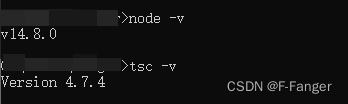
Premise: node and typescript are installed

Error: execute TSC xxx.ts in vscode, an error will be reported.

Solution: the execution mechanism of vscode is limited. Just change the execution mechanism

Exit vscode and run as administrator.
step 1:
execute get-ExecutionPolicy and return Restricted, which means it is restricted.
step 2:
execute  set-ExecutionPolicy RemoteSigned
step 3:
execute get-ExecutionPolicy and return RemoteSigned

Perform the above steps and execute TSC xxx.ts again is OK