Author Archives: Robins

MYSQL reported Fatal error encountered during command execution solution

Add to the connection string

Allow User Variables=True

solve.

Otherwise, errors will be reported from time to time, the stored procedure name will be longer, and the error will be reported, and sometimes it will not be reported. If the parameter is passed 1 digit, it will be normal and 2 digits will be reported as an error…

VTK GetScalarPointer() and GetScalarComponentAsFloat() not work

I am using VTK 5.10.1 with VS 2010, and the following example does not work on my machine:

http://www.vtk.org/Wiki/VTK/Examples/Cxx/ImageData/IterateImageData

The error said:

vtkImageData [009B92A8]: Bad component index 1302176011

I am not sure why this happened, and it should work since it is from the official document. However, the reality is that it does not work on my machine, neither GetScalarComponentAsFloat() or GetScalarComponentAsDouble() will work.

So if we want to get the pixel data from vtkImageData, we need to find another way to do it. And we can get the data by accessing vtkDataArray, please see the following example code:

#include <vtkVersion.h>
#include <vtkSmartPointer.h>
#include <vtkImageData.h>
#include <vtkPointData.h>
#include "vtkBMPReader.h"

int main(int, char *[])
{
    char * filename = "img.bmp";
    if( !filename  || strlen(filename) == 0 )
    {
        return -1;
    }

    vtkBMPReader * reader = vtkBMPReader::New();
    reader->SetFileName(filename);
    reader->Update();

    vtkSmartPointer<vtkImageData> image_data = reader->GetOutput();

    int* dims = image_data->GetDimensions();
    std::cout << "Dims: " << " x: " << dims[0] << " y: " << dims[1] << " z: " << dims[2] << std::endl;
    std::cout << "Number of points: " << image_data->GetNumberOfPoints() << std::endl;
    std::cout << "Number of cells: " << image_data->GetNumberOfCells() << std::endl;
    std::cout << "Number of scalar components: " << image_data->GetNumberOfScalarComponents() << std::endl;

    vtkDataArray *arr = image_data->GetPointData()->GetArray(0);

    // Retrieve the entries from the image data and print them to the screen
    for (int z = 0; z < dims[2]; z++)
    {
        for (int y = 0; y < dims[1]; y++)
        {
            for (int x = 0; x < dims[0]; x++)
            {
                /* Change this
                double* pixel = static_cast<double*>(imageData->GetScalarPointer(x,y,z));
                // do something with v
                std::cout << pixel[0] << " ";
                */
                double d[3];
                arr->GetTuple(y * dims[0] + x, d);
                std::cout << d[0] << " ";
            }
            std::cout << std::endl;
        }
        std::cout << std::endl;
    }

    return EXIT_SUCCESS;
}

Solve error LNK2001 about pcl::io::vtkPolyDataToPointCloud

When use function ‘pcl::io::vtkPolyDataToPointCloud’ in PCL 1.6.0, one may have error as follows:


1>demo.obj : error LNK2001: unresolved external symbol "void __cdecl pcl::io::vtkPolyDataToPointCloud<struct pcl::PointXYZRGB>(class vtkPolyData * const,class pcl::PointCloud<struct pcl::PointXYZRGB> &)" (??$vtkPolyDataToPointCloud@UPointXYZRGB@pcl@@@io@pcl@@YAXQAVvtkPolyData@@AAV?$PointCloud@UPointXYZRGB@pcl@@@1@@Z)
1>G:\projects\demo\demo.exe : fatal error LNK1120: 1 unresolved externals


This happens because function ‘pcl::io::vtkPolyDataToPointCloud’ has not been integrated in ‘pcl_io_release.lib’ library, instead it is implemented in the file ‘vtk_lib_io.hpp’, so we need to include both the header file and the hpp file:


#include <pcl/io/vtk_io.h>
#include <pcl/io/vtk_lib_io.h>
#include <pcl/io/vtk_lib_io.hpp>

Error running ‘PigSellCabinetApplication’: Command line is too long. Shorten command line for PigSellCabinetApplication or also for Spring Boot default configuration

Error running’PigSellCabinetApplication’: Command line is too long. Shorten command line for PigSellCabinetApplication or also for Spring Boot default configuration


When the project is started in Idea, sometimes an error is reported as Error running’Application’: Command line is too long. Shorten command line for Application or aalso for Spring Boot default configuration, the error message is as follows


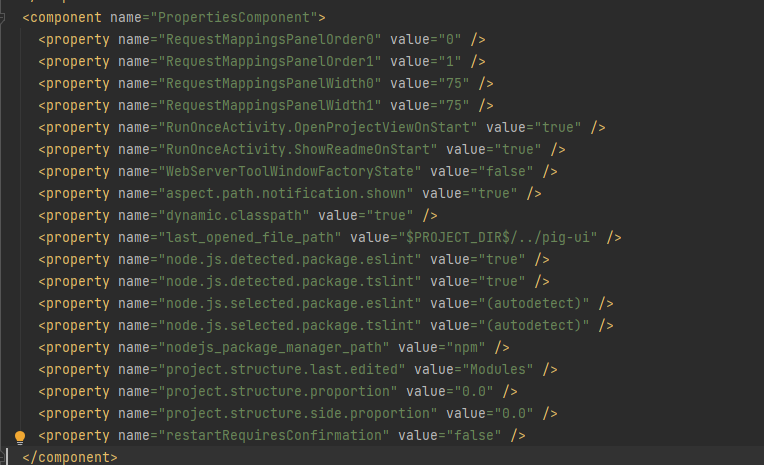
 How to solve it, first find the idea/workspace.xml file in the project, and then find the <component name="PropertiesComponent"></component >tag, the tag is as follows


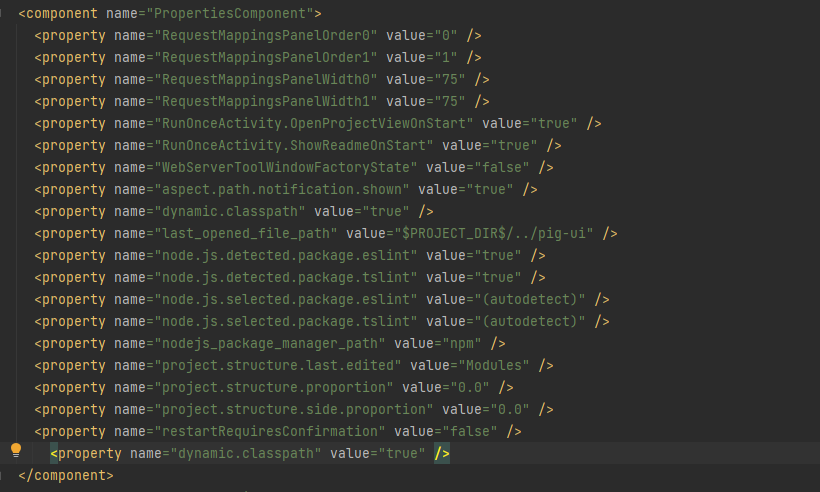
 Then add a line to the component tag  <property name="dynamic.classpath" value="true" />, it becomes the following


In this way, when starting the project, no error will be reported

ArchLinux starts error after modifying MariaDB database path Can’t create test file /xxxxx/xxxxx-test

Install MariaDB first, there is nothing special about this step.

>$ sudo pacman- Sy
 >$ sudo pacman -S extra/mariadb

After the installation is complete, pay attention to the prompts, which will ask us to initialize MariaDB.

sudo mariadb- install -db --user=mysql --basedir=/usr --datadir=/var/lib/mysql

Among them –datadir is the path where the database is located, I modified it to the path /home/mariadb.


Next, modify the configuration file and add the new database path.

>$ sudo vim /etc/my.cnf.d/ server.cnf
[mysqld]
datadir =/home/mariadb


Edit the /usr/share/mysql/policy/apparmor/usr.sbin.mysqld file and add the new path, otherwise the database service cannot be started.

Search for the default path of the database /var/lib/mysql in this file, and configure our new path in the same way.


The last step is to modify the service startup script, otherwise the service still cannot be started.

>$ sudo vim /lib/systemd/system/ mariadb.service
ProtectHome = false

Change ProtectHome=true to ProtectHome=false.


Now you can start the database.

>$ sudo systemctl daemon- reload
 >$ sudo systemctl start mariadb
# If you need to boot automatically, execute the following command
>$ sudo systemctl enable mariadb

Zchunk error: Unable to find multipart download range error in dnf update

Baidu did not search for the relevant problem, and finally found a temporary solution outside the wall.

It’s probably a bug of Zchunk, just disable Zchunk in the dnf configuration file.

>$ sudo vim /etc/dnf/ dnf.conf
 # Add the following at the end of the file 
zchunk = False
 # :wq save and exit

# Restart packagekit service
 >$ sudo systemctl restart packagekit.service

# Re-update the cache
>$ sudo pkcon refresh force

Error husky > pre-commit (node ​​v10.16.3) is reported when git commit is submitted

1. Error prompt:

husky> npm run -s precommit (node ​​v8.11.3)

Running tasks for *.{js,
jsx } [started] eslint –fix [started]
eslint –fix [failed]

Running tasks for *.{js, jsx } [failed]

× “eslint –fix” found some errors. Please fix them and try committing again.

Two, the solution

git commit -m "remarks information" --no-verify

Analysis of npm error ENOTFOUND npm ERR! network request to https://npm.***.com/*** failed and the role of the .npmrc file

1. npm reports an error:

  Looking at a project today, an error was reported when executing npm install to install dependencies:

84 error code ENOTFOUND
85 error errno ENOTFOUND
86 error network request to https://npm.***.com/@umijs%2fpreset-react failed, reason: getaddrinfo ENOTFOUND npm.***.com npm.***.com:443
87 error network This is a problem related to network connectivity.
87 error network In most cases you are behind a proxy or have bad network settings.
87 error network
87 error network If you are behind a proxy, please make sure that the
87 error network 'proxy' config is set properly.  See: 'npm help config'

ENOTFOUND   npm ERR! network request to https://npm.zhonganonline.com/@umijs%2fpreset-react failed

  It means that the registration address of this mirror cannot be found.

  Why is there such a situation? Aren’t all npm installation mirror addresses downloaded from npm? So look at the project structure and found the .npmrc file

2. The role of the .npmrc file

  There may be a .npmrc file in the root directory of some projects. When you click to open it, there is only one sentence: registry= http://registry.npm.xxxx.com

  Is the npm warehouse mirror address

  In npm i, if there is this file in the project root directory, node_modules will be automatically installed from this mirror address, and there is no need to manually set the mirror address.

  So the problem is that there is a problem with the mirror address in the .npmrc file, just delete this file.

3. npm configuration and .npmrc file

(1) npm cli provides the npm config command for npm related configuration, through npm config ls -l you can view all the configurations of npm, including the default configuration.

(2) npm config set to modify the configuration items, after using the command configuration, all the comments in the configuration file will be deleted

(3) Some common configurations:

  proxy, https-proxy: Specify npm to use a proxy

  registry specifies the source of the npm download and installation package. Default: https://registry.npmjs.org/

npm config set prefix $dir

(4) npmrc file: In addition to using the npm config command of cli to display and modify the npm configuration, you can also directly modify the configuration through the .npmrc file.

Failed to create pod sandbox: rpc error: code = Unknown desc = [failed to set up sandbox container…

About k8s deployment error resolution

  • Error message
Warning  FailedCreatePodSandBox  89s               kubelet            Failed to create pod sandbox: rpc error: code = Unknown desc = [failed to set up sandbox container "1c97ad2710e2939c0591477f9d6dde8e0d7d31b3fbc138a7fa38aaa657566a9a" network for pod "coredns-7f89b7bc75-qg924": networkPlugin cni failed to set up pod "coredns-7f89b7bc75-qg924_kube-system" network: error getting ClusterInformation: Get "https://[10.96.0.1]:443/apis/crd.projectcalico.org/v1/clusterinformations/default": x509: certificate signed by unknown authority (possibly because of "crypto/rsa: verification error" while trying to verify candidate authority certificate "kubernetes"), failed to clean up sandbox container "1c97ad2710e2939c0591477f9d6dde8e0d7d31b3fbc138a7fa38aaa657566a9a" network for pod "coredns-7f89b7bc75-qg924": networkPlugin cni failed to teardown pod "coredns-7f89b7bc75-qg924_kube-system" network: error getting ClusterInformation: Get "https://[10.96.0.1]:443/apis/crd.projectcalico.org/v1/clusterinformations/default": x509: certificate signed by unknown authority (possibly because of "crypto/rsa: verification error" while trying to verify candidate authority certificate "kubernetes")]
  • Performance status
[root@linux03 ~]# kubectl get pods -n kube-system
NAME                              READY   STATUS              RESTARTS   AGE
coredns-7f89b7bc75-jzs26          0/1     ContainerCreating   0          63s
coredns-7f89b7bc75-qg924          0/1     ContainerCreating   0          63s

# coredns cannot run
  • Change calico.yaml

# Cluster type to identify the deployment type
  - name: CLUSTER_TYPE
  value: "k8s,bgp"
# New below
  - name: IP_AUTODETECTION_METHOD
    value: "interface=ens192"
    # ens192 is the local NIC name
  • kubectl apply -f calico.yaml
  • Check that it is running
[root@linux03 ~]# kubectl get pods -n kube-system
NAME                                       READY   STATUS    RESTARTS   AGE
calico-kube-controllers-69496d8b75-2nm5k   1/1     Running   0          23m
calico-node-8wfk9                          1/1     Running   0          23m
calico-node-9vn4v                          1/1     Running   0          23m
calico-node-qm8s2                          1/1     Running   0          23m
coredns-7f89b7bc75-jzs26                   1/1     Running   0          26m
coredns-7f89b7bc75-qg924                   1/1     Running   0          26m
etcd-linux03                               1/1     Running   0          26m
kube-apiserver-linux03                     1/1     Running   0          26m
kube-controller-manager-linux03            1/1     Running   0          26m
kube-proxy-29lcf                           1/1     Running   0          25m
kube-proxy-c29wz                           1/1     Running   0          26m
kube-proxy-lpgrr                           1/1     Running   0          25m
kube-scheduler-linux03                     1/1     Running   0          26m

Database mirroring connection error 4’An error occurred while receiving data: ‘10054(An existing connection was forcibly closed by the remote host.)

A SQL Server mirroring of the company failed over (active/standby switchover). Check the reason for the main/standby switchover of SQL Server mirroring. The following error was found in the error log:

clip_image001

Date        2019/8/31 14:09:17
 
Log     SQL Server (Archive #4 - 2019/9/1 0:00:00)


Source      spid35s


Message
 
Database mirroring connection error 4 'An error occurred while receiving data: '10054(An existing connection was forcibly closed by the remote host.)'.' for 'TCP://xxxxx:7022'. .

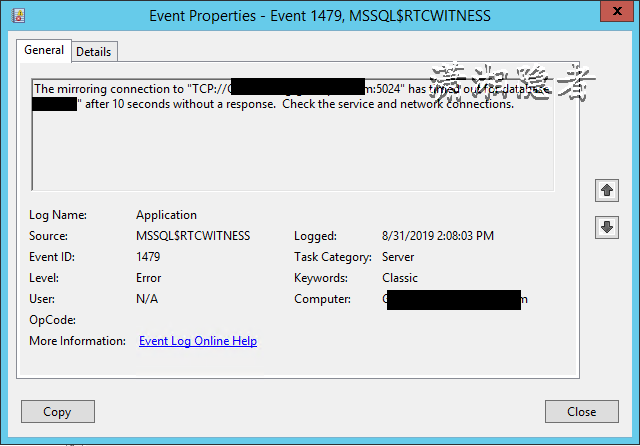
Check the system log of the witness server and find the following error message, which indicates that the witness server cannot get a response from the database after more than 10 seconds. Please check the service or network connections. (Check the service and network connections.)

clip_image002

At this point in the analysis, I can only guess that the SQL Server service abnormality or network abnormality caused the witness server to be unable to access the main server for more than 10 seconds, which caused the main/standby switch. When I asked the system administrator to assist in the analysis, the system administrator confirmed Saturday 14 Click on the main server that is using Veeam Backup & Replication to back up the mirror during that time period (he is testing the use of Veeam Backup & Replication to back up the VmWare virtual machine), but will this Veeam Backup & Replication backup cause network interruption? So, on Monday, we found a time to test whether Veeam Backup & Replication backup really caused network interruption. During the test, it was found that it really caused network interruption (it is not clear whether it is a setting problem or other mechanism reasons. ), the test process has indeed verified that the Veeam Backup & Replication backup caused the network interruption, which caused the master-slave switch of the mirroring, hereby record this case!