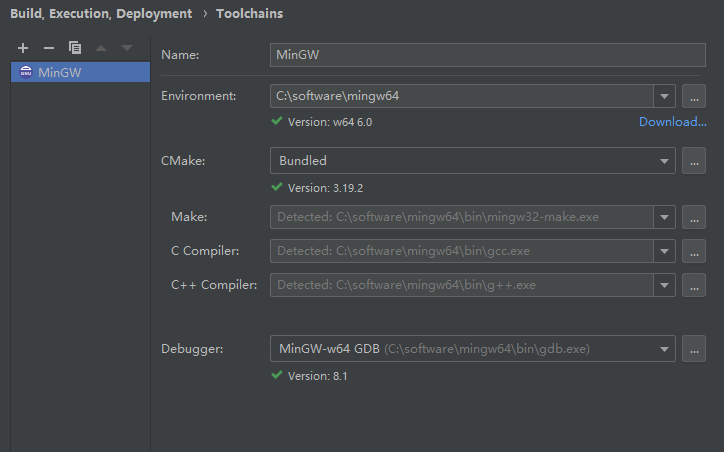
There are two reasons for the mingw path in Chinese or there are multiple mingw locally. Just delete the others.
There are two reasons for the mingw path in Chinese or there are multiple mingw locally. Just delete the others.
A problem,
This error is thrown when using the BAT script to copy files from a remote server
System error 85 has occurred
The local device name is already in use
My script USES disk mapping, something like this
:: Delete the last set mapping
net use Y /delete /y
:: Disk mapping
net use Y: \\ServerName\shares \\ServerName\shares /user:password /persistent:yes
Without further explanation, Google System Error 85 with “NET USE” command for the simple reason that the remote server’s protection mechanism is involved
2. Solutions
There are two solutions, one is to modify the registry of the remote server, and the other is to operate directly locally
1. Modify remote server registry
Change the value of this path in the registry from 1 to 0
HKLM\System\CurrentControlSet\Control\SessionManager\ProtectionMode
For the terminal Server of Window Server 2003, the situation is quite special. Refer to the problem of 935642
2. Modify the native script
In fact, it’s easier to just delete all the disk mappings on your machine, rather than just deleting the definition, and click on the reference method
:: Delete all set disk mappings
net use * /delete /y
When installing dependencies using the apt-get install directive, an error is reported as follows
dpkg: error processing tex-common (--configure):
 subprocess installed post-installation script returned error exit status 1
Errors were encountered while processing:
 tex-common
E: Sub-process /usr/bin/dpkg returned an error code (1)
The solution is a three-step process:
The first step
sudo mv /var/lib/dpkg/info /var/lib/dpkg/info.bak //First rename the info folder
sudo mkdir /var/lib/dpkg/info // Create a new info folder again
sudo apt-get update
The second step
apt-get -f install xxx  //Here xxx is replaced by the software to be installed
sudo mv /var/lib/dpkg/info/* /var/lib/dpkg/info.bak
The third step
sudo rm -rf /var/lib/dpkg/info //Delete the new info folder you created
sudo mv /var/lib/dpkg/info.bak /var/lib/dpkg/info // change the name of the previous info folder back
So far the installation problem has been solved!
If you have installed Windows SharePoint 3.0, “Error: 18456, Severity: 14, State: 38”, caused SQLSERVERAGENT does not start.
Set start mode for SQL Server Agent to automatic, fix this problem
I also encountered the Error 18456 Sev 14 State 16 on our MS Sql Server. At first i try to reset the password for my user but i have no success. But when I try again to look at the users properties having the error i found out that there is no default database assign for that user. I just assign a database and presto I can log on to my database.
My Slotuion:
1. Log on using sa account.
2. Expand secuirity and logins.
3. Right click on the user account with login problem problem and choose properties.
4. On properties genral tab, you will see an drop down option for default database used for the account, choose a database for the account to used and click ok or apply then ok.
5. Log off on sa account and try to log in again.
That solution works for me.
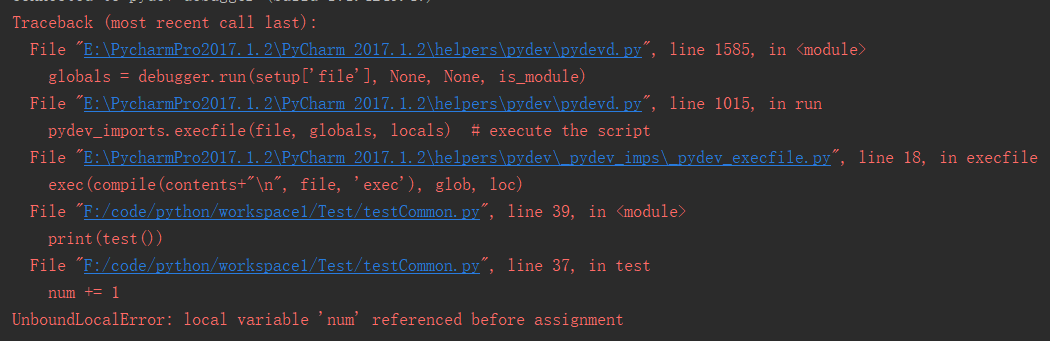
The source code
num = 1

def test():
    num += 1
    return num

print(test())
Error details
Possible reasons for
Undeclared variables appear in Python, and PY finds the scope of a variable by following a simple rule: If there is an assignment to a variable within a function, the variable is considered local and can be modified normally. However, if the variable is not defined inside the function, and there is no variable scope declaration (to call the external variable), the program cannot find the corresponding variable inside the function, so the error message of undefined variable will appear.
The solution
Declare variables as global variables, use global keywords when calling, and you can access them normally. The correct code is as follows:
num = 1

def test():
    global num
    num = num + 1
    return num

print(test())    # output is:2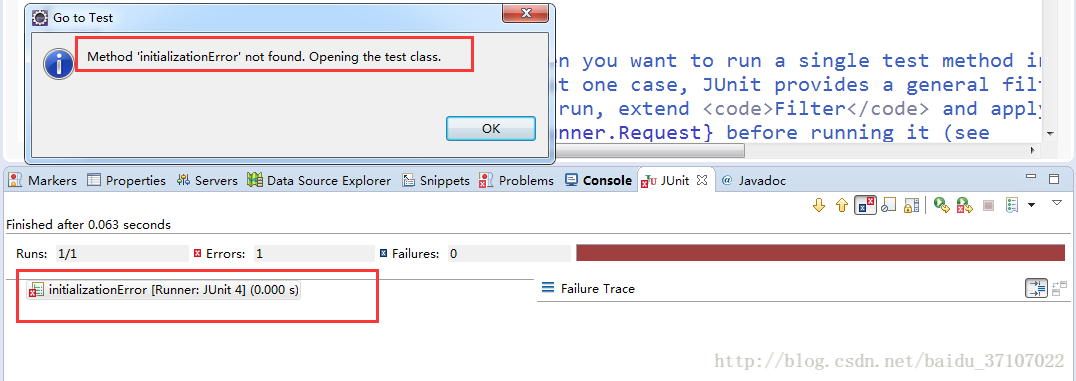
The reasons may be as follows:
1. Methods with return values cannot be tested directly
2. Methods with parameters cannot be directly tested
3. Methods with access rights under public cannot be directly tested
Static static methods cannot be directly tested
5. Do not add an @test annotation to any of the first four conditions, or an initializationError will occur to any method that meets the @test condition
Only the methods of public void can be tested using @test
Point one: must be public, the following are not allowed
Point two: must be void, no return value, without any modification final, static, etc.
Many bloggers say it could be the lead pack problem:
in addition to introducing junit-4.12.jar, two dependent jars were introduced: hamcrest-core-1.3.rc2.jar, and hamcrest-library-1.3.rc2.jar
(Note: After personal testing, this is usually not the case.)
Uncaught Error: SECURITY_ERR: DOM Exception 18
Question:
I get the following error in Chrome’s developer tools window when I try to set a cookie using this jQuery plugin:
Uncaught Error: SECURITY_ERR: DOM Exception 18
What does this error mean and how can I fix it? I get the same error when I use this jQuery plugin.
Answer:
You’re most likely using this on a local file over the file://URI scheme, which cannot have cookies set. Put it on a local server so you can use http://localhost.
How to Solve npm Error: unable to get local issuer certificate
Solution:
npm config set strict-ssl false
According to the configuration file, MySQL limits the size of the data packets accepted by the Server. Sometimes large inserts and updates are limited by the max_allowed_packet parameter, causing write or update failures. (For example, import database, data table)
The following errors appear in the process of migrating or restoring the mysql database:
ERROR 1231 ( 42000 ): Variable ' time_zone ' can ' t be set to the value of ' NULL '
ERROR 1231 (42000): Variable ' sql_mode ' can ' t be set  to the value of  ' NULL '
ERROR 1231 ( 42000 ): Variable ' foreign_key_checks ' can ' t be set to the value of ' NULL '
ERROR 1231 (42000): Variable 'unique_checks ' can ' t be set  to the value of  ' NULL '
ERROR 1231 ( 42000 ): Variable ' character_set_client ' can ' t be set to the value of ' NULL '
Query OK, 0 rows affected (0.00 sec)
ERROR 1231 (42000): Variable ' collation_connection ' can ' t be set  to the value of  ' NULL '
ERROR 1231 ( 42000 ): Variable ' sql_notes ' can ' t be set to the value of ' NULL '
Solution:
Modify the mysql configuration file: max_allowed_packet=1024M
View the current configuration:
show VARIABLES like ' %max_allowed_packet% ' ;
The results displayed are:
The above description shows that the current configuration is: 1M
Modification method
1. Modify the configuration file
You can edit my.cnf to modify (my.ini under windows), and modify it in the [mysqld] section or the mysql server configuration section.
If you can’t find my.cnf, you can pass
Look for the my.cnf file.
The file is under /etc/ under linux.
Restart mysql:
1. Start with service: service mysqld restart
2. Start with mysqld script: /etc/inint.d/mysqld restart
Check whether max_allowed_packet is successfully edited
Note: Setting this value too small will cause a single record to fail to write to the database after exceeding the limit, and subsequent record writing will also fail.
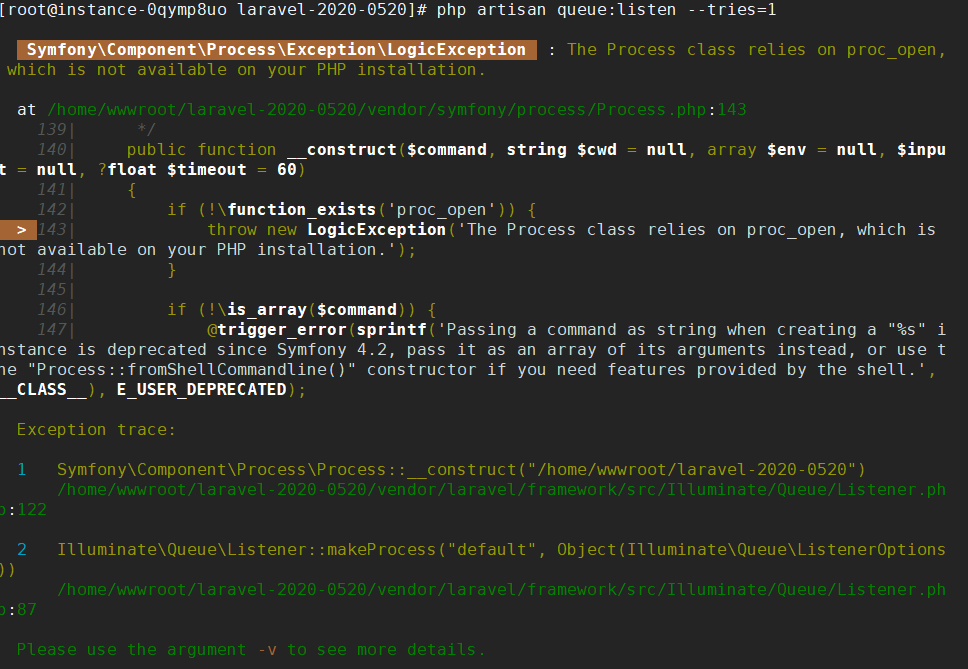
Solution:
In php.ini, find the disable_functions see if followed proc_open function is disabled, remove proc_get_status, proc_open to
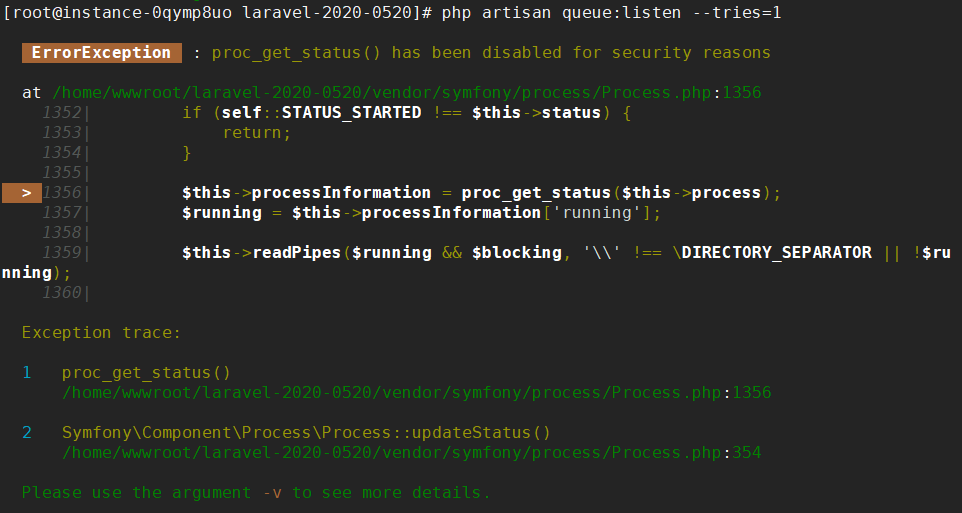
Solution:
In php.ini, find the disable_functions option to see if any proc_open function is disabled later, just remove proc_get_status, proc_open
You can add the following configuration to the .env file
LARAVEL_ECHO_SERVER_REDIS_HOST =
LARAVEL_ECHO_SERVER_REDIS_PASSWORD =
LARAVEL_ECHO_SERVER_REDIS_PORT =